Progressive Canary Deployments on Kubernetes with Argo Rollouts and Istio
Overview
Progressive Canary Deployments on Kubernetes with Argo Rollouts and Istio
Overview
Continuous Delivery is the backbone of modern software development, but releasing new versions can be a high-stakes game. How do you minimize risk while maximizing the speed of innovation? The answer lies in progressive delivery strategies like Canary Deployments.
While standard Kubernetes deployments offer a basic rolling update, they lack the granular traffic control needed for true risk mitigation. This is where Argo Rollouts steps in, integrating seamlessly with service meshes like **Istio** to provide unparalleled control over your release process.
In this deep dive, we’ll explore how to leverage Argo Rollouts and Istio for a robust Canary deployment with progressive traffic shifting, complete with practical implementation.
Why Canary Deployments?
A Canary deployment strategy involves gradually introducing a new version of your application to a small subset of users, monitoring its performance and stability, and then progressively rolling it out to more users. This approach offers significant benefits:
- Reduced Risk: Isolate potential issues to a small user base, preventing widespread outages.
- Faster Rollbacks: If problems arise, traffic can be instantly shifted back to the stable version.
- Real-world Testing: Validate new features and performance under actual production load.
The Power Couple: Argo Rollouts and Istio
While Argo Rollouts can perform basic Canary deployments by scaling pods and relying on Kubernetes’ native Service load balancing, this method has limitations:
- Pod-based Traffic: Traffic splitting is proportional to the number of pods for each version, not exact percentages.
- No Header-based Routing: Cannot route specific users (e.g., internal testers) to the Canary.
This is where Istio, a powerful service mesh, becomes invaluable. Istio’s VirtualService resource allows for incredibly granular traffic control based on weights, HTTP headers, and more.
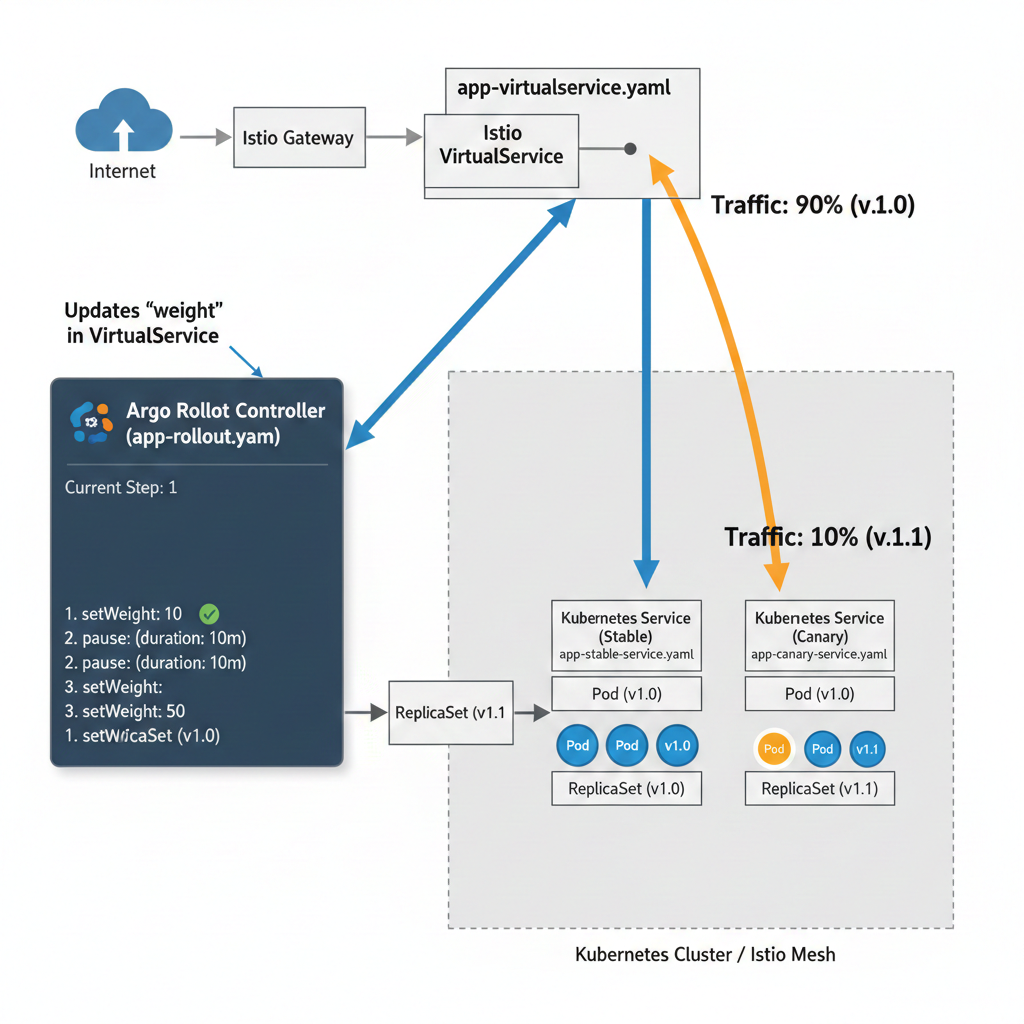
When combined, Argo Rollouts acts as the orchestrator, dynamically updating Istio’s VirtualService weights to manage the progressive traffic shift, while Istio enforces these routing rules at the network layer.
Architectural Overview
Let’s break down the components involved:
- Argo Rollout (CRD): Replaces your standard
Deploymentobject. It defines the rollout strategy (e.g., steps for traffic increase, duration, analysis). - Kubernetes Service (Stable): Points to the pods running the current stable version of your application.
- Kubernetes Service (Canary): Points to the pods running the new Canary version of your application. Argo Rollouts manages the lifecycle of these pods.
- Istio VirtualService: The core of traffic management. It defines how requests for a specific host are routed to different Kubernetes Services based on rules (e.g., weights). Argo Rollouts will modify the weights in this
VirtualService. - Istio Gateway (Optional but Recommended): Manages ingress traffic into your mesh, routing requests to the
VirtualService.
Implementation Steps
Let’s walk through a practical example. We’ll deploy a simple nginx application, demonstrating how to update it using a Canary strategy.
Prerequisites:
- A Kubernetes cluster (e.g., Minikube, Kind, GKE, EKS, AKS).
- Istio installed and configured in your cluster. Ensure sidecar injection is enabled for your namespace (
istio-injection=enabled). - Argo Rollouts controller installed in your cluster.
kubectl create namespace argo-rollouts
kubectl apply -n argo-rollouts -f https://github.com/argoproj/argo-rollouts/releases/latest/download/install.yamlkubectlandargocd-rolloutsCLI installed.
# For macOS
brew install argoproj/tap/kubectl-argo-rollouts- Create a Namespace
kubectl create namespace canary-demo
kubectl label namespace canary-demo istio-injection=enabled
2. Define Kubernetes Services
We need two Kubernetes Services: one for the stable version and one for the canary version. These will serve as the targets for Istio’s VirtualService.
# stable-service.yaml
apiVersion: v1
kind: Service
metadata:
  name: canary-demo-stable
  namespace: canary-demo
spec:
  ports:
  - port: 80
    targetPort: 80
    protocol: TCP
    name: http
  selector:
    app: canary-demo
# canary-service.yaml
apiVersion: v1
kind: Service
metadata:
name: canary-demo-canary
namespace: canary-demo
spec:
ports:
- port: 80
targetPort: 80
protocol: TCP
name: http
selector:
app: canary-demoApply these services:
kubectl apply -f stable-service.yaml -f canary-service.yaml3. Define Istio Gateway and VirtualService
The Gateway exposes our application, and the VirtualService defines how traffic is routed to our stable and canary services. Initially, all traffic will go to the stable service.
# istio-gateway-virtualservice.yaml
apiVersion: networking.istio.io/v1beta1
kind: Gateway
metadata:
  name: canary-demo-gateway
  namespace: canary-demo
spec:
  selector:
    istio: ingressgateway # use Istio default ingress gateway
  servers:
  - port:
      number: 80
      name: http
      protocol: HTTP
    hosts:
    - "*" # Allow all hosts for simplicity, or specify your domain

---
apiVersion: networking.istio.io/v1beta1
kind: VirtualService
metadata:
  name: canary-demo
  namespace: canary-demo
spec:
  hosts:
  - "*" # Route traffic for all hosts (adjust as needed)
  gateways:
  - canary-demo-gateway
  http:
  - name: canary-route
    route:
    - destination:
        host: canary-demo-stable.canary-demo.svc.cluster.local # Initial default target
      weight: 100
    - destination:
        host: canary-demo-canary.canary-demo.svc.cluster.local # Canary target
      weight: 0 # Initially, no traffic to canary
Apply this:
kubectl apply -f istio-gateway-virtualservice.yaml4. Define the Argo Rollout
This is the core resource. It tells Argo Rollouts how to manage the deployment and how to interact with Istio.
# argo-rollout.yaml
apiVersion: argoproj.io/v1alpha1
kind: Rollout
metadata:
  name: canary-demo
  namespace: canary-demo
spec:
  replicas: 3
  selector:
    matchLabels:
      app: canary-demo
  template:
    metadata:
      labels:
        app: canary-demo
    spec:
      containers:
      - name: canary-demo
        image: anuphnu/nginx:v1.0 # Initial stable version
        ports:
        - containerPort: 80
          name: http
  strategy:
    canary:
      canaryService: canary-demo-canary   # Name of the Canary Service
      stableService: canary-demo-stable   # Name of the Stable Service
      trafficRouting:
        istio:
          virtualService:
            name: canary-demo             # Name of the VirtualService
            routes:
            - canary-route                # Name of the HTTP route defined in VirtualService
      steps:
      - setWeight: 10                    # Shift 10% traffic to Canary
      - pause: {}                        # Manual approval step
      - setWeight: 25                    # Shift 25% traffic
      - pause: {duration: 30s}           # Pause for 30 seconds
      - setWeight: 50
      - pause: {duration: 30s}
      - setWeight: 75
      - pause: {duration: 30s}
      - setWeight: 100                   # Shift all traffic to Canary
      # Post-promotion, the new version becomes stable, and old one is scaled down.
Apply the Rollout:
kubectl apply -f argo-rollout.yaml5. Monitor the Rollout
Use the argocd-rollouts CLI to observe the rollout progress.
kubectl argo rollouts get rollout canary-demo -n canary-demo --watchInitially, you’ll see the stable version (anuphnu/nginx:v1.0) deployed and running. All traffic goes to it.
Name:            canary-demo
Namespace:       canary-demo
Status:          ✔ Healthy
Strategy:        Canary
  Step:          9/9
  SetWeight:     100
  ActualWeight:  100
Images:          anuphnu/nginx:v1.0 (stable)
Replicas:
  Desired:       3
  Current:       3
  Updated:       3
  Ready:         3
  Available:     3

NAME                                     KIND        STATUS     AGE   INFO
⟳ canary-demo                            Rollout     ✔ Healthy  106s
└──# revision:1
   └──⧉ canary-demo-6999599788           ReplicaSet  ✔ Healthy  106s  stable
      ├──□ canary-demo-6999599788-8mb5q  Pod         ✔ Running  106s  ready:1/1
      ├──□ canary-demo-6999599788-rrzdk  Pod         ✔ Running  106s  ready:1/1
      └──□ canary-demo-6999599788-x66mj  Pod         ✔ Running  106s  ready:1/1
Access your application via the Istio Ingress Gateway. First, get the ingress IP and port:
export INGRESS_HOST=$(kubectl -n istio-system get service istio-ingressgateway -o jsonpath='{.status.loadBalancer.ingress[0].ip}')
export INGRESS_PORT=$(kubectl -n istio-system get service istio-ingressgateway -o jsonpath='{.spec.ports[?(@.name=="http2")].port}')
export GATEWAY_URL="$INGRESS_HOST:$INGRESS_PORT"
echo "Application URL: $GATEWAY_URL"
Now, try curling it repeatedly:
while true; do curl -s $GATEWAY_URL; echo; sleep 0.5; doneYou should consistently see output like “App Version: v1.0”.
6. Trigger a New Version Canary Deployment
Edit the argo-rollout.yaml to change the image to a new version, for example, “anuphnu/nginx:v1.1".
# argo-rollout.yaml (partial update)
...
      containers:
      - name: canary-demo
        image: anuphnu/nginx:v1.1 # New Canary version
...
Apply the change:
kubectl apply -f argo-rollout.yamlWatch the rollout CLI again:
kubectl argo rollouts get rollout canary-demo -n canary-demo --watchWhat happens now:
- Argo Rollouts creates a new ReplicaSet for “anuphnu/nginx:v1.1”. This is your Canary.
- It scales up the Canary ReplicaSet.
- It updates the
VirtualServiceto shift10%of traffic to the Canary (anuphnu/nginx:v1.1) and90%to the Stable (anuphnu/nginx:v1.0). - The rollout will then
pause: {}.
Your argocd-rollouts output will look something like this:
Name:            canary-demo
Namespace:       canary-demo
Status:          ॥ Paused
Message:         CanaryPauseStep
Strategy:        Canary
  Step:          1/9
  SetWeight:     10
  ActualWeight:  10
Images:          anuphnu/nginx:v1.0 (stable)
                 anuphnu/nginx:v1.1 (canary)
Replicas:
  Desired:       3
  Current:       4
  Updated:       1
  Ready:         4
  Available:     4

NAME                                     KIND        STATUS     AGE    INFO
⟳ canary-demo                            Rollout     ॥ Paused   6m21s
├──# revision:2
│  └──⧉ canary-demo-cbfbcf7b9            ReplicaSet  ✔ Healthy  38s    canary
│     └──□ canary-demo-cbfbcf7b9-7595t   Pod         ✔ Running  38s    ready:1/1
└──# revision:1
   └──⧉ canary-demo-6999599788           ReplicaSet  ✔ Healthy  6m21s  stable
      ├──□ canary-demo-6999599788-8mb5q  Pod         ✔ Running  6m21s  ready:1/1
      ├──□ canary-demo-6999599788-rrzdk  Pod         ✔ Running  6m21s  ready:1/1
      └──□ canary-demo-6999599788-x66mj  Pod         ✔ Running  6m21s  ready:1/1
Now, if you hit your GATEWAY_URL repeatedly, you should see approximately 10% of requests served by the new “anuphnu/nginx:v1.1”(which typically shows “App Version: v1.1”). The other 90% will still be served by “anuphnu/nginx:v1.0"(which typically shows “App Version: v1.0”).
~/istio-1.28.2 > while true; do curl -s $GATEWAY_URL; echo; sleep 0.5; done                                                                             INT 6s 10:12:00 PM
App Version: v1.0
App Version: v1.0
App Version: v1.0
App Version: v1.0
App Version: v1.0
App Version: v1.0
App Version: v1.1   # new version
App Version: v1.0
App Version: v1.0
App Version: v1.0
# 10% from the new version, or another old one.
7. Progressing the Rollout
To move to the next step (25% traffic shift), you need to promote the rollout.
kubectl argo rollouts promote canary-demo -n canary-demoNAME KIND STATUS AGE INFO
⟳ canary-demo Rollout ॥ Paused 14m
├──# revision:2
│ └──⧉ canary-demo-cbfbcf7b9 ReplicaSet ✔ Healthy 8m43s canary
│ └──□ canary-demo-cbfbcf7b9-7595t Pod ✔ Running 8m43s ready:1/1
└──# revision:1
└──⧉ canary-demo-6999599788 ReplicaSet ✔ Healthy 14m stable
├──□ canary-demo-6999599788-8mb5q Pod ✔ Running 14m ready:1/1
├──□ canary-demo-6999599788-rrzdk Pod ✔ Running 14m ready:1/1
└──□ canary-demo-6999599788-x66mj Pod ✔ Running 14m ready:1/1
Name: canary-demo
Namespace: canary-demo
Status: ॥ Paused
Message: CanaryPauseStep
Strategy: Canary
Step: 3/9
SetWeight: 25
ActualWeight: 25
Images: anuphnu/nginx:v1.0 (stable)
anuphnu/nginx:v1.1 (canary)
Replicas:
Desired: 3
Current: 4
Updated: 1
Ready: 4
Available: 4
######Pause for 30 seconds
NAME KIND STATUS AGE INFO
⟳ canary-demo Rollout ॥ Paused 14m
├──# revision:2
│ └──⧉ canary-demo-cbfbcf7b9 ReplicaSet ✔ Healthy 8m44s canary
│ └──□ canary-demo-cbfbcf7b9-7595t Pod ✔ Running 8m44s ready:1/1
└──# revision:1
└──⧉ canary-demo-6999599788 ReplicaSet ✔ Healthy 14m stable
├──□ canary-demo-6999599788-8mb5q Pod ✔ Running 14m ready:1/1
├──□ canary-demo-6999599788-rrzdk Pod ✔ Running 14m ready:1/1
└──□ canary-demo-6999599788-x66mj Pod ✔ Running 14m ready:1/1
Name: canary-demo
Namespace: canary-demo
Status: ◌ Progressing
Message: more replicas need to be updated
Strategy: Canary
Step: 4/9
SetWeight: 50
ActualWeight: 25
Images: anuphnu/nginx:v1.0 (stable)
anuphnu/nginx:v1.1 (canary)
Replicas:
Desired: 3
Current: 4
Updated: 1
Ready: 4
Available: 4
...........
...........
...........
######Final steps
NAME KIND STATUS AGE INFO
⟳ canary-demo Rollout ✔ Healthy 25m
├──# revision:2
│ └──⧉ canary-demo-cbfbcf7b9 ReplicaSet ✔ Healthy 19m stable
│ ├──□ canary-demo-cbfbcf7b9-7595t Pod ✔ Running 19m ready:1/1
│ ├──□ canary-demo-cbfbcf7b9-kcmrs Pod ✔ Running 10m ready:1/1
│ └──□ canary-demo-cbfbcf7b9-r5kq5 Pod ✔ Running 9m59s ready:1/1
└──# revision:1
└──⧉ canary-demo-6999599788 ReplicaSet • ScaledDown 25m
Name: canary-demo
Namespace: canary-demo
Status: ✔ Healthy
Strategy: Canary
Step: 9/9
SetWeight: 100
ActualWeight: 100
Images: anuphnu/nginx:v1.1 (stable)
Replicas:
Desired: 3
Current: 3
Updated: 3
Ready: 3
Available: 3
NAME KIND STATUS AGE INFO
⟳ canary-demo Rollout ✔ Healthy 25m
├──# revision:2
│ └──⧉ canary-demo-cbfbcf7b9 ReplicaSet ✔ Healthy 19m stable
│ ├──□ canary-demo-cbfbcf7b9-7595t Pod ✔ Running 19m ready:1/1
│ ├──□ canary-demo-cbfbcf7b9-kcmrs Pod ✔ Running 10m ready:1/1
│ └──□ canary-demo-cbfbcf7b9-r5kq5 Pod ✔ Running 10m ready:1/1
└──# revision:1
└──⧉ canary-demo-6999599788 ReplicaSet • ScaledDown 25mThe rollout will proceed to the setWeight: 25 step, pause for 30 seconds (pause: {duration: 30s}), and then automatically move to the setWeight: 50 step, and so on, until it hits the next pause: {} or completes.
Continue promoting until the rollout is complete. Once setWeight: 100 is reached, all traffic is directed to the new version. Argo Rollouts will then promote the new version to "stable" and gracefully terminate the old stable ReplicaSet.
Advanced Considerations
- Automated Analysis: Argo Rollouts integrates with Prometheus, Datadog, New Relic, etc., for automated metric analysis during pauses. If a defined metric (e.g., error rate, latency) exceeds a threshold, the rollout can automatically abort or rollback.
- Header-based Routing: Istio allows routing based on HTTP headers. You could route users with a specific header (e.g.,
x-debug-version: canary) to the canary version exclusively, enabling internal testing before any public exposure. - Blue/Green: While we focused on Canary, Argo Rollouts also supports Blue/Green deployments by switching services.
- Rollback: If any issues are detected, you can initiate an immediate rollback:
kubectl argo rollouts abort canary-demo -n canary-demoThis instantly shifts all traffic back to the last stable version.
Conclusion
Combining Argo Rollouts with Istio provides an exceptionally robust and flexible framework for progressive delivery. By abstracting away the complexities of traffic management, it empowers development teams to release new features faster and with greater confidence, knowing that a safety net of automated monitoring and precise traffic control is always in place. Embrace Canary deployments with Argo Rollouts and Istio to elevate your release engineering practices to the next level.

👋 If you find this helpful, please click the clap 👏 button below a few times to show your support for the author 👇
🚀Join FAUN.dev() & get similar stories in your inbox each week for free!
메타데이터
- post_id
- 0e6513f7645e
- slug
- progressive-canary-deployments-on-kubernetes-with-argo-rollouts-and-istio-0e6513f7645e
- url
- https://faun.pub/progressive-canary-deployments-on-kubernetes-with-argo-rollouts-and-istio-0e6513f7645e
- canonical_url
- https://faun.pub/progressive-canary-deployments-on-kubernetes-with-argo-rollouts-and-istio-0e6513f7645e
- author_url
- https://medium.com/@sentraorb
- status
- ok
- fetched_at
- 2026-08-24 23:17:32