Visualising an LLM Wiki in Obsidian
How wikilinks, backlinks, aliases, and graph view make generated Markdown knowledge navigable
Visualising an LLM Wiki in Obsidian
How wikilinks, backlinks, aliases, and graph view make generated Markdown knowledge navigable
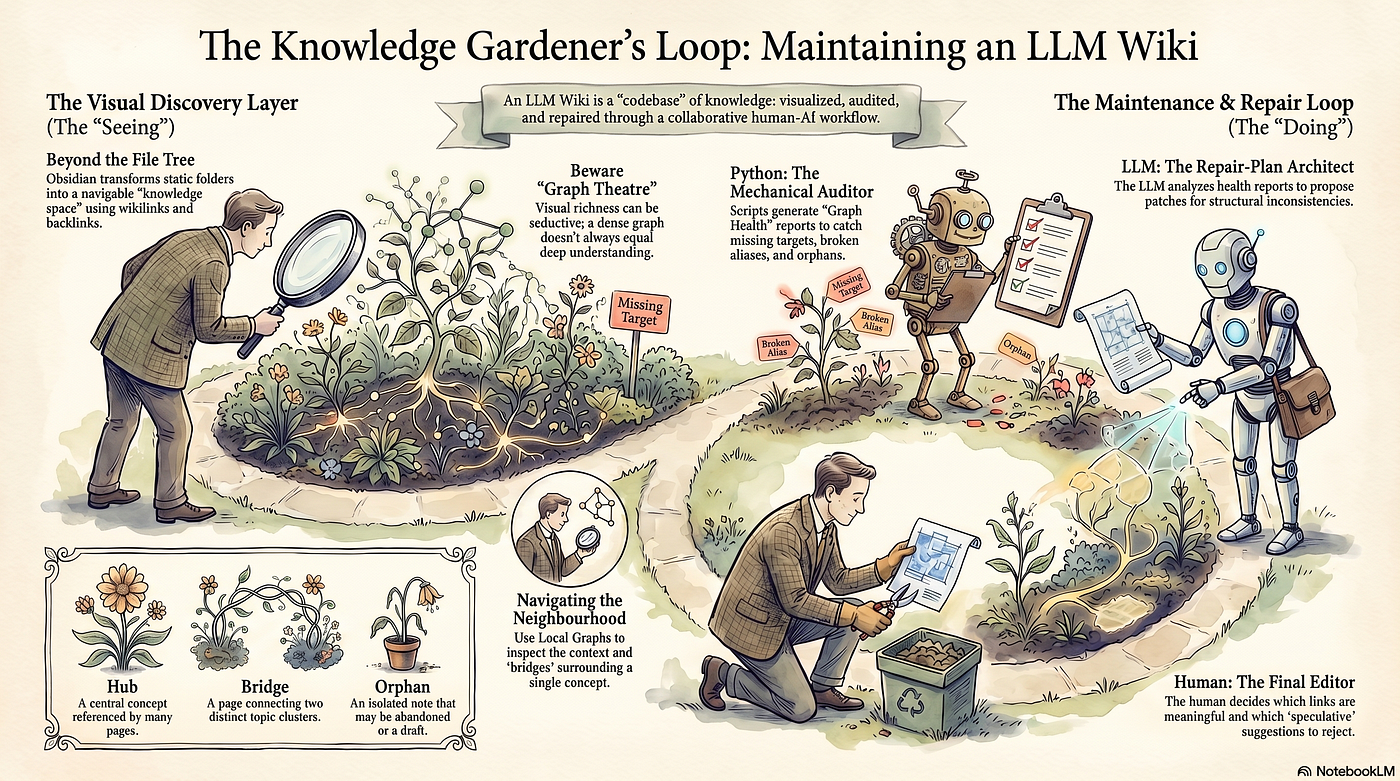
Infographic generated by NotebookLM
In the previous article, Building a Minimal LLM Wiki, which I will refer to as Article 1, we built a minimal LLM Wiki. The goal was not to create another folder of summaries, but to show how raw source notes could be compiled into reusable Markdown pages: concept pages, comparison pages, people pages, an index, a log, and an audit report. That gave us a working knowledge artefact, but a folder of Markdown files has a limitation: its relationships are not always visible.
A page may refer to another page. A comparison may depend on two concepts. A source note may support several claims. An acronym may point to a longer concept name. A generated page may accidentally link to something that does not exist. These relationships matter, but they are easy to miss when we only look at files and folders.
This is where Obsidian becomes useful. Obsidian stores notes as Markdown-formatted plain text files in a local vault. A vault is a folder on the local file system, including its subfolders, and the notes can also be edited with other text editors or file managers. That fits the LLM Wiki pattern well because the wiki remains readable, editable, and Git-friendly.
There is also a risk. Obsidian graph view can make a knowledge base look more intelligent than it really is. Notes become nodes. Links become edges. Clusters appear. Hubs emerge. The visual richness can be seductive, because a dense graph can look like understanding even when it mostly records accidental link density.
I will call this graph theatre: visual richness substituting for analytic content. The purpose of this article is not to make the LLM Wiki look impressive, but to make its relationships inspectable.
The workflow has four actors, each with a different responsibility.
- Obsidian is the visual discovery layer. It helps the human browse pages, follow wikilinks, inspect backlinks, and use graph view to notice relationships that are difficult to see in a file tree.
- Python is the mechanical reporting layer. It produces a persisted
graph-health.mdreport that can be opened in Obsidian, reviewed later, or compared in Git. - The LLM is the repair-plan generator. It reads the selected context bundle, interprets the graph-health report, and proposes a bounded maintenance plan.
- The human is the editor and final decision-maker. The human decides which links are meaningful, which pages should be created, which suggestions are premature, and which issues should remain untouched.
In Article 1, the LLM helped compile knowledge into Markdown. In this article, Obsidian becomes the human-facing inspection layer, Python produces a small graph-health.md report, the LLM proposes a bounded repair plan, and the human decides which changes should actually enter the wiki.
1. From compiled knowledge to visible relationships
In Article 1, the workflow looked like this:
Raw sources
   ↓
LLM-assisted synthesis
   ↓
Markdown wiki pages
   ↓
Links, index, log, audit
That produced a maintained Markdown artefact. In this article, we add a visual and maintenance layer:
Markdown wiki pages
   ↓
Obsidian wikilinks
   ↓
Backlinks and outgoing links
   ↓
Local graph and global graph
   ↓
graph-health.md
   ↓
LLM-assisted repair plan
   ↓
Human editorial decision
This changes the questions we can ask. Instead of only asking what pages exist, we can ask which concepts are central, which pages act as bridges, which notes are isolated, whether acronyms split the graph, and whether some useful text is not connected to anything.
This matters because an LLM Wiki is supposed to compound. Compounding does not come from adding more notes alone. It comes from connecting new material to an existing structure.
Karpathy’s LLM Wiki idea treats the wiki as a live working environment: the LLM makes edits while the human browses results in real time, follows links, checks graph view, and reads updated pages. His memorable framing is: “Obsidian is the IDE; the LLM is the programmer; the wiki is the codebase.”
This article focuses on the inspection and repair loop around that idea: how to see what the LLM has built, how to notice structural problems, how to generate a small mechanical report, and how to feed that report back into the maintenance process.
There is a historical reason linking matters. In 1945, Vannevar Bush described the Memex, a hypothetical device for storing, retrieving, and connecting information through associative trails. In the associative indexing section of As We May Think, he wrote: “The process of tying two items together is the important thing.”
That sentence is a useful frame for this article. The value of an LLM Wiki is not only that it stores generated summaries. The value comes from maintained trails: source notes linked to concepts, concepts linked to comparisons, acronyms linked to full terms, and new sources integrated into existing pages.
2. A short guide to Obsidian for readers who are new to it
Obsidian is a note-taking application built around local Markdown files. A collection of notes is called a vault. Unlike many note applications, the notes are not hidden inside a proprietary database. They are ordinary .md files in a folder. Obsidian’s own help page describes a vault as a folder on your local file system, including subfolders.
For this article, that is important. Our LLM Wiki already exists as Markdown files:
llm-wiki-demo/
  build_wiki.py
  wiki/
    index.md
    schema.md
    log.md
    audit.md
    sources/
    concepts/
    comparisons/
    people/
The wiki/ folder can be opened directly as an Obsidian vault. To do this, install Obsidian, open it, choose Open folder as vault, select the llm-wiki-demo/wiki/ folder, and open index.md.
You do not need to import the files or convert them. Obsidian reads the folder directly. For this article, open Settings → Core plugins. This page shows the built-in plugins with on/off toggles. Check that Backlinks, Outgoing links, Graph view, Search, and Properties view are enabled. Do not confuse this with individual plugin settings pages lower in the sidebar, such as Backlinks or Page preview, which configure plugin-specific behaviour after the plugin is enabled. Obsidian’s help page lists core plugins such as Backlinks, Graph view, Outgoing links, Search, and Properties.
Obsidian supports internal links between notes. These can be written as wikilinks, such as [[Three laws of motion]], or as Markdown links, such as [Three laws of motion](Three%20laws%20of%20motion.md). Obsidian’s documentation shows internal links as a way to create a network of knowledge across notes.
For an LLM Wiki, wikilinks are useful because they make relationships easy to write and easy to see. A link is not only a navigation shortcut. In Obsidian graph view, it becomes part of the visible structure.
3. A note on wikilinks and portability
There is a trade-off here. Wikilinks such as [[LLM Wiki]] are not standard Markdown. They are an Obsidian-style and wiki-style convention. If the same files are rendered on GitHub, processed by a CommonMark tool, or published through a static site generator, those links may not behave like ordinary Markdown links.
Obsidian’s documentation supports internal links between notes; for this working wiki, I accept the Obsidian trade-off because the main interface in this article is graph-based exploration. If the wiki is later published outside Obsidian, the wikilinks should be converted to relative Markdown links.
There is another practical detail. In Article 1, the generated files used slug-style filenames such as:
concepts/llm-wiki.md
concepts/retrieval-augmented-generation.md
comparisons/rag-vs-llm-wiki.md
In Obsidian, the safest way to link to these files while displaying readable names is to use path-based display links:
[[concepts/llm-wiki|LLM Wiki]]
[[concepts/retrieval-augmented-generation|Retrieval-Augmented Generation]]
[[comparisons/rag-vs-llm-wiki|RAG vs LLM Wiki]]
That is slightly less elegant than [[LLM Wiki]], but it avoids ambiguity when filenames are slugged. It also makes the demo more robust for readers who are continuing from Article 1.
4. Continue from Article 1, or create the demo vault directly
This article can be followed in two ways. If you completed Article 1, use the same project folder:
llm-wiki-demo/If you did not follow the article, the first script below will create a small compatible demo vault for you. This matters because we used an LLM, and LLM outputs vary. One reader may have concepts/llm-wiki.md; another may have a slightly different filename or no people page at all. This article should not silently depend on a particular model output.
The preparation script therefore does two things. It creates missing baseline files if they do not already exist, and it adds the Obsidian-specific visualisation layer used in this article.
The script also creates deliberate imperfections.
It leaves the link [[concepts/compiled-knowledge|Compiled knowledge]] unresolved. This shows how a recurring phrase can become a candidate concept page when it appears often enough to be useful.
It also leaves [[Coding agents]] unresolved. This creates a plausible but premature concept candidate, which the editorial workflow can later defer rather than automatically turn into a page.
The unresolved [[Knowledge systems]] link serves a different purpose. It represents a broad concept candidate that may be too vague to justify a page at this stage, so the repair workflow can reject it rather than making the graph denser for no clear reason.
The script also creates orphan-notes/unused-summary.md. This gives the vault a visible orphan note, so readers can see how disconnected pages appear in Obsidian and in the graph-health report.
It creates aliases/rag.md to demonstrate an alias-page strategy. This is useful when a short term or acronym needs a small redirect-style note.
Finally, the script adds aliases to concepts/retrieval-augmented-generation.md. This demonstrates Obsidian’s alias mechanism, where terms such as RAG can point back to the canonical Retrieval-Augmented Generation page.
A perfect demo vault teaches less than a slightly imperfect one.
5. Script 1: prepare an Obsidian-ready LLM Wiki vault
Create a new file in the project root called prepare_obsidian_vault.py, then add the following code:
from pathlib import Path
from datetime import datetime

BASE_DIR = Path(__file__).resolve().parent
WIKI_DIR = BASE_DIR / "wiki"
LOG_PATH = WIKI_DIR / "log.md"
CREATED = []
UPDATED = []

def clean(content: str) -> str:
    return content.strip() + "\n"

def write_text(relative_path: str, content: str, overwrite: bool = False) -> None:
    path = WIKI_DIR / relative_path
    path.parent.mkdir(parents=True, exist_ok=True)
    existed = path.exists()
    if existed and not overwrite:
        return
    path.write_text(clean(content), encoding="utf-8")
    if existed:
        UPDATED.append(relative_path)
    else:
        CREATED.append(relative_path)

def append_log(message: str) -> None:
    LOG_PATH.parent.mkdir(parents=True, exist_ok=True)
    if LOG_PATH.exists():
        existing = LOG_PATH.read_text(encoding="utf-8").rstrip()
    else:
        existing = "# Log"
    timestamp = datetime.now().strftime("%Y-%m-%d %H:%M:%S")
    updated = f"{existing}\n\n## {timestamp}\n\n{message.strip()}\n"
    LOG_PATH.write_text(updated, encoding="utf-8")
    UPDATED.append("log.md")

def ensure_aliases(relative_path: str, aliases: list[str]) -> None:
    path = WIKI_DIR / relative_path
    if not path.exists():
        print(f"Skipping aliases. File not found: {path}")
        return
    text = path.read_text(encoding="utf-8")
    existing_aliases = set()
    if text.startswith("---\n"):
        parts = text.split("---\n", 2)
        if len(parts) == 3:
            frontmatter = parts[1]
            in_aliases = False
            for line in frontmatter.splitlines():
                stripped = line.strip()
                if stripped.startswith("aliases:"):
                    in_aliases = True
                    continue
                if in_aliases and stripped.startswith("- "):
                    existing_aliases.add(stripped[2:].strip().strip('"').strip("'"))
                elif in_aliases and stripped and not line.startswith(" "):
                    in_aliases = False
    aliases_to_add = [alias for alias in aliases if alias not in existing_aliases]
    if not aliases_to_add:
        return
    alias_lines = "\n".join(f"  - {alias}" for alias in aliases_to_add)
    if text.startswith("---\n"):
        parts = text.split("---\n", 2)
        if len(parts) == 3:
            _, frontmatter, body = parts
            if "aliases:" in frontmatter:
                lines = frontmatter.rstrip().splitlines()
                out = []
                inserted = False
                in_aliases = False
                for line in lines:
                    stripped = line.strip()
                    out.append(line)
                    if stripped.startswith("aliases:"):
                        in_aliases = True
                        continue
                    if in_aliases and stripped and not stripped.startswith("- ") and not line.startswith(" "):
                        out.insert(len(out) - 1, alias_lines)
                        inserted = True
                        in_aliases = False
                if not inserted:
                    out.append(alias_lines)
                new_frontmatter = "\n".join(out).rstrip() + "\n"
            else:
                new_frontmatter = frontmatter.rstrip() + "\naliases:\n" + alias_lines + "\n"
            path.write_text(f"---\n{new_frontmatter}---\n{body.lstrip()}", encoding="utf-8")
            UPDATED.append(relative_path)
            return
    path.write_text(f"---\naliases:\n{alias_lines}\n---\n\n{text}", encoding="utf-8")
    UPDATED.append(relative_path)

def create_baseline_if_missing() -> None:
    write_text(
        "schema.md",
        """
# LLM Wiki Schema
## Purpose
This wiki is a small research knowledge base about LLM Wiki, RAG, Memex, Obsidian, and personal knowledge management.
## Core principles
- Raw source notes remain the source basis.
- Wiki pages are compiled summaries and syntheses, not replacements for original sources.
- Existing pages should be updated before duplicate pages are created.
- Preserve disagreement and uncertainty.
- Use Obsidian wikilinks for internal navigation; convert them to relative Markdown links if publishing the wiki outside Obsidian.
- Prefer path-based display links when filenames are slugged, for example [[concepts/llm-wiki|LLM Wiki]].
- Record meaningful changes in log.md.
- Record mechanical link issues in graph-health.md.
""",
        overwrite=False,
    )
    write_text(
        "sources/karpathy-llm-wiki.md",
        """
# Source: Andrej Karpathy - LLM Wiki
## Source type
GitHub Gist.
## Summary
Karpathy describes LLM Wiki as a pattern for maintaining a persistent, interlinked Markdown wiki with the help of LLMs.
The wiki sits between the user and raw sources. Raw sources remain the source of truth, while the wiki stores compiled summaries, concepts, comparisons, links, indexes, and maintenance notes.
## Key ideas
- The wiki is persistent rather than a one-off answer.
- The knowledge base should compound as sources are added.
- The LLM helps with summarising, cross-referencing, filing, and bookkeeping.
- Obsidian can be used as the human-facing interface for browsing the wiki.
- The LLM maintains the wiki, while the human reviews, explores, and judges.
## Related pages
- [[concepts/llm-wiki|LLM Wiki]]
- [[concepts/personal-knowledge-management|Personal Knowledge Management]]
- [[concepts/obsidian|Obsidian]]
""",
        overwrite=False,
    )
    write_text(
        "sources/rag-paper.md",
        """
# Source: Lewis et al. - Retrieval-Augmented Generation
## Source type
Research paper.
## Summary
Lewis et al. introduce retrieval-augmented generation as a way to connect a generative model with an external retrieval system.
The model retrieves relevant passages and uses them when generating answers.
## Key ideas
- Language models store knowledge in parameters, but this can be limited.
- Retrieval provides access to explicit external knowledge.
- RAG combines retrieval and generation.
- RAG is useful for knowledge-intensive question answering.
## Related pages
- [[concepts/retrieval-augmented-generation|Retrieval-Augmented Generation]]
- [[comparisons/rag-vs-llm-wiki|RAG vs LLM Wiki]]
""",
        overwrite=False,
    )
    write_text(
        "sources/as-we-may-think.md",
        """
# Source: Vannevar Bush - As We May Think
## Source type
Essay.
## Summary
Vannevar Bush's 1945 essay describes the Memex, a hypothetical device for storing, retrieving, and connecting information through associative trails.
## Key ideas
- Information overload is a long-standing problem.
- Knowledge systems should support trails between ideas.
- The important operation is not only storage, but the process of tying items together.
## Related pages
- [[concepts/memex|Memex]]
- [[concepts/personal-knowledge-management|Personal Knowledge Management]]
- [[people/vannevar-bush|Vannevar Bush]]
""",
        overwrite=False,
    )
    write_text(
        "sources/obsidian-graph-view.md",
        """
# Source: Obsidian - Graph View and Links
## Source type
Documentation / product documentation.
## Summary
Obsidian supports internal links between notes and provides graph views that visualise relationships between notes in a vault.
## Key ideas
- Notes can link to other notes.
- Graph view shows notes as nodes and internal links as lines.
- Backlinks show which notes refer to the active note.
- Aliases help different names point to the same note.
- Graph view can reveal hubs, clusters, bridges, and orphan notes.
## Related pages
- [[concepts/obsidian|Obsidian]]
- [[concepts/wikilinks|Wikilinks]]
- [[concepts/backlinks|Backlinks]]
- [[concepts/graph-view|Graph View]]
""",
        overwrite=False,
    )
    write_text(
        "concepts/llm-wiki.md",
        """
# LLM Wiki
LLM Wiki is a pattern for maintaining a persistent, interlinked Markdown knowledge base with the help of LLMs.
Raw sources remain the source basis. The wiki becomes a compiled layer of reusable concepts, comparisons, links, indexes, and maintenance notes.
## Why it matters
The important idea is compounding. A useful answer should not disappear into a chat window. It should be filed, linked, corrected, and reused.
## Related pages
- [[concepts/retrieval-augmented-generation|Retrieval-Augmented Generation]]
- [[comparisons/rag-vs-llm-wiki|RAG vs LLM Wiki]]
- [[concepts/personal-knowledge-management|Personal Knowledge Management]]
- [[concepts/obsidian|Obsidian]]
- [[concepts/compiled-knowledge|Compiled knowledge]]
- [[Coding agents]]
""",
        overwrite=False,
    )
    write_text(
        "concepts/retrieval-augmented-generation.md",
        """
---
aliases:
  - RAG
  - Retrieval Augmented Generation
---
# Retrieval-Augmented Generation
Retrieval-Augmented Generation, or RAG, connects a generative model to an external retrieval system.
Instead of relying only on model parameters, the model retrieves relevant passages at query time and uses them when generating an answer.
## Related pages
- [[comparisons/rag-vs-llm-wiki|RAG vs LLM Wiki]]
- [[concepts/llm-wiki|LLM Wiki]]
""",
        overwrite=False,
    )
    write_text(
        "concepts/memex.md",
        """
# Memex
The Memex was Vannevar Bush's hypothetical device for storing, retrieving, and connecting information.
It matters here because it made associative trails central to knowledge work.
## Related pages
- [[people/vannevar-bush|Vannevar Bush]]
- [[concepts/personal-knowledge-management|Personal Knowledge Management]]
- [[concepts/llm-wiki|LLM Wiki]]
- [[Knowledge systems]]
""",
        overwrite=False,
    )
    write_text(
        "concepts/personal-knowledge-management.md",
        """
# Personal Knowledge Management
Personal knowledge management is the practice of collecting, organising, connecting, and revising knowledge for later use.
An LLM Wiki can be understood as a machine-assisted personal knowledge management system.
## Related pages
- [[concepts/llm-wiki|LLM Wiki]]
- [[concepts/memex|Memex]]
- [[concepts/obsidian|Obsidian]]
- [[Coding agents]]
""",
        overwrite=False,
    )
    write_text(
        "comparisons/rag-vs-llm-wiki.md",
        """
# RAG vs LLM Wiki
RAG and LLM Wiki solve related but different problems.
| Dimension | RAG | LLM Wiki |
|---|---|---|
| Main action | Retrieve relevant chunks at query time | Maintain compiled Markdown pages over time |
| Output | Usually an answer | A reusable knowledge artefact |
| Maintenance focus | Index freshness and retrieval quality | Links, aliases, summaries, contradictions, and stale pages |
## Related pages
- [[concepts/retrieval-augmented-generation|Retrieval-Augmented Generation]]
- [[concepts/llm-wiki|LLM Wiki]]
- [[concepts/obsidian|Obsidian]]
""",
        overwrite=False,
    )
    write_text(
        "people/andrej-karpathy.md",
        """
# Andrej Karpathy
Andrej Karpathy proposed the LLM Wiki pattern as a way to use LLMs to maintain persistent, interlinked Markdown knowledge bases.
## Related pages
- [[concepts/llm-wiki|LLM Wiki]]
- [[concepts/obsidian|Obsidian]]
""",
        overwrite=False,
    )
    write_text(
        "people/vannevar-bush.md",
        """
# Vannevar Bush
Vannevar Bush wrote As We May Think, which introduced the Memex as a hypothetical system for associative trails through information.
## Related pages
- [[concepts/memex|Memex]]
- [[concepts/personal-knowledge-management|Personal Knowledge Management]]
""",
        overwrite=False,
    )
    write_text(
        "index.md",
        """
# LLM Wiki Index
## Core concepts
- [[concepts/llm-wiki|LLM Wiki]]
- [[concepts/retrieval-augmented-generation|Retrieval-Augmented Generation]]
- [[concepts/memex|Memex]]
- [[concepts/personal-knowledge-management|Personal Knowledge Management]]
## Comparison pages
- [[comparisons/rag-vs-llm-wiki|RAG vs LLM Wiki]]
## People
- [[people/andrej-karpathy|Andrej Karpathy]]
- [[people/vannevar-bush|Vannevar Bush]]
## Source notes
- [[sources/karpathy-llm-wiki|Karpathy - LLM Wiki]]
- [[sources/rag-paper|Lewis et al. - RAG]]
- [[sources/as-we-may-think|Bush - As We May Think]]
- [[sources/obsidian-graph-view|Obsidian - Graph View and Links]]
""",
        overwrite=False,
    )
    write_text(
        "log.md",
        """
# Log
This log records meaningful changes to the wiki.
""",
        overwrite=False,
    )

def add_obsidian_visualisation_layer() -> None:
    write_text(
        "concepts/obsidian.md",
        """
# Obsidian
Obsidian is the visual working environment for this LLM Wiki.
The wiki remains a folder of Markdown files. Obsidian does not replace the files or the LLM workflow. It provides another way to inspect the structure of the wiki.
## Why it matters for an LLM Wiki
Obsidian makes relationships between notes visible through [[concepts/wikilinks|Wikilinks]], [[concepts/backlinks|Backlinks]], and [[concepts/graph-view|Graph View]].
This is useful because an LLM Wiki should not only contain pages. It should contain connected pages.
## Related pages
- [[concepts/llm-wiki|LLM Wiki]]
- [[concepts/wikilinks|Wikilinks]]
- [[concepts/backlinks|Backlinks]]
- [[concepts/graph-view|Graph View]]
- [[concepts/personal-knowledge-management|Personal Knowledge Management]]
""",
        overwrite=True,
    )
    write_text(
        "concepts/wikilinks.md",
        """
# Wikilinks
Wikilinks are internal links written with double square brackets.
Examples:
    [[concepts/llm-wiki|LLM Wiki]]
    [[concepts/retrieval-augmented-generation|Retrieval-Augmented Generation]]
    [[comparisons/rag-vs-llm-wiki|RAG vs LLM Wiki]]
## Why they matter
In this wiki, wikilinks are the visible edges between notes.
A page without links can still contain useful text, but it is harder to discover from related pages. A page with useful links participates in the structure of the wiki.
## Display text
A wikilink can point to one page while displaying another label:
    [[concepts/retrieval-augmented-generation|RAG]]
This is useful when an acronym should point to a longer concept page.
## Related pages
- [[concepts/obsidian|Obsidian]]
- [[concepts/backlinks|Backlinks]]
- [[concepts/graph-view|Graph View]]
- [[concepts/retrieval-augmented-generation|Retrieval-Augmented Generation]]
""",
        overwrite=True,
    )
    write_text(
        "concepts/backlinks.md",
        """
# Backlinks
Backlinks show which notes point to the current note.
If [[comparisons/rag-vs-llm-wiki|RAG vs LLM Wiki]] links to [[concepts/retrieval-augmented-generation|Retrieval-Augmented Generation]], then the Retrieval-Augmented Generation page has a backlink from the comparison page.
## Why they matter
Backlinks help reveal the context around a concept. They show whether a page is becoming a hub, whether it is reused by comparison pages, and whether later notes are building on earlier notes.
## Related pages
- [[concepts/wikilinks|Wikilinks]]
- [[concepts/graph-view|Graph View]]
- [[concepts/llm-wiki|LLM Wiki]]
- [[concepts/personal-knowledge-management|Personal Knowledge Management]]
""",
        overwrite=True,
    )
    write_text(
        "concepts/graph-view.md",
        """
# Graph View
Graph View is the visual map of relationships between notes.
In this demo, pages are nodes and wikilinks are edges.
## What to look for
When opening the graph, look for:
- central concept pages;
- bridge pages connecting different topics;
- isolated pages;
- repeated acronyms;
- pages that should be connected but are not;
- pages that have many links but little content.
## Discovery before repair
The first purpose of graph view is discovery. It helps us see relationships that are difficult to notice in a file tree.
Once the visual structure suggests a problem, a deterministic script can produce a persisted report and an LLM can propose a repair plan.
## Related pages
- [[concepts/obsidian|Obsidian]]
- [[concepts/wikilinks|Wikilinks]]
- [[concepts/backlinks|Backlinks]]
- [[concepts/llm-wiki|LLM Wiki]]
- [[concepts/compiled-knowledge|Compiled knowledge]]
""",
        overwrite=True,
    )
    write_text(
        "aliases/rag.md",
        """
# RAG
RAG is a common abbreviation for [[concepts/retrieval-augmented-generation|Retrieval-Augmented Generation]].
This page exists to show one possible alias-page strategy. Another strategy is to use an Obsidian alias on the main concept page and write links as:
    [[concepts/retrieval-augmented-generation|RAG]]
## Related pages
- [[concepts/retrieval-augmented-generation|Retrieval-Augmented Generation]]
- [[comparisons/rag-vs-llm-wiki|RAG vs LLM Wiki]]
- [[concepts/llm-wiki|LLM Wiki]]
""",
        overwrite=True,
    )
    write_text(
        "orphan-notes/unused-summary.md",
        """
# Unused Summary
This note is intentionally disconnected.
It has no wikilinks and no page links to it.
The purpose is to create a visible orphan note in the Obsidian graph and in the Python graph-health report.
""",
        overwrite=True,
    )
    ensure_aliases(
        "concepts/retrieval-augmented-generation.md",
        aliases=[
            "RAG",
            "Retrieval Augmented Generation",
        ],
    )

def update_index_section() -> None:
    index_path = WIKI_DIR / "index.md"
    if index_path.exists():
        text = index_path.read_text(encoding="utf-8").rstrip()
    else:
        text = "# LLM Wiki Index"
    marker = "## Obsidian visualisation layer"
    section = """
## Obsidian visualisation layer
These pages were added for the Obsidian visualisation workflow.
- [[concepts/obsidian|Obsidian]]
- [[concepts/wikilinks|Wikilinks]]
- [[concepts/backlinks|Backlinks]]
- [[concepts/graph-view|Graph View]]
- [[concepts/retrieval-augmented-generation|RAG]]
- [[aliases/rag|RAG alias page]]
- [[comparisons/rag-vs-llm-wiki|RAG vs LLM Wiki]]
The page [[concepts/compiled-knowledge|Compiled knowledge]] is intentionally left unresolved for the graph-health example.
"""
    if marker in text:
        before = text.split(marker, 1)[0].rstrip()
        text = before + "\n\n" + section.strip()
    else:
        text = text + "\n\n" + section.strip()
    index_path.write_text(text + "\n", encoding="utf-8")
    UPDATED.append("index.md")

def main() -> None:
    WIKI_DIR.mkdir(parents=True, exist_ok=True)
    create_baseline_if_missing()
    add_obsidian_visualisation_layer()
    update_index_section()
    append_log(
        "- Prepared Obsidian visualisation layer.\n"
        "- Ensured baseline demo wiki files exist where missing.\n"
        "- Added pages for Obsidian, Wikilinks, Backlinks, and Graph View.\n"
        "- Added an alias page for RAG.\n"
        "- Added an intentional orphan note for graph inspection.\n"
        "- Added aliases to Retrieval-Augmented Generation if needed.\n"
        "- Updated index.md with an Obsidian visualisation section."
    )
    print("Obsidian demo vault prepared.")
    print(f"Wiki folder: {WIKI_DIR}")
    if CREATED:
        print("\nCreated files:")
        for item in sorted(set(CREATED)):
            print(f"  - wiki/{item}")
    if UPDATED:
        print("\nUpdated files:")
        for item in sorted(set(UPDATED)):
            print(f"  - wiki/{item}")

if __name__ == "__main__":
    main()
Run the script from the project root:
python prepare_obsidian_vault.pyIf you already followed Article 1, the script extends your existing wiki. If you did not, it creates a small compatible demo vault. You should now have a structure similar to this:
llm-wiki-demo/
  prepare_obsidian_vault.py
wiki/
    index.md
    schema.md
    log.md
    sources/
      karpathy-llm-wiki.md
      rag-paper.md
      as-we-may-think.md
      obsidian-graph-view.md
    concepts/
      llm-wiki.md
      retrieval-augmented-generation.md
      memex.md
      personal-knowledge-management.md
      obsidian.md
      wikilinks.md
      backlinks.md
      graph-view.md
    comparisons/
      rag-vs-llm-wiki.md
    people/
      andrej-karpathy.md
      vannevar-bush.md
    aliases/
      rag.md
    orphan-notes/
      unused-summary.md
Now open the wiki/ folder in Obsidian.
6. Wikilinks as relationship edges
Open wiki/index.md in Obsidian. In the Markdown source, the links are written like this:
[[concepts/llm-wiki|LLM Wiki]]
[[concepts/retrieval-augmented-generation|Retrieval-Augmented Generation]]
[[concepts/obsidian|Obsidian]]
[[concepts/graph-view|Graph View]]
In Obsidian, these links should appear as clickable note links with readable display text:
LLM Wiki
Retrieval-Augmented Generation
Obsidian
Graph View
Click a few of these displayed links inside Obsidian. For example, clicking LLM Wiki should open:
wiki/concepts/llm-wiki.mdClicking Obsidian should open:
wiki/concepts/obsidian.mdIf the links do not open with a normal click, you are probably in editing mode. In that case, use Cmd-click on macOS or Ctrl-click on Windows/Linux, or switch to Reading view first.
This is the first shift: the wiki is no longer only a file tree. It becomes a navigable knowledge space. A file tree shows containment:
concepts/
  llm-wiki.md
  retrieval-augmented-generation.md
  graph-view.md
The graph shows relationships:
LLM Wiki → Obsidian
Obsidian → Wikilinks
Wikilinks → Backlinks
RAG vs LLM Wiki → Retrieval-Augmented Generation
Obsidian’s Graph view represents notes as nodes and internal links as lines between nodes. The documentation also says that notes referenced by more notes appear larger.
That means link quality matters. If the LLM creates weak links, the graph will show weak structure. If it creates meaningful links, the graph becomes a useful map.
A good comparison page is especially useful because it can act as a bridge. For example:
# RAG vs LLM Wiki
[[concepts/retrieval-augmented-generation|Retrieval-Augmented Generation]]
retrieves relevant source material at query time.
[[concepts/llm-wiki|LLM Wiki]]
maintains a compiled Markdown knowledge layer over time.
That page connects two conceptual areas. In a growing wiki, bridge pages are often more valuable than isolated summaries.
7. Backlinks and outgoing links as context
A normal link tells us where the current page points. A backlink tells us which pages point back to the current page. Obsidian’s Backlinks plugin separates backlinks into linked mentions and unlinked mentions: linked mentions are notes that already contain an internal link to the active note, while unlinked mentions are occurrences of the active note’s name that have not yet been turned into links.
In this section, use concepts/llm-wiki.md as the example. Open that page in Obsidian, then look at the Backlinks panel on the right. The Backlinks panel shows notes that link to the currently open llm-wiki page under Linked mentions.
In my example vault, the linked mentions include:
andrej-karpathy    1
backlinks          1
graph-view         1
obsidian           1
rag                1
One possible source of confusion is the word backlinks itself. In this panel, backlinks does not mean the Backlinks feature. It is the name of a note, probably concepts/backlinks.md. The entry means that concepts/backlinks.md contains one link to the current llm-wiki page.
Similarly, andrej-karpathy refers to people/andrej-karpathy.md, graph-view refers to concepts/graph-view.md, obsidian refers to concepts/obsidian.md, and rag refers to aliases/rag.md.
The Backlinks panel therefore shows how the LLM Wiki concept is being referenced inside the wiki. It may be referenced from a person page, from a page explaining Graph View, from a page explaining Obsidian, or from an alias page. These incoming references give the current page context.
Outgoing links show the other direction. While keeping concepts/llm-wiki.md open, switch to the Outgoing links panel. Obsidian’s Outgoing links plugin shows links from the active note as well as potential links that could be made.
In the same example vault, the outgoing links include:
Obsidian
RAG
Personal knowledge management
Compiled knowledge
Coding agents
This means that the llm-wiki page points to these pages or link targets. For example, Obsidian corresponds to concepts/obsidian.md, while RAG points to the alias or concept related to Retrieval-Augmented Generation.
Some entries, such as Compiled knowledge or Coding agents, may be links to pages that do not yet exist, depending on your vault. These are not always mistakes. Compiled knowledge, for example, was an important metaphor in Article 1. If it appears repeatedly, it may deserve its own concept page.
Backlinks and outgoing links therefore show two different directions of context. Backlinks show which pages point to the current page. Outgoing links show which pages the current page points to. Together, they help us understand how a concept is used inside the wiki and where it connects.
8. Local graph: exploring one concept at a time
The full Graph view can become busy quickly, so the Local Graph is often more useful when you want to inspect the neighbourhood around one concept. First, open this page in Obsidian:
concepts/llm-wiki.mdThen open the Command Palette. On macOS, this is usually Cmd+P. On Windows/Linux, it is usually Ctrl+P. Search for and select:
Graph view: Open local graphThis opens a Local Graph centred on the currently open llm-wiki page. Obsidian’s documentation describes the local Graph view as showing notes connected to the active note, while the global Graph view shows notes across the vault.
In a Depth 1 Local Graph, you should see llm-wiki in the centre, with directly connected notes around it. In my example vault, this includes notes or link targets such as:
backlinks
Personal knowledge management
graph-view
andrej-karpathy
rag
Coding agents
obsidian
Compiled knowledge
compiled-knowledge

Local Graph of llm-wiki — Depth 1
To change the depth, open the settings panel inside the Local Graph, expand Filters, and adjust Depth. Depth 1 shows notes directly connected to the current note. Depth 2 expands the graph to show notes connected to those neighbouring notes as well. Obsidian’s documentation says that each depth level shows notes connected to notes revealed at the previous depth, and that local graph depth can be controlled from the local Graph Filter Settings panel.

Local Graph of llm-wiki — Depth 2
For an LLM Wiki, the Local Graph is useful because it lets the human inspect one concept at a time. Instead of looking at the entire vault, you can ask whether the neighbourhood around a concept makes sense:
- Is
LLM Wikidirectly connected toObsidianandGraph View? - Is it connected to
RAGandPersonal knowledge management? - Do unresolved or weak link targets such as
Compiled knowledgeorCoding agentsappear? - Are these links meaningful relationships, or are they only making the graph denser?
The Local Graph does not answer these questions by itself. It makes the neighbourhood around the current page visible so that the human editor can decide which relationships are meaningful.
9. Global graph: hubs, clusters, bridges, and orphans
Now open the full graph view. At this level, do not try to read every node. Look for shape.
A hub may suggest that a concept is referenced by many pages. In an LLM Wiki, this is often a central concept such as LLM Wiki, RAG, or Obsidian.
A bridge may suggest that a page connects two otherwise separate clusters. A comparison page, such as RAG vs LLM Wiki, often plays this role because it links two conceptual areas together.
A cluster may suggest that several pages belong to the same topic area. For example, Obsidian, Wikilinks, Backlinks, and Graph View may naturally form one cluster.
An isolated note may be disconnected, temporary, or abandoned. It is not automatically a problem, but it should be reviewed. Some isolated notes are intentional drafts or examples, while others are generated summaries that were never integrated into the wiki.
Repeated names may suggest that the same concept has been split across aliases. For example, RAG, Retrieval-Augmented Generation, and Retrieval Augmented Generation may need to point back to one canonical page.
Obsidian graph view also has filters, including toggles for tags, attachments, existing files only, and orphans. In Obsidian’s documentation, orphans are notes without links.
In this demo, the script intentionally created:
orphan-notes/unused-summary.mdIf orphans are shown, this note should appear as an isolated node. That is not automatically bad. Some orphan pages are drafts, raw notes, archive notes, or intentionally disconnected scratch material. Others are abandoned generated summaries that should be integrated or deleted.
The important question is whether the orphan is intentional. A dense graph may look better than a sparse graph, but density is not the goal. The goal is meaningful connection.
10. Aliases: avoiding split concepts
Aliases are important because knowledge graphs can split when one concept has multiple names. For example:
[[RAG]]
[[Retrieval-Augmented Generation]]
[[Retrieval Augmented Generation]]
A human understands that these probably refer to the same thing, but a graph may not.
Obsidian supports aliases as alternative names for a note. Its documentation gives examples such as acronyms, nicknames, and names in different languages. Aliases are stored in the aliases property, and when Obsidian links using an alias, it creates a display-text link such as [[Artificial Intelligence|AI]], rather than simply [[AI]].
In our demo, the script adds this to:
concepts/retrieval-augmented-generation.mdThe frontmatter should look like this:
---
aliases:
  - RAG
  - Retrieval Augmented Generation
---
# Retrieval-Augmented Generation
Frontmatter is a metadata block at the top of a Markdown file. In Obsidian, it is used for note properties such as aliases, tags, dates, or other custom fields. The block is placed between two --- lines before the main note content begins.
The preferred link is then:
[[concepts/retrieval-augmented-generation|RAG]]This keeps the graph connected to the main concept page while showing the short acronym to the reader.
There is also another option: create an alias page. In this demo, the script creates:
aliases/rag.mdwith this content:
# RAG
RAG is a common abbreviation for [[concepts/retrieval-augmented-generation|Retrieval-Augmented Generation]].
Both strategies can be useful.
For a common acronym, an Obsidian alias is usually the better choice. For example, RAG can be added as an alias of Retrieval-Augmented Generation, so the graph still points to the canonical concept page.
For an alternative spelling, an Obsidian alias is also usually enough. This prevents the graph from splitting just because one page says Retrieval-Augmented Generation and another says Retrieval Augmented Generation.
For a name in another language, an Obsidian alias is often the simplest solution. The reader can use the familiar term, while the wiki keeps one canonical page.
A term that needs its own explanation may deserve an alias page. In that case, the page is not only redirecting the reader; it is adding useful context.
An ambiguous acronym should usually have a separate page. If the same short form could mean several things, a simple alias may hide the ambiguity rather than resolving it.
A concept that may become a hub can also justify a separate page. If many pages are likely to refer to the idea, the wiki benefits from having a dedicated place where the concept is defined and linked.
For this wiki, I would usually use an Obsidian alias for simple acronyms and a separate page only when the abbreviation needs explanation. RAG is probably simple enough to be an alias. Compiled knowledge is different because it expresses an interpretive idea in the wiki, not merely an alternative name.
11. Script 2: generate a persisted graph-health report
Obsidian already surfaces unresolved links, orphans in graph view, and unlinked mentions interactively. A Python script should therefore not be oversold as if it provides something magical.
The script below adds three narrower things:
- It creates a persisted
graph-health.mdreport that can be reviewed in Obsidian or diffed in Git. - It gives simple acronym-target suggestions.
- It performs alias-aware link resolution so the report is closer to how the wiki is intended to behave.
Article 1 produced audit.md, which was mainly about content quality and maintenance issues. This article produces graph-health.md, which is the graph-structure counterpart: missing links, aliases, incoming links, outgoing links, and orphan pages.
Create a new file called audit_wikilinks.py, then add the following code:
from pathlib import Path
from collections import Counter, defaultdict
import re

BASE_DIR = Path(__file__).resolve().parent
WIKI_DIR = BASE_DIR / "wiki"
REPORT_PATH = WIKI_DIR / "graph-health.md"
WIKILINK_RE = re.compile(r"(?<!!)\[\[([^\]]+)\]\]")

def strip_md_suffix(value: str) -> str:
    value = value.strip()
    if value.lower().endswith(".md"):
        return value[:-3]
    return value

def slug_key(value: str) -> str:
    value = strip_md_suffix(value)
    value = value.replace("\\", "/")
    value = value.lower()
    value = re.sub(r"[^a-z0-9/]+", "-", value)
    value = re.sub(r"-+", "-", value)
    value = re.sub(r"/+", "/", value)
    return value.strip("-/")

def extract_wikilinks(text: str) -> list[str]:
    links = []
    for match in WIKILINK_RE.finditer(text):
        raw = match.group(1).strip()
        # Remove display text: [[Target|Display]]
        target = raw.split("|", 1)[0].strip()
        # Remove heading or block reference: [[Target#Heading]]
        target = target.split("#", 1)[0].strip()
        if target:
            links.append(strip_md_suffix(target))
    return links

def extract_aliases(text: str) -> list[str]:
    """
    Minimal YAML-frontmatter alias parser.
    It handles this form:
    ---
    aliases:
      - RAG
      - Retrieval Augmented Generation
    ---
    """
    if not text.startswith("---\n"):
        return []
    parts = text.split("---\n", 2)
    if len(parts) != 3:
        return []
    frontmatter = parts[1]
    aliases = []
    in_aliases = False
    for line in frontmatter.splitlines():
        stripped = line.strip()
        if re.match(r"^aliases\s*:", stripped):
            in_aliases = True
            value = stripped.split(":", 1)[1].strip()
            if value and not value.startswith("["):
                aliases.append(value.strip('"').strip("'"))
            continue
        if in_aliases:
            if stripped.startswith("- "):
                alias = stripped[2:].strip().strip('"').strip("'")
                if alias:
                    aliases.append(alias)
            elif stripped and not line.startswith(" "):
                break
    return aliases

def page_title(path: Path) -> str:
    text = path.read_text(encoding="utf-8")
    for line in text.splitlines():
        if line.startswith("# "):
            return line[2:].strip()
    return path.stem.replace("-", " ").title()

def initials_for_path(path: Path) -> str:
    words = re.split(r"[-_\s]+", path.stem)
    return "".join(word[0].upper() for word in words if word)

def collect_pages() -> list[Path]:
    if not WIKI_DIR.exists():
        raise FileNotFoundError(
            f"Missing wiki folder: {WIKI_DIR}. "
            "Run prepare_obsidian_vault.py first."
        )
    return sorted(
        path
        for path in WIKI_DIR.rglob("*.md")
        if ".obsidian" not in path.parts
        and path.name != "graph-health.md"
    )

def build_indexes(pages: list[Path]):
    path_index = {}
    stem_index = defaultdict(list)
    alias_index = defaultdict(list)
    for path in pages:
        rel = path.relative_to(WIKI_DIR).as_posix()
        rel_no_suffix = strip_md_suffix(rel)
        path_index[slug_key(rel_no_suffix)] = path
        stem_index[slug_key(path.stem)].append(path)
        text = path.read_text(encoding="utf-8")
        for alias in extract_aliases(text):
            alias_index[slug_key(alias)].append(path)
    return path_index, stem_index, alias_index

def resolve_target(target: str, path_index, stem_index, alias_index):
    target_key = slug_key(target)
    basename_key = slug_key(Path(target).stem)
    if target_key in path_index:
        return path_index[target_key], "path"
    if basename_key in stem_index and len(stem_index[basename_key]) == 1:
        return stem_index[basename_key][0], "stem"
    if target_key in alias_index and len(alias_index[target_key]) == 1:
        return alias_index[target_key][0], "alias"
    if basename_key in alias_index and len(alias_index[basename_key]) == 1:
        return alias_index[basename_key][0], "alias"
    return None, "missing"

def suggest_acronym_targets(target: str, pages: list[Path]) -> list[Path]:
    if not target.isupper() or len(target) < 2:
        return []
    return [path for path in pages if initials_for_path(path) == target]

def main() -> None:
    pages = collect_pages()
    path_index, stem_index, alias_index = build_indexes(pages)
    outgoing = defaultdict(list)
    incoming = Counter()
    missing_links = []
    alias_target_links = []
    for path in pages:
        text = path.read_text(encoding="utf-8")
        links = extract_wikilinks(text)
        outgoing[path] = links
        for target in links:
            resolved_path, mode = resolve_target(
                target,
                path_index,
                stem_index,
                alias_index,
            )
            if resolved_path is None:
                missing_links.append((path, target))
            else:
                incoming[resolved_path] += 1
                if mode == "alias":
                    alias_target_links.append((path, target, resolved_path))
    pages_with_no_incoming = [
        path for path in pages
        if incoming[path] == 0 and path.name not in {"index.md", "schema.md", "log.md"}
    ]
    pages_with_no_outgoing = [
        path for path in pages
        if len(outgoing[path]) == 0 and path.name not in {"schema.md", "log.md"}
    ]
    isolated_pages = [
        path for path in pages
        if incoming[path] == 0
        and len(outgoing[path]) == 0
        and path.name not in {"schema.md", "log.md"}
    ]
    most_linked = incoming.most_common(10)
    report = []
    report.append("# LLM Wiki Graph Health Report\n")
    report.append("This report was generated by `audit_wikilinks.py`.\n")
    report.append(
        "It is a small persisted report for review in Obsidian or Git. "
        "It is not a substitute for editorial judgement.\n"
    )
    report.append("## Summary\n")
    report.append(f"- Markdown pages scanned: {len(pages)}")
    report.append(f"- Missing wikilink targets: {len(missing_links)}")
    report.append(f"- Pages with no incoming links: {len(pages_with_no_incoming)}")
    report.append(f"- Pages with no outgoing links: {len(pages_with_no_outgoing)}")
    report.append(f"- Fully isolated pages: {len(isolated_pages)}")
    report.append(f"- Links that resolved through aliases: {len(alias_target_links)}")
    report.append("")
    report.append("## Missing wikilink targets\n")
    if missing_links:
        for source, target in missing_links:
            rel_source = source.relative_to(WIKI_DIR).as_posix()
            suggestions = suggest_acronym_targets(target, pages)
            if suggestions:
                suggestion_text = ", ".join(
                    f"`{p.relative_to(WIKI_DIR).as_posix()}`"
                    for p in suggestions
                )
                report.append(
                    f"- `{rel_source}` links to `[[{target}]]`, "
                    f"but no matching page was found. Possible acronym target: {suggestion_text}."
                )
            else:
                report.append(
                    f"- `{rel_source}` links to `[[{target}]]`, "
                    "but no matching page was found."
                )
    else:
        report.append("- No missing wikilink targets found.")
    report.append("")
    report.append("## Links that resolved through aliases\n")
    if alias_target_links:
        for source, target, resolved in alias_target_links:
            rel_source = source.relative_to(WIKI_DIR).as_posix()
            rel_target = resolved.relative_to(WIKI_DIR).as_posix()
            target_title = page_title(resolved)
            report.append(
                f"- `{rel_source}` links to `[[{target}]]`, "
                f"which resolved as an alias for `{rel_target}`. "
                f"Consider `[[{strip_md_suffix(rel_target)}|{target}]]` "
                f"if you want the graph to point directly to `{target_title}`."
            )
    else:
        report.append("- No alias-resolved links found.")
    report.append("")
    report.append("## Pages with no incoming links\n")
    if pages_with_no_incoming:
        for path in pages_with_no_incoming:
            report.append(f"- `{path.relative_to(WIKI_DIR).as_posix()}`")
    else:
        report.append("- No pages without incoming links found.")
    report.append("")
    report.append("## Pages with no outgoing links\n")
    if pages_with_no_outgoing:
        for path in pages_with_no_outgoing:
            report.append(f"- `{path.relative_to(WIKI_DIR).as_posix()}`")
    else:
        report.append("- No pages without outgoing links found.")
    report.append("")
    report.append("## Fully isolated pages\n")
    if isolated_pages:
        for path in isolated_pages:
            report.append(f"- `{path.relative_to(WIKI_DIR).as_posix()}`")
    else:
        report.append("- No fully isolated pages found.")
    report.append("")
    report.append("## Most linked pages\n")
    if most_linked:
        for path, count in most_linked:
            report.append(
                f"- `{path.relative_to(WIKI_DIR).as_posix()}` - {count} incoming link(s)"
            )
    else:
        report.append("- No incoming links found.")
    report.append("")
    report.append("## Suggested next maintenance tasks\n")
    report.append("- Review missing wikilinks and decide whether to create pages or rewrite links.")
    report.append("- Review pages with no incoming links and decide whether they are intentional.")
    report.append("- Review pages with no outgoing links and decide whether they should connect to related concepts.")
    report.append("- Normalise acronyms using aliases or alias pages.")
    report.append("- Ask an LLM for a patch plan, but review the proposed changes before applying them.")
    report.append("")
    REPORT_PATH.write_text("\n".join(report), encoding="utf-8")
    print(f"Graph health report written to: {REPORT_PATH}")

if __name__ == "__main__":
    main()
Run the script:
python audit_wikilinks.pyThe script creates:
wiki/graph-health.mdOpen that file in Obsidian. A typical report may include:
# LLM Wiki Graph Health Report

## Summary

- Markdown pages scanned: 20
- Missing wikilink targets: 20
- Pages with no incoming links: 5
- Pages with no outgoing links: 7
- Fully isolated pages: 2

## Missing wikilink targets

- `concepts/graph-view.md` links to `[[concepts/compiled-knowledge]]`, but no matching page was found.
- `concepts/llm-wiki.md` links to `[[Coding agents]]`, but no matching page was found.
- `concepts/memex.md` links to `[[Knowledge systems]]`, but no matching page was found.

## Fully isolated pages

- `orphan-notes/unused-summary.md`
This is intentionally modest. It is not a governance system or an ontology engine. It is a small, repeatable report that can be opened in Obsidian, committed to Git, and discussed with an LLM.
12. Ask the LLM for a repair plan
Up to this point, Obsidian and Python have helped us see the graph. The next question is what to do with what we have seen.
At this point, we have the full loop. Obsidian helped us discover the structure visually, and Python produced a persisted graph-health.md report. The next step is to ask an LLM to turn that report into a proposed maintenance plan.
There is one practical detail to make explicit. A normal chat-based LLM cannot automatically read local Markdown files just because they exist on your computer. You need to provide the relevant content yourself, either by pasting it, uploading files, or using an agentic coding tool that has access to the project folder.
There are two possible workflows.
The first is the context-bundle workflow. In this approach, a small Python script collects selected Markdown files into one file, such as llm-repair-context.md. The user then pastes or uploads that file to an LLM. This is the approach I use in this article because it is simple, reproducible, and suitable for beginner demos. It also lets the reader inspect exactly what is being sent to the model.
The second is the agentic coding workflow. In this approach, a coding agent with project-folder access, such as Codex or Claude Code, reads the relevant files directly from the repository. The user can then ask the agent to inspect the wiki, propose changes, and possibly edit files after approval. This is closer to Karpathy’s original LLM Wiki idea, where an LLM coding agent works with the files directly.
For larger projects, the agentic coding workflow may be more practical because the agent can safely inspect the repository instead of relying on a manually prepared context file. However, for this article, I will use the simpler context-bundle workflow. It is easier to reproduce, easier to explain, and makes the boundary of the LLM’s context explicit.
Create a new file in the project root:
prepare_llm_context.pyAdd the following code:
from pathlib import Path
BASE_DIR = Path(__file__).resolve().parent
WIKI_DIR = BASE_DIR / "wiki"
OUTPUT_PATH = BASE_DIR / "llm-repair-context.md"
FILES_TO_INCLUDE = [
    "schema.md",
    "index.md",
    "graph-health.md",
    "audit.md",
    "concepts/llm-wiki.md",
    "concepts/retrieval-augmented-generation.md",
    "concepts/graph-view.md",
    "concepts/backlinks.md",
    "concepts/wikilinks.md",
    "concepts/personal-knowledge-management.md",
    "concepts/memex.md",
    "aliases/rag.md",
    "orphan-notes/unused-summary.md",
]

def read_file(relative_path: str) -> str:
    path = WIKI_DIR / relative_path
    if not path.exists():
        return f"<!-- Missing file: wiki/{relative_path} -->\n"
    return path.read_text(encoding="utf-8")

def main() -> None:
    sections = []
    sections.append("# LLM Wiki Repair Context\n")
    sections.append(
        "This file contains selected Markdown files from the LLM Wiki demo vault.\n"
        "It is intended to be pasted or uploaded into an LLM chat so the model can propose a bounded repair plan.\n"
        "The LLM is not reading the local vault directly; it only sees the contents included in this context bundle.\n"
    )
    for relative_path in FILES_TO_INCLUDE:
        sections.append("\n---\n")
        sections.append(f"\n# FILE: wiki/{relative_path}\n")
        sections.append(read_file(relative_path))
    OUTPUT_PATH.write_text("\n".join(sections), encoding="utf-8")
    print(f"Wrote context bundle to: {OUTPUT_PATH}")

if __name__ == "__main__":
    main()
Run it:
python prepare_llm_context.pyThis creates:
llm-repair-context.mdOpen llm-repair-context.md, then either copy its contents into your LLM chat or upload the file if your LLM interface supports file upload.
Then use this prompt:
You are maintaining this Markdown-based LLM Wiki.

I will provide a context bundle containing selected files from the local wiki. The bundle includes schema.md, index.md, graph-health.md, audit.md, and several relevant pages.
Your task is not to rewrite the whole wiki.

Propose a small patch plan for:

1. missing wikilinks,
2. alias splits,
3. orphan pages,
4. pages with no outgoing links.

For each proposed change, explain:

- which file should change;
- whether the change is mechanical or editorial;
- whether a human should review it before applying;
- whether a new concept page is justified.

Rules:

- Do not invent new source claims.
- Do not create links only because words sound related.
- Prefer fewer meaningful links over dense linking.
- Preserve uncertainty.
- If a page should remain orphaned, say why.
- If a missing link should not become a page, say why.

Here is the context bundle:

[paste the contents of llm-repair-context.md here]
In my run, the LLM produced a patch plan rather than a rewrite. It identified several categories of issue: missing wikilinks, alias strategy, orphan pages, pages with no outgoing links, and a suggested patch order. The most useful part was not that the LLM found “the answer”. It separated mechanical fixes from editorial decisions.
An edited excerpt of the response looked like this:
# Patch Plan: Graph Health Review

## 1. Missing wikilinks

- Fix obvious path mismatches, such as links pointing to root-level pages when the canonical files live under `sources/` or `concepts/`.
- Treat `Compiled knowledge` as an editorial decision. It should become a page only if the article is moving from "teaching broken links" to a repaired wiki.
- Consider `Coding agents` as a possible concept page because the LLM Wiki workflow discusses agentic coding systems.
- Do not automatically create broad pages such as `Knowledge systems`.
- Do not automatically create separate pages for `Knowledge-intensive NLP`, `Non-parametric memory`, and `Dense vector retrieval` unless the wiki will later develop a deeper RAG theory section.

## 2. Alias strategy

- Make `concepts/retrieval-augmented-generation.md` the canonical RAG page.
- Use display links such as `[[concepts/retrieval-augmented-generation|RAG]]`.
- Keep `aliases/rag.md` only as a demo or redirect-style alias page.

## 3. Orphan pages

- Leave `orphan-notes/unused-summary.md` orphaned because it is intentionally disconnected for the demo.
- Treat `concepts/llm-wiki-initial.md` as an archival or draft page unless it has a current role.

## 4. Pages with no outgoing links

- Add sparse "Related pages" sections to source notes where the relationship is clearly supported.
- Do not add outgoing links to `orphan-notes/unused-summary.md`.
- Do not enrich duplicate root-level pages until their role is clear.

## Recommended minimal patch order

1. Canonicalise obvious path mismatches.
2. Resolve the RAG alias strategy.
3. Preserve intentional demo breakage where needed.
4. Add sparse source-page outgoing links.
5. Create at most one new concept page now.
This is a more useful response than a simple list of fixes because it preserves the distinction between mechanical repair and editorial judgement.
13. Repair the obvious, defer the speculative, leave the intentional
The LLM response gives us a useful maintenance situation because not every recommendation should be applied in the same way.
First, I would accept the recommendation to repair obvious path mismatches. For example, if a link points to a root-level page such as:
[[As We May Think]]but the canonical file is really:
sources/as-we-may-think.mdthen the link should be changed to a path-based display link:
[[sources/as-we-may-think|As We May Think]]This is mostly mechanical. It does not change the meaning of the wiki. It simply points the link to the correct canonical page.
Second, I would accept the recommendation to normalise the RAG link strategy. The canonical page should be:
concepts/retrieval-augmented-generation.mdand ordinary links can display the acronym while pointing to the full concept page:
[[concepts/retrieval-augmented-generation|RAG]]The separate page:
aliases/rag.mdcan remain in the tutorial because it demonstrates the alias-page strategy. In a production wiki, I would probably avoid making it the main hub because RAG is a simple acronym rather than a separate concept.
Third, I would accept the recommendation to leave the orphan demo note alone:
orphan-notes/unused-summary.mdThat file is intentionally disconnected. In a real project, I might delete it, archive it, or link it from a draft index. In this tutorial, it is useful because it shows how an intentional orphan appears in Obsidian and in graph-health.md.
The most interesting case is Compiled knowledge. The LLM correctly says that this depends on whether the demo is still teaching broken links or moving into a repaired wiki. In this article, I would choose to repair it because Compiled knowledge is load-bearing. It was the central metaphor of Article 1 and it explains why an LLM Wiki is different from a folder of chat exports or a query-time RAG system.
So I would create:
concepts/compiled-knowledge.mdwith the following content:
# Compiled Knowledge

Compiled knowledge is the idea that raw source material can be transformed into a maintained, reusable knowledge layer.
In this wiki, source notes remain the source basis. Concept pages, comparison pages, aliases, backlinks, and graph structure form the compiled layer.

## Why it matters

The purpose of an LLM Wiki is not only to retrieve information at query time. It is to preserve useful synthesis so that later questions can build on previous work.

## Related pages

- [[concepts/llm-wiki|LLM Wiki]]
- [[concepts/personal-knowledge-management|Personal Knowledge Management]]
- [[comparisons/rag-vs-llm-wiki|RAG vs LLM Wiki]]
After creating this file, run the graph-health script again:
python audit_wikilinks.pyThe missing-link count should go down because the repeated Compiled knowledge target now exists.
I would not immediately create all the other possible pages. Coding agents may become useful if the wiki continues to discuss agentic coding workflows, but I would defer it until there is enough reusable content. I would also reject broad bucket pages such as Knowledge systems for now because they risk becoming vague containers that make the graph denser without making the wiki clearer. I would apply the same caution to deeper RAG terms such as Knowledge-intensive NLP, Non-parametric memory, and Dense vector retrieval: they are valid terms, but they should become pages only when the wiki has enough reusable content to justify them.
This is the point of the editorial loop. Obsidian reveals structure. Python records mechanical issues. The LLM proposes a patch plan. The human decides which changes are meaningful, which are premature, and which should be left alone.
Appendix: graph-health checklist
The following checklist is useful reference material once the wiki grows beyond a few pages. It is not meant to become bureaucracy; its purpose is to keep the wiki from becoming an attractive but unreliable graph.
# LLM Wiki Graph-Health Checklist

## Links

- [ ] Are important concept pages linked from `index.md`?
- [ ] Do major concept pages have backlinks?
- [ ] Are there wikilinks pointing to pages that do not exist?
- [ ] Are acronyms handled consistently?
- [ ] Are important source notes linked to the concepts they support?

## Discovery

- [ ] Does the local graph around each major concept make sense?
- [ ] Are there useful bridge pages between clusters?
- [ ] Are comparison pages connected to both sides of the comparison?
- [ ] Are important people, systems, and concepts discoverable from related pages?

## Aliases

- [ ] Are acronyms added as aliases where appropriate?
- [ ] Are alternative spellings normalised?
- [ ] Are ambiguous abbreviations handled with separate pages?
- [ ] Are display links used where they improve readability?

## Orphans

- [ ] Are orphan pages intentional?
- [ ] Are draft notes clearly marked?
- [ ] Are source notes connected to concept pages where useful?
- [ ] Are unused generated summaries removed or archived?

## Graph shape

- [ ] Are there meaningful hubs?
- [ ] Are there isolated clusters?
- [ ] Are there over-linked generic pages?
- [ ] Does the graph reflect the topic structure, or only accidental wording?

## Maintenance

- [ ] Was `index.md` updated?
- [ ] Was `log.md` updated?
- [ ] Was `graph-health.md` reviewed?
- [ ] Were unsupported claims marked or removed?
Conclusion: from visible structure to maintainable knowledge
Article 1 showed how an LLM Wiki can compile raw source notes into Markdown pages. This article adds the inspection and repair loop around that wiki.
The practical test is whether the reader can open the vault in Obsidian, see the same intentional imperfections, inspect them through wikilinks, backlinks, local graph, and global graph, generate graph-health.md, and compare the LLM’s proposed repairs with their own judgement. That loop is the real artefact of the article.
Obsidian makes relationships visible. Python records a small set of mechanical graph issues. The LLM proposes repairs. The human decides which relationships are meaningful enough to keep.
That is how a folder of generated Markdown begins to behave like a maintainable knowledge graph.
References and further reading
Andrej Karpathy, “LLM Wiki,” GitHub Gist. https://gist.github.com/karpathy/442a6bf555914893e9891c11519de94f
Vannevar Bush, “As We May Think,” The Atlantic, July 1945. https://www.theatlantic.com/magazine/archive/1945/07/as-we-may-think/303881/
Obsidian Help, “How Obsidian stores data.” https://obsidian.md/help/data-storage
Obsidian Help, “Internal links.” https://obsidian.md/help/links
Obsidian Help, “Core plugins.” https://obsidian.md/help/plugins
Obsidian Help, “Graph view.” https://obsidian.md/help/plugins/graph
Obsidian Help, “Backlinks.” https://obsidian.md/help/plugins/backlinks
Obsidian Help, “Outgoing links.” https://obsidian.md/help/plugins/outgoing-links
Obsidian Help, “Aliases.” https://obsidian.md/help/aliases
OpenAI, “Codex web.” https://developers.openai.com/codex/cloud
Anthropic, “Claude Code common workflows.” https://code.claude.com/docs/en/common-workflows
메타데이터
- post_id
- 0e9ec9a4fb04
- slug
- visualising-an-llm-wiki-in-obsidian-0e9ec9a4fb04
- url
- https://medium.com/@ken.moriwaki/visualising-an-llm-wiki-in-obsidian-0e9ec9a4fb04
- canonical_url
- https://medium.com/@ken.moriwaki/visualising-an-llm-wiki-in-obsidian-0e9ec9a4fb04
- author_url
- https://medium.com/@ken.moriwaki
- status
- ok
- fetched_at
- 2026-06-09 14:34:10






