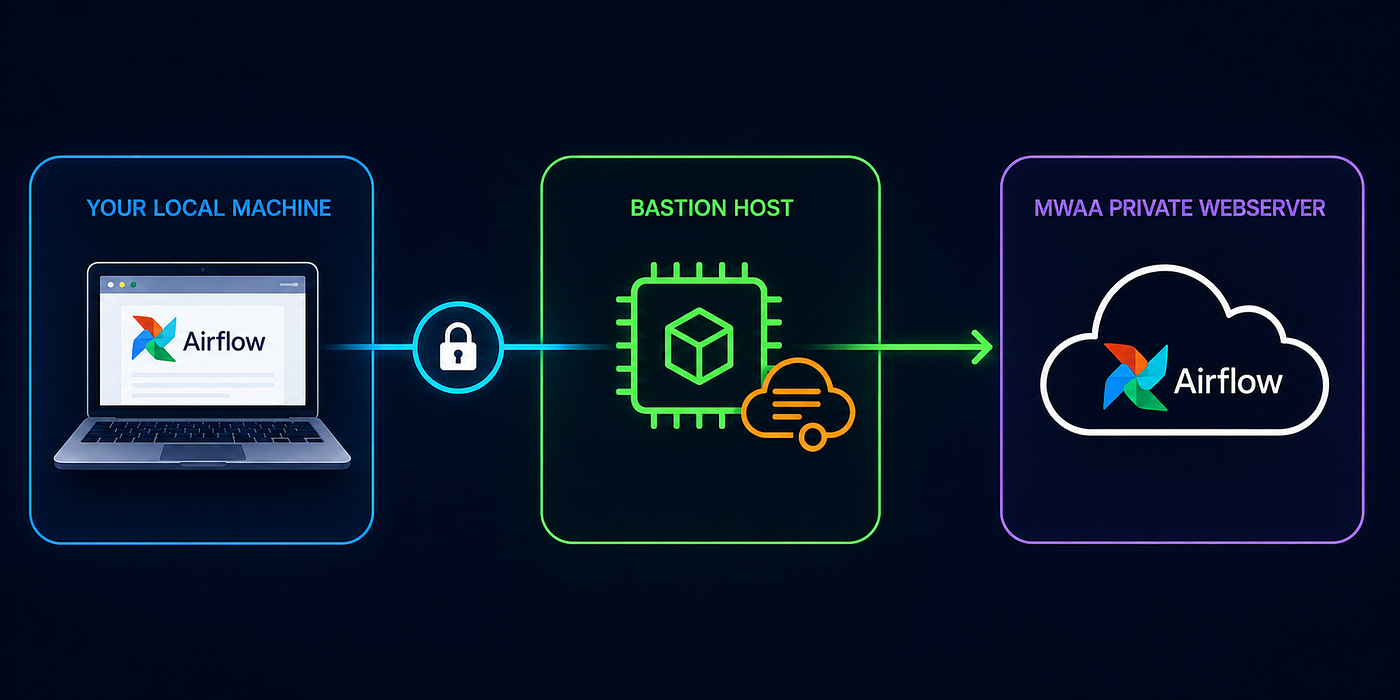
Accessing the Private MWAA Webserver via an Application Load Balancer (ALB)
Amazon MWAA (Managed Workflows for Apache Airflow) is AWS’s hosted Airflow service — you get the Airflow UI, scheduler, and workers without…
Accessing the Private MWAA Webserver via an Application Load Balancer (ALB)

Amazon MWAA (Managed Workflows for Apache Airflow) is AWS’s hosted Airflow service — you get the Airflow webserver, scheduler, workers and meta database without managing the infrastructure. For anything touching sensitive data or running in a regulated environment, you’ll usually configure it with PRIVATE_ONLY webserver access, which means the Airflow UI isn't reachable from the public internet.
If you need to give your team access to a private MWAA webserver without making everyone set up VPN clients or SSH tunnels, an Application Load Balancer might be exactly what you’re looking for.
Your MWAA webserver sits inside the MWAA service VPC, completely unreachable from the internet. But with an ALB in front of it, you can create a controlled entry point. Users hit the ALB, the ALB routes to MWAA, and everyone’s happy. You can even add authentication, WAF rules, or whatever security layers make sense for your setup.
[+] https://docs.aws.amazon.com/mwaa/latest/migrationguide/mwaa-architecture.html
This guide covers the full setup — both manual steps and a CloudFormation template that automates everything.
Understanding the Webserver VPC Endpoint
For a private webserver MWAA environment, AWS creates a webserver VPC endpoint with a service name like:
com.amazonaws.vpce.region.vpce-svc-xxxxxxxxxxxxxxxxxYou can find this in: MWAA Console → Your Environment → Network Details → “Webserver VPC endpoint service name” after the environment becomes AVAILABLE post creation.
For this ALB setup, we will need to target this webserver endpoint to route traffic to the Airflow UI.
Architecture Overview
Internet Users
      |
      v
[ALB] (public, in your VPC)
      |
      v
[Webserver VPC Endpoint] (vpce-svc-xxx, AWS managed)
      |
      v
[MWAA Webserver] (Airflow UI, AWS managed)
Traffic flow: User → ALB → Webserver VPC Endpoint (vpce-svc-xxx) → MWAA Webserver (UI)
Prerequisites
An MWAA environment configured with:
- Private webserver access mode
- VPC with public and private subnets
- Required MWAA security group
You may see the links below for guidance on the initial setup. The CloudFormation template below builds on that.
[+] https://docs.aws.amazon.com/mwaa/latest/mwaa-serverless-userguide/networking.html
Step-by-Step Configuration
Step 1: Locate MWAA Endpoint Information
- Go to MWAA Console → Your Environment
- Under “Network Details” find:
- Copy the Webserver VPC endpoint service name
- Example:
com.amazonaws.vpce.region.vpce-svc-xxxxxxxxxxxxxxxxx
Step 2: Get MWAA Webserver Endpoint IPs
- Go to VPC Console → Endpoints
- Search for your copied endpoint service name
- Locate the two Network Interfaces (ENIs) attached
- Note down both IP addresses — you’ll need these for the ALB target group
Step 3: Create Application Load Balancer
- Go to EC2 Console → Load Balancers → Create Load Balancer
- Choose “Application Load Balancer”
- Basic Configuration:
Name: your-mwaa-alb-name
Scheme: Internet-facing
IP address type: IPv4- Network Configuration:
VPC: Same VPC as MWAA
Mappings: Select TWO public subnets (different AZs)
Step 4: Create ALB Security Group
Create a new security group:
Inbound Rules:
Type: HTTPS
Port: 443
Source: 0.0.0.0/0 (or your specific IP range)
Outbound Rules:
Type: HTTPS
Port: 443
Destination: MWAA security group
Step 5: Configure MWAA Security Group
Edit the MWAA security group to allow traffic from the ALB:
Add Inbound Rule:
Type: HTTPS
Port: 443
Source: ALB security group
Keep Outbound Rule:
Type: All Traffic
Destination: 0.0.0.0/0
Step 6: Create Target Group
- Go to Target Groups → Create Target Group
- Basic Configuration:
Target type: IP addresses
Protocol: HTTPS
Port: 443
VPC: Same as MWAA- Health Check Settings:
Protocol: HTTPS
Path: /
Port: 443
Success codes: 200,302- Register Targets:
- Add both MWAA webserver endpoint IPs (from Step 2)
- Port: 443
Step 7: Create/Import Certificate
For development/testing, you can create a self-signed certificate in AWS CloudShell:
# Generate self-signed certificate
openssl req -x509 -nodes -days 365 -newkey rsa:2048 -keyout privateKey.key -out certificate.crt

# Convert to PEM format
openssl rsa -in privateKey.key -text > private.pem
openssl x509 -inform PEM -in certificate.crt > public.pem

# Upload to IAM
aws iam upload-server-certificate \
  --server-certificate-name mwaa-alb-cert \
  --certificate-body file://public.pem \
  --private-key file://private.pem
Copy the certificate ARN from the output.
Step 8: Configure ALB Listener
- Add HTTPS Listener:
Protocol: HTTPS
Port: 443
Default action: Forward to your target group- Select your certificate (IAM or ACM)
Accessing the Airflow UI
Generate Access Token
token=$(aws mwaa create-web-login-token --name your-environment-name)
WEB_TOKEN=$(echo $token | jq --raw-output '.WebToken')
echo $WEB_TOKEN
Access URL Format
https://your-alb-dns/aws_mwaa/aws-console-sso?login=true#<your-token>Go to the link and you should have access now.
Handling the “Not Secure” Warning
When using a self-signed certificate, the browser will show a security warning.
Why It Happens
- Self-signed certificates aren’t issued by a trusted Certificate Authority (CA)
- Browsers don’t trust them by default
- The connection IS encrypted, but the browser can’t verify who issued the certificate
For Development/Internal Use
Just click “Advanced” → “Proceed anyway”. The traffic is still encrypted and secure.
For Production (No Warning)
- Get a real domain (e.g.,
airflow.yourcompany.com) - Request ACM certificate (free):
aws acm request-certificate \
  --domain-name airflow.yourcompany.com \
--validation-method DNS-
Update the ALB listener to use the ACM certificate
-
Create a Route 53 record pointing your domain to the ALB
With a real domain + ACM certificate, the browser will show the padlock icon with no warnings.
Multi-User Access
This setup supports multiple users:
- ALB — single entry point, all users hit the same ALB
- MWAA Webserver — has internal load balancing across web server instances
- Sticky Sessions — enabled in the target group to maintain user sessions
- Authentication — each user generates their own login token
Automated Deployment (CloudFormation)
For automated deployment, you can use this CloudFormation template that creates everything including:
- VPC, subnets, security groups, VPC endpoints
- MWAA environment
- ALB with HTTPS listener
- Automatically registers MWAA endpoint IPs to target group
- Lambda for login URL generation
Prerequisites for CloudFormation
- S3 bucket with a
dags/folder for your DAG files - IAM certificate for ALB HTTPS listener (create using the commands in Step 7)
Deploy
aws cloudformation deploy \
  --template-file mwaa-alb-complete.yaml \
  --stack-name mwaa-stack \
  --parameter-overrides \
    EnvironmentName=MyAirflowEnv \
    S3BucketName=your-dags-bucket \
    CertificateArn=arn:aws:iam::123456789012:server-certificate/mwaa-alb-cert \
  --capabilities CAPABILITY_NAMED_IAM
This creates everything. MWAA environment creation takes ~30 minutes.
Access Airflow UI (After Deployment)
aws lambda invoke \
  --function-name mwaa-stack-get-login-url \
  --payload '{}' \
  --cli-binary-format raw-in-base64-out \
  response.json && cat response.json
Open the loginUrl in your browser. Accept the self-signed certificate warning.
CloudFormation Template
AWSTemplateFormatVersion: "2010-09-09"
Description: Complete MWAA with ALB - fully automated, no manual steps
Parameters:
EnvironmentName:
Type: String
Description: Name for the MWAA environment
S3BucketName:
Type: String
Description: S3 bucket for DAGs (must already exist with dags/ folder)
CertificateArn:
Type: String
Description: ARN of IAM server certificate for ALB HTTPS listener
Resources:
# ==========================================================================
# VPC
# ==========================================================================
VPC:
Type: AWS::EC2::VPC
Properties:
CidrBlock: 10.192.0.0/16
EnableDnsSupport: true
EnableDnsHostnames: true
Tags:
- Key: Name
Value: !Ref AWS::StackName
InternetGateway:
Type: AWS::EC2::InternetGateway
InternetGatewayAttachment:
Type: AWS::EC2::VPCGatewayAttachment
Properties:
InternetGatewayId: !Ref InternetGateway
VpcId: !Ref VPC
# ==========================================================================
# NAT Gateway
# ==========================================================================
NatGatewayEIP:
Type: AWS::EC2::EIP
DependsOn: InternetGatewayAttachment
Properties:
Domain: vpc
NatGateway:
Type: AWS::EC2::NatGateway
Properties:
AllocationId: !GetAtt NatGatewayEIP.AllocationId
SubnetId: !Ref PublicSubnet1
# ==========================================================================
# Subnets
# ==========================================================================
PublicSubnet1:
Type: AWS::EC2::Subnet
Properties:
VpcId: !Ref VPC
AvailabilityZone: !Select [0, !GetAZs ""]
CidrBlock: 10.192.1.0/24
MapPublicIpOnLaunch: true
Tags:
- Key: Name
Value: !Sub "${AWS::StackName}-public-1"
PublicSubnet2:
Type: AWS::EC2::Subnet
Properties:
VpcId: !Ref VPC
AvailabilityZone: !Select [1, !GetAZs ""]
CidrBlock: 10.192.2.0/24
MapPublicIpOnLaunch: true
Tags:
- Key: Name
Value: !Sub "${AWS::StackName}-public-2"
PrivateSubnet1:
Type: AWS::EC2::Subnet
Properties:
VpcId: !Ref VPC
AvailabilityZone: !Select [0, !GetAZs ""]
CidrBlock: 10.192.10.0/24
Tags:
- Key: Name
Value: !Sub "${AWS::StackName}-private-1"
PrivateSubnet2:
Type: AWS::EC2::Subnet
Properties:
VpcId: !Ref VPC
AvailabilityZone: !Select [1, !GetAZs ""]
CidrBlock: 10.192.11.0/24
Tags:
- Key: Name
Value: !Sub "${AWS::StackName}-private-2"
# ==========================================================================
# Route Tables
# ==========================================================================
PublicRouteTable:
Type: AWS::EC2::RouteTable
Properties:
VpcId: !Ref VPC
PublicRoute:
Type: AWS::EC2::Route
DependsOn: InternetGatewayAttachment
Properties:
RouteTableId: !Ref PublicRouteTable
DestinationCidrBlock: 0.0.0.0/0
GatewayId: !Ref InternetGateway
PublicSubnet1RouteTableAssoc:
Type: AWS::EC2::SubnetRouteTableAssociation
Properties:
RouteTableId: !Ref PublicRouteTable
SubnetId: !Ref PublicSubnet1
PublicSubnet2RouteTableAssoc:
Type: AWS::EC2::SubnetRouteTableAssociation
Properties:
RouteTableId: !Ref PublicRouteTable
SubnetId: !Ref PublicSubnet2
PrivateRouteTable:
Type: AWS::EC2::RouteTable
Properties:
VpcId: !Ref VPC
PrivateRoute:
Type: AWS::EC2::Route
Properties:
RouteTableId: !Ref PrivateRouteTable
DestinationCidrBlock: 0.0.0.0/0
NatGatewayId: !Ref NatGateway
PrivateSubnet1RouteTableAssoc:
Type: AWS::EC2::SubnetRouteTableAssociation
Properties:
RouteTableId: !Ref PrivateRouteTable
SubnetId: !Ref PrivateSubnet1
PrivateSubnet2RouteTableAssoc:
Type: AWS::EC2::SubnetRouteTableAssociation
Properties:
RouteTableId: !Ref PrivateRouteTable
SubnetId: !Ref PrivateSubnet2
# ==========================================================================
# VPC Endpoints for MWAA
# ==========================================================================
S3VpcEndpoint:
Type: AWS::EC2::VPCEndpoint
Properties:
ServiceName: !Sub "com.amazonaws.${AWS::Region}.s3"
VpcEndpointType: Gateway
VpcId: !Ref VPC
RouteTableIds:
- !Ref PrivateRouteTable
SqsVpcEndpoint:
Type: AWS::EC2::VPCEndpoint
Properties:
ServiceName: !Sub "com.amazonaws.${AWS::Region}.sqs"
VpcEndpointType: Interface
VpcId: !Ref VPC
PrivateDnsEnabled: true
SubnetIds:
- !Ref PrivateSubnet1
- !Ref PrivateSubnet2
SecurityGroupIds:
- !Ref MWAASecurityGroup
LogsVpcEndpoint:
Type: AWS::EC2::VPCEndpoint
Properties:
ServiceName: !Sub "com.amazonaws.${AWS::Region}.logs"
VpcEndpointType: Interface
VpcId: !Ref VPC
PrivateDnsEnabled: true
SubnetIds:
- !Ref PrivateSubnet1
- !Ref PrivateSubnet2
SecurityGroupIds:
- !Ref MWAASecurityGroup
MonitoringVpcEndpoint:
Type: AWS::EC2::VPCEndpoint
Properties:
ServiceName: !Sub "com.amazonaws.${AWS::Region}.monitoring"
VpcEndpointType: Interface
VpcId: !Ref VPC
PrivateDnsEnabled: true
SubnetIds:
- !Ref PrivateSubnet1
- !Ref PrivateSubnet2
SecurityGroupIds:
- !Ref MWAASecurityGroup
KmsVpcEndpoint:
Type: AWS::EC2::VPCEndpoint
Properties:
ServiceName: !Sub "com.amazonaws.${AWS::Region}.kms"
VpcEndpointType: Interface
VpcId: !Ref VPC
PrivateDnsEnabled: true
SubnetIds:
- !Ref PrivateSubnet1
- !Ref PrivateSubnet2
SecurityGroupIds:
- !Ref MWAASecurityGroup
AirflowApiVpcEndpoint:
Type: AWS::EC2::VPCEndpoint
Properties:
ServiceName: !Sub "com.amazonaws.${AWS::Region}.airflow.api"
VpcEndpointType: Interface
VpcId: !Ref VPC
PrivateDnsEnabled: true
SubnetIds:
- !Ref PrivateSubnet1
- !Ref PrivateSubnet2
SecurityGroupIds:
- !Ref MWAASecurityGroup
AirflowEnvVpcEndpoint:
Type: AWS::EC2::VPCEndpoint
Properties:
ServiceName: !Sub "com.amazonaws.${AWS::Region}.airflow.env"
VpcEndpointType: Interface
VpcId: !Ref VPC
PrivateDnsEnabled: true
SubnetIds:
- !Ref PrivateSubnet1
- !Ref PrivateSubnet2
SecurityGroupIds:
- !Ref MWAASecurityGroup
AirflowOpsVpcEndpoint:
Type: AWS::EC2::VPCEndpoint
Properties:
ServiceName: !Sub "com.amazonaws.${AWS::Region}.airflow.ops"
VpcEndpointType: Interface
VpcId: !Ref VPC
PrivateDnsEnabled: true
SubnetIds:
- !Ref PrivateSubnet1
- !Ref PrivateSubnet2
SecurityGroupIds:
- !Ref MWAASecurityGroup
EcrApiVpcEndpoint:
Type: AWS::EC2::VPCEndpoint
Properties:
ServiceName: !Sub "com.amazonaws.${AWS::Region}.ecr.api"
VpcEndpointType: Interface
VpcId: !Ref VPC
PrivateDnsEnabled: true
SubnetIds:
- !Ref PrivateSubnet1
- !Ref PrivateSubnet2
SecurityGroupIds:
- !Ref MWAASecurityGroup
EcrDkrVpcEndpoint:
Type: AWS::EC2::VPCEndpoint
Properties:
ServiceName: !Sub "com.amazonaws.${AWS::Region}.ecr.dkr"
VpcEndpointType: Interface
VpcId: !Ref VPC
PrivateDnsEnabled: true
SubnetIds:
- !Ref PrivateSubnet1
- !Ref PrivateSubnet2
SecurityGroupIds:
- !Ref MWAASecurityGroup
# ==========================================================================
# Security Groups
# ==========================================================================
MWAASecurityGroup:
Type: AWS::EC2::SecurityGroup
Properties:
VpcId: !Ref VPC
GroupDescription: MWAA Security Group
GroupName: !Sub "${AWS::StackName}-mwaa-sg"
MWAASecurityGroupSelfIngress:
Type: AWS::EC2::SecurityGroupIngress
Properties:
GroupId: !Ref MWAASecurityGroup
IpProtocol: "-1"
SourceSecurityGroupId: !Ref MWAASecurityGroup
MWAASecurityGroupALBIngress:
Type: AWS::EC2::SecurityGroupIngress
Properties:
GroupId: !Ref MWAASecurityGroup
IpProtocol: tcp
FromPort: 443
ToPort: 443
SourceSecurityGroupId: !Ref ALBSecurityGroup
ALBSecurityGroup:
Type: AWS::EC2::SecurityGroup
Properties:
VpcId: !Ref VPC
GroupDescription: ALB Security Group
GroupName: !Sub "${AWS::StackName}-alb-sg"
SecurityGroupIngress:
- IpProtocol: tcp
FromPort: 443
ToPort: 443
CidrIp: 0.0.0.0/0
# ==========================================================================
# MWAA Execution Role
# ==========================================================================
MWAAExecutionRole:
Type: AWS::IAM::Role
Properties:
RoleName: !Sub "${AWS::StackName}-mwaa-execution-role"
AssumeRolePolicyDocument:
Version: "2012-10-17"
Statement:
- Effect: Allow
Principal:
Service:
- airflow.amazonaws.com
- airflow-env.amazonaws.com
Action: sts:AssumeRole
Policies:
- PolicyName: MWAAExecutionPolicy
PolicyDocument:
Version: "2012-10-17"
Statement:
- Effect: Allow
Action: airflow:PublishMetrics
Resource: !Sub "arn:aws:airflow:${AWS::Region}:${AWS::AccountId}:environment/${EnvironmentName}"
- Effect: Deny
Action: s3:ListAllMyBuckets
Resource: "*"
- Effect: Allow
Action:
- s3:GetObject*
- s3:GetBucket*
- s3:List*
Resource:
- !Sub "arn:aws:s3:::${S3BucketName}"
- !Sub "arn:aws:s3:::${S3BucketName}/*"
- Effect: Allow
Action:
- logs:CreateLogStream
- logs:CreateLogGroup
- logs:PutLogEvents
- logs:GetLogEvents
- logs:GetLogRecord
- logs:GetLogGroupFields
- logs:GetQueryResults
Resource: !Sub "arn:aws:logs:${AWS::Region}:${AWS::AccountId}:log-group:airflow-${EnvironmentName}-*"
- Effect: Allow
Action: logs:DescribeLogGroups
Resource: "*"
- Effect: Allow
Action: cloudwatch:PutMetricData
Resource: "*"
- Effect: Allow
Action:
- sqs:ChangeMessageVisibility
- sqs:DeleteMessage
- sqs:GetQueueAttributes
- sqs:GetQueueUrl
- sqs:ReceiveMessage
- sqs:SendMessage
Resource: !Sub "arn:aws:sqs:${AWS::Region}:*:airflow-celery-*"
- Effect: Allow
Action:
- kms:Decrypt
- kms:DescribeKey
- kms:GenerateDataKey*
- kms:Encrypt
Resource: "*"
Condition:
StringLike:
"kms:ViaService": !Sub "sqs.${AWS::Region}.amazonaws.com"
# ==========================================================================
# MWAA Environment
# ==========================================================================
MWAAEnvironment:
Type: AWS::MWAA::Environment
DependsOn:
- S3VpcEndpoint
- SqsVpcEndpoint
- LogsVpcEndpoint
- MonitoringVpcEndpoint
- KmsVpcEndpoint
- AirflowApiVpcEndpoint
- AirflowEnvVpcEndpoint
- AirflowOpsVpcEndpoint
- EcrApiVpcEndpoint
- EcrDkrVpcEndpoint
Properties:
Name: !Ref EnvironmentName
AirflowVersion: "2.10.3"
EnvironmentClass: mw1.small
MaxWorkers: 2
MinWorkers: 1
Schedulers: 2
WebserverAccessMode: PRIVATE_ONLY
ExecutionRoleArn: !GetAtt MWAAExecutionRole.Arn
SourceBucketArn: !Sub "arn:aws:s3:::${S3BucketName}"
DagS3Path: dags/
NetworkConfiguration:
SecurityGroupIds:
- !Ref MWAASecurityGroup
SubnetIds:
- !Ref PrivateSubnet1
- !Ref PrivateSubnet2
LoggingConfiguration:
DagProcessingLogs:
Enabled: true
LogLevel: INFO
SchedulerLogs:
Enabled: true
LogLevel: INFO
TaskLogs:
Enabled: true
LogLevel: INFO
WebserverLogs:
Enabled: true
LogLevel: INFO
WorkerLogs:
Enabled: true
LogLevel: INFO
# ==========================================================================
# Application Load Balancer
# ==========================================================================
ApplicationLoadBalancer:
Type: AWS::ElasticLoadBalancingV2::LoadBalancer
Properties:
Name: !Sub "${AWS::StackName}-alb"
Scheme: internet-facing
Type: application
SecurityGroups:
- !Ref ALBSecurityGroup
Subnets:
- !Ref PublicSubnet1
- !Ref PublicSubnet2
ALBTargetGroup:
Type: AWS::ElasticLoadBalancingV2::TargetGroup
Properties:
Name: !Sub "${AWS::StackName}-tg"
Protocol: HTTPS
Port: 443
TargetType: ip
VpcId: !Ref VPC
HealthCheckProtocol: HTTPS
HealthCheckPath: /health
Matcher:
HttpCode: "200,302"
TargetGroupAttributes:
- Key: stickiness.enabled
Value: "true"
- Key: stickiness.type
Value: lb_cookie
- Key: stickiness.lb_cookie.duration_seconds
Value: "86400"
ALBListener:
Type: AWS::ElasticLoadBalancingV2::Listener
Properties:
LoadBalancerArn: !Ref ApplicationLoadBalancer
Protocol: HTTPS
Port: 443
Certificates:
- CertificateArn: !Ref CertificateArn
DefaultActions:
- Type: forward
TargetGroupArn: !Ref ALBTargetGroup
SslPolicy: ELBSecurityPolicy-TLS13-1-2-2021-06
# ==========================================================================
# Custom Resource: Auto-register MWAA targets
# ==========================================================================
RegisterTargetsRole:
Type: AWS::IAM::Role
Properties:
RoleName: !Sub "${AWS::StackName}-register-targets-role"
AssumeRolePolicyDocument:
Version: "2012-10-17"
Statement:
- Effect: Allow
Principal:
Service: lambda.amazonaws.com
Action: sts:AssumeRole
ManagedPolicyArns:
- arn:aws:iam::aws:policy/service-role/AWSLambdaBasicExecutionRole
Policies:
- PolicyName: RegisterTargetsPolicy
PolicyDocument:
Version: "2012-10-17"
Statement:
- Effect: Allow
Action:
- airflow:GetEnvironment
Resource: !Sub "arn:aws:airflow:${AWS::Region}:${AWS::AccountId}:environment/${EnvironmentName}"
- Effect: Allow
Action:
- ec2:DescribeVpcEndpoints
- ec2:DescribeNetworkInterfaces
Resource: "*"
- Effect: Allow
Action:
- elasticloadbalancing:RegisterTargets
- elasticloadbalancing:DeregisterTargets
Resource: !Ref ALBTargetGroup
RegisterTargetsFunction:
Type: AWS::Lambda::Function
Properties:
FunctionName: !Sub "${AWS::StackName}-register-targets"
Runtime: python3.11
Handler: index.handler
Timeout: 300
Role: !GetAtt RegisterTargetsRole.Arn
Environment:
Variables:
MWAA_ENV_NAME: !Ref EnvironmentName
TARGET_GROUP_ARN: !Ref ALBTargetGroup
VPC_ID: !Ref VPC
Code:
ZipFile: |
import boto3
import cfnresponse
import os
def handler(event, context):
try:
if event['RequestType'] == 'Delete':
cfnresponse.send(event, context, cfnresponse.SUCCESS, {})
return
mwaa = boto3.client('mwaa')
ec2 = boto3.client('ec2')
elbv2 = boto3.client('elbv2')
env_name = os.environ['MWAA_ENV_NAME']
tg_arn = os.environ['TARGET_GROUP_ARN']
vpc_id = os.environ['VPC_ID']
# Get MWAA webserver VPC endpoint service
env = mwaa.get_environment(Name=env_name)['Environment']
webserver_vpc_endpoint_service = env.get('WebserverVpcEndpointService')
if not webserver_vpc_endpoint_service:
cfnresponse.send(event, context, cfnresponse.FAILED,
{'Error': 'WebserverVpcEndpointService not found'})
return
# Find the VPC endpoint with matching service name
endpoints = ec2.describe_vpc_endpoints(
Filters=[
{'Name': 'vpc-id', 'Values': [vpc_id]},
{'Name': 'service-name', 'Values': [webserver_vpc_endpoint_service]}
]
)['VpcEndpoints']
if not endpoints:
cfnresponse.send(event, context, cfnresponse.FAILED,
{'Error': f'No VPC endpoint found for {webserver_vpc_endpoint_service}'})
return
# Get ENI IPs from the endpoint
eni_ids = endpoints[0].get('NetworkInterfaceIds', [])
if not eni_ids:
cfnresponse.send(event, context, cfnresponse.FAILED,
{'Error': 'No network interfaces found on endpoint'})
return
enis = ec2.describe_network_interfaces(NetworkInterfaceIds=eni_ids)['NetworkInterfaces']
ips = [eni['PrivateIpAddress'] for eni in enis]
# Register targets
targets = [{'Id': ip, 'Port': 443} for ip in ips]
elbv2.register_targets(TargetGroupArn=tg_arn, Targets=targets)
cfnresponse.send(event, context, cfnresponse.SUCCESS, {
'RegisteredIPs': ','.join(ips)
})
except Exception as e:
print(f"Error: {str(e)}")
cfnresponse.send(event, context, cfnresponse.FAILED, {'Error': str(e)})
RegisterTargetsCustomResource:
Type: Custom::RegisterTargets
DependsOn: MWAAEnvironment
Properties:
ServiceToken: !GetAtt RegisterTargetsFunction.Arn
# ==========================================================================
# Lambda: Get Login URL
# ==========================================================================
GetLoginUrlRole:
Type: AWS::IAM::Role
Properties:
RoleName: !Sub "${AWS::StackName}-get-login-url-role"
AssumeRolePolicyDocument:
Version: "2012-10-17"
Statement:
- Effect: Allow
Principal:
Service: lambda.amazonaws.com
Action: sts:AssumeRole
ManagedPolicyArns:
- arn:aws:iam::aws:policy/service-role/AWSLambdaBasicExecutionRole
Policies:
- PolicyName: MWAACreateToken
PolicyDocument:
Version: "2012-10-17"
Statement:
- Effect: Allow
Action: airflow:CreateWebLoginToken
Resource: !Sub "arn:aws:airflow:${AWS::Region}:${AWS::AccountId}:environment/${EnvironmentName}"
GetLoginUrlFunction:
Type: AWS::Lambda::Function
Properties:
FunctionName: !Sub "${AWS::StackName}-get-login-url"
Runtime: python3.11
Handler: index.handler
Timeout: 30
Role: !GetAtt GetLoginUrlRole.Arn
Environment:
Variables:
MWAA_ENV_NAME: !Ref EnvironmentName
ALB_DNS: !GetAtt ApplicationLoadBalancer.DNSName
Code:
ZipFile: |
import boto3
import json
import os
def handler(event, context):
mwaa = boto3.client('mwaa')
env_name = os.environ['MWAA_ENV_NAME']
alb_dns = os.environ['ALB_DNS']
response = mwaa.create_web_login_token(Name=env_name)
token = response['WebToken']
url = f"https://{alb_dns}/aws_mwaa/aws-console-sso?login=true#{token}"
return {
'statusCode': 200,
'body': json.dumps({
'loginUrl': url,
'note': 'Token expires in 60 seconds. Open URL in browser.'
})
}
Outputs:
AirflowUICommand:
Description: "Run this command to get login URL"
Value: !Sub "aws lambda invoke --function-name ${AWS::StackName}-get-login-url --payload '{}' --cli-binary-format raw-in-base64-out response.json && cat response.json"
ALBDnsName:
Description: ALB DNS Name
Value: !GetAtt ApplicationLoadBalancer.DNSName
MWAAEnvironmentName:
Description: MWAA Environment Name
Value: !Ref EnvironmentNameTroubleshooting
Target group unhealthy Security group is blocking traffic. Verify the ALB SG can reach the MWAA SG on port 443.
502 Bad Gateway Targets not registered. Check that both ENI IPs from the webserver endpoint are registered in the target group.
504 Gateway Timeout
Cannot reach the endpoint. Verify the webserver endpoint exists and is in Available state.
“Token expired” / Forbidden Token is older than 60 seconds. You must generate a new token and paste the URL immediately.
Certificate warning Expected with a self-signed certificate. Click Advanced → Proceed for dev/test. Use an ACM certificate with a real domain for production.
Summary
An ALB gives you a proper front door to your private MWAA environment. Your team gets easy access, you keep security controls tight, and nobody needs to mess with VPN clients or SSH tunnels.
What you get:
- A single entry point for all your users
- Room to add WAF, Cognito, or whatever else you need
- The whole thing deployable via CloudFormation
For teams where multiple people need Airflow access, this setup scales way better than handing out VPN configs to everyone.
메타데이터
- post_id
- 0eb88126a65a
- slug
- accessing-the-private-mwaa-webserver-via-an-application-load-balancer-alb-0eb88126a65a
- url
- https://medium.com/@viukpe/accessing-the-private-mwaa-webserver-via-an-application-load-balancer-alb-0eb88126a65a
- canonical_url
- https://medium.com/@viukpe/accessing-the-private-mwaa-webserver-via-an-application-load-balancer-alb-0eb88126a65a
- author_url
- https://medium.com/@viukpe
- status
- ok
- fetched_at
- 2026-06-09 15:37:30