Tips for Getting Started with Power Platform for Your Business
The Microsoft Power Platform is transforming how businesses approach digital transformation. With tools like Power BI, Power Apps, Power…
Tips for Getting Started with Power Platform for Your Business
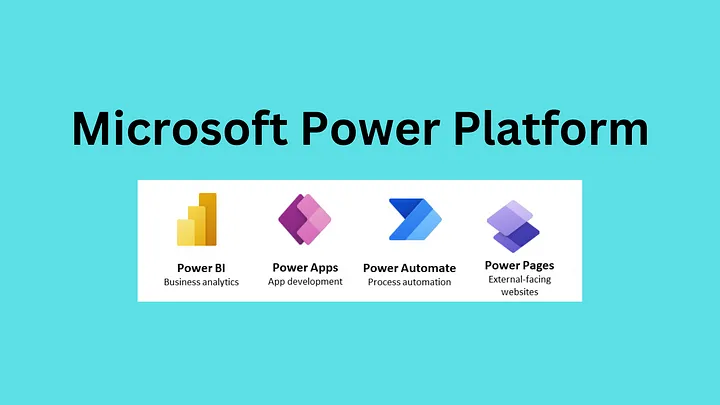
The Microsoft Power Platform is transforming how businesses approach digital transformation. With tools like Power BI, Power Apps, Power Automate, and Power Virtual Agents, organizations can quickly build apps, automate workflows, analyze data, and create intelligent chatbots — all with little to no code.
Whether you’re a small business looking to streamline operations or a large enterprise aiming to modernize legacy systems, getting started with Power Platform can open the door to innovation and agility.
✅ What is Microsoft Power Platform?
The Power Platform is a low-code suite of tools by Microsoft that empowers users to:
- Analyze data with **Power BI**
- Build apps with Power Apps
- Automate processes with Power Automate
- Create chatbots with Power Virtual Agents
All tools are built to integrate seamlessly with Microsoft 365, Azure, and hundreds of other data connectors.
🧩 Key Tips for Getting Started
1. Define Your Business Objectives Clearly
Before adopting any tool, align your Power Platform use with specific business goals:
- Do you want to reduce manual tasks?
- Are you looking to visualize KPIs in real time?
- Is your goal to digitize paper-based processes?
Clarity helps you choose the right tool or combination of tools within the platform.
2. Start Small with High-Impact Use Cases
Begin with a single process or workflow that’s easy to automate or improve, such as:
- Automating employee leave requests
- Building a sales lead tracker
- Creating dashboards for monthly reports
This builds early momentum and proves ROI quickly.
3. Empower Citizen Developers
Encourage non-technical users to create apps and flows. Power Platform is designed for business users, so with minimal training, your team can:
- Create custom business apps with Power Apps
- Build flows with Power Automate
- Use natural language to create chatbots in Power Virtual Agents
Use the Microsoft Learn platform or internal workshops to upskill your teams.
4. Connect to Existing Data Sources
Power Platform connects to over 800+ data sources, including:
- SharePoint
- Excel
- Dynamics 365
- SQL Server
- Salesforce
- Dropbox
This makes it easier to bring your data into apps, dashboards, and workflows without building new infrastructure.
5. Leverage Templates and Pre-Built Solutions
Microsoft and its partners offer a variety of templates for apps, flows, and dashboards:
- Expense trackers
- Approval workflows
- Onboarding apps
- Project management dashboards
These pre-built assets can be customized to fit your business, saving time and effort.
6. Ensure Governance and Security from the Start
As you scale Power Platform usage, set up Data Loss Prevention (DLP) policies, environment strategy, and role-based access to ensure compliance and security.
Microsoft provides admin centers and Azure AD integration to help you manage governance efficiently.
7. Integrate with Microsoft Teams
Teams and Power Platform work hand-in-hand:
- Add Power BI dashboards inside Teams
- Run Power Automate flows from chats
- Embed apps in Teams channels
This increases adoption and productivity by placing tools where your team already collaborates.
8. Track Performance and ROI
Use Power Platform Admin Center and Power BI reports to track usage, app performance, and ROI. Monitor:
- Flow run success/failure
- App usage trends
- Support tickets generated vs. resolved by bots
Data-driven insights help you improve and scale efficiently.
9. Collaborate with a Power Platform Partner
For complex scenarios or enterprise-scale adoption, consider working with a **Power Platform consulting company**. They can help with:
- Solution architecture
- Custom connectors and integrations
- Training and support
- Governance implementation
10. Iterate and Scale
Once your pilot project succeeds, expand to other areas like:
- HR onboarding
- Customer support bots
- Sales forecasting dashboards
- Inventory management flows
Continue evolving with regular feedback from users and stakeholders.
🏁 Final Thoughts
Getting started with Microsoft Power Platform doesn’t require a large investment or deep technical expertise. By starting small, involving end-users, and focusing on real business needs, you can unlock powerful gains in productivity, automation, and decision-making.
Whether it’s automating a manual workflow, building a mobile app, or empowering teams with insights, the Power Platform provides a scalable, secure foundation for digital transformation.
메타데이터
- post_id
- 0ec7bb1069a5
- slug
- tips-for-getting-started-with-power-platform-for-your-business-0ec7bb1069a5
- url
- https://medium.com/@smith.emily2584/tips-for-getting-started-with-power-platform-for-your-business-0ec7bb1069a5
- canonical_url
- https://medium.com/@smith.emily2584/tips-for-getting-started-with-power-platform-for-your-business-0ec7bb1069a5
- author_url
- https://medium.com/@smith.emily2584
- status
- ok
- fetched_at
- 2026-07-13 07:47:57