How to Use AI to Generate 3D Models for Your AR/VR Projects — Tools, Pipelines, and Quality Tips
A developer’s guide to AI 3D model generation: comparing Meshy, Tripo, Point-E, Shap-E, and Rodin, plus the exact cleanup, retopology, and…
How to Use AI to Generate 3D Models for Your AR/VR Projects — Tools, Pipelines, and Quality Tips
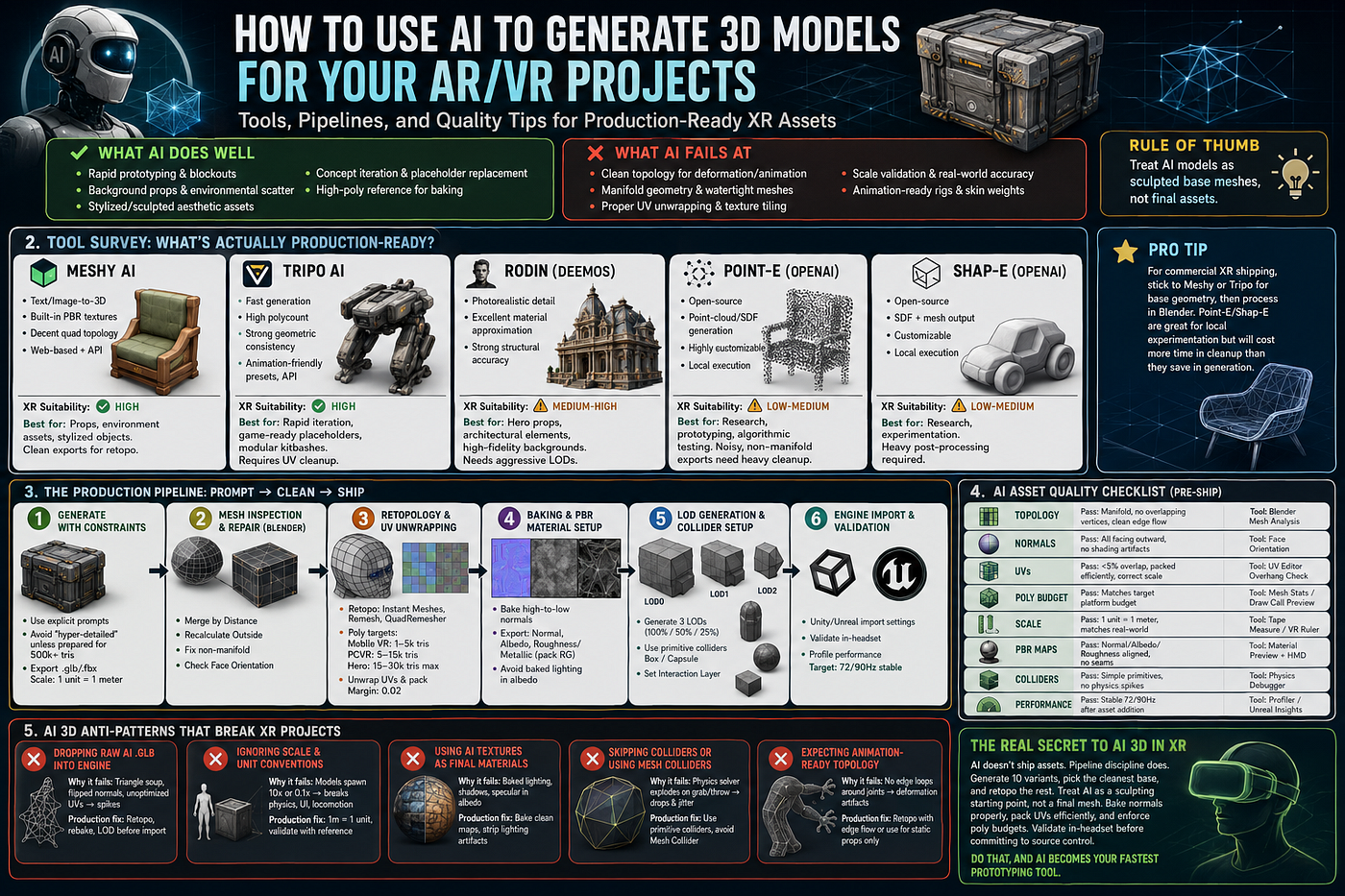
A developer’s guide to AI 3D model generation: comparing Meshy, Tripo, Point-E, Shap-E, and Rodin, plus the exact cleanup, retopology, and import workflows needed to ship production-ready XR assets without breaking frame budgets.
🔍 1. The AI 3D Reality Check for XR
Before picking a tool, understand what AI can and can’t do for spatial computing right now:
✅ What AI Does Well
- Rapid prototyping & blockouts
- Background props & environmental scatter
- Stylized/sculpted aesthetic assets
- Concept iteration & placeholder replacement
- High‑poly reference for baking
❌ What AI Fails At
- Clean topology for deformation/animation
- Manifold geometry & watertight meshes
- Proper UV unwrapping & texture tiling
- Scale validation & real‑world unit accuracy
- Animation‑ready rigs & skin weights
Rule of thumb: Treat AI models as sculpted base meshes, not final assets. Your job is to clean, optimize, and integrate.
🧰 2. Tool Survey: What’s Actually Production-Ready?
Meshy AI
- Strengths: Text/Image‑to‑3D, built‑in PBR texture generation, decent quad‑dominant topology, web‑based, API
- XR suitability: ✅ High
- Best use case: Props, environment assets, stylized objects. Exports clean
.glb/.fbxready for retopo
Tripo AI
- Strengths: Fast generation, high polycount, strong geometric consistency, animation‑friendly presets, developer API
- XR suitability: ✅ High
- Best use case: Rapid iteration, game‑ready placeholders, modular kitbashes. Requires UV cleanup
Rodin (Deemos)
- Strengths: Photorealistic detail, excellent material approximation, strong structural accuracy
- XR suitability: ⚠️ Medium‑High
- Best use case: Hero props, architectural elements, high‑fidelity backgrounds. Heavy topology needs aggressive LODs
Point‑E / Shap‑E (OpenAI)
- Strengths: Open‑source, local execution, point‑cloud/SDF generation, highly customizable
- XR suitability: ⚠️ Low‑Medium
- Best use case: Research, prototyping, algorithmic testing. Exports are noisy, non‑manifold, and require heavy processing
💡 Pro Tip: For commercial XR shipping, stick to Meshy or Tripo for base geometry, then process in Blender. Point-E/Shap-E are great for local experimentation but will cost more time in cleanup than they save in generation.
🛠️ 3. The Production Pipeline: Prompt → Clean → Ship
AI generation is step one. Steps 2–6 are where assets become XR-ready.
Step 1: Generate with Constraints
- Use explicit prompts:
"Low-poly sci-fi crate, clean topology, game-ready, no floating geometry, orthogonal edges" - Avoid:
"hyper-detailed", "cinematic", "organic flow"unless you're prepared for 500k+ triangle counts. - Export as
.glbor.fbxwith scale set to1 unit = 1 meter.
Step 2: Mesh Inspection & Repair (Blender)
AI outputs often contain non-manifold edges, flipped normals, and internal geometry.
Mesh > Clean Up > Merge by Distance(remove doubles)Mesh > Normals > Recalculate OutsideSelect > Select All by Trait > Non-Manifold→ Fix or delete- Enable
Face Orientationoverlay to verify no inverted faces remain
Step 3: Retopology & UV Unwrapping
Never ship AI triangle soup to VR.
- Use Instant Meshes (auto-quad), Blender Remesh (voxel), or QuadRemesher for clean edge flow
- Target poly counts:
Mobile VR: 1–5k tris,PCVR: 5–15k tris,Hero assets: 15–30k tris max - Unwrap UVs:
Smart UV Project(quick) or manual seams for production - Pack UV islands with
Margin: 0.02to prevent texture bleeding
Step 4: Baking & PBR Material Setup
AI textures are often baked incorrectly or lack proper maps.
- Bake high-to-low poly normals in Blender (
Cycles Bake) or Marmoset - Export:
Normal,Albedo,Roughness/Metallic(pack into RG channels for Unity/Unreal) - Avoid AI-generated emissive or SSS maps unless you understand engine-specific shader setups
Step 5: LOD Generation & Collider Setup
- Generate 3 LODs:
LOD0 (100%),LOD1 (50%),LOD2 (25%)via Blender Decimate or Simplygon - Add colliders:
Box/Capsulefor interaction zones. Never useMesh Collideron AI props in VR - Assign
Interaction Layerfor ray/poke/grab compatibility
Step 6: Engine Import & Validation
- Unity: Enable
Generate Collidersoff,Read/Writeoff. SetMesh CompressiontoHigh. UseASTC 4x4for mobile VR - Unreal: Disable
Nanitefor low-poly AI props. SetLightmap UVschannel 2. UseAuto-LODwith aggressive distance thresholds - Validate in-headset:
Stat Unit/Profiler →Render Thread< 4ms,GPU< 8ms
📋 4. AI Asset Quality Checklist (Pre-Ship)
Topology
- Pass criteria: Manifold, no overlapping vertices, clean edge flow
- Tool: Blender →
Mesh Analysis
Normals
- Pass criteria: All facing outward, no shading artifacts
- Tool: Face Orientation Overlay
UVs
- Pass criteria: <5% overlap, packed efficiently, correct scale
- Tool: UV Editor →
Overhangcheck
Poly Budget
- Pass criteria: Matches target platform budget
- Tool:
Mesh Stats/Draw Call Preview
Scale
- Pass criteria: 1 unit = 1 meter, matches real‑world reference
- Tool: Tape Measure / VR Ruler
PBR Maps
- Pass criteria: Normal/Albedo/Roughness aligned, no AI texture seams
- Tool: Material Preview → In‑Headset
Colliders
- Pass criteria: Simple primitives, no physics solver spikes
- Tool: Physics Debugger
Performance
- Pass criteria: Stable 72/90Hz after asset addition
- Tool: Unity Profiler / Unreal Insights
Pro Tip: Run this checklist before every AI asset commit. One unoptimized mesh can tank an entire scene’s frame budget.
🚫 5. AI 3D Anti-Patterns That Break XR Projects
Dropping raw AI .glb into Unity/Unreal
- Why it fails: Triangle soup, flipped normals, unoptimized UVs → shader/compiler spikes
- Production fix: Always retopo, rebake, and LOD before import
Ignoring scale & unit conventions
- Why it fails: AI models spawn at 10x or 0.1x size → breaks physics, UI, and locomotion
- Production fix: Set export scale to
1m = 1 unit, validate with reference object
Using AI textures as final PBR materials
- Why it fails: AI generates baked lighting, shadows, and specular into albedo
- Production fix: Bake clean normals/roughness, strip lighting artifacts
Skipping colliders or using mesh colliders
- Why it fails: Physics solver explodes on grab/throw → frame drops & jitter
- Production fix: Use primitive colliders, disable
Convexunless Rigidbody interaction is required
Expecting animation‑ready topology
- Why it fails: AI meshes lack edge loops around joints → deformation artifacts
- Production fix: Retopo with animation edge flow, or treat as static/scenic props only
🔑 The Real Secret to AI 3D in XR
AI doesn’t ship assets. Pipeline discipline does.
The developers winning with AI 3D generation aren’t chasing perfection. They:
- Generate 10 variants, pick the cleanest base, and retopo the rest
- Treat AI as a sculpting starting point, not a final mesh
- Bake normals properly, pack UVs efficiently, and enforce poly budgets
- Validate in-headset before committing to source control
Do that, and AI becomes your fastest prototyping tool. Skip it, and it becomes your biggest performance bottleneck.
메타데이터
- post_id
- 0f3e843ef173
- slug
- how-to-use-ai-to-generate-3d-models-for-your-ar-vr-projects-tools-pipelines-and-quality-tips-0f3e843ef173
- url
- https://medium.com/@atnoforarvrdeveloper/how-to-use-ai-to-generate-3d-models-for-your-ar-vr-projects-tools-pipelines-and-quality-tips-0f3e843ef173
- canonical_url
- https://medium.com/@atnoforarvrdeveloper/how-to-use-ai-to-generate-3d-models-for-your-ar-vr-projects-tools-pipelines-and-quality-tips-0f3e843ef173
- author_url
- https://medium.com/@atnoforarvrdeveloper
- status
- ok
- fetched_at
- 2026-06-22 12:55:45