Mocking Data in Remote Microfrontend Apps with Angular Using Mock Service Worker
👋 Hello, friend! If you ended up in the situation that led you to this article, I wish you luck because the Microfrontend world is a…
Mocking Data in Remote Microfrontend Apps with Angular Using Mock Service Worker
👋 Hello, friend! If you ended up in the situation that led you to this article, I wish you luck because the Microfrontend world is a little tricky sometimes. 🪄 💫 ✨ 🎩 🐇
Today I will try to help with one of the key design and architecture MFE concerns: “How to make HTTP-like requests to get mock data in the remote apps?”
A list of ways to resolve it:
- Proxying Asset Requests
- Configure Asset Prefixes
- Use a Content Delivery Network (CDN) or Separate Asset Server
- Shared Asset Repository
- MSW or mock API servers (which we will implement today!)
- etc
Why I’ve chosen MSW instead of alternatives?
1.) Most realistic HTTP behavior:
- MSW intercepts requests after they leave your app, just like a real network call.
- Your application code stays unchanged.
- Works with any request library (fetch, Axios, GraphQL, etc.)
- Closest behavior to production.
2.) Reusable mocks across dev + tests (You write mocks only once and reuse everywhere)
3.) Independent development of Microfrontends
4.) Clean separation between UI and mocks
5.) Supports different scenarios:
- Slow network
- Errors
- Different responses
- Conditional logic
- Authentication headers
First, let’s implement Microfrontend Apps
For that, I’m using the @angular-architects/native-federation library
I have two different repos, each with a blank Angular app (each 20.3.0)
To each repo, I’m adding (@angular-architects/native-federation 20.3.1 in my scenario)
npm i @angular-architects/native-federation -DI’m converting one app into the remote app:
npx ng g @angular-architects/native-federation:init --project your-host-app-name --port 4201 --type remoteHere’s the list of files that were changed:
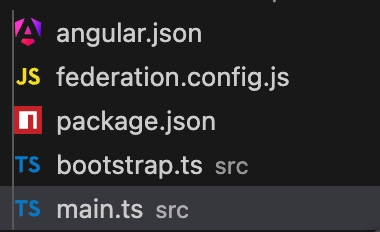
(Changes above are auto-generated, so I won’t go into detail for each file, but you can check my remote app repo)
And another one to the host app:
ng g @angular-architects/native-federation:init --project your-remote-app-name --port 4200 --type dynamic-hostThe list of files that were changed for the host app:

(Changes above are auto-generated, so I won’t go into detail for each file, but you can check my host app repo)
In the host federation.manifest.json:
{
 "your-remote-app-name": "http://localhost:4201/remoteEntry.json"
}
You also need to add a route to load the remote app in the host:
{
    path: 'remote',
    loadChildren: () => loadRemoteModule('your-remote-app-name', './routes').then(m => m.routes)
},
In the federation.config of the remote app, you need to expose the routes:
exposes: {
  './routes': './src/app/app.routes.ts',
},
Altogether it should init Native Federation runtime, use shared modules, skip unnecessary modules, and use builder from native-federation and, finally, load the remote app inside of the host.
Sweet! 🍭
Second, let’s get some data from an API request
I used JSONPlaceholder, a free online REST API — you can use any alternative. I set up a small service with one GET request and cached the data in localStorage to avoid re-fetching during development.
const STORAGE_KEY = 'todos_cache';

@Injectable({
  providedIn: 'root',
})
export class DataService {
  private readonly http = inject(HttpClient);
  private readonly apiUrl = 'https://jsonplaceholder.typicode.com/todos';

  getTodos(): Observable<Todo[]> {
    const cached = localStorage.getItem(STORAGE_KEY);
    if (cached) {
      return of(JSON.parse(cached) as Todo[]);
    }
    return this.fetchAndCache();
  }

  refreshTodos(): Observable<Todo[]> {
    return this.fetchAndCache();
  }

  private fetchAndCache(): Observable<Todo[]> {
    return this.http.get<Todo[]>(this.apiUrl)
     .pipe(
       tap((data) => localStorage.setItem(STORAGE_KEY, JSON.stringify(data)
       ))
     );
  }
}
Simply showing this data on the page:
<ul>
  @for (todo of todos$ | async; track todo.id) {
    <li>
      <strong>#{{ todo.id }}</strong> — {{ todo.title }}
      (User: {{ todo.userId }} | Completed: {{ todo.completed }})
    </li>
  }
</ul>
Then, to add mock data to the app, I’ve added a flag to the localStorage to understand which mode my app is currently in And, basically, you’d need an if-else block inside each function to retrieve mock data from a local JSON file or make an HTTP call. But we want to make an HTTP-like call for mock data as well!
Making a simple change:

return this.http.get<Todo[]>(this.isMockMode() ? MOCK_API_URL : REAL_API_URL)And with this change, in mock mode, we will receive a 404, as expected.

Let’s return to the original question ↙️
Why did it happen❓
This is because you’re trying to get mock data from the host’s origin, while the file currently lives in the remote app’s origin.
If the host app has this file located at the same URL (/mocks/todos.json) - we will receive a 200 response code with the required data.
However, we can have multiple remotes, and each remote for the same request can want its own unique data. And that’s where the MSW library would help us. 💁
What Does the MSW Library Do?
It registers a Service Worker that listens to the application’s outgoing requests via the **fetch** event, directs those requests to the client-side library, and sends a mocked response, if any, back to the worker.
Request flow diagram of Mock Service Worker:

So let’s make some changes in the host app! 🏃♂️💨
- ) Install MSW as a development dependency:
npm install msw --save-devRight now, for me, it installed 2.12.10; it can be different for you.
- ) Generate the
mockServiceWorker.jsfile in your application's public asset directory (/public in my scenario) with the command below:
npx msw init public/⚠️ *Why
/public?* Angular serves static assets from the/publicdirectory at the root URL. ThemockServiceWorker.jsfile must be accessible at[http://localhost:4200/mockServiceWorker.js](http://localhost:4200/mockServiceWorker.js%60) — the same origin as your host app. If placed anywhere else, the browser won’t be able to register the service worker, and MSW will fail to start.
Generating this file will also add this piece to the root package.json:
"msw": {
  "workerDirectory": [
    "public"
  ]
}
Also make sure that the newly mockServiceWorker.js is included in the build (in project/angular.json) (should be in assets array) like this:
"assets": [
  {
   "glob": "mockServiceWorker.js",
   "input": "path/to/public/folder",
   "output": "/"
  }
 ],
3.) Need to start MSW
We are implementing a function that will start the service worker if our app is currently in the mock mode.
import { setupWorker, SetupWorker } from 'msw/browser';
import { MOCK_MODE_KEY } from './core/mock-mode.util';

export const worker: SetupWorker = setupWorker();

export async function startMSWIfMockMode(): Promise<void> {
  if (localStorage.getItem(MOCK_MODE_KEY) !== 'true') {
    return;
  }
  await worker.start({
    // Don't hard fail if a request doesn't have a corresponding request handler.
    onUnhandledRequest: 'bypass',
    serviceWorker: {
        url: '/mockServiceWorker.js',
    }
  });
}
You need to call this function before bootstrap of the application in main.ts:
import { initFederation } from '@angular-architects/native-federation';
import { startMSWIfMockMode } from './app/msw-setup';

initFederation('federation.manifest.json')
  .catch(err => console.error(err))
  .then(() => startMSWIfMockMode()) // <----
  .catch((err) => console.error('Failed to start MSW', err)) // <----
  .then(_ => import('./bootstrap'))
  .catch(err => console.error(err));

}
Now in browser console we should see something like this:

Great! Now we need to create request handlers inside of the remote app and register these handlers in the host app, and we are all set!
4.) So let’s add request handlers:
import { http, HttpResponse, HttpHandler } from 'msw';
import mockData from './mocks/todos.json';

const REAL_API_URL = 'https://jsonplaceholder.typicode.com/todos'; // use your API

export function registerMockHandlers(): HttpHandler[] {
    return [
        http.get(REAL_API_URL, async () => {
            return HttpResponse.json(mockData);
        })
    ];
}
Don’t forget that you need to have "resolveJsonModule": true in the tsconfig.json of the remote app when you have this kind of JSON import.
In the service, you’ll no longer need this (use the real API URL only):
private get apiUrl(): string {
  return this.isMockMode() ? MOCK_API_URL : REAL_API_URL;
}
Aaaaand you need to expose mock handlers in federation.config.js
exposes: {
  './routes': './src/app/app.routes.ts',
  './mockHandlers': './src/app/mock.handlers.ts', // <----- add this
},
A quick note about the exposes property:
Here, a developer can add a list of publicly available modules for consumption by other applications (hosts) at runtime. These can be a button, a service, or routes and mock handlers, as in our example — essentially anything the remote app needs to share with the host.
Great! Now our host app can register these handlers.
5.) Registering handlers in the host To the file with the startMSWIfMockMode function add the function below:
const registeredRemotes = new Set<string>();

export async function registerRemoteMockHandlers(remoteName: string): Promise<void> {
    if (registeredRemotes.has(remoteName)) return; // idempotent guard
    registeredRemotes.add(remoteName);
    try {
        const module = await import(`${remoteName}/mockHandlers`);
        const handlers: RequestHandler[] = module?.registerMockHandlers();
        if (handlers?.length) {
            worker.use(...handlers);
            console.log(`Registering ${handlers.length} mock handlers for remote: ${remoteName}`);
        }
    } catch (err) {
        console.error(`Failed to register mock handlers for remote: ${remoteName}`, err);
    }
}
And you can call it when you’re loading the remote route:
export const routes: Routes = [
    {
        path: 'remote',
        loadChildren: () => loadRemoteModule(REMOTE_NAME, './routes').then(async (m) => {
            await registerRemoteMockHandlers(REMOTE_NAME); /// <----
            return m.routes;
        })
    },
]
You can also unregister them using guards if you need to do so when leaving the remote URL, for example.
And that’s it! Open the browser and check mock data!


Links to GitHub repos:
remote — https://github.com/pishchela/mocking-data-in-microfrontend-remote
host — https://github.com/pishchela/mocking-data-in-microfrontend-host
It was my first post, so big THANKS for spending your time reading the post.
The majority of the code is AI-generated, so don’t judge the code style much — it might need some polish 🤝
Hope it helps you, and good luck with your journey!
Peace ☮️✌️
메타데이터
- post_id
- 0f6ab4d4bed5
- slug
- mocking-data-in-remote-microfrontend-apps-with-angular-using-mock-service-worker-0f6ab4d4bed5
- url
- https://medium.com/@pishchela/mocking-data-in-remote-microfrontend-apps-with-angular-using-mock-service-worker-0f6ab4d4bed5
- canonical_url
- https://medium.com/@pishchela/mocking-data-in-remote-microfrontend-apps-with-angular-using-mock-service-worker-0f6ab4d4bed5
- author_url
- https://medium.com/@pishchela
- status
- ok
- fetched_at
- 2026-07-28 02:32:30




