Konfigurasi VTP di Cisco Packet Tracer
VTP (VLAN Trunking Protocol) adalah protokol yang digunakan dalam jaringan Cisco untuk mengelola dan menyebarkan informasi VLAN (Virtual…
Konfigurasi VTP di Cisco Packet Tracer
VTP (VLAN Trunking Protocol) adalah protokol yang digunakan dalam jaringan Cisco untuk mengelola dan menyebarkan informasi VLAN (Virtual Local Area Network) di seluruh switch yang berada dalam satu domain VTP. Tujuannya adalah untuk menyederhanakan manajemen VLAN, terutama pada jaringan yang memiliki banyak switch.
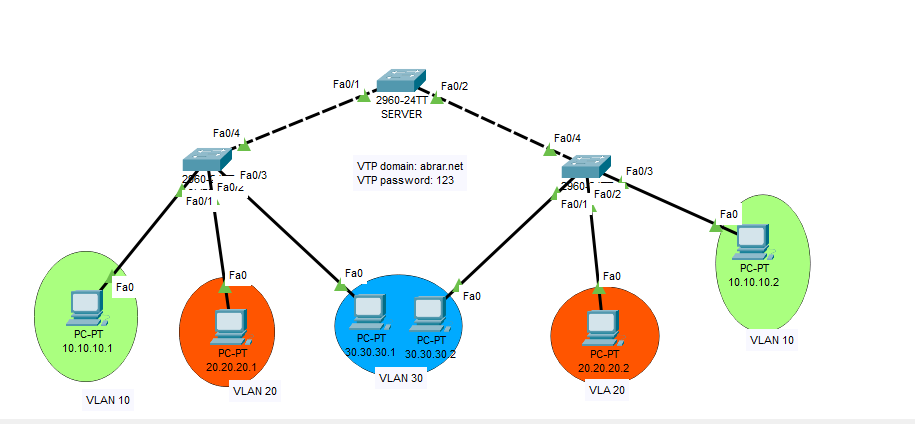
Gambar Topologi VTP
Konfigurasi Switch Server
switch>en
Switch#conf t
Switch(config)#hostname server
server(config)#vtp domain abrar.net
Changing VTP domain name from NULL to abrar.net
server(config)#vtp pass 123
Setting device VLAN database password to 123
server(config)#vtp mode server
Device mode already VTP SERVER.
server(config)#
server(config)#vlan 10
server(config-vlan)#name accunting
server(config-vlan)#name lab1
server(config-vlan)#ex
server(config)#vlan 20
server(config-vlan)#name lab2
server(config-vlan)#ex
server(config)#vlan 30
server(config-vlan)#name lab3
server(config-vlan)#ex
server(config)#int range fa0/1–2
server(config-if-range)#sw mode tr
server(config-if-range)#sw tr all vlan 1,10,20,30
server(config-if-range)#ex
server(config)#
Cek Status VTP dan VLAN di Switch Server
server(config)#do sh vtp stat
VTP Version : 2
Configuration Revision : 7
Maximum VLANs supported locally : 255
Number of existing VLANs : 8
VTP Operating Mode : Server
VTP Domain Name : abrar.net
VTP Pruning Mode : Disabled
VTP V2 Mode : Disabled
VTP Traps Generation : Disabled
MD5 digest : 0x98 0x4B 0x5F 0x91 0x7C 0x32 0x52 0x2E
Configuration last modified by 0.0.0.0 at 3–1–93 00:03:17
Local updater ID is 0.0.0.0 (no valid interface found)
server(config)#
server#
server(config)#do sh vl br
VLAN Name Status Ports
 - - - - - - - - - - - - - - - - - - - - - - - - - - - - - - - - - - - - - - -
1 default active Fa0/3, Fa0/4, Fa0/5, Fa0/6
Fa0/7, Fa0/8, Fa0/9, Fa0/10
Fa0/11, Fa0/12, Fa0/13, Fa0/14
Fa0/15, Fa0/16, Fa0/17, Fa0/18
Fa0/19, Fa0/20, Fa0/21, Fa0/22
Fa0/23, Fa0/24, Gig0/1, Gig0/2
10 lab1 active
20 lab2 active
30 lab3 active
1002 fddi-default active
1003 token-ring-default active
1004 fddinet-default active
1005 trnet-default active
server(config)#
Konfigurasi di Switch Client1
switch>en
Switch#conf t
Switch(config)#int fa 0/4
Switch(config-if)#sw mode tr
Switch(config-if)#sw tr all vlan 1,10,20,30
Switch(config-if)#ex
Switch(config)#int fa 0/1
Switch(config-if)#sw acc vlan 10
Switch(config-if)#ex
Switch(config)#int fa 0/2
Switch(config-if)#sw acc vlan 20
Switch(config-if)#ex
Switch(config)#int fa 0/3
Switch(config-if)#sw acc vlan 30
Switch(config-if)#ex
Switch(config)#vtp domain abrar.net
Changing VTP domain name from NULL to abrar.net
Switch(config)#vtp pass 123
Setting device VLAN database password to 123
Switch(config)#vtp mode client
Setting device to VTP CLIENT mode.
Cek Status VLAN dan VTP di Switch Client1
Switch(config)#do sh vl br
VLAN Name Status Ports
 - - - - - - - - - - - - - - - - - - - - - - - - - - - - - - - - - - - - - - -
1 default active Fa0/5, Fa0/6, Fa0/7, Fa0/8
Fa0/9, Fa0/10, Fa0/11, Fa0/12
Fa0/13, Fa0/14, Fa0/15, Fa0/16
Fa0/17, Fa0/18, Fa0/19, Fa0/20
Fa0/21, Fa0/22, Fa0/23, Fa0/24
Gig0/1, Gig0/2
10 lab1 active Fa0/1
20 lab2 active Fa0/2
30 lab3 active Fa0/3
1002 fddi-default active
1003 token-ring-default active
1004 fddinet-default active
1005 trnet-default active
Switch(config)#do sh vtp stat
VTP Version : 2
Configuration Revision : 7
Maximum VLANs supported locally : 255
Number of existing VLANs : 8
VTP Operating Mode : Client
VTP Domain Name : abrar.net
VTP Pruning Mode : Disabled
VTP V2 Mode : Disabled
VTP Traps Generation : Disabled
MD5 digest : 0x98 0x4B 0x5F 0x91 0x7C 0x32 0x52 0x2E
Configuration last modified by 0.0.0.0 at 3–1–93 00:03:17
Switch(config)#
Konfigurasi di Switch Client2
Switch>en
Switch#conf t
Switch(config)#int fa 0/4
Switch(config-if)#sw mode tr
Switch(config-if)#sw tr all vlan 1,10,20,30
Switch(config-if)#ex
Switch(config)#int fa 0/1
Switch(config-if)#sw acc vlan 30
Switch(config-if)#ex
Switch(config)#int fa 0/2
Switch(config-if)#sw acc vlan 20
Switch(config-if)#ex
Switch(config)#int fa 0/1
Switch(config-if)#ex
Switch(config)#int fa 0/3
Switch(config-if)#sw acc vlan 10
Switch(config-if)#ex
Switch(config)#vtp domain abrar.net
Domain name already set to abrar.net.
Switch(config)#vtp pass 123
Setting device VLAN database password to 123
Switch(config)#vtp mode client
Setting device to VTP CLIENT mode.
Cek Status VTP dan VLAN di Switch Client2
Switch(config)#do sh vtp stat
VTP Version : 2
Configuration Revision : 7
Maximum VLANs supported locally : 255
Number of existing VLANs : 8
VTP Operating Mode : Client
VTP Domain Name : abrar.net
VTP Pruning Mode : Disabled
VTP V2 Mode : Disabled
VTP Traps Generation : Disabled
MD5 digest : 0x98 0x4B 0x5F 0x91 0x7C 0x32 0x52 0x2E
Configuration last modified by 0.0.0.0 at 3–1–93 00:03:17
Switch(config)#do sh vl br
VLAN Name Status Ports
 - - - - - - - - - - - - - - - - - - - - - - - - - - - - - - - - - - - - - - -
1 default active Fa0/5, Fa0/6, Fa0/7, Fa0/8
Fa0/9, Fa0/10, Fa0/11, Fa0/12
Fa0/13, Fa0/14, Fa0/15, Fa0/16
Fa0/17, Fa0/18, Fa0/19, Fa0/20
Fa0/21, Fa0/22, Fa0/23, Fa0/24
Gig0/1, Gig0/2
10 lab1 active Fa0/3
20 lab2 active Fa0/2
30 lab3 active Fa0/1
1002 fddi-default active
1003 token-ring-default active
1004 fddinet-default active
1005 trnet-default active
Switch(config)#
Hasil Uji Coba
Lakukan tes ping pada PC dengan VLAN yang sama jika Successful maka berhasil. pada VLAN yang berbeda tidak bisa
메타데이터
- post_id
- 0f9991444cbc
- slug
- konfigurasi-vtp-di-cisco-packet-tracer-0f9991444cbc
- url
- https://medium.com/@abrartkj/konfigurasi-vtp-di-cisco-packet-tracer-0f9991444cbc
- canonical_url
- https://medium.com/@abrartkj/konfigurasi-vtp-di-cisco-packet-tracer-0f9991444cbc
- author_url
- https://medium.com/@abrartkj
- status
- ok
- fetched_at
- 2026-06-25 16:53:31