Unlock Peak Laptop Performance: A Deep Dive into the XUM 32GB DDR4 3200MHz SODIMM RAM Kit
Discover how a 32GB DDR4 3200MHz memory upgrade can revolutionize your laptop’s speed, efficiency, and multitasking capabilities.
Unlock Peak Laptop Performance: A Deep Dive into the XUM 32GB DDR4 3200MHz SODIMM RAM Kit
Discover how a 32GB DDR4 3200MHz memory upgrade can revolutionize your laptop’s speed, efficiency, and multitasking capabilities.
Key Insights into This High-Performance Laptop RAM
- Enhanced Multitasking & Responsiveness: The 32GB (2 x 16GB) configuration at 3200MHz significantly boosts a laptop’s ability to handle multiple applications simultaneously, run demanding software, and provide overall smoother system responsiveness.
- Standard JEDEC Compliance: Operating at a JEDEC standard of 3200MHz CL22 with 1.2V, this memory kit is designed for seamless plug-and-play compatibility with most modern DDR4-compatible laptops, eliminating the need for complex BIOS configurations.
- Optimized for Laptop Environments: Its SODIMM form factor, low 1.2V power consumption, and non-ECC unbuffered design are specifically tailored for the compact and energy-efficient requirements of laptops, ensuring stable performance without excessive heat or power drain.
Understanding the XUM 32GB DDR4 3200MHz SODIMM Laptop Memory Kit
The product you’ve identified, the XUM 32GB (2 x 16GB) DDR4 3200MHz SODIMM Non-ECC Unbuffered Laptop Memory RAM (PC4–25600), is a high-capacity, high-speed memory solution designed to significantly enhance the performance of compatible laptops. This kit provides a total of 32GB of RAM, split into two 16GB modules, a configuration that is ideal for leveraging dual-channel memory architecture in systems that support it. This dual-channel setup effectively doubles the memory bandwidth, leading to a substantial boost in data transfer rates and overall system responsiveness.
This DDR4 (Double Data Rate 4) SDRAM module represents the current standard for modern laptops, offering an optimal balance between speed and power efficiency. The SODIMM (Small Outline Dual In-Line Memory Module) form factor is specifically engineered to fit the smaller dimensions of laptop motherboards, distinguishing it from the larger DIMM modules used in desktop PCs.
Detailed Specifications of the XUM Memory Kit
The specifications of this RAM kit highlight its suitability for performance-oriented laptop users:
- Capacity: 32GB (configured as 2 x 16GB modules).
- Memory Type: DDR4 SDRAM, providing improved bandwidth and efficiency over previous generations.
- Form Factor: SODIMM, 260-pin, ensuring compatibility with laptop memory slots.
- Speed: 3200MHz (also known as PC4–25600), indicating a data transfer rate of 25600 MB/s. This speed is a key factor in faster application loading and smoother multitasking.
- CAS Latency (CL): CL22. This refers to the number of clock cycles it takes for the RAM to respond to a request for data. CL22 is a standard latency for 3200MHz DDR4 modules.
- Voltage: 1.2V. This low voltage operation contributes to reduced power consumption, which is crucial for extending laptop battery life and minimizing heat generation.
- Data Integrity: Non-ECC (Error-Correcting Code) Unbuffered. This type of memory is typical for consumer-grade laptops, prioritizing performance and cost-efficiency over the error correction capabilities found in server-grade ECC memory.
- Rank: Often dual-rank (2R), which can offer performance benefits on some motherboards by allowing more concurrent operations.
Visualizing Key Memory Attributes
To better understand the attributes and capabilities of this memory kit, here’s a radar chart comparing various aspects that contribute to its overall performance profile:
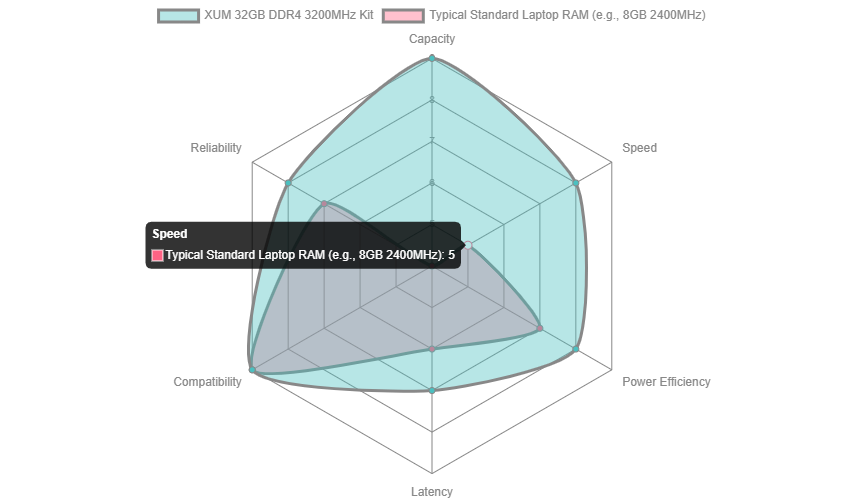
This chart illustrates how the XUM 32GB DDR4 3200MHz kit excels in crucial areas like capacity and speed, offering a significant upgrade over typical standard laptop RAM. While latency is standard for its speed, its strong compatibility and reliability make it a robust choice for enhancing laptop performance.
Compatibility and Performance Benefits
One of the strongest advantages of this XUM memory kit is its broad compatibility. It is designed for DDR4-compatible motherboards and a wide range of laptops from major manufacturers, including Dell Inspiron, HP Pavilion, Lenovo ThinkPad, ASUS ZenBook, and Acer Aspire series. It supports both Intel and AMD processors, making it a versatile upgrade for many modern laptops.
The 3200MHz speed (PC4–25600) ensures rapid data access, which translates directly into improved system responsiveness. This is particularly beneficial for:
- Gaming: Reduced load times and smoother gameplay, especially in memory-intensive titles.
- Content Creation: Faster rendering, editing, and processing in applications like video editing suites, graphic design software, and 3D modeling tools.
- Multitasking: Seamless switching between numerous open applications and browser tabs without slowdowns.
- Professional Applications: Enhanced performance for virtual machines, CAD software, and complex data analysis programs.
The 1.2V operating voltage ensures that this performance boost doesn’t come at the expense of battery life or increased heat, making it an energy-efficient choice for laptops.
It’s important to note that this memory adheres to JEDEC (Joint Electron Device Engineering Council) standards, meaning most laptops will automatically recognize and utilize its full speed without requiring advanced BIOS configurations like XMP (Extreme Memory Profile), which is more common in desktop systems.
A Glimpse into DDR4 Technology
DDR4 memory offers several advancements over its predecessors, DDR3. These include higher module density, lower voltage requirements (1.2V vs. 1.5V for DDR3), and higher transfer rates. These improvements contribute to overall system efficiency and performance, making DDR4 a cornerstone of modern computing.

Installation and Pre-Upgrade Checks
Upgrading your laptop’s RAM is a relatively straightforward process, but it requires careful attention to detail to avoid damage. The product page provides a comprehensive guide, and general steps include:
- Power Down and Disconnect: Completely shut down your laptop, unplug it from the power source, and remove the battery if possible.
- Discharge Residual Power: Hold the power button for a few seconds to discharge any remaining power.
- Access Laptop Casing: Carefully open your laptop’s casing. This process varies significantly by model, so consulting your laptop’s manual or an online guide specific to your model is highly recommended.
- Ground Yourself: Before touching any internal components, ground yourself to prevent electrostatic discharge (ESD) by touching a metal object or wearing an anti-static wrist strap.
- Locate RAM Slots: Identify the RAM slots, which are typically found under a removable back panel or sometimes beneath the keyboard.
- Remove Old RAM (if applicable): If you’re replacing existing RAM, gently push the side clips outward to release the module, then carefully pull it out.
- Insert New RAM: Align the notch on the new SODIMM module with the key in the slot. Insert the module at a 45-degree angle, then press it down firmly until the side clips click into place, securing the module.
- Reassemble and Verify: Reassemble your laptop, power it on, and verify that the new RAM is recognized in your system’s BIOS or operating system settings.
Before purchasing, it is crucial to perform pre-upgrade checks to ensure compatibility and maximum utilization of the new RAM. This involves:
- Checking Current RAM: Use tools like Windows System Information (
msinfo32), Command Prompt (wmic memorychip get Capacity), or Task Manager (Performance tab -> Memory) to determine your current RAM type, speed, capacity, and the number of occupied slots. - Verifying Laptop’s Maximum RAM Capacity: Consult your laptop manufacturer’s specifications or motherboard documentation to confirm the maximum RAM capacity your system supports and the number of available SODIMM slots.
- Confirming 64-bit OS: To fully utilize 32GB or more RAM, your operating system must be 64-bit. A 32-bit OS typically supports a maximum of about 4GB of RAM.
Visualizing the Laptop Memory Upgrade Process
The process of upgrading RAM in a laptop typically involves several key steps, from preparing the device to physically installing the modules. This mindmap outlines the essential stages and considerations:

This mindmap serves as a comprehensive guide, breaking down the RAM upgrade process into manageable steps, from initial compatibility checks to the final verification, ensuring a smooth and successful upgrade.
Comparing Similar Memory Solutions
While the XUM 32GB DDR4 3200MHz SODIMM kit is a strong contender, the market offers several similar products from reputable brands. These alternatives often share the same core specifications (3200MHz speed, 1.2V operating voltage, non-ECC unbuffered design, and CL22 latency) as they all adhere to JEDEC standards for DDR4 SODIMM. Here’s a brief comparison:

This table highlights that while brand-specific features like “high-performance” branding or specific downclocking capabilities might differ, the core technical specifications for 3200MHz CL22 DDR4 SODIMM memory are largely consistent across manufacturers due to adherence to industry standards.
Visual Guide: Upgrading Laptop RAM
For those who prefer a visual walkthrough, embedding a relevant YouTube video can be incredibly helpful. The following video provides a practical demonstration of how to upgrade RAM in most laptops, featuring a similar SODIMM kit. This visual guide can demystify the process and build confidence for users considering an upgrade.
[embed]
This video focuses on a Lexar 32GB 2666 MHz DDR4 kit, demonstrating the general steps involved in opening a laptop, locating the RAM slots, and installing new modules. While the speed of the RAM shown is slightly different (2666MHz vs. 3200MHz), the physical installation process for SODIMM modules remains largely identical. It’s a great resource for understanding the practical aspects of a RAM upgrade, including precautions and common practices.
Frequently Asked Questions (FAQ)
What is SODIMM RAM?
SODIMM stands for Small Outline Dual In-line Memory Module. It is a smaller, more compact version of DIMM (used in desktops) specifically designed for space-constrained devices like laptops, small form-factor PCs, and some all-in-one computers.
What does “Non-ECC Unbuffered” mean for laptop RAM?
“Non-ECC” means the memory does not have Error-Correcting Code, which is a feature primarily found in server memory to detect and correct data errors. “Unbuffered” means there is no register between the RAM module and the memory controller, leading to faster access times. These are standard characteristics for consumer laptop RAM, balancing performance with cost-efficiency.
Is 3200MHz RAM compatible with all laptops?
While 3200MHz is a common speed for modern DDR4 laptops, compatibility depends on your laptop’s motherboard and CPU chipset. Most laptops from the past few years that support DDR4 will likely support 3200MHz, often defaulting to it via JEDEC standards. However, it’s always best to check your laptop’s specific model specifications for maximum supported RAM speed and type before upgrading.
Can I mix and match different RAM speeds or brands?
While physically possible, mixing different RAM speeds or brands is generally not recommended. For optimal performance, especially to enable dual-channel mode, it’s best to use matching RAM sticks (same capacity, speed, and ideally, brand and model). If different speeds are used, the faster module will downclock to match the speed of the slower module.
How does CAS Latency (CL) affect performance?
CAS Latency (CL) is a measure of the delay between the memory controller requesting data and the data being available from the RAM module. A lower CL number generally indicates faster responsiveness. For 3200MHz DDR4 SODIMM, CL22 is a standard and well-balanced latency, and its impact on overall performance is often less significant than factors like total capacity and speed.
Conclusion
The XUM 32GB (2 x 16GB) DDR4 3200MHz SODIMM Laptop Memory RAM kit offers an excellent upgrade path for laptop users looking to significantly boost their system’s performance. Its high capacity, combined with a fast 3200MHz speed and energy-efficient 1.2V operation, makes it ideal for handling demanding applications, heavy multitasking, and immersive gaming experiences. Adhering to JEDEC standards ensures broad compatibility and straightforward installation for most modern DDR4-enabled laptops. By understanding its specifications, compatibility, and the proper installation procedures, users can confidently leverage this memory kit to unlock the full potential of their portable computing devices.
메타데이터
- post_id
- 0fbb6f941f3f
- slug
- unlock-peak-laptop-performance-a-deep-dive-into-the-xum-32gb-ddr4-3200mhz-sodimm-ram-kit-0fbb6f941f3f
- url
- https://medium.com/@drmemga/unlock-peak-laptop-performance-a-deep-dive-into-the-xum-32gb-ddr4-3200mhz-sodimm-ram-kit-0fbb6f941f3f
- canonical_url
- https://medium.com/@drmemga/unlock-peak-laptop-performance-a-deep-dive-into-the-xum-32gb-ddr4-3200mhz-sodimm-ram-kit-0fbb6f941f3f
- author_url
- https://medium.com/@drmemga
- status
- ok
- fetched_at
- 2026-06-17 14:34:23

