Why Pods Get Stuck in Pending or CrashLoopBackOff in EKS (AWS-Specific Deep Dive)
If you’ve worked with Kubernetes, you’ve probably seen these two states more times than you’d like:
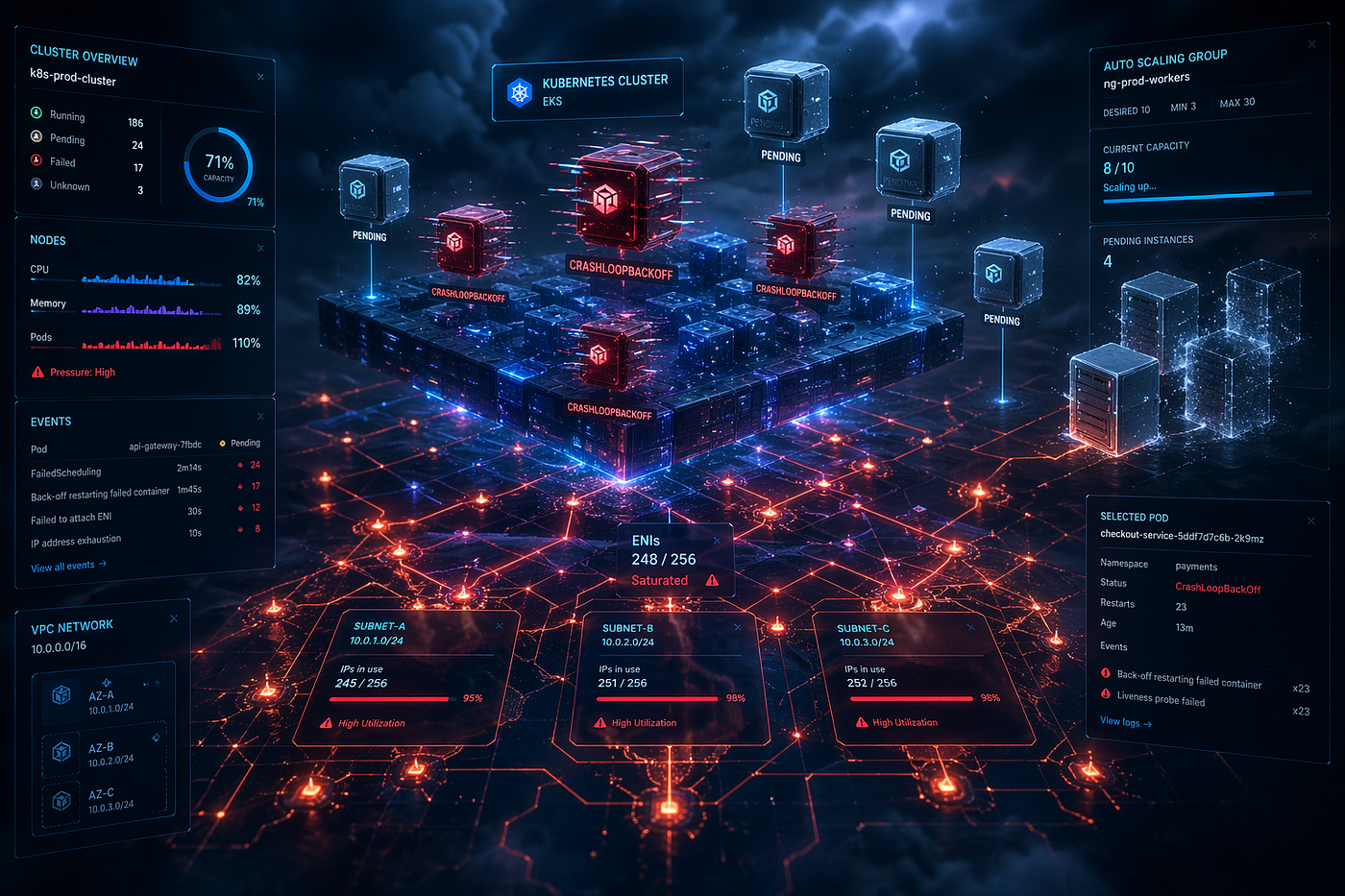
When Kubernetes meets AWS limits: pods don’t just fail — they get stuck between layers.
Why Pods Get Stuck in Pending or CrashLoopBackOff in EKS (AWS-Specific Deep Dive)
If you’ve worked with Kubernetes, you’ve probably seen these two states more times than you’d like:
PendingCrashLoopBackOff
In vanilla Kubernetes, the causes are often predictable. But in Amazon EKS, AWS infrastructure adds another layer of complexity.
That means some failures aren’t just “Kubernetes problems” — they’re AWS-integrated problems.
Let’s go beyond the usual explanations and focus on AWS-specific reasons why pods get stuck — and how to actually debug them.
First: What These States Really Mean
Before diving into AWS-specific causes:
Pending
Kubernetes wants to run your pod — but can’t find a suitable node or resources.
CrashLoopBackOff
Your pod starts — but crashes repeatedly and Kubernetes keeps retrying.
Now let’s look at how AWS changes the story.
Part 1: Why Pods Get Stuck in Pending (EKS-Specific Causes)
1. IP Address Exhaustion (Most Common in EKS)
Unlike many Kubernetes setups:
Pods in EKS get real IPs from your Amazon VPC.
This means:
- Your subnet has a finite number of IPs
- Each pod consumes one IP
- Nodes consume IPs too
Real Example
A team scales from 50 → 300 pods.
Symptoms:
- Pods stuck in
Pending - No CPU/memory issues
Root cause:
- Subnet ran out of IP addresses
How to Verify
kubectl describe pod <pod-name>Look for:
failed to assign an IP addressFix
- Use larger CIDR blocks
- Add more subnets
- Enable prefix delegation
- Optimize pod density per node
2. ENI Limits on EC2 Instances
Each node (EC2 instance) has limits on:
- Number of ENIs
- Number of IPs per ENI
Even if your subnet has space:
Your node might not be able to attach more IPs.
Real Example
Using small instance types like t3.small:
- Limited ENIs
- Limited IP capacity
Result:
- Pods remain
Pendingdespite available cluster resources
Fix
- Use larger instance types
- Check AWS ENI limits per instance type
- Monitor IP utilization
3. Security Groups for Pods (Misconfiguration)
If you’re using advanced networking:
- Security Groups for Pods require ENI allocation
- Misconfigured rules can block pod creation
Symptom
- Pods stuck in
Pending - No obvious CPU/memory issues
Fix
- Verify security group rules
- Check ENI allocation logs
- Ensure proper IAM permissions
4. Node Group Scaling Delays
EKS relies on:
- Cluster Autoscaler
- EC2 Auto Scaling Groups
But EC2 instances take time to launch.
Real Example
Traffic spike → HPA creates more pods → pods go Pending
Why?
- Nodes are still launching (takes ~1–2 minutes)
Fix
- Maintain buffer capacity
- Use faster instance types
- Tune autoscaler settings
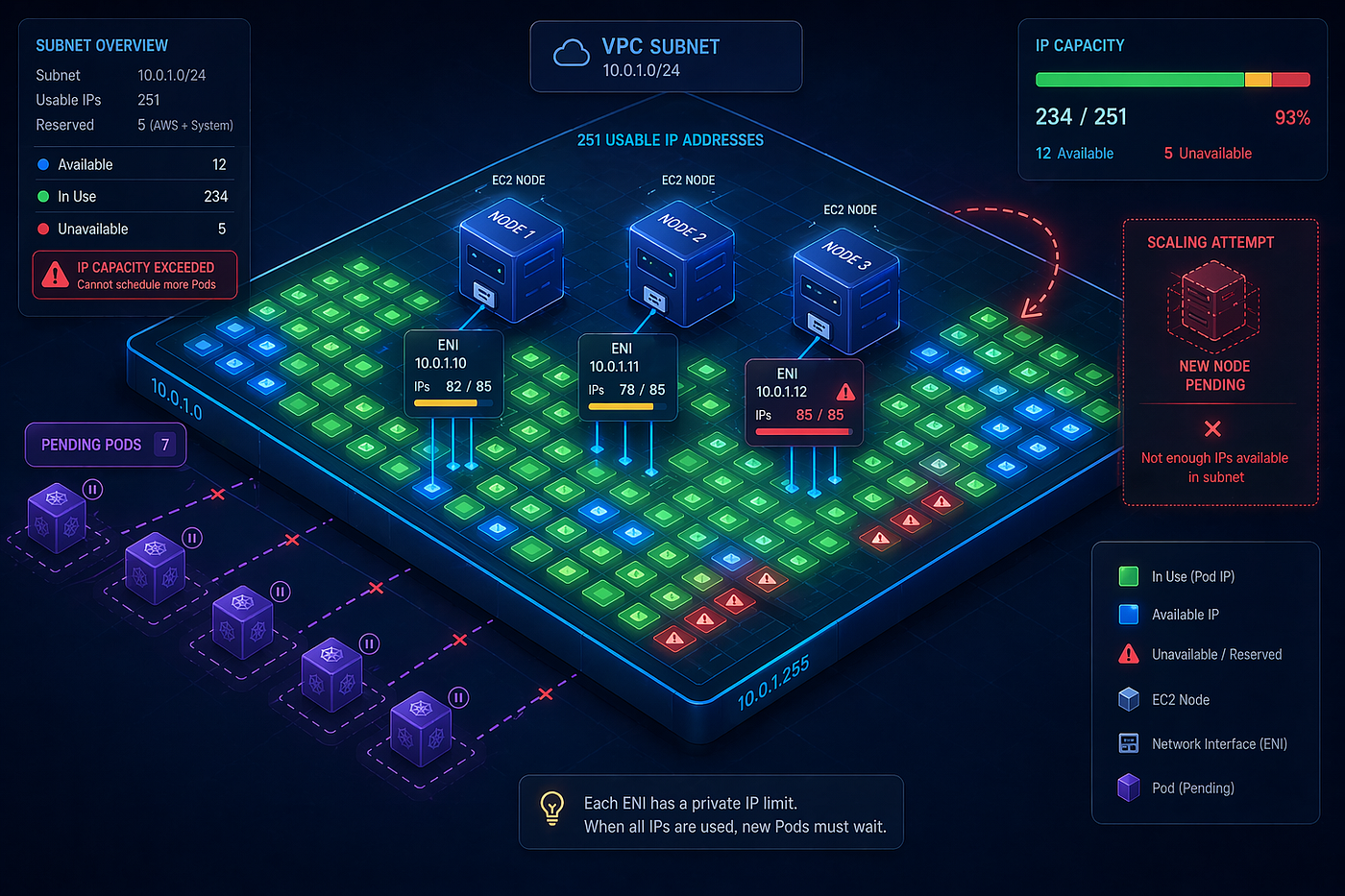
In Amazon EKS, scaling isn’t just about compute — IP space can quietly bring everything to a halt.
Part 2: Why Pods Go into CrashLoopBackOff (EKS-Specific Causes)
1. IAM Permissions (IRSA Issues)
If your pod uses AWS services:
- S3
- DynamoDB
- Secrets Manager
It likely uses IAM Roles for Service Accounts (IRSA).
Problem
- Incorrect IAM role
- Missing permissions
- Wrong trust policy
Real Example
A pod tries to read from S3:
- Fails with access denied
- App crashes on startup
- Enters CrashLoopBackOff
Fix
- Verify IAM policy
- Check service account annotation
- Test permissions manually
2. Failure to Access AWS Services (Networking Issue)
Even if IAM is correct:
- Security groups
- Route tables
- NAT gateways
can block access.
Example
Pod tries to reach:
- RDS database in private subnet
But:
- Security group doesn’t allow inbound traffic
Result:
- Connection timeout
- Application crashes
Fix
- Verify security group rules
- Check VPC routing
- Ensure proper subnet placement
3. Missing Secrets or Config from AWS Services
Many apps fetch configuration from:
- AWS Secrets Manager
- Parameter Store
Problem
- Secret not found
- Incorrect ARN
- Region mismatch
Result
App fails during startup → CrashLoopBackOff
4. Image Pull Failures from Private Registries
EKS integrates with Amazon ECR.
If:
- Node IAM role lacks permissions
- Image tag doesn’t exist
Pods fail to start.
Symptom
kubectl describe podShows:
ImagePullBackOffFix
- Verify ECR permissions
- Check image tag
- Ensure nodes can access registry
A Simple Debugging Framework
When you see Pending or CrashLoopBackOff, follow this:
Step 1: Describe the Pod
kubectl describe pod <pod-name>This gives the first clue (almost always).
Step 2: Check Logs (for CrashLoopBackOff)
kubectl logs <pod-name> --previousStep 3: Check AWS Layer
- VPC (IP availability)
- EC2 (node capacity)
- IAM (permissions)
- Security groups (network access)
Step 4: Correlate Everything
Kubernetes tells you what failed. AWS tells you why it failed.
Key Takeaways
Pendingin EKS is often IP or ENI related, not CPUCrashLoopBackOffis often IAM or AWS service access related- AWS networking (VPC) plays a huge role in pod lifecycle
- Debugging requires looking beyond Kubernetes
Final Thoughts
EKS simplifies Kubernetes — but it also extends it into AWS infrastructure.
That means:
- More power
- Better integration
- But also more places where things can go wrong
Once you understand how Kubernetes and AWS interact, these issues become far less mysterious — and much easier to fix.
Have you faced a tricky Pending or CrashLoopBackOff issue in EKS that wasn’t obvious at first? What was the root cause? Let’s share and learn from real-world failures.
메타데이터
- post_id
- 0fbdb2fa9031
- slug
- why-pods-get-stuck-in-pending-or-crashloopbackoff-in-eks-aws-specific-deep-dive-0fbdb2fa9031
- url
- https://medium.com/@sharathkumarlokesh/why-pods-get-stuck-in-pending-or-crashloopbackoff-in-eks-aws-specific-deep-dive-0fbdb2fa9031
- canonical_url
- https://medium.com/@sharathkumarlokesh/why-pods-get-stuck-in-pending-or-crashloopbackoff-in-eks-aws-specific-deep-dive-0fbdb2fa9031
- author_url
- https://medium.com/@sharathkumarlokesh
- status
- ok
- fetched_at
- 2026-07-11 08:53:43