🔍 Why Some Cells Are Read-Only in FCC — and How Users Can Quickly Find the Root Cause.
One of the most common questions FCC users ask is:
🔍 Why Some Cells Are Read-Only in FCC — and How Users Can Quickly Find the Root Cause.
One of the most common questions FCC users ask is:
“Why am I unable to enter data in this cell?” “The form shows the value… but I cannot type anything. Why?”
This confusion appears frequently during month-end close, data-entry activities, and whenever new entities or accounts are introduced. The cell looks normal, but when the user tries to type, the value does not change — because FCC has marked the cell as read-only.
The good news is: FCC provides an in-built feature to show the exact reason why a cell is read-only
✔️ How to Identify Why a Cell Is Read-Only
In any FCC data entry form, follow these steps:
Navigate to the Data input form where cell’s are read only mode.
- Refresh the grid to load the reasons why cells are read-only by clicking Actions, and then Show Reasons for Read-Only Cells.
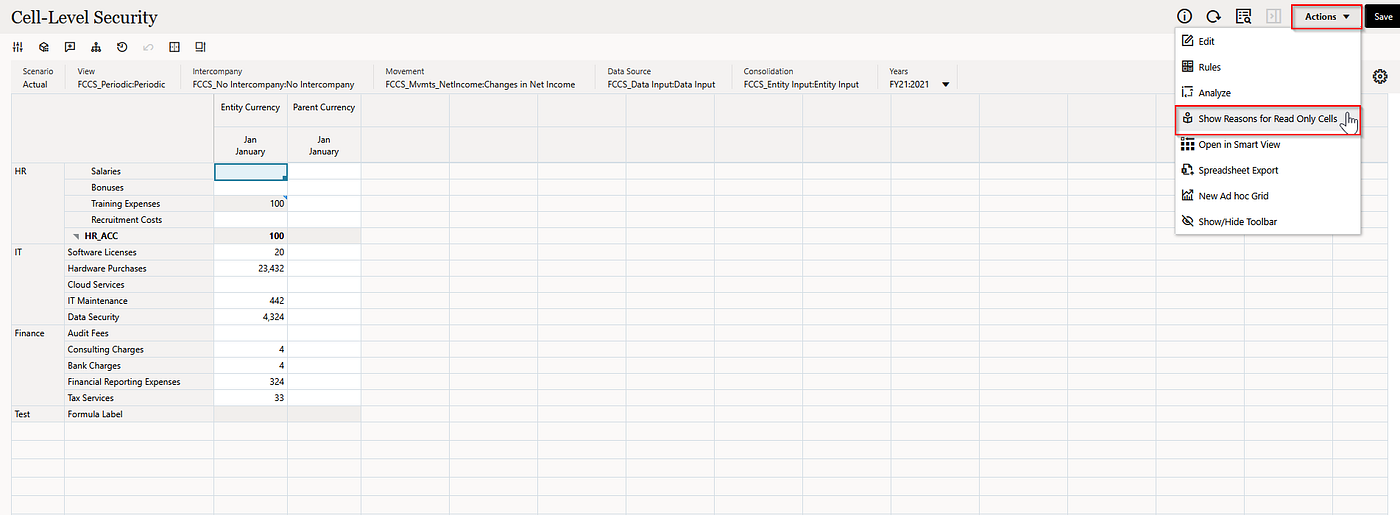
- Put the cursor in a read-only cell, right-click, and then select View Reasons for Read-Only Cell.

After clicking on the View Reasons for Read-Only Cell. A pop-up window will appear showing the exact reason. In these example : HR_Acc is parent member which as Dynamic calc as data storage property.

Example 1
Example 2: In these example user don’t have access for cells that’s why it showing as Security as reason.

Example 2
Example 3 : In these example that Test row is basically the formula row in the data form and period is locked from Approval. that’s it was showing 4 reasons in these case.

Example 3
📌 Common Reasons Cells Become Read-Only in FCC
Below is an FCC-specific explanation of what typically causes a cell to be Read only.

Reasons for Cells Read only
🧩 Why This Feature Is So Important for FCC Users
Most data-entry issues happen because users don’t know the root cause. All they see is: “The cell is not taking input.”
Using View Reasons for Read-Only Cell, users can immediately understand:
- Is it a security issue?
- Is it an invalid intersection?
- Is it coming from a calculation?
- Is the entire form read-only?
- Is it a parent/aggregate?
- Is it because the Approval Unit is locked?
This greatly reduces confusion, avoids unnecessary support tickets, and helps users feel more confident during data-entry activities.
🏁 Final Recommendation
Encourage FCC users to use this feature whenever they face data-entry issues.
➡️ Actions → Show Reasons for Read-Only Cells ➡️ Right-click → View Reasons for Read-Only Cell
Encourage users to check the root cause before raising a ticket or contacting the admin team. This simple step can save a significant amount of time during month-end close and daily operations.
Author: Anand Thota Category: Oracle EPM Cloud / FCC Topic: FCC Read-Only Cells Explained: Causes, Fixes, and Best Practices
메타데이터
- post_id
- 0fbfd07f0a0c
- slug
- why-some-cells-are-read-only-in-fcc-and-how-users-can-quickly-find-the-root-cause-0fbfd07f0a0c
- url
- https://medium.com/@anandjoy8/why-some-cells-are-read-only-in-fcc-and-how-users-can-quickly-find-the-root-cause-0fbfd07f0a0c
- canonical_url
- https://medium.com/@anandjoy8/why-some-cells-are-read-only-in-fcc-and-how-users-can-quickly-find-the-root-cause-0fbfd07f0a0c
- author_url
- https://medium.com/@anandjoy8
- status
- ok
- fetched_at
- 2026-07-18 12:15:57