🕍 Sefaria API Intro
🚀 What Is Sefaria?
🕍 Sefaria API Intro
🚀 What Is Sefaria?
Sefaria.org is a powerful digital library of Jewish texts — Tanakh, Talmud, Rambam, and countless commentaries — all structured and accessible via API.
Whether you’re building analytics tools, search engines, or AI applications, the Sefaria API gives you a clean way to work with this entire corpus programmatically.
In this guide, we’ll break down the core concepts and then walk through practical examples — from fetching verses to downloading entire books like the Chumash and Mishneh Torah.
🎥 YouTube Video
(YouTube video coming soon)
🧠 Big Picture: Sefaria Is a Graph
The best way to understand Sefaria is as a network of connected texts.
- Nodes → the texts themselves (Tanakh, Talmud, Rambam, commentaries, etc.)
- Links → the relationships between them (commentary, references, parallels)
You interact with this network using refs — human-readable addresses like "Genesis 1:1".
In API terms:
texts(ref)→ get the content (node)links(ref)→ get related texts (connections)
⚠️ Important: The level of data you get depends entirely on the ref.
"Genesis"→ entire book"Genesis 1"→ chapter"Genesis 1:1"→ verse
👉 The API doesn’t enforce a fixed unit — the ref controls both location and size of the data.
🧱 Nodes (Content)
Nodes are pieces of content at any level in the text hierarchy.
That includes:
- Books (e.g.
"Genesis") - Chapters (e.g.
"Genesis 1") - Verses (e.g.
"Genesis 1:1") - Commentaries (e.g.
"Rashi on Genesis 1:1")
👉 Everything is just a node — only the depth changes.
📦 Structure & Granularity
Sefaria texts are nested like this:
Book → Chapter → Verse
This directly determines the shape of the API response:
- Book → list of chapters → list of verses
- Chapter → list of verses
- Verse → single string
👉 Your ref controls how deep into this structure you go.
Think of it like a zoom level:
- Book → full dataset
- Chapter → ideal working unit
- Verse → atomic unit
This becomes especially important when building data pipelines or AI applications.
🔗 Links (How Nodes Connect)
Once you have a node, you can explore its connections.
Links represent relationships such as:
- Commentary → base text
- Source → quoted source
- Related passages
Examples:
- Tanakh ↔ Rashi
- Tanakh ↔ Talmud
- Rambam ↔ other sources
👉 This is what turns Sefaria into a graph of interconnected knowledge, not just a collection of texts.
🛠️ Practical Workflow
Let’s walk through the two core operations: fetching text and exploring connections.
1️⃣ Fetch a Text (Node)
- Change
refvariable for different texts
import requests

ref = "Genesis 1:1"
data = requests.get(
    f"https://www.sefaria.org/api/v3/texts/{ref}"
).json()
print(data["ref"])
Explore:
data.keys()
To get the text you do:
data['versions'][0]['text']Note: We get a default version by default, but you can specify a specific version such as follows:
Fetch Text for a Specific Version
- i.e. The Koren Jerusalem Bible
There are two possible forms for the string passed as the version:
- language
- language|versionTitle
import requests
from urllib.parse import quote

ref = "Genesis 1:1"
version_title = "The Koren Jerusalem Bible"

# 1. Update the URL to include /v3/
# 2. Update the version parameter format to 'english|Version Title'
url = f"https://www.sefaria.org/api/v3/texts/{quote(ref)}?version=english|{quote(version_title)}"

response = requests.get(url)
data = response.json()

# In v3, the response structure is different.
# 'versions' is a list; the filtered version will be at index 0.
if data.get('versions'):
    selected_version = data['versions'][0]
    print(f"Version: {selected_version.get('versionTitle')}")
    print(f"Text: {selected_version.get('text')}")
else:
    print("Version not found or reference invalid.")
Commentaries use the same system — no special handling — just change the ref variable
ref = "Rashi on Genesis 1:1"

data = requests.get(
    f"https://www.sefaria.org/api/v3/texts/{ref}"
).json()
👉 Commentaries are just nodes like everything else
💡 Practical Tip (for AI / Data Projects)
While you can fetch entire books, it’s usually better to work at the chapter level:
- Books → too large for embeddings / LLMs
- Chapters → ideal chunk size
- Verses → often too granular
A common pattern:
for i in range(1, 51):
    ref = f"Genesis {i}"
This gives you clean, structured chunks for downstream processing.
2️⃣ Fetch Connections (Links)
ref = "Genesis 1:1"

links = requests.get(
    f"https://www.sefaria.org/api/links/{ref}"
).json()
print(links[0])
Output:
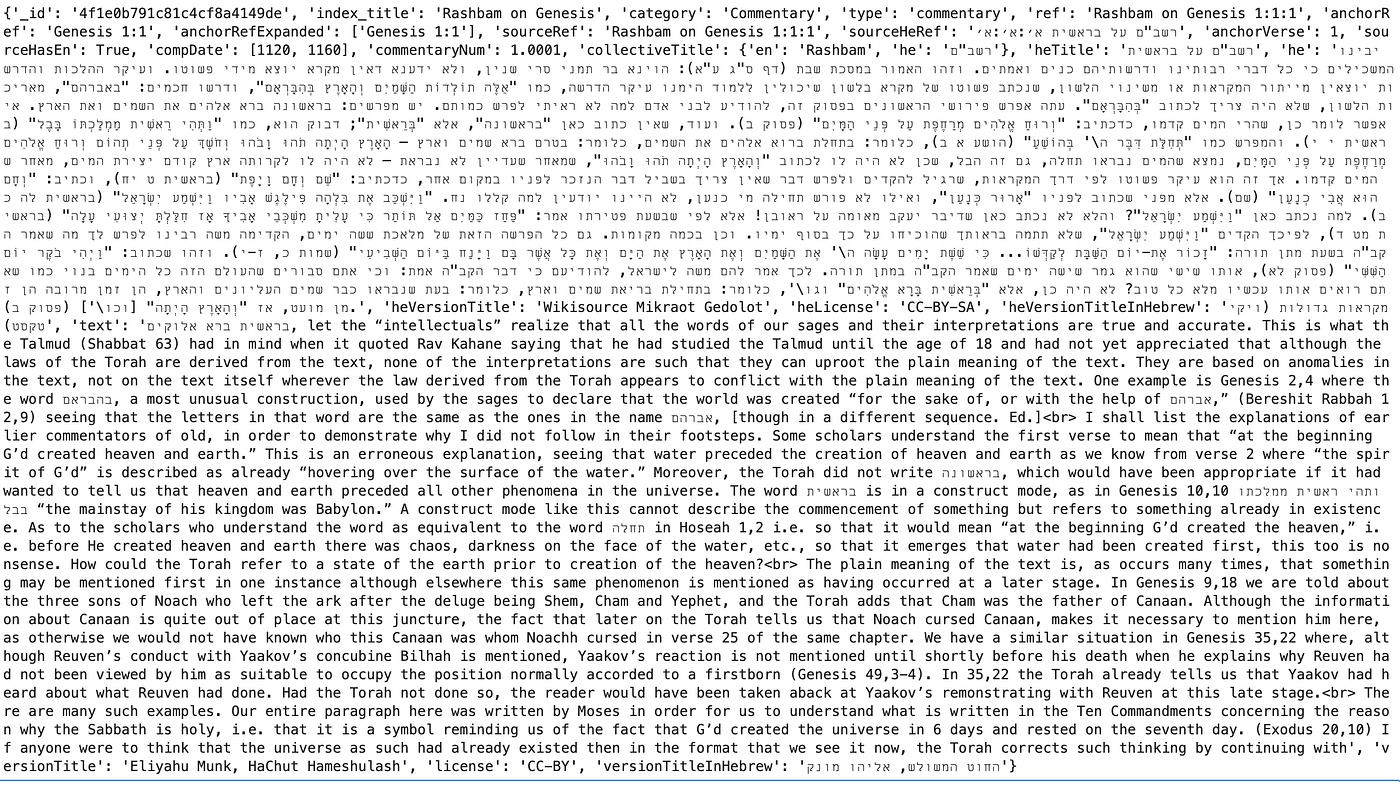
Get all the different links (their refs)
for link in links:
    print(link['ref'])
Output:
Sefat Emet, Genesis, Bereshit 1:4
Siftei Chakhamim, Genesis 1:1:1
Siftei Chakhamim, Genesis 1:1:2
Siftei Chakhamim, Genesis 1:1:3
Siftei Chakhamim, Genesis 1:1:4
Yeriot Shlomo on Torah, Genesis 1:1:1
Yeriot Shlomo on Torah, Genesis 1:1:2
Sefat Emet, Genesis, Bereshit 15:2
Sefat Emet, Genesis, Bereshit 22:3
Sefat Emet, Genesis, Noach 33:4
Sefat Emet, Exodus, Bo 14:2
Yalkut Shimoni on Torah 187:3
Siftei Chakhamim, Genesis 1:1:5
Siftei Chakhamim, Genesis 1:1:6
Siftei Chakhamim, Genesis 1:1:7
Siftei Chakhamim, Genesis 1:1:8
Siftei Chakhamim, Genesis 1:1:9
Siftei Chakhamim, Genesis 1:1:10
Siftei Chakhamim, Genesis 1:1:11
Siftei Chakhamim, Genesis 1:1:12
Siftei Chakhamim, Genesis 1:1:13
Siftei Chakhamim, Genesis 1:1:14
Siftei Chakhamim, Genesis 1:1:15
Yeriot Shlomo on Torah, Genesis 1:1:3
Yeriot Shlomo on Torah, Genesis 1:1:4
Yeriot Shlomo on Torah, Genesis 1:1:5
Sefat Emet, Leviticus, Emor 29:4
Tanya, Part III; Iggeret HaTeshuvah 1:2
Siftei Chakhamim, Genesis 1:1:13
Siftei Chakhamim, Genesis 1:1:14
Siftei Chakhamim, Genesis 1:1:16
Siftei Chakhamim, Genesis 1:1:17
Yeriot Shlomo on Torah, Genesis 1:1:6
Shemot Rabbah 30:13
Sefat Emet, Genesis, Bereshit 6:3
Sefat Emet, Genesis, Bereshit 7:4
Sefat Emet, Genesis, Bereshit 10:3
Shenei Luchot HaBerit, Torah Shebikhtav, Matot, Masei, Devarim, Torah Ohr 6
Gur Aryeh on Bereishit 1:1:1
Gur Aryeh on Bereishit 1:1:2
Gur Aryeh on Bereishit 1:1:3
Gur Aryeh on Bereishit 1:1:4
Mizrachi, Genesis 1:1:4
Mizrachi, Genesis 1:1:5
Mizrachi, Genesis 1:1:6
Mizrachi, Genesis 1:1:2
Mizrachi, Genesis 1:1:3
Mizrachi, Genesis 1:1:7
Mizrachi, Genesis 1:1:1
Maskil LeDavid, Genesis 1:1:1
Bereshit Rabbah 1:2
Levush HaOrah, Genesis 1:1:3
Genesis 1:1
Psalms 111:6
Exodus 12:2
Jeremiah 27:5
Gur Aryeh on Bereishit 1:1:5
Gur Aryeh on Bereishit 1:1:6
Gur Aryeh on Bereishit 1:1:7
Gur Aryeh on Bereishit 1:1:8
Gur Aryeh on Bereishit 1:1:9
Gur Aryeh on Bereishit 1:1:10
Gur Aryeh on Bereishit 1:1:11
Gur Aryeh on Bereishit 1:1:12
Gur Aryeh on Bereishit 1:1:13
Mizrachi, Genesis 1:1:8
Mizrachi, Genesis 1:1:9
Mizrachi, Genesis 1:1:11
Mizrachi, Genesis 1:1:10
Mizrachi, Genesis 1:1:12
Mizrachi, Genesis 1:1:13
Mizrachi, Genesis 1:1:14
Mizrachi, Genesis 1:1:15
Mizrachi, Genesis 1:1:16
Bartenura on Torah, Genesis 1:1:1
Bartenura on Torah, Genesis 1:1:2
Ramban on Genesis 1:1:3
Ramban on Genesis 1:1:2
Maskil LeDavid, Genesis 1:1:2
Genesis 1:1
Divrei David on Rashi, Genesis 1:1:1
Divrei David on Rashi, Genesis 1:1:2
Divrei David on Rashi, Genesis 1:1:3
Divrei David on Rashi, Genesis 1:1:4
Divrei David on Rashi, Genesis 1:1:5
Divrei David on Rashi, Genesis 1:1:6
Divrei David on Rashi, Genesis 1:1:7
Proverbs 8:22
Deuteronomy 18:4
Isaiah 46:10
Isaiah 8:4
Jeremiah 2:3
Hosea 1:2
Genesis 10:10
Amos 6:12
Job 3:10
Jeremiah 26:1
Noam Elimelekh, Sefer Bereshit, Bereshit 1:12
Bereshit Rabbah 1:6
Job 3:9
Bereshit Rabbah 4:7
Birkat Asher on Torah, Genesis 1:1:2
Notes by Rabbi Yehoshua Hartman on Netzach Yisrael 15:2
Jeremiah 27:1
Gur Aryeh on Bereishit 1:1:2
Gur Aryeh on Bereishit 1:1:14
Gur Aryeh on Bereishit 1:1:14
Gur Aryeh on Bereishit 1:1:15
Gur Aryeh on Bereishit 1:1:16
Mizrachi, Genesis 1:1:18
Mizrachi, Genesis 1:1:17
Maskil LeDavid, Genesis 1:1:3
Pesikta Rabbati 40:1
Bereshit Rabbah 14:1
Levush HaOrah, Genesis 1:1:6
Genesis 1:1
Genesis 2:4
Bereshit Rabbah 12:15
Mareh Yechezkel on Torah, Bereshit 11
Example: Get Only Commentaries for a text
def get_commentaries(ref):
    links = requests.get(
        f"https://www.sefaria.org/api/links/{ref}"
    ).json()
    out = []
        for l in links:
            if l.get("category") == "Commentary":
                if "refs" in l:
                    out.append(l["refs"][1])
                else:
                    out.append(l.get("sourceRef"))
        return out
3️⃣ Versions (Important)
There are often many versions of a text, meaning different translations and commentaries.
- Fetching text and fetching versions are separate steps.
Get Available Versions
from urllib.parse import quote

index = "Genesis"
versions = requests.get(
    f"https://www.sefaria.org/api/texts/versions/{quote(index)}"
).json()
for v in versions[:10]:
    print(v.get("versionTitle"), "|", v.get("language"))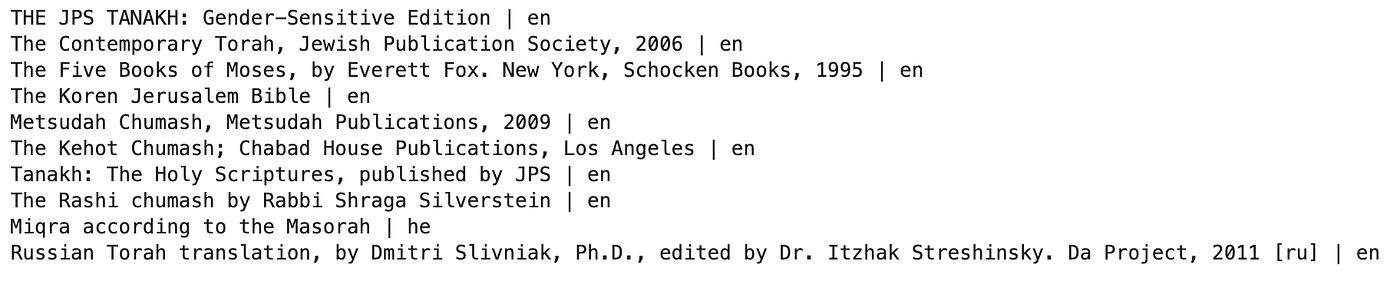
Calendars API
Sefaria also provides a Calendars API (https://developers.sefaria.org/reference/get-calendars) for daily learning schedules such as Parashat Hashavua, Daf Yomi, Daily Rambam, and more. This is especially useful when you do not want to hardcode a schedule yourself. Instead, you can ask Sefaria for the learning items for a specific date, pull out the relevant ref, and then fetch the actual text in a separate request.
A few helpful parameters are:
diaspora:0for Israel,1for Diasporayear,month,day: lets you request the schedule for a specific date (default is current date)
This makes it easy to build projects around daily learning. For example, you can request the calendar data for a given day, clean the response into a dataframe, and then filter for Daily Rambam (3 Chapters) to get the exact ref you want to use next:
This is a much better approach than manually maintaining schedules, and it works well for things like a Daily Rambam app, a Parsha generator, or a daily learning dashboard.
import requests
import pandas as pd

diaspora = 0  # 0 = Israel, 1 = Diaspora

url = "https://www.sefaria.org/api/calendars"

params = {
    "diaspora": diaspora,
    "year": 2026,
    "month": 2,
    "day": 3,
}

headers = {
    "accept": "application/json"
}

response = requests.get(url, params=params, headers=headers)
response.raise_for_status()
data = response.json()

df = pd.DataFrame(data["calendar_items"])

df_clean = pd.DataFrame({
    "type": df["title"].apply(lambda x: x.get("en") if isinstance(x, dict) else None),
    "name": df["displayValue"].apply(lambda x: x.get("en") if isinstance(x, dict) else None),
    "ref": df.get("ref"),
    "category": df.get("category"),
})

df_clean
# Filter just the 3-chapter Rambam track
daily_rambam_3 = df_clean[df_clean["type"] == "Daily Rambam (3 Chapters)"]

daily_rambam_3
# Pull the refs as a list
rambam_ref = daily_rambam_3["ref"].iloc[0]
rambam_ref
Then you can use that ref “rambam_ref” with the texts API:
import requests
from urllib.parse import quote
from IPython.display import HTML

ref = rambam_ref

url = f"https://www.sefaria.org/api/v3/texts/{quote(ref)}"

params = {
    "version": "hebrew"
}

response = requests.get(url, params=params)
data = response.json()

print(data["versions"][0]["versionTitle"])
text = data["versions"][0]["text"]

for i,h in enumerate(data["versions"][0]["text"]):
    if isinstance(h,list):
        for j,h2 in enumerate(h):
            display(f"{i} : {j}")
            display(h2)
This is a nice pattern for building a Daily Rambam app, quiz generator, or study companion as we will show in a later post.
⚙️ A Note on API Versions
I am definitely not an expert on Sefaria — this guide is based on hands-on experimentation, debugging, and figuring out what actually worked for me in practice.
We used the latest /api/v3/texts endpoint for fetching text whenever possible.
However some endpoints use different versions.
Table of Contents (Index API)
Returns the full structure of the Sefaria library (categories → books -> Titles).
import requests

url = "https://www.sefaria.org/api/index"
toc = requests.get(url, timeout=60).json()

This gives you the entire library structure—but not as a flat list. Instead, it’s a deeply nested hierarchy of categories, subcategories, and texts under "contents".
This gives you the entire library structure — but not as a flat list. Instead, it’s a deeply nested hierarchy of categories, subcategories, and texts under "contents".
If you want to extract something like Genesis, Mishneh Torah, or any other collection, you need to traverse the tree, not just filter.
A small but important pattern when walking the TOC is:
label = node.get("title") or node.get("category")Some nodes are actual texts ("title"), while others are just structural groupings ("category"). This ensures every node has a usable label.
A minimal recursive pattern to collect matching titles:
def collect_titles(node, keyword, results):
    if isinstance(node, list):
        for x in node:
            collect_titles(x, keyword, results)
    elif isinstance(node, dict):
        label = node.get("title") or node.get("category")
    if label and keyword in label:
                results.append(label)
            collect_titles(node.get("contents", []), keyword, results)
    results = []
    collect_titles(toc, "Mishneh Torah", results)  # or "Genesis", etc.
Explaining this snippet is outside the scope of this tutorial. Still, it’s a great real-world exercise in recursive programming.
📜 Example 1: Get the Chumash (English Translation)
👉 Here we intentionally fetch full books (e.g. "Genesis") — but remember, you can always switch to chapter-level refs if you want smaller chunks.
import requests
from urllib.parse import quote

class TorahFetcher:
    def __init__(self):
        self.torah_books = ['Genesis', 'Exodus', 'Leviticus', 'Numbers', 'Deuteronomy']
        self.hebrew_names = {
            'Genesis': 'בראשית',
            'Exodus': 'שמות',
            'Leviticus': 'ויקרא',
            'Numbers': 'במדבר',
            'Deuteronomy': 'דברים'
        }

        # Default versions for v3 (Language|VersionTitle)
        self.default_versions = {
            'he': 'hebrew|Tanach with Ta\'amei Hamikra',
            'en': 'english|The Koren Jerusalem Bible'
        }

    def get_torah_book_text(self, book_name, lang='he'):
        # 1. Use the v3 endpoint
        url = f'https://www.sefaria.org/api/v3/texts/{quote(book_name)}'

        # 2. Map 'he'/'en' to the required v3 version string
        version_str = self.default_versions.get(lang, self.default_versions['he'])

        # 3. 'context' and 'commentary' still work, but 'lang' is replaced by 'version'
        params = {
            'version': version_str,
            'context': 0,
            'commentary': 0
        }

        response = requests.get(url, params=params)
        response.raise_for_status()
        data = response.json()

        # 4. In v3, text is inside the first element of the 'versions' list
        if data.get('versions'):
            return data['versions'][0].get('text', [])

        return []
📊 Fetch Torah Text
- First into dictionary by book
- Into dataframe split by chapter and verse.
import pandas as pd

fetcher = TorahFetcher()
texts = {book: fetcher.get_torah_book_text(book, lang='en') for book in fetcher.torah_books}
rows = []
for book, chapters in texts.items():
    for chapter_idx, chapter in enumerate(chapters, 1):
        for verse_idx, verse in enumerate(chapter, 1):
            rows.append((book, chapter_idx, verse_idx, verse))
df_bible = pd.DataFrame(rows, columns=['book', 'chapter', 'verse', 'text'])
df_bible['text'] = df_bible['text'].str.split("<").str[0]
df_bible.dropna(inplace=True)
Now you have a structured table of Torah verses.
df_bible📜 Example 2: Get Rambam’s Mishneh Torah (English Translation)
import re
import time
import pandas as pd
from urllib.parse import quote

def fetch_text_v3(ref, language="english"):
    safe_ref = quote(ref, safe="")
    url = f"https://www.sefaria.org/api/v3/texts/{safe_ref}"
    params = {
        "language": language
    }
    r = requests.get(url, params=params, timeout=60)
    r.raise_for_status()
    return r.json()

def clean_text(text):
    if text is None:
        return ""
    text = re.sub(r"<[^>]+>", "", str(text))
    text = re.sub(r"\s+", " ", text).strip()
    return text

def section_name_from_title(title):
    return title.replace("Mishneh Torah, ", "").strip()

def fetch_text(ref, lang="en"):
    safe_ref = quote(ref, safe="")
    url = f"https://www.sefaria.org/api/texts/{safe_ref}"

    params = {
        "context": 0,
        "commentary": 0,
        "pad": 0,
        "lang": lang
    }

    r = requests.get(url, params=params, timeout=60)
    r.raise_for_status()
    return r.json()

def flatten_section(payload, title):
    rows = []

    chapters = payload.get("text", [])

    if not isinstance(chapters, list):
        return rows

    for chapter_num, chapter in enumerate(chapters, start=1):
        if not isinstance(chapter, list):
            continue

        for halacha_num, halacha_text in enumerate(chapter, start=1):
            if isinstance(halacha_text, list):
                continue

            text = clean_text(halacha_text)
            if not text:
                continue

            rows.append({
                "ref": f"{title} {chapter_num}:{halacha_num}",
                "book": "Mishneh Torah",
                "hilchot": section_name_from_title(title),
                "chapter": chapter_num,
                "halacha": halacha_num,
                "text": text,
                "language": payload.get("lang", "unknown"),
                "versionTitle": payload.get("versionTitle"),
            })

    return rows

def build_rambam_dataset(section_titles, sleep_sec=0.15):
    all_rows = []
    failed = []

    for i, title in enumerate(section_titles, start=1):
        try:
            print(f"[{i}/{len(section_titles)}] Fetching {title}")

            # 🔥 Try English first
            payload = fetch_text(title, lang="en")

            if not payload.get("text"):
                print(f"{title}: No English → falling back to Hebrew")
                payload = fetch_text(title, lang="he")

            rows = flatten_section(payload, title)

            if not rows:
                failed.append({"title": title, "error": "No rows extracted"})
            else:
                all_rows.extend(rows)

            time.sleep(sleep_sec)

        except Exception as e:
            print(f"FAILED: {title} -> {e}")
            failed.append({"title": title, "error": str(e)})

    df = pd.DataFrame(all_rows)
    failed_df = pd.DataFrame(failed)

    if not df.empty:
        df["text_len"] = df["text"].str.len()
        df = df.sort_values(["hilchot", "chapter", "halacha"]).reset_index(drop=True)

    return df, failed_df

df, failed_df = build_rambam_dataset(section_titles)

print("\nDONE")
print("Rows:", len(df))
print("Failures:", len(failed_df))

df.head()
🔗 What’s Next
If you want to take this further into something more “real-world AI”:
In these posts, we move beyond just pulling data from Sefaria and actually:
- Build a RAG (Retrieval-Augmented Generation) pipeline
- Embed Torah text using OpenAI
- Retrieve relevant sources
- Generate grounded answers in a chatbot UI
The end result is a system that answers questions based only on Torah and Rambam’s Mishneh Torah sources, combining Sefaria + LLMs + vector search.
📚 References
- Sefaria API (official documentation + endpoints) https://developers.sefaria.org/reference/getting-started
- Sefaria.org — structured Jewish text library
메타데이터
- post_id
- 10783d6f6680
- slug
- sefaria-api-intro-10783d6f6680
- url
- https://medium.com/@trademamba/sefaria-api-intro-10783d6f6680
- canonical_url
- https://medium.com/@trademamba/sefaria-api-intro-10783d6f6680
- author_url
- https://medium.com/@trademamba
- status
- ok
- fetched_at
- 2026-07-13 09:30:18