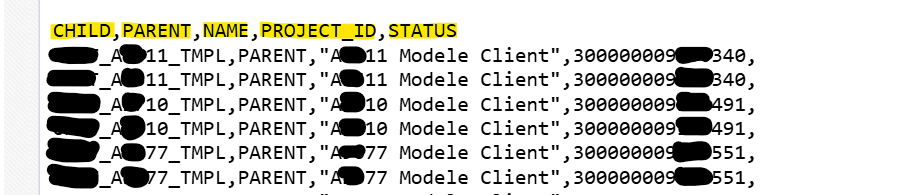
From BI Publisher to SFTP in OIC: Why decodeBase64ToReference() Is All You Need
A field debugging story — and the one function that replaces a Stage File action entirely
From BI Publisher to SFTP in OIC: Why decodeBase64ToReference() Is All You Need
A field debugging story — and the one function that replaces a Stage File action entirely
The Setup
If you’ve built an Oracle Integration Cloud (OIC) integration that retrieves a report from BI Publisher via RunReportService and needs to push that report to an external SFTP server, you've probably hit the same wall I did.
The flow looks simple on paper:
SOAP Invoke (RunReportService) → FTP Write → SFTPBut the moment you open the mapper, the “obvious” approach stops working — and the fix isn’t where you’d expect it.
The SOAP Response
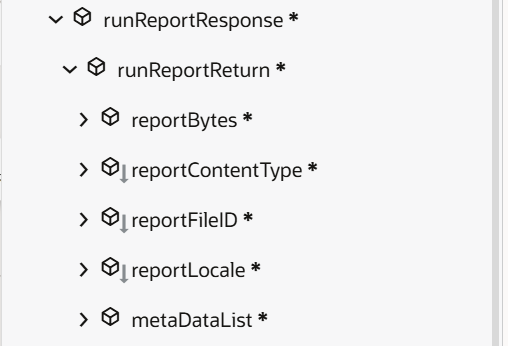
Calling RunReportService via a SOAP invoke returns a response shaped like this:
runReportResponse
 └─ runReportReturn
     ├─ reportBytes
     ├─ reportContentType
     ├─ reportFileID
     ├─ reportLocale
     └─ metaDataList
reportBytes is the report content itself, base64-encoded. It looks like exactly what you need to hand to an FTP Write action. That assumption is where the trouble starts.
Part 1 — The Natural Reflex: Mapping reportBytes Directly
The first instinct is straightforward: reportBytes is already base64, and the FTP Write operation supports an "opaque" mode when you set schema structure to No. So why not map it straight in?
Because that’s not actually what the target expects. Even with structure set to No, the FTP Write “Write File” operation exposes this:
TransferReport Request (FTP)
 ├─ File Name
 ├─ Directory
 └─ ICS File *
     ├─ File Reference *
     └─ Properties *
File Reference is a required field — and it does not accept raw base64 content. This is the detail that trips people up, because nothing in the UI tells you explicitly that these are two different kinds of objects.
reportBytes vs. File Reference — What's Actually the Difference
**reportBytes**
- What it is: the actual file content, base64-encoded
- Size: heavy — the entire report, inline
- Where it lives: in the integration instance’s memory, carried through the payload
- What accepts it: an opaque/base64Binary element in a mapping
**File Reference**
- What it is: a lightweight pointer to a file already sitting in OIC’s internal stage
- Size: a few characters — just an identifier
- Where it lives: in OIC’s staging area, on disk
- What accepts it: any adapter action built to read from the stage (FTP, Stage File…)
The reason this distinction exists is architectural: file-oriented adapters in OIC (FTP, Stage File) are designed to stream from the stage, not to carry large binary payloads through XSLT transformations. Passing a multi-megabyte base64 string through a mapper works against that design — which is exactly why File Reference is the required field instead of a free opaque node.
Part 2 — The False Lead: Stage File “Read Entire File” with a Structured CSV
Even after decoding the report with decodeBase64ToReference(), the next reasonable step feels like reading that file back before handing it to the FTP adapter. So the flow becomes:
Assign: vDecodeBase64 = decodeBase64ToReference(reportBytes)
   → Stage File: Read Entire File (File Reference = vDecodeBase64)
   → Map / Invoke: FTP Write
In the Stage File action, Choose Stage File Operation is set to Read Entire File, with Configure File Reference set to Yes, and vDecodeBase64 supplied as the reference to read.
It seems like the safe move — the FTP Write needs something concrete to send, so reading the file back first feels like it’s preparing that content properly. But it’s an unnecessary step: the FTP Write action already knows how to consume a File Reference directly, without needing its content read back out beforehand. Adding a Read Entire File action in between just means writing the file, reading it straight back out, and then mapping that output into the FTP adapter — an extra round-trip for content that never needed to leave the stage in the first place.


Part 3 — The Actual Solution: decodeBase64ToReference()
The fix turns out to be a single function.
decodeBase64ToReference() decodes the base64 string and returns a usable file reference in one step. No Stage File Write, no Stage File Read, no schema.
Assign action:
vDecodeBase64 = decodeBase64ToReference(reportBytes)FTP Write mapping:
ICS File > File Reference = vDecodeBase64That’s the entire bridge between the SOAP response and the FTP adapter. The function itself takes care of writing the decoded content to the stage internally and handing back the reference the FTP Write action is asking for — which is exactly the two-step Stage File dance from Part 2, just done in one call instead of two separate actions plus a schema.


A Quality Guard Before the Transfer
One more piece worth keeping in the flow: a Switch condition before attempting the transfer, to skip empty or failed report generations:
string-length(reportBytes) >= number(20)If BI Publisher returns an empty or malformed reportBytes (report generation failure, no data, etc.), this avoids pushing a broken or empty file to the SFTP server.
Part 4 — The Final Flow
SOAP Invoke (RunReportService)
   → Switch: string-length(reportBytes) >= 20
        → Assign: vDecodeBase64 = decodeBase64ToReference(reportBytes)
        → FTP Write (Binary): File Reference = vDecodeBase64
        → File written to SFTP
Four steps. No Stage File action. No manually crafted CSV sample. No column mapping to maintain.


Proof It Works
Running the flow end-to-end in Debug tracing confirms the transfer completes successfully:


Takeaways
**reportBytesandFile Referenceare not interchangeable.** One is content, the other is a pointer — know which one the adapter action in front of you is actually asking for.**decodeBase64ToReference()** turns a base64 payload into a stage-backed file reference directly — no round-trip needed.- Add a length or emptiness guard before triggering a file transfer, so a failed report generation doesn’t silently produce a broken file downstream.
메타데이터
- post_id
- 107bbebfc38f
- slug
- from-bi-publisher-to-sftp-in-oic-why-decodebase64toreference-is-all-you-need-107bbebfc38f
- url
- https://medium.com/@mariagalman2025/from-bi-publisher-to-sftp-in-oic-why-decodebase64toreference-is-all-you-need-107bbebfc38f
- canonical_url
- https://medium.com/@mariagalman2025/from-bi-publisher-to-sftp-in-oic-why-decodebase64toreference-is-all-you-need-107bbebfc38f
- author_url
- https://medium.com/@mariagalman2025
- status
- ok
- fetched_at
- 2026-08-21 05:43:42