Prompt Versioning Done Right: Treating Prompts as Deployable Artifacts
Rolling back a bad prompt should take 1 second, not the 30 minutes a redeploy costs. Why prompts belong in a versioned registry — labeled…
Prompt Versioning Done Right: Treating Prompts as Deployable Artifacts
Rolling back a bad prompt should take 1 second, not the 30 minutes a redeploy costs. Why prompts belong in a versioned registry — labeled versions, runtime fetch, and the version-linked tracing that finally answers whether a prompt change helped or hurt.
Prompt versioning is the practice of storing every prompt your application sends to a model as a named, version-controlled artifact rather than a string buried in your code. Each version gets a label — production, staging, whatever you need - and the application fetches the labeled version at runtime. Change the prompt, you cut a new version. Need to undo it, you move the label back. No code change. No deploy.
That last part is the whole point. The first time a prompt change quietly breaks a chatbot in production, you learn what it costs to fix it the old way. Someone edits a string in the repo, opens a pull request, waits for review, waits for CI, waits for the deploy pipeline — call it 30 minutes on a good day, longer if the build is flaky — while the broken prompt keeps answering customers. With a prompt registry, the same fix is one label change and the next request picks it up. Seconds, not a release cycle.
We have reviewed a lot of LLM codebases over the years, and the single most common piece of technical debt — we have hit it in 8 of our last 10 reviews — is the same one every time: the prompts live in the application. Hardcoded. Sometimes in a constants file, sometimes inline in the function that calls the model, occasionally — and this one always hurts — concatenated together from six places so no human can see the final string the model actually received. This is a guide to digging out of that hole and treating prompts the way you already treat every other thing that ships to production.
Why Hardcoded Prompts Are a Production Incident Waiting to Happen
A prompt is not a configuration value. A database URL is a config value: it changes between environments and almost never otherwise. A prompt is closer to code. It changes constantly, every change alters product behavior, and the changes are made by people — product managers, domain experts, prompt engineers — who often cannot and should not be opening pull requests against your application repo.
When prompts live in code, three things go wrong, and they compound.
First, every prompt change becomes a deploy. A one-word tweak to a system prompt rides the same pipeline as a database migration. That is slow, and worse, it is risky: you are now coupling experimental copy changes to your release process.
Second, you lose the audit trail. Six months from now, when a customer escalates an answer the bot gave in March, the question you need to answer is “what exact prompt produced this?” If the prompt was hardcoded and has since changed four times, you cannot reconstruct it. The string is gone. You are guessing.
Third, non-engineers are locked out. The people best equipped to improve a prompt are usually not the people with merge rights. So either they file tickets and wait, or — far more common — the prompts simply stop improving, because the friction is too high.
None of this shows up in LLM observability dashboards as an error. It shows up as a slow, invisible erosion of quality that nobody can trace to a cause. That is the failure mode prompt versioning exists to kill.
A Prompt Is a Deployable Artifact
Shift the mental model. A prompt is an artifact you deploy, with the same lifecycle as a container image or a compiled binary: it is built, versioned, labeled, rolled out, and — when it misbehaves — rolled back. Once you accept that, the architecture follows naturally.
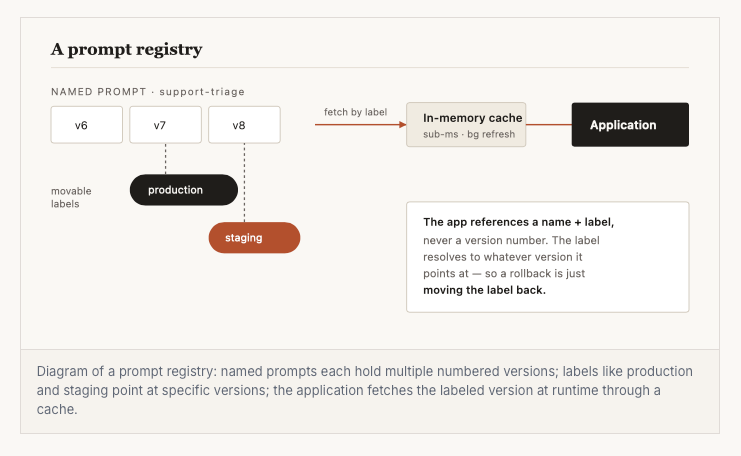
Named prompts with labeled versions
The registry stores prompts by name — support-triage, summarize-ticket, extract-invoice-fields. Each name holds an ordered history of versions: v1, v2, v3, and so on, immutable once created. On top of that history sit movable labels. production points at one version. staging points at another. Your application never asks for "v7" - it asks for the prompt named support-triage with the label production, and the registry resolves that to whatever version the label currently points at.
This indirection is the entire trick. The application code references a stable name and label. The actual content behind that label changes without the application knowing or caring.
Runtime fetch with caching
The obvious objection is latency. If the app fetches the prompt over the network on every request, you have added a round trip to the hot path. The answer is a cache. The client fetches a labeled prompt once, caches it in memory, and serves subsequent requests from cache, refreshing in the background every 60 seconds. Done right, the per-request overhead is a sub-millisecond memory lookup — well under 1 ms — instead of a 50-to-100 ms network round trip on every call. Cache the prompt the same way you cache API-key validation — aggressively, on the hot path, because it happens on every single request.
Version-Linked Tracing: Closing the Loop
Here is where prompt versioning stops being a nice-to-have and becomes the foundation for actually improving your product.
When a generation runs, the prompt version that produced it gets attached to the trace as an attribute. Not the prompt name. The specific version. Now your entire trace history is filterable by prompt version, and that unlocks the one question every team is actually trying to answer: did this prompt change make things better or worse on real traffic?
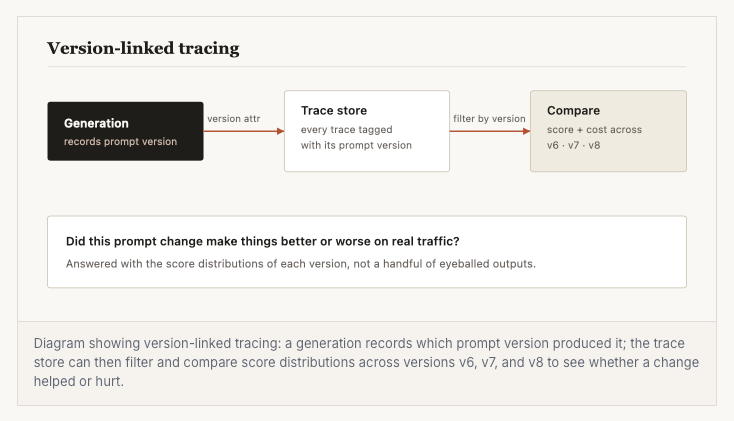
Without version-linked tracing, you answer that question with vibes. Someone changes the prompt, the team eyeballs a few outputs, declares victory, and moves on. With it, you answer with data: pull every trace produced by v7, pull every trace produced by v8, and compare the score distributions from your LLM-as-a-judge evaluators. If v8’s faithfulness scores dropped two points across 10,000 production conversations, you know — before the customer complaints arrive, not after.
This is also how you measure cost honestly. Each version’s token usage is right there in the linked generations. A prompt rewrite that improves answers but quietly adds 400 tokens of instructions to every call has a real price: at 50,000 calls a day, that is 20 million extra input tokens daily — a line item that shows up on the bill weeks before anyone connects it to the prompt. Version-linked tracing surfaces it on day 1. Pair it with the levers in token optimization and you can see the quality-versus-cost trade of a prompt change in numbers instead of opinions.
Rollback Is a Label Change
The payoff. When a deployed prompt turns out to be worse — and it will, regularly, because prompt changes are hard to fully validate before real traffic hits them — recovery is trivial. You move the production label back to the previous version. The application pulls production on its next request and immediately serves the older, known-good prompt.
No redeployment. No config propagation across a fleet. No incident bridge with six engineers. The time-to-recovery drops from a release cycle to a single API call, which in a real incident is the difference between a footnote and a postmortem.

How to Build It: Six Steps
- Get prompts out of the application. The first and hardest step is mechanical: find every hardcoded prompt, every f-string, every concatenated fragment, and move it into a registry behind a name. You cannot version what you cannot see.
- Reference prompts by name and label, never by version number. The app asks for
support-triageat labelproduction. Hardcoding a version number just recreates the original problem one layer down. - Cache the runtime fetch. Pull the labeled prompt once, serve from memory, refresh in the background. Never put a network call on the per-request hot path.
- Attach the version to every generation. This is the step teams skip and regret. Without the version on the trace, you have versioning without the ability to evaluate versions — half the value, gone.
- Use labels as your deploy mechanism. Promote staging to production by moving a label. Roll back by moving it back. Treat the label as the deployable surface, because it is.
- Compare versions against production data, not benchmarks. When you ship a new version, watch the score distributions and cost-per-call on real traffic for that version specifically. Synthetic eval sets tell you a prompt is plausible; production traces tell you it works.
Teams with years of experience running this treat the prompt registry as production infrastructure, not a content tool — versioned, access-controlled, and wired into the same audit trail as everything else that touches a customer.
What Prompt Versioning Doesn’t Solve
Set expectations. Versioning gives you the ability to change, trace, and roll back prompts safely. It does not tell you whether a prompt is good — that is what evaluation is for, and the two are designed to work together. It does not manage the models behind the prompts; a prompt tuned for one model can degrade on another, and the version label won’t warn you.
And it is not a substitute for review on high-stakes prompts. Letting anyone move the production label is great for velocity and dangerous for a prompt that gates a financial or medical workflow. Mature setups gate label promotion on those prompts behind an approval, the same way you gate a production deploy. The goal is to remove pointless friction, not all of it
메타데이터
- post_id
- 10b74ab4a074
- slug
- prompt-versioning-done-right-treating-prompts-as-deployable-artifacts-10b74ab4a074
- url
- https://medium.com/@soraya.z/prompt-versioning-done-right-treating-prompts-as-deployable-artifacts-10b74ab4a074
- canonical_url
- https://medium.com/@soraya.z/prompt-versioning-done-right-treating-prompts-as-deployable-artifacts-10b74ab4a074
- author_url
- https://medium.com/@soraya.z
- status
- ok
- fetched_at
- 2026-07-09 15:12:33





