What Took Hours of AliExpress Research Now Takes Under 2 Minutes
Still checking AliExpress prices one listing at a time? Pull 96 products with sold counts, discount percentages, shipping origin, and…
What Took Hours of AliExpress Research Now Takes Under 2 Minutes
Still checking AliExpress prices one listing at a time? Pull 96 products with sold counts, discount percentages, shipping origin, and top-rated flags in under 2 minutes. No AliExpress API. Here’s the exact setup.

The Problem with Manual AliExpress Research
If you’ve ever tried to find winning products or compare supplier prices on AliExpress, you know how long it takes.
One keyword search turns into:
- Scrolling through pages of listings looking for the ones that actually sell
- Clicking into each product to check the orders count and rating
- Manually noting prices, discounts, and shipping origins in a spreadsheet
- Realizing the sort order changed and you need to start over
Two keywords. Forty-eight results each. An hour of clicking before I even had a shortlist. I knew there had to be a better way.
The Tool That Changed Everything
What if you could pull every AliExpress listing for a keyword, sorted by orders, with all the data already structured?
That’s exactly what the **AliExpress Search Scraper** does.
Type a keyword or several. Set a sort order, a minimum rating, a minimum order count. Hit run. The actor pages through AliExpress search results and returns every listing as a clean, structured record.
For each product, it collects:
- Product title, AliExpress item ID, and direct URL
- Sale price, original price, and discount percentage
- Star rating and total orders sold
- Shipping label (e.g. “Free shipping”) and country of origin
- Promotional tags shown on the card (new buyer discounts, coin savings, fast delivery)
isTopRatedboolean: true when rating is 4.8 or above- Main product image URL and additional carousel images
To test it, I ran “smartphone” and “wireless earbuds” in one batch, 48 items each, up to 2 pages per keyword.
In 1 minute 38 seconds, the actor collected 96 products across both keywords. Sold counts, discount percentages, and shipping origins all included. All structured.
Two keywords in. Ninety-six complete records out. That’s when I stopped checking AliExpress listings by hand.
The setup process (3 minutes, no code required)

Let’s walk through the setup. No technical skills needed. Three steps and you’re running.
Step 1: Access the scraper
Go to the AliExpress Search Scraper page on Apify and click “Try for free.” The button is right there in the top right corner. You can’t miss it.

The actor page on Apify. Click “Try for free” to open the input form and run your first search.
Step 2: Log in to Apify
You’ll need an Apify account. If you don’t have one, there’s a “Sign up” link right on the login screen. I already had an account so I just entered my email and password. The whole login takes about 20 seconds.
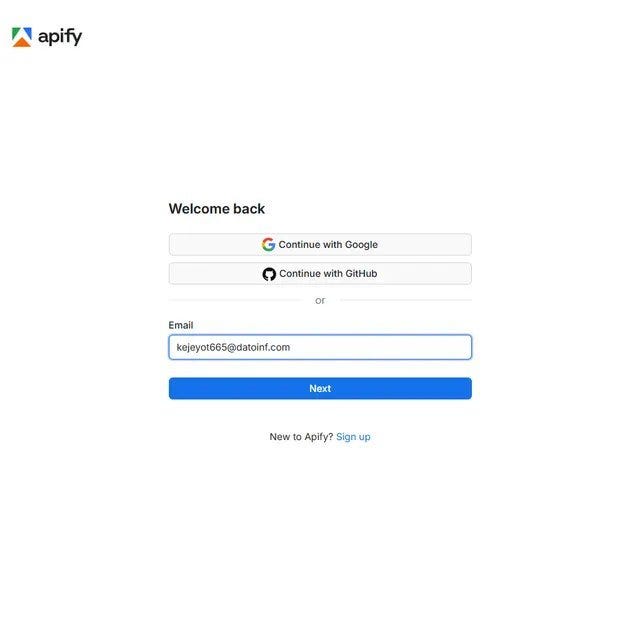
Step 2a: Enter your Apify email. You can also log in with Google or GitHub if that’s faster.
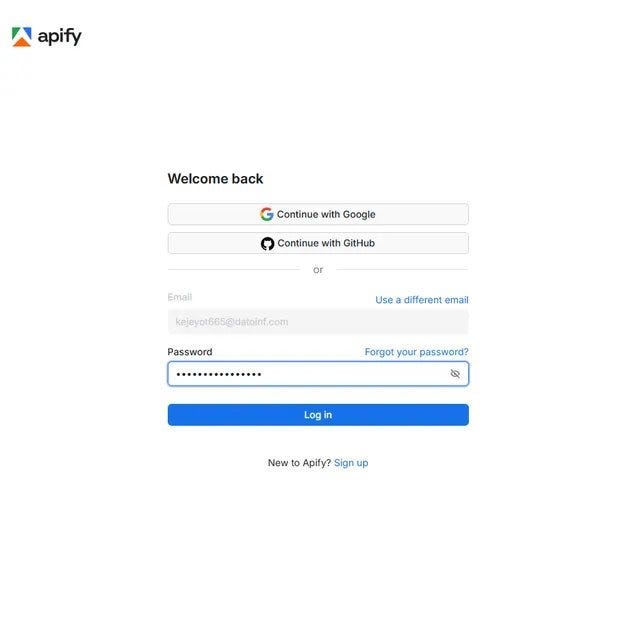
Step 2b: Enter your password and hit Log in. Standard stuff, takes seconds.
Step 3: Add your keywords and hit Start
The main field is Search keywords. Type any product term here: smartphone, wireless earbuds, led strip lights. Use the "+ Add" button to run multiple keywords in one go.
Expand Search Options to set a sort order: relevance, orders, price ascending, price descending, or top rated. Expand Filters to set a minimum rating, minimum order count, or price range. Expand Limits to control max items and pages per keyword.
Click the green Start button at the bottom left. The red arrow in the screenshot points right to it.

Step 3: Type your keywords into the highlighted fields. Add as many as you need. Hit Start. That’s the full setup.
What happens when it runs
The Log tab shows the actor working in real time. You can see it processing each keyword, scraping page by page, retrying automatically when AliExpress returns a blocked page, and pushing records as they come in.
My smartphone and wireless earbuds run processed both keywords across 2 pages each. AliExpress blocked a couple of page requests, the actor retried and got through, and finished cleanly. Total: 96 products in 1 minute 38 seconds.

The run log in real time. Each line shows the actor moving through pages, retrying blocked requests automatically, and pushing records to the dataset. 96 products, 1 minute 38 seconds.
The Part That Impressed Me Most
Speed is nice.
The orders and discount fields are even better.
When the run finished, every product came back with the data that actually matters for product research:
ordersas a parsed integer, ready to sort without any data cleaningdiscountas a percentage string (e.g. "-55%") so you can instantly spot the deepest markdownsshippingFromcountry code (CN, ES, US) for filtering by shipping speedisTopRatedboolean so you can filter for only 4.8+ products in one clicktagsarray with all promotional labels from the card, including "Delivery in 2 days" and new-buyer coin discounts
No cleanup. No sorting text fields manually. No missing sold counts.
Just a dataset ready to open in Excel and sort by orders in two clicks.
What used to take an hour of scrolling and clicking now takes 98 seconds. Sorting by orders and filtering by rating made the shortlist obvious in seconds.
Before vs. After Using the Scraper
Manual Research
- ⏱️ 1 to 2 hours for two keywords at 48 products each
- 📦 Covers whatever you have patience to click through
- ⚠️ Orders and discounts noted inconsistently or skipped
- 🚚 Shipping origin requires clicking into each individual listing
Using the Scraper
- ⚡ 1 minute 38 seconds for 96 products across 2 keywords
- 📦 Up to 200 products per keyword, up to 20 pages
- ✅ Orders, discounts, rating, and shipping all structured per record
- 🚚
shippingFromcountry code on every record for instant filtering
The difference is simple: more products, deeper data, zero manual clicking.
Getting your data out
When the run finishes, click Storage in the top nav. The Dataset tab shows your item count and file size. My 96-product run came in at 20.3 kB. Pick your format (JSON, CSV, Excel, JSONL, or HTML Table) and hit Download.
For dropshipping research or price analysis, CSV opens directly in Google Sheets. For pipeline work or scheduled runs, JSON or JSONL is cleaner. The Dataset ID also lets you pull data via the Apify API without touching the console.

The Storage tab after a completed run. 96 items, 20.3 kB. One click to download in JSON, CSV, XML, or Excel. Use the Dataset ID to pull records via the API or schedule automatic runs.
Who Needs This?

Still checking AliExpress product data one listing at a time?
Then you’re probably the right audience for this.
The AliExpress Search Scraper is useful for:
- 🛍️ Dropshippers finding products with high order counts and strong ratings before committing to a niche
- 📊 Resellers comparing AliExpress wholesale prices against what they’re already selling
- 📈 E-commerce brand builders tracking competitor pricing and discount depth in their category
- 🔍 Product researchers who need a quick, sortable view of what’s trending and what’s not moving
What Could You Build With This?

Automate the search and a lot becomes possible.
📉 Dropshipping Product Finder
Run the actor weekly on 10 to 20 trending keywords, sorted by orders with a minimum rating of 4.5. Compare each run against the last to find products gaining sales velocity. The orders and isTopRated fields do the filtering automatically. Dropshippers pay for exactly this kind of signal.
💰 AliExpress Price Monitor
Schedule daily runs on a fixed keyword list. Track price and discount field changes over time for the same productId. Alert when a supplier drops their price or deepens a discount. Resellers and buyers who source in bulk use price timing to improve margins.
🛒 Niche Market Intelligence Dashboard
Pull 200 products per keyword across 5 to 10 categories. Group by shippingFrom to see which regions dominate supply for each niche. Chart order volume by price tier using the orders and price fields. Useful for brand builders deciding which product category has the most room to compete on quality.
Ready to pull AliExpress product data at scale?
**Try the AliExpress Search Scraper on Apify**
No infrastructure. No maintenance. Just run it and get your data.
Final thoughts
I’m not trying to sell you anything. I’m just sharing what worked after too many afternoons scrolling AliExpress search pages trying to find which products actually sell and which are just cheap listings nobody buys.
The AliExpress Search Scraper took three minutes to set up and replaced a manual routine that was eating into every product research session. The orders field and the automatic retry on blocked pages are the two things I would have built myself if I were writing a custom scraper. And it runs the same way every time.
Have you tried automating AliExpress product research? Leave a comment. I’m always looking for better methods.
메타데이터
- post_id
- 10df9d0e700f
- slug
- what-took-hours-of-aliexpress-research-now-takes-under-2-minutes-10df9d0e700f
- url
- https://medium.com/@bigiByte/what-took-hours-of-aliexpress-research-now-takes-under-2-minutes-10df9d0e700f
- canonical_url
- https://medium.com/@bigiByte/what-took-hours-of-aliexpress-research-now-takes-under-2-minutes-10df9d0e700f
- author_url
- https://medium.com/@bigiByte
- status
- ok
- fetched_at
- 2026-06-22 12:55:45