🚀 Day 2: Set Up and Configure Jupyter Notebook Server | KodeKloud MLOps Journey
As part of my KodeKloud MLOps learning journey, Day 2 focused on setting up and troubleshooting a JupyterLab server configuration for a…
🚀 Day 2: Set Up and Configure Jupyter Notebook Server | KodeKloud MLOps Journey
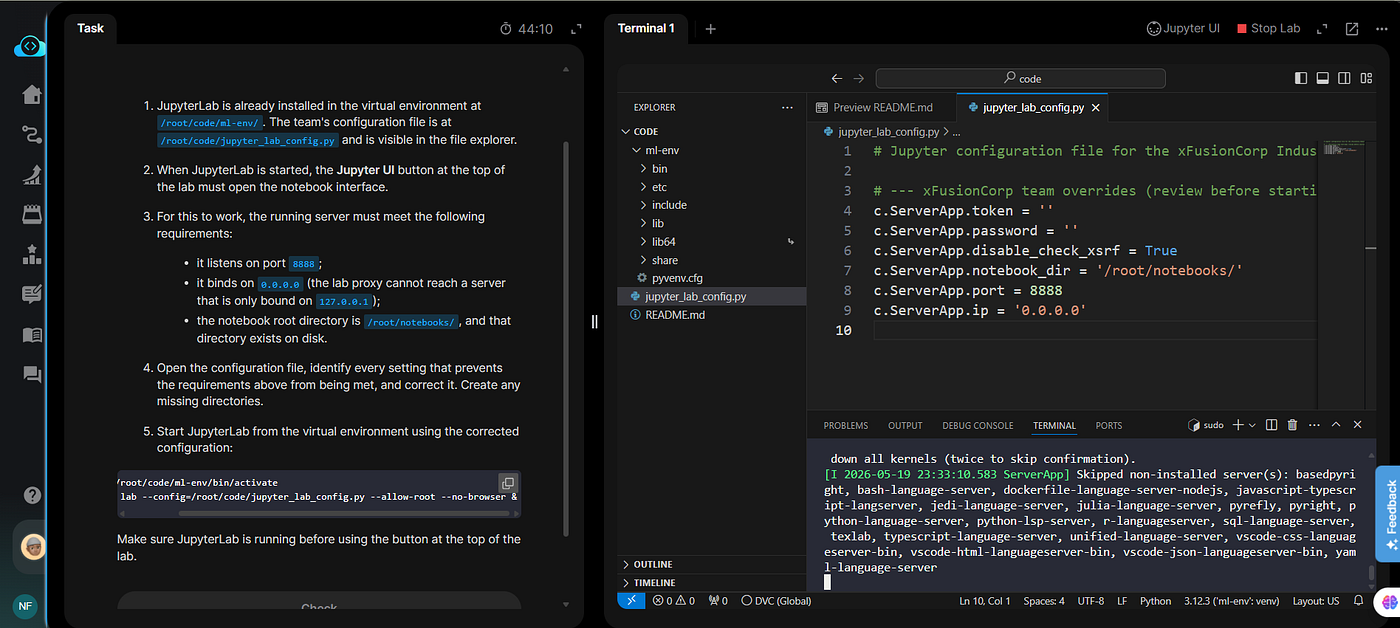
As part of my KodeKloud MLOps learning journey, Day 2 focused on setting up and troubleshooting a JupyterLab server configuration for a Machine Learning environment.
This task was a practical DevOps + MLOps troubleshooting exercise that helped me better understand how JupyterLab servers work, how configuration impacts accessibility, and why proper server setup is important in real-world data science workflows.
📘 What is JupyterLab?
JupyterLab is an advanced interactive development environment used by:
- Data Scientists
- Machine Learning Engineers
- AI Researchers
- Python Developers
It allows users to:
- Write and execute Python code
- Create notebooks
- Visualize data
- Train ML models
- Run experiments interactively
JupyterLab is widely used in Machine Learning and MLOps projects because it provides a flexible environment for experimentation and development.
🎯 Lab Objective
The xFusionCorp Industries data science team had a misconfigured JupyterLab server that was not functioning correctly.
The task was to:
- Inspect the configuration
- Diagnose incorrect settings
- Fix the issues
- Start the JupyterLab server successfully
The server needed to satisfy the following requirements:
✔ Listen on port 8888
✔ Bind to 0.0.0.0
✔ Use /root/notebooks/ as the notebook root directory
✔ Ensure the notebook directory exists
🛠️ Initial Broken Configuration
The provided configuration file contained several incorrect settings:
c.ServerApp.notebook_dir = '/root/wrong-path'
c.ServerApp.port = 8000
c.ServerApp.ip = '1.1.1.1'
These issues prevented the Jupyter UI from opening properly.
🔍 Problems Identified
1. Wrong Notebook Directory
The notebook directory was pointing to:
/root/wrong-pathBut the lab required:
/root/notebooks/2. Incorrect Port
The server was configured to run on:
8000However, the lab proxy expected JupyterLab on:
88883. Incorrect IP Binding
The server was bound to:
1.1.1.1This prevents external access.
Correct configuration:
0.0.0.0Binding to 0.0.0.0 allows the server to accept connections from external interfaces and lab proxies.
⚙️ Corrected Configuration
The final working configuration became:
c.ServerApp.root_dir = '/root/notebooks/'
c.ServerApp.port = 8888
c.ServerApp.ip = '0.0.0.0'
📂 Creating the Notebook Directory
The required notebook directory did not exist initially.
It was created using:
mkdir -p /root/notebooks🐍 Activating the Python Virtual Environment
The JupyterLab installation already existed inside a Python virtual environment.
To activate it:
source /root/code/ml-env/bin/activateUsing virtual environments helps isolate dependencies and maintain clean ML development environments.
▶️ Starting the JupyterLab Server
The server was started using:
jupyter lab --config=/root/code/jupyter_lab_config.py --allow-root --no-browser &Explanation:
--config→ Uses the custom configuration file--allow-root→ Allows execution as root user--no-browser→ Prevents automatic browser launch&→ Runs the process in the background
✅ Verifying the Server
To confirm the server was running correctly:
ss -tulnp | grep 8888Expected output:
0.0.0.0:8888This confirmed:
- JupyterLab was active
- Running on correct port
- Accessible externally
🧠 What I Learned
This lab taught me several important MLOps concepts:
✔️ JupyterLab Configuration Management
Understanding how configuration files affect notebook server behavior.
✔️ Networking Basics
Why IP binding matters (127.0.0.1 vs 0.0.0.0).
✔️ Linux Troubleshooting
Diagnosing and correcting server configuration issues.
✔️ Python Virtual Environments
Managing isolated Python environments for ML projects.
✔️ Practical MLOps Skills
Setting up development environments is a core part of MLOps workflows.
📊 Why This Matters in MLOps
In real-world MLOps systems:
- Data scientists use notebook servers daily
- Teams require secure and accessible environments
- Incorrect configurations can block collaboration and experimentation
- Proper environment setup improves reproducibility and productivity
JupyterLab is commonly used in:
- ML experimentation
- Data analysis
- Feature engineering
- Model training
- Research workflows
🚀 Conclusion
Day 2 of the KodeKloud MLOps journey was a valuable hands-on exercise in configuring and troubleshooting a JupyterLab server.
Although the issue looked simple at first, it highlighted several important concepts related to:
- Linux administration
- Networking
- Python environments
- JupyterLab configuration
- MLOps infrastructure setup
Each small troubleshooting task helps build the practical skills needed for real-world Machine Learning Operations.
I’m excited to continue learning and exploring more advanced MLOps concepts in the upcoming labs.
메타데이터
- post_id
- 10e0074eea25
- slug
- day-2-set-up-and-configure-jupyter-notebook-server-kodekloud-mlops-journey-10e0074eea25
- url
- https://medium.com/@nathashaflorin2001/day-2-set-up-and-configure-jupyter-notebook-server-kodekloud-mlops-journey-10e0074eea25
- canonical_url
- https://medium.com/@nathashaflorin2001/day-2-set-up-and-configure-jupyter-notebook-server-kodekloud-mlops-journey-10e0074eea25
- author_url
- https://medium.com/@nathashaflorin2001
- status
- ok
- fetched_at
- 2026-06-09 15:37:30

