Comparison of File System Types
The choice of file system depends heavily on the specific use case, workload, and environment.
Comparison of File System Types
The choice of file system depends heavily on the specific use case, workload, and environment.
Traditional journaling file systems like Ext4 provide reliability for local storage through efficient crash recovery mechanisms.
Copy-on-write systems such as ZFS and Btrfs offer advanced features like snapshots and data integrity, making them suitable for data-intensive applications requiring versioning and protection against corruption.
Network and distributed systems like NFS, GlusterFS, Ceph, MinIO, and HDFS extend storage capabilities across networks, with varying degrees of scalability, performance, and complexity — NFS for simple sharing, GlusterFS and Ceph for flexible cloud setups, MinIO for high-speed object storage, and HDFS for big data ecosystems.
Supported File Systems and Their Related Categories
Each file system has its strengths and limitations. Although each file system claims to be better, faster, more reliable, and more secure than all others, it is important to note that no file system is the best choice for all types of applications.
A file system uses complex structures to organize data on a physical disk.
What Happens When Creating a File?
With this in mind, let’s say we’re creating a simple file to add text to.
- Create and initialize a new inode for the created file. An inode must be unique within a file system.
- Update the timestamps for the directory where the file is created.
- Update the inode for the directory. This is required to update the file name to inode mapping.
Even for an operation as simple as creating a text file, the kernel performs multiple I/O operations. If there is a hardware or power outage that causes the system to shut down suddenly, the file system will be structurally inconsistent.
If an inode is initialized for a file and is not linked to the directory containing the file, the inode is considered an orphan. When the system comes back online, a consistency check is run on the file system, which removes any inodes that are not associated with any directories. After a crash, the file system itself may remain intact, but individual files may be affected. In the worst case, the file system itself can be permanently damaged.
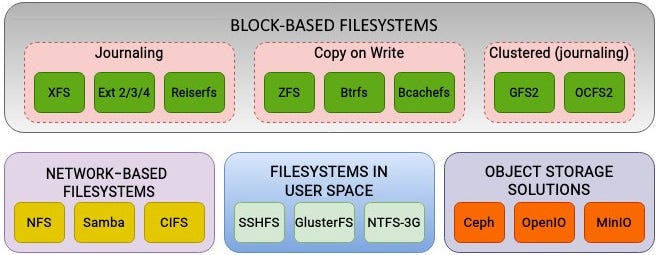
Supported file systems and their related categories
Journaling (EXT4)
To improve file system reliability in case of outages and system crashes, the feature of journaling was introduced in file systems.
The concept of file system journaling finds its roots in the design of database systems. Journaling guarantees data consistency and integrity in case a transaction fails due to external events, such as hardware failure. A journal will keep track of uncommitted changes by recording such operations in a journal. When the system comes back online, the database will perform a recovery using the journal.

filesystem journaling
File System Journaling
Journaling in file systems follows the same route. Any changes on the file system are first written sequentially to a journal. These changes are referred to as transactions. In the case of a system crash, the file system replays the journal to see whether any transaction is incomplete. Depending on the journaling approach, either metadata or actual data (or both) is first written to the journal. Once data has been written to the file system, the transaction is removed from the journal.
In most cases, journaling improves performance by reducing frequent trips to disks and performing multiple updates in an atomic operation.
Copy-on-Write File Systems (ZFS, Btrfs)
The CoW approach of file systems such as Btrfs and ZFS ensures that existing data is never overwritten. Hence, even in the case of a sudden system crash, existing data will not be in an inconsistent state.
When a modification is requested on a file, instead of directly modifying the original data, a separate copy of the data is created. The original data remains intact while the modified version is stored separately.
While this technique preserves original data, it simplifies file system recovery in the case of a system crash. It also allows for the implementation of snapshots at the file system level. Only modified data blocks are copied to a new location. When a file system needs to be restored using a particular snapshot, the data can be easily reconstructed.
Like ZFS, Btrfs is not just a simple disk file system; it also offers the functionality of a logical volume manager and software RAID. Some of its features include snapshots, checksums, encryption, deduplication, and compression, which are usually not available in regular block file systems.


Network filesystem (NFS)
NFS is a long-standing protocol for network file sharing, allowing clients to access remote files as if they were local. It operates on a centralized client-server architecture, which limits its scalability to the capacity of the central server. Performance is solid for small-scale, low-latency file access, but fault tolerance is minimal without external redundancy like RAID. It offers strong consistency, making it reliable for immediate data access, and it’s easy to set up with broad integration across operating systems like Linux and Windows. NFS excels in legacy applications and shared file systems but falls short in large-scale or cloud environments compared to more modern systems.
Although it lags in performance when compared to regular block storage, it is still used in most enterprise infrastructures, mainly for backups and archiving.
NFS is a distributed filesystem, which allows accessing files stored in a remote location. NFS version 4 is the most recent version of the protocol. Since the communication between the client and server is over a network, any request by the clients will traverse all the layers in the Open Systems Interconnection (OSI) model.

Flow of an I/O request in NFS
The request from an NFS client ends up on the NFS server after traversing the entire network stack. To standardize data representation between the client and server, NFS uses XDR for data encoding at the presentation layer of the OSI model.
The mount command will include the name of the remote directory to be mounted. In NFS terms, this is called an export. The NFS server keeps a list of filesystems that can be exported and a list of hosts that are allowed to access these exports.

NFS versus block filesystem
I/O operations performed on an NFS are called file-level I/O operations. Unlike block filesystems, file-level I/O doesn’t specify the block address of a file when requesting an operation. keeping track of the exact location of the file on the disk is the job of the NFS server. Upon receiving the request from the NFS client, the NFS server will convert it into a block-level request and perform the requested operation.
Filesystem in user space (FUSE, GlusterFS)
In contrast to NFS, GlusterFS is a scalable, open-source distributed file system that aggregates storage from multiple servers into a unified namespace using a decentralized peer-to-peer architecture. This design enables high scalability through scale-out additions, with strong fault tolerance via replication and erasure coding. Performance shines for high-throughput large files but can be moderate in latency for smaller operations. It typically follows an eventual consistency model, though configurable, and requires moderate setup effort. GlusterFS integrates well with cloud and container environments, making it ideal for high-performance computing (HPC), media storage, and cloud setups, where its flexibility outperforms NFS’s simplicity but may not match Ceph’s versatility.
Through the use of the filesystem in user space (FUSE) interface, filesystems can be created without tinkering with the kernel code. Both the actual data and metadata on the filesystem are managed by user-space processes. This is extremely flexible as it allows non-privileged users to mount the filesystem. It’s important to note that FUSE-based filesystems can be stackable, meaning that they can be deployed on top of existing filesystems such as Ext4 and XFS.
The interaction between the user-space daemon and the kernel is achieved using a character device, /dev/fuse. This device plays the role of a bridge between the user-space daemon and the kernel module. The user-space daemon will read from and write requests to this device:
When a process in user space performs any operation on a FUSE filesystem, the relevant system call is sent to the VFS layer. Upon checking that this corresponds to a FUSE-based filesystem, VFS will forward this request to the FUSE kernel module. The FUSE driver will create a request structure and put it in the FUSE queue in /dev/fuse. The communication between the kernel module and libfuse library is achieved using a special file descriptor. The user-space daemon will open the /dev/fuse device to process the result. If the FUSE filesystem is stacked on top of an existing filesystem, then the request will again be routed to the kernel space so that it can be passed to the filesystem underneath.
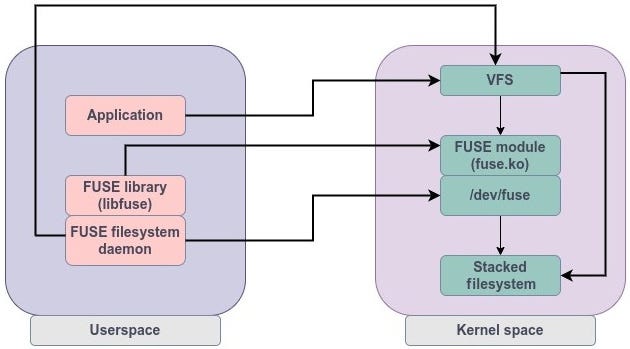
The FUSE approach
One of the most widely used FUSE-based solutions that makes use of this approach is GlusterFS. GlusterFS operates as a user-space filesystem and can be stacked on top of any existing block-based filesystem such as Ext4 or XFS.
FUSE filesystems are not as robust as traditional filesystems but they offer a great deal of flexibility. They are easy to deploy and can be mounted by non-privileged users. Since the filesystem code is in user space, it is easier to troubleshoot and make changes.
Ceph
Ceph stands out as a comprehensive, open-source software-defined storage platform that unifies object, block, and file storage in a decentralized peer-to-peer setup.
Its scalability is exceptional, handling massive growth through scale-out, and it provides top-tier fault tolerance with replication, erasure coding, and self-healing features driven by the CRUSH algorithm. Performance is balanced across mixed workloads, with strong consistency for block and file storage.
However, it’s complex to deploy and manage, demanding more expertise than GlusterFS or MinIO. Ceph integrates seamlessly with ecosystems like OpenStack and Kubernetes, positioning it perfectly for cloud infrastructures, virtualization, and environments needing mixed storage types, where its all-in-one approach surpasses GlusterFS’s file-focused design but adds overhead.
MinIO
MinIO focuses on high-performance object storage, compatible with Amazon S3 APIs, in a decentralized peer-to-peer architecture that’s lightweight and easy to deploy.
It scales effortlessly for large datasets, with excellent fault tolerance through erasure coding, and delivers high throughput optimized for object-based workloads. Consistency is strong and S3-compliant, making it simpler than Ceph’s multi-storage setup.
MinIO shines in cloud-native applications, AI/ML, and analytics, with minimal management needs compared to HDFS’s ecosystem ties. While it lacks native block or file support, its simplicity and performance make it a go-to for modern data lakes, outperforming Ceph in pure object scenarios but not in unified storage versatility.
HDFS (Hadoop Distributed File System)
As an example of other systems, HDFS is tailored for the Hadoop ecosystem, using a centralized architecture with a NameNode managing metadata and DataNodes for storage.
It scales well for large datasets but can face bottlenecks at the NameNode, mitigated in high-availability configurations.
Fault tolerance is high with replication, and performance is optimized for large sequential reads in batch processing. It enforces strong consistency and integrates deeply with tools like Spark and Hive, requiring moderate Hadoop knowledge for setup. HDFS is best for big data analytics and Hadoop workflows, where it handles massive sequential data better than MinIO’s object focus but struggles with small files or random access compared to more general-purpose systems like Ceph.
Summery
Overall, NFS prioritizes simplicity for traditional file sharing, while GlusterFS and Ceph emphasize scalability and fault tolerance for cloud and HPC — GlusterFS leaning toward file storage flexibility and Ceph toward unified multi-type support. MinIO excels in object storage speed and ease for AI/ML, and HDFS targets big data processing efficiency. For small-scale legacy needs, opt for NFS; for versatile cloud setups, choose Ceph; for object-heavy modern apps, go with MinIO; and for Hadoop-centric analytics, select HDFS. If your specific workload involves HPC or media, GlusterFS bridges the gap effectively. Let me know if you’d like more details on any aspect!
메타데이터
- post_id
- 10e2afcf068d
- slug
- comparison-of-file-system-types-10e2afcf068d
- url
- https://medium.com/@kiamars.mirzaee/comparison-of-file-system-types-10e2afcf068d
- canonical_url
- https://medium.com/@kiamars.mirzaee/comparison-of-file-system-types-10e2afcf068d
- author_url
- https://medium.com/@kiamars.mirzaee
- status
- ok
- fetched_at
- 2026-06-16 19:09:56