Why Your Kubernetes Pod Takes 2–3 Minutes to Start: The Hidden Storage Bottleneck
Have you ever deployed a Kubernetes Pod and noticed it stays in the ContainerCreating state for several minutes? At first, you might think…
Why Your Kubernetes Pod Takes 2–3 Minutes to Start: The Hidden Storage Bottleneck
Have you ever deployed a Kubernetes Pod and noticed it stays in the ContainerCreating state for several minutes? At first, you might think Kubernetes is slow, but in many cases, the real bottleneck is the storage layer.
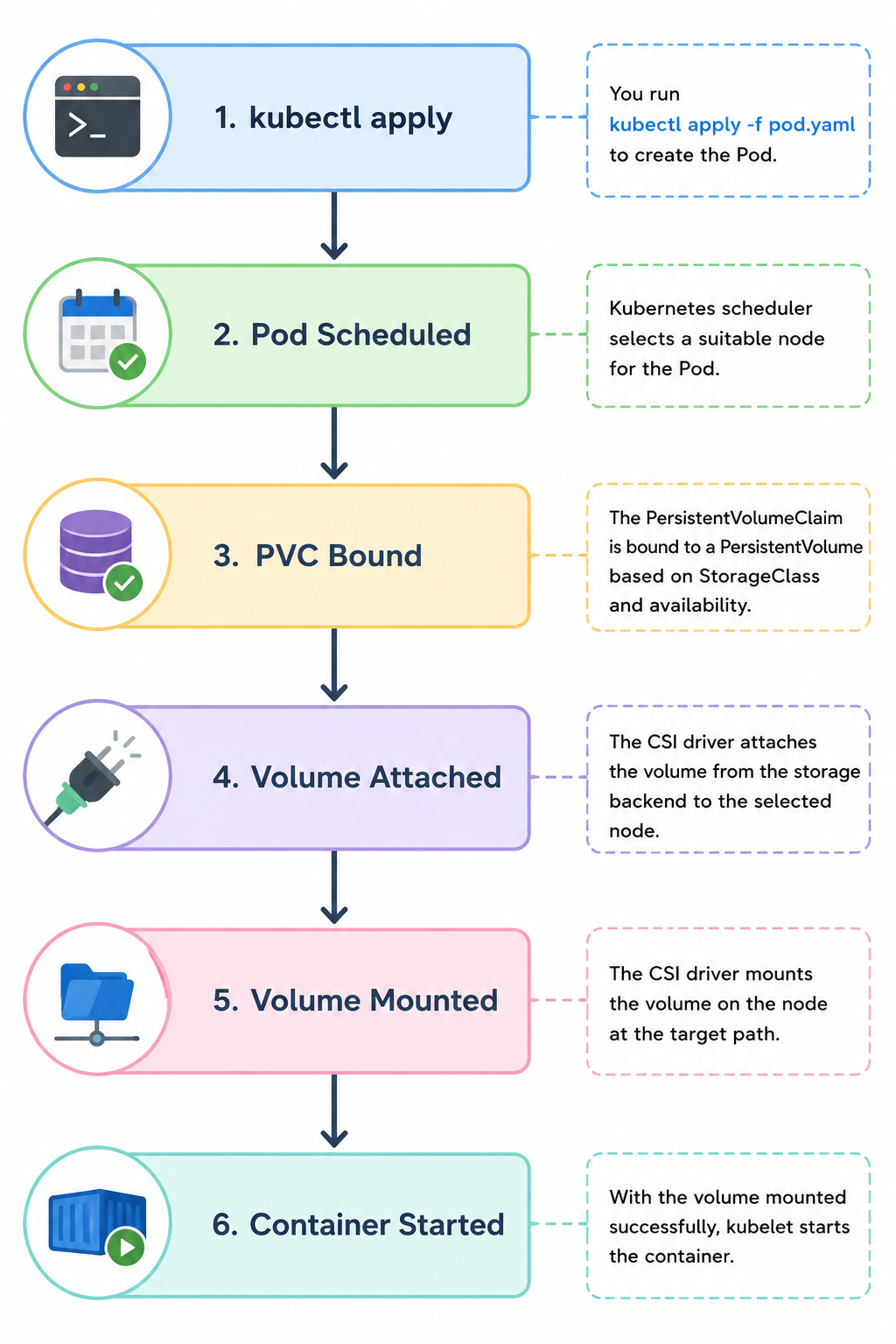
When a Pod uses a Persistent Volume (PV), Kubernetes performs several operations before starting the container. It checks the PersistentVolumeClaim (PVC), attaches the storage volume to the selected node through the CSI (Container Storage Interface) driver, mounts the filesystem, and only then starts the container. If any of these steps are slow, your Pod startup time increases.
A common error you may see is:
MountVolume.MountDevice failed:
rpc error: code = DeadlineExceeded desc = context deadline exceeded
This error usually indicates that Kubernetes is waiting for the storage system to finish attaching or mounting the volume.
The startup process looks like this:
To troubleshoot slow Pod startups, check the Pod events and CSI driver logs:
kubectl describe pod <pod-name>
kubectl get volumeattachment
kubectl describe volumeattachment <name>
If you’re using storage solutions like Longhorn, Amazon EBS, or Azure Disk, slow volume attachment, replica synchronization, or network latency can significantly increase startup time.
Conclusion
When a Pod remains in ContainerCreating, don’t assume Kubernetes is the problem. In many cases, the storage system is the hidden bottleneck. Understanding how PVCs, CSI drivers, and volume attachments work will help you identify and resolve these delays much faster.
References:
- https://kubernetes.io/docs/concepts/storage/persistent-volumes/
- https://kubernetes.io/docs/concepts/storage/storage-classes/
- https://kubernetes-csi.github.io/docs/
- https://kubernetes.io/docs/concepts/storage/volumes/
- https://kubernetes.io/docs/tasks/debug/debug-application/debug-running-pod/
- https://kubernetes.io/docs/concepts/workloads/pods/pod-lifecycle/
메타데이터
- post_id
- 117a026331fc
- slug
- why-your-kubernetes-pod-takes-2-3-minutes-to-start-the-hidden-storage-bottleneck-117a026331fc
- url
- https://medium.com/@deniskalpeshbhai436/why-your-kubernetes-pod-takes-2-3-minutes-to-start-the-hidden-storage-bottleneck-117a026331fc
- canonical_url
- https://medium.com/@deniskalpeshbhai436/why-your-kubernetes-pod-takes-2-3-minutes-to-start-the-hidden-storage-bottleneck-117a026331fc
- author_url
- https://medium.com/@deniskalpeshbhai436
- status
- ok
- fetched_at
- 2026-08-17 18:38:08

