Creating a Smooth WhatsApp-Style Bottom Navigation Animation with Jetpack Compose
One of the things that most impact the perception of quality of a mobile app is micro-interactions. Recently, I decided to replicate the…
Creating a Smooth WhatsApp-Style Bottom Navigation Animation with Jetpack Compose
One of the things that most impact the perception of quality of a mobile app is micro-interactions. Recently, I decided to replicate the famous soft “jump” of WhatsApp’s bottom bar icons in my project.
The Goal
- When the user switches tabs, the icon smoothly lifts upward.
- It has a subtle overshoot (bounce).
- Returns to its original position naturally.
- The animation should only trigger on real tab changes.
Technical Solution
I used what I consider one of the best current approaches in Compose:
- Intelligent Animation Trigger
var trigger by remember { mutableStateOf(0) }

LaunchedEffect(isSelected) {
    if (isSelected) trigger++
}- Natural Spring Animations
val jump by animateFloatAsState(
    targetValue = if (isSelected) -11f else 0f,
    animationSpec = spring(dampingRatio = 0.64f, stiffness = 340f)
)- Efficient Rendering with graphicsLayer
Modifier.graphicsLayer {
    translationY = jump
    scaleX = scale * pressScale
    scaleY = scale * pressScale
}- Final Abstraction: Custom Modifier
Created animatedBottomNavIcon() — a reusable Modifier custom that encapsulates all the animation logic, press feedback, and trigger control.
Why graphicsLayer?
- Doesn’t affect the layout pass (unlike Modifier.offset).
- Excellent performance for continuous animations.
- Allows cheap 2D/3D transformations.
This approach delivers extremely fluid navigation without sacrificing performance or causing unnecessary recompositions.
The Result:
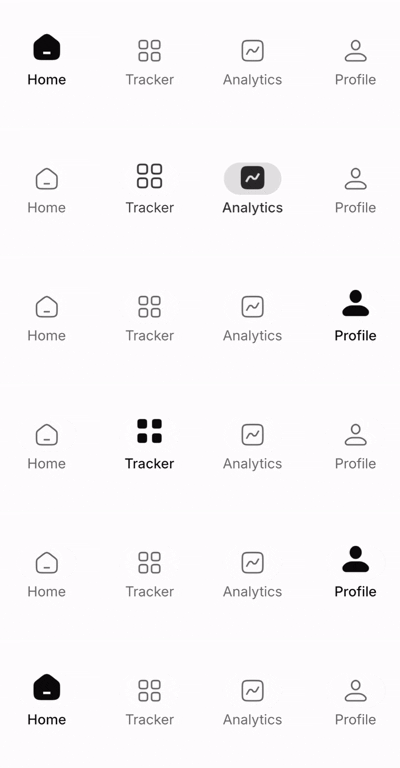
The Custom Modifier
@Composable
fun Modifier.animatedBottomNavIcon(
    isSelected: Boolean,
    jumpHeight: Float = -11f,
    selectedScale: Float = 1.18f,
    pressScale: Float = 0.88f
): Modifier = composed {

    var trigger by remember { mutableStateOf(0) }
    LaunchedEffect(isSelected) {

        if (isSelected) trigger++

    }

    val jump by animateFloatAsState(
        targetValue = if (isSelected) jumpHeight else 0f,
        animationSpec = spring(
            dampingRatio = 0.64f,
            stiffness = 340f
        ),
        label = "jump"
    )

    val scale by animateFloatAsState(
        targetValue = if (isSelected) selectedScale else 1f,
        animationSpec = spring(
            dampingRatio = 0.72f,
            stiffness = 320f
        ),
        label = "scale"
    )

    // Press effect
    val interactionSource = remember { MutableInteractionSource() }
    val isPressed by interactionSource.collectIsPressedAsState()

    val press by animateFloatAsState(
        targetValue = if (isPressed) pressScale else 1f,
        animationSpec = spring(stiffness = 600f),
        label = "press"
    )

    this.then(
        Modifier
            .graphicsLayer {
                translationY = jump
                scaleX = scale * press
                scaleY = scale * press

            }
    )

}
메타데이터
- post_id
- 11e55a809446
- slug
- creating-a-smooth-whatsapp-style-bottom-navigation-animation-with-jetpack-compose-11e55a809446
- url
- https://medium.com/@ktlevelll/creating-a-smooth-whatsapp-style-bottom-navigation-animation-with-jetpack-compose-11e55a809446
- canonical_url
- https://medium.com/@ktlevelll/creating-a-smooth-whatsapp-style-bottom-navigation-animation-with-jetpack-compose-11e55a809446
- author_url
- https://medium.com/@ktlevelll
- status
- ok
- fetched_at
- 2026-06-09 15:37:30



