CX Agent Studio Architecture Deep Dive: Root Agents, Sub-Agents, Tools, and the Agentic Paradigm
v
CX Agent Studio Architecture Deep Dive: Root Agents, Sub-Agents, Tools, and the Agentic Paradigm
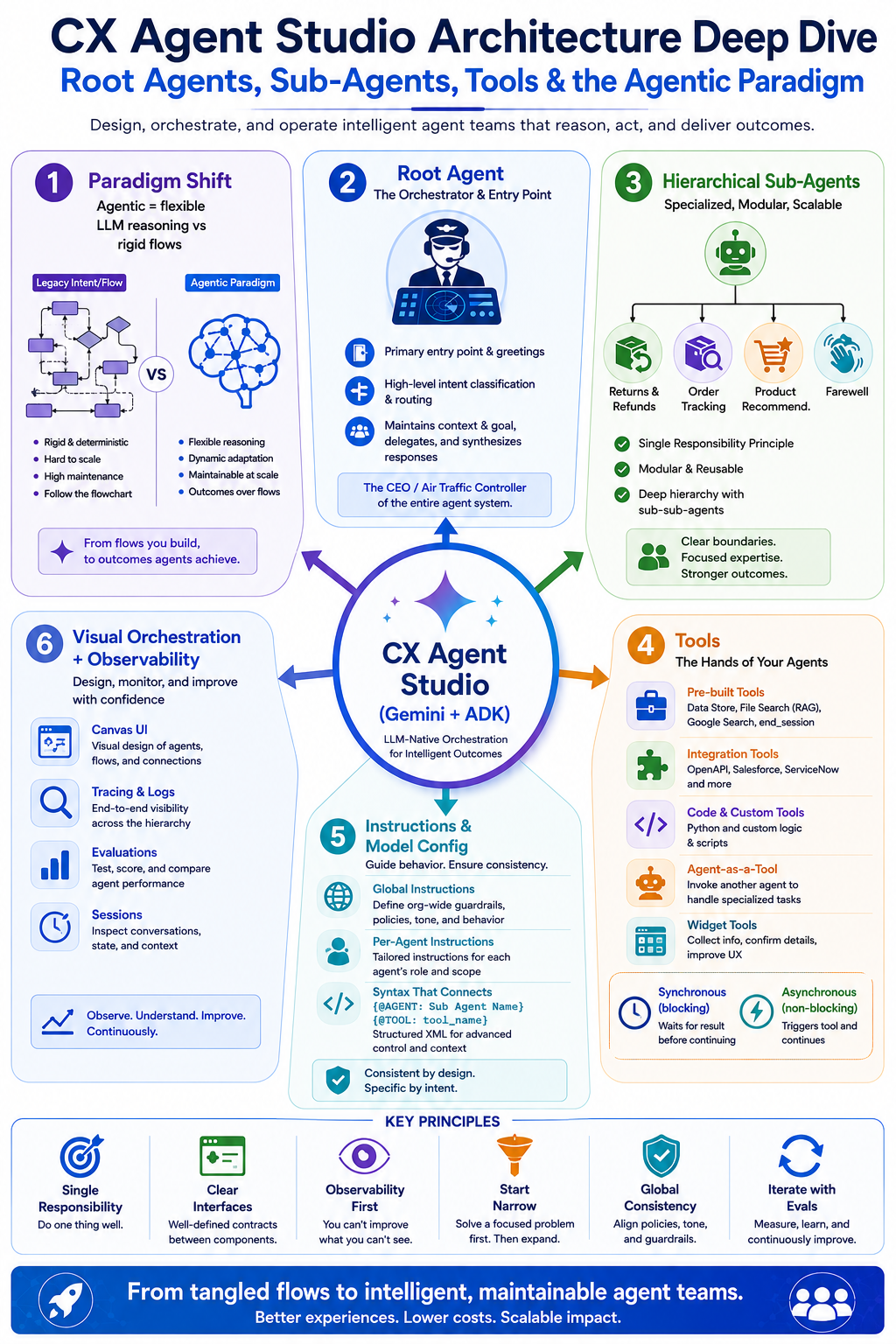
v
Agentic vs. Intent/Flow Paradigm: The Fundamental Shift

Dialogflow CX excels at structured, predictable experiences. You define intents, map them to flows, and control every transition with pages, conditions, and fulfillment. It’s deterministic, auditable, and great for compliance-heavy or highly scripted scenarios (think regulatory disclosures or step-by-step troubleshooting).
But as conversations grow complex — multiple domains, dynamic routing, tool use, personalization, and multi-turn reasoning — those graphs become a liability. Managing 100+ pages across interconnected flows turns into a maintenance nightmare. The mental model is “follow this flowchart.”
CX Agent Studio flips the model. It’s built on Google’s Agent Development Kit (ADK) and powered by Gemini. Instead of rigid flows, you get LLM-native agents that:
- Reason about user goals
- Delegate dynamically
- Use tools
- Maintain context across specialized components
The question changes from “Which intent did the user trigger?” to “What does the user need, and which specialized agent or tool should handle it?”
This agentic paradigm shines in complex, ambiguous, or evolving scenarios. It trades some predictability for dramatically higher flexibility and lower long-term maintenance.
Root Agent: The Orchestrator and Entry Point
Every agent application in CX Agent Studio has exactly one root agent (also called the steering agent).
Think of the root agent as the CEO or air traffic controller:
- It’s the primary entry point for user conversations.
- It handles initial greetings and high-level intent classification/routing.
- It maintains the overall goal and conversation context.
- It delegates specific tasks to the right sub-agents.
- It synthesizes results and responds to the user.

The root agent doesn’t need to do everything itself. Its superpower is orchestration. With clear instructions and descriptions of available sub-agents, the LLM inside the root agent intelligently decides when and how to delegate.
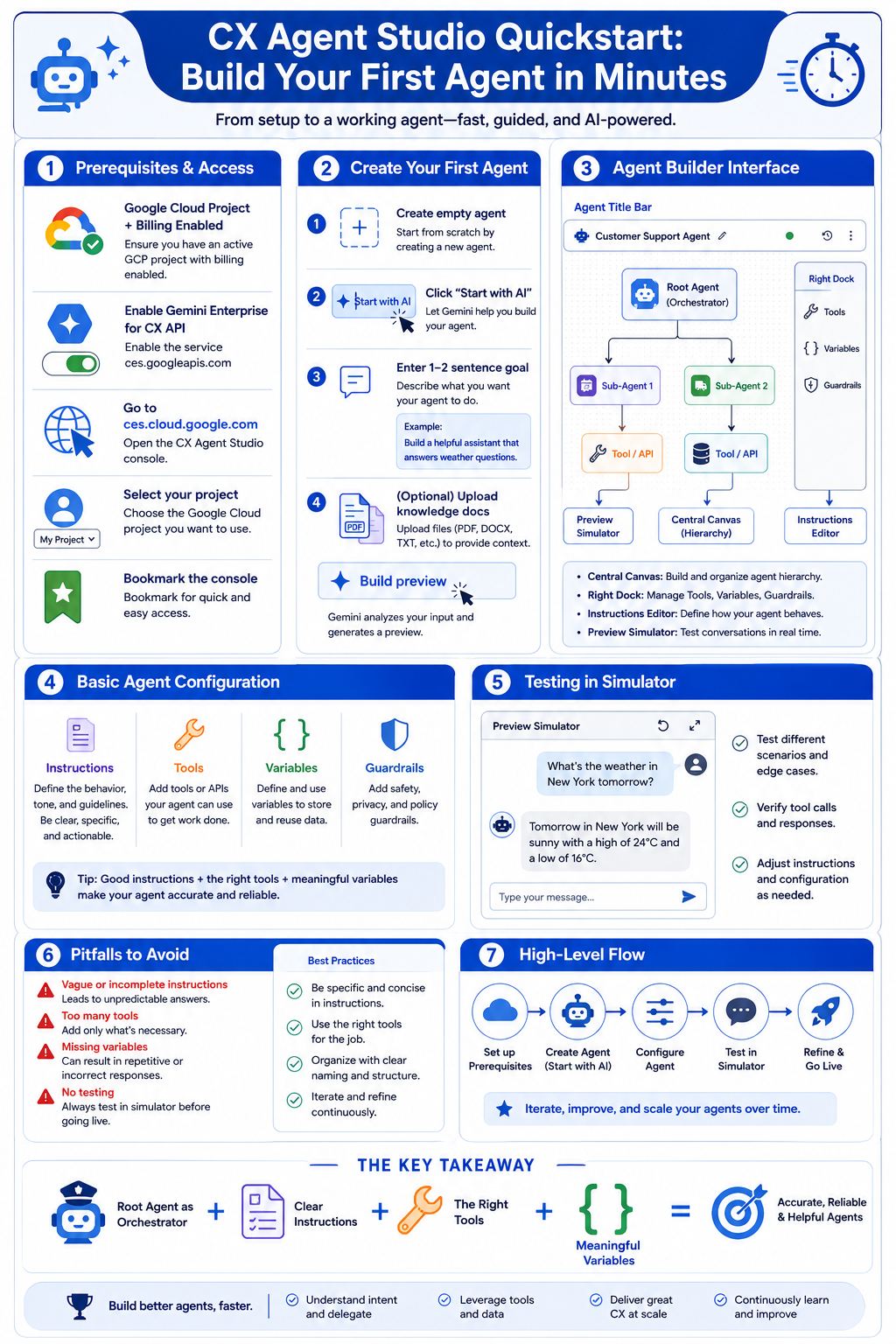
You create the root agent automatically when you create a new agent application in the CX Agent Studio console.
Sub-Agents: Specialization, Modularity, and Hierarchical Power
Sub-agents (child agents) are specialized agents designed for specific tasks, domains, or capabilities. Examples include:
- A “Returns & Refunds” sub-agent
- An “Order Tracking” sub-agent
- A “Product Recommendation” sub-agent
- A “Farewell” sub-agent for clean conversation closure
Why sub-agents matter:
- Single Responsibility Principle — Each sub-agent owns one clear domain.
- Modularity & Reusability — Build once, invoke from multiple parents.
- Hierarchical composition — Sub-agents can themselves have sub-agents, creating deep trees.
- Focused instructions & tools — A specialist agent can have tighter prompts and only the tools it needs.

Root agents invoke sub-agents (and sub-agents can invoke other sub-agents) primarily through well-crafted instructions using the special syntax {@AGENT: Sub Agent Name}. The LLM uses the sub-agent’s description + your routing instructions to decide delegation.
You add sub-agents visually in the agent builder by clicking the plus icon on a parent agent.
This hierarchical model is far more maintainable than flat, massive flow graphs.
Tools: The Hands of Your Agents
If agents are the brains, tools are the hands that connect to the real world.
CX Agent Studio supports a rich set of tools:
- Pre-built: Data store tools, File search (RAG), Google Search grounding, System tools (e.g., end_session).
- Integration-focused: OpenAPI tools, Integration Connector tools, Salesforce, Service Now.
- Code & Custom: Python code tools, Client function tools.
- Agent as a Tool: Reuse another agent’s capabilities without handing off the full conversation (great for focused capability reuse with sync or async execution).
- Widget tools: For rich interactive UI elements.

How agents use tools:
- Create the tool in the tool panel.
- Attach it to specific agents.
- Instruct the agent (using {@TOOL: tool_name} syntax) on when and how to use it.
Tools support synchronous (blocking — agent waits for result) and asynchronous (non-blocking — agent can continue conversing while the tool works in the background, with pending/final response handling).
Global tool execution mode (parallel vs sequential) is configurable at the agent application level.
Pro tip: Always give tools semantically rich names and high-quality descriptions — the LLM relies on them heavily for correct tool selection.
Instructions & Model Configuration: The Secret Sauce
Instructions are where the magic (and most of the control) lives.
Per-agent instructions define role, persona, goals, constraints, task flows, and routing logic. You can write in natural language and then use the Restructure instructions button to convert to a recommended XML-like structure (<role>, <persona>, <constraints>, <taskflow>, <examples>, etc.). This structured format often improves reliability.
Special syntax makes everything first-class:
- {@AGENT: Greeting Agent} for delegation
- {@TOOL: get_order_status} for tool use
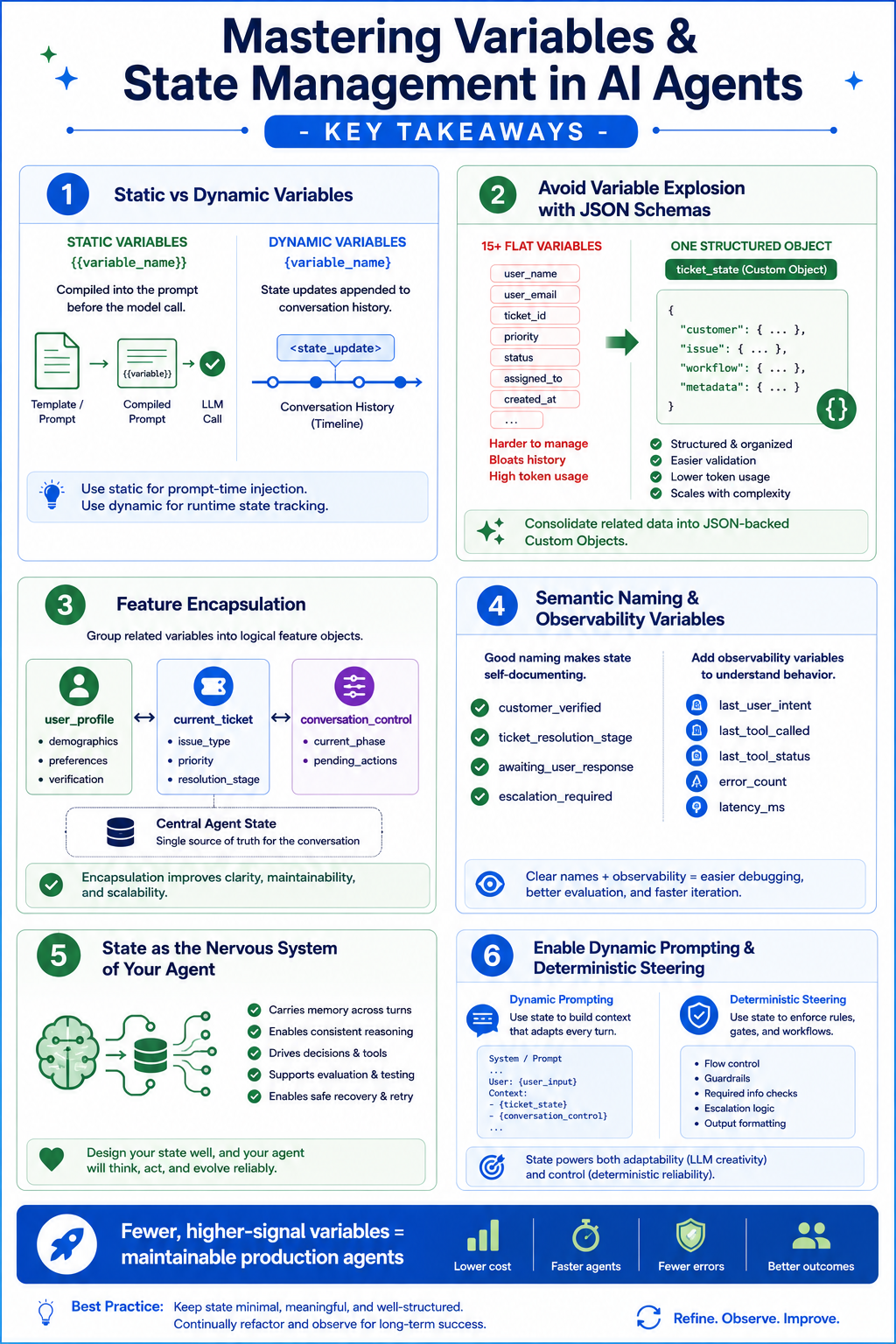
- {variable_name} for context/variables
Global instructions (set at the agent application level) apply to every agent. Use them for shared personality, brand tone, DOs/DON’Ts, and common context. This is your primary lever for consistent personality across the hierarchy.
Model configuration:
- Set a global default model for the entire application.
- Override per agent (useful for using lighter/faster models on the root and heavier models on complex sub-agents or when using agents-as-tools).
- Supported models include Gemini variants optimized for text or voice (e.g., gemini-2.5-flash, voice-optimized live models).
Well-structured instructions + clear agent descriptions are the difference between flaky and reliable multi-agent systems.
Supporting Components: Sessions, Tracing, and Observability
CX Agent Studio provides first-class support for production needs:
- Sessions: Manage conversation state and context.
- Global variables: Centralized state management (huge improvement over scattered flow variables).
- Tracing & Evals: Inspect reasoning, tool calls, and delegation decisions. Use scenario-based testing (describe a goal → AI simulates) and golden tests for regression.
- Callbacks: Custom code hooks for advanced logic.
- Collaboration & Versioning: Built-in support for team workflows.
Observability is dramatically better than traditional flow debugging because you can see why the agent delegated or called a tool.
Visual Orchestration in the UI
One of the most delightful aspects of CX Agent Studio is the visual agent builder. You don’t just define hierarchies in code or docs — you see them.
The canvas-style interface lets you:
- Add sub-agents with a click
- Visually arrange and understand the hierarchy
- Move agents logically
- Quickly grasp responsibilities at a glance
This is a massive leap from managing tangled flow graphs in Dialogflow CX. It aligns the UI with how you think about the system: as a team of specialists reporting up to a coordinator.
Nuances & Edge Cases (Learn These the Hard Way)
Even with great architecture, watch for these:
- Over-delegation: Too many layers or too many sub-agents increases latency and can confuse routing. Keep hierarchies reasonably shallow.
- Consistent personality: Rely heavily on global instructions + shared persona guidelines.
- Tool failures & async handling: Explicitly instruct agents on error handling, retries, pending states, and graceful fallbacks.
- State & context: Use global variables and pass relevant context when delegating. Don’t assume sub-agents magically know everything.
- Agent-as-Tool vs Sub-Agent: Use sub-agents when you want full delegation with broader context. Use “Agent as a Tool” when you want to reuse capabilities synchronously or asynchronously without transferring conversational control.
- Rule of thumb: Use CX Agent Studio for most new complex or dynamic experiences. Keep or import Dialogflow flows for highly deterministic, compliance-critical paths if needed.
Design Principles for Mastery
To build systems that scale:
- Single Responsibility — One clear job per sub-agent.
- Clear Interfaces — Excellent descriptions + specific instructions for every agent and tool.
- Observability First — Design with tracing and evals in mind.
- Start Narrow, Expand — Begin with root + 2–3 focused sub-agents.
- Global Consistency — Use global instructions aggressively for tone and guardrails.
- Iterate with Evals — Scenario tests and golden tests are your friends.
Conclusion: Building the Future of Conversational AI
CX Agent Studio’s architecture — root as orchestrator, specialized hierarchical sub-agents, rich tool ecosystem, and visual-first design — represents a genuine evolution in how we build production agentic systems.
메타데이터
- post_id
- 1203ca2ddafe
- slug
- cx-agent-studio-architecture-deep-dive-root-agents-sub-agents-tools-and-the-agentic-paradigm-1203ca2ddafe
- url
- https://medium.com/google-cloud/cx-agent-studio-architecture-deep-dive-root-agents-sub-agents-tools-and-the-agentic-paradigm-1203ca2ddafe
- canonical_url
- https://medium.com/google-cloud/cx-agent-studio-architecture-deep-dive-root-agents-sub-agents-tools-and-the-agentic-paradigm-1203ca2ddafe
- author_url
- https://medium.com/@yashkavaiya
- status
- ok
- fetched_at
- 2026-06-21 15:33:18