🚀 How We Boosted LCTL OCR Labeling Efficiency by 10x with PaddleOCR + ERNIE 4.5
If you’ve ever worked on OCR for less commonly taught languages (LCTLs) like Russian, Thai, or Arabic, you know the pain: data labeling.
🚀 How We Boosted LCTL OCR Labeling Efficiency by 10x with PaddleOCR + ERNIE 4.5

Automated OCR Annotation Pipeline
If you’ve ever worked on OCR for less commonly taught languages (LCTLs) like Russian, Thai, or Arabic, you know the pain: data labeling.
Getting high-quality labeled data of LCTLs is the single biggest roadblock. It’s expensive (think $120 per 1,000 LCTL characters), slow (weeks of work), and sometimes… unreliable (annotators get tired, humans disagree, and consistency tanks).
Meanwhile, your model is sitting there, hungry for more training data.
So we asked ourselves:
👉 What if AI could label its own training data?
That question led us to build an automated ocr annotation pipeline that combines PaddleOCR (for detection + cropping) with ERNIE 4.5 (for multilingual recognition). The result?
- Data prep time: weeks → hours
- Cost: 95% lower
- Accuracy: better than manual labeling
- Efficiency: 22× faster
And the best part — it actually works in production. Let’s walk through how.
🌍 The Data Dilemma in LCTL OCR
OCR for English and Chinese is a solved problem (datasets are huge, tooling is mature). But in the real world, businesses need OCR for dozens of LCTLs:
- Russian receipts for e-commerce
- Arabic invoices for cross-border payments
- Thai menus for localization apps
Here’s the catch:
- 📉 Data is scarce — no massive open datasets like English
- 💸 Annotation is costly — you need skilled linguists, not just crowd workers
- 💤 Manual labeling is slow and inconsistent
This is the classic LCTL trap. Without labeled data, you can’t train a model. Without a model, you can’t scale annotation.
So… why not let AI bootstrap the process?
⚡ Our Approach: AI Labeling AI
We designed a pipeline with a simple principle:
Let AI do the boring, repetitive work, and let humans only review the edge cases. Here’s the workflow:
- Detect text lines with PaddleOCR (PP-OCRv5).
- Crop each text line into a small image.
- Run ERNIE 4.5 twice on each crop (two independent recognitions).
- Keep only the consistent outputs (if both predictions match).
That’s it. Inconsistent samples get flagged for review, but most data sails through automatically.
This dual-check trick is key — it filters out “AI hallucinations” and ensures only high-confidence labels make it into your dataset.
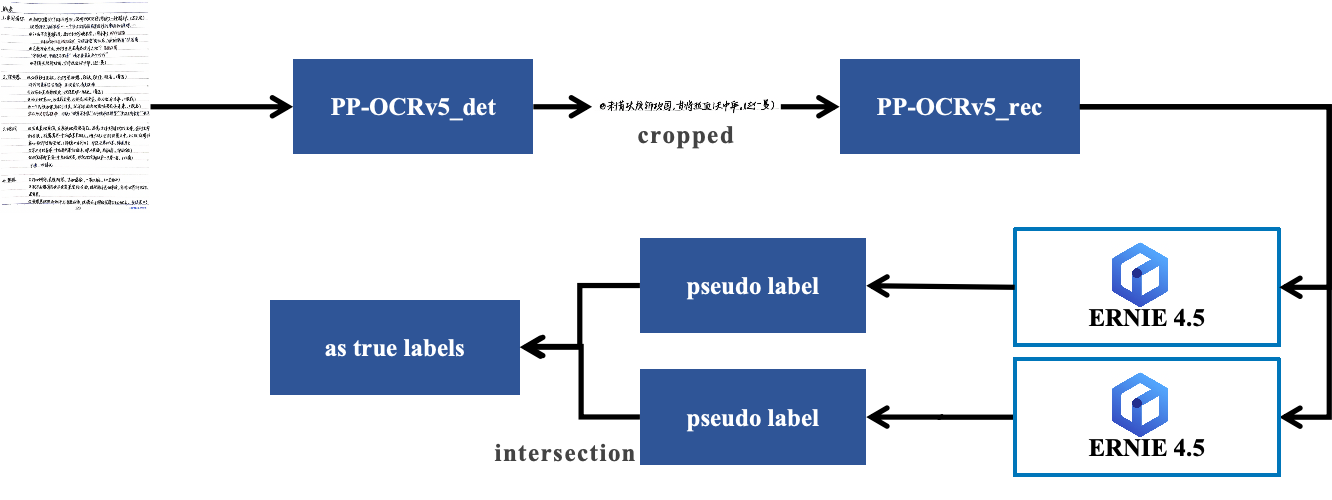
The workflow of AI Labeling
🛠️ Setting Up the Pipeline
If you’ve worked with PaddleOCR before, refer to the Installation document:
# Create and activate virtual environment (recommended)
python -m venv ocr-env
source ocr-env/bin/activate # Linux/Mac
ocr-env\Scripts\activate    # Windows

# Install dependencies
pip install paddlepaddle-gpu # or paddlepaddle (CPU version)
pip install paddleocr
pip install openai # for calling ERNIE 4.5 API
pip install matplotlib tqdm opencv-python
🔑 Pro tip: The openai SDK works for ERNIE if you just point base_url to your ERNIE 4.5 endpoint.
🔍 Step 1: Detect and Crop Text Lines
We start by detecting all text regions in an image and saving them as small crops.
from paddleocr import TextDetection
import cv2, os, glob

ocr = TextDetection(model_name="PP-OCRv5_server_det", device='gpu')

def crop_and_save(image_path, output_dir):
    result = ocr.predict(image_path)
    for idx, box in enumerate(result[0]['dt_polys']):
        # crop text region here...
        cv2.imwrite(f"{output_dir}/crop_{idx}.jpg", crop_img)
Think of this step as a data explosion — one photo with 20 lines of Russian text suddenly gives you 20 small labeled candidates.
🤖 Step 2: Let ERNIE 4.5 Do the Labeling
Here’s the magic:
from openai import OpenAI
client = OpenAI(base_url="http://your-ernie-server:8866/v1", api_key="xxx")

def auto_label(image_path):
    # Run recognition twice
    text1 = run_ernie(image_path)
    text2 = run_ernie(image_path)
    return text1 if text1 == text2 else None
If both outputs match, we trust the result. If not — toss it or flag for review.
This simple rule gave us 96.3% accuracy in Russian text, outperforming human annotators in consistency.
👉 The full sample project code is available here
📊 Results: What Changed
On 1,000 Russian product images, here’s the side-by-side:
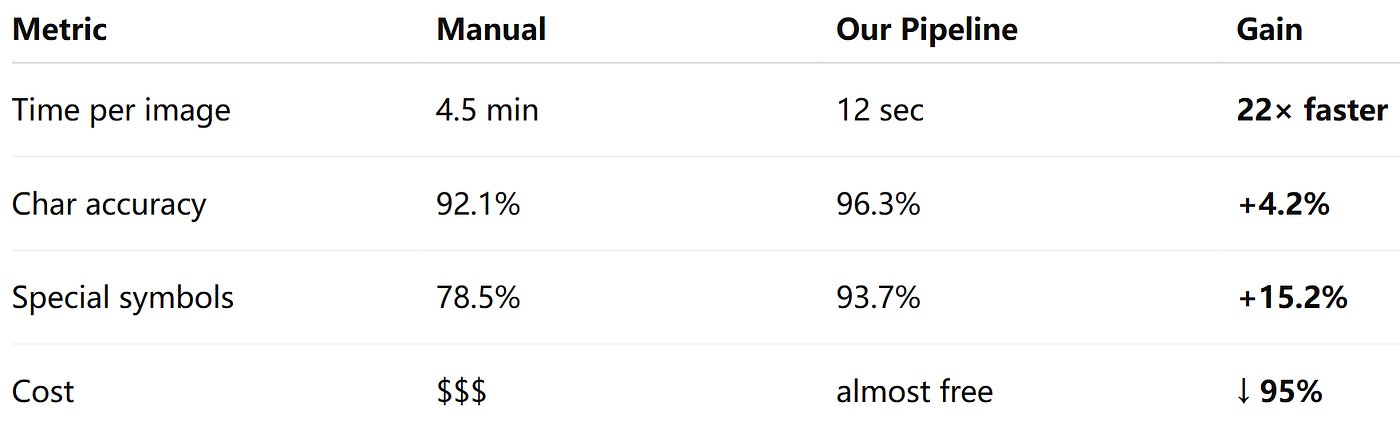
Results of AI Labelling
🚢 Training and Deployment
Once labeled, you can drop the dataset straight into PaddleOCR training scripts:
python PaddleOCR/tools/train.py \
    -c configs/rec/PP-OCRv5/multi_language/ru_PP-OCRv5_mobile_rec.yml \
    -o Global.train_batch_size_per_card=64 \
       Global.epoch_num=200 \
       Global.lr=0.001 \
       Global.print_batch_step=10
✅ Tip: Randomly sample 100–200 labels for manual inspection before training to ensure quality.
Export and deploy as usual:
python PaddleOCR/tools/export_model.py \
    -c configs/rec/PP-OCRv5/multi_language/ru_PP-OCRv5_mobile_rec.yml \
    -o Global.save_inference_dir=./inference/rec_ru
And you’re ready to run real-time inference with your new Russian OCR model.
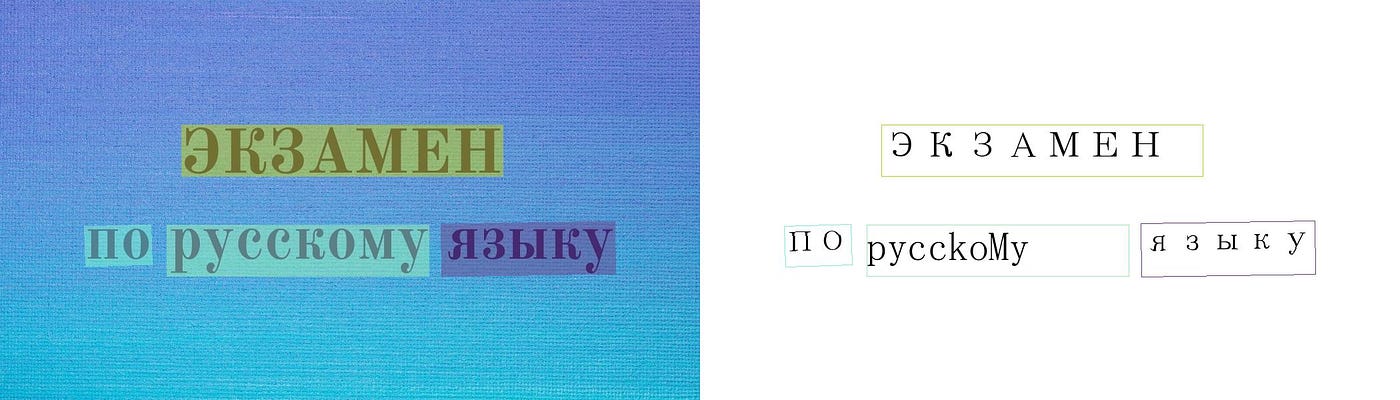
!paddleocr text_recognition -i https://paddle-model-ecology.bj.bcebos.com/paddlex/PaddleX3.0/demo_images/labeled_test.jpg --model_name eslav_PP-OCRv5_mobile_rec --model_dir ./inference/rec_ru/Here is the recoginition result:
💡 Why This Matters
For me, the “aha” moment was realizing this pipeline turns annotation from a bottleneck into a non-issue.
- No more waiting weeks for labeled data.
- No more burning budget on manual annotation.
- No more inconsistent human labels.
Instead, we get:
✅ AI labeling AI → fast, consistent, scalable ✅ Humans only review edge cases → smarter use of expert time ✅ Models iterate faster → easier cold starts for new languages
And while we tested on Russian, the same trick applies to less commonly taught languages (LCTLs).
🔮 Looking Ahead
This approach is more than just a hack — it’s a glimpse into how we’ll build AI in the LLM era.
Instead of humans painstakingly feeding data to models, models will increasingly generate their own data, validate it, and improve themselves.
For OCR, that means unlocking dozens of under-served languages. For multimodal AI, it means rethinking the entire R&D workflow.
And honestly? That’s exciting.
📎 Resources
- Full tutorial (with code): LCTL OCR with PaddleOCR + ERNIE
- PaddleOCR docs: https://github.com/PaddlePaddle/PaddleOCR
- ERNIE docs: https://github.com/PaddlePaddle/ERNIE
메타데이터
- post_id
- 12129cc64dad
- slug
- how-we-boosted-lctl-ocr-labeling-efficiency-by-10x-with-paddleocr-ernie-4-5-12129cc64dad
- url
- https://medium.com/@alex_paddleocr/how-we-boosted-lctl-ocr-labeling-efficiency-by-10x-with-paddleocr-ernie-4-5-12129cc64dad
- canonical_url
- https://medium.com/@alex_paddleocr/how-we-boosted-lctl-ocr-labeling-efficiency-by-10x-with-paddleocr-ernie-4-5-12129cc64dad
- author_url
- https://medium.com/@alex_paddleocr
- status
- ok
- fetched_at
- 2026-06-24 16:30:55