Building Local AI Agents: A Practical Guide to Models, Memory, and Orchestration
A local AI agent is a system where the model runs on your own hardware, takes actions on your behalf, and maintains context across…
Building Local AI Agents: A Practical Guide to Models, Memory, and Orchestration
A local AI agent is a system where the model runs on your own hardware, takes actions on your behalf, and maintains context across sessions, all without sending data to an external API. Unlike a simple chatbot that responds and forgets, an agent can reason over multiple steps, use tools, and build up knowledge over time. Running it locally means you get the benefits of an intelligent assistant without the privacy trade-offs or API costs that come with cloud-hosted alternatives.
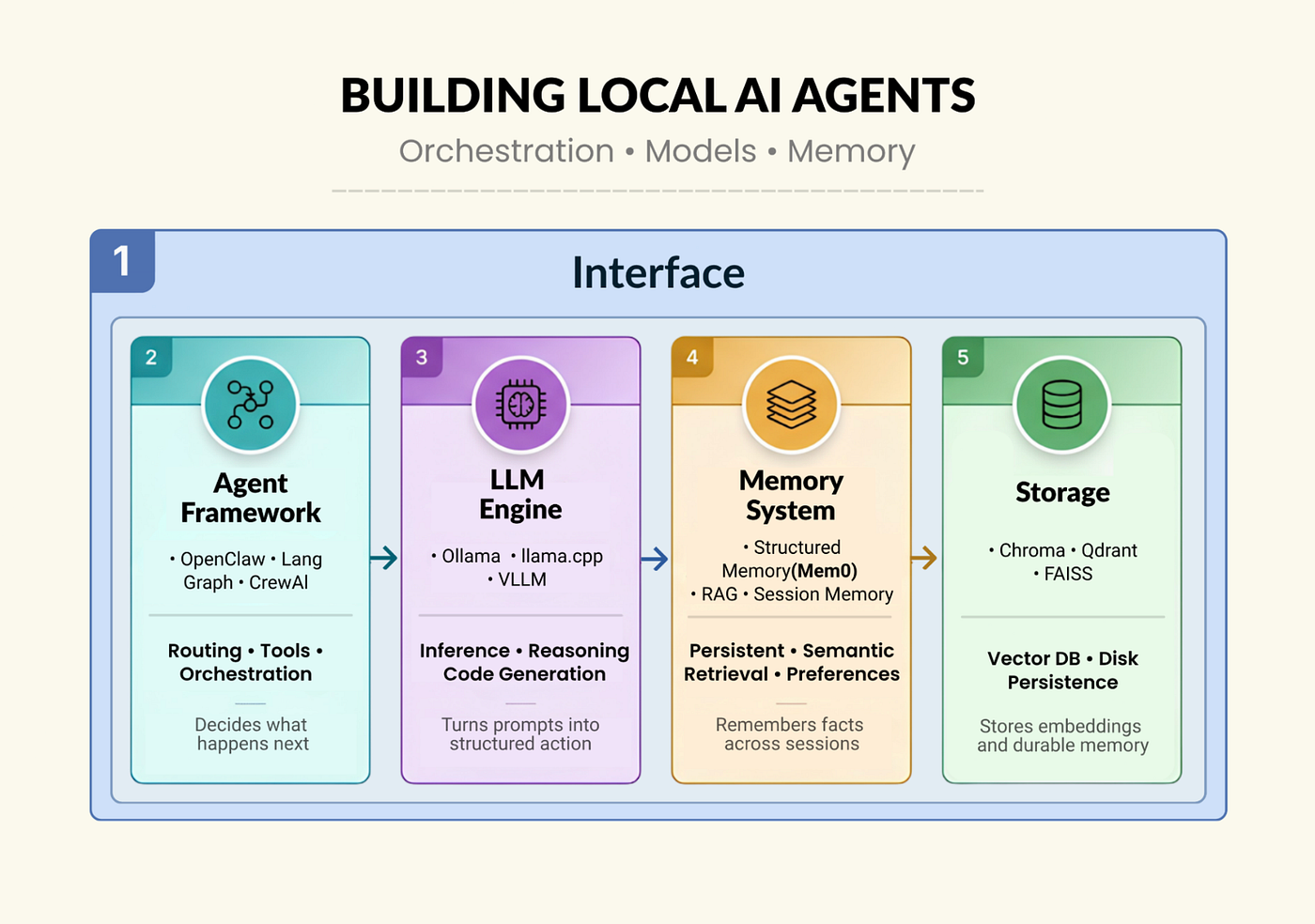
Building a local AI agent requires five layers to work: an LLM layer that runs inference on your hardware, an agent framework that routes and executes actions, a memory layer that makes the agent smarter over time, a storage layer that persists what it learns, and an interface layer that connects it to how you actually work.
This article walks through each layer, compares options, and explains the trade-offs so you can build a stack that fits your actual use case.
Layer 1: LLM Layer
This is the engine. The model handles intent detection, code generation, and any structured data extraction that the rest of the stack depends on. Everything else is plumbing built around what the model can reliably do.
Three major tools that dominate the local inference space include:
- Ollama: This is the easiest entry point into local inference. All it requires is one command to install it, one command to pull a model, and we immediately have an OpenAI-compatible API running on localhost. It also handles model management, quantization selection, and context windows without configuration. However, it is not designed for production traffic, but more for a personal assistant or developer tool.
ollama pull qwen3:8b
ollama pull nomic-embed-text
- Llama.cpp: This library sits one level lower than Ollama. It is a C++ inference engine that runs quantized GGUF models directly without any daemon or HTTP layer. Llama.cpp’s memory footprint is minimal, making it the right choice for edge deployments like Raspberry Pi, embedded Linux, hardware where Ollama would be too heavy. The trade-off is that there is no built-in model management and more manual configuration.
- vLLM: This one is a production option. It implements PagedAttention and continuous batching techniques which are used at scale in cloud inference APIs. If you’re building something that serves multiple users or has real throughput requirements, vLLM is the right layer. It requires proper GPU infrastructure, but it scales better than Ollama or llama.cpp.
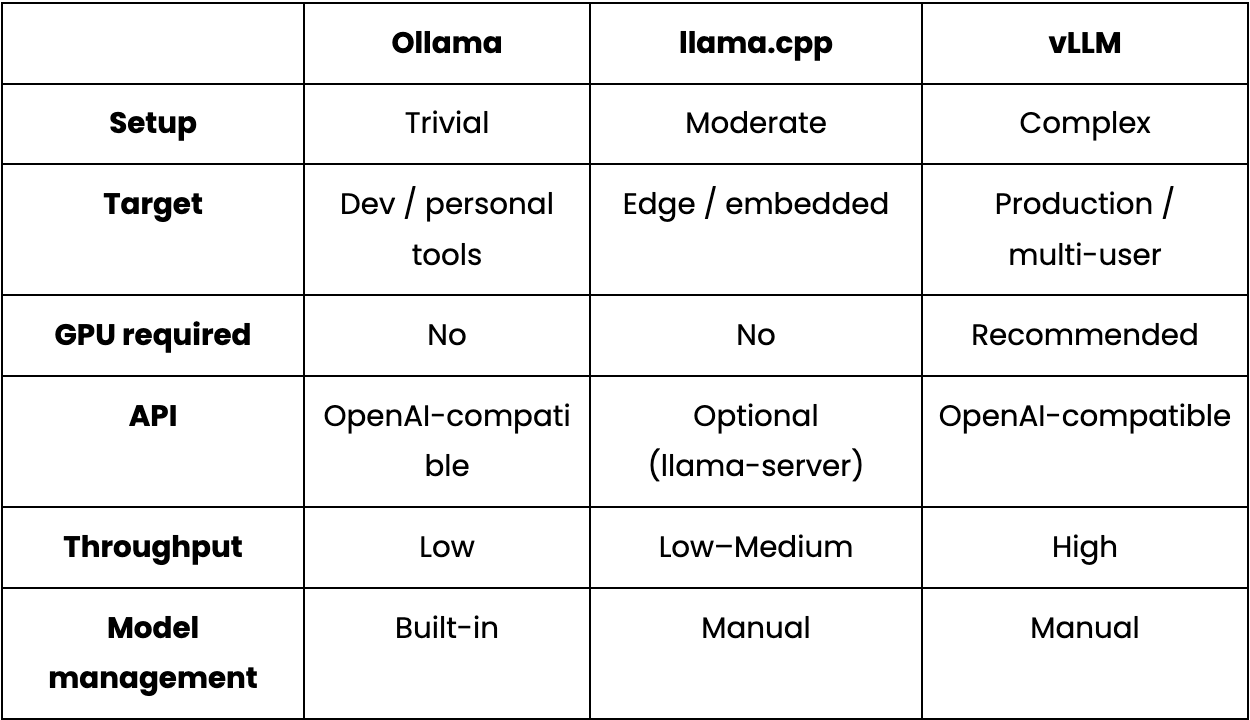
In practice, for a single-developer local assistant, Ollama is the right default setup where simplicity outweighs throughput. The qwen3:8b model is worth highlighting specifically as it produces reliable JSON for intent detection, handles code generation cleanly, and fits in 8 GB VRAM. One quirk to be aware of is that it wraps output in <think>…</think> blocks before returning actual content, which breaks any downstream JSON parser that processes the raw response. The fix is a small intercept that injects think: False globally:
_orig_ollama_chat = ollama.chat
def _no_think_chat(*args, **kwargs):
    opts = kwargs.get("options") or {}
    if isinstance(opts, dict):
        opts.setdefault("think", False)
        kwargs["options"] = opts
    return _orig_ollama_chat(*args, **kwargs)
ollama.chat = _no_think_chat
Using setdefault means individual callers can still opt into thinking mode explicitly when they need it. For JSON extraction and code generation in a tool-use pipeline, thinking mode adds latency without improving output quality.
Layer 2: Agent Framework Layer
The LLM layer is responsible for generating text. While the agent framework decides what to do with it and what to do next. This layer handles intent classification, action routing, and execution.
OpenClaw is tool-first approach and filesystem-native. Every agent action is a command dispatched to a declared skill like create a file, write code, open a folder, run a shell command. You write a SKILL.md file that declares the skill’s name and dispatch method, and OpenClaw handles routing:
- -
name: local-ai-assistant
description: Local AI coding assistant with persistent memory
command-dispatch: tool
command-tool: exec
command-arg-mode: raw
-
For a coding assistant where the majority of operations are file I/O, this model fits naturally. The limitation is that it’s not designed for complex multi-step reasoning chains or coordination across multiple agents.
LangGraph takes the opposite approach. You define an explicit state graph where nodes are LLM calls or actions, edges are transitions, and the framework manages state across steps. The trade-off is upfront design work where you need to define your state schema and graph topology before writing business logic. For simple tool-use tasks, it’s overengineering. For complex multi-step pipelines, it gives you a traceable, inspectable record of what happened at each step.
CrewAI abstracts one level higher by defining agents with roles, tasks with descriptions, and the framework figures out execution order and inter-agent communication. It’s the fastest path to a working multi-agent prototype. The downside is that the abstraction makes failures harder to debug.
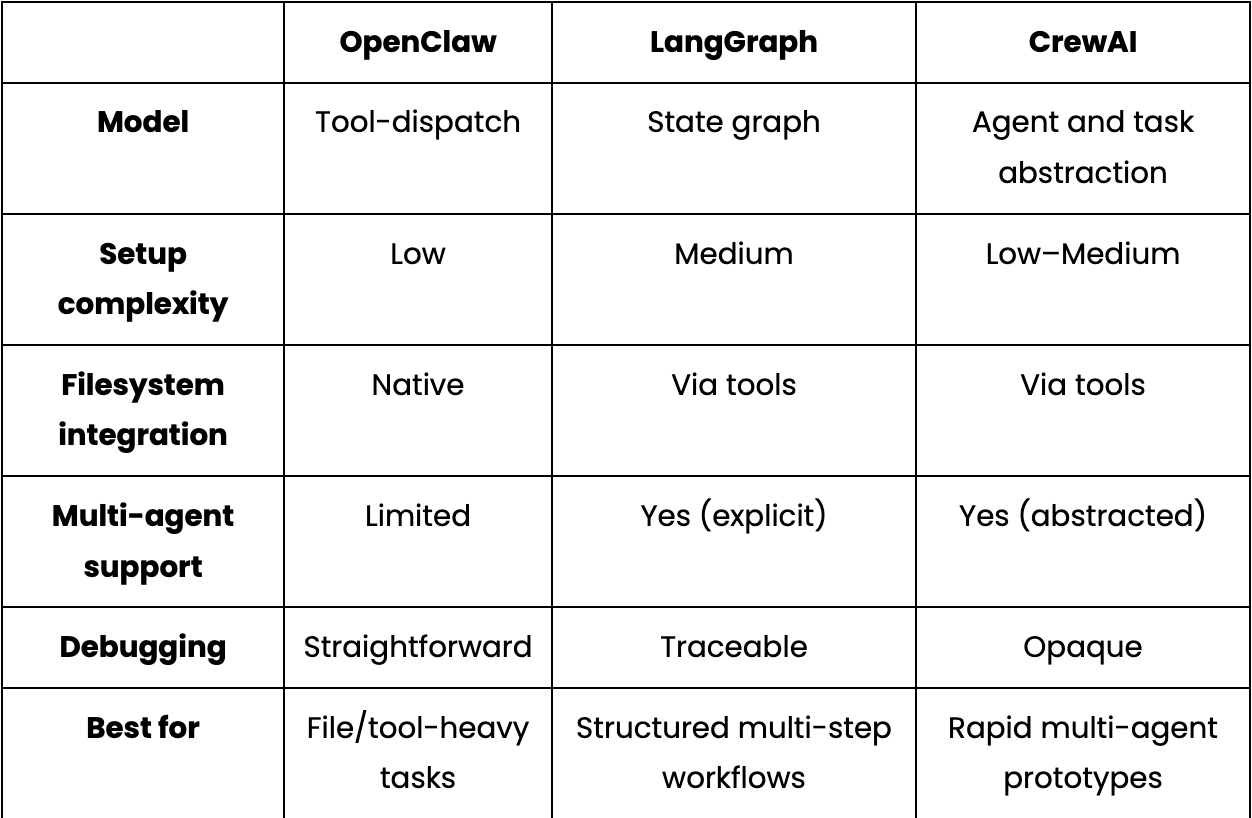
In practice, OpenClaw’s command-dispatch: tool and command-tool: exec tell it to shell out to Python scripts when a skill is invoked, making file operations flow through the framework. Regardless of which framework you choose, intent classification is the first thing that runs on every incoming message. A two-tier system of LLM classification with a regex fallback handles the failure modes better than either approach alone:
def detect_intent(message: str) -> dict:
    try:
        resp = ollama.chat(
            model=OLLAMA_CHAT_MODEL,
            messages=[{"role": "user", "content": INTENT_PROMPT.format(message=message)}],
            options={"temperature": 0, "num_predict": 1024},
        )
        return extract_json(resp["message"]["content"])
    except Exception:
        return keyword_intent_fallback(message)
The regex fallback catches common patterns when the LLM returns malformed output. With thinking mode disabled and temperature at 0, the LLM path handles the vast majority of requests, but the fallback is what keeps the agent functional.
Layer 3: Memory Layer
Memory is what separates an agent that adapts to you from one that treats every conversation as the first. Memory helps to learn your conventions, your preferences, and your project context, and apply them without being asked.
For every memory the core problem lies with in-context memory. The common workarounds are a PREFERENCES.md loaded at startup, a long system prompt, a CONTEXT.md file. These all share a common flaw that they live inside the context window, where they get suppressed by context compaction, token limits, and session restarts.
However, an agent actually needs is memory that lives outside the context window which is stored durably, retrieved semantically when relevant, and updated as facts change.
Here are some common memory approaches that are beneficial for different usecases:
- Basic RAG(Retrieval-Augmented Generation): This is the most common approach and is completely beginner-friendly. A basic RAG flow includes chunking documents or conversation history, embeding them, and retrieving the top-k most similar chunks at query time with minimal setup. The limitation is that it treats memory as a document store, so there’s no distinction between what’s worth keeping long-term and what’s a throwaway query.
- Session-scoped memory (LangChain’s
ConversationBufferMemory,ConversationSummaryMemory, and more): This solves in-session coherence, so the agent won’t forget what you said five messages ago, and summaries keep the context window from filling up. But it doesn’t survive session restarts. For a coding assistant, this is the core gap. - Structured persistent memory(Mem0): This treats memory as first-class data rather than raw text. Instead of storing messages verbatim, the system uses the LLM to extract discrete facts, then embeds and stores those facts in a vector database. On retrieval, the query is embedded, and semantically similar facts are returned, even when the current message doesn’t use the same words as when the fact was stored. Facts persist across sessions and can be deduplicated and updated as they change over time. Libraries like Mem0 implement this pattern with local model support, making it straightforward to wire into an Ollama-based stack.
In practice, if you tell a basic RAG system you prefer pytest, and it stores the raw message. A structured memory system like Mem0, extracts and stores the discrete preference. The next time you ask for a function with tests, the memory returns “user prefers pytest” even if the current message says nothing about testing frameworks.
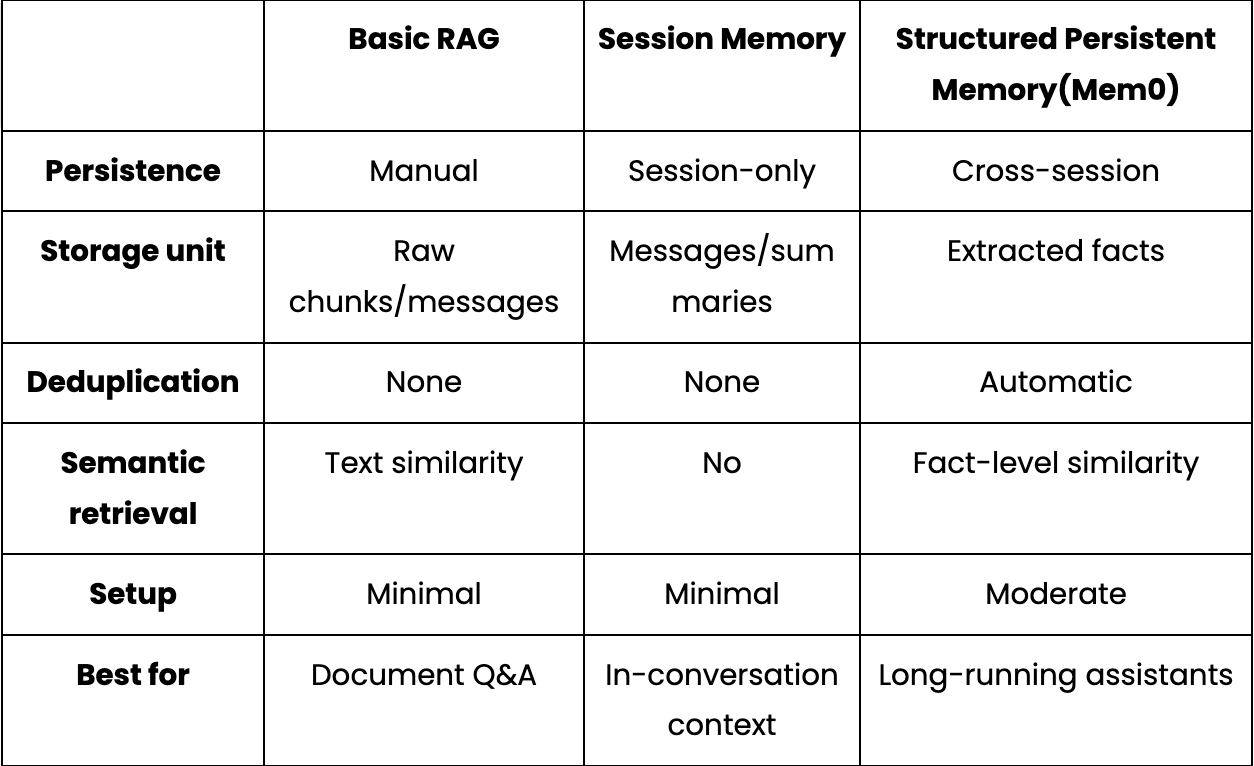
Integrating Mem0 into a local Ollama setup requires only a small configuration snippet. You simply point it at your local LLM, local embedding model, and vector store of choice:
from mem0 import Memory
config = {
    "llm": {
        "provider": "ollama",
        "config": {"model": "qwen3:8b", "ollama_base_url": "http://localhost:11434"},
    },
    "embedder": {
        "provider": "ollama",
        "config": {"model": "nomic-embed-text", "ollama_base_url": "http://localhost:11434"},
    },
    "vector_store": {
        "provider": "qdrant",
        "config": {"host": "localhost", "port": 6333, "embedding_model_dims": 768},
    },
}
memory = Memory.from_config(config)
memory.add("I always use type hints and pytest", user_id="dev")
results = memory.search("write a utility function", user_id="dev")
The above llm block points Mem0 at qwen3:8b for fact extraction which turns a raw message into discrete stored preferences rather than verbatim text. The embedder block uses nomic-embed-text to convert those facts into vectors on write and embed queries on retrieval. Finally, the memory.search() retrieves content by meaning, not keyword match.
One underrated improvement, regardless of your memory approach is to filter what goes into storage before writing it. You can opt for a lightweight classifier that runs before every write which keeps the memory layer clean and retrieval quality high. Here is a code snippet to do the same:
def _is_worth_storing(self, user_message: str) -> bool:
    response = ollama.chat(
        model=OLLAMA_CHAT_MODEL,
        messages=[{"role": "user", "content": SMART_MEMORY_PROMPT.format(
            user_message=user_message
        )}],
        options={"temperature": 0, "num_predict": 512},
    )
    data = self._extract_json_robust(response["message"]["content"])
    return bool(data.get("worth_storing", False))
The classifier prompt gives the model clear examples of the distinction:
HIGH-VALUE (worth storing):
- "I prefer TypeScript over JavaScript"
- "I use pytest, never unittest"
- "Always use Google-style docstrings"

LOW-VALUE (discard):
- "What does enumerate() do?"
- "Write a retry decorator"
- "Thanks"
Without this filter, the vector database fills up with one-off requests that dilute retrieval quality over time.
Layer 4: Storage Layer
The memory layer decides what to remember. The storage layer is where those memories actually live on disk.
- FAISS: This is an in-process library which is fast, well-tested, and has no infrastructure dependencies. So, we can embed it directly in our Python process and it runs in memory or serializes to disk. The only limitation is operational i.e, persistence requires explicit serialization calls, and there’s no HTTP API or built-in replication. It is useful for research pipelines and batch workloads, but is more fragile for a long-running assistant that restarts frequently.
- Chroma: Chroma is the simplest possible vector database for developers. It runs as a local Python process with an optional embedded mode. Data persists to a local directory automatically. To install it, simply run the following command:
pip install chromadbFor a personal assistant with thousands of stored facts, Chroma is more than sufficient. It removes the infrastructure dependency entirely, at the cost of more limited filtering capabilities compared to Qdrant.
- Qdrant: It runs as a proper service, exposes a full REST and gRPC API, supports payload filtering and named vectors. Qdrant is designed for deployments with millions of vectors and concurrent queries. It runs as a separate service, persists to disk natively, and survives Docker restarts without any special handling:
# Qdrant via Docker
docker run -d - name qdrant-local -p 6333:6333 \
-v $(pwd)/qdrant_storage:/qdrant/storage qdrant/qdrant
Here is a quick comparison of these services:
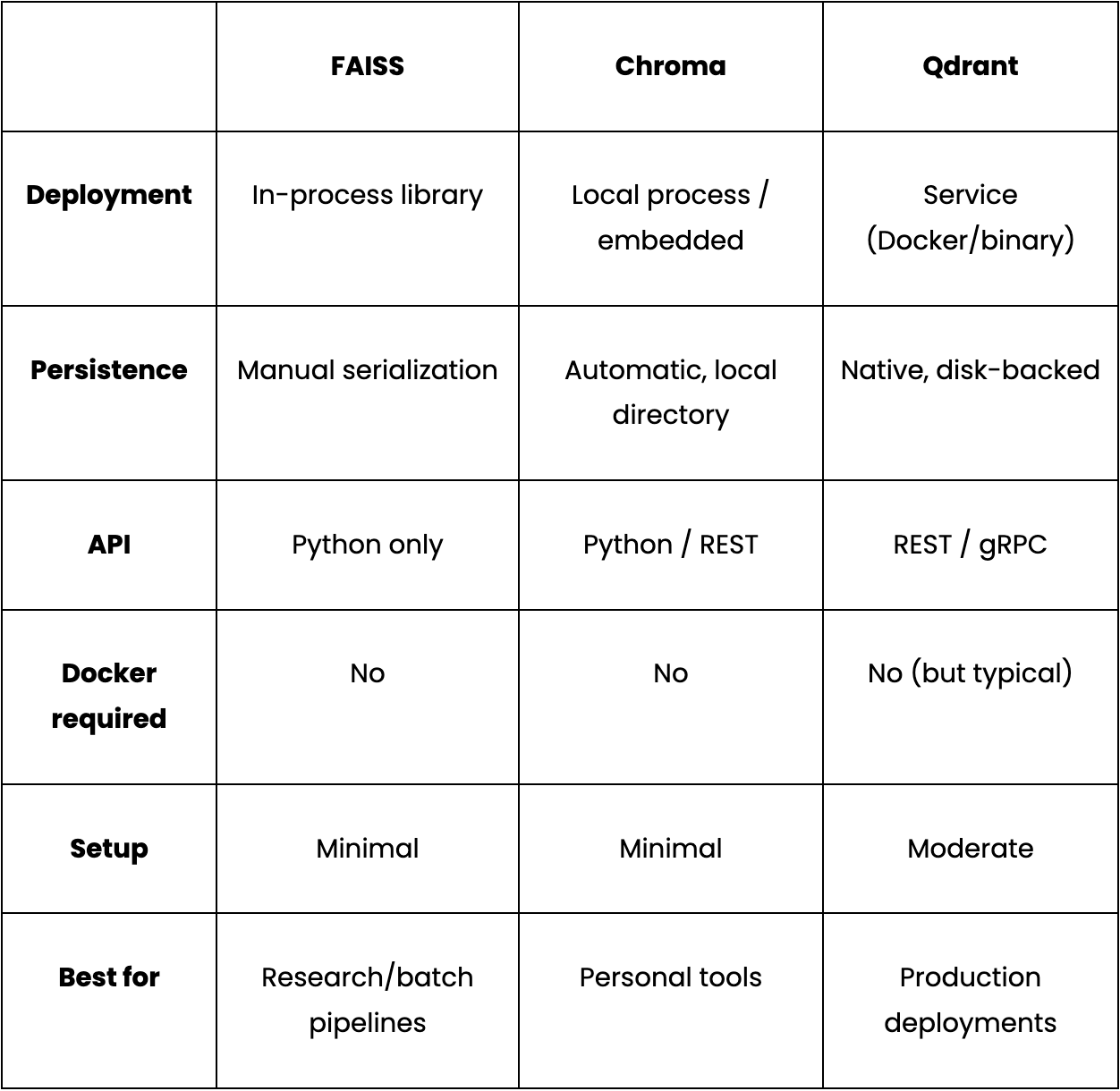
One configuration detail that silently breaks things is that, embedding dimension in the vector store config must exactly match the output dimension of our embedding model. For example, the nomic-embed-text model produces 768-dimensional vectors. Swap to a different embedding model without updating this value and all inserts will fail silently.
"vector_store": {
    "provider": "qdrant",
    "config": {
        "collection_name": "coding_assistant",
        "host": "localhost",
        "port": 6333,
        "embedding_model_dims": 768,  # must match your embedding model exactly
    },
}
Chroma is a direct swap if you want to drop the Docker dependency and change the vector_store provider in your config and the rest of the stack stays identical.
Layer 5: Interface Layer
This is the final and outermost layer of the stack which shapes, how a user interacts with the agent. The right interface depends entirely on where the agent fits into your existing workflow. Some most commonly used interfaces include:
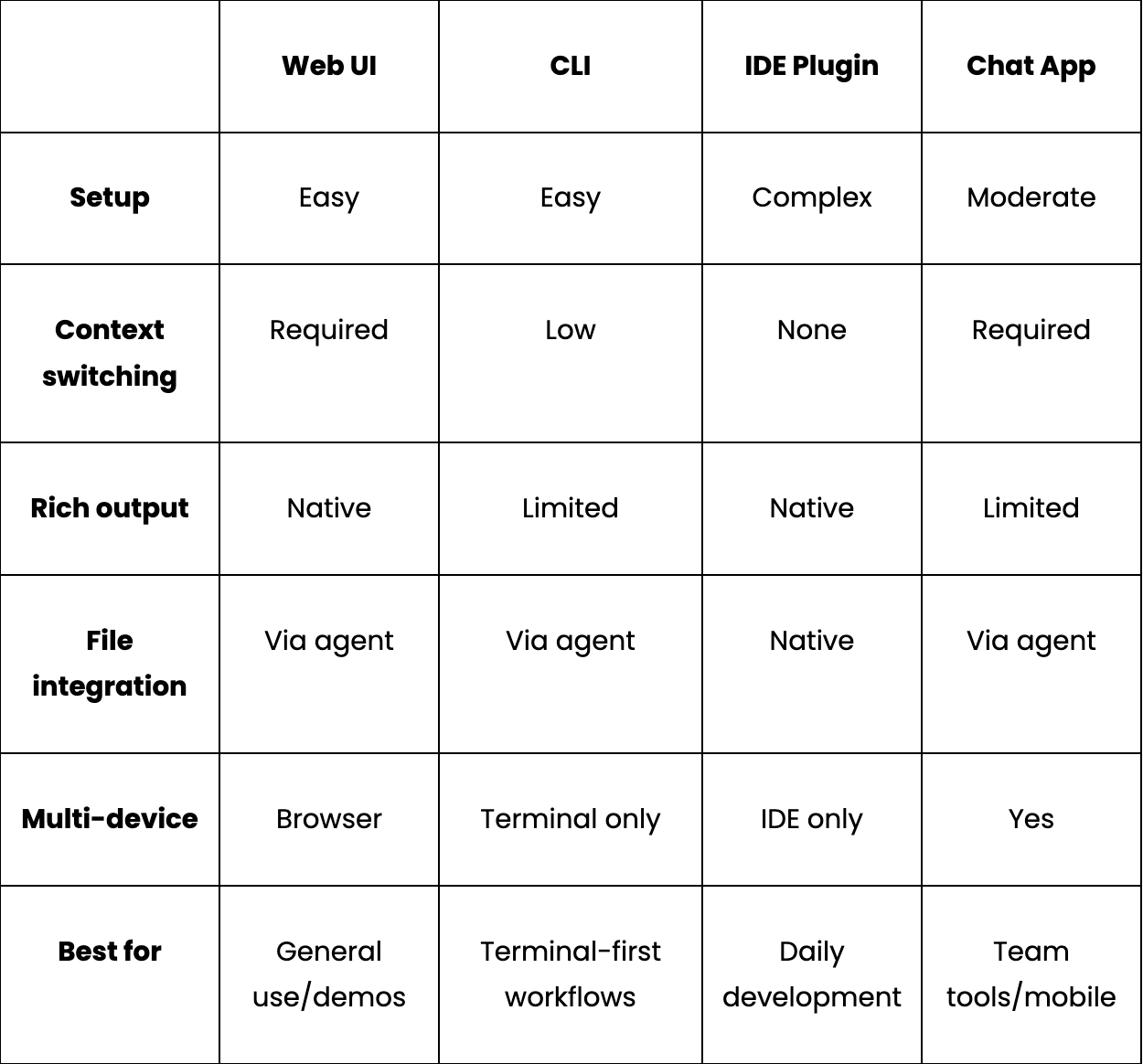
- Web UI: This is the most flexible interface for local agents. It runs in a browser, supports formatting like markdown, syntax-highlighted code, collapsible sections and works across operating systems without installation. For a coding assistant, a web UI can display the current file, generated code, and the agent’s memory state side by side in one view.
- CLI: A CLI is a terminal assistant that integrates naturally into shell workflows, can pipe output to other tools, and has zero visual overhead. The trade-off is that rich output requires extra care, and multi-turn conversations are more awkward than in a chat UI. CLI works best for quick lookups, file operations, and scripted workflows where you want the assistant inside an existing terminal session.
- IDE plugins: Plugins act as an assistant, embedded in VS Code or JetBrains that lives next to the file you’re editing, can see which file is open, and suggests edits inline. The trade-off is that IDE extensions require knowledge of specific extension APIs and ongoing maintenance as the IDE updates. It is potentially worth it for a team tool used every day.
- Chat apps (Slack bots, Discord bots, Telegram integrations): Chat apps make sense when the assistant needs to be accessible across devices or shared across a team. They work well when you want to reach the agent from multiple devices or on the go. The limitation for a coding assistant specifically is that chat interfaces aren’t designed for code review or file editing, but these are best suited for Q&A, status checks, and lightweight requests.
You can understand this comparison using the table below:
Wrapping Up
Each layer makes a decision that constrains the ones around it. The LLM choice determines what API shape the agent framework calls. The memory approach determines what the storage layer needs to support. The interface choice determines how much output formatting matters.
For a single-developer local coding assistant, the stack that minimizes friction while keeping every layer swappable:
Interface: Web UI on localhost
│
Framework: OpenClaw - tool-dispatch, SKILL.md routing
│
LLM: Ollama for qwen3:8b
(think mode disabled for JSON reliability)
│
Memory: Structured persistent memory with value filtering
Embeddings via nomic-embed-text
│
Storage: Chroma (zero infrastructure) or Qdrant (more robust)
Since each layer is independently swappable, we can start with the simplest option at each level and upgrade individual layers as requirements grow. Switching Chroma to Qdrant, or Ollama to vLLM, doesn’t require rebuilding anything above or below it.
The one layer worth investing in early, before optimizing anything else, is memory. A modest local model with a well-designed persistent memory layer consistently outperforms a larger model that starts every session from scratch.
If you want to run this exact stack end-to-end, here’s the full working source code to run a Local AI Agent pipeline:
Full source code: https://github.com/AashiDutt/OpenClaw_Mem0_Oll

This story is published on Generative AI. Connect with us on LinkedIn and follow Zeniteq to stay in the loop with the latest AI stories.
Subscribe to our newsletter and YouTube channel to stay updated with the latest news and updates on generative AI. Let’s shape the future of AI together!

메타데이터
- post_id
- 12622e9e0269
- slug
- building-local-ai-agents-a-practical-guide-to-models-memory-and-orchestration-12622e9e0269
- url
- https://generativeai.pub/building-local-ai-agents-a-practical-guide-to-models-memory-and-orchestration-12622e9e0269
- canonical_url
- https://generativeai.pub/building-local-ai-agents-a-practical-guide-to-models-memory-and-orchestration-12622e9e0269
- author_url
- https://medium.com/@aashi-dutt3
- status
- ok
- fetched_at
- 2026-06-24 11:06:28