You’re Using Kubernetes Secrets Wrong. Here’s What Actually Secures Your Cluster.
That “Kubernetes Secret” protecting your database password is stored as plain Base64. Anyone with etcd access can decode it in 0.3 seconds…
You’re Using Kubernetes Secrets Wrong. Here’s What Actually Secures Your Cluster.
That “Kubernetes Secret” protecting your database password is stored as plain Base64. Anyone with etcd access can decode it in 0.3 seconds. Here’s what to use instead.
Series: Part 1 — Your Secrets Are Probably Leaking · Part 2 — HashiCorp Vault Deep Dive · Part 3 — Azure Key Vault vs AWS Secrets Manager · Part 4 — Kubernetes Secrets & Production Patterns (this article)
Tags: kubernetes security devops vault secrets-management platform-engineering cloud-native devsecops sre backend
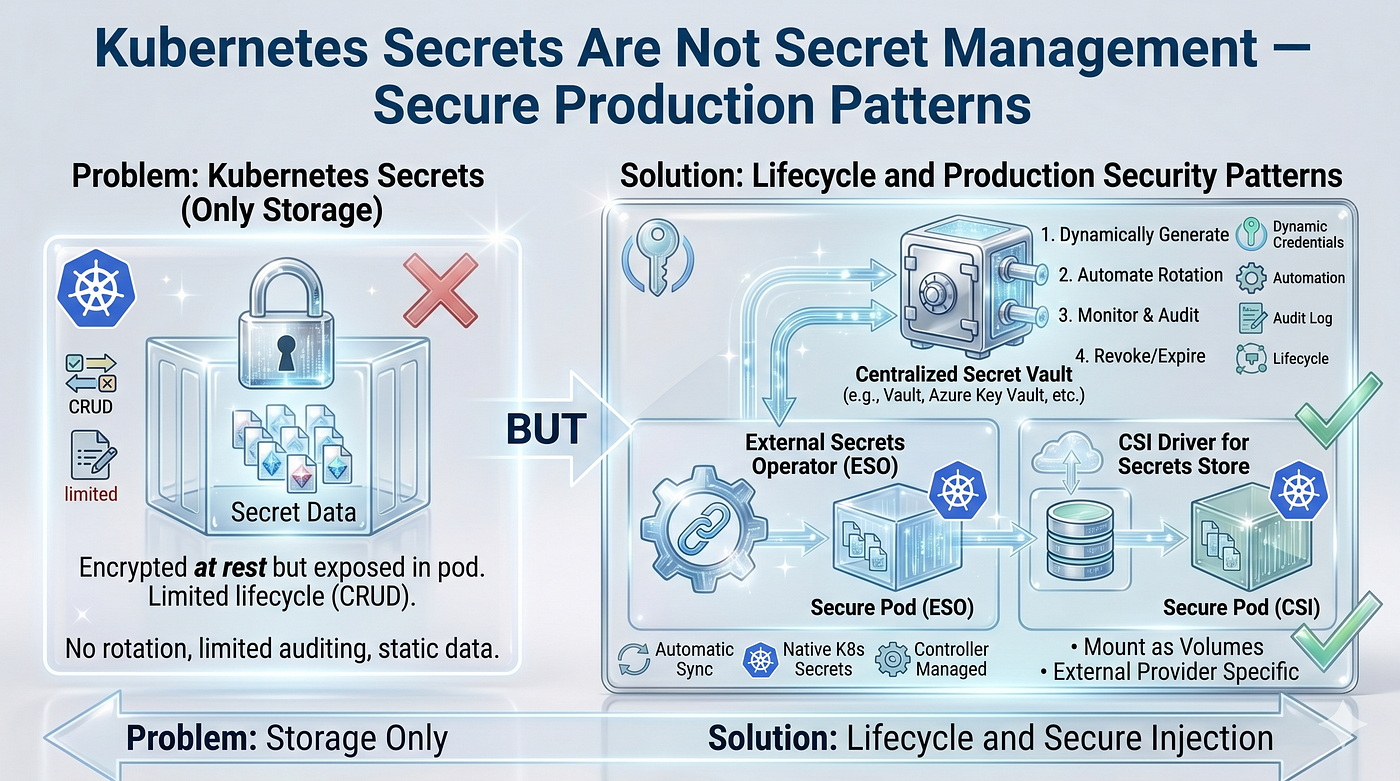
Most Kubernetes clusters treat Secrets as a security solution.
They are not.
Kubernetes Secrets solve storage. Secret management platforms solve lifecycle — rotation, revocation, auditing, dynamic credentials, and PKI. Conflating the two is one of the most common and most damaging security mistakes in cloud-native engineering.
In this article — the final chapter of this series — we go deep on what Kubernetes Secrets actually do, every way they can leak, and how to build a production-grade secret management architecture using Vault, External Secrets Operator, and the Secrets Store CSI Driver.
What Kubernetes Secrets Actually Do
A Kubernetes Secret is a Kubernetes API object used to store small amounts of sensitive data — passwords, tokens, TLS certificates, SSH keys. It ships natively in every cluster and needs zero additional tooling to use.
Here is what it gives you out of the box:
- ✅ Base64-encoded storage in etcd
- ✅ Mountable as volumes or environment variables in Pods
- ✅ RBAC-controllable via standard Kubernetes authorization
- ✅ Namespace-scoped isolation
Here is what it does not give you — and this is the critical distinction:
- ❌ Automatic secret rotation
- ❌ Dynamic, short-lived credentials
- ❌ Lease management and TTLs
- ❌ Revocation (instant kill-switch for compromised credentials)
- ❌ PKI and certificate lifecycle management
- ❌ Centralized audit logging
- ❌ Break-glass access workflows
- ❌ Secret versioning with rollback
Every item on that second list represents a gap that either a secret management platform (Vault, AWS Secrets Manager, Azure Key Vault) or an operator pattern (ESO, CSI Driver) must fill. Understanding where one ends and the other begins is the foundation of production secret security.
How Kubernetes Stores Secrets
The internal storage path matters because each hop is an attack surface.

The critical detail: encryption between the API server and etcd only happens if you have explicitly configured an EncryptionConfiguration. Without it, your secrets are stored as raw Base64 in etcd — readable by anyone with etcd access, any backup system that snapshotted the cluster, or any cluster restore process.
Base64 Is Not Encryption
Let us be extremely direct about this because it still surprises engineers at every level.
# What you see in a Kubernetes Secret manifest
apiVersion: v1
kind: Secret
metadata:
  name: db-credentials
  namespace: production
type: Opaque
data:
  username: cHJvZF91c2Vy        # "prod_user"   in base64
  password: U3VwM3JTM2NyZXQh   # "Sup3rS3cret!" in base64
Anyone who finds this manifest — in a Git repo, a CI log, a cluster backup, a Slack message — can decode it instantly:
echo "U3VwM3JTM2NyZXQh" | base64 --decode
# Output: Sup3rS3cret!
That takes 0.3 seconds. Base64 is a transport encoding, not a confidentiality mechanism. Its purpose is safe transmission of binary data as ASCII text. It was never designed to protect secrets.
Using stringData does not help either — it is syntactic sugar that Kubernetes encodes to Base64 before storage:
# This looks safer. It is not.
apiVersion: v1
kind: Secret
metadata:
  name: db-credentials
stringData:
  password: "Sup3rS3cret!"  # Kubernetes base64-encodes this on write
The Full Secret Exposure Surface
Once a Secret object is created, its value can reach many places — most of which teams do not actively monitor.

Node-Level Risks in Detail
Even with airtight RBAC, a compromised worker node is devastating. Secrets mounted as volumes land on the node filesystem under /var/lib/kubelet/pods/<uid>/volumes/kubernetes.io~secret/. A container breakout or a malicious DaemonSet can walk that path.
Environment variables are even worse — they are readable by every process in the pod (including sidecars you did not write) via /proc/<pid>/environ and visible in crash dumps, profiler output, and any debugging tool that introspects the process environment.
Prefer volume mounts over environment variables for secrets. Restrict to files where possible.
Encryption at Rest
This is the single most impactful cluster-level control you can add with zero application changes.
EncryptionConfiguration — AES-CBC (Basic)
# /etc/kubernetes/encryption-config.yaml
# Apply via kube-apiserver flag: --encryption-provider-config
apiVersion: apiserver.config.k8s.io/v1
kind: EncryptionConfiguration
resources:
  - resources:
      - secrets
      - configmaps   # optionally encrypt ConfigMaps too
    providers:
      - aescbc:
          keys:
            - name: key1
              # Generate: head -c 32 /dev/urandom | base64
              secret: <base64-encoded-32-byte-key>
      - identity: {}  # fallback — allows reading unencrypted data during migration
⚠️ Key rotation caveat: rotating this key requires a rewrite of all existing Secrets (
kubectl get secrets --all-namespaces -o json | kubectl replace -f -). Plan this operation carefully in production.
KMS-Backed Encryption (Production Standard)
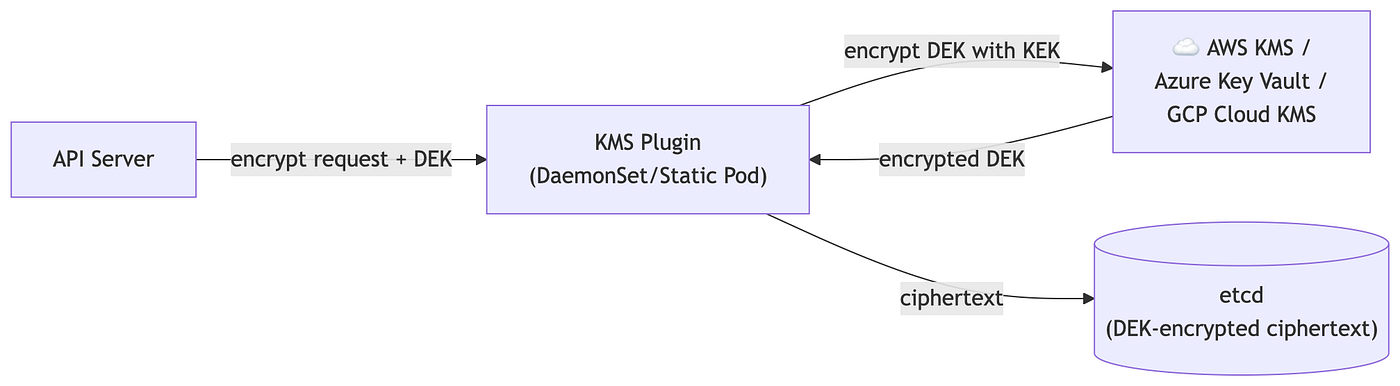
For production clusters, delegate key management to a KMS provider — AWS KMS, Azure Key Vault, or GCP Cloud KMS. This removes the encryption key from the cluster entirely.
apiVersion: apiserver.config.k8s.io/v1
kind: EncryptionConfiguration
resources:
  - resources:
      - secrets
    providers:
      - kms:
          apiVersion: v2
          name: aws-kms-provider
          endpoint: unix:///var/run/kmsplugin/socket.sock
          timeout: 3s
      - identity: {}
The KMS plugin runs as a DaemonSet or static Pod that proxies encryption/decryption calls to your cloud KMS. Envelope encryption means etcd holds only ciphertext; the data encryption key (DEK) is itself encrypted with a key encryption key (KEK) stored in KMS.
RBAC for Secrets — Least Privilege in Practice
The most common security failure is not Base64. It is over-permissioned RBAC.
Never do this — granting wildcard access to all secrets in a namespace:
# ❌ DANGEROUS — never grant wildcard secrets access
kind: Role
apiVersion: rbac.authorization.k8s.io/v1
metadata:
  name: secret-reader-bad
  namespace: production
rules:
  - apiGroups: [""]
    resources: ["secrets"]
    verbs: ["get", "list", "watch"]  # "list" + "watch" exposes all secret names and values
Do this instead — name the exact Secret your workload needs:
# ✅ CORRECT — least privilege, named resource
kind: Role
apiVersion: rbac.authorization.k8s.io/v1
metadata:
  name: app-secret-reader
  namespace: production
rules:
  - apiGroups: [""]
    resources: ["secrets"]
    resourceNames: ["db-credentials", "api-key-external-service"]
    verbs: ["get"]  # "get" only — no list, no watch
---
kind: RoleBinding
apiVersion: rbac.authorization.k8s.io/v1
metadata:
  name: app-secret-reader-binding
  namespace: production
subjects:
  - kind: ServiceAccount
    name: payment-service
    namespace: production
roleRef:
  kind: Role
  name: app-secret-reader
  apiGroup: rbac.authorization.k8s.io
Audit command:
kubectl auth can-i list secrets --namespace=production --as=system:serviceaccount:production:payment-service
External Secrets Operator
The External Secrets Operator (ESO) bridges Kubernetes and external secret stores — Vault, AWS Secrets Manager, Azure Key Vault, GCP Secret Manager, 1Password, and others — by synchronizing secrets into native Kubernetes Secret objects on a configurable schedule.

Installation
helm repo add external-secrets https://charts.external-secrets.io
helm repo update
helm install external-secrets external-secrets/external-secrets \
  --namespace external-secrets \
  --create-namespace \
  --set installCRDs=true
SecretStore — Configure the Backend
# Connect ESO to HashiCorp Vault
apiVersion: external-secrets.io/v1beta1
kind: SecretStore
metadata:
  name: vault-backend
  namespace: production
spec:
  provider:
    vault:
      server: "https://vault.internal.company.com:8200"
      path: "secret"           # KV v2 mount path
      version: "v2"
      auth:
        kubernetes:
          mountPath: "kubernetes"
          role: "payment-service-role"
          serviceAccountRef:
            name: "payment-service"
ExternalSecret — Pull and Sync
# Pull specific keys from Vault and create a Kubernetes Secret
apiVersion: external-secrets.io/v1beta1
kind: ExternalSecret
metadata:
  name: payment-db-credentials
  namespace: production
spec:
  refreshInterval: "1h"          # re-sync every hour
  secretStoreRef:
    name: vault-backend
    kind: SecretStore
  target:
    name: payment-db-secret      # resulting Kubernetes Secret name
    creationPolicy: Owner
    deletionPolicy: Retain
  data:
    - secretKey: username        # key in the Kubernetes Secret
      remoteRef:
        key: production/payment-service/db   # path in Vault
        property: username
    - secretKey: password
      remoteRef:
        key: production/payment-service/db
        property: password
Important ESO Limitation
ESO synchronizes secrets. It does not rotate them.
The rotation lifecycle lives entirely in the external store. When Vault or AWS Secrets Manager rotates a credential, ESO picks up the new value at the next refreshInterval. Your application must handle the updated Kubernetes Secret — either by restarting (for env vars) or reading the updated file (for volume mounts).
If your application caches credentials in memory and does not reload, rotation will cause authentication failures even though the Kubernetes Secret has the correct new value.
Secrets Store CSI Driver
The Secrets Store CSI Driver takes a different approach: instead of creating Kubernetes Secret objects, it mounts secret values directly as files into Pods as ephemeral volumes backed by the external store. Secrets never touch etcd.

SecretProviderClass — Configure the Mount
apiVersion: secrets-store.csi.x-k8s.io/v1
kind: SecretProviderClass
metadata:
  name: payment-vault-secrets
  namespace: production
spec:
  provider: vault
  parameters:
    vaultAddress: "https://vault.internal.company.com:8200"
    roleName: "payment-service-role"
    objects: |
      - objectName: "db-username"
        secretPath: "secret/data/production/payment-service/db"
        secretKey: "username"
      - objectName: "db-password"
        secretPath: "secret/data/production/payment-service/db"
        secretKey: "password"
      - objectName: "tls-cert"
        secretPath: "secret/data/production/payment-service/tls"
        secretKey: "certificate"
  # Optional: also sync to a Kubernetes Secret for env var use
  secretObjects:
    - secretName: payment-db-synced
      type: Opaque
      data:
        - objectName: "db-username"
          key: username
        - objectName: "db-password"
          key: password
Pod Using CSI Driver
apiVersion: v1
kind: Pod
metadata:
  name: payment-service
  namespace: production
spec:
  serviceAccountName: payment-service
  containers:
    - name: app
      image: payment-service:v2.1.0
      volumeMounts:
        - name: secrets-store-inline
          mountPath: "/mnt/secrets"
          readOnly: true
  volumes:
    - name: secrets-store-inline
      csi:
        driver: secrets-store.csi.k8s.io
        readOnly: true
        volumeAttributes:
          secretProviderClass: "payment-vault-secrets"
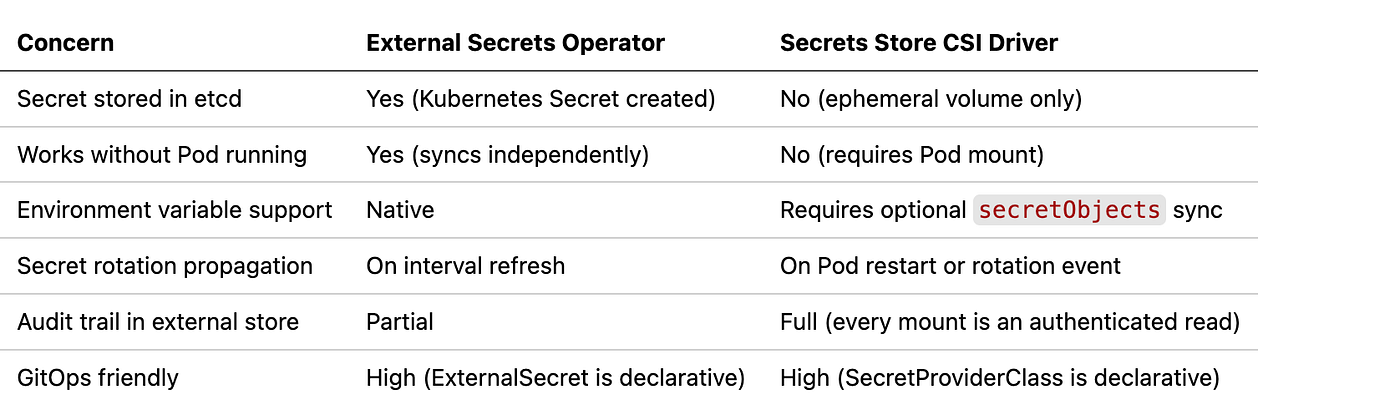
ESO vs CSI Driver — When to Use Which
Vault Agent Injector — Sidecar Pattern
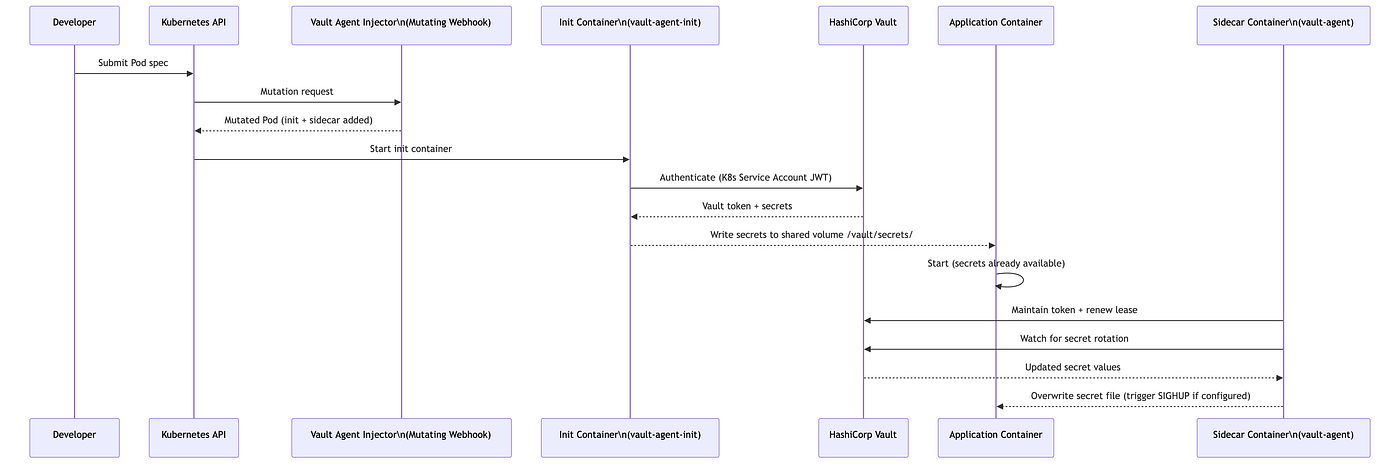
The Vault Agent Injector is a mutating admission webhook. When a Pod with the correct annotations is submitted to the API server, the injector automatically adds an init container and an optional sidecar container to the Pod spec — without modifying your application image.
Pod Annotations to Enable Injection
apiVersion: apps/v1
kind: Deployment
metadata:
  name: payment-service
  namespace: production
spec:
  template:
    metadata:
      annotations:
        # Enable Vault Agent injection
        vault.hashicorp.com/agent-inject: "true"
        vault.hashicorp.com/role: "payment-service-role"
        vault.hashicorp.com/agent-inject-secret-db-config: "secret/data/production/payment-service/db"
        # Custom template — render as properties file
        vault.hashicorp.com/agent-inject-template-db-config: |
          {{- with secret "secret/data/production/payment-service/db" -}}
          db.username={{ .Data.data.username }}
          db.password={{ .Data.data.password }}
          db.host={{ .Data.data.host }}
          {{- end -}}
        # Keep sidecar running for lease renewal and rotation
        vault.hashicorp.com/agent-pre-populate-only: "false"
The init container runs first, fetches secrets, and writes them to a shared in-memory emptyDir volume. The application starts only after the init container succeeds. The sidecar handles token renewal and pushes updated values on rotation.
Workload Identity — No More Long-Lived Credentials
Long-lived cloud credentials (AWS access keys, Azure client secrets, GCP service account key files) are the most dangerous secret class in a Kubernetes cluster. They are static, broadly scoped, and when leaked, provide durable access until manually rotated.
Modern cloud providers offer workload identity — a mechanism that lets your Kubernetes Service Account assume a cloud IAM identity automatically, with no stored credentials.
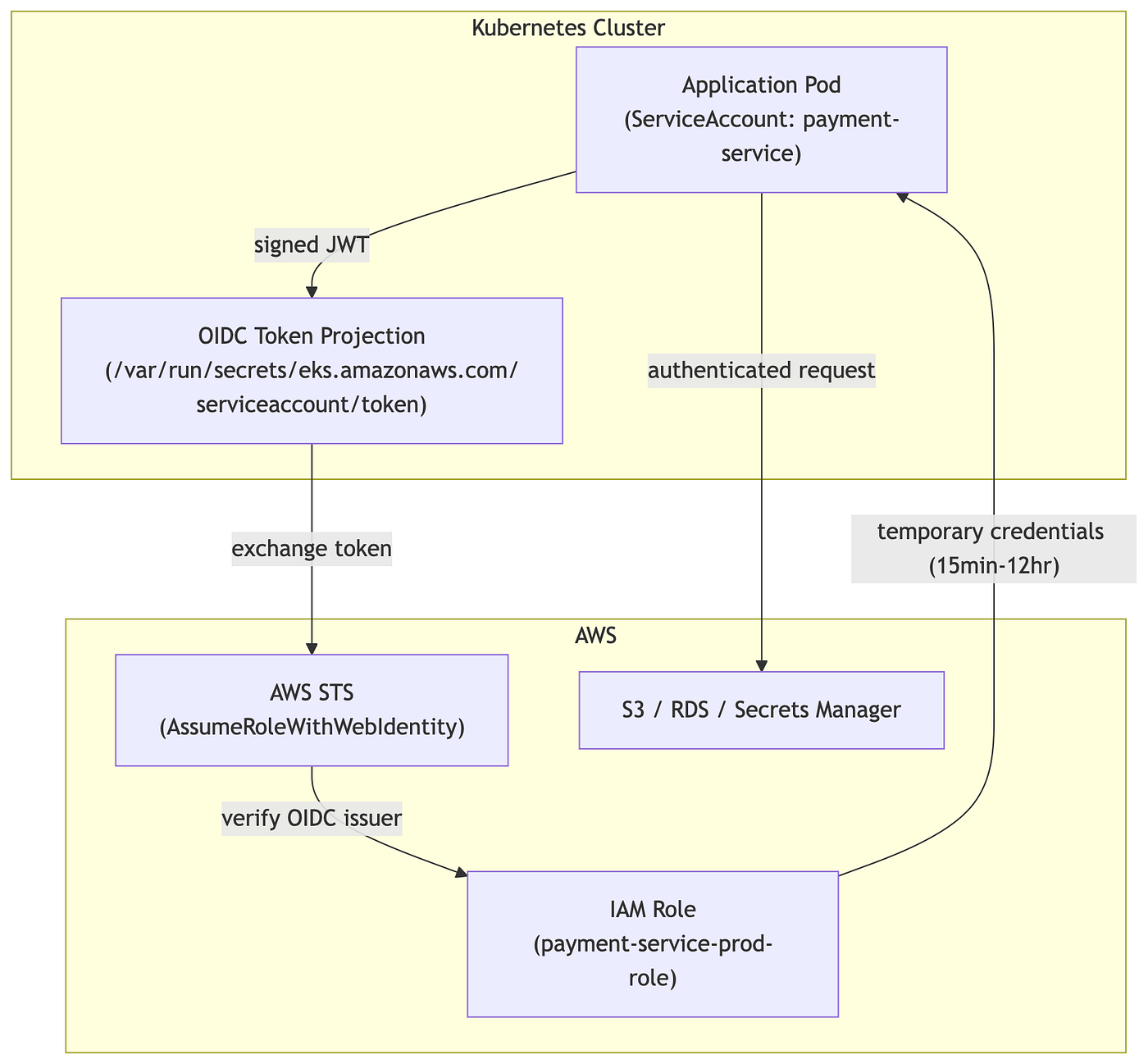
AWS — IRSA (IAM Roles for Service Accounts)
# 1. Annotate the Kubernetes Service Account
apiVersion: v1
kind: ServiceAccount
metadata:
  name: payment-service
  namespace: production
  annotations:
    eks.amazonaws.com/role-arn: "arn:aws:iam::123456789012:role/payment-service-prod-role"
// 2. IAM Role Trust Policy - trust the OIDC provider
{
  "Version": "2012-10-17",
  "Statement": [{
    "Effect": "Allow",
    "Principal": {
      "Federated": "arn:aws:iam::123456789012:oidc-provider/oidc.eks.us-east-1.amazonaws.com/id/EXAMPLED539D4633E53DE1B71EXAMPLE"
    },
    "Action": "sts:AssumeRoleWithWebIdentity",
    "Condition": {
      "StringEquals": {
        "oidc.eks.us-east-1.amazonaws.com/id/EXAMPLED539D4633E53DE1B71EXAMPLE:sub":
          "system:serviceaccount:production:payment-service",
        "oidc.eks.us-east-1.amazonaws.com/id/EXAMPLED539D4633E53DE1B71EXAMPLE:aud":
          "sts.amazonaws.com"
      }
    }
  }]
}
Azure — Workload Identity
# Service Account annotated with Azure AD application client ID
apiVersion: v1
kind: ServiceAccount
metadata:
  name: payment-service
  namespace: production
  annotations:
    azure.workload.identity/client-id: "00000000-0000-0000-0000-000000000000"
---
# Pod label enables the webhook to inject the federated credential
apiVersion: v1
kind: Pod
metadata:
  labels:
    azure.workload.identity/use: "true"
spec:
  serviceAccountName: payment-service
GKE — Workload Identity
# Link Kubernetes SA to Google Service Account
gcloud iam service-accounts add-iam-policy-binding \
  payment-service@PROJECT_ID.iam.gserviceaccount.com \
  --role roles/iam.workloadIdentityUser \
  --member "serviceAccount:PROJECT_ID.svc.id.goog[production/payment-service]"
apiVersion: v1
kind: ServiceAccount
metadata:
name: payment-service
namespace: production
annotations:
iam.gke.io/gcp-service-account: payment-service@PROJECT_ID.iam.gserviceaccount.comRule: If you are storing a cloud provider credential as a Kubernetes Secret and your workload runs inside that cloud, you are doing it wrong. Workload identity eliminates that entire class of credential.
Dynamic Credentials — Vault’s Strongest Capability
Dynamic credentials are Vault-generated, short-lived credentials that exist only for the duration of a lease. Vault creates the credential, tracks its TTL, and revokes it automatically when the lease expires — or immediately on demand.
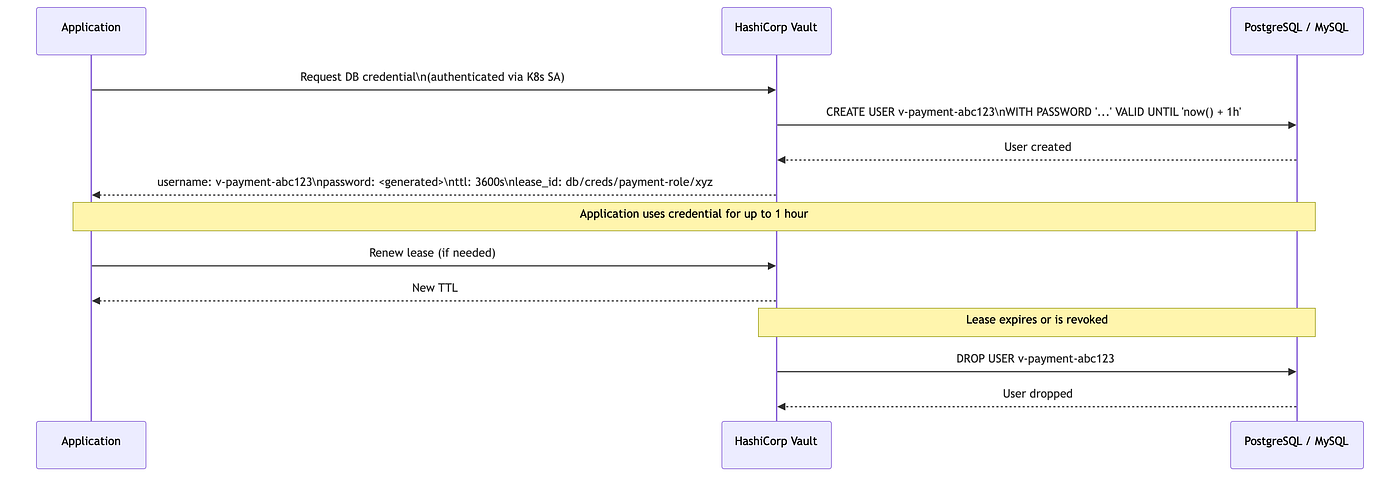
Vault Database Role Configuration
# Enable the database secrets engine
vault secrets enable database
# Configure the PostgreSQL connection
vault write database/config/production-postgres \
  plugin_name=postgresql-database-plugin \
  allowed_roles="payment-service-role" \
  connection_url="postgresql://{{username}}:{{password}}@postgres.internal:5432/payments?sslmode=require" \
  username="vault-root-user" \
  password="vault-root-password"
# Create a role that defines the credential shape and TTL
vault write database/roles/payment-service-role \
  db_name=production-postgres \
  creation_statements="CREATE ROLE \"{{name}}\" WITH LOGIN PASSWORD '{{password}}' VALID UNTIL '{{expiration}}';
                       GRANT SELECT, INSERT, UPDATE ON payments TO \"{{name}}\";" \
  revocation_statements="REVOKE ALL ON payments FROM \"{{name}}\"; DROP ROLE IF EXISTS \"{{name}}\";" \
  default_ttl="1h" \
  max_ttl="24h"
Impact: A credential breach does nothing. The credential expires. There is nothing to rotate. There is nothing to notify engineers about at 3 AM. The blast radius collapses to one hour.
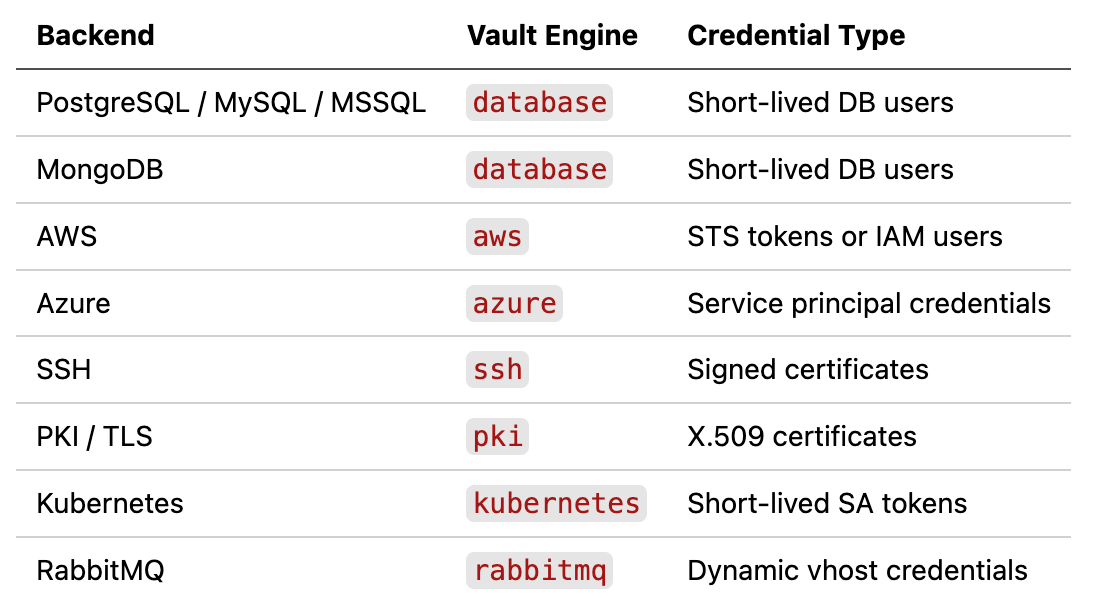
Dynamic Credentials for Other Backend Types
Sealed Secrets for GitOps Workflows
If you use GitOps (ArgoCD, Flux) and need to commit encrypted secrets to Git, Sealed Secrets is the most common Kubernetes-native solution.

# Install kubeseal CLI and fetch the cluster's public certificate
kubeseal --fetch-cert \
  --controller-namespace=sealed-secrets \
  --controller-name=sealed-secrets-controller \
  > pub-sealed-secrets.pem

# Encrypt a secret
kubectl create secret generic db-credentials \
  --from-literal=password=Sup3rS3cret! \
  --dry-run=client \
  -o yaml | \
kubeseal --cert pub-sealed-secrets.pem \
  --format yaml > sealed-db-credentials.yaml
# Commit sealed-db-credentials.yaml to Git - it is safe to store publicly
# The resulting SealedSecret (safe to commit to Git)
apiVersion: bitnami.com/v1alpha1
kind: SealedSecret
metadata:
name: db-credentials
namespace: production
spec:
encryptedData:
password: AgA3+...long encrypted blob...
template:
metadata:
name: db-credentials
namespace: production
type: OpaqueLimitation: Sealed Secrets does not solve rotation or dynamic credentials. It solves Git storage safety. Use it in combination with ESO or Vault for full lifecycle management.
Admission Control — Policy Enforcement at the Gate
Policy engines intercept API requests before they reach the cluster. They can block insecure patterns, enforce naming conventions, require labels, and alert on policy violations.

Kyverno — Block Secrets in Environment Variables
# Block pods that pass Secrets directly as environment variable values
apiVersion: kyverno.io/v1
kind: ClusterPolicy
metadata:
  name: disallow-secrets-in-env
spec:
  validationFailureAction: Enforce
  background: true
  rules:
    - name: disallow-secret-env
      match:
        any:
          - resources:
              kinds: [Pod]
      validate:
        message: "Secrets must be mounted as volumes, not passed as environment variables via valueFrom.secretKeyRef."
        deny:
          conditions:
            any:
              - key: "{{ request.object.spec.containers[].env[].valueFrom.secretKeyRef | length(@) }}"
                operator: GreaterThan
                value: "0"
Kyverno — Require Secrets to Come from External Store
# Require pods to use the CSI driver for secret mounts — not native Kubernetes Secrets
apiVersion: kyverno.io/v1
kind: ClusterPolicy
metadata:
  name: require-csi-secret-driver
spec:
  validationFailureAction: Enforce
  rules:
    - name: check-secret-volumes
      match:
        any:
          - resources:
              kinds: [Pod]
              namespaces: [production, staging]
      validate:
        message: "Secret volumes must use the secrets-store.csi.k8s.io driver."
        pattern:
          spec:
            =(volumes):
              =(secret): "null | none"
OPA Gatekeeper — ConstraintTemplate for Secret RBAC
# OPA ConstraintTemplate: block wildcard secret access
apiVersion: templates.gatekeeper.sh/v1
kind: ConstraintTemplate
metadata:
  name: k8snosecretwildcard
spec:
  crd:
    spec:
      names:
        kind: K8sNoSecretWildcard
  targets:
    - target: admission.k8s.gatekeeper.sh
      rego: |
        package k8snosecretwildcardviolation[{"msg": msg}] {
          input.review.kind.kind == "Role"
          rule := input.review.object.rules[_]
          rule.resources[_] == "secrets"
          rule.verbs[_] == "*"
          msg := "Wildcard verb on secrets is not allowed. Use explicit verbs."
        }
Secret Rotation — What Actually Goes Wrong
Secret rotation sounds simple. In practice it is one of the most incident-prone operations in platform engineering.
The Rotation Failure Chain

Rotation Failure Mode Taxonomy

The Dual-Write / Graceful Rotation Pattern
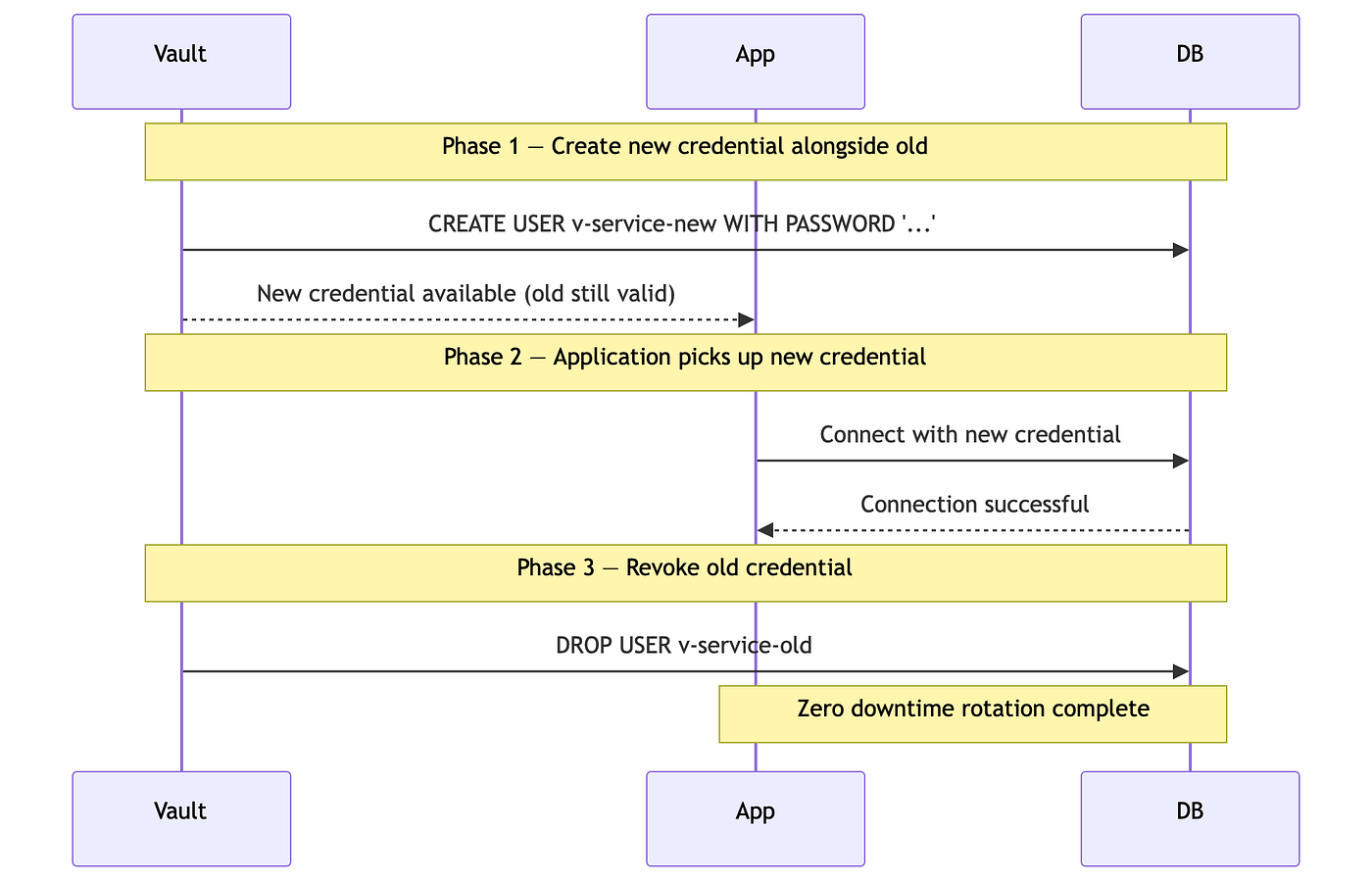
What You Must Test in Staging Before Production
# Rotation test runbook
# 1. Trigger rotation
vault write -force secret/data/production/payment-service/db
# 2. Verify ESO picks up new value within refreshInterval
kubectl get externalsecret payment-db-credentials -n production -w
# 3. Verify Kubernetes Secret updated
kubectl get secret payment-db-secret -n production -o jsonpath='{.data.password}' | base64 -d
# 4. Verify application still serving traffic
curl -s https://payment.internal/healthz | jq .
# 5. Check error rate in metrics
kubectl exec -it prometheus-0 -n monitoring -- \
  promtool query instant 'rate(http_requests_total{status=~"5.."}[5m])'
Decision Matrix — Choosing the Right Pattern
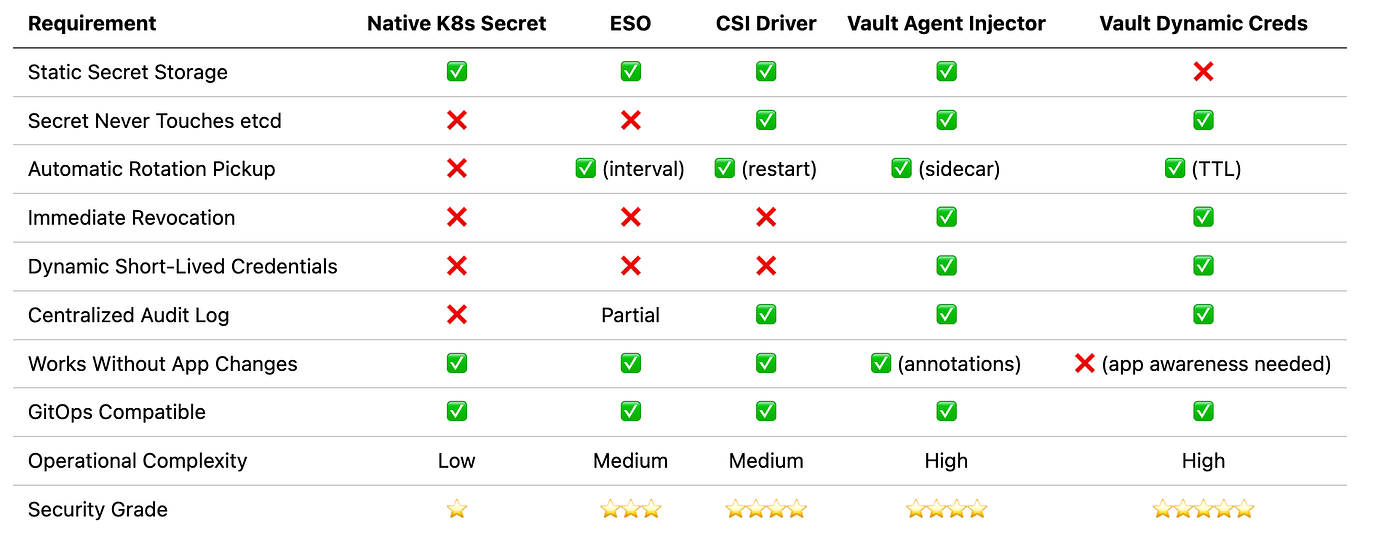
Use this to drive the architectural conversation with your team. The right answer is almost always a combination of patterns, not a single one.
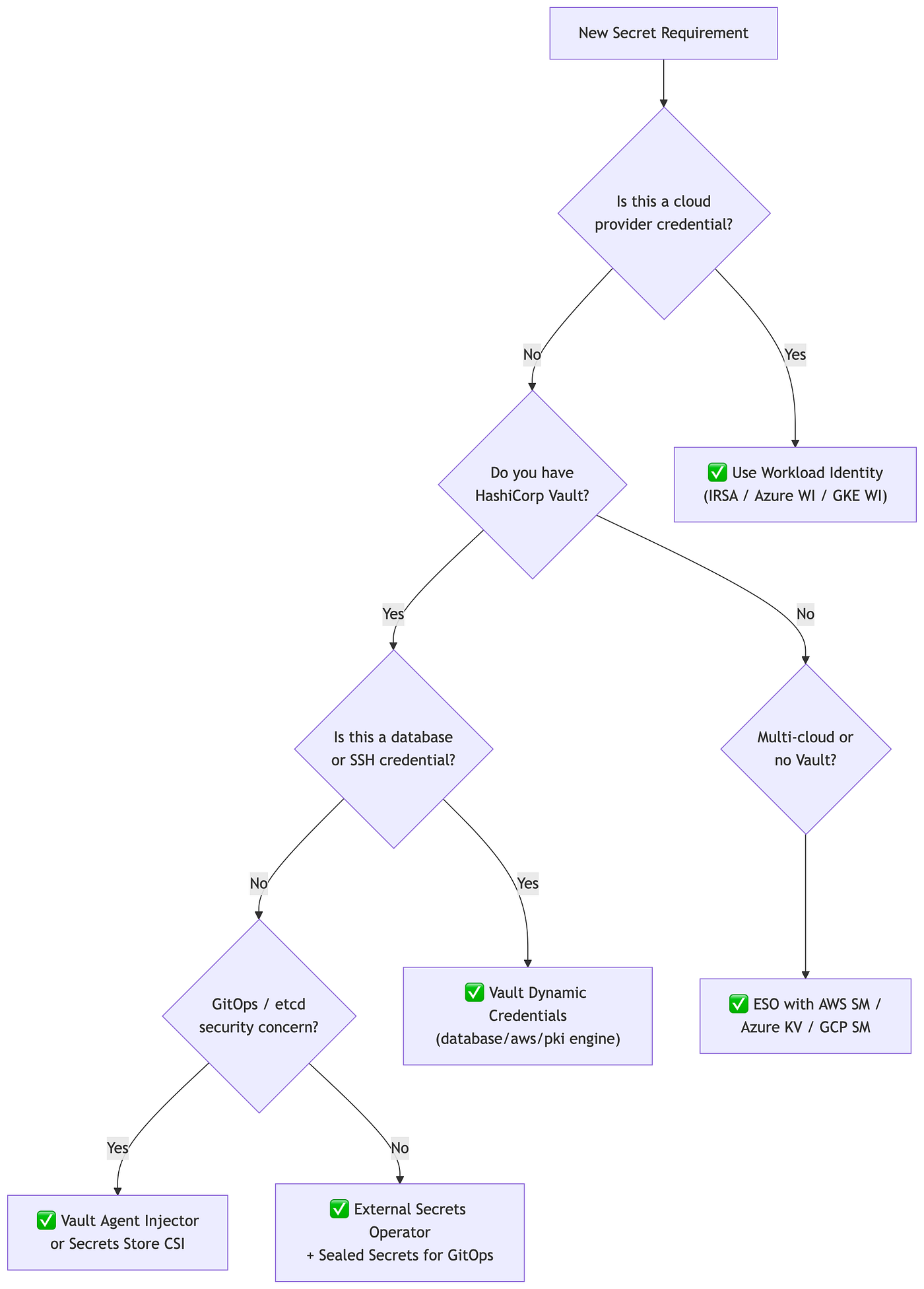
Decision Guide
Production Architecture — The Full Picture
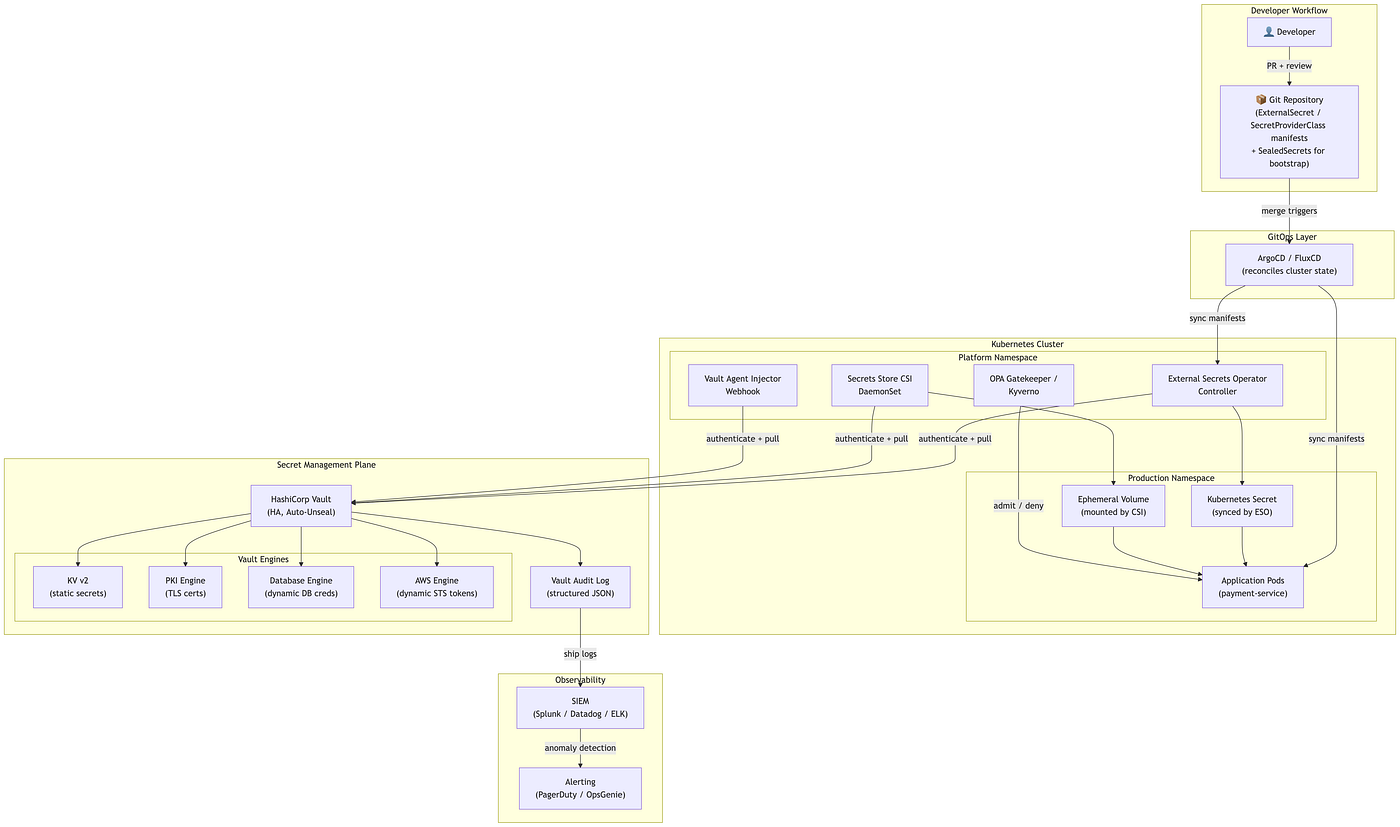
This is the architecture that a mature platform engineering team should be targeting. It combines GitOps delivery, Vault for lifecycle management, ESO for synchronization, and observability through audit log forwarding to a SIEM.
Infrastructure Requirements Checklist
# Vault HA Deployment (Helm values excerpt)
server:
  ha:
    enabled: true
    replicas: 3
    raft:
      enabled: true
  auditStorage:
    enabled: true
    size: 10Gi
  seal:
    type: awskms          # Auto-unseal via AWS KMS
    region: us-east-1
    kms_key_id: "arn:aws:kms:us-east-1:123456789012:key/mrk-..."
# Vault audit log configuration
vault audit enable file file_path=/vault/audit/audit.log
# Forward audit logs to SIEM with Fluentd/Vector DaemonSet
# (every secret read, write, and token issuance is logged)Security Hardening Checklist
Use this as a PR review gate and security review checklist before any Kubernetes cluster reaches production with sensitive workloads.
Cluster Level
[ ] EncryptionConfiguration enabled with KMS backend (not AES-CBC only)
[ ] etcd communication uses mutual TLS
[ ] etcd backups are encrypted and access-controlled
[ ] API server audit logging enabled (not just Vault audit)
[ ] Network policies restrict Pod-to-Pod traffic in secret-sensitive namespaces
[ ] Node access restricted — no direct SSH; use kubectl debug or session logging
RBAC Level
[ ] No Role/ClusterRole grants list or watch on secrets without resourceNames
[ ] No ServiceAccount has cluster-admin or secrets wildcard
[ ] Default ServiceAccount has no mounted API token (automountServiceAccountToken: false)
[ ] CI/CD service accounts have namespace-scoped, named-secret access only
[ ] RBAC audit run monthly: kubectl auth can-i --list --as=system:serviceaccount:<ns>:<sa>
Secret Delivery Level
[ ] No secrets in environment variables for production workloads
[ ] No secrets in container image layers (docker history checked in CI)
[ ] No secrets in Helm values files committed to Git (use ESO or SealedSecrets)
[ ] No secrets in ConfigMaps
[ ] No secrets in Pod annotations or labels
[ ] Volume mounts are readOnly: true
[ ] Secret files have mode 0400 (owner read only)
Secret Lifecycle Level
[ ] All static secrets have a rotation runbook
[ ] Rotation tested in staging within the last 90 days
[ ] Dynamic credentials used wherever backend supports it
[ ] Vault lease TTLs set to minimum viable duration
[ ] Vault revocation tested: vault lease revoke -prefix <path>
[ ] Workload identity used for all cloud provider access (no static cloud credentials)
Observability Level
[ ] Vault audit logs forwarded to SIEM
[ ] Alert on: bulk secret reads, after-hours access, access from unexpected IPs
[ ] Alert on: ESO sync failures (secret out of sync with external store)
[ ] Alert on: CSI mount failures
[ ] Alert on: certificate expiry within 14 days (if using PKI engine)
[ ] Incident runbook for suspected secret compromise exists and is tested
Series Wrap-Up — The Mental Model
After four articles, here is the model that should govern every secret-related decision:

The lifecycle is a loop, not a one-time operation. Every break in that loop — a secret with no rotation plan, a cluster with no audit logging, a team that has never tested revocation — is a gap that becomes an incident.
Kubernetes Secrets are the last mile of that loop. They are not the vault.
What We Covered in This Series

Tags: #Kubernetes #Security #Vault #DevSecOps #PlatformEngineering #CloudNative #SRE #SecretsManagement #ExternalSecretsOperator #Devsecops
Stay Connected
If this helped you think more clearly about secrets management, the best thing you can do is share it with someone building on the same problems.
Follow TheProdSDE for more content on platform engineering, cloud architecture, and production systems:
- 🔗 LinkedIn: linkedin.com/in/TheProdSDE
- 🐦 X (Twitter): x.com/TheProdSDE
- ▶️ YouTube: youtube.com/@TheProdSDE
- ✍️ Medium: medium.com/@TheProdSDE
Every article, video, and thread in this space is aimed at one thing: helping engineers build production systems that don’t break quietly.
If this series helped your team, share it with the engineers who still think base64 is encryption.
@TheProdSDE
메타데이터
- post_id
- 128370946e9a
- slug
- kubernetes-secrets-are-not-secret-management-vault-eso-csi-driver-and-production-security-128370946e9a
- url
- https://pub.towardsai.net/kubernetes-secrets-are-not-secret-management-vault-eso-csi-driver-and-production-security-128370946e9a
- canonical_url
- https://pub.towardsai.net/kubernetes-secrets-are-not-secret-management-vault-eso-csi-driver-and-production-security-128370946e9a
- author_url
- https://medium.com/@theprodsde
- status
- ok
- fetched_at
- 2026-07-09 22:34:41