HTTP Live Streaming(HLS) — getting started for Seamless Video Delivery
In the past, streaming videos online posed significant challenges. If a video source was in high definition (HD), the output quality would…
HTTP Live Streaming(HLS) — Getting started for Seamless Video Delivery
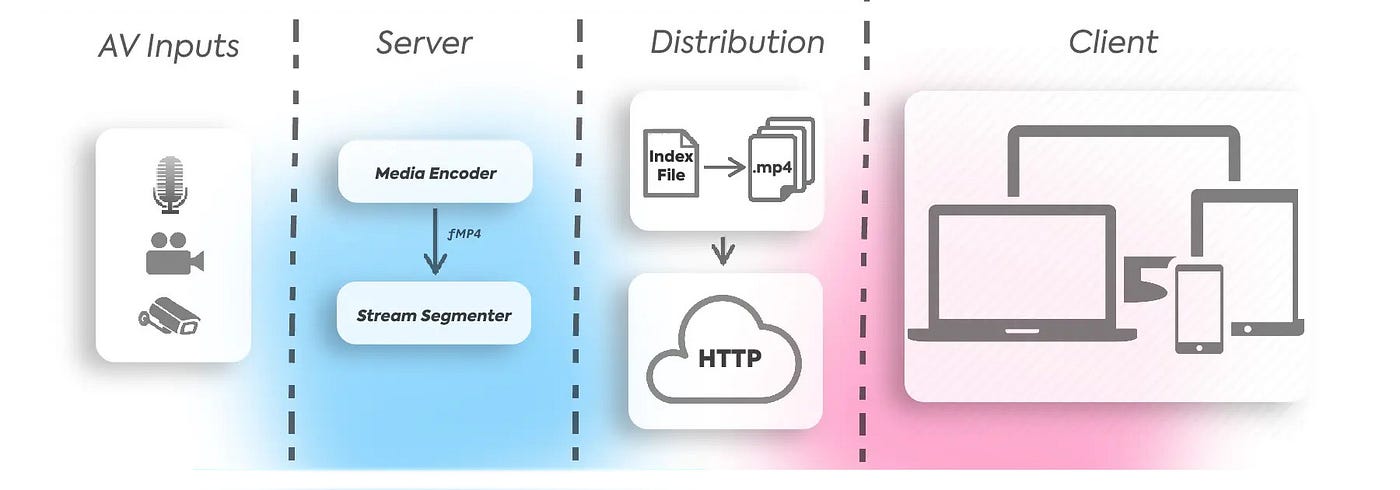
In the past, streaming videos online posed significant challenges. If a video source was in high definition (HD), the output quality would remain the same, irrespective of the viewer’s internet speed. Due to the large source file size, it was often impossible to stream these videos on low-bandwidth networks, such as 2G. This used to get us frustrated especially with slow internet and was a horrible experience. Usually to get some resource from server there are two ways. The first one is to download the entire resource as a whole while the alternative way will be to segment it into smaller chunks and download as per requirement. This makes sense especially in the case of video files since downloading the whole file is completely unnecessary.
Apple in 2009 came to our rescue with HTTP Live Streaming(HLS) protocol. Now this is the mainly used protocol for Apple devices while there is another protocol available as DASH. But HLS has a very wide support to start with.
So HLS basically contains two types of file.
- .m3u8 manifest file — this file contains a list of URLs or references to the segmented/chunked media files and specifies the order in which these files should be played with some other metadatas.
- .ts file — this will be the actual video segment file. There will be multiple such .ts video chunks which will be created from the main video file
So how does HLS work ?
- First a client requests the manifest (.m3u8) file which will be containing the references to the individual chunks in order.
- The client will start requesting for each individual .ts video chunks one after another to load and buffer the content. Now this step is completely upto the client side requirement as how to handle it. For a scenario where a user skipped some part of the video, the client should be smart enough to skip those video chunks and start from the time where its required.
The main advantage of this is since its based on HTTP and file sizes are also small now, it can be cached easily for better user experience.
#EXTM3U
#EXT-X-VERSION:3
#EXT-X-TARGETDURATION:2
#EXT-X-MEDIA-SEQUENCE:0
#EXT-X-PLAYLIST-TYPE:VOD
#EXTINF:1.920000,
segment_0.ts
#EXTINF:1.920000,
segment_1.ts
#EXTINF:1.040000,
segment_2.ts
#EXT-X-ENDLIST
The above is a sample manifest file. It's pretty straight forward. all the references with .ts are for video chunks while EXTINF contains the duration info with other tags containg some additional meta data about the video.
We can use some online HLS player like https://livepush.io/hls-player/index.html or create a basic player from scratch using hls.js to test if everything is working out.

HLS player

HLS files
Here since I am using an online video player, so I uploaded the manifest and .ts files to s3 bucket with CORS enabled so it can be loaded cross domain. Now if everything is good then the video will start playing. But wait, you will see only one video resolution here unlike multiple resolution which we are used to. Now that's a different topic called Adaptive bitrate streaming(ABR). HLS is always used in conjunction with ABR for better user experience. We will explore this topic some different article.
How to create the HLS files ?
Well, we can use the ffmpeg tool to create the hls files.
ffmpeg -i foo.mp4 -codec copy -vbsf h264_mp4toannexb \
-map 0 -f segment \
-segment_list out_720.m3u8 \
-segment_time 2 out_720%03d.ts
The above code is a simple example which will accept a video and convert to HLS format. here segment_time is the parameter based on which the duration of each segment will be decided.
Once everything is ready we can set up a local test server and client to test the files or like me simply upload to an online storage from where we can easily access it and test.

Now we can verify this by going to the network tab of the browser. As we can see here once the manifest file is loaded the vidoe chunks will be loaded one by one as per requirement only. Now this becomes very efficient instead of downloading the whole file at once.
So what's HLS vs ABR then ?
In typical video streaming scenarios, the client dynamically assesses the device’s internet bandwidth and selects the most suitable video resolution for streaming. When producing content for HTTP Live Streaming (HLS), a common practice involves creating multiple versions of manifest and video chunks tailored for various resolution levels. These individual manifest files, in turn, are consolidated into a single master manifest file, which serves as the point of reference for all the different resolution options. This approach enables adaptive streaming, ensuring viewers receive the best possible quality based on their network conditions.
Thank you everyone for contributing your valuable time on this. Please correct me if any mistakes, comment your thoughts or any suggestions and I am always happy to learn from you.
메타데이터
- post_id
- 12a7224d2ac2
- slug
- http-live-streaming-hls-getting-started-for-seamless-video-delivery-12a7224d2ac2
- url
- https://medium.com/@nandagopal05/http-live-streaming-hls-getting-started-for-seamless-video-delivery-12a7224d2ac2
- canonical_url
- https://medium.com/@nandagopal05/http-live-streaming-hls-getting-started-for-seamless-video-delivery-12a7224d2ac2
- author_url
- https://medium.com/@nandagopal05
- status
- ok
- fetched_at
- 2026-06-28 10:39:35



