NFV AND OPENSTACK : DEPLOYMENT OF OSM (Open Source MANO)
1. Definition of OSM
NFV AND OPENSTACK : DEPLOYMENT OF OSM (Open Source MANO)

Source
1. Definition of OSM
According to the official site, Open Source Mano is defined as an ETSI-hosted project to develop an Open Source NFV Management and Orchestration (MANO) software stack aligned with ETSI NFV.
2. NFV architecture
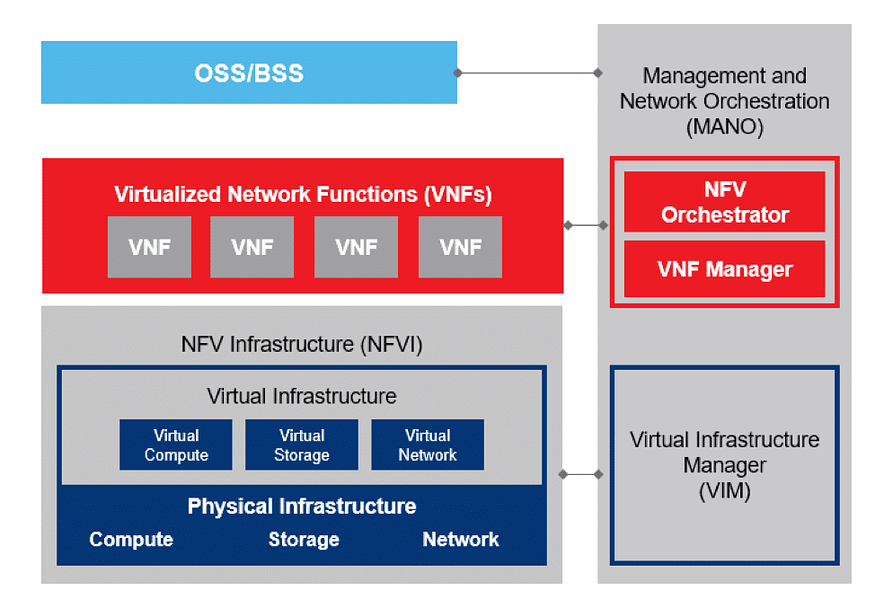
Source
3. Installation of OSM
1. Prerequisites
For the installation of OSM, I need a VM with the following requirements :
OS : Ubuntu Server 24.04
CPU : 4
RAM : 16 GB
Disk : 80 GB
I also need the VM to run OpenStack. For the case, I deploy MicroStack.

Source
“Canonical MicroStack is an open source project that enables you to easily deploy a fully-functional OpenStack environment on your workstation or even a virtual machine (VM) in minutes”.
It currrently provides OpenStack services such as Keystone, Nova, Glance, Neutron and Horizon.
So, I run the following commands to install and initialize MicroStack.
sudo snap install microstack --classic --beta
sudo microstack.init
To get the default password to login with the admin username, I run the command :
sudo snap get microstack config.credentials.keystone-password
I download an Ubuntu Server image 20.04 in order to use MicroStack as VIM.
As I used snap for MicroStack installation, I change directory to the default location for saving the image :
cd /var/snap/microstack/common/images/
sudo wget https://cloud-images.ubuntu.com/focal/current/focal-server-cloudimg-amd64.img
microstack.openstack image create --file="./focal-server-cloudimg-amd64.img" --container-format=bare --disk-format=qcow2 ubuntu20.04
microstack.openstack image list
2. Installation
To install OSM, I download the installation file :
wget https://osm-download.etsi.org/ftp/osm-14.0-fourteen/install_osm.sh
chmod +x install_osm.sh
./install_osm.sh
OSM is in version 17 now.
After the installation, I check the objects created :
helm list --all-namespaces
kubectl get svc -n osm
kubectl get deploy -n osm
kubectl get sts -n osm

I log in to the application


To interact with OSM by commands, I install osmclient :
sudo snap install osmclient4. Adding VIM to OSM
Before adding MicroStack as VIM to OSM, I first create a keypair :
microstack.openstack keypair create microstack
- And I run the command below :
osmclient.osm vim-create --name microstack --user admin --password keystone --auth_url https://192.168.191.132:5000/v3 --tenant admin --account_type openstack \
      --config='{security_groups: default,
                 keypair: microstack,
                 project_name: admin,
                 user_domain_name: default,
                 region_name: microstack,
                 insecure: True,
                 availability_zone: nova,
                 version: 3,
                 use_floating_ip: true}'

5. Deploying a Network Service (NS) and a Virtual Network Function (VNF)
A Network Service is a composition of Network Functions that defines an end-to-end functional and behavioral specification. Consequently, a network service can be viewed architecturally as a forwarding graph of Network Functions (NFs) interconnected by supporting network infrastructure.
While a VNF commonly refers to the software form of network appliances such as a router, firewall, load balancer, etc. VNFs are mostly deployed as virtual machines (VMs) on Linux KVM or VMware vSphere hypervisors.

Source
So, to deploy a NS and a VNF, I download packages provided by Open Source MANO
wget http://osm-download.etsi.org/ftp/osm-5.0-five/6th-hackfest/packages/hackfest_basic_vnf.tar.gz
wget http://osm-download.etsi.org/ftp/osm-5.0-five/6th-hackfest/packages/hackfest_basic_ns.tar.gz
wget https://osm-download.etsi.org/ftp/Hackfests/OSM_Training_SLICES_Feb2024/hackfest_basic_metrics_vnf.tar.gz
wget https://osm-download.etsi.org/ftp/Hackfests/OSM_Training_SLICES_Feb2024/hackfest_basic_metrics_ns.tar.gz
Once downloaded, I run the commands below to upload those packages into OSM :
osmclient.osm nfpkg-create hackfest_basic_vnf.tar.gz
osmclient.osm nspkg-create hackfest_basic_ns.tar.gz
osmclient.osm nfpkg-create hackfest_basic_metrics_vnf.tar.gz
osmclient.osm nspkg-create hackfest_basic_metrics_ns.tar.gz
After uploading packages, I check :
osmclient.osm vnfpkg-list
osmclient.osm nspkg-list

6. Instantiating a NS
To instantiate a NS consists of creating an instance from the NS by running the command :
osmclient.osm ns-create --ns_name ns_instance --nsd_name hackfest_basic-ns --vim_account microstack
osmclient.osm ns-list
osmclient.osm vnf-list

7. Checking on VIM
To check that the NS instance has been created into the VIM, I run the command :
microstack.openstack server list
microstack.openstack server show <server_name>
A flavor has also been created hackfest_basic-VM-vnf-1-flv.

And the instance created is using as image the one I created at the beginning, Ubuntu20.04.
A floating IP is also created and assigned to the instance created according to the configuration parameters provided while adding the VIM.


At the Network Topology tab of OpenStack, I have my NS instance.
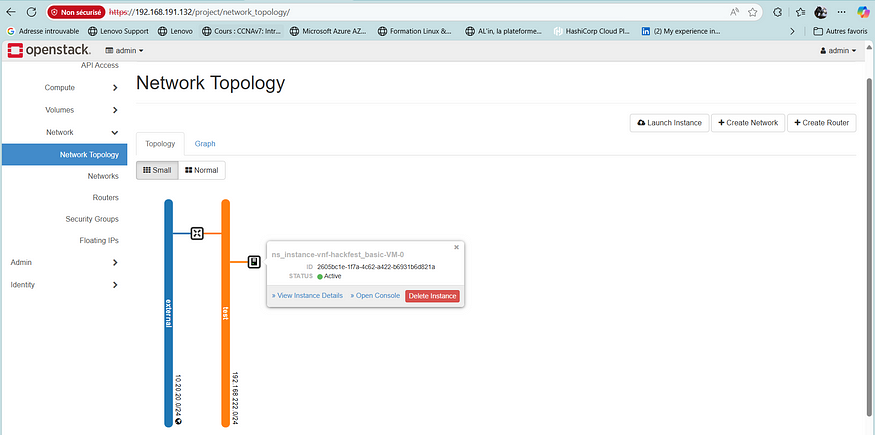
At the end, here is the dasboard

For the observability, there are Grafana and Prometheus that are installed during the OSM installation.
Grafana

Prometheus

https://osm.etsi.org/docs/user-guide/latest/01-quickstart.html
microstack — OpenStack in a snap!
Network Functions Virtualization (NFV) & Virtualized Network Functions (VNF) | A10 Networks
TOSCA Simple Profile for Network Functions Virtualization (NFV) Version 1.0
Committee Specification Draft 03 17 March 2016 Specification URIs This version…
메타데이터
- post_id
- 12d60c5d7166
- slug
- nfv-and-openstack-deployment-of-osm-open-source-mano-12d60c5d7166
- url
- https://awstip.com/nfv-and-openstack-deployment-of-osm-open-source-mano-12d60c5d7166
- canonical_url
- https://awstip.com/nfv-and-openstack-deployment-of-osm-open-source-mano-12d60c5d7166
- author_url
- https://medium.com/@hermann.priso
- status
- ok
- fetched_at
- 2026-06-15 20:49:13