How to Run Linkerd on OpenShift: Security Context Constraints and Networking Deep Dive
Red Hat OpenShift is gaining momentum as enterprises standardize Kubernetes across hybrid and multicloud environments without giving up…

How to Run Linkerd on OpenShift: Security Context Constraints and Networking Deep Dive
Red Hat OpenShift is gaining momentum as enterprises standardize Kubernetes across hybrid and multicloud environments without giving up enterprise support and security controls. IBM has recently reported OpenShift annual recurring revenue of roughly $1.7B in mid-2025 with growth in the 20%–30% range. In South Korea, organizations such as Statistics Korea, Shinhan Bank, Samsung Electronics, Lotte Card, Kakao Corp., and Korea Land & Housing use OpenShift in different ways, from modernizing application platforms to supporting regulated workloads and large-scale data initiatives.
In this article, we’ll do a deep dive into what it takes to run Linkerd on OpenShift, focusing on the OpenShift-specific security and networking behaviors that can affect installation, and sidecar injection.
Azure OpenShift Architecture
In this demo, I’ll use Azure Red Hat OpenShift (ARO), Azure’s managed OpenShift offering, to quickly provision an OpenShift cluster backed by Azure Virtual Machines. The Linkerd installation and configuration are the same as in an on-premises OpenShift environment. The diagram below provides a high-level view of the default platform components and services deployed in a typical OpenShift cluster.
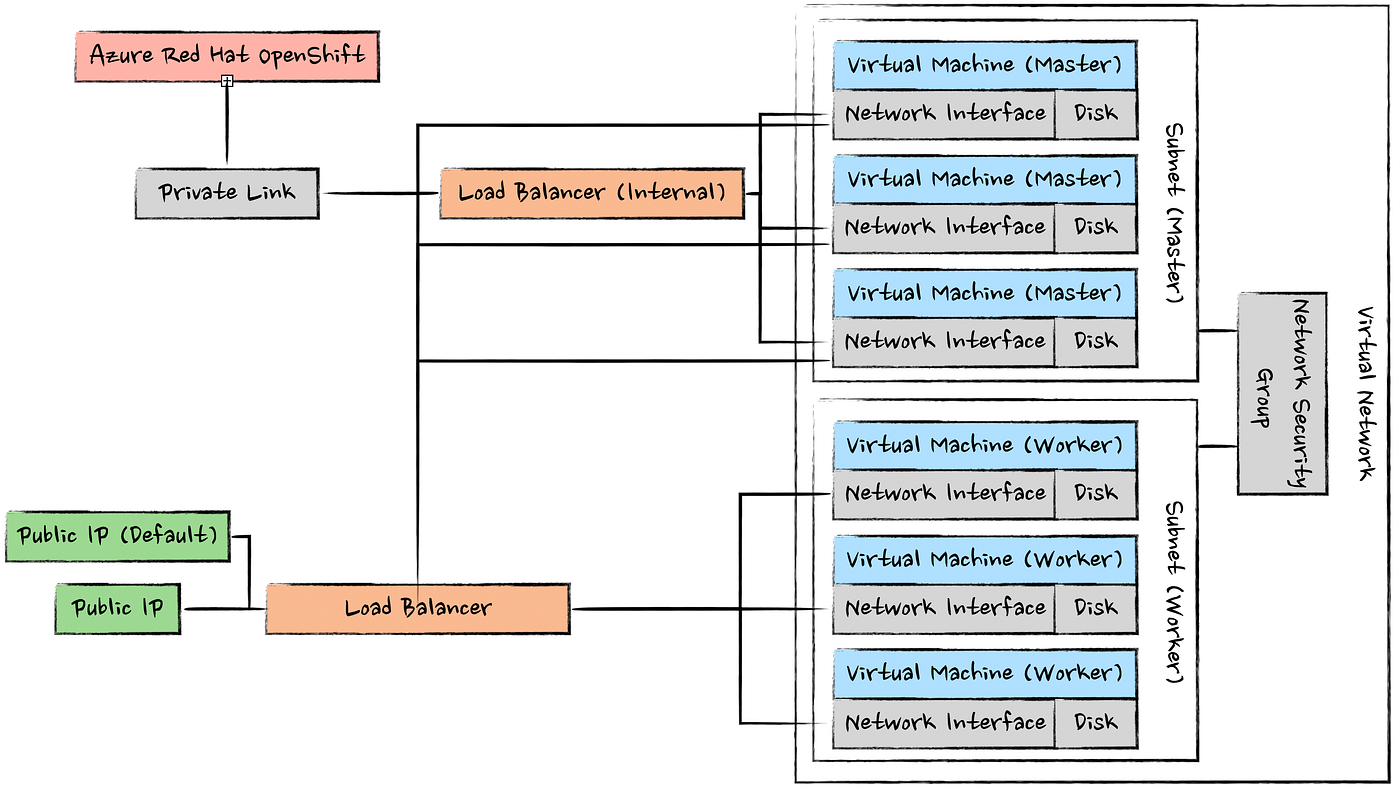
For sizing, ARO has Azure-enforced that the cluster must include at least three worker VMs with 4 vCPU (for example, a D4s family) and control plane (master) VMs with a minimum of 8 vCPU (for example, a D8s family).
Azure and Regional Quotas
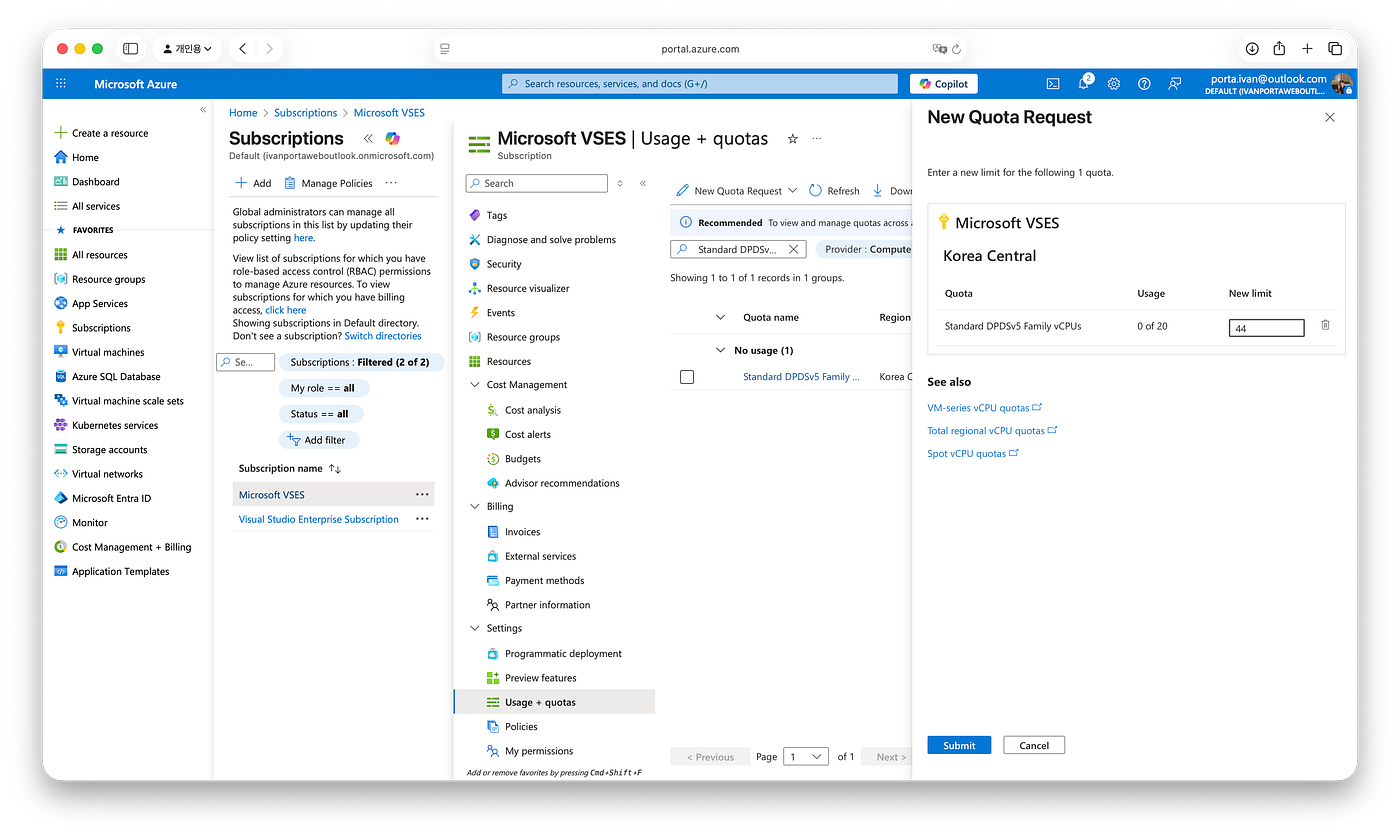
Before provisioning the OpenShift cluster on Azure with Terraform, verify that your subscription has enough vCPU quota in the target region. Azure enforces vCPU limits per region and per VM size family. If the quota is too low, Terraform/ARM will fail with an error similar to:
Resource quota of standardDSv5Family exceeded. Maximum allowed: 20, Current in use: 0, Additional requested: 44.To raise the limit in the Azure portal:
- Open the Azure portal and search for Quotas.
- Go to Compute and select the region you’re deploying into.
- Find Standard DSv5 Family vCPUs and, Total Regional vCPUs and submit a new limit request for a value ≥ 44 vCPUs.
Terraform Code
Now that the required Azure quota is in place, we can provision the ARO cluster with Terraform.
terraform {
  required_version = ">= 1.5.0"
  required_providers {
    azurerm = {
      source  = "hashicorp/azurerm"
      version = "~> 3.103"
    }
  }
}

provider "azurerm" {
  features {}
  tenant_id = "****"
  subscription_id = "****"
  client_id = "****"
  client_secret = "****"
}

# ==================================================
# Data Sources
# ==================================================

data "azurerm_client_config" "example" {}

data "azuread_client_config" "example" {}

data "azuread_service_principal" "redhatopenshift" {
  client_id = "f1dd0a37-89c6-4e07-bcd1-ffd3d43d8875"
}

# ==================================================
# Resuorce Group
# ==================================================

resource "azurerm_resource_group" "rg" {
  name     = "rg-openshift-krc-01"
  location = "koreacentral"
}

# ==================================================
# Virtual Networks and Subnets
# ==================================================

resource "azurerm_virtual_network" "vnet_01" {
  name                = "vnet-openshift-01"
  location            = azurerm_resource_group.rg.location
  resource_group_name = azurerm_resource_group.rg.name
  address_space       = ["10.0.0.0/20"]
}

resource "azurerm_subnet" "subnet_01" {
  name                 = "subnet-master"
  resource_group_name  = azurerm_resource_group.rg.name
  virtual_network_name = azurerm_virtual_network.vnet_01.name
  address_prefixes     = ["10.0.0.0/24"]
}

resource "azurerm_subnet" "subnet_01_workers" {
  name                 = "subnet-worker"
  resource_group_name  = azurerm_resource_group.rg.name
  virtual_network_name = azurerm_virtual_network.vnet_01.name
  address_prefixes     = ["10.0.1.0/24"]
}

# ==================================================
# Azure AD Application and Service Principal
# ==================================================

resource "azuread_application" "aad_user_01" {
  display_name = "openshift-app"
}

resource "azuread_service_principal" "aad_user_01_principal" {
  client_id = azuread_application.aad_user_01.client_id
}

resource "azuread_service_principal_password" "aad_user_01_password" {
  service_principal_id = azuread_service_principal.aad_user_01_principal.id
}

# ==================================================
# Role Assignments
# ==================================================

resource "azurerm_role_assignment" "role_network_user_01" {
  scope                = azurerm_virtual_network.vnet_01.id
  role_definition_name = "Network Contributor"
  principal_id         = azuread_service_principal.aad_user_01_principal.object_id
}

resource "azurerm_role_assignment" "role_network_user_openshift" {
  scope                = azurerm_virtual_network.vnet_01.id
  role_definition_name = "Network Contributor"
  principal_id         = data.azuread_service_principal.redhatopenshift.object_id
}

# ==================================================
# Red Hat OpenShift Cluster
# ==================================================

resource "azurerm_redhat_openshift_cluster" "opsh_01" {
  name                = "openshift-krc-01"
  location            = azurerm_resource_group.rg.location
  resource_group_name = azurerm_resource_group.rg.name
  cluster_profile {
    domain  = "*****"
    version = "4.19.20"
  }
  network_profile {
    pod_cidr     = "10.128.0.0/14"
    service_cidr = "172.30.0.0/16"
  }
  main_profile {
    vm_size   = "Standard_D8s_v3"
    subnet_id = azurerm_subnet.subnet_01.id
  }
  api_server_profile {
    visibility = "Public"
  }
  ingress_profile {
    visibility = "Public"
  }
  worker_profile {
    vm_size      = "Standard_D4s_v5"
    disk_size_gb = 128
    node_count   = 3
    subnet_id    = azurerm_subnet.subnet_01_workers.id
  }
  service_principal {
    client_id     = azuread_application.aad_user_01.client_id
    client_secret = azuread_service_principal_password.aad_user_01_password.value
  }
}

# ==================================================
# Outputs
# ==================================================

output "console_url" {
  value = azurerm_redhat_openshift_cluster.opsh_01.console_url
}
It will take around ~40 minutes to provisioning the cluster, depending on region and Azure capacity. Once the cluster is ready, open the OpenShift web console (the console_url Terraform output).
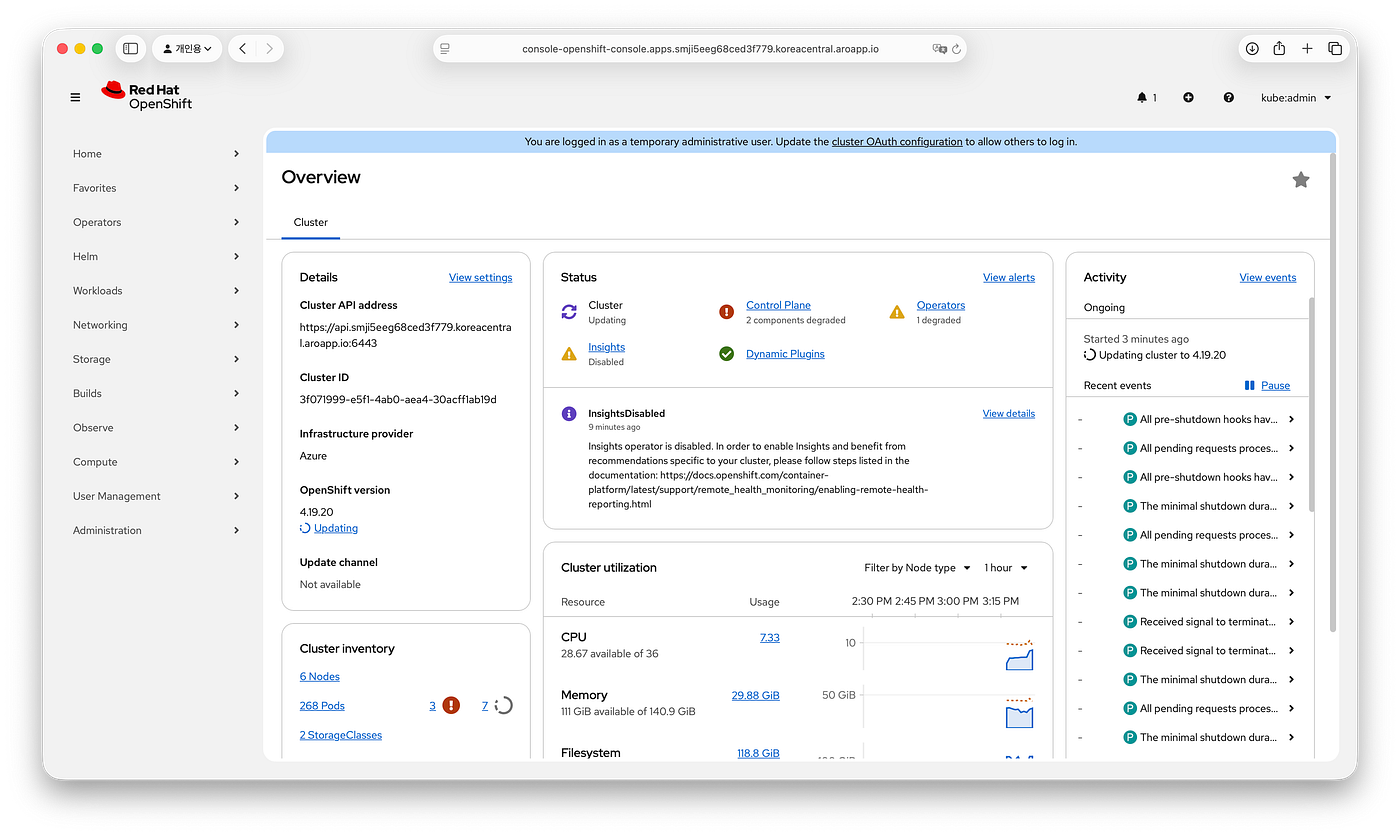
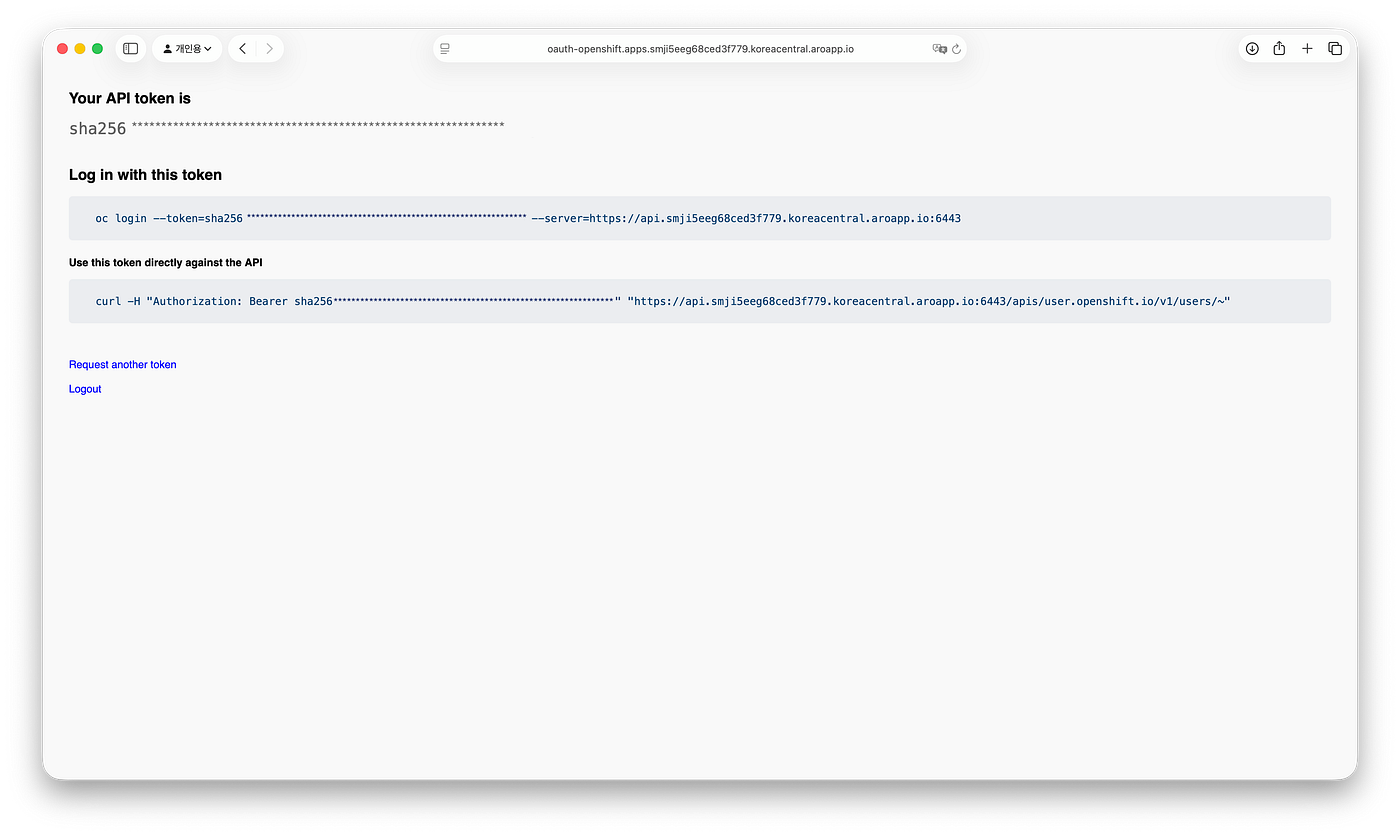
In the console, click your user menu and choose Copy login command. OpenShift will redirect you to an OAuth page that shows an oc login command containing a short-lived API token.
Similar to AKS, ARO provisions resources across two separate Azure resource groups:
- Service-managed resource group: contains the ARO cluster and the virtual network resource.
- Infrastructure resource group: contains the underlying infrastructure Azure deploys on your behalf (VMs, NICs, load balancers, etc.).
az resource list --resource-group aro-infra-mji5gsxe-openshift-krc-01 -o table
Name                                                                 ResourceGroup                        Location      Type                                     Status
-------------------------------------------------------------------  -----------------------------------  ------------  ---------------------------------------  ---------
openshift-krc-01-95h2b-pe                                            aro-infra-mji5gsxe-openshift-krc-01  koreacentral  Microsoft.Network/privateEndpoints       Succeeded
openshift-krc-01-95h2b-pip-v4                                        aro-infra-mji5gsxe-openshift-krc-01  koreacentral  Microsoft.Network/publicIPAddresses      Succeeded
openshift-krc-01-95h2b-nsg                                           aro-infra-mji5gsxe-openshift-krc-01  koreacentral  Microsoft.Network/networkSecurityGroups  Succeeded
openshift-krc-01-95h2b-default-v4                                    aro-infra-mji5gsxe-openshift-krc-01  koreacentral  Microsoft.Network/publicIPAddresses      Succeeded
openshift-krc-01-95h2b-internal                                      aro-infra-mji5gsxe-openshift-krc-01  koreacentral  Microsoft.Network/loadBalancers          Succeeded
clustercrndh9xk5g                                                    aro-infra-mji5gsxe-openshift-krc-01  koreacentral  Microsoft.Storage/storageAccounts        Succeeded
imageregistrycrndh9xk5g                                              aro-infra-mji5gsxe-openshift-krc-01  koreacentral  Microsoft.Storage/storageAccounts        Succeeded
openshift-krc-01-95h2b                                               aro-infra-mji5gsxe-openshift-krc-01  koreacentral  Microsoft.Network/loadBalancers          Succeeded
openshift-krc-01-95h2b-pls                                           aro-infra-mji5gsxe-openshift-krc-01  koreacentral  Microsoft.Network/privateLinkServices    Succeeded
openshift-krc-01-95h2b-pls.nic.844314e7-f9c7-4e0c-8ea4-a1f742518653  aro-infra-mji5gsxe-openshift-krc-01  koreacentral  Microsoft.Network/networkInterfaces      Succeeded
openshift-krc-01-95h2b-pe.nic.74d5dd3c-1e88-4ed1-b6cf-da6dca5df5d2   aro-infra-mji5gsxe-openshift-krc-01  koreacentral  Microsoft.Network/networkInterfaces      Succeeded
openshift-krc-01-95h2b-master1-nic                                   aro-infra-mji5gsxe-openshift-krc-01  koreacentral  Microsoft.Network/networkInterfaces      Succeeded
openshift-krc-01-95h2b-master0-nic                                   aro-infra-mji5gsxe-openshift-krc-01  koreacentral  Microsoft.Network/networkInterfaces      Succeeded
openshift-krc-01-95h2b-master2-nic                                   aro-infra-mji5gsxe-openshift-krc-01  koreacentral  Microsoft.Network/networkInterfaces      Succeeded
openshift-krc-01-95h2b-master-1                                      aro-infra-mji5gsxe-openshift-krc-01  koreacentral  Microsoft.Compute/virtualMachines        Succeeded
openshift-krc-01-95h2b-master-0                                      aro-infra-mji5gsxe-openshift-krc-01  koreacentral  Microsoft.Compute/virtualMachines        Succeeded
openshift-krc-01-95h2b-master-2                                      aro-infra-mji5gsxe-openshift-krc-01  koreacentral  Microsoft.Compute/virtualMachines        Succeeded
openshift-krc-01-95h2b-master-0_OSDisk                               ARO-INFRA-MJI5GSXE-OPENSHIFT-KRC-01  koreacentral  Microsoft.Compute/disks                  Succeeded
openshift-krc-01-95h2b-master-2_OSDisk                               ARO-INFRA-MJI5GSXE-OPENSHIFT-KRC-01  koreacentral  Microsoft.Compute/disks                  Succeeded
openshift-krc-01-95h2b-master-1_OSDisk                               ARO-INFRA-MJI5GSXE-OPENSHIFT-KRC-01  koreacentral  Microsoft.Compute/disks                  Succeeded
openshift-krc-01-95h2b-worker-koreacentral1-vfp8r-nic                aro-infra-mji5gsxe-openshift-krc-01  koreacentral  Microsoft.Network/networkInterfaces      Succeeded
openshift-krc-01-95h2b-worker-koreacentral2-2gw82-nic                aro-infra-mji5gsxe-openshift-krc-01  koreacentral  Microsoft.Network/networkInterfaces      Succeeded
openshift-krc-01-95h2b-worker-koreacentral3-8gf2m-nic                aro-infra-mji5gsxe-openshift-krc-01  koreacentral  Microsoft.Network/networkInterfaces      Succeeded
openshift-krc-01-95h2b-worker-koreacentral3-8gf2m                    aro-infra-mji5gsxe-openshift-krc-01  koreacentral  Microsoft.Compute/virtualMachines        Succeeded
openshift-krc-01-95h2b-worker-koreacentral2-2gw82                    aro-infra-mji5gsxe-openshift-krc-01  koreacentral  Microsoft.Compute/virtualMachines        Succeeded
openshift-krc-01-95h2b-worker-koreacentral1-vfp8r                    aro-infra-mji5gsxe-openshift-krc-01  koreacentral  Microsoft.Compute/virtualMachines        Succeeded
openshift-krc-01-95h2b-worker-koreacentral3-8gf2m_OSDisk             ARO-INFRA-MJI5GSXE-OPENSHIFT-KRC-01  koreacentral  Microsoft.Compute/disks                  Succeeded
openshift-krc-01-95h2b-worker-koreacentral2-2gw82_OSDisk             ARO-INFRA-MJI5GSXE-OPENSHIFT-KRC-01  koreacentral  Microsoft.Compute/disks                  Succeeded
openshift-krc-01-95h2b-worker-koreacentral1-vfp8r_OSDisk             ARO-INFRA-MJI5GSXE-OPENSHIFT-KRC-01  koreacentral  Microsoft.Compute/disks                  Succeeded

az resource list --resource-group rg-openshift-krc-01 -o table
Name               ResourceGroup        Location      Type                                         Status
-----------------  -------------------  ------------  -------------------------------------------  ---------
vnet-openshift-01  rg-openshift-krc-01  koreacentral  Microsoft.Network/virtualNetworks            Succeeded
openshift-krc-01   rg-openshift-krc-01  koreacentral  Microsoft.RedHatOpenShift/OpenShiftClusters  Succeeded
Red Hat OpenShift Overview
Before we dive into Linkerd, let’s take some time to understand a few OpenShift resources and configuration defaults that matter for service meshes. In this section, we’ll focus on the OpenShift components and security settings that can directly impact Linkerd installation, sidecar injection, and runtime behavior.
Security Context Constraints
Security Context Constraints (SCCs) are OpenShift resources that define which security settings pods are allowed to use, limiting what containers can do and what host resources they can access (for example, running as root or within specific UID ranges, using privileged mode/capabilities, host networking/IPC/PID, or accessing hostPath volumes).
When a request to create a pod is sent to the Kubernetes API in OpenShift, the SCC admission plugin determines which SCCs the requesting user/serviceaccount is allowed to use, chooses an SCC that can admit the pod, and update the SCC security-related fields using annotations like openshift.io/sa.scc.uid-range, openshift.io/sa.scc.mcs, and openshift.io/sa.scc.supplemental-groups. It then enforces that the pod satisfies the selected SCC; otherwise, the request is rejected. The selected SCC is recorded on the admitted pod via the openshift.io/scc annotation.
kubectl get scc
NAME                              PRIV    CAPS                   SELINUX     RUNASUSER          FSGROUP     SUPGROUP    PRIORITY     READONLYROOTFS   VOLUMES
anyuid                            false   <no value>             MustRunAs   RunAsAny           RunAsAny    RunAsAny    10           false            ["configMap","csi","downwardAPI","emptyDir","ephemeral","persistentVolumeClaim","projected","secret"]
hostaccess                        false   <no value>             MustRunAs   MustRunAsRange     MustRunAs   RunAsAny    <no value>   false            ["configMap","csi","downwardAPI","emptyDir","ephemeral","hostPath","persistentVolumeClaim","projected","secret"]
hostmount-anyuid                  false   <no value>             MustRunAs   RunAsAny           RunAsAny    RunAsAny    <no value>   false            ["configMap","csi","downwardAPI","emptyDir","ephemeral","hostPath","nfs","persistentVolumeClaim","projected","secret"]
hostmount-anyuid-v2               false   <no value>             RunAsAny    RunAsAny           RunAsAny    RunAsAny    <no value>   false            ["configMap","csi","downwardAPI","emptyDir","ephemeral","hostPath","nfs","persistentVolumeClaim","projected","secret"]
hostnetwork                       false   <no value>             MustRunAs   MustRunAsRange     MustRunAs   MustRunAs   <no value>   false            ["configMap","csi","downwardAPI","emptyDir","ephemeral","persistentVolumeClaim","projected","secret"]
hostnetwork-v2                    false   ["NET_BIND_SERVICE"]   MustRunAs   MustRunAsRange     MustRunAs   MustRunAs   <no value>   false            ["configMap","csi","downwardAPI","emptyDir","ephemeral","persistentVolumeClaim","projected","secret"]
insights-runtime-extractor-scc    true    ["CAP_SYS_ADMIN"]      RunAsAny    RunAsAny           RunAsAny    RunAsAny    <no value>   false            ["*"]
machine-api-termination-handler   false   <no value>             MustRunAs   RunAsAny           MustRunAs   MustRunAs   <no value>   false            ["downwardAPI","hostPath"]
node-exporter                     true    <no value>             RunAsAny    RunAsAny           RunAsAny    RunAsAny    <no value>   false            ["*"]
nonroot                           false   <no value>             MustRunAs   MustRunAsNonRoot   RunAsAny    RunAsAny    <no value>   false            ["configMap","csi","downwardAPI","emptyDir","ephemeral","persistentVolumeClaim","projected","secret"]
nonroot-v2                        false   ["NET_BIND_SERVICE"]   MustRunAs   MustRunAsNonRoot   RunAsAny    RunAsAny    <no value>   false            ["configMap","csi","downwardAPI","emptyDir","ephemeral","persistentVolumeClaim","projected","secret"]
privileged                        true    ["*"]                  RunAsAny    RunAsAny           RunAsAny    RunAsAny    <no value>   false            ["*"]
privileged-genevalogging          true    ["*"]                  RunAsAny    RunAsAny           RunAsAny    RunAsAny    <no value>   false            ["*"]
restricted                        false   <no value>             MustRunAs   MustRunAsRange     MustRunAs   RunAsAny    <no value>   false            ["configMap","csi","downwardAPI","emptyDir","ephemeral","persistentVolumeClaim","projected","secret"]
restricted-v2                     false   ["NET_BIND_SERVICE"]   MustRunAs   MustRunAsRange     MustRunAs   RunAsAny    <no value>   false            ["configMap","csi","downwardAPI","emptyDir","ephemeral","persistentVolumeClaim","projected","secret"]
Container Network Interface
OpenShift 4 uses OVN-Kubernetes as the default CNI, based on OVN, and Multus CNI, a meta-plugin that allows pods to have multiple network interfaces.
oc get network.operator cluster -o jsonpath='{.spec.defaultNetwork.type}{"\n"}'
# OVNKubernetes
To see what kubelet is using on a node, start a privileged debug session and inspect the host filesystem.
oc get nodes
NAME                                                STATUS   ROLES                  AGE    VERSION
openshift-krc-01-95h2b-master-0                     Ready    control-plane,master   6h9m   v1.32.9
openshift-krc-01-95h2b-master-1                     Ready    control-plane,master   6h9m   v1.32.9
openshift-krc-01-95h2b-master-2                     Ready    control-plane,master   6h9m   v1.32.9
openshift-krc-01-95h2b-worker-koreacentral1-vfp8r   Ready    worker                 6h     v1.32.9
openshift-krc-01-95h2b-worker-koreacentral2-2gw82   Ready    worker                 6h     v1.32.9
openshift-krc-01-95h2b-worker-koreacentral3-8gf2m   Ready    worker                 6h     v1.32.9

oc debug node/openshift-krc-01-95h2b-worker-koreacentral1-vfp8r
Starting pod/openshift-krc-01-95h2b-worker-koreacentral1-vfp8r-debug-2rvzs ...
To use host binaries, run `chroot /host`. Instead, if you need to access host namespaces, run `nsenter -a -t 1`.
Pod IP: 10.0.1.4
If you don't see a command prompt, try pressing enter.

sh-5.1# chroot /host
On OpenShift nodes, you’ll commonly find two CNI config locations:
/etc/kubernetes/cni/net.d: the directory with the Kubernetes-specific configurations, like Multus./etc/cni/net.d: the directory with the CRI-O configuration.
sh-5.1# ls -la /etc/kubernetes/cni/net.d 2>/dev/null
total 4
drwxr-xr-x. 3 root root  49 Dec 23 06:14 .
drwxr-xr-x. 3 root root  19 Dec 23 05:56 ..
-rw-------. 1 root root 409 Dec 23 06:14 00-multus.conf
drwxr-xr-x. 2 root root  76 Dec 23 05:59 whereabouts.d

sh-5.1# ls -la /etc/cni/net.d 2>/dev/null
total 8
drwxr-xr-x. 2 root root  67 Dec 23 05:56 .
drwxr-xr-x. 5 root root  47 Dec 23 05:58 ..
-rw-------. 1 root root 469 Dec 23 05:56 100-crio-bridge.conflist
-rw-------. 1 root root 129 Dec 23 05:56 200-loopback.conflist

sh-5.1# cat /etc/kubernetes/cni/net.d/00-multus.conf
{
  "binDir": "/var/lib/cni/bin",
  "cniVersion": "0.3.1",
  "logLevel": "verbose",
  "logToStderr": true,
  "name": "multus-cni-network",
  "clusterNetwork": "/host/run/multus/cni/net.d/10-ovn-kubernetes.conf",
  "namespaceIsolation": true,
  "globalNamespaces": "default,openshift-multus,openshift-sriov-network-operator,openshift-cnv",
  "type": "multus-shim",
  "auxiliaryCNIChainName": "vendor-cni-chain",
  "daemonSocketDir": "/run/multus/socket"
}

sh-5.1# cat run/multus/cni/net.d/10-ovn-kubernetes.conf
{
  "cniVersion": "0.4.0",
  "name": "ovn-kubernetes",
  "type": "ovn-k8s-cni-overlay",
  "ipam": {},
  "dns": {},
  "logFile": "/var/log/ovn-kubernetes/ovn-k8s-cni-overlay.log",
  "logLevel": "4",
  "logfile-maxsize": 100,
  "logfile-maxbackups": 5,
  "logfile-maxage": 0,
  "runtimeConfig": {}
}

sh-5.1# cat /etc/cni/net.d/100-crio-bridge.conflist
{
  "cniVersion": "1.0.0",
  "name": "crio",
  "plugins": [
    {
      "type": "bridge",
      "bridge": "cni0",
      "isGateway": true,
      "ipMasq": true,
      "hairpinMode": true,
      "ipam": {
        "type": "host-local",
        "routes": [
            { "dst": "0.0.0.0/0" },
            { "dst": "::/0" }
        ],
        "ranges": [
            [{ "subnet": "10.85.0.0/16" }],
            [{ "subnet": "1100:200::/24" }]
        ]
      }
    }
  ]
}

sh-5.1# cat /etc/cni/net.d/200-loopback.conflist
{
    "cniVersion": "1.0.0",
    "name": "loopback",
    "plugins": [
        {
            "type": "loopback"
        }
    ]
}
Projects
Finally, we have projects. In OpenShift, a project is the primary unit of isolation and collaboration. Administrators can define resource quotas and apply security policies and RBAC roles at the project level. Under the hood, an OpenShift project maps 1:1 to a Kubernetes namespace; you can think of it as a namespace plus OpenShift-specific metadata and policy that support governance and access control.
OpenShift CLI
OpenShift ships with its own command-line client, oc, which extends kubectl with OpenShift-specific workflows. On macOS, you can install it with Homebrew:
brew install openshift-cliThe following are the high-level commands that is support:
oc --help
OpenShift Client

This client helps you develop, build, deploy, and run your applications on any
OpenShift or Kubernetes cluster. It also includes the administrative
commands for managing a cluster under the 'adm' subcommand.

Basic Commands:
  login             Log in to a server
  new-project       Request a new project
  new-app           Create a new application
  status            Show an overview of the current project
  project           Switch to another project
  projects          Display existing projects
  explain           Get documentation for a resource

Build and Deploy Commands:
  rollout           Manage the rollout of a resource
  rollback          Revert part of an application back to a previous deployment
  new-build         Create a new build configuration
  start-build       Start a new build
  cancel-build      Cancel running, pending, or new builds
  import-image      Import images from a container image registry
  tag               Tag existing images into image streams

Application Management Commands:
  create            Create a resource from a file or from stdin
  apply             Apply a configuration to a resource by file name or stdin
  get               Display one or many resources
  describe          Show details of a specific resource or group of resources
  edit              Edit a resource on the server
  set               Commands that help set specific features on objects
  label             Update the labels on a resource
  annotate          Update the annotations on a resource
  expose            Expose a replicated application as a service or route
  delete            Delete resources by file names, stdin, resources and names,
or by resources and label selector
  scale             Set a new size for a deployment, replica set, or replication
controller
  autoscale         Autoscale a deployment config, deployment, replica set,
stateful set, or replication controller
  secrets           Manage secrets

Troubleshooting and Debugging Commands:
  logs              Print the logs for a container in a pod
  rsh               Start a shell session in a container
  rsync             Copy files between a local file system and a pod
  port-forward      Forward one or more local ports to a pod
  debug             Launch a new instance of a pod for debugging
  exec              Execute a command in a container
  proxy             Run a proxy to the Kubernetes API server
  attach            Attach to a running container
  run               Run a particular image on the cluster
  cp                Copy files and directories to and from containers
  wait              Experimental: Wait for a specific condition on one or many
resources
  events            List events

Advanced Commands:
  adm               Tools for managing a cluster
  replace           Replace a resource by file name or stdin
  patch             Update fields of a resource
  process           Process a template into list of resources
  extract           Extract secrets or config maps to disk
  observe           Observe changes to resources and react to them
(experimental)
  policy            Manage authorization policy
  auth              Inspect authorization
  image             Useful commands for managing images
  registry          Commands for working with the registry
  idle              Idle scalable resources
  api-versions      Print the supported API versions on the server, in the form
of "group/version"
  api-resources     Print the supported API resources on the server
  cluster-info      Display cluster information
  diff              Diff the live version against a would-be applied version
  kustomize         Build a kustomization target from a directory or URL

Settings Commands:
  get-token         Experimental: Get token from external OIDC issuer as
credentials exec plugin
  logout            End the current server session
  config            Modify kubeconfig files
  whoami            Return information about the current session
  completion        Output shell completion code for the specified shell (bash,
zsh, fish, or powershell)

Other Commands:
  plugin            Provides utilities for interacting with plugins
  version           Print the client and server version information

Usage:
  oc [flags] [options]

Use "oc <command> --help" for more information about a given command.
Use "oc options" for a list of global command-line options (applies to all
commands).
Linkerd and OpenShift
There’s nothing that technically prevents you from installing Linkerd into a namespace created by Helm (--create-namespace). However,However, “when in Rome, do as the Romans do,” so we’ll follow the OpenShift convention and create a dedicated project for Linkerd:
oc new-project linkerdBehind the scenes, this creates the following resources:
apiVersion: project.openshift.io/v1
kind: Project
metadata:
  annotations:
    openshift.io/description: ""
    openshift.io/display-name: ""
    openshift.io/requester: kube:admin
    openshift.io/sa.scc.mcs: s0:c27,c24
    openshift.io/sa.scc.supplemental-groups: 1000750000/10000
    openshift.io/sa.scc.uid-range: 1000750000/10000
    security.openshift.io/MinimallySufficientPodSecurityStandard: restricted
  creationTimestamp: "2025-12-26T15:56:53Z"
  labels:
    kubernetes.io/metadata.name: linkerd
    pod-security.kubernetes.io/audit: restricted
    pod-security.kubernetes.io/audit-version: latest
    pod-security.kubernetes.io/warn: restricted
    pod-security.kubernetes.io/warn-version: latest
  name: linkerd
  resourceVersion: "61498"
  uid: 659721e4-573d-4a08-bf50-e7b7e7c032df
spec:
  finalizers:
  - kubernetes
status:
  phase: Active
---
apiVersion: v1
kind: Namespace
metadata:
  annotations:
    openshift.io/description: ""
    openshift.io/display-name: ""
    openshift.io/requester: kube:admin
    openshift.io/sa.scc.mcs: s0:c27,c24
    openshift.io/sa.scc.supplemental-groups: 1000750000/10000
    openshift.io/sa.scc.uid-range: 1000750000/10000
    security.openshift.io/MinimallySufficientPodSecurityStandard: restricted
  creationTimestamp: "2025-12-26T15:56:53Z"
  labels:
    kubernetes.io/metadata.name: linkerd
    pod-security.kubernetes.io/audit: restricted
    pod-security.kubernetes.io/audit-version: latest
    pod-security.kubernetes.io/warn: restricted
    pod-security.kubernetes.io/warn-version: latest
  name: linkerd
  resourceVersion: "61498"
  uid: 659721e4-573d-4a08-bf50-e7b7e7c032df
spec:
  finalizers:
  - kubernetes
status:
  phase: Active
As you can see, the admission controller creates and populates several annotations that are evaluated when processing requests to create pods in the namespace. These annotations become important shortly.
Generate Linkerd identity certificates
Linkerd mTLS relies on two certificates that you provide at install time: a root certificate and an intermediate issuer certificate. Linkerd later uses the issuer certificate to generate short-lived workload certificates. Let’s generate both certificates using step.
mkdir certificates

step certificate create root.linkerd.cluster.local ./certificates/ca.crt ./certificates/ca.key \
  --profile root-ca --no-password --insecure --force

step certificate create identity.linkerd.cluster.local ./certificates/issuer.crt ./certificates/issuer.key \
  --ca ./certificates/ca.crt --ca-key ./certificates/ca.key \
  --profile intermediate-ca --not-after 8760h --no-password --insecure --force
Install Linkerd with Helm
In this tutorial, we’ll use the Linkerd Enterprise charts, but the same OpenShift-specific constraints apply to Linkerd OSS as well.
helm repo add linkerd-buoyant https://helm.buoyant.cloud

helm upgrade --install linkerd-enterprise-crds linkerd-buoyant/linkerd-enterprise-crds \
  -n linkerd --version 2.19.3

helm upgrade --install linkerd-enterprise-control-plane linkerd-buoyant/linkerd-enterprise-control-plane \
  -n linkerd --version 2.19.3 \
  --set-file=identityTrustAnchorsPEM=./certificates/ca.crt \
  --set-file=identity.issuer.tls.crtPEM=./certificates/issuer.crt \
  --set-file=identity.issuer.tls.keyPEM=./certificates/issuer.key \
  --set license='***********'
After installing, you will see the deployments created but with no available pods:
kubectl get deployment -n linkerd
NAME                     READY   UP-TO-DATE   AVAILABLE   AGE
linkerd-destination      0/1     0            0           2m40s
linkerd-enterprise       0/1     0            0           2m40s
linkerd-identity         0/1     0            0           2m40s
linkerd-proxy-injector   0/1     0            0           2m40s
SCC and Linkerd
If you inspect events in the linkerd namespace, you’ll see the pod creation of the Linkerd Control Plane being forbidden by different security context constraints.
kubectl get events -n linkerd
LAST SEEN   TYPE      REASON         OBJECT                                         MESSAGE
7m47s       Warning   FailedCreate   replicaset/linkerd-destination-5fd5f7b7f7      Error creating: pods "linkerd-destination-5fd5f7b7f7-" is forbidden: unable to validate against any security context constraint: [provider "anyuid": Forbidden: not usable by user or serviceaccount, provider restricted-v2: .initContainers[0].runAsUser: Invalid value: 65534: must be in the ranges: [1000750000, 1000759999], provider restricted-v2: .initContainers[0].capabilities.add: Invalid value: "NET_ADMIN": capability may not be added, provider restricted-v2: .initContainers[0].capabilities.add: Invalid value: "NET_RAW": capability may not be added, provider restricted-v2: .containers[0].runAsUser: Invalid value: 2102: must be in the ranges: [1000750000, 1000759999], provider restricted-v2: .containers[1].runAsUser: Invalid value: 2103: must be in the ranges: [1000750000, 1000759999], provider restricted-v2: .containers[2].runAsUser: Invalid value: 2103: must be in the ranges: [1000750000, 1000759999], provider restricted-v2: .containers[3].runAsUser: Invalid value: 2103: must be in the ranges: [1000750000, 1000759999], provider "restricted": Forbidden: not usable by user or serviceaccount, provider "nonroot-v2": Forbidden: not usable by user or serviceaccount, provider "nonroot": Forbidden: not usable by user or serviceaccount, provider "hostmount-anyuid": Forbidden: not usable by user or serviceaccount, provider "hostmount-anyuid-v2": Forbidden: not usable by user or serviceaccount, provider "machine-api-termination-handler": Forbidden: not usable by user or serviceaccount, provider "hostnetwork-v2": Forbidden: not usable by user or serviceaccount, provider "hostnetwork": Forbidden: not usable by user or serviceaccount, provider "hostaccess": Forbidden: not usable by user or serviceaccount, provider "insights-runtime-extractor-scc": Forbidden: not usable by user or serviceaccount, provider "node-exporter": Forbidden: not usable by user or serviceaccount, provider "privileged": Forbidden: not usable by user or serviceaccount, provider "privileged-genevalogging": Forbidden: not usable by user or serviceaccount]
7m47s       Warning   FailedCreate   replicaset/linkerd-enterprise-6dd8db856        Error creating: pods "linkerd-enterprise-6dd8db856-" is forbidden: unable to validate against any security context constraint: [provider "anyuid": Forbidden: not usable by user or serviceaccount, provider restricted-v2: .initContainers[0].runAsUser: Invalid value: 65534: must be in the ranges: [1000750000, 1000759999], provider restricted-v2: .initContainers[0].capabilities.add: Invalid value: "NET_ADMIN": capability may not be added, provider restricted-v2: .initContainers[0].capabilities.add: Invalid value: "NET_RAW": capability may not be added, provider restricted-v2: .containers[0].runAsUser: Invalid value: 2102: must be in the ranges: [1000750000, 1000759999], provider restricted-v2: .containers[1].runAsUser: Invalid value: 2103: must be in the ranges: [1000750000, 1000759999], provider "restricted": Forbidden: not usable by user or serviceaccount, provider "nonroot-v2": Forbidden: not usable by user or serviceaccount, provider "nonroot": Forbidden: not usable by user or serviceaccount, provider "hostmount-anyuid": Forbidden: not usable by user or serviceaccount, provider "hostmount-anyuid-v2": Forbidden: not usable by user or serviceaccount, provider "machine-api-termination-handler": Forbidden: not usable by user or serviceaccount, provider "hostnetwork-v2": Forbidden: not usable by user or serviceaccount, provider "hostnetwork": Forbidden: not usable by user or serviceaccount, provider "hostaccess": Forbidden: not usable by user or serviceaccount, provider "insights-runtime-extractor-scc": Forbidden: not usable by user or serviceaccount, provider "node-exporter": Forbidden: not usable by user or serviceaccount, provider "privileged": Forbidden: not usable by user or serviceaccount, provider "privileged-genevalogging": Forbidden: not usable by user or serviceaccount]
106s        Warning   FailedCreate   job/linkerd-heartbeat-29446087                 Error creating: pods "linkerd-heartbeat-29446087-" is forbidden: unable to validate against any security context constraint: [provider "anyuid": Forbidden: not usable by user or serviceaccount, provider restricted-v2: .containers[0].runAsUser: Invalid value: 2103: must be in the ranges: [1000750000, 1000759999], provider "restricted": Forbidden: not usable by user or serviceaccount, provider "nonroot-v2": Forbidden: not usable by user or serviceaccount, provider "nonroot": Forbidden: not usable by user or serviceaccount, provider "hostmount-anyuid": Forbidden: not usable by user or serviceaccount, provider "hostmount-anyuid-v2": Forbidden: not usable by user or serviceaccount, provider "machine-api-termination-handler": Forbidden: not usable by user or serviceaccount, provider "hostnetwork-v2": Forbidden: not usable by user or serviceaccount, provider "hostnetwork": Forbidden: not usable by user or serviceaccount, provider "hostaccess": Forbidden: not usable by user or serviceaccount, provider "insights-runtime-extractor-scc": Forbidden: not usable by user or serviceaccount, provider "node-exporter": Forbidden: not usable by user or serviceaccount, provider "privileged": Forbidden: not usable by user or serviceaccount, provider "privileged-genevalogging": Forbidden: not usable by user or serviceaccount]
7m47s       Warning   FailedCreate   replicaset/linkerd-identity-688fff88b4         Error creating: pods "linkerd-identity-688fff88b4-" is forbidden: unable to validate against any security context constraint: [provider "anyuid": Forbidden: not usable by user or serviceaccount, provider restricted-v2: .initContainers[0].runAsUser: Invalid value: 65534: must be in the ranges: [1000750000, 1000759999], provider restricted-v2: .initContainers[0].capabilities.add: Invalid value: "NET_ADMIN": capability may not be added, provider restricted-v2: .initContainers[0].capabilities.add: Invalid value: "NET_RAW": capability may not be added, provider restricted-v2: .containers[0].runAsUser: Invalid value: 2103: must be in the ranges: [1000750000, 1000759999], provider restricted-v2: .containers[1].runAsUser: Invalid value: 2102: must be in the ranges: [1000750000, 1000759999], provider "restricted": Forbidden: not usable by user or serviceaccount, provider "nonroot-v2": Forbidden: not usable by user or serviceaccount, provider "nonroot": Forbidden: not usable by user or serviceaccount, provider "hostmount-anyuid": Forbidden: not usable by user or serviceaccount, provider "hostmount-anyuid-v2": Forbidden: not usable by user or serviceaccount, provider "machine-api-termination-handler": Forbidden: not usable by user or serviceaccount, provider "hostnetwork-v2": Forbidden: not usable by user or serviceaccount, provider "hostnetwork": Forbidden: not usable by user or serviceaccount, provider "hostaccess": Forbidden: not usable by user or serviceaccount, provider "insights-runtime-extractor-scc": Forbidden: not usable by user or serviceaccount, provider "node-exporter": Forbidden: not usable by user or serviceaccount, provider "privileged": Forbidden: not usable by user or serviceaccount, provider "privileged-genevalogging": Forbidden: not usable by user or serviceaccount]
7m47s       Warning   FailedCreate   replicaset/linkerd-proxy-injector-5f654db4db   Error creating: pods "linkerd-proxy-injector-5f654db4db-" is forbidden: unable to validate against any security context constraint: [provider "anyuid": Forbidden: not usable by user or serviceaccount, provider restricted-v2: .initContainers[0].runAsUser: Invalid value: 65534: must be in the ranges: [1000750000, 1000759999], provider restricted-v2: .initContainers[0].capabilities.add: Invalid value: "NET_ADMIN": capability may not be added, provider restricted-v2: .initContainers[0].capabilities.add: Invalid value: "NET_RAW": capability may not be added, provider restricted-v2: .containers[0].runAsUser: Invalid value: 2102: must be in the ranges: [1000750000, 1000759999], provider restricted-v2: .containers[1].runAsUser: Invalid value: 2103: must be in the ranges: [1000750000, 1000759999], provider "restricted": Forbidden: not usable by user or serviceaccount, provider "nonroot-v2": Forbidden: not usable by user or serviceaccount, provider "nonroot": Forbidden: not usable by user or serviceaccount, provider "hostmount-anyuid": Forbidden: not usable by user or serviceaccount, provider "hostmount-anyuid-v2": Forbidden: not usable by user or serviceaccount, provider "machine-api-termination-handler": Forbidden: not usable by user or serviceaccount, provider "hostnetwork-v2": Forbidden: not usable by user or serviceaccount, provider "hostnetwork": Forbidden: not usable by user or serviceaccount, provider "hostaccess": Forbidden: not usable by user or serviceaccount, provider "insights-runtime-extractor-scc": Forbidden: not usable by user or serviceaccount, provider "node-exporter": Forbidden: not usable by user or serviceaccount, provider "privileged": Forbidden: not usable by user or serviceaccount, provider "privileged-genevalogging": Forbidden: not usable by user or serviceaccount]
By default, vanilla OpenShift projects are tightly restricted. You can see that in the namespace/project security.openshift.io/MinimallySufficientPodSecurityStandard annotation set to restricted. This means pods in the project are evaluated against the restricted-v2 SCC that will then cause some conflicts with the default Linkerd settings:
**proxy-initrequires privileged networking capabilities:** By default, Linkerd deploys aproxy-initinit container that configuresiptablesso inbound and outbound traffic is redirected through the Linkerd proxy. Modifying networking rules requires theNET_ADMINandNET_RAWcapabilities, which are disallowed by therestricted-v2SCC.- Default UIDs don’t match OpenShift’s per-project UID ranges: OpenShift assigns each project a unique UID range and enforces that range under
restricted-v2. By default, Linkerd containers run as UID2102, which falls outside the project’s allocated range, preventing the pods from being created.
Let’s tackle these issues in two scenarios: with Linkerd CNI and without Linkerd CNI.
Linkerd have an extension called Linkerd CNI, which removes the need to grant additional capabilities to proxy-init(and skips proxy-init entirely) by performing the traffic redirection at the CNI layer. When deployed, it creates a DaemonSet that uses CNI chaining to inject Linkerd-specific configuration into the existing CNI setup. When a new pod is created, the Linkerd CNI binaries on each node use that configuration to update routing and redirect traffic through the Linkerd proxy.
Let’s start by creating a dedicated project for Linkerd CNI:
oc new-project linkerd-cniThen install the Linkerd CNI extension using Helm.
Important: By default, the chart installs binaries into /opt/cni/bin and writes configuration under /etc/cni/net.d. Those paths don’t exist on OpenShift by default, so we need to override them to match OpenShift’s paths:
helm repo add linkerd2-edge https://helm.linkerd.io/edge
helm install linkerd2-cni linkerd2-edge/linkerd2-cni \
  --namespace linkerd-cni \
  --version 2025.12.3 \
  --set destCNIBinDir=/var/lib/cni/bin \
  --set destCNINetDir=/etc/kubernetes/cni/net.d \
  --set privileged=true
However, you’ll hit a similar issue with the Linkerd CNI installation as we did with the Linkerd control plane:
kubectl get events -n linkerd-cni
LAST SEEN   TYPE      REASON         OBJECT                  MESSAGE
0s          Warning   FailedCreate   daemonset/linkerd-cni   Error creating: pods "linkerd-cni-" is forbidden: unable to validate against any security context constraint: [provider "anyuid": Forbidden: not usable by user or serviceaccount, spec.volumes[0]: Invalid value: "hostPath": hostPath volumes are not allowed to be used, spec.volumes[1]: Invalid value: "hostPath": hostPath volumes are not allowed to be used, provider "restricted": Forbidden: not usable by user or serviceaccount, provider "nonroot-v2": Forbidden: not usable by user or serviceaccount, provider "nonroot": Forbidden: not usable by user or serviceaccount, provider "hostmount-anyuid": Forbidden: not usable by user or serviceaccount, provider "hostmount-anyuid-v2": Forbidden: not usable by user or serviceaccount, provider "machine-api-termination-handler": Forbidden: not usable by user or serviceaccount, provider "hostnetwork-v2": Forbidden: not usable by user or serviceaccount, provider "hostnetwork": Forbidden: not usable by user or serviceaccount, provider "hostaccess": Forbidden: not usable by user or serviceaccount, provider "insights-runtime-extractor-scc": Forbidden: not usable by user or serviceaccount, provider "node-exporter": Forbidden: not usable by user or serviceaccount, provider "privileged": Forbidden: not usable by user or serviceaccount, provider "privileged-genevalogging": Forbidden: not usable by user or serviceaccount]
By default, the linkerd-cni project is also evaluated under a restricted SCC, which conflicts with what a CNI plugin needs to do.
- HostPath volumes are not allowed: The CNI DaemonSet commonly needs to mount host paths so that it can add the Linkerd-specific CNI configuration and related binaries.
To solve this hiccup, I recommend avoiding the built-in privileged SCC and instead creating a custom SCC that grants only the permissions needed by Linkerd CNI. This helps you maintain a least-privilege security approach:
apiVersion: security.openshift.io/v1
kind: SecurityContextConstraints
metadata:
  name: linkerd-cni-scc
allowPrivilegedContainer: true
allowPrivilegeEscalation: true
defaultAllowPrivilegeEscalation: true
allowHostNetwork: false
allowHostPorts: false
allowHostPID: false
allowHostIPC: false
allowHostDirVolumePlugin: true
volumes:
  - hostPath
  - configMap
  - projected
  - downwardAPI
  - emptyDir
seccompProfiles:
  - '*'
runAsUser:
  type: RunAsAny
seLinuxContext:
  type: RunAsAny
fsGroup:
  type: RunAsAny
supplementalGroups:
  type: RunAsAny
users:
- system:serviceaccount:linkerd-cni:linkerd-cni
Once applied, you should see the pods scheduled and running:
kubectl get pods -n linkerd-cni
NAME                READY   STATUS    RESTARTS   AGE
linkerd-cni-bb2p4   1/1     Running   0          56s
linkerd-cni-knkwm   1/1     Running   0          56s
linkerd-cni-pwd9d   1/1     Running   0          56s
linkerd-cni-tx8l2   1/1     Running   0          56s
linkerd-cni-v87hh   1/1     Running   0          17s
linkerd-cni-vfbg9   1/1     Running   0          56s
Now let’s check what changed on the node. Start a privileged debug session and inspect the host filesystem again:
oc debug node/os-01-sc8tf-worker-koreacentral1-fd626
Temporary namespace openshift-debug-444xr is created for debugging node...
Starting pod/os-01-sc8tf-worker-koreacentral1-fd626-debug-ngvvj ...
To use host binaries, run `chroot /host`. Instead, if you need to access host namespaces, run `nsenter -a -t 1`.
Pod IP: 10.0.0.134
If you don't see a command prompt, try pressing enter.

sh-5.1# chroot /host

sh-5.1# cat /etc/kubernetes/cni/net.d/00-multus.conflist
{
  "plugins": [
    {
      "binDir": "/var/lib/cni/bin",
      "logLevel": "verbose",
      "logToStderr": true,
      "name": "multus-cni-network",
      "clusterNetwork": "/host/run/multus/cni/net.d/10-ovn-kubernetes.conf",
      "namespaceIsolation": true,
      "globalNamespaces": "default,openshift-multus,openshift-sriov-network-operator,openshift-cnv",
      "type": "multus-shim",
      "auxiliaryCNIChainName": "vendor-cni-chain",
      "daemonSocketDir": "/run/multus/socket"
    },
    {
      "name": "linkerd-cni",
      "type": "linkerd-cni",
      "log_level": "info",
      "kubernetes": {
        "kubeconfig": "/etc/kubernetes/cni/net.d/ZZZ-linkerd-cni-kubeconfig"
      },
      "linkerd": {
        "incoming-proxy-port": 4143,
        "outgoing-proxy-port": 4140,
        "proxy-uid": 2102,
        "ports-to-redirect": [],
        "inbound-ports-to-ignore": [
          "4191",
          "4190"
        ],
        "simulate": false,
        "use-wait-flag": false,
        "iptables-mode": "nft",
        "ipv6": false
      }
    }
  ],
  "name": "k8s-pod-network",
  "cniVersion": "0.3.0"
}

sh-5.1# ls /var/lib/cni/bin/ | grep linkerd
linkerd-cni
You should see that the Multus config has been updated to a .conflist (because it now contains a chained plugin list), and the linkerd-cni binary ahve been installed in the CNI bin directory.
All that’s left is to instruct Linkerd to use the Linkerd CNI instead of proxy-init by setting cniEnabled to true .
helm upgrade --install linkerd-enterprise-control-plane linkerd-buoyant/linkerd-enterprise-control-plane \
  -n linkerd --version 2.19.3 \
  --set-file=identityTrustAnchorsPEM=./certificates/ca.crt \
  --set-file=identity.issuer.tls.crtPEM=./certificates/issuer.crt \
  --set-file=identity.issuer.tls.keyPEM=./certificates/issuer.key \
  --set cniEnabled=true \
  --set license='***********'
Linkerd Proxy-Init
If you don’t want to use the Linkerd CNI extension, you’ll need a slightly more permissive SCC that allows the proxy-init required capabilities.
apiVersion: security.openshift.io/v1
kind: SecurityContextConstraints
metadata:
  name: linkerd-scc
allowPrivilegedContainer: false
# Required for the iptables-save in the linkerd-init
allowPrivilegeEscalation: true
defaultAllowPrivilegeEscalation: true
allowHostNetwork: false
allowHostPorts: false
allowHostPID: false
allowHostIPC: false
allowHostDirVolumePlugin: false
requiredDropCapabilities:
  - ALL
allowedCapabilities:
  - NET_ADMIN
  - NET_RAW
  - NET_BIND_SERVICE
volumes:
  - hostPath
  - configMap
  - projected
  - downwardAPI
  - emptyDir
  - secret
seccompProfiles:
  - '*'
runAsUser:
  type: MustRunAsNonRoot
seLinuxContext:
  type: RunAsAny
fsGroup:
  type: RunAsAny
supplementalGroups:
  type: RunAsAny
users:
  - system:serviceaccount:linkerd:linkerd-destination
  - system:serviceaccount:linkerd:linkerd-identity
  - system:serviceaccount:linkerd:linkerd-proxy-injector
  - system:serviceaccount:linkerd:linkerd-heartbeat
Once applied, you should see the pods being scheduled, but they will still fail due to a problem with the InitContainer.
kubectl get pods -n linkerd
NAME                                      READY   STATUS                  RESTARTS     AGE
linkerd-destination-76cfccd54b-lp4xc      0/4     Init:CrashLoopBackOff   1 (3s ago)   7s
linkerd-identity-854c975769-zjs54         0/2     Init:CrashLoopBackOff   1 (3s ago)   7s
linkerd-proxy-injector-75949d4dfb-f5sl8   0/2     Init:CrashLoopBackOff   1 (3s ago)   7s
If we check the logs of any of these pods (they all run proxy-init), we’ll see that the root cause is missing kernel modules on the node.
kubectl get pods -n linkerd
NAME                                      READY   STATUS                  RESTARTS     AGE
linkerd-destination-76cfccd54b-lp4xc      0/4     Init:CrashLoopBackOff   1 (3s ago)   7s
linkerd-identity-854c975769-zjs54         0/2     Init:CrashLoopBackOff   1 (3s ago)   7s
linkerd-proxy-injector-75949d4dfb-f5sl8   0/2     Init:CrashLoopBackOff   1 (3s ago)   7s
gtrekter@MacBook-Pro-M4 Desktop % oc logs -n linkerd deploy/linkerd-destination -c linkerd-init --previous
time="2025-12-27T04:59:58Z" level=info msg="/usr/sbin/iptables-nft-save -t nat"
time="2025-12-27T04:59:58Z" level=info msg="# Generated by iptables-nft-save v1.8.11 (nf_tables) on Sat Dec 27 04:59:58 2025\n*nat\n:PREROUTING ACCEPT [0:0]\n:INPUT ACCEPT [0:0]\n:OUTPUT ACCEPT [0:0]\n:POSTROUTING ACCEPT [0:0]\n:PROXY_INIT_REDIRECT - [0:0]\nCOMMIT\n# Completed on Sat Dec 27 04:59:58 2025\n"
time="2025-12-27T04:59:58Z" level=info msg="/usr/sbin/iptables-nft -t nat -F PROXY_INIT_REDIRECT"
time="2025-12-27T04:59:58Z" level=info msg="/usr/sbin/iptables-nft -t nat -A PROXY_INIT_REDIRECT -p tcp --match multiport --dports 4190,4191,4567,4568 -j RETURN -m comment --comment proxy-init/ignore-port-4190,4191,4567,4568"
time="2025-12-27T04:59:58Z" level=info msg="Warning: Extension multiport revision 0 not supported, missing kernel module?\niptables v1.8.11 (nf_tables):  RULE_APPEND failed (No such file or directory): rule in chain PROXY_INIT_REDIRECT\n"
Error: exit status 4
...
A standard way in OpenShift to ensure kernel modules are loaded at boot is to deploy a MachineConfig. Apply the following configuration:
apiVersion: machineconfiguration.openshift.io/v1
kind: MachineConfig
metadata:
  name: load-linkerd-xt-modules
  labels:
    machineconfiguration.openshift.io/role: worker
spec:
  config:
    ignition:
      version: 3.2.0
    storage:
      files:
      - path: /etc/modules-load.d/linkerd-xt.conf
        mode: 0644
        overwrite: true
        contents:
          source: data:,xt_multiport%0Axt_comment%0Axt_REDIRECT%0Axt_owner
Then wait for the MachineConfigPool to roll out (this typically takes a few minutes). You can check progress with:
oc get mcp worker
NAME     CONFIG                                             UPDATED   UPDATING   DEGRADED   MACHINECOUNT   READYMACHINECOUNT   UPDATEDMACHINECOUNT   DEGRADEDMACHINECOUNT   AGE
worker   rendered-worker-b29ca3a56668b78f25262ed49e096cb5   False     True       False      3              1                   1                     0                      8h
Once all machines are updated, but you will still see the linkerd-destination pod stuck in CrashLoopBackOff:
kubectl get pods -n linkerd
NAME                                      READY   STATUS             RESTARTS        AGE
linkerd-destination-54d9b7448f-9vzzx      3/4     CrashLoopBackOff   7 (58s ago)     12m
linkerd-identity-854c975769-4p28l         2/2     Running            0               6m10s
linkerd-proxy-injector-75949d4dfb-562pg   2/2     Running            0               6m10s
If you check the policy controller logs inside the destination deployment, you’ll see an authorization error on a Leaseobject:
kubectl logs -n linkerd deploy/linkerd-destination -c policy
Found 2 pods, using pod/linkerd-destination-54d9b7448f-9vzzx
Error: failed to get lease: ApiError: leases.coordination.k8s.io "policy-controller-write" is forbidden: cannot set an ownerRef on a resource you can't delete: , <nil>: Forbidden (ErrorResponse { status: "Failure", message: "leases.coordination.k8s.io \"policy-controller-write\" is forbidden: cannot set an ownerRef on a resource you can't delete: , <nil>", reason: "Forbidden", code: 403 })
Caused by:
    0: ApiError: leases.coordination.k8s.io "policy-controller-write" is forbidden: cannot set an ownerRef on a resource you can't delete: , <nil>: Forbidden (ErrorResponse { status: "Failure", message: "leases.coordination.k8s.io \"policy-controller-write\" is forbidden: cannot set an ownerRef on a resource you can't delete: , <nil>", reason: "Forbidden", code: 403 })
    1: leases.coordination.k8s.io "policy-controller-write" is forbidden: cannot set an ownerRef on a resource you can't delete: , <nil>: Forbidden
This is triggered by Kubernetes’ OwnerReferencesPermissionEnforcement admission plugin, which is enabled by default in OpenShift. It enforces that if a controller sets metadata.ownerReferences on an object, it must also have delete permission on that object. To fix this, apply the following patch:
RULE_IDX=$(kubectl get clusterrole linkerd-policy -o json | jq -r '
  .rules
  | to_entries[]
  | select(.value.apiGroups==["coordination.k8s.io"] and .value.resources==["leases"])
  | .key
')

oc patch clusterrole linkerd-policy --type='json' -p="[
  {\"op\":\"add\",\"path\":\"/rules/$RULE_IDX/verbs/-\",\"value\":\"update\"},
  {\"op\":\"add\",\"path\":\"/rules/$RULE_IDX/verbs/-\",\"value\":\"delete\"}
]"
Congratulations, your Linkerd Control Plane is now up and running.
Deploy a testing application
Let’s now test the correct injection and behavior of Linkerd by deploying a simple client/server application. Let’s start by creatign the related project/namesapce and add the Linkerd-specific annotation that will trigger the injection of the linkerd proxy.
oc new-project simple-app
oc annotate ns simple-app linkerd.io/inject=enabled
Then deploy the clinet/servers
apiVersion: v1
kind: Service
metadata:
  name: simple-app-v1
  namespace: simple-app
spec:
  selector:
    app: simple-app-v1
    version: v1
  ports:
    - port: 80
      targetPort: 5678
---
apiVersion: apps/v1
kind: Deployment
metadata:
  name: simple-app-v1
  namespace: simple-app
spec:
  replicas: 1
  selector:
    matchLabels:
      app: simple-app-v1
      version: v1
  template:
    metadata:
      labels:
        app: simple-app-v1
        version: v1
    spec:
      containers:
        - name: http-app
          image: hashicorp/http-echo:latest
          args:
            - "-text=Simple App v1 - CLUSTER_NAME"
          ports:
            - containerPort: 5678
---
apiVersion: apps/v1
kind: Deployment
metadata:
  name: traffic
  namespace: simple-app
  labels:
    app: traffic
spec:
  replicas: 1
  selector:
    matchLabels:
      app: traffic
  template:
    metadata:
      labels:
        app: traffic
    spec:
      containers:
      - name: traffic
        image: curlimages/curl:latest
        command: ["/bin/sh", "-c"]
        args:
        - |
          while true; do
            TIMESTAMP_SEND=$(date '+%Y-%m-%d %H:%M:%S')
            PAYLOAD="{\"timestamp\":\"$TIMESTAMP_SEND\",\"test_id\":\"sniff_me\",\"message\":\"hello-world\"}"
            echo "$TIMESTAMP_SEND - Sending payload: $PAYLOAD"
            RESPONSE=$(curl -s -X POST \
              -H "Content-Type: application/json" \
              -d "$PAYLOAD" \
              http://simple-app-v1.simple-app.svc.cluster.local:80)
            TIMESTAMP_RESPONSE=$(date '+%Y-%m-%d %H:%M:%S')
            echo "$TIMESTAMP_RESPONSE - RESPONSE: $RESPONSE"
            sleep 0.1
          done
if we check the events, we will see that the pod is not being scheduled because forbiddedn by the SCC.
kubectl get events -n simple-app
LAST SEEN   TYPE      REASON              OBJECT                                MESSAGE
6s          Warning   FailedCreate        replicaset/simple-app-v1-5fb98b8bc9   Error creating: pods "simple-app-v1-5fb98b8bc9-" is forbidden: unable to validate against any security context constraint: [provider "anyuid": Forbidden: not usable by user or serviceaccount, provider "linkerd-scc": Forbidden: not usable by user or serviceaccount, provider restricted-v2: .initContainers[0].runAsUser: Invalid value: 65534: must be in the ranges: [1000780000, 1000789999], provider restricted-v2: .initContainers[0].capabilities.add: Invalid value: "NET_ADMIN": capability may not be added, provider restricted-v2: .initContainers[0].capabilities.add: Invalid value: "NET_RAW": capability may not be added, provider restricted-v2: .containers[0].runAsUser: Invalid value: 2102: must be in the ranges: [1000780000, 1000789999], provider "restricted": Forbidden: not usable by user or serviceaccount, provider "nonroot-v2": Forbidden: not usable by user or serviceaccount, provider "nonroot": Forbidden: not usable by user or serviceaccount, provider "hostmount-anyuid": Forbidden: not usable by user or serviceaccount, provider "hostmount-anyuid-v2": Forbidden: not usable by user or serviceaccount, provider "machine-api-termination-handler": Forbidden: not usable by user or serviceaccount, provider "hostnetwork-v2": Forbidden: not usable by user or serviceaccount, provider "hostnetwork": Forbidden: not usable by user or serviceaccount, provider "hostaccess": Forbidden: not usable by user or serviceaccount, provider "insights-runtime-extractor-scc": Forbidden: not usable by user or serviceaccount, provider "node-exporter": Forbidden: not usable by user or serviceaccount, provider "privileged": Forbidden: not usable by user or serviceaccount, provider "privileged-genevalogging": Forbidden: not usable by user or serviceaccount]
17s         Normal    ScalingReplicaSet   deployment/simple-app-v1              Scaled up replica set simple-app-v1-5fb98b8bc9 from 0 to 1
6s          Normal    Injected            deployment/simple-app-v1              Linkerd sidecar proxy injected
6s          Warning   FailedCreate        replicaset/traffic-fff6567dd          Error creating: pods "traffic-fff6567dd-" is forbidden: unable to validate against any security context constraint: [provider "anyuid": Forbidden: not usable by user or serviceaccount, provider "linkerd-scc": Forbidden: not usable by user or serviceaccount, provider restricted-v2: .initContainers[0].runAsUser: Invalid value: 65534: must be in the ranges: [1000780000, 1000789999], provider restricted-v2: .initContainers[0].capabilities.add: Invalid value: "NET_ADMIN": capability may not be added, provider restricted-v2: .initContainers[0].capabilities.add: Invalid value: "NET_RAW": capability may not be added, provider restricted-v2: .containers[0].runAsUser: Invalid value: 2102: must be in the ranges: [1000780000, 1000789999], provider "restricted": Forbidden: not usable by user or serviceaccount, provider "nonroot-v2": Forbidden: not usable by user or serviceaccount, provider "nonroot": Forbidden: not usable by user or serviceaccount, provider "hostmount-anyuid": Forbidden: not usable by user or serviceaccount, provider "hostmount-anyuid-v2": Forbidden: not usable by user or serviceaccount, provider "machine-api-termination-handler": Forbidden: not usable by user or serviceaccount, provider "hostnetwork-v2": Forbidden: not usable by user or serviceaccount, provider "hostnetwork": Forbidden: not usable by user or serviceaccount, provider "hostaccess": Forbidden: not usable by user or serviceaccount, provider "insights-runtime-extractor-scc": Forbidden: not usable by user or serviceaccount, provider "node-exporter": Forbidden: not usable by user or serviceaccount, provider "privileged": Forbidden: not usable by user or serviceaccount, provider "privileged-genevalogging": Forbidden: not usable by user or serviceaccount]
17s         Normal    ScalingReplicaSet   deployment/traffic                    Scaled up replica set traffic-fff6567dd from 0 to 1
6s          Normal    Injected            deployment/traffic                    Linkerd sidecar proxy injected
Finally, grant the SCC either to all service accounts in the namespace or to a specific service account using the OpenShift CLI or manaully add the service accounts to the SCC users.
oc adm policy add-scc-to-group linkerd-scc system:serviceaccounts:simple-app
oc adm policy add-scc-to-user linkerd-scc -z default -n simple-app
After that, you should see one pod running as expected, while the other is still failing:
kubectl get pods -n simple-app
NAME                             READY   STATUS                       RESTARTS   AGE
simple-app-v1-68c5f88666-8l5wv   2/2     Running                      0          6m50s
traffic-84f9996b87-gw7hq         1/2     CreateContainerConfigError   0          5m29s
If you look at the events, the failure is due to the container image specifying a non-numeric user. Because the SCC uses runAsUser: MustRunAsNonRoot, OpenShift must be able to verify that the container is not running as root but it can’t do that when the image user is a string rather than a numeric UID.
kubectl get events -n simple-app
LAST SEEN   TYPE      REASON                  OBJECT                                MESSAGE
...
9s          Warning   Failed                  pod/traffic-84f9996b87-gw7hq          Error: container has runAsNonRoot and image has non-numeric user (curl_user), cannot verify user is non-root (pod: "traffic-84f9996b87-gw7hq_simple-app(31dc7dfa-d3f2-4b34-af42-8a89ea32b43c)", container: traffic)
To fix this, we can patch the deployment template to set an explicit numeric UID:
oc -n simple-app patch deploy traffic --type='strategic' -p '{
  "spec": {
    "template": {
      "spec": {
        "containers": [
          {
            "name": "traffic",
            "securityContext": {
              "runAsUser": 1000,
              "runAsNonRoot": true
            }
          }
        ]
      }
    }
  }
}'
If you want a more “dynamic” approach, you can use a mutating admission controller, such as Kyverno, Gatekeeper mutation, or a custom MutatingAdmissionWebhook, to automatically inject a securityContext for pods like this.
Once patched, you should see both pods in the Running state.
kubectl get pods -n simple-app
NAME                             READY   STATUS             RESTARTS   AGE
simple-app-v1-68c5f88666-8l5wv   2/2     Running            0          18m
traffic-84f9996b87-gw7hq         2/2     Running            0          17m
References
- Linkerd Enterprise: https://www.buoyant.io/linkerd-enterprise
- OpenShift Security Context Constraints: https://docs.redhat.com/en/documentation/openshift_container_platform/4.12/html/authentication_and_authorization/managing-pod-security-policies
- OpenShift CNI: https://docs.redhat.com/en/documentation/openshift_container_platform/4.10/html/networking/ovn-kubernetes-default-cni-network-provider
- OpenShift Projects: https://docs.redhat.com/en/documentation/openshift_container_platform/4.14/html/project_apis/project-project-openshift-io-v1
- OpenShift RBAC: https://docs.redhat.com/en/documentation/openshift_container_platform/4.8/html/authentication_and_authorization/using-rbac
- OpenShift Security Policies: https://docs.redhat.com/en/documentation/openshift_dedicated/4/html/authentication_and_authorization/managing-pod-security-policies
- Linkerd CNI Plugin: https://linkerd.io/2.19/features/cni/
- OwnerReferencesPermissionEnforcement: https://kubernetes.io/docs/reference/access-authn-authz/admission-controllers/
- OpenShift Extensions: https://docs.redhat.com/en/documentation/openshift_container_platform/4.18/html/extensions/cluster-extensions
- HashCorp HTTP-Echo Source Code: https://github.com/hashicorp/http-echo/blob/main/Dockerfile
- RedHat and Statistics Korea: https://www.redhat.com/en/resources/statistics-korea-cloud-platform-customer-success-snapshot
- RedHat and Shinhan Bank: https://www.redhat.com/en/resources/shinhan-bank-case-study
- RedHat and Samsung Electronics: https://www.redhat.com/en/resources/samsung-propels-5g-case-study
- RedHat and Lotte Card: https://www.redhat.com/en/resources/lotte-card-financial-platform-customer-success-snapshot
- RedHat and Korea Land and Housing Corporation: https://www.redhat.com/en/resources/korea-land-housing-case-study
메타데이터
- post_id
- 13663d47eef4
- slug
- how-to-run-linkerd-on-openshift-security-context-constraints-and-networking-deep-dive-13663d47eef4
- url
- https://medium.com/microsoftazure/how-to-run-linkerd-on-openshift-security-context-constraints-and-networking-deep-dive-13663d47eef4
- canonical_url
- https://medium.com/microsoftazure/how-to-run-linkerd-on-openshift-security-context-constraints-and-networking-deep-dive-13663d47eef4
- author_url
- https://medium.com/@gtrekter
- status
- ok
- fetched_at
- 2026-06-21 07:44:09