Optimize Your GPU KV-Cache for Llama.cpp, OpenCode & Co.
There’s more about KV-Cache than you would have imagined — and much more you can use to improve your local LLM setup.
Optimize Your GPU KV-Cache for Llama.cpp, OpenCode & Co.
There’s more about KV-Cache than you would have imagined — and much more you can use to improve your local LLM setup.
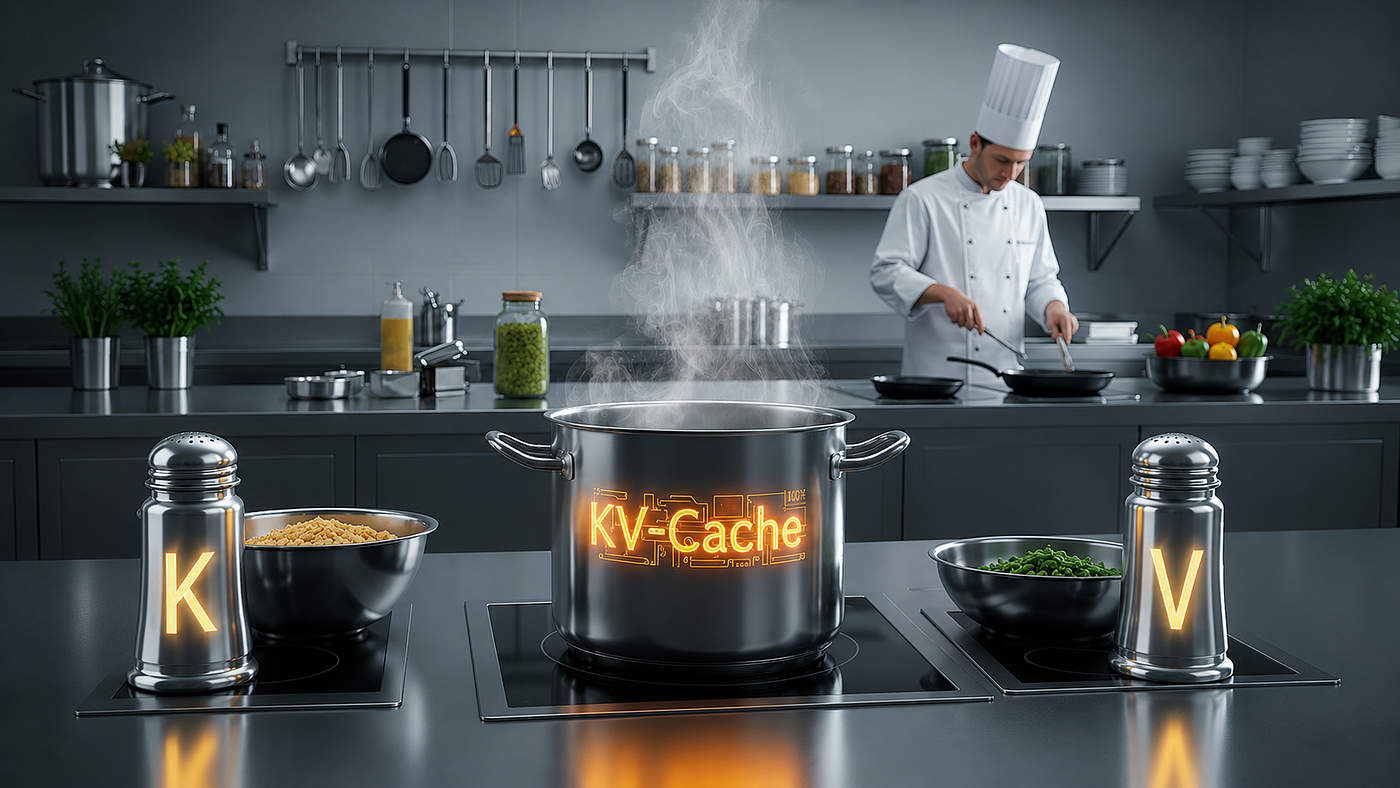
ChatGPT generated picture showing the issues of this article in form of symolic salt & pepper shakers
I thought I was done with the KV-Cache topic. Knew everything worth knowing for running .gguf models on 16GB VRAM. The last breakthrough — in the Agentic Coding / OpenCode space — came from switching the quantization from f16 to q8_0. You’ll find the corresponding article linked below. Once it hit me that others might find this useful, I followed up with a foundational piece on KV-Cache in general.

The previously announced articles — just click on a picture — the accociated articles will open
But throughout all of this, I was firmly in Agentic Coding territory — and the Llama.cpp tweak was optimized exactly for that. The question of how the chat frontend behaves with q8_0? Never actually crossed my mind. And no time for leisurely testing either.
The “Old Apache”
ANo matter how deep you dig in the mining grounds of Generative AI: once you’ve uncovered something genuinely good, there’s always this “old Apache” — waiting to tell you about further secrets and treasures still undiscovered.
The “old Apache” is a metaphor, borrowed from the film John Carter. It shows up as an intuition, a sudden flash of insight. A new problem you hadn’t seen coming. Or — as in this case — a throwaway remark in a Perplexity chat about something else entirely.
GenAI-adjacent, sure — but the involuntary side-information that thing spat out? That was the new treasure. And it’s revealed below.
Follow me down the rabbit-hole. Again. And again: deeper!
Lower quantization = lower quality! Right?
In principle: yes! But context is everything — and that only became clear while working through that Perplexity chat:
The KV-Cache is neither purely static nor purely dynamic — exactly the misconception that triggered this deep-dive in the first place. And it’s modular in the literal sense: there’s “K” and there’s “V” — and they can be quantized differently, for different use cases.
### The quantization settings - Agentic Coding optimized

"cache_type_k": "q8_0",
"cache_type_v": "q8_0"
only made it into the Llama.cpp server backend after some cross-research. And yes — for Agentic Coding with something like OpenCode, this is exactly the right move: running a qwen2.5-coder-14b-instruct-q5_k_m.gguf at 9.8GB on disk with a ctx_size of 32k, comfortably within VRAM.
But only for Agentic Coding — and that’s the point.
Other use cases could need special adjusted — or even none! — manipulations of those values!
PPerplexity nails the explanation.
No editorial polish needed:
KV Cache Quantization in llama.cpp: The Underrated Lever for Local LLMs
Overview
Anyone running local Large Language Models via llama.cpp knows the fundamental dilemma: VRAM is scarce, quality matters, and speed is non-negotiable. Quantizing model weights (Q4_K_M, Q5_K_M, Q8_0, etc.) is by now well-documented territory — far less known, however, is that llama.cpp has long supported separate quantization of the KV cache. This follow-up article explores why this is one of the most effective tuning knobs for local setups, what trade-offs it involves, and how this knowledge translates into a practical frontend concept.
What Is the KV Cache?
During transformer inference, every layer computes Key (K) and Value (V) vectors for each token in the context. These are stored in the KV cache so they don’t need to be recomputed when generating subsequent tokens.[cite:72]
The longer the context, the larger this cache grows — linearly. On a model like Qwen3–14B with a 128K context window, the KV cache can consume several gigabytes of VRAM at full utilization, cutting deeply into available headroom.
KV Cache Quantization: The Core Idea
By default, llama.cpp stores the KV cache in float16 (FP16) or bfloat16 (BF16) — full 16-bit precision for every stored vector. Quantization reduces this footprint:[cite:72]
- q8_0: Halves cache memory compared to FP16, minimal precision loss — practically lossless for most tasks[cite:72]
- q4_0: Quarters cache memory, noticeable but acceptable precision loss for many use cases
Configuration in llama.cpp uses two parameters:
"cache_type_k": "q8_0",
"cache_type_v": "q8_0"
A real-world example on an RTX 4070 Ti Super (16 GB): with q8_0 for both K and V, VRAM usage settles at 13,377 of 16,376 MiB — nearly 3 GB of genuine headroom, no silent CPU offloading, everything sitting cleanly in VRAM.[cite:72]
K and V Are Not the Same
A critical, often overlooked distinction: Key cache and Value cache respond differently to quantization.[cite:58]
- The Value cache (V) has a direct influence on output token probabilities. Its quantization correlates more strongly with response quality.
- The Key cache (K) governs how the model relates tokens to one another within the context. Errors manifest more subtly — as token flips or incorrect diffs during long coding sessions.[cite:62]
This means asymmetric configuration is often more sensible than treating both caches identically.
The Four Configuration Profiles
Combining these insights yields four practical profiles, each suited to a specific usage scenario:
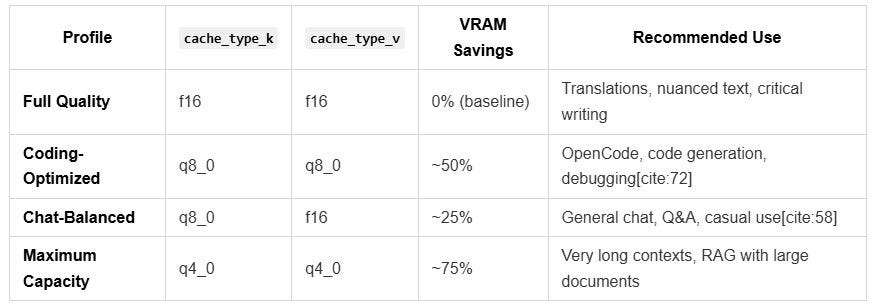
The Four Configuration Profiles
❗ Why Coding Is More Tolerant
Code has a tight, deterministic expectation structure: syntax rules, variable names, function signatures. The “correct” next token carries very high probability mass. Small rounding errors in the KV cache barely register.[cite:62]
Benchmark data confirms this: for code generation, Q4 still achieves ~92%, Q5 ~95%, and Q8 ~98% of FP16 quality.[cite:129]
❗ Why Natural Language Is More Sensitive
Natural language is the opposite: many tokens carry similarly high probabilities, and nuance emerges from subtle weight differences. Concrete effects with longer contexts and aggressive quantization include:[cite:62][cite:63]
- Stylistic degradation: Translations and creative writing lose subtlety and become flat
- Factual drift: Hallucination rates increase measurably as context grows
- Coherence loss: Threads across long conversations break down earlier
- Tool-call errors: Even in coding agents, incorrect diffs can emerge from K-cache quantization[cite:62]
Practical Impact: A Concrete Example
Setup: RTX 4070 Ti Super, 16 GB VRAM, Qwen3–14B Q5_K_M (~10 GB model weights).
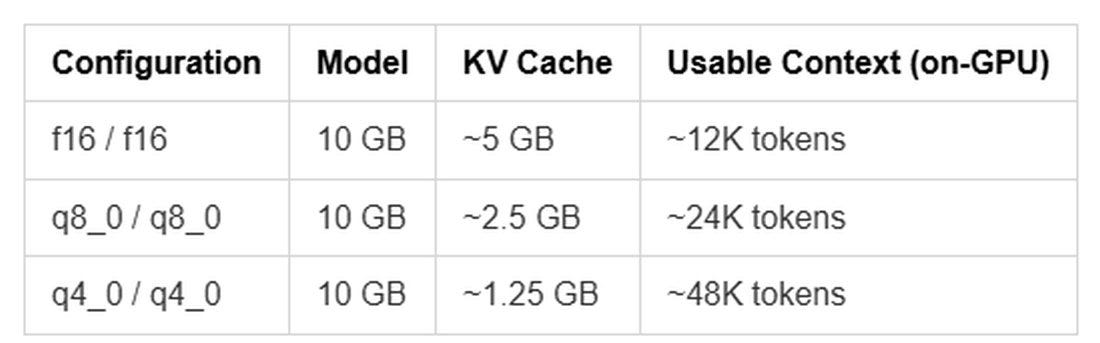
Practical Impact: A Concrete Example as table
Frontend Concept: Dynamic Profile Selection
The four profiles described above translate naturally into a llama.cpp frontend. The core concept:
Profile Selection at Model Load
Since llama.cpp server accepts cache parameters at startup, the selection must happen before loading. A sensible UI pattern:
[ Load model: Qwen3-14B-Q5_K_M.gguf              ▾ ]

Usage profile:
○ Full Quality       (k:f16  / v:f16)
● Coding             (k:q8_0 / v:q8_0)   ← default
○ Chat-Balanced      (k:q8_0 / v:f16)
○ Maximum Capacity   (k:q4_0 / v:q4_0)

[ Start server ]
Implementation Note
The server launch command varies by profile in exactly two flags:
# Coding profile
llama-server -m model.gguf --cache-type-k q8_0 --cache-type-v q8_0

# Chat-balanced
llama-server -m model.gguf --cache-type-k q8_0 --cache-type-v f16

# Full quality
llama-server -m model.gguf --cache-type-k f16 --cache-type-v f16
The frontend simply passes the appropriate flags when restarting the llama-server process — an elegant approach that requires no changes to the model itself.
Putting It in Context: KV Cache vs. Model Quantization
A common source of confusion: KV cache quantization and model weight quantization are independent dimensions.
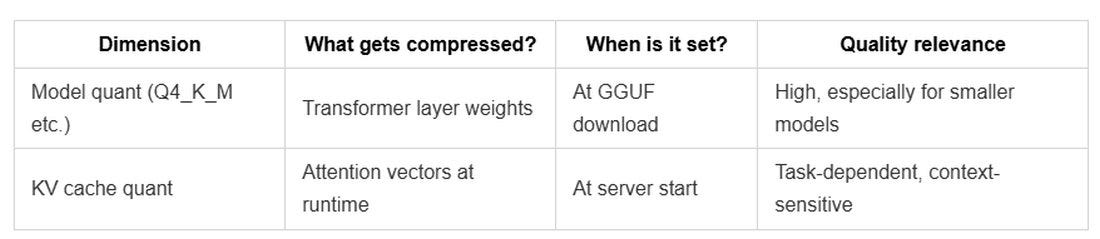
Putting It in Context: KV Cache vs. Model Quantization
The fundamental rule holds: more model parameters beat higher precision — a Qwen3–14B at Q4_K_M outperforms a 4B model at Q8_0 for coding tasks.[cite:130][cite:140] KV cache quantization optimizes within that framework.
Summary and Recommendations
For local LLM setups with 16 GB VRAM (e.g. RTX 4070 Ti Super), the practical takeaways are:
- Coding with OpenCode or similar agents:
k:q8_0 / v:q8_0— virtually lossless, maximum context headroom[cite:72] - General chat:
k:q8_0 / v:f16— solid balance between memory savings and quality[cite:58] - Creative writing, translations, nuanced output:
k:f16 / v:f16— no compromises on quality - Long documents / RAG:
k:q4_0 / v:q4_0— when context depth matters more than precision
The frontend concept with a profile selector at model load is technically straightforward and puts the user in control — without requiring manual management of the underlying parameter arithmetic. It turns a low-level implementation detail into an intuitive, task-driven feature.
BF16, FP16, and FP32: Understanding the Number Formats Behind LLMs
Overview
Anyone running local LLMs will inevitably encounter abbreviations like FP32, FP16, or BF16 — usually in the context of model sizes, VRAM requirements, or quantization decisions. What lies behind them is less mysterious than it sounds: it comes down to how numbers are stored in memory, and what trade-offs arise from different approaches.
How Computers Store Decimal Numbers
Computers represent fractional numbers as floating-point values. Each such value is composed of three parts:
- Sign (1 bit): positive or negative
- Exponent (several bits): how large or small is the number?
- Mantissa (several bits): how precisely is it represented?
The more bits available in total, the more accurately and flexibly a number can be expressed — but the more memory it also requires.
The Three Key Formats Compared

The Three Key Formats Compared
FP32: The Classical Standard
FP32 — also called single precision — has been the standard format for scientific computing for decades and long served as the reference for training neural networks. It offers the widest numerical range and highest precision, but also consumes the most memory: a model with 14 billion parameters in FP32 would occupy roughly 56 GB.
FP16: Halved, But With a Catch
FP16 cuts memory consumption in half to 2 bytes per value. The drawback: the smaller exponent (5 bits instead of 8) significantly narrows the representable numerical range. During training, large gradients can cause numerical overflow — values exceed what the format can represent, and results become unusable. FP16 therefore often requires additional stabilization techniques during training, adding complexity.
BF16: The Clever Compromise
BF16 stands for bfloat16 — the “b” is short for “Brain”, after Google Brain, the AI research team at Google that originally developed the format for use on TPUs.
TPUs (Tensor Processing Units) are specialized AI chips that Google designs and operates in its own data centers. Unlike GPUs — which were built for graphics and later adapted for machine learning — TPUs are engineered from the ground up for matrix multiplications, the dominant operation in transformer inference and training. When Google’s research team ran into FP16 instability issues during large-scale training runs, they developed BF16 as a solution.
The concept is elegant:
BF16 retains the same 8-bit exponent as FP32 — meaning the same numerical range — while sacrificing precision in the mantissa (only 7 bits instead of 23). The result is a format that:
- can “think” as broadly as FP32 (no overflow risk)
- requires only half the memory of FP32
- is directly compatible with FP32 values (the mantissa is simply truncated)
Today, BF16 is supported natively in hardware not only on TPUs, but also on modern NVIDIA GPUs starting with the Ampere generation (RTX 30xx series) and on recent AMD GPUs.
BF16 as a Model’s “Raw State”
When a language model like Qwen3–14B or Gemma 4 is trained, it typically happens in BF16 or mixed precision (FP32 for numerically sensitive operations, BF16 for the bulk of computation). The finished model is then saved in BF16 — this is what’s referred to as the raw state or full precision checkpoint.
A 14B model in BF16 occupies around 28 GB (14 billion parameters × 2 bytes). This is the starting point from which all further quantization steps compress downward:
BF16 (~28 GB)
  → Q8_0   (~14 GB)  — halved
  → Q5_K_M  (~9 GB)  — one third
  → Q4_K_M  (~7 GB)  — one quarter
Each quantization level compresses further — at the cost of precision, with varying practical impact on output quality depending on the task.
What This Means for Local Setups
Downloading a GGUF model always means downloading an already quantized version — a compression derived from BF16. The BF16 size figures listed on Hugging Face or in model overviews serve as a reference point: they show how much quality was “built in” before quantization was applied.
For a practical setup on an RTX 4070 Ti Super (16 GB VRAM), this translates to:
- Running BF16 directly: Not possible for 14B models (28 GB exceeds 16 GB VRAM)
- Q8_0: Fits natively for models up to roughly 7B parameters, too large for 14B
- Q5_K_M / Q4_K_M: The practical sweet spot for 14B models on 16 GB
BF16 is therefore less a format one actively selects in daily use, and more the benchmark against which all other formats are measured — the reference for maximum quality unconstrained by hardware limits.
Interested in more on topics like this?
SStay in touch: I regularly share insights on OpenCode, AI tools & GenAI workflows — no Medium membership needed (*)
→ http://www.linkedin.com/in/christoph-schweres
*() But I really advise you to become a member here on Medium — it’s totally free! And you can add articles and authors to your timeline.**
Disclaimer
This text was written by hand in the beginning, it then was developed and created — and may have been revised — partially with the help of tools such as Claude, Claude Code, ChatGPT or Gemini (among other GenAI tools), based on a current project.
After all the original German version was translated to English by Claude
메타데이터
- post_id
- 13b6bc74f5ec
- slug
- optimize-your-gpu-kv-cache-for-llama-cpp-opencode-co-13b6bc74f5ec
- url
- https://medium.com/rigel-computer-com/optimize-your-gpu-kv-cache-for-llama-cpp-opencode-co-13b6bc74f5ec
- canonical_url
- https://medium.com/rigel-computer-com/optimize-your-gpu-kv-cache-for-llama-cpp-opencode-co-13b6bc74f5ec
- author_url
- https://medium.com/@rigel-computer
- status
- ok
- fetched_at
- 2026-06-14 11:28:49