The EBS Volume You Forgot Is Costing You More Than the EC2 Instance It Was Attached To
Understanding orphaned storage economics at scale, and a practical framework to stop the bleeding.
The EBS Volume You Forgot Is Costing You More Than the EC2 Instance It Was Attached To
Understanding orphaned storage economics at scale, and a practical framework to stop the bleeding.
You terminated the EC2 instance three sprints ago. The project is dead. The team moved on. But somewhere in us-east-1, ten gp3 volumes are still billing $160 every month to your cost center, invisible in a sea of line items no one reviews. I found this out the hard way when a quarterly cost audit revealed that our orphaned EBS volumes were costing more than the dev instances we were actually using.
The Math That Should Make You Uncomfortable
A single gp3 volume costs $0.08 per GB-month. A 500GB volume sitting idle runs you $40/month. A t3.small instance, running 24/7, costs about $15/month. The storage you forgot about costs 2.7 times more than the compute it was once attached to. I had to double-check this math the first time because it felt wrong. It is not wrong.
Now scale this to a real scenario I have seen more than once. A team runs load tests, spins up 10 instances with 200GB volumes each, finishes the test, terminates the instances. The volumes stay. Nobody notices because the test is done and everyone moved on. Twelve months later, that is $1,920 in volume costs alone. But the volumes also had daily snapshots running before termination, and those snapshot schedules do not automatically stop. Add the snapshot accumulation and the real total is closer to $3,120. For a test that ran for three days.
The individual numbers are bad enough. At organizational scale, they become absurd. In my experience working across organizations with 50+ AWS accounts, somewhere between 20% and 40% of EBS volumes are unattached at any given time. Not volumes in use by stopped instances. Completely unattached volumes with no path back to any running workload. If your organization spends $100,000/month on EBS, there is a good chance $20,000–$40,000 of that is pure waste sitting in accounts nobody actively monitors.
What makes this particularly frustrating is how invisible it stays. A $40/month volume does not trigger any alarm. It does not show up in any anomaly detection. It just compounds quietly, month after month, across dozens of accounts, until someone finally runs an audit and discovers the storage bill exceeds the compute bill for entire development environments.
How AWS Defaults Create Orphaned Volumes by Design
The root cause is not careless engineers. It is a specific AWS default that creates orphaned volumes by design.
When you launch an EC2 instance, the root volume has DeleteOnTermination set to true. This makes sense. You terminate the instance, the boot disk goes away. But every additional EBS volume you attach — your data volume, your application storage, your logs disk — defaults to DeleteOnTermination=false. AWS preserves it on termination. The instance disappears, the volume stays behind in “available” state, and you keep paying for it.
I understand why AWS chose this default. Losing data is worse than wasting money, at least from a safety perspective. If someone terminates an instance by accident, preserving the data volume is the right call. But this reasonable safety default becomes a silent cost trap the moment your organization lacks explicit lifecycle governance for storage. And most organizations lack exactly that.
The problem compounds because every tool inherits this behavior. The AWS Console does it. CloudFormation does it. Terraform does it. CDK does it. Unless you write an explicit override, every additional volume you create through any workflow will survive instance termination. In CloudFormation, you need to set DeletionPolicy: Delete and configure the volume’s DeleteOnTermination property. In Terraform, you need delete_on_termination = true in the ebs_block_device block. These are not hard fixes, but they require knowing the default exists in the first place.
# CloudFormation: explicitly override the default
MyVolume:
  Type: AWS::EC2::Volume
  DeletionPolicy: Delete
  Properties:
    AvailabilityZone: !GetAtt MyInstance.AvailabilityZone
    Size: 100
    VolumeType: gp3
The worst part is what happens after termination. The volume transitions to “available” state with zero fanfare. No CloudWatch alarm fires. No notification goes to the team that created it. No billing alert triggers because a single 100GB gp3 volume costs $8/month — well below any reasonable anomaly threshold. It just sits there, accruing charges, until someone explicitly looks for it.
The Snapshot Layer You Did Not Know Was Compounding
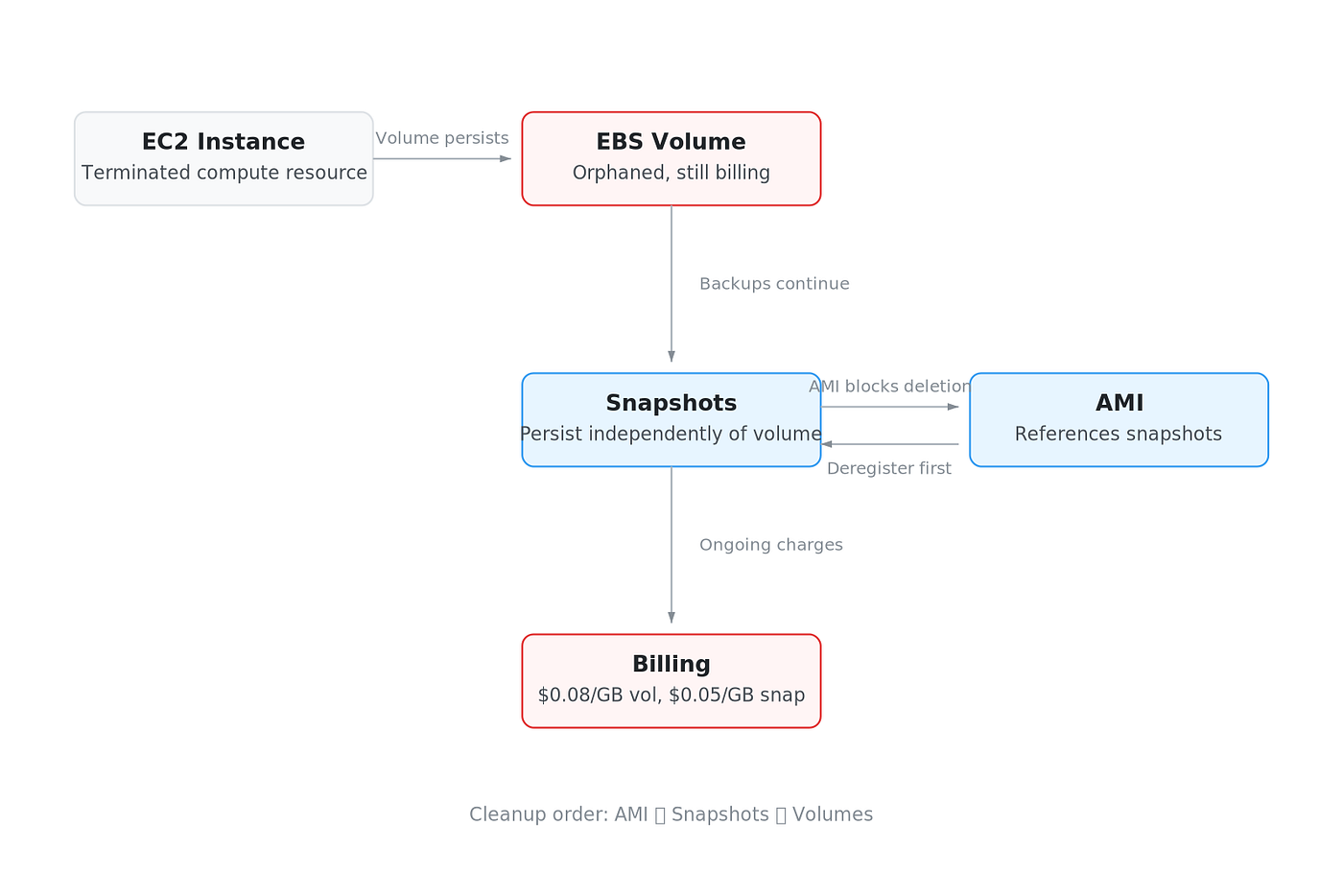
Diagram: The three-layer dependency chain that blocks cleanup: AMIs reference snapshots, snapshots reference deleted volumes, creating a cascade that must be unwound in reverse order.
Here is where it gets worse. Say you notice the orphaned volume six months later and delete it. You feel responsible, you cleaned up. But the snapshots you took of that volume — maybe automated daily backups, maybe a snapshot before a risky deployment — those are still there. AWS does not delete snapshots when you delete the volume they came from. There is no cascade. Each snapshot is an independent object with its own billing line at $0.05/GB-month.
I learned this the hard way when I deleted about 40 orphaned volumes across two accounts and saw almost no change in the storage bill the following month. The volumes were gone, but hundreds of snapshots referencing those volumes remained. The snapshots do not care that their source volume no longer exists. They hold their data independently.
The incremental snapshot model makes this worse than it sounds. AWS snapshots are incremental — each one stores only the blocks that changed since the previous snapshot. But when you delete a snapshot in the middle of a chain, AWS migrates any blocks that the next snapshot depends on, so no data is lost. Deleting mid-chain snapshots can free storage for blocks that are unique to that snapshot and not referenced by any other snapshot in the chain, but in practice — especially with daily automated snapshots where change rates are low — the savings from deleting individual snapshots are often negligible. To fully reclaim storage, you typically need to delete all snapshots in the chain.
Finding these orphaned snapshots is harder than finding orphaned volumes. Volumes have a clean “available” state you can filter on. Snapshots have no equivalent. You need to check whether a snapshot’s volume-id still references a volume that exists:
ec2 = boto3.client('ec2')
snapshots = ec2.describe_snapshots(OwnerIds=['self'])['Snapshots']
volumes = {v['VolumeId'] for v in ec2.describe_volumes()['Volumes']}
orphaned = [s for s in snapshots if s['VolumeId'] not in volumes]
Simple enough in one account. Now multiply by 80 accounts and add the AMI dependency layer. Every AMI is backed by one or more snapshots. You cannot delete a snapshot that is referenced by a registered AMI. So you have AMIs nobody uses, referencing snapshots of volumes that no longer exist, and you cannot clean up the snapshots without deregistering the AMIs first. Three layers of invisible cost, each blocking the cleanup of the layer below it. The Snapshot Archive tier at $0.0125/GB-month exists as a compromise for snapshots you must retain, but most teams do not even know their orphaned snapshots exist, let alone have a plan to archive them.
Why Your Billing Dashboard Does Not Show This Problem
Open Cost Explorer right now and filter by EBS. You will see a single line: “Amazon Elastic Block Store.” Maybe broken down by volume type if you are lucky. There is no native filter for “attached” versus “unattached.” You cannot ask Cost Explorer to show you only the spend on volumes that are not connected to any running instance. The data exists in EC2 metadata, but the billing system does not join against it. So your orphaned volumes hide inside the same line item as your production databases, and the total looks reasonable because production storage is supposed to cost money.
Cost allocation tags do not solve this either. The volumes that become orphans are exactly the ones nobody tagged — created during a debugging session, or by a load test script, or by an engineer who attached extra storage to reproduce a production issue and forgot about it three days later. Untagged resources are invisible in tag-based cost views by design. AWS Config’s ec2-volume-inuse-check rule and Trusted Advisor can flag unattached volumes, but neither shows dollar amounts on a billing dashboard. They produce compliance findings, not cost reports. The gap between “detected” and “quantified in dollars” is where most cleanup efforts die.
A 30-Day Audit Framework That Will Not Break Production
In my experience, a disciplined 30-day audit typically reclaims 25–35% of total EBS spend. The framework takes four phases. It sounds slow, but the safety nets are what make teams actually execute instead of stalling in analysis paralysis for six months.
Week 1: Discovery. Run a single command across every account and region:
aws ec2 describe-volumes \
  --filters Name=status,Values=available \
  --query 'Volumes[*].{ID:VolumeId,Size:Size,Type:VolumeType,Created:CreateTime,AZ:AvailabilityZone}' \
  --output table
If you have multiple accounts under Organizations, wrap this in a loop that assumes a role in each account. The important part is capturing every region, not just the ones you think you use. I have found orphaned volumes in ap-southeast-1 on accounts where nobody remembered deploying anything there. Pipe the results into a single CSV with account ID and region columns. This is your baseline number.
Week 2: Classification. Not every unattached volume is waste. Some are legitimate detached-but-needed resources: volumes waiting for a maintenance window re-attach, data volumes for batch jobs that spin up weekly, or CloudFormation-managed resources in a paused stack. Correlate each volume against CloudFormation stack resources, check for automation tags like kubernetes.io/created-for or aws:cloudformation:stack-name, and look at the AttachTime from describe-volumes output. If a volume has been unattached for more than 90 days with no identifying tags, it is almost certainly garbage. Volumes unattached for 30–90 days go into a “probably garbage” bucket. Anything under 30 days gets a pass for now.
Week 3: Grace period. Tag every candidate volume with marked-for-deletion: 2026–06–16 (or whatever your target date is) and deletion-owner: your-team-email. Send a notification to owning teams based on account ownership. This step catches the 5% of cases where someone actually needs the volume. In my experience, about 3% of tagged volumes get reclaimed during the grace period. The other 97% get zero responses.
Week 4: Safe deletion. For every volume that survived the grace period without objection, create a snapshot before deleting. This is your insurance policy. A 500GB gp3 volume costs you $40/month. The snapshot of that same data costs $25/month at full capacity — but in practice, most orphaned volumes are not 100% full. A volume provisioned at 500GB but holding 50GB of actual data produces a snapshot costing roughly $2.50/month, since snapshots only store used blocks. Even at full capacity, you are replacing a $40/month charge with a $25/month snapshot you can delete after 90 days of nobody asking for the data back. The real savings come from deleting both the volume and the insurance snapshot once the grace period passes.
The “cleanup is too risky” argument dies here. Snapshot-before-delete makes every deletion reversible. The real risk is not deleting things accidentally. The real risk is paying $15,000 per month for storage that serves no purpose because nobody wanted to own the cleanup decision. After the initial audit, enable the AWS Config rule ec2-volume-inuse-check to catch new orphans within 24 hours of creation. The 30-day framework is a one-time fix. The Config rule makes it permanent.
Prevention: Stop Creating Orphans in the First Place

Diagram: Decision tree for choosing the correct storage strategy for an EBS volume after instance termination: delete, snapshot, or archive based on workload type and retention requirements.
Cleaning up existing orphans is necessary, but it only resets the counter. Without prevention, you will be back in the same situation in six months. I have seen teams run quarterly “EBS cleanup sprints” for years because they never fixed the source of the problem.
The single highest-leverage change is setting DeleteOnTermination explicitly in your infrastructure-as-code templates. For any workload where the volume is ephemeral — application servers, worker nodes, CI runners — there is no reason to keep the volume after the instance dies. In CloudFormation, this looks like:
BlockDeviceMappings:
  - DeviceName: /dev/xvdf
    Ebs:
      VolumeSize: 100
      VolumeType: gp3
      DeleteOnTermination: true
Terraform and CDK have equivalent settings. The point is to make the default explicit so that nobody inherits the AWS default of keeping additional volumes alive after termination. I add this to every template now, even when it seems obvious, because “obvious” is how orphans get created.
The second fix is tagging at creation time. Deploy an SCP or AWS Organizations tag policy that requires a purpose and expiry-date tag on every EBS volume. A volume without an expiry date is a volume that nobody will ever clean up. The expiry date does not need to be a hard deletion trigger — it just needs to exist so that your automation can flag volumes past their expected lifetime.
Third, deploy the ec2-volume-inuse-check AWS Config rule with either auto-remediation or SNS alerting. This catches any volume that becomes unattached and flags it within 24 hours.
For stateful workloads where you genuinely need backup — databases, persistent queues, anything with data you cannot regenerate — stop keeping live volumes as insurance. Use DLM (Data Lifecycle Manager) snapshot policies instead. DLM automates snapshot creation on a schedule you define, manages retention (e.g., keep the last 7 daily snapshots), and handles cross-region copying if needed. A basic DLM policy looks like this:
{
  "PolicyType": "EBS_SNAPSHOT_MANAGEMENT",
  "ResourceTypes": ["VOLUME"],
  "Schedules": [{
    "Name": "daily-backup",
    "CreateRule": { "Interval": 24, "IntervalUnit": "HOURS" },
    "RetainRule": { "Count": 7 }
  }]
}
A snapshot costs $0.05/GB-month for changed blocks. A live gp3 volume costs $0.08/GB-month, and io2 runs up to $0.125/GB-month. Switching from “keep the volume around just in case” to “snapshot it and delete the volume” saves 37–60% on that storage immediately, with the same recovery capability.
The Tradeoff: When Keeping Volumes Is Actually Correct
I am not arguing that every unattached volume is waste. Some are legitimate, and deleting them blindly will break things.
Compliance is the obvious case. Healthcare, finance, and government workloads often have data retention requirements that mandate keeping storage available for specific periods. If your legal team says “retain for seven years,” you retain for seven years. But that volume needs a tag explaining why it exists, who owns the requirement, and when the retention expires. An untagged compliance volume is indistinguishable from an orphan during cleanup, which means it either gets deleted by accident or protects every other orphan from deletion because nobody is sure what is what.
Automation dependencies are the second legitimate reason. I have seen CI/CD pipelines that pre-provision volumes, attach them during builds, and detach them after. Stateful ECS tasks sometimes expect named volumes to exist on launch. If you delete those, your next deployment fails at 2 AM. The classification phase I described earlier exists specifically to catch these — any volume referenced in launch templates, CloudFormation stacks, or automation scripts gets flagged before anyone touches it.
The goal is not zero unattached volumes. The goal is zero unaccounted-for volumes. Every unattached volume should have an owner, a reason, and an expiration date or review schedule.
That said, “we need it for disaster recovery” is not a reason to keep a live volume running. Move those to snapshots. A standard snapshot costs $0.05/GB-month versus $0.08 for gp3 — a 37% reduction. If your retention requirement is long-term and you can tolerate 24–72 hours of restore time, Snapshot Archive tier drops to $0.0125/GB-month. That is an 85% cost reduction compared to keeping a live volume, with the same data preservation guarantee. The tradeoff is restore latency, not data safety.
What I Run Now
Here is what I actually run in production, and it is embarrassingly simple.
A weekly cron job calls aws ec2 describe-volumes –filters Name=status,Values=available across all accounts, filters for volumes unattached longer than 7 days, and posts the list to a Slack channel. That is it. No fancy tooling, no third-party platform. The script is about 40 lines of bash. The notification alone changed behavior — engineers started cleaning up after themselves once the accumulation became visible.
On the prevention side, every Terraform module and CloudFormation template in our organization defaults to DeleteOnTermination=true for all EBS volumes. If someone needs to preserve a volume after instance termination, they must explicitly set the opt-out and leave a comment explaining the business reason. This single default eliminated roughly 80% of new orphans.
Every quarter we run a cleanup sprint. It takes about two hours total. We review the volumes tagged for deletion, confirm nothing is referenced by a running workload, snapshot anything that might have forensic value, then delete. The quarterly cadence means the list never grows beyond a dozen items.
The total engineering investment is maybe 8 hours per year. The savings have been consistently between $4,000 and $7,000 annually for our relatively small fleet. For organizations running hundreds of accounts, multiply accordingly.
Think of orphaned EBS volumes like a streaming subscription you forgot to cancel. Each one is small enough to ignore. But you have dozens of them, nobody reviews the bill, and they never expire on their own. Unlike a streaming service, there is no annual reminder email — AWS will happily bill you forever for storage nobody uses.
Run aws ec2 describe-volumes –filters Name=status,Values=available against your accounts this week. Just look at the output. I guarantee you will find volumes you forgot existed, attached to projects that ended months ago, quietly billing to cost centers nobody audits. The fix is a 30-day process. The discovery takes five minutes. Start there.
메타데이터
- post_id
- 13efa80eebfe
- slug
- the-ebs-volume-you-forgot-is-costing-you-more-than-the-ec2-instance-it-was-attached-to-13efa80eebfe
- url
- https://medium.com/@yalovoy/the-ebs-volume-you-forgot-is-costing-you-more-than-the-ec2-instance-it-was-attached-to-13efa80eebfe
- canonical_url
- https://medium.com/@yalovoy/the-ebs-volume-you-forgot-is-costing-you-more-than-the-ec2-instance-it-was-attached-to-13efa80eebfe
- author_url
- https://medium.com/@yalovoy
- status
- ok
- fetched_at
- 2026-07-30 16:03:33