วิธีการสร้าง Webhook บน Discord ด้วยภาษา Python ตอนที่ 1 ส่งข้อความ
Introduction: บทความนี้เราก็จะมาเขียนโปรแกรมด้วยภาษา python โดยที่ให้โปรแกรมที่เราเขียนส่งข้อมูลไปแสดงบนห้องๆ หนึ่ง บนเซิฟเวอร์ Discord…
วิธีการสร้าง Webhook บน Discord ด้วยภาษา Python ตอนที่ 1 ส่งข้อความ
Introduction: บทความนี้เราก็จะมาเขียนโปรแกรมด้วยภาษา python โดยที่ให้โปรแกรมที่เราเขียนส่งข้อมูลไปแสดงบนห้องๆ หนึ่ง บนเซิฟเวอร์ Discord ที่เราใช้หรือสำหรับให้บริการต่างๆ เช่นการส่งข้อมูลแจ้งเตือนตามเวลา ส่งภาพ เช็คงานขึ้นอยู่กับรูปแบบที่เราเขียนขึ้นมา
ก่อนอื่นโปรแกรมที่ใช้สำหรับเขียน code ของผมจะใช้โปรแกรม Visual Studio Code ติดตั้ง Python ได้ที่ : https://www.python.org/ วิธีติดตั้ง Python ให้เขียนได้บนโปรแกรม Visual Studio Code : Click here.
Web Hook
มาเริ่มเขียนโปรแกรมกันดีกว่า
ขั้นที่ 1 ให้เราไปสร้างห้องสำหรับ bot webhook บน discord 1.เปิด Discord แล้วสร้าง Server จากนั้นให้สร้างห้องแชทสำหรับบอทที่เราจะสร้าง
2.กด “แก้ไขช่อง หรือ Edit Channel” (เอาเมาส์ไปชี้ที่ชื่อห้องจะเห็นรูปเฟือง)

3.ด้านซ้าย เลือกหัวข้อ “รวบรวม หรือ Integration” จากนั้นเลือก “สร้าง Webhook หรือ Create Webhook”

4.กดที่ บอทจะแสดงหน้าต่างเพิ่มเติ่มขึ้นมาจากนั้นให้เรากด ปุ่ม “คัดลอก URL เว็บฮุก” เราจะได้ URL มาในรูปแบบนี้ https://discord.com/api/webhooks/14890383297348916/t6lYtSDFoqcpKQ4UyDegMIAkhF519NMwJp11DQ-3bKa85oTXCGwh-9ADN10e8GeFC URL ที่เรากด Copy ออกมาจะถูกนำไปใช้สำหรับการเขียนโปรแกรมสำหรับติดต่อส่งค่าไปมายัง Discord
ขั้นที่ 2 ให้เราติดตั้ง library discord-webhook
1.ให้เราเปิด โปรแกรม Visual Studio Code ไปที่ Terminal>New Terminal ป้อนสำสั่ง pip install discord-webhook แล้วกด Enter
pip install discord-webhookเมื่อทำการติดตั้งเสร็จจะแสดงผลตามภาพ

Successfully installed discord-webhook
ขั้นที่ 3 เขียนโปรแกรม
- เริ่มจากการ import library DiscordWebhook โดยการเขียน
from discord_webhook import DiscordWebhook- สร้างตัวแปลไว้สำหรับ เก็บค่า URL และ Content
- URL คือ Link ที่เรา Copy มาจากที่เราสร้าง Webhook บน Discord
- Content คือ ข้อความที่เราจะส่ง
webhook_url = "YOUR DISCORD WEBHOOK URL"
massage = "Hello Discord"
webhook = DiscordWebhook(url= webhook_url, content= massage)- webhook.execute() คือคำสั่งสำหรับการส่งข้อความ
- response คือตัวแปลที่เก็บค่าการตอบกลับจาก Discord เช่น <Response [200]>
response = webhook.execute()ถ้าต้องการแสดงผล response
print(response)
# #  ผลลัพธ์ <Response [200]>
print(response.status_code)
# #  ผลลัพธ์ 200
ตัวอย่างทั้งหมด
from discord_webhook import DiscordWebhook

webhook_url = "https://discord.com/api/webhooks/1248911395756703775/zDuvTqrqz347c1fO2qC3vxkfXhf7Eut83UKqAgFdV0hpXGdxYN_3qK1nkNfqrKAvKv6r"
massage = "Hello Discord"

webhook = DiscordWebhook(url = webhook_url, content = massage)
response = webhook.execute() # execute ส่งข้อความ

print(response.status_code) # แสดงสถานะการติดต่อ
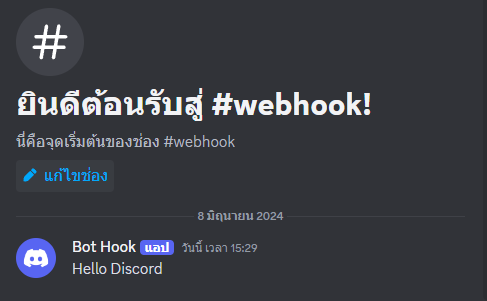
ผลลัพธ์ที่ได้บน Discord

ผลลัพธ์ที่ได้
TIP : ถ้าต้องการ @ everyone หรือ @ here ให้ใส่ลงไปในข้อความ เช่น
massage = "Hello Discord @everyone @here"
ผลลัพธ์ที่ได้
อ่านตอนที่ 2: การส่งข้อความซ้ำๆ และ ลบข้อความ
อ่านตอนที่ 3: การตั้งค่าชื่อ Bot และ การส่งรูปภาพ
อ่านตอนที่ 4: Embed สร้างบล็อกข้อความที่มีรูปแบบสวยงาม
— — — — — — — — — — — — — — — — — — — — — — — — — — — — — — — — — — — — — — >> ติดตาม Page Facebook ได้ที่ : Catifo Channel <<
>> ถ้าชอบหรือบทความนี้เป็นประโยชน์ กดตบมือและกดติดตามกดแชร์เป็นกำลังใจให้ผมในการเขียนเรื่องอื่นๆอีกต่อไปเรื่อยๆครับ ขอขอบคุณครับ <<
메타데이터
- post_id
- 142da91e0156
- slug
- วิธีการสร้าง-webhook-บน-discord-ด้วยภาษา-python-ตอนที่-1-ส่งข้อความ-142da91e0156
- url
- https://medium.com/@pattanapong.sriph/%E0%B8%A7%E0%B8%B4%E0%B8%98%E0%B8%B5%E0%B8%81%E0%B8%B2%E0%B8%A3%E0%B8%AA%E0%B8%A3%E0%B9%89%E0%B8%B2%E0%B8%87-webhook-%E0%B8%9A%E0%B8%99-discord-%E0%B8%94%E0%B9%89%E0%B8%A7%E0%B8%A2%E0%B8%A0%E0%B8%B2%E0%B8%A9%E0%B8%B2-python-%E0%B8%95%E0%B8%AD%E0%B8%99%E0%B8%97%E0%B8%B5%E0%B9%88-1-%E0%B8%AA%E0%B9%88%E0%B8%87%E0%B8%82%E0%B9%89%E0%B8%AD%E0%B8%84%E0%B8%A7%E0%B8%B2%E0%B8%A1-142da91e0156
- canonical_url
- https://medium.com/@pattanapong.sriph/%E0%B8%A7%E0%B8%B4%E0%B8%98%E0%B8%B5%E0%B8%81%E0%B8%B2%E0%B8%A3%E0%B8%AA%E0%B8%A3%E0%B9%89%E0%B8%B2%E0%B8%87-webhook-%E0%B8%9A%E0%B8%99-discord-%E0%B8%94%E0%B9%89%E0%B8%A7%E0%B8%A2%E0%B8%A0%E0%B8%B2%E0%B8%A9%E0%B8%B2-python-%E0%B8%95%E0%B8%AD%E0%B8%99%E0%B8%97%E0%B8%B5%E0%B9%88-1-%E0%B8%AA%E0%B9%88%E0%B8%87%E0%B8%82%E0%B9%89%E0%B8%AD%E0%B8%84%E0%B8%A7%E0%B8%B2%E0%B8%A1-142da91e0156
- author_url
- https://medium.com/@pattanapong.sriph
- status
- ok
- fetched_at
- 2026-08-05 06:22:14