The Command Design Pattern in Go: Your Guide to Flexible, Undoable Actions
Let me ask you something: have you ever hit Ctrl+Z to undo something you just did? Of course you have. Now, here’s the interesting question…
The Command Design Pattern in Go: Your Guide to Flexible, Undoable Actions
Let me ask you something: have you ever hit Ctrl+Z to undo something you just did? Of course you have. Now, here’s the interesting question — how do you think that works behind the scenes? How does your text editor remember what you did and how to reverse it?
The answer is probably the Command pattern. And once you understand it, you’ll start seeing it everywhere — and more importantly, you’ll know exactly when to use it in your own Go code.
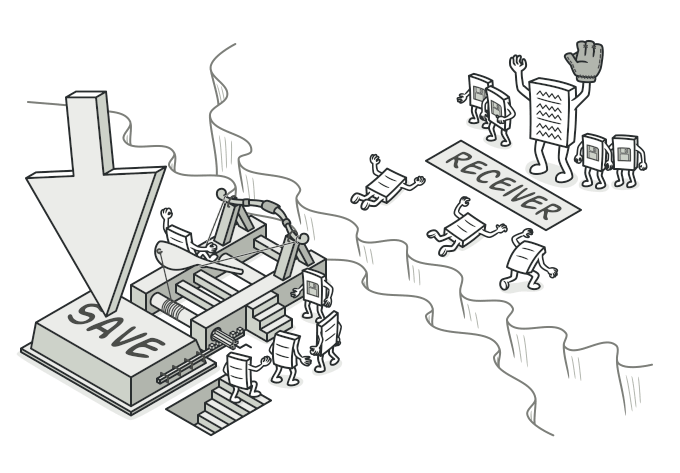
golang command pattern
The Problem: When Actions Get Complicated
Before we dive into the solution, let’s understand the problem. Imagine you’re building a text editor, or a drawing application, or maybe a home automation system. Users can perform actions — type text, draw shapes, turn on lights. Simple enough, right?
Now here’s where it gets interesting. What if you need to:
- Undo those actions
- Redo them after undoing
- Log what actions happened
- Queue actions to run later
- Run the same action on different objects
Think about how you’d implement this. Would you have a giant switch statement somewhere? A bunch of if-else chains? How would you keep track of what needs to be undone?
This is exactly the kind of problem the Command pattern solves. And it does it elegantly.
The Core Idea: Treating Actions as Objects
Here’s the fundamental insight behind the Command pattern: what if we could turn actions into objects?
Instead of calling methods directly, what if we wrapped those method calls inside structs? Then we could:
- Pass actions around like any other data
- Store them in a slice (hello, undo history!)
- Execute them whenever we want
- Keep information about how to reverse them
It’s a simple idea, but it’s powerful. Let’s see how it works in Go.
The Basic Structure: Understanding the Pieces
The Command pattern has a few key players. Let me introduce them in Go:
The Command Interface
package main

// Command defines what all commands can do
type Command interface {
    Execute() error
    Undo() error
}
Concrete Commands
// Light is our receiver - the object that does the actual work
type Light struct {
    isOn bool
}

func (l *Light) TurnOn() {
    l.isOn = true
    println("Light is on")
}

func (l *Light) TurnOff() {
    l.isOn = false
    println("Light is off")
}

// TurnOnLightCommand is a concrete command
type TurnOnLightCommand struct {
    light *Light
}

func NewTurnOnLightCommand(light *Light) *TurnOnLightCommand {
    return &TurnOnLightCommand{light: light}
}

func (c *TurnOnLightCommand) Execute() error {
    c.light.TurnOn()
    return nil
}

func (c *TurnOnLightCommand) Undo() error {
    c.light.TurnOff()
    return nil
}
The Invoker
// RemoteControl executes commands without knowing what they do
type RemoteControl struct {
    command Command
}

func (r *RemoteControl) SetCommand(cmd Command) {
    r.command = cmd
}

func (r *RemoteControl) PressButton() error {
    if r.command == nil {
        return fmt.Errorf("no command set")
    }
    return r.command.Execute()
}
See how they fit together? The RemoteControl doesn’t know anything about lights — it just knows it has a command to execute. The command knows about the light and how to control it. This is loose coupling at its finest!
A Real Example: Building a Simple Text Editor
Let’s build something practical. Imagine you’re creating a basic text editor that needs undo/redo functionality. Here’s how the Command pattern makes this surprisingly simple in Go.
First, let’s define our document — the thing being edited:
package main

import "strings"

// Document represents a text document
type Document struct {
    content string
}

func NewDocument() *Document {
    return &Document{content: ""}
}

func (d *Document) InsertText(text string, position int) {
    if position > len(d.content) {
        position = len(d.content)
    }
    d.content = d.content[:position] + text + d.content[position:]
}

func (d *Document) DeleteText(position, length int) string {
    if position >= len(d.content) {
        return ""
    }
    end := position + length
    if end > len(d.content) {
        end = len(d.content)
    }

    deleted := d.content[position:end]
    d.content = d.content[:position] + d.content[end:]
    return deleted
}

func (d *Document) GetText() string {
    return d.content
}
Now, let’s create commands for our operations:
// InsertTextCommand inserts text at a specific position
type InsertTextCommand struct {
    document *Document
    text     string
    position int
}

func NewInsertTextCommand(doc *Document, text string, position int) *InsertTextCommand {
    return &InsertTextCommand{
        document: doc,
        text:     text,
        position: position,
    }
}

func (c *InsertTextCommand) Execute() error {
    c.document.InsertText(c.text, c.position)
    return nil
}

func (c *InsertTextCommand) Undo() error {
    c.document.DeleteText(c.position, len(c.text))
    return nil
}

// DeleteTextCommand deletes text at a specific position
type DeleteTextCommand struct {
    document    *Document
    position    int
    length      int
    deletedText string // we save this for undo!
}

func NewDeleteTextCommand(doc *Document, position, length int) *DeleteTextCommand {
    return &DeleteTextCommand{
        document: doc,
        position: position,
        length:   length,
    }
}

func (c *DeleteTextCommand) Execute() error {
    // Save what we're deleting so we can restore it
    c.deletedText = c.document.DeleteText(c.position, c.length)
    return nil
}

func (c *DeleteTextCommand) Undo() error {
    c.document.InsertText(c.deletedText, c.position)
    return nil
}
See what’s happening? Each command knows how to do its thing AND how to undo it. That’s the magic right there.
Now for the editor itself, which manages the undo/redo stacks:
// TextEditor manages commands and undo/redo functionality
type TextEditor struct {
    document  *Document
    undoStack []Command
    redoStack []Command
}

func NewTextEditor(doc *Document) *TextEditor {
    return &TextEditor{
        document:  doc,
        undoStack: make([]Command, 0),
        redoStack: make([]Command, 0),
    }
}

func (e *TextEditor) ExecuteCommand(cmd Command) error {
    if err := cmd.Execute(); err != nil {
        return err
    }

    e.undoStack = append(e.undoStack, cmd)
    e.redoStack = nil // clear redo stack after new action
    return nil
}

func (e *TextEditor) Undo() error {
    if len(e.undoStack) == 0 {
        return fmt.Errorf("nothing to undo")
    }

    // Pop from undo stack
    cmd := e.undoStack[len(e.undoStack)-1]
    e.undoStack = e.undoStack[:len(e.undoStack)-1]

    if err := cmd.Undo(); err != nil {
        return err
    }

    e.redoStack = append(e.redoStack, cmd)
    return nil
}

func (e *TextEditor) Redo() error {
    if len(e.redoStack) == 0 {
        return fmt.Errorf("nothing to redo")
    }

    // Pop from redo stack
    cmd := e.redoStack[len(e.redoStack)-1]
    e.redoStack = e.redoStack[:len(e.redoStack)-1]

    if err := cmd.Execute(); err != nil {
        return err
    }

    e.undoStack = append(e.undoStack, cmd)
    return nil
}
Check out how clean this is. The editor doesn’t care what kind of commands it’s dealing with — it just executes them, undoes them, or redoes them. Want to add a new operation like “replace text” or “format text”? Just create a new command struct. The editor doesn’t need to change at all.
Here’s how you’d use it:
func main() {
    // Create our document and editor
    doc := NewDocument()
    editor := NewTextEditor(doc)

    // Type some text
    editor.ExecuteCommand(NewInsertTextCommand(doc, "Hello", 0))
    editor.ExecuteCommand(NewInsertTextCommand(doc, " World", 5))

    fmt.Println(doc.GetText()) // "Hello World"

    // Oops, made a mistake - undo!
    editor.Undo()
    fmt.Println(doc.GetText()) // "Hello"

    // Actually, that was right - redo!
    editor.Redo()
    fmt.Println(doc.GetText()) // "Hello World"
}
Pretty neat, right?
Going Deeper: Macro Commands
Here’s where things get really interesting. What if you want to execute multiple commands as a single unit? Like, in a drawing app, you might want to “create rectangle” to actually mean “draw four lines.”
Enter the Macro Command (also called Composite Command):
// MacroCommand executes multiple commands as one
type MacroCommand struct {
    commands []Command
}

func NewMacroCommand() *MacroCommand {
    return &MacroCommand{
        commands: make([]Command, 0),
    }
}

func (m *MacroCommand) AddCommand(cmd Command) {
    m.commands = append(m.commands, cmd)
}

func (m *MacroCommand) Execute() error {
    for _, cmd := range m.commands {
        if err := cmd.Execute(); err != nil {
            return fmt.Errorf("macro command failed: %w", err)
        }
    }
    return nil
}

func (m *MacroCommand) Undo() error {
    // Undo in reverse order!
    for i := len(m.commands) - 1; i >= 0; i-- {
        if err := m.commands[i].Undo(); err != nil {
            return fmt.Errorf("macro undo failed: %w", err)
        }
    }
    return nil
}
Now you can do something like this:
func main() {
    doc := NewDocument()
    editor := NewTextEditor(doc)

    // Create a macro to format text (multiple operations)
    formatCommand := NewMacroCommand()
    formatCommand.AddCommand(NewInsertTextCommand(doc, "**", 0))
    formatCommand.AddCommand(NewInsertTextCommand(doc, "Hello", 2))
    formatCommand.AddCommand(NewInsertTextCommand(doc, "**", 7))

    // Execute all commands at once
    editor.ExecuteCommand(formatCommand)
    fmt.Println(doc.GetText()) // "**Hello**"

    // And undo them all with one undo!
    editor.Undo()
    fmt.Println(doc.GetText()) // ""
}
This is powerful because you can build complex operations out of simple ones, and the undo/redo machinery just works.
Real-World Use Case: Home Automation
Let me show you a different example that really highlights why the Command pattern is so useful. Imagine you’re building a home automation system where you can program different buttons to do different things.
First, your devices:
package main

// Light device
type Light struct {
    name       string
    brightness int
}

func NewLight(name string) *Light {
    return &Light{name: name, brightness: 0}
}

func (l *Light) TurnOn() {
    l.brightness = 100
    fmt.Printf("%s turned on\n", l.name)
}

func (l *Light) TurnOff() {
    l.brightness = 0
    fmt.Printf("%s turned off\n", l.name)
}

func (l *Light) Dim(level int) {
    l.brightness = level
    fmt.Printf("%s dimmed to %d%%\n", l.name, level)
}

// Thermostat device
type Thermostat struct {
    name        string
    temperature int
}

func NewThermostat(name string) *Thermostat {
    return &Thermostat{name: name, temperature: 70}
}

func (t *Thermostat) SetTemperature(temp int) {
    t.temperature = temp
    fmt.Printf("%s temperature set to %d°F\n", t.name, temp)
}

// MusicPlayer device
type MusicPlayer struct {
    name    string
    playing bool
}

func NewMusicPlayer(name string) *MusicPlayer {
    return &MusicPlayer{name: name, playing: false}
}

func (m *MusicPlayer) Play() {
    m.playing = true
    fmt.Printf("%s playing music\n", m.name)
}

func (m *MusicPlayer) Stop() {
    m.playing = false
    fmt.Printf("%s stopped\n", m.name)
}
Now, commands for each device:
// LightOnCommand turns a light on
type LightOnCommand struct {
    light              *Light
    previousBrightness int
}

func NewLightOnCommand(light *Light) *LightOnCommand {
    return &LightOnCommand{light: light}
}

func (c *LightOnCommand) Execute() error {
    c.previousBrightness = c.light.brightness
    c.light.TurnOn()
    return nil
}

func (c *LightOnCommand) Undo() error {
    c.light.Dim(c.previousBrightness)
    return nil
}

// LightDimCommand dims a light to a specific level
type LightDimCommand struct {
    light              *Light
    level              int
    previousBrightness int
}

func NewLightDimCommand(light *Light, level int) *LightDimCommand {
    return &LightDimCommand{light: light, level: level}
}

func (c *LightDimCommand) Execute() error {
    c.previousBrightness = c.light.brightness
    c.light.Dim(c.level)
    return nil
}
func (c *LightDimCommand) Undo() error {
    c.light.Dim(c.previousBrightness)
    return nil
}

// ThermostatCommand changes thermostat temperature
type ThermostatCommand struct {
    thermostat       *Thermostat
    newTemp          int
    previousTemp     int
}

func NewThermostatCommand(thermostat *Thermostat, temp int) *ThermostatCommand {
    return &ThermostatCommand{
        thermostat: thermostat,
        newTemp:    temp,
    }
}
func (c *ThermostatCommand) Execute() error {
    c.previousTemp = c.thermostat.temperature
    c.thermostat.SetTemperature(c.newTemp)
    return nil
}

func (c *ThermostatCommand) Undo() error {
    c.thermostat.SetTemperature(c.previousTemp)
    return nil
}

// MusicStopCommand stops music
type MusicStopCommand struct {
    player      *MusicPlayer
    wasPlaying  bool
}
func NewMusicStopCommand(player *MusicPlayer) *MusicStopCommand {
    return &MusicStopCommand{player: player}
}

func (c *MusicStopCommand) Execute() error {
    c.wasPlaying = c.player.playing
    c.player.Stop()
    return nil
}

func (c *MusicStopCommand) Undo() error {
    if c.wasPlaying {
        c.player.Play()
    }
    return nil
}
Here’s the cool part — the universal remote:
// UniversalRemote can execute different commands on different buttons
type UniversalRemote struct {
    commands map[string]Command
    history  []Command
}

func NewUniversalRemote() *UniversalRemote {
    return &UniversalRemote{
        commands: make(map[string]Command),
        history:  make([]Command, 0),
    }
}

func (r *UniversalRemote) SetCommand(buttonName string, cmd Command) {
    r.commands[buttonName] = cmd
}

func (r *UniversalRemote) PressButton(buttonName string) error {
    cmd, exists := r.commands[buttonName]
    if !exists {
        return fmt.Errorf("no command set for button %s", buttonName)
    }

    if err := cmd.Execute(); err != nil {
        return err
    }

    r.history = append(r.history, cmd)
    return nil
}

func (r *UniversalRemote) PressUndo() error {
    if len(r.history) == 0 {
        return fmt.Errorf("nothing to undo")
    }

    cmd := r.history[len(r.history)-1]
    r.history = r.history[:len(r.history)-1]

    return cmd.Undo()
}
Now check out how flexible this is:
func main() {
    // Set up devices
    livingRoomLight := NewLight("Living Room")
    bedroom := NewThermostat("Bedroom")
    spotify := NewMusicPlayer("Spotify")

    // Create remote
    remote := NewUniversalRemote()

    // Program the buttons
    remote.SetCommand("A", NewLightOnCommand(livingRoomLight))
    remote.SetCommand("B", NewThermostatCommand(bedroom, 72))

    // Create a "movie mode" macro
    movieMode := NewMacroCommand()
    movieMode.AddCommand(NewLightDimCommand(livingRoomLight, 20))
    movieMode.AddCommand(NewThermostatCommand(bedroom, 68))
    movieMode.AddCommand(NewMusicStopCommand(spotify))
    remote.SetCommand("MOVIE", movieMode)

    // Use it
    remote.PressButton("MOVIE") // Dims lights, lowers temp, stops music

    // Output:
    // Living Room dimmed to 20%
    // Bedroom temperature set to 68°F
    // Spotify stopped

    remote.PressUndo() // Reverses everything!

    // Output:
    // Spotify playing music
    // Bedroom temperature set to 70°F
    // Living Room dimmed to 0%
}
See the beauty here? You can reprogram the remote to do completely different things without changing any of the remote’s code. You can create complex multi-device actions easily. And undo works automatically for everything.
Advanced Patterns: Queuing and Scheduling
The Command pattern shines when you need to queue up operations or schedule them for later. Think about:
- A task scheduler that runs commands at specific times
- A job queue that processes commands one by one
- A transaction system that batches commands together
Here’s a simple command queue in Go:
package main

import (
    "sync"
    "time"
)

// CommandQueue processes commands sequentially
type CommandQueue struct {
    queue []Command
    mu    sync.Mutex
}

func NewCommandQueue() *CommandQueue {
    return &CommandQueue{
        queue: make([]Command, 0),
    }
}

func (q *CommandQueue) Enqueue(cmd Command) {
    q.mu.Lock()
    defer q.mu.Unlock()
    q.queue = append(q.queue, cmd)
}

func (q *CommandQueue) ProcessNext() (bool, error) {
    q.mu.Lock()
    defer q.mu.Unlock()

    if len(q.queue) == 0 {
        return false, nil
    }

    cmd := q.queue[0]
    q.queue = q.queue[1:]

    return true, cmd.Execute()
}

func (q *CommandQueue) ProcessAll() error {
    for {
        hasMore, err := q.ProcessNext()
        if err != nil {
            return err
        }
        if !hasMore {
            break
        }
    }
    return nil
}

func (q *CommandQueue) Size() int {
    q.mu.Lock()
    defer q.mu.Unlock()
    return len(q.queue)
}
This becomes incredibly useful in scenarios like background processing:
func main() {
    jobQueue := NewCommandQueue()

    // Queue up expensive operations
    jobQueue.Enqueue(NewGenerateReportCommand(data))
    jobQueue.Enqueue(NewSendEmailCommand(email))
    jobQueue.Enqueue(NewUpdateDatabaseCommand(records))

    // Process them in a goroutine
    go func() {
        if err := jobQueue.ProcessAll(); err != nil {
            log.Printf("Error processing queue: %v", err)
        }
    }()
}
Here’s a rate-limited queue that’s super useful for API calls:
// RateLimitedQueue limits how fast commands execute
type RateLimitedQueue struct {
    *CommandQueue
    maxPerSecond     int
    lastExecutionTime time.Time
    mu               sync.Mutex
}

func NewRateLimitedQueue(maxPerSecond int) *RateLimitedQueue {
    return &RateLimitedQueue{
        CommandQueue:      NewCommandQueue(),
        maxPerSecond:      maxPerSecond,
        lastExecutionTime: time.Now(),
    }
}

func (q *RateLimitedQueue) ProcessNext() (bool, error) {
    q.mu.Lock()
    elapsed := time.Since(q.lastExecutionTime)
    minInterval := time.Second / time.Duration(q.maxPerSecond)

    if elapsed < minInterval {
        time.Sleep(minInterval - elapsed)
    }

    q.lastExecutionTime = time.Now()
    q.mu.Unlock()

    return q.CommandQueue.ProcessNext()
}
Logging and Auditing
Another powerful use case: logging every action in your system. This is huge for debugging, compliance, and audit trails.
package main

import (
    "log"
    "time"
)

// LoggableCommand wraps any command with logging
type LoggableCommand struct {
    innerCommand Command
    description  string
}

func NewLoggableCommand(cmd Command, description string) *LoggableCommand {
    return &LoggableCommand{
        innerCommand: cmd,
        description:  description,
    }
}

func (c *LoggableCommand) Execute() error {
    log.Printf("Executing: %s", c.description)
    startTime := time.Now()

    err := c.innerCommand.Execute()
    duration := time.Since(startTime)

    if err != nil {
        log.Printf("Failed: %s - %v", c.description, err)
        return err
    }

    log.Printf("Completed: %s in %v", c.description, duration)
    return nil
}

func (c *LoggableCommand) Undo() error {
    log.Printf("Undoing: %s", c.description)
    return c.innerCommand.Undo()
}
Now you can wrap any command with logging:
func main() {
    doc := NewDocument()

    cmd := NewInsertTextCommand(doc, "Hello", 0)
    loggableCmd := NewLoggableCommand(cmd, "Insert 'Hello' at position 0")

    loggableCmd.Execute()

    // Output:
    // 2025/10/14 12:34:56 Executing: Insert 'Hello' at position 0
    // 2025/10/14 12:34:56 Completed: Insert 'Hello' at position 0 in 125µs
}
This is the Decorator pattern working with the Command pattern — a powerful combination!
When Should You Use the Command Pattern?
Okay, so the Command pattern is cool. But when should you actually use it in your Go projects? Here’s my practical guide:
USE IT WHEN YOU NEED :
Undo/Redo functionality
- Text editors, drawing apps, anything with user actions
- This is the most common and clearest use case
Actionqueuing
- Background job processing
- Task schedulers
- Request buffering
Action logging/auditing
- Financial systems
- Medical software
- Anywhere you need an audit trail
Macro/composite actions
- Complex operations built from simple ones
- User-defined workflows
- Automation systems
Parameterizable actions
- Toolbar buttons that can be reassigned
- Keyboard shortcuts
- Programmable interfaces
DON’T USE IT WHEN:
Actions are simple and direct
- If you’re just calling
object.Method()with no extra logic - The overhead isn’t worth it for simple cases
You don’t need the extra features
- No undo, no queuing, no logging
- Direct method calls are simpler and more idiomatic
Performance is ultra-critical
- Creating command structs and calling through interfaces adds small overhead
- Sometimes direct calls are necessary (but profile first!)
Common Mistakes and How to Avoid Them
Let me share some mistakes I’ve seen (and made myself) when implementing the Command pattern in Go:
Mistake 1: Forgetting to save state for undo
// BAD - doesn't save previous state
type ChangeColorCommand struct {
    shape    *Shape
    newColor string
}

func (c *ChangeColorCommand) Undo() error {
    // What was the old color? We don't know!
    c.shape.SetColor(???)
    return nil
}

// GOOD - saves state
type ChangeColorCommand struct {
    shape         *Shape
    newColor      string
    previousColor string
}

func (c *ChangeColorCommand) Execute() error {
    c.previousColor = c.shape.GetColor() // Save it!
    c.shape.SetColor(c.newColor)
    return nil
}

func (c *ChangeColorCommand) Undo() error {
    c.shape.SetColor(c.previousColor)
    return nil
}
Mistake 2: Not handling errors properly
Go’s explicit error handling is a feature, not a bug. Use it in your commands:
// SafeMacroCommand handles errors gracefully
type SafeMacroCommand struct {
    commands []Command
}

func (m *SafeMacroCommand) Execute() error {
    executed := make([]Command, 0)

    for _, cmd := range m.commands {
        if err := cmd.Execute(); err != nil {
            // Rollback what we executed
            for i := len(executed) - 1; i >= 0; i-- {
                executed[i].Undo()
            }
            return fmt.Errorf("macro failed, rolled back: %w", err)
        }
        executed = append(executed, cmd)
    }

    return nil
}
Mistake 3: Not making commands thread-safe when needed
If commands will be used concurrently, protect shared state:
type ThreadSafeCommand struct {
    mu   sync.Mutex
    data *SharedData
}

func (c *ThreadSafeCommand) Execute() error {
    c.mu.Lock()
    defer c.mu.Unlock()

    // Safe concurrent access
    c.data.Modify()
    return nil
}
Testing Benefits
One underrated benefit of the Command pattern: it makes testing so much easier in Go.
package main

import (
    "testing"
)

// Mock document for testing
type MockDocument struct {
    insertCalled   bool
    insertText     string
    insertPosition int
    deleteCalled   bool
    deletePosition int
    deleteLength   int
}

func (m *MockDocument) InsertText(text string, position int) {
    m.insertCalled = true
    m.insertText = text
    m.insertPosition = position
}

func (m *MockDocument) DeleteText(position, length int) string {
    m.deleteCalled = true
    m.deletePosition = position
    m.deleteLength = length
    return ""
}

func TestInsertTextCommand(t *testing.T) {
    mock := &MockDocument{}
    cmd := NewInsertTextCommand(mock, "test", 0)

    err := cmd.Execute()

    if err != nil {
        t.Errorf("Execute failed: %v", err)
    }
    if !mock.insertCalled {
        t.Error("InsertText was not called")
    }
    if mock.insertText != "test" {
        t.Errorf("Expected 'test', got '%s'", mock.insertText)
    }
    if mock.insertPosition != 0 {
        t.Errorf("Expected position 0, got %d", mock.insertPosition)
    }
}

func TestInsertTextCommandUndo(t *testing.T) {
    mock := &MockDocument{}
    cmd := NewInsertTextCommand(mock, "test", 0)

    cmd.Execute()
    err := cmd.Undo()

    if err != nil {
        t.Errorf("Undo failed: %v", err)
    }
    if !mock.deleteCalled {
        t.Error("DeleteText was not called")
    }
    if mock.deleteLength != 4 {
        t.Errorf("Expected delete length 4, got %d", mock.deleteLength)
    }
}
Because commands are self-contained, you can test them in isolation without setting up complex scenarios.
Wrapping Up
The Command pattern is one of those patterns that seems simple at first but reveals its power gradually. You start with “oh, I can undo things” and end up with a flexible, extensible system that handles complex workflows elegantly.
The key insights to remember:
- Actions as objects — turning method calls into structs opens up a world of possibilities
- Separation of concerns — the invoker doesn’t know what commands do, commands don’t know who invokes them
- Flexibility — easy to add new commands without changing existing code
- Composability — build complex operations from simple ones using MacroCommand
- Go idioms — use interfaces, explicit error handling, and goroutines where appropriate
Next time you’re implementing undo/redo, or building a task queue, or creating a programmable interface in Go, think about the Command pattern. It might just be exactly what you need.
And who knows? Maybe you’ll end up using it in places you never expected. That’s the thing about good design patterns — once you really understand them, you start seeing opportunities to apply them everywhere.
메타데이터
- post_id
- 14bbabc86c32
- slug
- the-command-design-pattern-in-go-your-guide-to-flexible-undoable-actions-14bbabc86c32
- url
- https://medium.com/@codexplorer/the-command-design-pattern-in-go-your-guide-to-flexible-undoable-actions-14bbabc86c32
- canonical_url
- https://medium.com/@codexplorer/the-command-design-pattern-in-go-your-guide-to-flexible-undoable-actions-14bbabc86c32
- author_url
- https://medium.com/@codexplorer
- status
- ok
- fetched_at
- 2026-09-20 15:29:57