Native RBAC in Firebase: the feature that’s still missing
RBAC stands for Role-Based Access Control. It is a security management method that involves granting permissions to roles rather than to…
Native RBAC in Firebase:
the feature that’s still missing
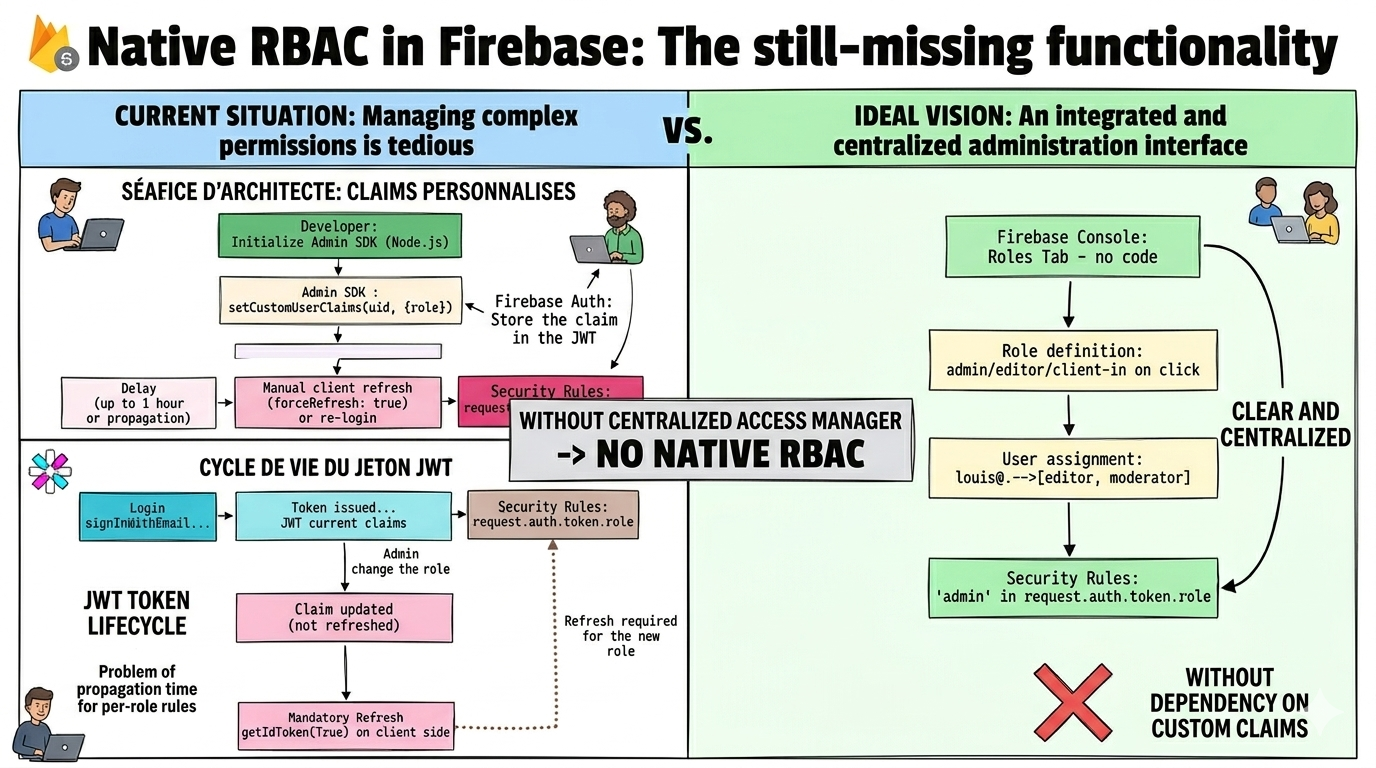
Native RBAC in Firebase: the still-missing functionality
RBAC stands for Role-Based Access Control. It is a security management method that involves granting permissions to roles rather than to individual users.
Managing roles like admin, editor, or client in **Firebase **is more complicated than it should be. Here’s why , and what a real native solution would look like.
The problem today
Firebase is often the go-to choice for developers who want to move fast: built-in authentication, real-time database, hosting… But the moment you need to differentiate users by role, things get complicated.
Consider a typical app with three user profiles: admin, editor and client. How do you make it so an admin can read everything, an editor can modify content, and a client only sees their own data? Firebase’s current answer: 𝗖𝘂𝘀𝘁𝗼𝗺 𝗖𝗹𝗮𝗶𝗺𝘀.
Custom Claims are not accessible from the Firebase console. They require the Admin SDK (Node.js), a server-side environment, and a solid understanding of JWT tokens. For a beginner, that’s a mountain to climb before writing a single security rule.
Here is the full workflow every Firebase developer must set up today to assign a role to a user:
1- Initialize the Admin SDK server-side: Cloud Function, Express server, or a dedicated Node.js script — this cannot be done from the client.
2- Assign the role via setCustomUserClaims(): an async call with the user’s UID and an object containing the role.
3- Force a token refresh on the client: the JWT token is not updated in real time — the user must sign out and back in, or call getIdToken(true).
4- Write Security Rules based on those claims: use request.auth.token.role inside your Firestore or Storage rules.
Node.js — Admin SDK
// File: functions/setRole.js
const admin = require('firebase-admin');
admin.initializeApp();

async function assignRole(uid, role) {
  await admin.auth().setCustomUserClaims(uid, {
    role: role  // 'admin' | 'editor' | 'client'
  });

  // ⚠️ The user MUST refresh their token
  // for the change to take effect
}

// Example call
assignRole('uid_louis', 'admin');
Firestore security rules
rules_version = '2';
service cloud.firestore {
  match /databases/{database}/documents {

    // Helper function to read the role
    function getUserRole() {
      return request.auth.token.role;
    }

    match /articles/{articleId} {
      // Read: editors and admins only
      allow read: if getUserRole() in ['editor', 'admin'];

      // Write: admins only
      allow write: if getUserRole() == 'admin';
    }

    match /orders/{orderId} {
      // A client only sees their own orders
      allow read: if request.auth.uid == resource.data.userId
                  || getUserRole() == 'admin';
    }
  }
}
This code works? Yes ! But let’s look at what it really means for someone just starting out with Firebase.

The ideal feature: native Firebase RBAC
Let’s imagine what Firebase could offer if a role management system were built directly into the platform.
1. Role definition from the console
A “Roles” tab in the Authentication section would allow you to create named roles, attach a description, and assign them to users directly from the UI — without a single line of server-side code.
Analogy: This is exactly what Google Cloud IAM and AWS IAM have been doing for years. You define roles in the console, assign them to identities, and permissions apply automatically. Firebase deserves the same level of maturity for its own services.
2. Automatic availability in request.auth
With native RBAC, roles would be accessible in Security Rules with no extra setup. The request.auth object would include a roles field (an array) managed by Firebase itself:
Security Rules — ideal syntax
rules_version = '2';
service cloud.firestore {
  match /databases/{database}/documents {

    match /articles/{articleId} {
      // ✨ No Custom Claims, no helper function needed
      // request.auth.roles is managed natively by Firebase

      allow read: if 'editor' in request.auth.roles
                  || 'admin' in request.auth.roles;

      allow write: if 'admin' in request.auth.roles;
    }
  }
}
3. Instant propagation
Today, changing a user’s role via Custom Claims only takes effect at the next token refresh — up to an hour later if you don’t force a renewal. Native RBAC would solve this by handling propagation at the infrastructure level, transparently.
A role changed from the Firebase console should be active in Security Rules within 60 seconds, with no action required on the client side. That’s the standard expected from any modern access management system.
4. Multi-role support
A user should be able to hold multiple roles simultaneously. For example, an admin-editor who combines the permissions of both profiles. The current approach with a single role claim (a string) doesn't support this naturally — you have to hack around it with arrays or bitmasks.
Multi-role assignment — concept
// Firebase console side (concept)
// User: louis@company.com
// Assigned roles: ['editor', 'moderator']

// In Security Rules:
allow write: if 'editor' in request.auth.roles;
allow delete: if 'moderator' in request.auth.roles;

// Louis can write AND delete
// Japheth (editor only) can only write
In the meantime: the best approach available today
Firebase hasn’t implemented this feature yet. Until then, here is the most robust strategy for managing roles without too much friction.
1. Custom Claims via Cloud Functions
Create a Cloud Function triggered on user creation or via a secured HTTP call. This is the most scalable approach and the closest thing to native RBAC available today.
Cloud Function — automatic role assignment
const functions = require('firebase-functions');
const admin = require('firebase-admin');
admin.initializeApp();

// Default role on account creation
exports.setDefaultRole = functions.auth.user().onCreate(async (user) => {
  await admin.auth().setCustomUserClaims(user.uid, {
    role: 'client'
  });
});

// Promote a user (secured callable)
exports.promoteUser = functions.https.onCall(async (data, context) => {
  // Verify the caller is an admin
  if (context.auth?.token?.role !== 'admin') {
    throw new functions.https.HttpsError(
      'permission-denied',
      'Only an admin can promote a user'
    );
  }

  await admin.auth().setCustomUserClaims(data.uid, {
    role: data.newRole
  });

  return { success: true };
});
2. Roles stored in Firestore
Store roles in a Firestore collection and read them in Security Rules via get(). More flexible for complex permission structures, but every rule evaluation triggers an extra read — watch the performance and cost implications.
Security Rules with Firestore lookup
function getUserRole(uid) {
  return get(/databases/$(database)/documents/users/$(uid)).data.role;
}

match /articles/{articleId} {
  allow read: if getUserRole(request.auth.uid) in ['editor', 'admin'];
}
Watch out: every call to
get()inside a Security Rule consumes a Firestore read. At scale, this can significantly increase your bill. Prefer Custom Claims for straightforward cases.
Firebase excels at speed of development, but role management remains a blind spot in the platform. What should be a few-click operation today requires understanding JWTs, maintaining a server-side environment, and manually handling rights propagation.
Native RBAC with a console interface, automatic availability in request.auth.roles, and instant propagation — would fill a real gap, especially for developers just getting started with Firebase.
Until then, Custom Claims via Cloud Functions remain the best option available. They are robust, well-documented, and flexible enough for most use cases as long as you’re willing to accept the initial complexity they bring.
See you soon for another article! 😎
메타데이터
- post_id
- 14e4c849f345
- slug
- native-rbac-in-firebase-the-feature-thats-still-missing-14e4c849f345
- url
- https://medium.com/@louisjaphethkouassi/native-rbac-in-firebase-the-feature-thats-still-missing-14e4c849f345
- canonical_url
- https://medium.com/@louisjaphethkouassi/native-rbac-in-firebase-the-feature-thats-still-missing-14e4c849f345
- author_url
- https://medium.com/@louisjaphethkouassi
- status
- ok
- fetched_at
- 2026-08-07 03:23:15