From Cables to Convergence
From Cables to Convergence
If there is one thing that hands-on lab work teaches you, it is that engineering a network on paper is worlds apart from making it work in real life. This week, as part of our ongoing networking practicals at Uganda Christian University’s Department of Computing & Technology, our lab group stepped away from basic device configurations and dove straight into enterprise scale routing and switching.
Our goal: Take independent server racks, segment them into secure corporate departments, automate their addressing, and link them across a central ISP Layer 3 core switch using dynamic routing.
Here is a look behind the scenes at how we made it happen.
Step 1: Laying the Groundwork (Switch Hardening & VLANs)
We started at Layer 2, working directly with our Cisco 2960 switches. Before passing any data, security was our top priority. We performed essential device hardening, moving away from vulnerable telnet access to secure SSH, configured local database authentication, and set up a mandatory login banner to keep unauthorized eyes out.
Once the switch was secured, we began logical segmentation. Networks get bogged down quickly by massive broadcast storms if everything sits in one giant pool. By creating unique VLANs, we isolated traffic for different services. End-user PCs were assigned to specific physical access ports, trapping local department traffic exactly where it belonged.
Step 2: Breaking the Walls (Router-on-a-Stick)
Isolation is fantastic for security, but what happens when a PC in one VLAN needs to share a file with a PC in another? Layer 2 switches can’t pass traffic between different subnets on their own.
To bridge the gap, we configured an IEEE 802.1Q Trunk Link from our switch up to our Cisco router. Using a method known as Router-on-a-Stick (RoaS), we split a single physical router interface into multiple logical sub-interfaces. Each sub-interface was mapped to its matching VLAN ID and assigned a gateway IP, acting as the exit router path for that specific subnet.
Step 3: Automating the Overhead (DHCP Setup)
Nobody wants to walk around a campus manually typing static IP addresses into hundreds of computers. To make our network scalable, we turned our rack routers into centralized DHCP servers. After excluding our static management IPs to avoid messy address conflicts, we set up unique DHCP pools for every single VLAN. Instantly, our end-user machines were leasing accurate IP addresses, masks, and gateways automatically.
Step 4: Connecting the Entire Campus (OSPF Dynamic Routing)
Up to this point, our rack was working beautifully internally. But as you can see in our master campus topology diagram,
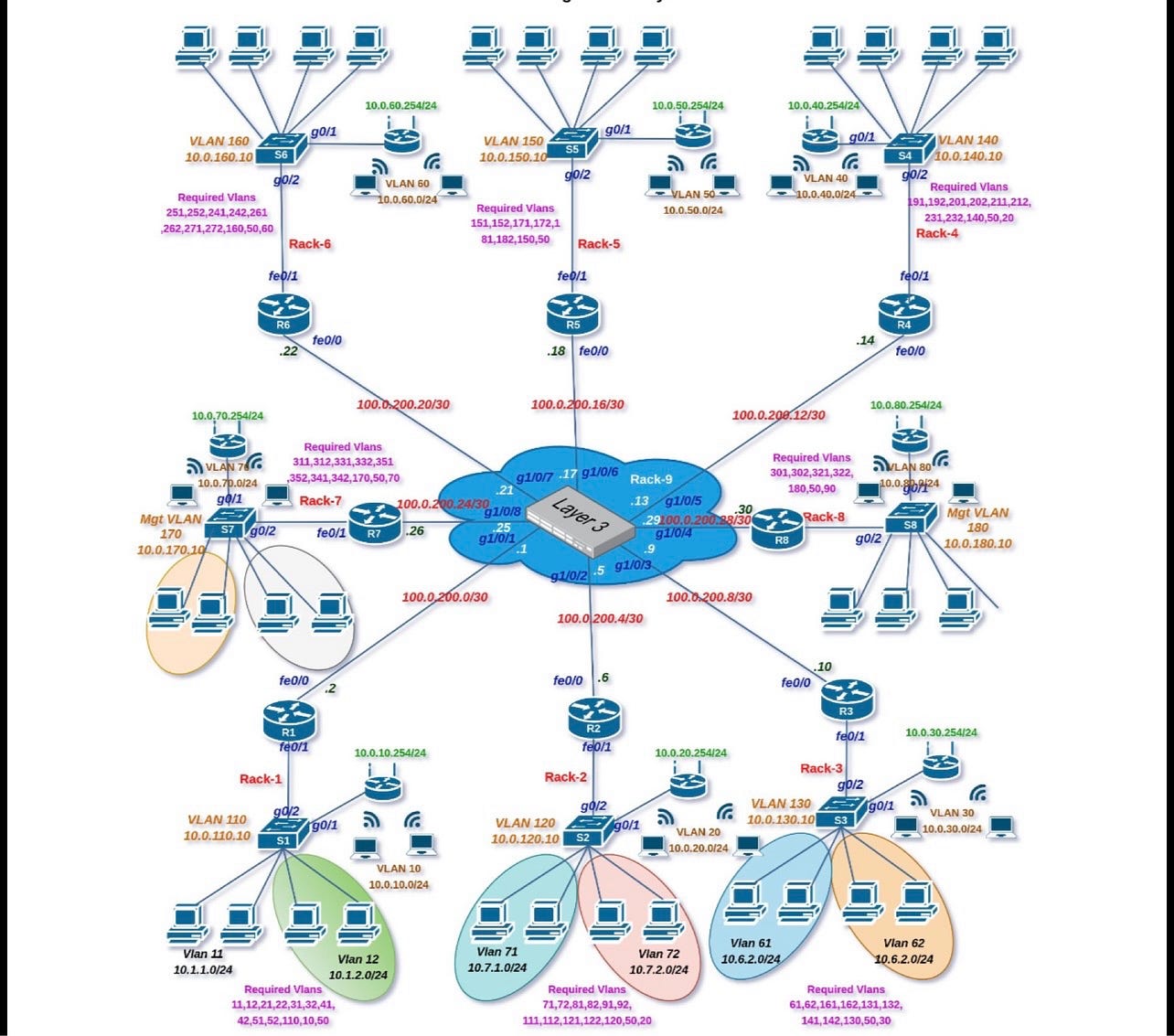
our rack was just one piece of a much larger puzzle. There were 8 separate racks in total, all converging onto a single ISP Layer 3 core switch.
To let the different racks talk to each other, we implemented Open Shortest Path First (OSPF). We initialized the OSPF routing process on our routers, configured our point-to-point WAN links, and advertised our internal local networks straight into Area 0. Within moments, our routers formed neighbor adjacencies with the central ISP core, and routing tables began synchronizing across the entire lab.
The Ultimate Test: Packet Sharing and Live Streaming
The real magic of networking happens when the configuration phase ends and the testing begins. With our OSPF paths fully converged, we ran end-to-end testing across the campus layout.
We didn’t just achieve standard inter-VLAN routing; we successfully managed full-scale packet sharing and live data streaming from hosts on our rack to completely different networks on opposing sides of the room. The data packets moved flawlessly up to our local router, across the ISP core switch, and straight to their destinations without a single dropped frame.
Looking Forward
We wrapped up the week by saving our configurations to NVRAM ensuring our hard work survives the next lab power cycle and cleaning up our physical cabling layouts.
Building enterprise architectures like this reminds you how crucial attention to detail is. Miss one wildcard mask or forget an encapsulation command, and the whole system stalls. But when it all comes together? There is no better feeling in tech.
What networking challenges are you working on this week? Let’s talk about it in the comments below!
메타데이터
- post_id
- 157fdb880bcc
- slug
- from-cables-to-convergence-157fdb880bcc
- url
- https://medium.com/@joriana800/from-cables-to-convergence-157fdb880bcc
- canonical_url
- https://medium.com/@joriana800/from-cables-to-convergence-157fdb880bcc
- author_url
- https://medium.com/@joriana800
- status
- ok
- fetched_at
- 2026-06-14 11:28:49