How to Test the 0.8V LDO Chip on a Hash Board Using the Fluke 15B MAX-KIT Multimeter
If you work in ASIC miner repair, you must know that the core voltage of the hash board is crucial for the miner’s mining operation. The…
How to Test the 0.8V LDO Chip on a Hash Board Using the Fluke 15B MAX-KIT Multimeter
If you work in ASIC miner repair, you must know that the core voltage of the hash board is crucial for the miner’s mining operation. The LDO circuit is a core power-supply component for ASIC chips. Specifically, the 0.8V and 1.2V LDO chips on the hash board provide output voltage to the ASIC chips. When the ASIC chips receive sufficient voltage, the miner operates normally to enable mining; if the LDO circuit malfunctions, the miner’s hashrate will decrease or it will fail to start mining.
Fortunately, even if you are a beginner at repairs, testing the LDO circuit’s pin voltage is easier than you might think. In this guide, I will walk you through the steps to perform the test using the Fluke 15B MAX-KIT multimeter — a tool favored by professionals for its high accuracy and user-friendly operation.
Required Tools
Fluke 15B MAX-KIT Multimeter: Equipped with test leads, easy to operate, and suitable for beginners (no complex setup required).

Hash Board: Ensure it is powered off first — safety comes first!
Adjustable Voltage Power Supply: Allows free voltage adjustment, providing greater convenience and safety.
Testing Method for the 0.8V LDO Chip
●Step 1: Understand the Pin Definition of the LDO Chip and Locate the 0.8V LDO Chip on the Hash Board
First, familiarize yourself with the LDO chip’s pinout, then find the 0.8V LDO chip on the hash board.
●Step 2: Set Up Your Fluke 15B MAX Multimeter
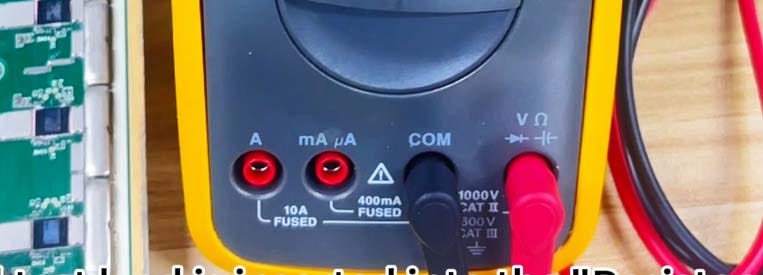
The Fluke 15B MAX is plug-and-play, but proper setup is still necessary: Insert the black test lead into the “COM” port (negative terminal), and the red test lead into the “Resistance, Continuity, Diode” port (positive terminal).
●Step 3: Test the 0.8V LDO Chip
Now, let’s check if the LDO is functioning correctly:
Turn on the adjustable-voltage power supply (for example, set the voltage to approximately 15V and the current to 30A for Antminer hash boards).

Press the “Output” button to supply voltage to the hash board.

Set the multimeter to the DC voltage (V⎓) range. For testing the 0.8V LDO chip’s voltage, the DC voltage range is always used.

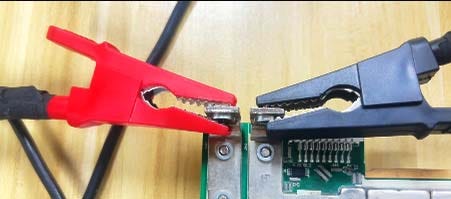
Clip the red alligator clip to the positive terminal of the hash board and the black alligator clip to the negative terminal of the hash board (Note: Do not reverse the positive and negative terminals here).
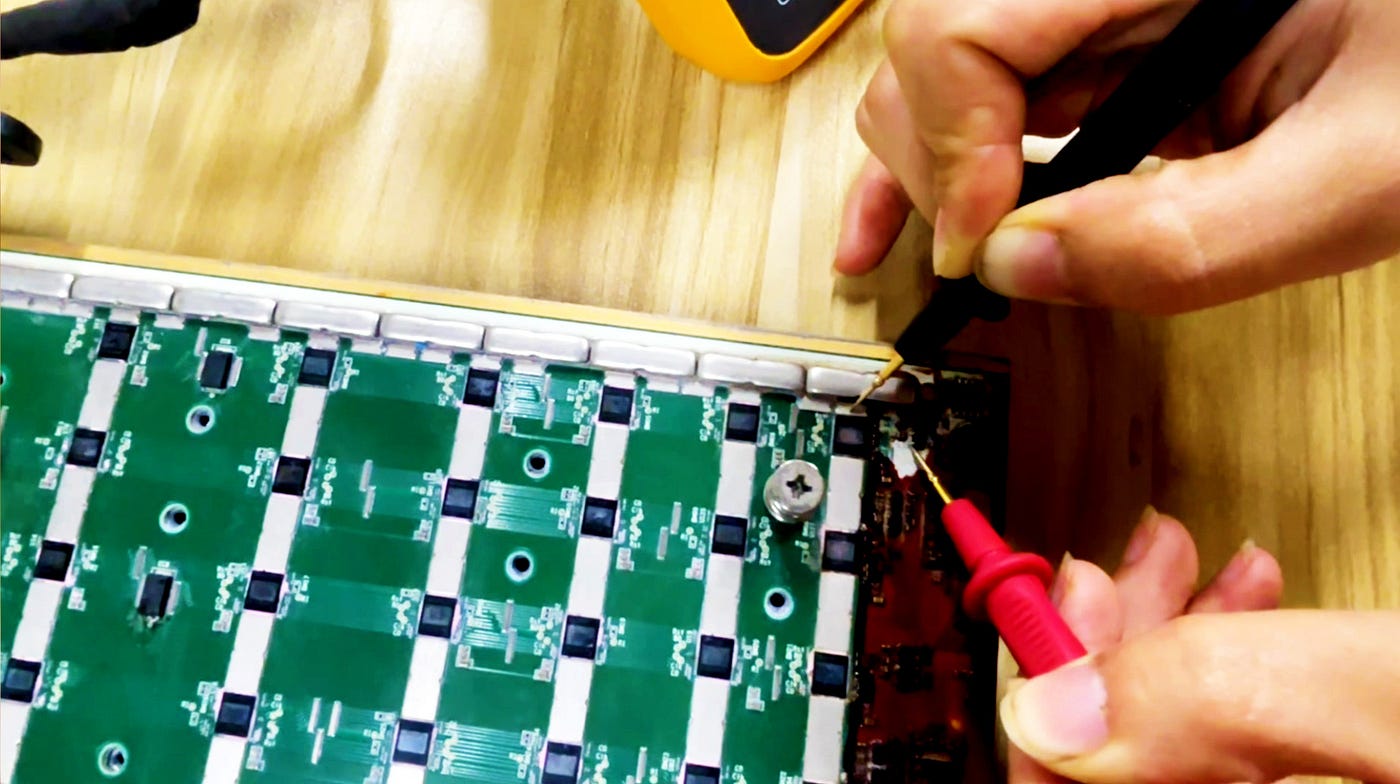
Start the test: Touch the red test probe to the output pin of the 0.8V LDO chip, and the black test probe to the negative terminal of the domain where the chip is located. The multimeter will then correctly display the chip’s output voltage.

If the multimeter reads approximately 0.8V, the 0.8V LDO chip is functioning normally.

If the reading is 0V, it indicates that the 0.8V LDO chip is damaged, and you should check whether its input voltage is standard.
If you do not know how to troubleshoot chip pin voltage or are unclear about the pin definition of the chip, you may learn from our course videos: https://z-m.cc/c/16.

What to Do If the LDO Chip Malfunctions?
Don’t panic! You can replace the faulty LDO chip with a new one. 0.8V LDO chips are affordably priced. You can use a heating plate or a heat gun to remove the faulty LDO chip (Note: When using a heating plate or heat gun, be sure not to set the temperature too high!).
You need to replace it with an LDO chip of the same model. Tip: When removing the faulty chip, be careful not to damage or displace any nearby small components!
Summarize:
Testing the LDO chip’s pin voltage with the Fluke 15B MAX-KIT multimeter is one of the quickest ways to diagnose issues with the hash board.
🌐 https://youtu.be/vLdkfF-bcJo
If you find this article helpful, please like it so other miners can find it.
mining #miner #repair #fluke #multimeter #electronic #testing #technology #repairtools #cryptomining #bitcoinmining #btcmining #asicminer #hashboard #chip #bitmain
메타데이터
- post_id
- 159c91cdfa78
- slug
- how-to-test-the-0-8v-ldo-chip-on-a-hash-board-using-the-fluke-15b-max-kit-multimeter-159c91cdfa78
- url
- https://medium.com/@miner-sunny/how-to-test-the-0-8v-ldo-chip-on-a-hash-board-using-the-fluke-15b-max-kit-multimeter-159c91cdfa78
- canonical_url
- https://medium.com/@miner-sunny/how-to-test-the-0-8v-ldo-chip-on-a-hash-board-using-the-fluke-15b-max-kit-multimeter-159c91cdfa78
- author_url
- https://medium.com/@miner-sunny
- status
- ok
- fetched_at
- 2026-06-27 07:40:21




