Comprehensive Security Assessment of vAPI Aligned with the OWASP API Security Top 10
APIs are a critical component of modern applications, enabling communication between services, mobile platforms, and cloud environments…
Comprehensive Security Assessment of vAPI Aligned with the OWASP API Security Top 10

APIs are a critical component of modern applications, enabling communication between services, mobile platforms, and cloud environments. However, insecure APIs remain one of the most exploited attack surfaces in contemporary systems.
As part of the API Penetration Testing curriculum under the CyberGirls APISEC Fellowship, I conducted a structured security assessment of the vAPI application, evaluating vulnerabilities across API1 through API10 of the OWASP API Security Top 10.
The objective of this assessment was to simulate real-world attacker behavior while applying a systematic testing methodology to identify weaknesses in authentication, authorization, input validation, configuration management, asset management, and monitoring mechanisms.
High-Risk Findings:
- Broken Object-Level Authorization (BOLA)
- Broken Authentication
- Excessive Data Exposure
- Lack of Resources & Rate Limiting
- Broken Function Level Authorization
- Mass Assignment
- Security Misconfiguration (CORS)
- SQL Injection
- Improper Asset Management
- Lack of Logging & Monitoring
These vulnerabilities could lead to data breaches, privilege escalation, database compromise, and prolonged attacker persistence.
This article documents the testing methodology, exploitation process, security implications, and remediation recommendations identified during the assessment.
Lab Setup
Environment: Kali Linux with Docker
mkdir lab
cd lab
git clone https://github.com/roottusk/vapi.git
cd vapi
sudo docker compose up
docker compose ps  # Verify containers
Access the application at: [http://localhost:8000/vapi](http://localhost:8000/vapi)
Postman Setup: Imported the following:
vAPI.postman_collection.jsonvAPI_ENV.postman_environment.json
Additional tools: Burp Suite, FFUF, SQLMap
Findings: OWASP API Top 10
The following are the key findings from the security assessment of the vAPI application. Each endpoint was systematically tested against common API security risks as defined in the OWASP API Security Top 10. Supporting screenshots were captured to validate each vulnerability.
1. API1: Broken Object-Level Authorization (BOLA)
Broken Object-Level Authorization (BOLA) happens when an API allows users to access or modify objects they are not supposed to, typically by changing an identifier in a request. This happens due to missing or insufficient authorization checks.
To test for BOLA, I created a new user via the /vapi/api1/user endpoint as shown in the screenshot below:

With this account, I verified that I could successfully retrieve my own user details through the GET /vapi/api1/user/{api1_id} endpoint, which returned information such as username, name, course, and user ID.
Next, to check for BOLA, I attempted to access data for other users by modifying the api1_id parameter in the request to determine whether the API properly enforced authorization checks on user-specific resources.
Using burpusite, I intercepted my original request and modified the api1_id parameter to attempt access to other users’ accounts. Using the same account, I was able to retrieve data for users I was not authorized to access, including accounts with IDs 1 and 2.

Figure 2: Unauthorized access to user Id 1 data

Figure 3:Unauthorized access to user id 2 data
Flag for this task: flag{api1_d0cd9be2324cc237235b}
Security Implications: The lack of proper object-level authorization allows any authenticated user to access or potentially modify data belonging to other users.
2. API2 — Broken Authentication
Broken Authentication occurs when an API improperly validates user credentials, allowing attackers to compromise accounts through techniques such as credential stuffing or brute force attacks.
To test for Broken Authentication, I used a credential list provided within the lab environment. The file was located at: *~/lab/vapi/Resources/API2_CredentialStuffing/creds.csv*.This file contained a list of comma-separated email and password combinations. I copied the creds.csv file into my working vAPI directory to use it during testing.

Figure 4: Credential list within lab environment
Step 1: Intercepting the Login Request
To begin testing API2 for broken authentication, I first examined the User Login request under the API2 section in the imported Postman collection.
Since no valid credentials were available, I entered random values in the email and password fields (test@gmail.com and 1234) and sent the request to burp suite where the login endpoint was captured in the intercept tab.

Figure 5: Payload Positions
I right-clicked the intercepted request and selected “Send to Intruder” to perform automated credential testing. This step allowed me to use Burp’s Intruder module to simulate a credential stuffing attack against the login endpoint.
Step 2: Configuring the Intruder Attack
After sending the login request to Intruder, I configured the attack in the Positions tab. Since each email needed to be tested with its corresponding password, the Pitchfork attack type was selected.

Figure 6: Pitchfork attack selected under intruder in burp suite
After running the attack, three valid credential pairs returned HTTP 200 responses confirming successful authentication.

Figure 7: Three Valid Credentials Found
For each successful login attempt, the server returned a valid authentication token. These tokens were then used in the GET /vapi/api2/user/details endpoint.

Figure 8: Valid authentication token returned
The retrieved authentication token was supplied in the Authorization-Token header and used to access the GET /vapi/api2/user/details endpoint. The response returned details of all registered users instead of restricting access to the authenticated user only. This confirms that proper authorization checks were not enforced and that tokens were not scoped to specific user accounts.

Figure 9: All useres retrieved after using one token
Flag Captured: flag{api2_6bf2beda61e2a1ab2d0a}
Implications
· Unlimited login attempts were allowed without throttling or account lockout mechanisms.
· Successful credential stuffing resulted in valid authentication tokens.
· Tokens were not properly bound to user-specific authorization controls.
· A single compromised account enabled access to sensitive data of all users.
Fix Recommendations
· Implement rate limiting on authentication endpoints.
· Enforce account lockout after multiple failed login attempts.
· Apply strong password policies.
· Ensure authentication tokens are properly validated and scoped to the authenticated user.
· Implement role-based access control (RBAC) or equivalent authorization mechanisms.
3. API3 — Excessive Data Exposure
Excessive Data Exposure occurs when an API returns more information than is necessary for the client’s intended functionality.
To test for excessive data exposure in the vAPI environment, I first launched TheCommentApp.apk inside my Android emulator. I configured the application to use the locally hosted vAPI instance: http://localhost:8000/vapi

Next, I configured the emulator to route traffic through Burp Suite and enabled intercept to monitor API requests and responses. I then created a new user account within the application and observed the registration request and response in Burp Suite.
After successfully registering, I logged into the application using the newly created credentials. Upon login, the application displayed a post created by another user along with existing comments.

Figure 10: Registering a new user in the commenter App
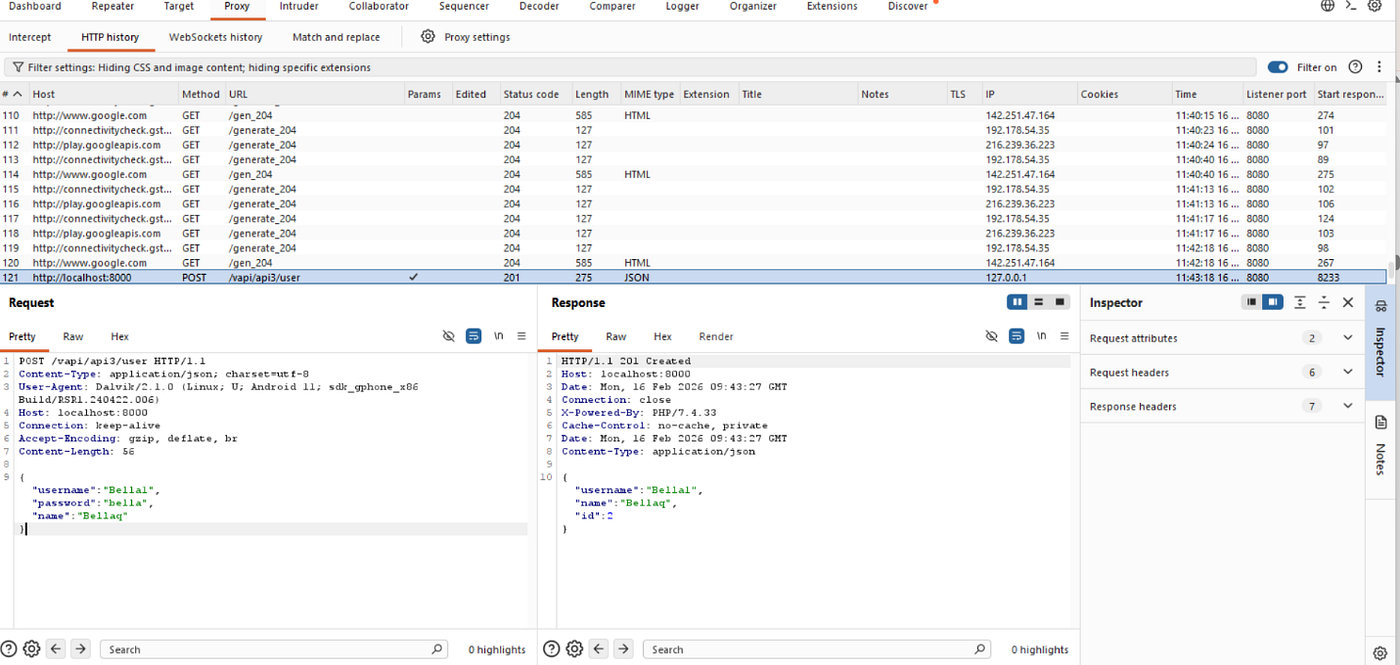
Figure 11: User successfully registered as shown in burp suite interception
After successfully registering, I logged into the application using the newly created credentials. Upon login, the application displayed a post created by another user along with existing comments. While analyzing the API response in Burp Suite, I observed that the response body included sensitive information about users who had commented on the post. Specifically, the API response exposed username and GPS location coordinates.
This information was not necessary for displaying the post and comments in the application interface. The API returned complete user data objects instead of limiting the response to only required fields as shown in the screenshot below:

Flag Captured: flag{api3_0bad677bfc504c75ff72}Impact
The exposure of unnecessary sensitive data increases the attack surface and may allow attackers to collect Personally Identifiable Information (PII), track user locations, perform profiling or targeted attacks.
Recommendation
To mitigate excessive data exposure:
· Implement server-side filtering to return only required fields.
· Avoid sending full user objects in API responses.
· Apply proper data minimization principles.
· Conduct regular API response reviews to ensure sensitive data is not unnecessarily exposed.
4. API4 — Lack of Resources & Rate Limiting
This vulnerability occurs when an API does not properly limit the number of requests a user can make within a given time frame.
To test for this vulnerability, I first used Postman to send a Mobile Login request from the API4 folder using the supplied body data. This request successfully logged into the user account associated with the provided mobile phone number.
In the response body, the application indicated that a 4-digit OTP code had been sent to the user’s device. Since I did not have access to the user’s device, I did not have the OTP code and therefore needed to find an alternative method to bypass this verification step.

Next, I sent a Verify OTP request and intercepted it using Burp Suite. Here we got a 403 error code because the OTP that was inputted is wrong.

By proxying the request into Burp Suite, I was able to capture and analyze the OTP verification request before it reached the server. Because the API does not implement proper rate limiting, it becomes possible to repeatedly send multiple OTP verification attempts without being blocked, increasing the likelihood of successfully brute-forcing the 4-digit code.

I used the sniper attack to try to find the correct otp but it took too long, so I opted to use ffuf instead, which is faster. First, I downloaded and extracted charset.lst from the provided GitHub link. I then generated all possible 4-digit numeric combinations (0000–9999) using:
crunch 4 4 -f charset.lst numeric -o numbers.txt.
Next, I ran FFUF to fuzz the OTP field in the POST request: In a few minutes FFUF identified a valid OTP: 1872

I returned to Burp Suite and sent the Verify OTP request from Intruder to Repeater. After replacing the OTP value with the discovered code (1872) and sending the request, the server responded successfully and returned a key in the response body.

I then returned to Postman and selected the Get Details request under the API4 collection. I pasted the retrieved key into the Authorization Token field and sent the request. The response body returned the user’s details along with the flag:
Flag Captured: flag{api4_ce696239323ea5b2d015}

This demonstrates that the API does not enforce adequate resource restrictions or rate limiting controls, making it vulnerable to OTP brute-force attacks.
Implications
Without rate limiting or resource restrictions, an attacker can send a large number of requests to brute-force inputs such as OTP codes, leading to unauthorized access.
5. Broken Function Level Authorization (API5)
The vAPI is vulnerable to Broken Function Level Authorization. This happens when backend functions that should be restricted like admin operations are accessible to regular authenticated users because proper function-level access control is not implemented. In other words, authentication exists, but authorization is missing or weak.
To test this, I first created a normal user by sending a POST request to the /vapi/api5/user endpoint. This was done to generate a user account without admin privileges. The user was created successfully, as shown in the figure below:

Next, I attempted to access admin-only functions using this normal user by sending a GET request to the /vapi/api5/users endpoint. The purpose was to see if a normal user could access data reserved for admins. The result showed that the normal user was able to retrieve all users’ details, including sensitive information such as flags, as shown below:

Implications
· Unauthorized users can access privileged functions.
· Sensitive data, including other users’ information and flags, can be leaked.
· Potential for privilege escalation and security breaches.
Recommendation:
· Implement role-based access control (RBAC).
· Enforce authorization checks at the controller level for all admin-level endpoints.
· Regularly test API endpoints to ensure users cannot access functions beyond their role.
Flag Captured: flag{api5_76dd990a97ff1563ae76}
6. API6 — Mass Assignment
Mass Assignment occurs when an API allows users to modify object properties that were not intended to be modified. This happens when the backend automatically binds user input to internal object fields without properly filtering or validating which parameters are allowed.
The vAPI is vulnerable to mass assignment because it fails to restrict which parameters could be submitted during user creation.
To test for Mass Assignment in the vAPI application:
-
I navigated to the API6 folder in the Postman collection.
-
I used the Create User request to create a new user named MassTest.

- After creating the user, I verified using the Get User Details request that the
creditvalue was set to 0 by default.

To further test the vulnerability:
- I created another user named MassUserTest2. This time, I manually added an additional parameter in the request body: “credit”: 100. The request was successfully processed.

- Using the Get User Details request, I confirmed that the user was created with a
creditvalue of 100, even though this parameter was not intended to be user-controlled

Additionally, the application displayed the flag for this task:
flag{api6_afb969db8b6e272694b4}This confirms successful exploitation of the Mass Assignment vulnerability.
Impact
This vulnerability allows attackers to manipulate sensitive object properties that should not be user-controlled, such as account credit or balance, user roles (e.g., privilege escalation to admin), account status flags and internal configuration attributes. This could lead to financial loss, privilege escalation, and unauthorized access to sensitive system functionality.
Recommendation
· Implement strict whitelisting of allowed fields.
· Use DTOs (Data Transfer Objects) instead of directly binding request bodies to database models.
· Enforce strong server-side validation.
· Explicitly block sensitive fields such as credit, role, or isAdmin from being modified via user input.
7. API7 — Security Misconfiguration (CORS Misconfiguration)
An API is vulnerable to Security Misconfiguration when security settings are either not implemented or improperly configured. One common example is an improperly configured Cross-Origin Resource Sharing (CORS) policy. CORS controls which external domains are allowed to interact with the API.
If CORS is missing or misconfigured (e.g., allowing all origins), attackers can perform unauthorized cross-origin requests, potentially leading to data exposure or account compromise.
To test for API7 in the vAPI application:
-
I navigated to the API7 folder in the Postman collection.
-
I used the Create User request to create a new user.
-
The request was successfully processed, and confirmation was received that the new user had been created as shown in the screenshot below:

-
I then sent the User Login request to authenticate the user. The login request was accepted, confirming successful authentication.
-
I sent the Get Key request and intercepted the traffic into Burp Suite. Inspecting the response headers, I observed the following:

*Access-Control-Allow-Origin: **
Access-Control-Allow-Credentials: true
This configuration is insecure because:
Access-Control-Allow-Origin: allows requests from any domain.*
Access-Control-Allow-Credentials: true allows cookies and authentication tokens to be included in cross-origin requests.
This combination is dangerous and indicates improper CORS configuration
To demonstrate the vulnerability:
-
I sent the intercepted request to Repeater in Burp Suite. Then, I manually added a custom Origin header to simulate a malicious third-party domain: Origin: http://evil.com
-
I resent the request. The server accepted the request and returned sensitive data in the response body. Additionally, the flag for this task was displayed:

Flag Captured: flag{api7_e71b65071645e24ed50a}
8. API8 — Injection
Injection vulnerabilities occur when untrusted user input is directly incorporated into database queries without proper validation or sanitization. This allows attackers to manipulate queries to bypass authentication, extract sensitive data, or modify database contents. In this case, the login functionality appeared suspicious because it lacked proper credential validation, suggesting that injection might be required to bypass authentication.
To test for Injection in the vAPI application:
-
I navigated to the API8 folder in Postman.
-
I examined the login request and observed that it did not enforce strict credential validation.
-
To test for SQL Injection, I injected a single quote (
') into the username field. -
The server responded with a SQL syntax error.
This error indicates that user input was being directly concatenated into a SQL query without proper sanitization, confirming the presence of a SQL Injection vulnerability.

Using SQLMap, I:
- Enumerated the backend MySQL databases and identified a database named vapi.
- Dumped the a_p_i8_users table and retrieved administrative credentials and the secret flag stored in the database.
The extracted credentials were then used to log in successfully to the application, confirming that the injection vulnerability allowed full database access.

After identifying the backend database (vapi) and listing available tables, I observed that the tables followed the same numbering pattern as the vAPI tasks. The table corresponding to Task 8 was identified as: a_p_i8_users.
To inspect the structure of this table, I enumerated its columns using SQLMap: This revealed three sensitive and relevant columns: username, password and secret.

To retrieve sensitive information, I performed a targeted dump of specific columns using the following query:
sqlmap -u http://192.168.1.26/vapi/api8/user/login \--data="username=u&password=p" \
-p username \
-D vapi \
-T a_p_i8_users \
-C password,secret,username \
--dump
This successfully extracted the username, password and the flag. The flag retrieved was: flag{api8_509f8e201807860d5c91}. This confirms that the injection vulnerability allowed full access to sensitive database content.

Impact
This vulnerability allows an attacker to manipulate backend SQL queries to extract sensitive data, including administrative credentials and secret values, effectively bypassing authentication controls. By exploiting the injection flaw, an attacker can enumerate databases, dump critical tables, and gain unauthorized access to the application, potentially leading to full system compromise, data breaches, and loss of confidentiality and integrity of the system.
Recommendation
· Use parameterized queries (prepared statements).
· Avoid dynamic query concatenation.
· Implement strict input validation and sanitization.
· Suppress detailed database error messages in production.
· Apply the principle of least privilege to database accounts
9. API9 — Improper Asset Management
Improper Asset Management occurs when outdated or deprecated API versions remain accessible and are not properly secured.
Organizations may update to newer API versions but fail to disable older ones, leaving them exposed to vulnerabilities such as missing security controls. In the vAPI, older API versions were still accessible and lacked important protections.
To test for API9 in the vAPI application:
-
I first tested the
/v2API endpoint. -
The response included rate-limiting headers indicating that only a limited number of requests were allowed. The response showed that 4 requests remained, confirming that rate limiting was properly configured in
/v2.

Then, I tested the older /v1 API endpoint. The response did not include rate-limiting headers. This indicates that the deprecated /v1 version does not implement the same security controls as /v2. This confirms that an older API version is still publicly accessible and lacks critical protections.

Exploitation: Brute Forcing the PIN
Since /v1 lacked rate limiting, I attempted to brute force the user PIN. Using the four-digit number wordlist (numbers.txt) created earlier, I executed the following FFUF command:
ffuf -w ~/lab/vapi/numbers.txt -X POST -d ‘{“username”:”richardbranson”,”pin”:”FUZZ”}’ -H “Content-Type: application/json” -u http://localhost:8000/vapi/api9/v1/user/login -fs 0


Matching Pin found 1655
After discovering the valid PIN, I returned to Burp Suite Repeater. I modified the login request to include the correct PIN and resent the request. This time, the login attempt was successful, and the server returned the flag in the response body: flag{api9_81e306bdd20a7734e244}
This confirms successful exploitation of the deprecated /v1 endpoint due to missing security controls.
Impact
This vulnerability allows attackers to:
· Brute force authentication credentials
· Gain unauthorized account access
· Bypass security controls implemented in newer API versions
· Exploit forgotten or deprecated endpoints
Recommendation
· Disable or remove deprecated API versions.
· Apply consistent security controls across all API versions.
· Implement rate limiting on authentication endpoints.
· Monitor and log excessive login attempts.
· Maintain a comprehensive API inventory and lifecycle management process.
1. API10: Lack of logging and monitoring
Lack of Logging and Monitoring occurs when an application does not properly log security-relevant events or monitor suspicious activity. Logging and monitoring are critical for detecting attacks, investigating incidents, and responding in a timely manner.
Without proper visibility into API activity, malicious behavior can go undetected for extended periods.
Testing Procedure
To test for API10 in the vAPI application:
-
I navigated to the API10 folder in Postman.
-
I sent the Get Flag request.
-
The response confirmed that the API lacked proper logging and monitoring mechanisms as shown in the screenshot below:
The flag for this task was displayed in the response body: flag{api10_5db611f7c1ffd747971f}
Impact
When logging and monitoring are absent attacks remain undetected. Lack of monitoring often allows attackers to maintain persistence within systems for long periods.
Recommendation
· Implement centralized logging for all API requests and responses.
· Log authentication attempts (successful and failed).
· Monitor unusual patterns such as excessive login attempts or abnormal request volumes.
· Configure real-time alerts for suspicious activity.
· Regularly review logs and conduct security audits.
1. API10: Lack of logging and monitoring
Lack of Logging and Monitoring occurs when an application does not properly log security-relevant events or monitor suspicious activity. Logging and monitoring are critical for detecting attacks, investigating incidents, and responding in a timely manner.
Without proper visibility into API activity, malicious behavior can go undetected for extended periods.
Testing Procedure
To test for API10 in the vAPI application:
-
I navigated to the API10 folder in Postman.
-
I sent the Get Flag request.
-
The response confirmed that the API lacked proper logging and monitoring mechanisms as shown in the screenshot below:
The flag for this task was displayed in the response body: flag{api10_5db611f7c1ffd747971f}
Impact
When logging and monitoring are absent attacks remain undetected. Lack of monitoring often allows attackers to maintain persistence within systems for long periods.
Recommendation
· Implement centralized logging for all API requests and responses.
· Log authentication attempts (successful and failed).
· Monitor unusual patterns such as excessive login attempts or abnormal request volumes.
· Configure real-time alerts for suspicious activity.
· Regularly review logs and conduct security audits.
1. API10: Lack of logging and monitoring
Lack of Logging and Monitoring occurs when an application does not properly log security-relevant events or monitor suspicious activity. Logging and monitoring are critical for detecting attacks, investigating incidents, and responding in a timely manner.
Without proper visibility into API activity, malicious behavior can go undetected for extended periods.
Testing Procedure
To test for API10 in the vAPI application:
-
I navigated to the API10 folder in Postman.
-
I sent the Get Flag request.
-
The response confirmed that the API lacked proper logging and monitoring mechanisms as shown in the screenshot below:
The flag for this task was displayed in the response body: flag{api10_5db611f7c1ffd747971f}
Impact
When logging and monitoring are absent attacks remain undetected. Lack of monitoring often allows attackers to maintain persistence within systems for long periods.
Recommendation
· Implement centralized logging for all API requests and responses.
· Log authentication attempts (successful and failed).
· Monitor unusual patterns such as excessive login attempts or abnormal request volumes.
· Configure real-time alerts for suspicious activity.
· Regularly review logs and conduct security audits.
1. API10: Lack of logging and monitoring
Lack of Logging and Monitoring occurs when an application does not properly log security-relevant events or monitor suspicious activity. Logging and monitoring are critical for detecting attacks, investigating incidents, and responding in a timely manner.
Without proper visibility into API activity, malicious behavior can go undetected for extended periods.
Testing Procedure
To test for API10 in the vAPI application:
-
I navigated to the API10 folder in Postman.
-
I sent the Get Flag request.
-
The response confirmed that the API lacked proper logging and monitoring mechanisms as shown in the screenshot below:
The flag for this task was displayed in the response body: flag{api10_5db611f7c1ffd747971f}
Impact
When logging and monitoring are absent attacks remain undetected. Lack of monitoring often allows attackers to maintain persistence within systems for long periods.
Recommendation
· Implement centralized logging for all API requests and responses.
· Log authentication attempts (successful and failed).
· Monitor unusual patterns such as excessive login attempts or abnormal request volumes.
· Configure real-time alerts for suspicious activity.
· Regularly review logs and conduct security audits.
1. API10: Lack of logging and monitoring
Lack of Logging and Monitoring occurs when an application does not properly log security-relevant events or monitor suspicious activity. Logging and monitoring are critical for detecting attacks, investigating incidents, and responding in a timely manner.
Without proper visibility into API activity, malicious behavior can go undetected for extended periods.
Testing Procedure
To test for API10 in the vAPI application:
-
I navigated to the API10 folder in Postman.
-
I sent the Get Flag request.
-
The response confirmed that the API lacked proper logging and monitoring mechanisms as shown in the screenshot below:
The flag for this task was displayed in the response body: flag{api10_5db611f7c1ffd747971f}
Impact
When logging and monitoring are absent attacks remain undetected. Lack of monitoring often allows attackers to maintain persistence within systems for long periods.
Recommendation
· Implement centralized logging for all API requests and responses.
· Log authentication attempts (successful and failed).
· Monitor unusual patterns such as excessive login attempts or abnormal request volumes.
· Configure real-time alerts for suspicious activity.
· Regularly review logs and conduct security audits.
1. API10: Lack of logging and monitoring
Lack of Logging and Monitoring occurs when an application does not properly log security-relevant events or monitor suspicious activity. Logging and monitoring are critical for detecting attacks, investigating incidents, and responding in a timely manner.
Without proper visibility into API activity, malicious behavior can go undetected for extended periods.
Testing Procedure
To test for API10 in the vAPI application:
-
I navigated to the API10 folder in Postman.
-
I sent the Get Flag request.
-
The response confirmed that the API lacked proper logging and monitoring mechanisms as shown in the screenshot below:
The flag for this task was displayed in the response body: flag{api10_5db611f7c1ffd747971f}
Impact
When logging and monitoring are absent attacks remain undetected. Lack of monitoring often allows attackers to maintain persistence within systems for long periods.
Recommendation
· Implement centralized logging for all API requests and responses.
· Log authentication attempts (successful and failed).
· Monitor unusual patterns such as excessive login attempts or abnormal request volumes.
· Configure real-time alerts for suspicious activity.
· Regularly review logs and conduct security audits.
10. API10: Lack of logging and monitoring
Lack of Logging and Monitoring occurs when an application does not properly log security-relevant events or monitor suspicious activity. Logging and monitoring are critical for detecting attacks, investigating incidents, and responding in a timely manner.
Without proper visibility into API activity, malicious behavior can go undetected for extended periods.
To test for API10 in the vAPI application:
-
I navigated to the API10 folder in Postman.
-
I sent the Get Flag request.
-
The response confirmed that the API lacked proper logging and monitoring mechanisms as shown in the screenshot below:

The flag for this task was displayed in the response body: flag{api10_5db611f7c1ffd747971f}
Impact
When logging and monitoring are absent attacks remain undetected. Lack of monitoring often allows attackers to maintain persistence within systems for long periods.
Recommendation
· Implement centralized logging for all API requests and responses.
· Log authentication attempts (successful and failed).
· Monitor unusual patterns such as excessive login attempts or abnormal request volumes.
· Configure real-time alerts for suspicious activity.
· Regularly review logs and conduct security audits.
Conclusion
The vAPI application exhibits multiple high-risk vulnerabilities across all ten OWASP API Security categories. Exploitation of these weaknesses could result in sensitive data exposure, privilege escalation, and full system compromise. Implementing the recommended mitigations is critical for securing the API in production environments.
Know More About Me
My Name is Gertrude Nsaku. I am a passionate cybersecurity professional specializing in API security, penetration testing, and secure application design. I enjoy exploring real-world attack scenarios, identifying vulnerabilities, and providing actionable recommendations to improve security.
Beyond cybersecurity, I am committed to continuous learning and mentoring through initiatives like the CyberGirls APISEC Fellowship, sharing my knowledge to empower others in the field.
Feel free to connect with me on LinkedIn.
메타데이터
- post_id
- 15c387a67233
- slug
- comprehensive-security-assessment-of-vapi-aligned-with-the-owasp-api-security-top-10-15c387a67233
- url
- https://medium.com/@gertnsaku/comprehensive-security-assessment-of-vapi-aligned-with-the-owasp-api-security-top-10-15c387a67233
- canonical_url
- https://medium.com/@gertnsaku/comprehensive-security-assessment-of-vapi-aligned-with-the-owasp-api-security-top-10-15c387a67233
- author_url
- https://medium.com/@gertnsaku
- status
- ok
- fetched_at
- 2026-07-11 15:31:54