Handling GPSR using Amazon SP-API
Introduction on GPSR
How to solve GPSR Violations on Seller Central using Amazon SP-API

GPSR — General Product Safety Regulation
Handling GPSR requirements using Amazon SP-API
Don’t have a Medium Premium Account? Follow this Friend Link for a free read!
Introduction on GPSR
On the 23rd May 2023 a new European Regulation has been published in the Official Journal of the EU. This new Regulation is called “General Product Safety Regulation” — GPSR and its purpose is to protect european consumers from risky products and to guarantee safety for them.
This regulation will replace, from the 13th December 2024, the current General Product Safety Directive (aka GPSD) and the Food Imitating Product Directive. It applies to all non-food products and to all sales channels, included ecommerce sites and marketplaces like Amazon and eBay.
Before moving on, let me make an announcement!
Bling Blong If you want to join my Whatsapp group dedicated to Amazon SP-API developers, follow this link. No fees, no plans. Just and old-school community with people that just speak our language! Come on in! We are waiting for you! Bling Blong
The factsheet that you can download from the European Commission website provides the insights that guideded them during the building of this huge regulation. What struck me most was that 11,5 billion € per year are the costs associated with accidents related to unsafe products. We all pay them and this huge amount of money would be probably spent better in different ways.
Few exclusions are determined inside the GPSR:
- Medicinal products for human or veterinary use
- Food and feed products
- Living plants and animals, genetically modified organisms and genetically modified microorganisms in contained use, as well as products of plants and animals relating directly to their future reproduction
- Animal by-products and derived products
- Plant protection products, also referred to as pesticides
- Equipment on which consumers ride or travel where that equipment is directly operated by a service provider within the context of a transport service provided to consumers and is not operated by the consumers themselves;
- Aircraft referred to in Article 2(3), point (d) of Regulation (EU) 2018/1139
- Antiques such as works of art or collectors’ items
Are you impacted by GPSR?
If your products are offered for sale and target at consumers in the Union, either through an ecommerce website or through a marketplace, then they are considered to be made available on the market and so they must comply with GPSR. In other words, if a european citizen can buy your products, then you are impacted, even if you are outside EU.
[embed]If you sell online to EU citizens, GPSR is coming to you!
Which informations must be provided? And who must provide them?
GPSR impacts the whole supply chain, from manufacturers, to importers, distributors and economic operators.
Manufacturers should draw up technical documentation regarding the products they place on the market, which should contain the necessary information to prove that those products are safe.
What is important is for private-label sellers, because, as per GPSR (article 34):
Any natural or legal person that either places a product on the market under their own name or trademark or substantially modifies a product in such a way that conformity with the requirements of this Regulation might be affected, should be considered to be the manufacturer and should assume the obligations of the manufacturer.
If you are an online seller, then, you must gather these informations from the manufacturer.
Another important situation is when the manufacturer is located outside the European Union. This may neither be established nor have a legal representative in the Union. In this case the manufacturer must nominate an authorised representative established in the Union (called Responsible Person, RP) which is entrusted with tasks regarding such products, providing market surveillance authorities with an interlocutor and, where appropriate with regard to the possible risks related to a product, performing specific tasks in a timely manner to ensure that the products are safe.
The authorized representative has received a written mandate from a manufacturer to act on that manufacturer’s behalf in relation to specified tasks with regard to the manufacturer’s obligations under this Regulation.
The contact information of the economic operator established in the Union and responsible for products falling within the scope of this Regulation should be indicated with the product in order to facilitate checks throughout the supply chain.
That’s why Amazon, eBay and all of the other different marketplaces are asking sellers to provide these informations. They are required by this regulation.
What should you do if you are a seller?
If you sell products to EU customers, you are required to provide safety informations for these products. These informations must be provided by the manufacturer. If the manufacturer is not located in the EU, he must nominate an authorized representative. Contact informations related to the authorized representative must be provided by the manufacturer.
[embed]Don’t cry. Act!
As a seller you must comply to what is specified under at Article 12 — “Obligations of distributor” of the GPSR. This means that you are responsible to check that manufacturer and importers comply with this regulation. So it’s up to you to provide these informations to the online marktplace, that’s why Amazon is requesting this to you.
Required informations
As per Article 19 of the GPSR, you are required to clearly and visibly indicate at least the following information:
- name, registered trade name or registered trade mark of the manufacturer, as well as the postal and electronic address at which they can be contacted
- where the manufacturer is not established in the Union, the name, postal and electronic address of the responsible person
- information allowing the identification of the product, including a picture of it, its type and any other product identifier
- any warning or safety information to be affixed to the product or to the packaging or included in an accompanying document in accordance with this Regulation or the applicable Union harmonisation legislation in a language which can be easily understood by consumers, as determined by the Member State in which the product is made available on the market
How to send these informations to Amazon using SP-API
If you are pushing products to Amazon using Listings API, then the good news it that you can send required informations through them.
[embed]You can do it with Amazon SP-API!
If you download the most recent schema for your requested Product Type Definition, you will find these new fields:
- gpsr_safety_attestation: states if the product is exempt to provide a safety attestation. So set it to true if your product doesn’t have any warning and safety information, as it can be used safely and as intended without it.
- gpsr_manufacturer_reference > gpsr_manufacturer_email_address: contains the email address of the manufacturer. This is the key that will be used by Amazon to retrieve manufacturer informations and show them on the product page.
- dsa_responsible_party_address: contains the email address of the responsible party, if any. This is the key that will be used by Amazon to retrieve responsible party informations and show them on the product page.
If any safety attestation has to be provided, you must upload them inside the compliance_media field, which is in fact an array of object. Objects contained are described by these informations:
- content_type: which is an enum, from which you can choose the document type (e.g. “Installation Manual”, “Instructions for Use”…)
- content_language: which is the enum value through which you will be able to tell Amazon in which language the content in provided. Remember that you must provide documents in the language used in the country you are offering your products
- source_location: which is the URL of the media file
Regarding safety images, you can use the following elements:
- image_locator_ps01
- image_locator_ps02
- image_locator_ps03
- image_locator_ps04
- image_locator_ps05
- image_locator_ps06
By providing these informations, your offer won’t be taken off by Amazon on the 13th of December. So be sure to get it and insert them as soon as possible to avoid losing sales.
Can I just send these informations without pushing all the products back to Amazon?
Yes! You can do that using the patchListingsItem operation of Listings API.
What happens if different sellers send different informations?
As stated in the Amazon Seller Central page dedicated to GPSR:
We display Responsible Person information on the corresponding product detail pages. If users with offers on an ASIN submit different Responsible Person information, each submission will be displayed in a list on the product detail page. We’ll start displaying one manufacturer information submission per ASIN by September 2024.
Good luck!
[embed]A successful seller which is becoming richer and richer!
⚠ IMPORTANT UPDATES 2024–10–24
After few experiments performed with some of our sellers, here are some findings that are very important in order to create a good flow and solve all the violations. The most important part is that Sellers are required do perform some operations on Seller Central before any update is sent using Listings API. Read it carefully!
Mandatory operations on Seller Central
Before sending updates using Listings API on the attributes I listed before (gpsr_manufacturer_email_address and dsa_responsible_party_address) you must create Manufacturers and Responsible Persons contact details on Seller Central.
Some Q&A on this:
- no, there is no way to create Manufacturers and Responsible Persons contact details using SP-API
- yes, currently the only way is to create them manually, one by one, using Seller Central
- yes, it is a crazy amount of work
Where to operate on Seller Central
Log into Seller Central and jump to the Account Health and in the Regulatory Compliance section.
In this section you will see violations grouped by brands but exploded by violation type. There are three kind of violations:
- GPSR: manufacturer contact details
- GPSR: Responsible Person contact details
- GPSR: warning and safety information
This interface is not really clear. So I’ll try to clarify a bit, basing on what I discovered. Let make an example.
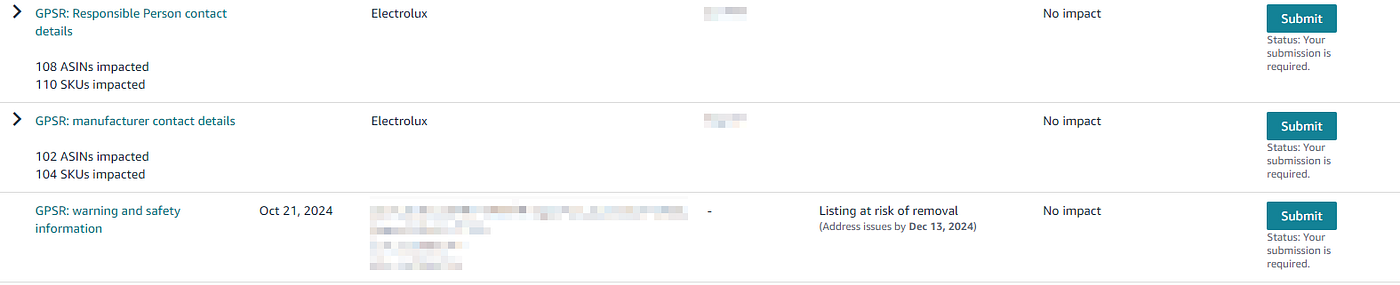
As you can see for “Manufacturer Contact Details” and “Responsible Persons Contact Details”, violations are grouped by brand. For “Warning and Safety Informations”, violations are exploed by ASIN.
If you expand violations, by clicking the arrow, you will see which ASINs are impacted by the regulation.
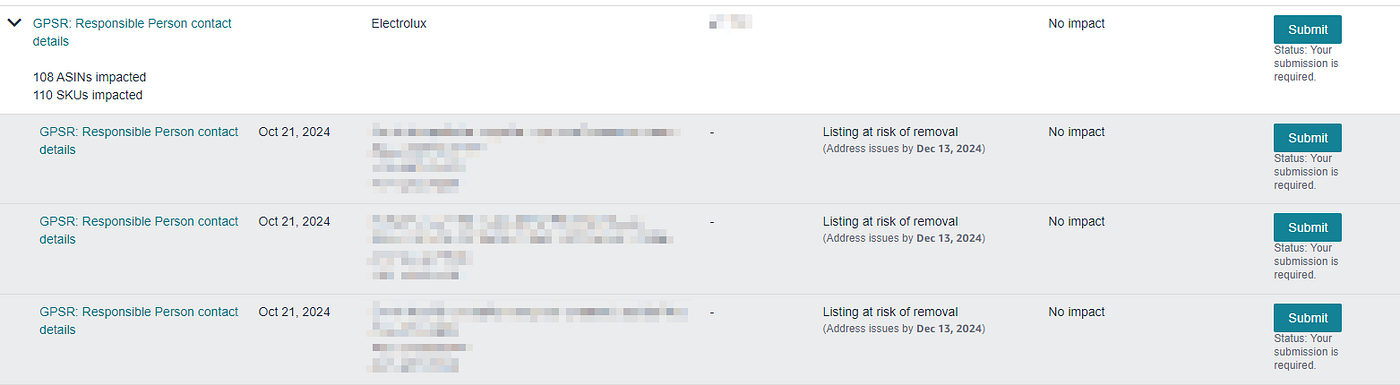
As you can see there is a “Submit” button for each row. Problem is that, even if the label is the same, the action is different. Keep this in mind, as it will be important for next steps.
What to do on Seller Central in order to solve the“GPSR: manufacturer contact details” violation
Before pushing updates on Listings API on the field gpsr_manufacturer_email_address, you must set Manufacturer Contact Details using Seller Central.
In order to do that, for each row corresponding to the “GPSR: manufacturer contact details” and not related to a particular product, click on the Submit button. Click on the highlited one, forget those related to ASINs as you won’t use them (because that operation is performed behind the scenes when you update the listing using Listings API)

By clicking on that Submit button, a panel slides in on the right.
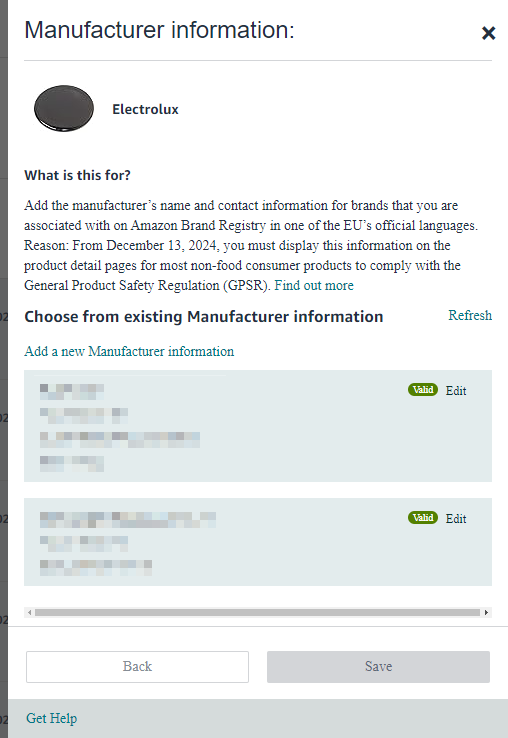
You will see:
- a list of Manufacturers Contact Details that you previously inserted, each of them with a status (in the screenshot you can see two of them, with a Valid status)
- the link “Add a new Manufacturer Information”. This is the link that you want to click in order to show the form, like this one.
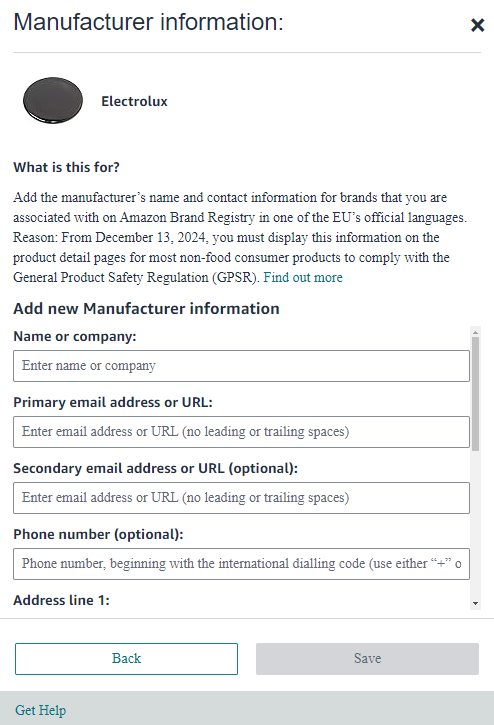
Fill in the informations. Put particular care for “Primary email address or URL” field. What you insert here, is what you will need to insert on the gpsr_manufacturer_email_address.
When you are done, click on “Save”. 100% you won’t see this Manufacturer in the list. Don’t worry. It will take some time, hours or even days. I suppose that either Amazon is loaded of submission or there is a manual validation process. In any case don’t do anything with Listings API until you see the Manufacturer in the list with a Valid status.
Important note: Manufacturers Contact Informations are not shared, as far as I know, between sellers. This means that in your list, you will only see your submissions.
What to do on Seller Central in order to solve the “GPSR: Responsible Person contact details” violation
Steps are similar as Manufacturers. Click on the “Submit” button corresponding to the “GPSR: Responsible Person contact details” and not related to a particular product.
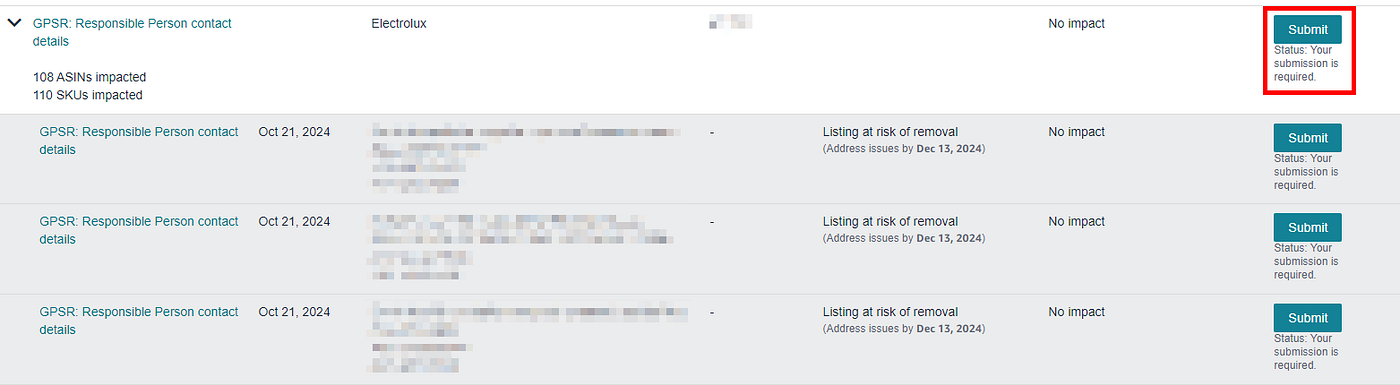
Click on the highlited one, forget those related to ASINs as you won’t use them (because that operation is performed behind the scenes when you update the listing using Listings API).
By clicking on that Submit button, a panel slides in on the right.

You will see:
- a list of Responsible Persons Contact Details that you previously inserted, each of them with a status (in the screenshot you can see two of them, with a Valid status). Unlike what happens with Manufacturer Contact Details, in this list you will see contacts inserted by other sellers. I suspect that these are RP Contact Details related to brands for which you have active offers on your Seller Central.
- the link “Add a new Responsible Person Address”. This is the link that you want to click in order to show the form if there isn’t a RP that you can already use in the list, like this one.
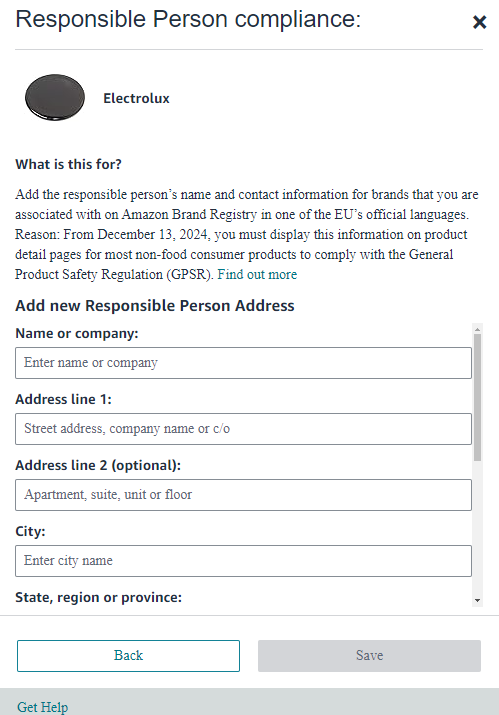
Fill in the informations. Put particular care for “Email or URL” field. What you insert here, is what you will need to insert on the dsa_responsible_party_address.
When you are done, click on “Save”. 100% you won’t see this RP in the list. Don’t worry. As per Manufacturers, it will take some time. In any case don’t do anything with Listings API until you see the RP in the list with a Valid status.
If the RP is already there because is inserted by other, click on the corresponding Edit button and copy the value in the field “Email or URL”. This is what you will need to send inside the dsa_responsible_party_address in order to let Amazon create the link.
What to do when Manufacturer Contact Details and Responsible Persons Contact Details are visible and validated on Seller Central
Take a deep breath. You are almost done. If they are there and validated, is time to set Listings API attributes. When you do that, is like if you are on Seller Central, clicking on the Submit button corresponding to each ASIN and selecting the correct Manufacturer / RP.
In order to sum up:
- gpsr_manufacturer_email_address has to be set using the Primary email address or URL value set inside the Manufacturer Contact Details form
- dsa_responsible_party_address has to be set using the Email or URL value set inside the Responsible Person Contact Details form
Is it possible to gather contact details from Amazon?
Short answer is no. Using Listings API you can retrieve attributes using getListingsItem, but values contained in these attributes is what you set. If a different seller set these attributes for the same ASIN, you won’t see these values.
What to do if you sent updates using Listings API before having Manufacturer / RP Contact Informations visible and validated on Seller Central?
I tried this approach and worked:
- send a patch update, removing the value for those attributes (gpsr_manufacturer_email_address and dsa_responsible_party_address)
- wait a bit (24–48 hours) in order to be sure
- send them again
How to check that everything is ok on Seller Central after I pushed updates using Listings API?
As soon as you updated a listing filling in those two fields, you can click on the Submit button, corresponding to the ASIN that you updated. If everything is correct, you won’t be able to select a Manfacturer / RP. Instead you will see a green checkbox that will last for 1–2 days. After that, violation will be removed.
Another way is to call the getListingsItem of Listings API asking for issues inside the “includedData” parameter. If you see that the issue is disappeared, then you are done!
⚠ IMPORTANT UPDATES 2024–11–19
Two important resources have been published by Amazon.
The first is a webinar, which clarifies few things. In particular it clarifies the meaning of the attribute gpsr_safety_attestation. In particular the speaker explains that this is related to categories which may have or not safety-impacted products. Let’s make an example: clothing normally don’t have anything risky associated to its products, except — for example — those who contain batteries (think about a t-shirt with lights on it). In that case, you will set True for normal products (e.g. those who don’t have batteries), and set False for those who are not. For those who are not, then you will have to provide safety sheets.
[embed]
The second is a recent blog post on Amazon SP-API Portal which states that XML-based feeds are not supported for GPSR-related informations. Find it here: https://developer-docs.amazon.com/sp-api/v2.0/changelog/developers-can-use-attributes-in-their-programmatic-listings-submissions-to-comply-with-gpsr
🚀🚀🚀 IMPORTANT UPDATES 2024–11–21
Do you want to speed up your manufacturer and responsible persons upload process on Seller Central? Have tons of manufacturers and responsible persons to push? If you use MarketRock or you have a CSV file containing your data, you can use our brand new shining Chrome Extension to perform this task easilly
You can download it on our GitHub here: https://github.com/marconline/gpsr-sc-chrome
IMPORTANT UPDATES 2024–11–29
Our Google Chrome Extension is finally on the Chrome Web Store. You can safely download and use it for free. Install it from the Chrome Web Store.
⚠️ Heads Up! Compliance Media URL
It has just been discovered that, in some cases, Amazon automatically rejects the compliance_media document pushed via SP-API. It has been diagnosed that the problem was releated by the webserver blocking Amazon from retrieving the document. If you see that Amazon is rejecting the file, then, please check:
- that the URL is valid (no Dropbox &
- that the URL serves the document in PDF format
- that the Content-Type header is valid
- that Amazon’s IP are not blocked by the server
- … more to come

Adv: these informations (manufacturers, responsible persons, safety documents…) are totally and fully managed by our SaaS MarketRock. We support all Amazon websites and also have a great set of APIs that will let you push listings and create new products without having to dig into the complexity of Amazon SP-APIs. Feel free to contact me if interested in a demo!
Hey! Did I help you with this article? If yes, remember that I’m italian and italians do drink a lot of coffee (and eat a lot of pizza). Hence, if you wish, buy me a coffee ☕!
메타데이터
- post_id
- 165ddd6cafae
- slug
- handling-gpsr-using-amazon-sp-api-165ddd6cafae
- url
- https://medium.com/@marco-tibaldeschi/handling-gpsr-using-amazon-sp-api-165ddd6cafae
- canonical_url
- https://medium.com/@marco-tibaldeschi/handling-gpsr-using-amazon-sp-api-165ddd6cafae
- author_url
- https://medium.com/@marco-tibaldeschi
- status
- ok
- fetched_at
- 2026-06-09 15:37:30