How to Develop Complex AgentScope Workflows with Multi-Agent Debate and Parallel Execution
If you have been following the AI space for a while, you have probably noticed that single-prompt chatbots are slowly giving way to…
How to Develop Complex AgentScope Workflows with Multi-Agent Debate and Parallel Execution
If you have been following the AI space for a while, you have probably noticed that single-prompt chatbots are slowly giving way to something way more interesting: multi-agent systems. These are setups where multiple AI models work together, pass information between themselves, argue, reason, and produce outputs that no single agent could on its own.
AgentScope is a Python framework built exactly for this. It gives developers a clean way to wire up agents, connect them to tools, coordinate how they communicate, and get structured results back. What makes it stand out is how much it handles under the hood without getting in your way when you want to customise things.
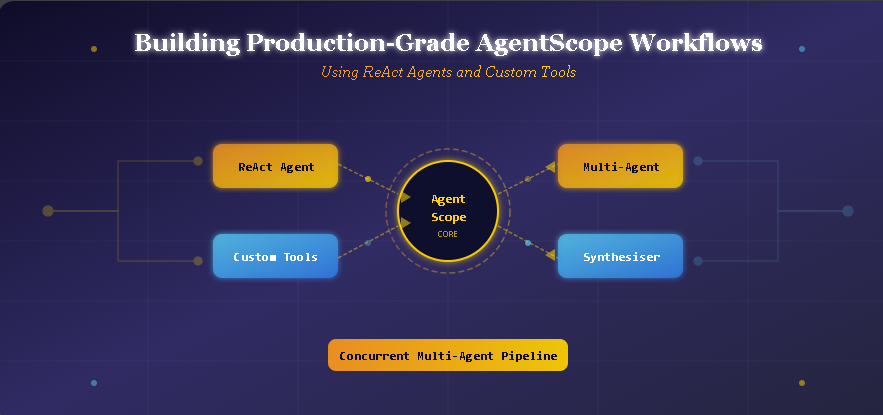
This guide walks through how to build a full production-grade AgentScope workflow step by step. You will go from setting up the environment to building a multi-agent debate, running agents in parallel, and enforcing structured outputs. Each section builds on the last, so by the end, you will have a solid mental map of how all the pieces fit together.
What Is AgentScope and Why Should You Care
Before diving into code, it helps to understand what problem AgentScope actually solves.
When you call a language model directly, you get a single response. That works fine for simple tasks. But when you need a system that can use external tools, remember what was said earlier in a conversation, coordinate multiple agents with different roles, and return results in a specific format, a raw API call is not enough.
AgentScope handles all of that. It wraps language model calls in a structured agent interface, provides memory systems, formats messages for different multi-agent scenarios, and gives you pipelines that can run agents in sequence or all at once concurrently.
The core building block is the ReActAgent. ReAct stands for Reasoning and Acting. The idea is that an agent does not just respond to a message. It thinks about what needs to happen, decides if it needs to use a tool, uses the tool, looks at the result, and then continues reasoning until it has a proper answer. This loop makes agents much more reliable on complex tasks.
Setting Up the Environment
Getting started with AgentScope requires installing a handful of Python packages. You need agentscope itself, openai for the language model, pydantic for structured data, and nest_asyncio to make async code work smoothly in environments like Google Colab.
import subprocess, syssubprocess.check_call([
sys.executable, "-m", "pip", "install", "-q",
"agentscope", "openai", "pydantic", "nest_asyncio",
])import nest_asyncio
nest_asyncio.apply()import asyncio
import json
import getpass
import math
import datetime
from typing import Any
from pydantic import BaseModel, FieldThe nest_asyncio.apply() call patches the event loop so you can run async functions inside environments that already have a running loop. Without it, you will get errors when trying to use asyncio.run() inside Colab.
After that, you capture your API key securely and define a helper function to create model instances:
OPENAI_API_KEY = getpass.getpass("Enter your OpenAI API key: ")
MODEL_NAME = "gpt-4o-mini"
from agentscope.model import OpenAIChatModeldef build_model(stream: bool = False) -> OpenAIChatModel:
return OpenAIChatModel(
model_name=MODEL_NAME,
api_key=OPENAI_API_KEY,
stream=stream,
generate_kwargs={
"temperature": 0.7,
"max_tokens": 1024
},
)Wrapping model creation in a function is a small thing that pays off later. When you need to create a dozen agents, each getting their own model instance, having this one-liner saves a lot of repetition.
Making Your First Model Call
The first real test is just getting a response from the model and confirming everything is wired up correctly. This might feel like a basic step, but it teaches you how AgentScope structures responses.
from agentscope.message import Msgasync def test_basic_call():
model = build_model()
response = await model(
messages=[
{"role": "user", "content": "What is AgentScope in one sentence?"}
],
)
text = response.content[0]["text"]
print(f"Model says: {text}")
print(f"Tokens used: {response.usage}")asyncio.run(test_basic_call())The response comes back as a content list. Each item in the list can be different types: text, tool use, tool result, image, and so on. For a basic text response, you index content[0]["text"]. Understanding this structure now makes it easier to work with more complex responses later.
Building Custom Tool Functions
This is where things get genuinely interesting. AgentScope lets you define regular Python functions and register them as tools that agents can call. The framework automatically generates JSON schemas from your function signatures, which is what the language model uses to understand what each tool does and what arguments it expects.
Here is an example of two tool functions: a safe math evaluator and a datetime checker:
from agentscope.tool import Toolkit, ToolResponse
from agentscope.message import TextBlock, ToolUseBlock
async def safe_math_eval(expression: str) -> ToolResponse:
"""Evaluate a math expression safely using allowed functions only."""
safe_globals = {
"abs": abs, "round": round, "min": min, "max": max,
"sum": sum, "pow": pow, "sqrt": math.sqrt, "pi": math.pi,
"log": math.log, "sin": math.sin, "cos": math.cos,
"factorial": math.factorial,
}
try:
result = eval(expression, {"__builtins__": {}}, safe_globals)
return ToolResponse(content=[TextBlock(type="text", text=str(result))])
except Exception as error:
return ToolResponse(content=[TextBlock(type="text", text=f"Error: {error}")])
async def fetch_current_time(utc_offset: int = 0) -> ToolResponse:
    """Return the current time for a given UTC offset."""
    tz = datetime.timezone(datetime.timedelta(hours=utc_offset))
    now = datetime.datetime.now(tz)
    formatted = now.strftime("%Y-%m-%d %H:%M:%S %Z")
    return ToolResponse(content=[TextBlock(type="text", text=formatted)])
Notice the safe_math_eval function. It uses eval() but restricts the available names to a whitelist. This is important for production systems. You never want an agent to evaluate arbitrary code. By controlling what functions are accessible, you keep the tool useful while blocking anything dangerous.
Now you register these tools into a Toolkit and inspect the auto-generated schemas:
toolkit = Toolkit()
toolkit.register_tool_function(safe_math_eval)
toolkit.register_tool_function(fetch_current_time)
schemas = toolkit.get_json_schemas()
print(json.dumps(schemas, indent=2))When you print those schemas, you see how AgentScope has turned your Python function signatures into structured JSON that a language model can read. The function name becomes the tool name. The docstring becomes the description. The parameter types become the schema properties. It is clean and automatic.
You can also test the tool directly without going through an agent:
async def verify_tool():
    result_stream = await toolkit.call_tool_function(
        ToolUseBlock(
            type="tool_use",
            id="verify-001",
            name="safe_math_eval",
            input={"expression": "factorial(10)"},
        )
    )
    async for resp in result_stream:
print(f"factorial(10) = {resp.content[0]['text']}")asyncio.run(verify_tool())Running this directly is a good debugging habit. If something breaks later inside a ReAct agent, you will know whether the problem is in the tool itself or in how the agent is calling it.
Building a ReAct Agent with Tool Access
Now that you have tools registered, you can build an agent that knows when and how to use them. The ReActAgent class handles the reasoning loop internally. You give it a system prompt, a model, memory, a formatter, and a toolkit. It takes care of the rest.
from agentscope.agent import ReActAgent
from agentscope.formatter import OpenAIChatFormatter
from agentscope.memory import InMemoryMemory
async def run_react_agent():
agent = ReActAgent(
name="AssistantBot",
sys_prompt=(
"You are AssistantBot, a helpful assistant that can solve math "
"problems and check the time. Use safe_math_eval for any "
"calculations. Use fetch_current_time when asked about the time."
),
model=build_model(),
memory=InMemoryMemory(),
formatter=OpenAIChatFormatter(),
toolkit=toolkit,
max_iters=5,
) questions = [
"What is the square root of 144 multiplied by pi?",
"What time is it in UTC+3?",
] for question in questions:
print(f"\nUser: {question}")
message = Msg("user", question, "user")
reply = await agent(message)
print(f"AssistantBot: {reply.get_text_content()}")
agent.memory.clear()asyncio.run(run_react_agent())The max_iters=5 parameter limits how many reasoning steps the agent can take. This prevents runaway loops in production. The agent.memory.clear() call between questions ensures each query starts fresh without any leftover context from the previous one.
What happens internally when you send a message to a ReActAgent is worth understanding. The agent formats the incoming message, calls the model, checks whether the model wants to use a tool, executes the tool if so, feeds the result back to the model, and repeats until the model produces a final text response. This loop is why it is called ReAct: Reason, Act, Reason, Act, and so on.
Setting Up a Multi-Agent Debate with MsgHub
This is one of the most compelling features of AgentScope. You can set up multiple agents with opposing viewpoints and have them debate a topic in a structured way. The MsgHub class manages shared message broadcasting, so every agent in the group sees what the others say.
The use case here is a debate about whether AGI research should be publicly available or kept within private labs. It is a meaty topic with valid arguments on both sides, which makes it perfect for testing how agents handle adversarial dialogue.
from agentscope.pipeline import MsgHubDEBATE_TOPIC = (
"Should artificial general intelligence research be open-sourced, "
"or should it remain behind closed doors at major labs?"
)async def run_debate():
advocate = ReActAgent(
name="Advocate",
sys_prompt=(
f"You argue strongly IN FAVOR of open-sourcing AGI research. "
f"Topic: {DEBATE_TOPIC}\n"
"Keep each response to 2-3 focused paragraphs. "
"Directly address your opponent's points."
),
model=build_model(),
memory=InMemoryMemory(),
formatter=OpenAIMultiAgentFormatter(),
) skeptic = ReActAgent(
name="Skeptic",
sys_prompt=(
f"You argue strongly AGAINST open-sourcing AGI research. "
f"Topic: {DEBATE_TOPIC}\n"
"Keep each response to 2-3 focused paragraphs. "
"Directly address your opponent's points."
),
model=build_model(),
memory=InMemoryMemory(),
formatter=OpenAIMultiAgentFormatter(),
) for round_num in range(1, 3):
print(f"\n--- Round {round_num} ---")
async with MsgHub(
participants=[advocate, skeptic],
announcement=Msg(
"Moderator",
f"Round {round_num}. Topic: {DEBATE_TOPIC}",
"assistant"
),
):
pro_reply = await advocate(
Msg("Moderator", "Advocate, present your argument.", "user")
)
print(f"\nAdvocate:\n{pro_reply.get_text_content()}") con_reply = await skeptic(
Msg("Moderator", "Skeptic, respond with your counter-argument.", "user")
)
print(f"\nSkeptic:\n{con_reply.get_text_content()}") print("\n--- Debate Complete ---")asyncio.run(run_debate())The OpenAIMultiAgentFormatter is different from OpenAIChatFormatter. It formats messages in a way that makes the speaker's name visible to all participants. This is important because each agent needs to know who said what in order to reference and respond to specific points. Without this formatter, agents might respond as if they were in a solo conversation, which defeats the purpose of the debate setup.
The MsgHub context manager is elegant. When you enter the async with block, it sets up the shared broadcast channel. Any message sent within that block is visible to all participants. When you exit, the channel closes cleanly. This pattern makes multi-agent coordination feel natural rather than like a complex orchestration problem.
One thing to notice is that both agents have InMemoryMemory(). This means each agent accumulates context across rounds. By round two, the Advocate remembers what the Skeptic said in round one and can reference it directly. This continuity is what makes the debate feel like an actual exchange rather than two monologues.
Enforcing Structured Outputs with Pydantic
Getting a language model to return data in a consistent format is one of the harder problems in production AI systems. You can ask a model to return JSON and it usually will, but “usually” is not good enough when you are building something that processes the output programmatically.
AgentScope solves this by accepting a Pydantic model as a parameter. When you pass structured_model to an agent call, the framework coerces the response into your schema. If the model returns something that does not fit, it gets rejected and retried.
Here is an example using a movie review schema:
class FilmReview(BaseModel):
    release_year: int = Field(description="The year the film was released.")
    primary_genre: str = Field(description="The main genre of the film.")
    score: float = Field(description="Rating from 0.0 to 10.0.")
    strengths: list[str] = Field(description="Two to three things the film does well.")
    weaknesses: list[str] = Field(description="One to two areas where the film falls short.")
    summary_verdict: str = Field(description="A single sentence final assessment.")
async def structured_review():
critic = ReActAgent(
name="FilmCritic",
sys_prompt="You are a professional film critic with sharp analytical skills.",
model=build_model(),
memory=InMemoryMemory(),
formatter=OpenAIChatFormatter(),
) query = Msg("user", "Review the film Parasite (2019) by Bong Joon-ho.", "user")
result = await critic(query, structured_model=FilmReview) print(f"Year: {result.metadata.get('release_year')}")
print(f"Genre: {result.metadata.get('primary_genre')}")
print(f"Score: {result.metadata.get('score')}/10")
print(f"Verdict: {result.metadata.get('summary_verdict')}")asyncio.run(structured_review())Using Pydantic this way gives you several things at once. The Field descriptions tell the model what each property should contain. The type annotations enforce the data types. The model cannot accidentally return the score as a string when you need a float. You also get a clean result.metadata dictionary that maps directly to your schema fields.
For any workflow where you need to chain outputs from one agent into inputs for another, this is invaluable. If agent A produces a structured FilmReview object, agent B can read from review.score without any parsing logic.
Running Multiple Agents Concurrently
Here is where things get genuinely powerful. Most real-world analysis problems benefit from multiple perspectives considered at the same time. A financial decision involves economics, ethics, and technical feasibility. A product launch involves market timing, user research, and engineering constraints. Rather than asking one agent to wear all those hats, you can spin up specialist agents and run them all at once.
asyncio.gather is the key here. It takes multiple coroutines and runs them concurrently, returning all results when every coroutine completes.
from agentscope.formatter import OpenAIMultiAgentFormatterasync def parallel_analysis():
analyst_roles = {
"Economist": (
"You are an economist. Analyze the given topic from an economic "
"lens in 2-3 sentences."
),
"Ethicist": (
"You are an ethicist. Analyze the given topic from an ethical "
"standpoint in 2-3 sentences."
),
"Engineer": (
"You are a software engineer. Analyze the given topic from a "
"technical implementation perspective in 2-3 sentences."
),
} specialists = [
ReActAgent(
name=name,
sys_prompt=prompt,
model=build_model(),
memory=InMemoryMemory(),
formatter=OpenAIChatFormatter(),
)
for name, prompt in analyst_roles.items()
] topic = Msg(
"user",
"Analyze the impact of large language models on the global workforce.",
"user",
) print("Running 3 specialists concurrently...")
analyses = await asyncio.gather(*(agent(topic) for agent in specialists)) for agent, analysis in zip(specialists, analyses):
print(f"\n{agent.name}:\n{analysis.get_text_content()}") combined = "\n\n".join(
f"[{agent.name}]: {result.get_text_content()}"
for agent, result in zip(specialists, analyses)
) synthesiser = ReActAgent(
name="Synthesiser",
sys_prompt=(
"You receive analyses from an Economist, an Ethicist, and an Engineer. "
"Combine their perspectives into a single coherent summary of 3-4 sentences."
),
model=build_model(),
memory=InMemoryMemory(),
formatter=OpenAIMultiAgentFormatter(),
) final_msg = Msg(
"user",
f"Here are the specialist analyses:\n\n{combined}\n\nPlease synthesise.",
"user",
)
synthesis = await synthesiser(final_msg)
print(f"\nSynthesised Summary:\n{synthesis.get_text_content()}")asyncio.run(parallel_analysis())The concurrency here is real. All three specialist agents send their requests to the language model API at the same time. You are not waiting for the economist to finish before the ethicist starts. Depending on your workload, this can reduce total execution time by two to three times compared to running agents sequentially.
The synthesiser agent at the end is a separate concern. Its job is not to add new analysis but to weave the three specialist outputs into a single coherent narrative. Giving it the OpenAIMultiAgentFormatter ensures it can attribute each piece of analysis to the right specialist when constructing its summary.
Memory Management Across Agents
One thing worth paying attention to in any multi-agent system is how memory is scoped. In the examples above, every agent gets its own InMemoryMemory() instance. This is intentional.
When agents share memory, they can inadvertently contaminate each other’s context. Imagine a debate where both agents read from the same memory. The Advocate might start picking up on the Skeptic’s internal reasoning and vice versa. Separating memory keeps each agent’s reasoning clean and independent.
That said, there are scenarios where shared memory is useful. If you are building a collaborative writing system where agents build on each other’s drafts, shared memory or passing outputs explicitly between agents is the right approach. The point is to be deliberate about it rather than defaulting to a shared state.
Clearing memory between tasks is equally important. If you run the same agent on ten different user queries in a loop, you want agent.memory.clear() between each one. Otherwise, the agent carries context from query one into query ten, and its answers become increasingly influenced by irrelevant prior conversations.
Putting It All Together: The Full Pipeline Architecture
After working through each component, the full picture looks like this:
- Install dependencies and configure the model factory.
- Define tool functions with clear docstrings and type annotations.
- Register tools into a Toolkit and verify them independently.
- Build a ReActAgent for tasks that require tool use and multi-step reasoning.
- Use MsgHub for structured multi-agent debates with shared message broadcasting.
- Add Pydantic schemas when outputs need to feed into downstream processing.
- Use
asyncio.gatherfor concurrent specialist agents followed by a synthesiser.
Each of these layers is optional and composable. A simple use case might only need steps one through four. A production system with multiple agents collaborating on a complex task will use all seven.
The real strength of AgentScope is that you can mix these patterns. You could have a debate using MsgHub where each debater is also a ReActAgent with access to a web search tool. The Advocate could pull real statistics mid-debate and cite them. The Skeptic could counter with its own data. The whole thing runs asynchronously.
What Makes This Production-Ready
The word “production-ready” gets thrown around loosely in developer content, so it is worth being specific here.
A workflow is production-ready when it handles failures gracefully, produces consistent and parseable outputs, does not leak context between tasks, and scales to handle concurrent workloads without degrading.
AgentScope’s architecture supports all of these. The Pydantic structured output layer ensures parseable responses. The scoped InMemoryMemory instances prevent context leakage. The asyncio.gather pattern handles concurrency natively. The max_iters parameter on ReActAgent prevents runaway loops that would otherwise cause long delays or excessive API usage.
What you add on top of this baseline is logging, error handling around API calls, retry logic for failed tool executions, and monitoring of token usage across agents. AgentScope surfaces token usage through response.usage, which gives you the data you need to track costs per workflow run.
A Few Things to Watch Out For
When building with AgentScope, a few patterns cause problems in practice.
Formatter mismatch: Using OpenAIChatFormatter for a multi-agent scenario instead of OpenAIMultiAgentFormatter means agents will not see each other's speaker names in the message history. The debate will technically run, but each agent will treat all previous messages as coming from an anonymous user rather than from named participants.
Uncontrolled tool execution: If you define a tool that calls an external API or writes to a database, test it thoroughly in isolation before connecting it to a ReActAgent. Agents can call tools multiple times per response. If your tool has side effects, unexpected multiple calls can cause real problems.
Context window growth in long debates: Each round of a debate adds messages to every participant’s memory. Over many rounds, the accumulated context can push you toward the model’s token limit. Consider adding a memory summarisation step after every few rounds to compress older exchanges into a compact summary.
Wrapping Up
AgentScope gives you a genuinely solid foundation for building multi-agent systems that go beyond toy examples. The patterns covered here, from ReAct agents with tool access to MsgHub debates to concurrent pipelines with structured outputs, are the same building blocks you would use in real production systems.
The thing that makes these systems satisfying to build is how the pieces fit together. A debate between two agents is interesting on its own. Add structured outputs and you can pipe the debate results into a report generator. Add a synthesiser agent and the whole thing becomes a research pipeline. The architecture scales naturally.
Start with the basics, get comfortable with the formatter and memory choices, and build from there. Once you understand how messages flow between agents and how tools get called, the more advanced patterns feel like natural extensions rather than new concepts to learn.
Check out the official AgentScope documentation and GitHub repository for more patterns, examples, and the latest framework updates.
메타데이터
- post_id
- 166dd87d6d4e
- slug
- how-to-develop-complex-agentscope-workflows-with-multi-agent-debate-and-parallel-execution-166dd87d6d4e
- url
- https://medium.com/@mealermed/how-to-develop-complex-agentscope-workflows-with-multi-agent-debate-and-parallel-execution-166dd87d6d4e
- canonical_url
- https://medium.com/@mealermed/how-to-develop-complex-agentscope-workflows-with-multi-agent-debate-and-parallel-execution-166dd87d6d4e
- author_url
- https://medium.com/@mealermed
- status
- ok
- fetched_at
- 2026-08-19 18:20:52