What Is AWS? The Ultimate Beginner’s Guide to Amazon Web Services (2026 Edition)
Learn AWS from Scratch — EC2, S3, IAM, VPC, RDS, Lambda, Cloud Computing Concepts & Real-World Use Cases
What Is AWS? The Ultimate Beginner’s Guide to Amazon Web Services (2026 Edition)
Learn AWS from Scratch — EC2, S3, IAM, VPC, RDS, Lambda, Cloud Computing Concepts & Real-World Use Cases
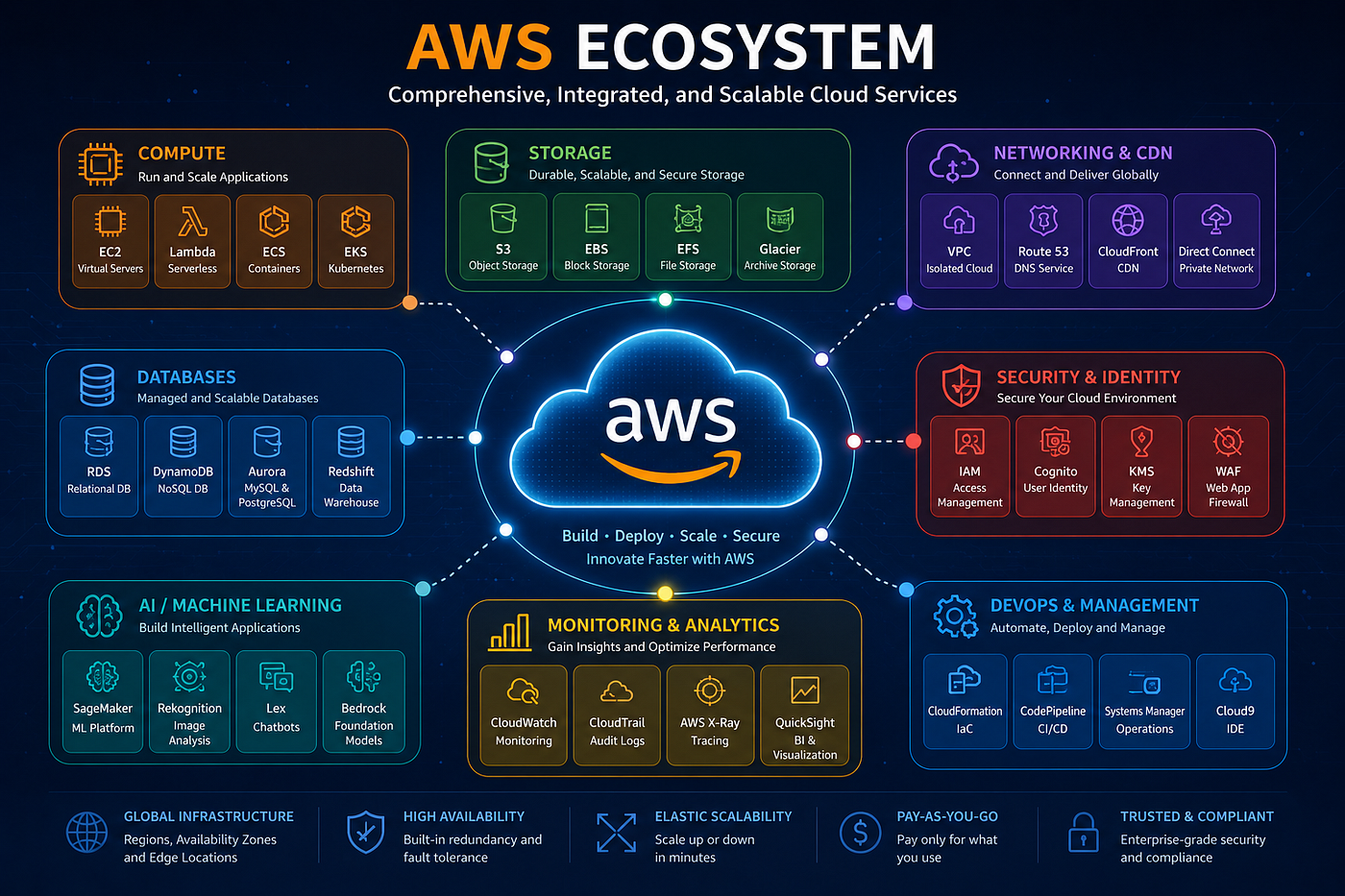
AWS ECOSYSTEM
Introduction
Cloud computing has completely transformed how modern applications are built, deployed, and scaled.
Years ago, companies had to:
- Purchase expensive physical servers
- Maintain data centers
- Handle hardware failures
- Pay for infrastructure even when traffic was low
- Hire teams to manage networking and storage
Building scalable applications was expensive, slow, and difficult.
Today, cloud platforms solve these problems.
And among all cloud providers, one platform dominates the industry:
Amazon Web Services (AWS)
AWS stands for Amazon Web Services. It is the world’s most comprehensive and broadly adopted cloud platform. It provides on-demand computing power, database storage, and other IT services over the internet, allowing individuals and businesses to avoid maintaining physical data centers
What is Cloud Computing?
Cloud computing means renting computing resources over the internet instead of owning physical hardware.
Instead of buying:
- Servers
- Storage devices
- Networking hardware
- Databases
You rent them on demand.
Think of cloud computing like electricity.
You do not build your own power plant. You simply use electricity when needed and pay only for what you consume.
AWS works the same way.
You can:
- Launch servers in minutes
- Store files instantly
- Create databases
- Deploy applications globally
- Scale infrastructure automatically
Without buying physical hardware.
What is AWS?
AWS (Amazon Web Services) is a cloud computing platform provided by Amazon.
It offers hundreds of services for:
- Computing
- Storage
- Databases
- Networking
- Security
- Artificial Intelligence
- Machine Learning
- Monitoring
- DevOps
- Analytics
AWS officially launched in 2006.
Today, it is the largest cloud platform in the world.
Why is AWS So Popular?
AWS became popular because it solved major infrastructure problems.
1. Scalability
Applications can automatically scale based on traffic.
Imagine your website suddenly receives 1 million users.
AWS can:
- Add more servers automatically
- Remove extra servers when traffic decreases
This improves performance while reducing costs.
2. Global Infrastructure
AWS has data centers across the world.
This allows applications to serve users faster by placing infrastructure closer to them.
For example:
- Indian users can access servers near India
- European users can access servers near Europe
This reduces latency significantly.
3. Pay-As-You-Go Pricing
You only pay for what you use.
There is no need to spend lakhs on infrastructure before even launching a project.
This is one of the biggest reasons startups love AWS.
4. High Availability
AWS infrastructure is highly reliable.
Even if one server or data center fails, applications can continue running using backup infrastructure.
5. Security
AWS provides enterprise-level security features like:
- Encryption
- Access control
- Identity management
- Firewalls
- Monitoring tools
This makes AWS suitable for companies of every size.

AWS Advantages
AWS Global Infrastructure
AWS infrastructure is divided into:
- Regions
- Availability Zones (AZs)
- Edge Locations
Understanding these concepts is extremely important.
What is a Region?
A Region is a geographical area containing AWS data centers.
Examples include:
- Mumbai Region
- Singapore Region
- US East (Virginia)
- London Region
Each region is isolated from others.
What is an Availability Zone (AZ)?
Each AWS Region contains multiple Availability Zones.
An Availability Zone is:
- One or more physically separate data centers
- Connected using high-speed networking
AZs improve fault tolerance.
If one data center fails, another AZ can continue serving traffic.
What are Edge Locations?
Edge Locations are used by AWS CloudFront (CDN service).
They cache content closer to users.
For example:
If a website image is cached in Delhi, Indian users can access it much faster.
Core AWS Services
AWS offers over 200 services. Here are the fundamental ones you must know to get started.
1. Compute Services
- Amazon EC2 (Elastic Compute Cloud): Resizable virtual servers. You choose the OS (Linux/Windows) and the hardware power (CPU/RAM). It is the workhorse of AWS.
- AWS Lambda: Serverless compute. You upload your code, and Lambda runs it only when triggered (by an event like a file upload). You don’t manage any servers.
- AWS Elastic Beanstalk: Platform as a Service (PaaS) for deploying web apps. You upload code, and AWS handles the deployment (capacity provisioning, load balancing, auto-scaling).
2. Storage Services
- Amazon S3 (Simple Storage Service): Object storage for files (images, videos, backups). It allows you to store and retrieve any amount of data from anywhere on the web.
- Amazon EBS (Elastic Block Store): Block storage (virtual hard drives) that you attach to EC2 instances. It is persistent storage for your virtual servers.
- Amazon Glacier: Extremely low-cost storage for data archiving and long-term backup.
3. Database Services
- Amazon RDS (Relational Database Service): Managed SQL databases. It supports engines like MySQL, PostgreSQL, Oracle, SQL Server, and Amazon Aurora (AWS’s high-performance proprietary engine).
- Amazon DynamoDB: A managed NoSQL database service that provides fast and predictable performance with seamless scalability.
4. Networking Services
- Amazon VPC (Virtual Private Cloud): Lets you provision a logically isolated section of the AWS Cloud where you can launch resources in a virtual network you define.
- Amazon CloudFront: A Content Delivery Network (CDN) that speeds up distribution of your static and dynamic web content to users.
- Amazon Route 53: A highly available and scalable cloud Domain Name System (DNS) web service.
AWS Pricing Basics
AWS follows a pay-as-you-go pricing model.
You pay based on usage.
Common pricing factors include:
- Compute hours
- Storage usage
- Network traffic
- Database usage

AWS Pricing Model: Pay Only for What You Use
Real-World AWS Architecture Example
Let us understand how companies use AWS in production.
Imagine an e-commerce application.
Step 1 — User Accesses Website
Users access:
shop.com
Route 53 routes traffic.
Step 2 — CloudFront Caches Static Files
CloudFront serves:
- Images
- CSS
- JavaScript
This improves speed globally.
Step 3 — Load Balancer Distributes Traffic
Traffic is distributed across multiple EC2 servers.
This prevents overload.
Step 4 — EC2 Runs Backend Application
EC2 instances run applications like:
- Node.js
- Java
- Python
- Django
- Spring Boot
Applications process requests.
Step 5 — RDS Stores Data
RDS stores:
- User accounts
- Orders
- Payments
- Products
Step 6 — S3 Stores Images
Product images are stored in S3.
Step 7 — CloudWatch Monitors Infrastructure
CloudWatch tracks:
- CPU usage
- Errors
- Logs
- Performance
This is how modern cloud architecture works.
AWS and DevOps
AWS is heavily used in DevOps workflows.
Popular AWS DevOps practices include:
- CI/CD pipelines
- Infrastructure as Code (IaC)
- Container orchestration
- Monitoring and logging
- Automated deployments
AWS integrates well with tools like:
- Jenkins
- Docker
- Kubernetes
- Terraform
- GitHub Actions
Beginner AWS Projects
Here are some excellent beginner AWS projects.
1. Static Website Hosting Using S3
Host your portfolio website using S3.
Great for beginners.
2. Deploy a Node.js App on EC2
Learn:
- Linux
- SSH
- Deployment
- Nginx
- Server management
3. Create a Serverless API Using Lambda
Learn serverless architecture and event-driven systems.
4. Build a CI/CD Pipeline
Automate deployments using:
- GitHub
- Jenkins
- AWS CodePipeline
5. Multi-Tier Architecture Project
Use:
- VPC
- EC2
- RDS
- Load Balancer
This project looks excellent on resumes.
Final Thoughts
AWS is much more than just a cloud platform.
It is the foundation powering modern internet infrastructure.
From startups to enterprise companies, AWS helps organizations:
- Scale globally
- Reduce infrastructure costs
- Improve reliability
- Deploy applications faster
- Automate operations
For beginners, AWS may initially feel overwhelming.
But once you understand the core services:
- EC2
- S3
- IAM
- VPC
- RDS
- Lambda
Everything starts connecting together.
The best way to learn AWS is simple:
- Build projects
- Deploy applications
- Break things
- Fix problems
- Practice consistently
Cloud computing is one of the most valuable skills in modern software engineering and AWS is one of the best places to start.
💡 Like & Share if you found this useful!
🔔 Follow to stay updated.
🌟 Enjoyed this article? Give it claps!
메타데이터
- post_id
- 166f01d63e1b
- slug
- what-is-aws-the-ultimate-beginners-guide-to-amazon-web-services-2026-edition-166f01d63e1b
- url
- https://medium.com/@harleenkour9164/what-is-aws-the-ultimate-beginners-guide-to-amazon-web-services-2026-edition-166f01d63e1b
- canonical_url
- https://medium.com/@harleenkour9164/what-is-aws-the-ultimate-beginners-guide-to-amazon-web-services-2026-edition-166f01d63e1b
- author_url
- https://medium.com/@harleenkour9164
- status
- ok
- fetched_at
- 2026-06-23 03:48:11