How to sync genomics data to the cloud real time with AWS DataSync
Leveraging cloud computing for genomics research is now commonplace and a frequent requirement is the ability to transfer a stream of…
How to sync genomics data to the cloud real time with AWS DataSync
Leveraging cloud computing for genomics research is now commonplace and a frequent requirement is the ability to transfer a stream of sequencing data to the cloud in real time. Currently, no available cloud data migration solution provides real time synchronization of data. All though AWS’s DataSync is the best available option for online data migration to the cloud and is 10 times faster than other open-sourced data copy tools such as Unison and Rsync, its scheduler has a minimum interval of 1 hour. This means that data synchronization can be delayed by up to an hour. To solve this, I designed a solution which can sync on-premises data to cloud in as little as 5 mins.
Data Migration with AWS DataSync and Features
DataSync works through a VM agent that is connected to an NFS mount on a local server. The agent establishes a secure TLS connection with the DataSync service, then gains access to Amazon Elastic File System (EFS) or S3 buckets.
A proprietary data transfer protocol is used by AWS DataSync to accelerate the data movement over the DirectConnect/Internet with incremental transfers of changed files and inline compression with sparse file detection. DataSync also performs encryption and data transfer validation.
The established connection between the on-premises agent and AWS are horizontally scalable and multithreaded. Additional agents can be added to increase the throughput and maximize utilization of up to 10 Gbps network links. One can also cap the bandwidth to avoid degraded network performance for other applications.
When copying data to S3, every file is converted into an object, and file metadata is stored as S3 object metadata. DataSync uses TLS encryption during transmission and writes encrypted data to EFS or S3.
Users can monitor, log and audit usage of AWS DataSync with CloudWatch and CloudTrail.
Pros:
- DataSync automatically scales and handles moving files and objects, scheduling data transfers, monitoring the progress of transfers, data encryption, and verification of transferred data.
- With DataSync you pay only for the amount of data copied, with no minimum commitments or upfront fees.
- DataSync includes encryption and integrity validation to help make sure your data arrives securely, intact, and ready to use.
- You can schedule your tasks using the AWS DataSync Console or AWS Command Line Interface (CLI), without needing to write and run scripts to manage repeated transfers. Task scheduling automatically runs tasks on the schedule you configure.
- If a DataSync task is interrupted (for instance, if the network connection goes down or the DataSync agent is restarted), the next run of the task will transfer missing files, and the data will be complete and consistent at the end of this run.
- You can specify **exclude filters, include filters, or both**, to determine which files, folders, or objects get transferred each time your task runs.
Cons:
- Fewer how-to articles and unavailability of open source automation solutions.
- Not a cost/time effective option for petabytes of data transfer.
- If you are using DataSync Scheduler to copy the data on regular intervals, there is no provision to stop that schedule, other than canceling that task.
- For Scheduler Frequency, the minimum interval is of 1 hour. If you have a requirement to sync your data in less than 1 hour, you need to develop your own custom solution
Data copy in real time using DataSync
I recently had a requirement to copy data via DataSync in near real time, where the source generated data in chunks and the copy needed to start as soon as the first chunk arrived. DataSync supports data copy at a minimum interval of 1 hour which would not work in this case. So, to support this requirement, I ended up creating a custom solution.
To design this solution, I started by breaking the data copy solution into multiple individual tasks:
- Copy will start when an API is invoked, and the copy metadata will get registered to a database.
- A scheduler that is run at a given interval will scan the database and pick up the new copy request.
- Based on the database record, the scheduler will create and initiate the DataSync data copy to S3/EFS.
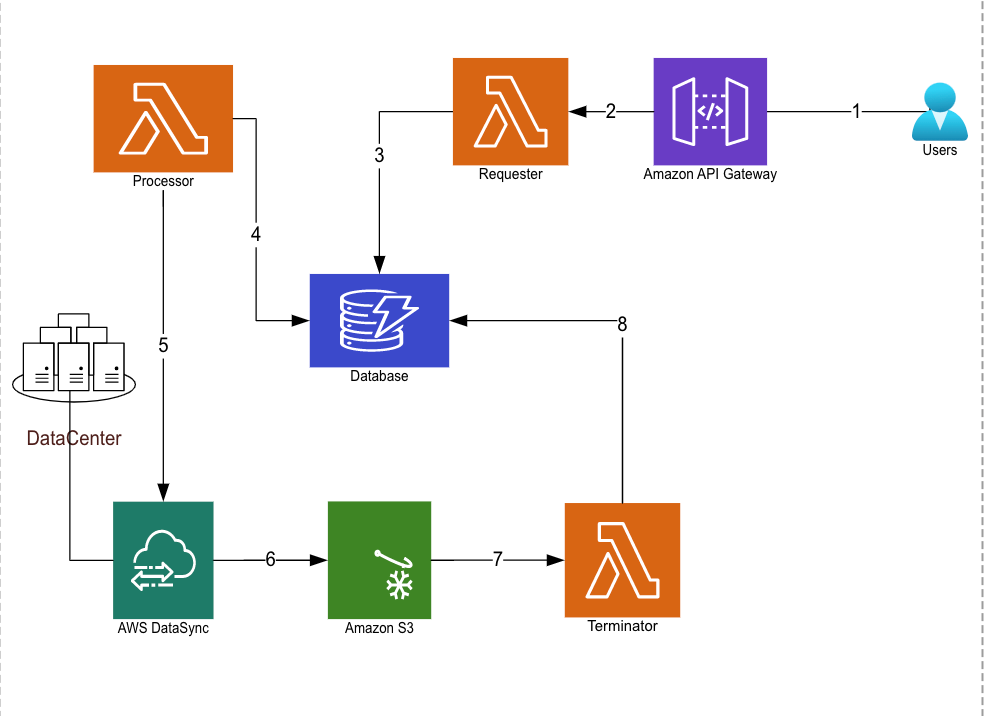
This is how the solution looks like:
-
User will call the RestAPI with details like on-premise source location and S3/EFS destination location.
-
API will validate the request and invoke a lambda function to read the user input.
-
Now the requester function will record the user input in database.
-
The processor function which is running at the configured time interval will scan the database and determine for every active record whether it’s a new request or an in-progress copy.
-
If it’s a new request, processor function will create and start a new DataSync task to copy from on-premise to cloud. If it’s an in-progress copy then the processor will re-run the existing DataSync task to copy the delta of on-premise data to cloud.
-
Once the data copy is completed (this can be any custom logic to determine the copy completion, e.g. the source and destination data sizes are same, or the final chunk is copied to the destination), a new event will be triggered.
-
This event will invoke the terminator function to update the records in database to make it inactive.
This custom solution gave us flexibility to schedule the data copy in near real time where syncing can be as close as 5 mins interval, also all copy meta data is stored in database and can be retained as per your organization policies.
메타데이터
- post_id
- 16775e4cefe0
- slug
- how-to-move-and-store-real-time-data-with-aws-datasync-16775e4cefe0
- url
- https://medium.com/@ritzsri/how-to-move-and-store-real-time-data-with-aws-datasync-16775e4cefe0
- canonical_url
- https://medium.com/@ritzsri/how-to-move-and-store-real-time-data-with-aws-datasync-16775e4cefe0
- author_url
- https://medium.com/@ritzsri
- status
- ok
- fetched_at
- 2026-06-15 20:49:13



