How Salesforce Lead-to-Account Matching Improves Attribution
Quick Answer
How Salesforce Lead-to-Account Matching Improves Attribution
Quick Answer
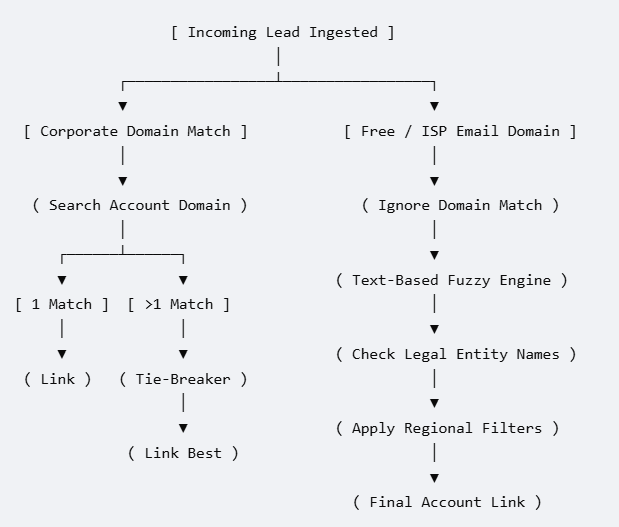
Salesforce lead to account matching bridges the architectural gap between individual Leads and corporate Accounts by automatically mapping incoming people to their parent organizations. While basic setups rely on simple exact email domain tracking, enterprise Revenue Operations (RevOps) must deploy multi-layered matching frameworks — using deterministic field mapping, fuzzy string matching, and clear tie-breaking rules — to power automated routing, prevent duplicate outreach, and ensure accurate marketing attribution.
The Architectural Problem: Why Leads and Accounts Live in Isolation
In the native Salesforce CRM architecture, the Lead object and the Account object exist as two completely separate islands. A lead represents an unverified individual, while an account represents a validated company. Because these objects do not natively relate to one another until manual conversion occurs, enterprise go-to-market (GTM) teams suffer from structural blindness:
- Split Account Context: Half of an enterprise account’s buying committee is tracked on the Account record, while the other half sits unlinked as separate Lead records.
- Broken Attribution: Marketing drives traffic from a strategic account, but Salesforce attributes the revenue to an unrelated, isolated lead.
- Internal Sales Conflicts: An account executive works an active six-figure opportunity, while a business development representative cold-calls a new lead from that exact same company.

To run account-based marketing (ABM) or complex territory routing, you must build a bridge between these two islands. Automating this connection turns raw data into clean account context.
The 3 Core Pillars of an Enterprise Matching Engine
A reliable matching framework uses a three-layer filter to process incoming data before making changes in your database.
1. Deterministic Domain Mapping
The system cleans the incoming email address (e.g., stripping john.doe@google.com down to google.com) and looks for an exact match against the Account Website or custom domain fields.
- The Catch: The system must ignore generic internet service provider (ISP) domains (like
gmail.com,yahoo.com, oroutlook.com) to prevent thousands of consumer leads from matching to a single accidental account.
2. Heuristic and Fuzzy String Matching
When an email domain is generic or missing, the matching engine evaluates the company name string.
- Standardization: The engine strips out common corporate suffixes like “Inc.”, “LLC”, “GmbH”, and “Limited”.
- Fuzzy Scoring: It uses algorithms to calculate distances between words. This catches typos, abbreviations, and spacing variations, recognizing that “FedEx”, “Federal Express”, and “Fed Ex Corp” all mean the same thing.
3. Tie-Breaking Hierarchy
When a lead matches multiple accounts in a large CRM, the system cannot guess. You must establish strict, tie-breaking rules. A standard enterprise tie-breaker hierarchy looks like this:

Alternative Salesforce Architectures for 2026
Depending on your team’s budget, data volume, and internal technical skills, there are three distinct ways to build an L2A matching system.

Step-by-Step Implementation Blueprint
To successfully build an automated matching system without messing up your existing CRM data, follow this four-phase deployment plan:
Phase 1: Data Normalisation Audit
Before turning on any automated tools, run a cleanup report on your existing accounts. Fill in missing corporate websites and fix obvious duplicate records. If your underlying account data is messy, your matching tool will consistently pick the wrong records.
Phase 2: Configure the Global Exclusion List
Build a list of domains that your matching engine must completely ignore. This list should include generic providers (gmail.com, icloud.com), temporary email services, and your own company domains to keep internal testing from breaking the system.
Phase 3: Set Up the Match Object & Visual Logs
Do not let your matching tool change or route records in secret. Set up your system to write matching information directly into hidden fields on the Lead record, such as Matched_Account_ID__c and Match_Confidence_Score__c. This creates a clear trail for troubleshooting later.
Phase 4: Run a Sandbox Simulation
Deploy your matching rules in a Salesforce Full Sandbox first. Run a batch of 10,000 old lead records through the system and check the results. Look for false positives (leads connected to the wrong company) and false negatives (leads that should have matched but did not) before turning the rules on in production.
메타데이터
- post_id
- 16b236e2ceef
- slug
- how-salesforce-lead-to-account-matching-improves-attribution-16b236e2ceef
- url
- https://medium.com/@varleneheidi/how-salesforce-lead-to-account-matching-improves-attribution-16b236e2ceef
- canonical_url
- https://medium.com/@varleneheidi/how-salesforce-lead-to-account-matching-improves-attribution-16b236e2ceef
- author_url
- https://medium.com/@varleneheidi
- status
- ok
- fetched_at
- 2026-07-13 14:03:22