Flutter for Single-Page Scrollable Websites with Navigator 2.0 — Part 6: Navigation
In the previous articles, we focused on implementing a single-page scrollable website from the scroll logic point. In this and the next…
Flutter for Single-Page Scrollable Websites with Navigator 2.0 — Part 6: Navigation
In the previous articles, we focused on implementing a single-page scrollable website from the scroll logic point. In this and the next article, we will explore how to utilize the Navigator 2.0 API to manage the URLs on the browser’s address bar.
- Part 1: Introduction
- Part 2: Scroll to Position
- Part 3: Scroll to Page
- Part 4: Ensure Visible
- Part 5: Scroll to Index
- Part 6: Navigation
- Part 7: Query Params
If you are not familiar with the fundamentals of declarative navigation, I would suggest taking a break here and starting with my Flutter Navigator 2.0 for Authentication and Bootstrapping series. In the Web part of that series, we covered the two-way [RouteInformation](https://api.flutter.dev/flutter/widgets/RouteInformation-class.html) flow between the Router widget and the operating system (OS). For the sake of simplicity, we didn’t dive into how the Flutter framework layer communicates with the OS.
Flutter architecture
Flutter architecture has a layered system. Each layer is optional and replaceable [1][2].
- Flutter framework layer contains platform, layout, and foundational high-level libraries written in the Dart language. Although it is the layer that developers mostly code in, accessing the lower layers when needed is possible.
- Flutter engine layer is a portable runtime for hosting Flutter applications. It is the lowest layer of Flutter. It provides the low-level implementation of Flutter’s core API. It is mostly written in C++ but also Java, Objective-C, and Dart to provide communication with the underlying OS.
- The embedder layer is a native OS application. It is an entry point to the underlying OS and contains platform-specific dependencies. It hosts the entire Flutter content and also enables integrating Flutter code as a module to the existing native applications.
Flutter was first introduced as a cross-platform toolkit for mobile applications. By the time, it is expanded to incorporate Web, desktop, and embedded platforms [3]. The engine of the Flutter Web applications needed to be different due to the unique characteristics of the Web. Therefore, the Flutter Web engine is the reimplementation of the C++ Flutter engine on top of standard browser APIs. The Dart code in the engine for the Flutter Web is compiled into JavaScript instead of ARM machine code that is used for mobile applications.

For Web apps, it is actually not the OS that the Flutter app communicates with. A Web app is sandboxed in the Web browser application so it can’t directly access the file system or low-level network [2]. For example, we can’t import [dart.io](https://flutter.dev/docs/development/platform-integration/web#can-i-use-dartio-with-a-web-app) libraries to Flutter Web projects. However, this doesn’t make any difference for the Navigator 2.0 API, because in the end, it is implemented in the Flutter framework layer, and it doesn’t need to know the engine implementation details.
Browser History
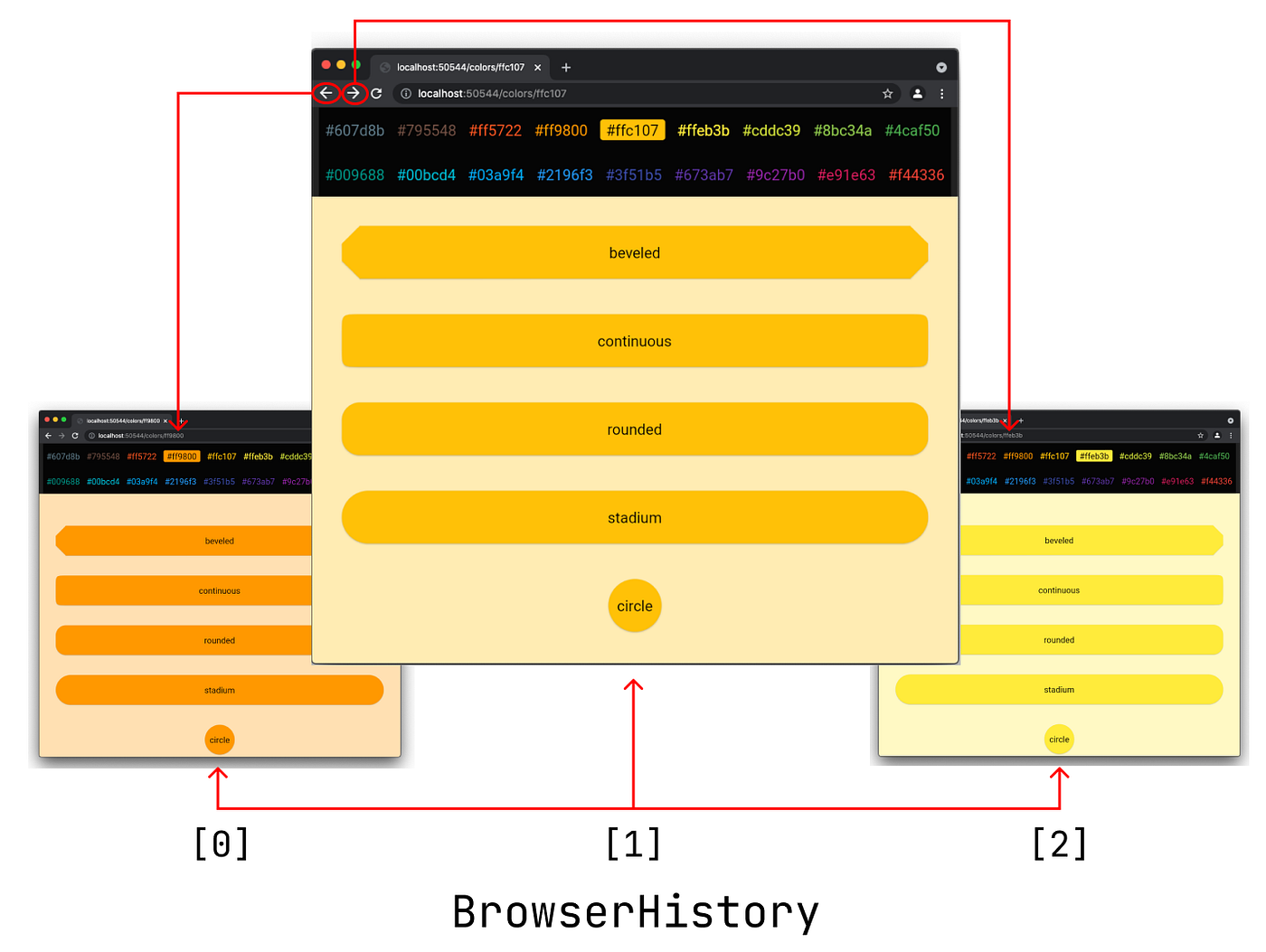
When we are working with the Navigator 2.0 API for Web apps, we quite often hear the term browser history. The first thing we should know is that the browser history is different than the navigation history (a.k.a navigation stack) managed by the [Navigator](https://api.flutter.dev/flutter/widgets/Navigator-class.html) widget. While the [BrowserHistory](https://github.com/flutter/engine/blob/99fa4a1ab34317c40b03d2aaf9c0b172c684a871/lib/web_ui/lib/src/engine/navigation/history.dart) is included in the Flutter Web Engine, the [Navigator](https://api.flutter.dev/flutter/widgets/Navigator-class.html) widget is part of the Flutter framework layer.
The [Navigator](https://api.flutter.dev/flutter/widgets/Navigator-class.html) widget takes a list of [Page](https://api.flutter.dev/flutter/widgets/Page/Page.html) instances to construct a navigation history. The [pages](https://api.flutter.dev/flutter/widgets/Navigator/pages.html) are then turned into a stack of[Route](https://api.flutter.dev/flutter/widgets/Route-class.html) s. When the back button is dispatched in the mobile platforms, the [maybePop](https://api.flutter.dev/flutter/widgets/NavigatorState/maybePop.html) method of the [Navigator](https://api.flutter.dev/flutter/widgets/Navigator-class.html) widget will be invoked to pop the current route.
The [BrowserHistory](https://github.com/flutter/engine/blob/99fa4a1ab34317c40b03d2aaf9c0b172c684a871/lib/web_ui/lib/src/engine/navigation/history.dart) is a list of history entries each contains a location (URL) and a state object. When we click the browser’s backward or the forward buttons, the browser takes the information from the entry list prior to or next to the current history entry in the[BrowserHistory](https://github.com/flutter/engine/blob/99fa4a1ab34317c40b03d2aaf9c0b172c684a871/lib/web_ui/lib/src/engine/navigation/history.dart) class. Then, the Router widget in the Flutter framework maps the[BrowserHistory](https://github.com/flutter/engine/blob/99fa4a1ab34317c40b03d2aaf9c0b172c684a871/lib/web_ui/lib/src/engine/navigation/history.dart) entry to the [RouteInformation](https://api.flutter.dev/flutter/widgets/RouteInformation-class.html) instance to build a new navigation history with the help of its delegates.

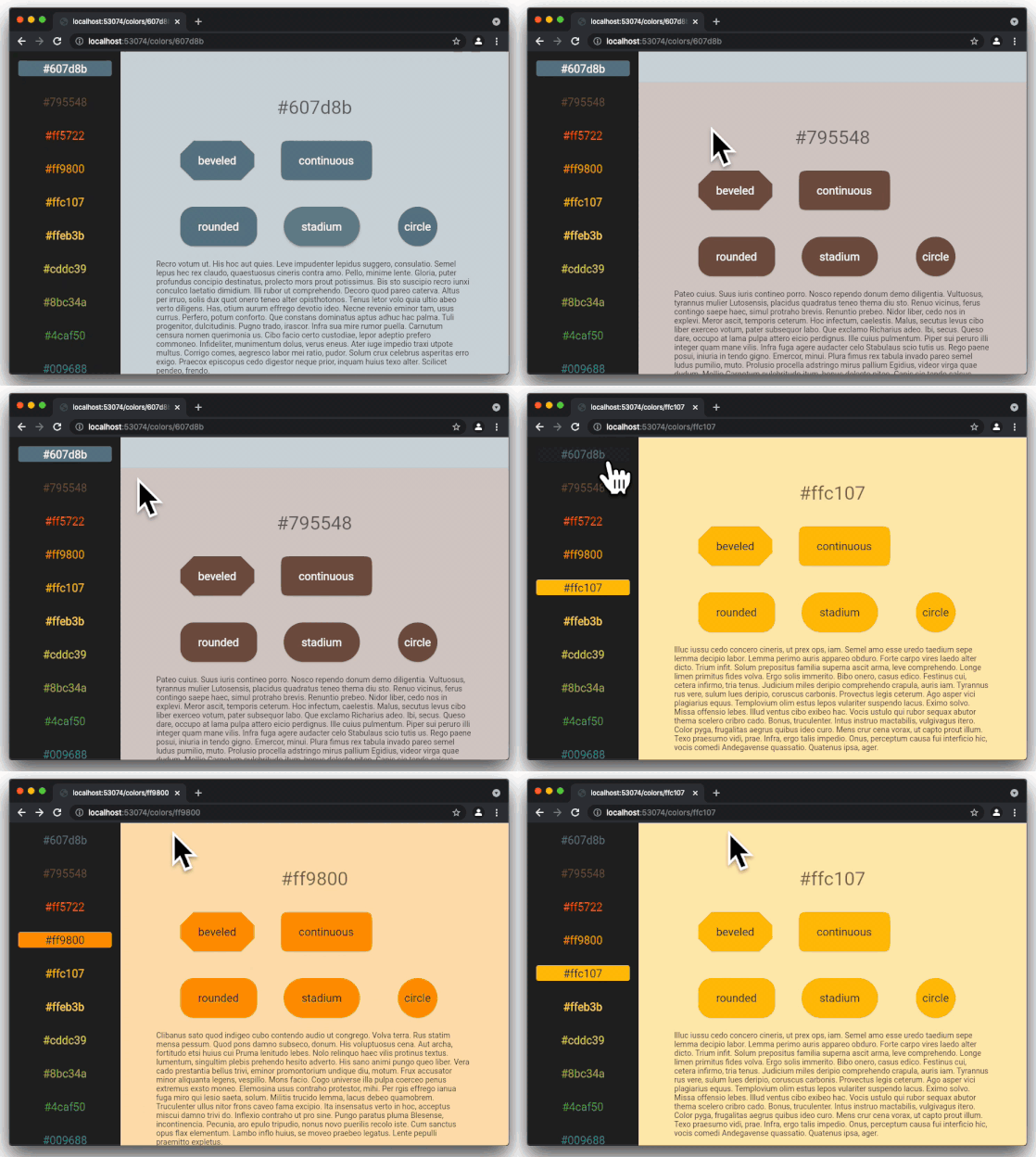
In the last four sample apps of this series, we manage the entries in the browser history and update the URL in the browser’s address bar with the following cases:
- First visible section changes (trailing index) as the user scrolls.
- Top or side navigation menu button clicks.
- User interaction with the Web browser app such as back/forward button click, or entering URL on the address bar.
- Clicking the shaped button in the sections.
- Clicking the barrier of the shaped border dialog.
SinglePageAppConfiguration
The SinglePageAppConfiguration is a custom data type that is used by the [Router](https://api.flutter.dev/flutter/widgets/Router-class.html) widget and its delegates in the following ways:
- The
[RouteInformationProvider](https://api.flutter.dev/flutter/widgets/RouteInformationProvider-class.html) gets location and state information from the[BrowserHistory](https://github.com/flutter/engine/blob/99fa4a1ab34317c40b03d2aaf9c0b172c684a871/lib/web_ui/lib/src/engine/navigation/history.dart) entry and maps it to the[RouteInformation](https://api.flutter.dev/flutter/widgets/RouteInformation-class.html) . Then the[RouteInformationParser](https://api.flutter.dev/flutter/widgets/RouteInformationParser-class.html) parses the[RouteInformation](https://api.flutter.dev/flutter/widgets/RouteInformation-class.html) and returns an instance of the configuration. Finally, the[RouterDelegate](https://api.flutter.dev/flutter/widgets/RouterDelegate-class.html) updates the app state according to this configuration instance and builds provides a[Navigator](https://api.flutter.dev/flutter/widgets/Navigator-class.html) widget to theRouter.

[Router](https://api.flutter.dev/flutter/widgets/Router-class.html) widget reports[RouteInformation](https://api.flutter.dev/flutter/widgets/RouteInformation-class.html) in certain events to the engine. For example, once the navigation stack changes upon app state update, a new[RouteInformation](https://api.flutter.dev/flutter/widgets/RouteInformation-class.html) reporting is scheduled. When the[RouteInformation](https://api.flutter.dev/flutter/widgets/RouteInformation-class.html) reporting task is scheduled, the[Router](https://api.flutter.dev/flutter/widgets/Router-class.html) widget first retrieves the current app configuration from the[RouterDelegate](https://api.flutter.dev/flutter/widgets/RouterDelegate-class.html) and then passes it to the[RouteInformationParser](https://api.flutter.dev/flutter/widgets/RouteInformationParser-class.html) . Using this configuration,[RouteInformationParser](https://api.flutter.dev/flutter/widgets/RouteInformationParser-class.html) restores the[RouteInformation](https://api.flutter.dev/flutter/widgets/RouteInformation-class.html) which is then provided back to the engine through the[RouteInformationProvider](https://api.flutter.dev/flutter/widgets/RouteInformationProvider-class.html).

In my opinion, defining a proper app configuration is the key to implement a good navigation logic using the Navigator 2.0 API. In our case, the app state is defined by three properties of the SinglePageAppConfiguration class: colorCode , shapeBorderType , and unknown .
The colorCode field is set in the following ways:
- The user clicks a button on the side or top navigation menu bar.
- The first visible section changes.
- The user specifies a color code by typing a URL on the address bar.
- The user clicks a shaped border button that has an associated color.
The shapeBorderType field is set when the user clicks a shaped button in any section or the user specifies the type by typing a URL on the address bar.
The unknown field is set depending on the validity of the URL typed by the user on the address bar.
[embed]
HomePage
Since this is a single-page website, the content of the HomeScreen is expected to be heavy, so we should avoid re-instantiating the entireHomeScreen each time the [Navigator](https://api.flutter.dev/flutter/widgets/Navigator-class.html) widget is rebuilt. Hence, we create the HomePage instance when the [RouterDelegate](https://api.flutter.dev/flutter/widgets/RouterDelegate-class.html) is instantiated, and use this instance when building a [Navigator](https://api.flutter.dev/flutter/widgets/Navigator-class.html) widget.
[Page](https://api.flutter.dev/flutter/widgets/Page-class.html) is only an extended version of the [RouteSettings](https://api.flutter.dev/flutter/widgets/RouteSettings-class.html) . When we instantiate the HomePage , we don’t build the HomeScreen , but instead, we tell the [Navigator](https://api.flutter.dev/flutter/widgets/Navigator-class.html) widget what to build when needed.
In the sample apps, I could have used a customized HomePage class which extends the [Page](https://api.flutter.dev/flutter/widgets/Page-class.html) class. However, I realized that each time the [Navigator](https://api.flutter.dev/flutter/widgets/Navigator-class.html) widget is built, the builder method of the HomePage returned a new HomeScreen widget instance although the [Page](https://api.flutter.dev/flutter/widgets/Page-class.html) key was the same. This is probably the expected behavior but it causes a really bad user experience especially in the case that list items are not built lazily. This issue is demonstrated in the below screen recording. 👇

Using Custom page triggers HomeScreen construction
Instead of using a custom [Page](https://api.flutter.dev/flutter/widgets/Page/Page.html) class for the HomePage , I instantiated a MaterialPageRoute when the [RouterDelegate](https://api.flutter.dev/flutter/widgets/RouterDelegate-class.html) is instantiated, and used that instance when building the [Navigator](https://api.flutter.dev/flutter/widgets/Navigator-class.html) widget. As can be noticed in the below recording, unlike the previous case, the HomeScreen is not constructed each time the [Navigator](https://api.flutter.dev/flutter/widgets/Navigator-class.html) widget is built. Hence, the scrolling when the first visible section changes is smoother .`👇

We use Material Page Route in sample apps for HomePage
ShapePage
The ShapePage is a very simple Cupertino dialog. It is shown when any of the shaped color buttons is clicked. One way of showing this dialog is by calling the [showCupertioneDialog()](https://api.flutter.dev/flutter/cupertino/showCupertinoDialog.html) method of the Flutter API on button click.
[embed]
Let’s see the implementation of [showCupertioneDialog()](https://api.flutter.dev/flutter/cupertino/showCupertinoDialog.html) in Flutter:

Click the image to visit the source code
As seen in the source code, when [showCupertioneDialog](https://api.flutter.dev/flutter/cupertino/showCupertinoDialog.html)() is called, it first finds the closest [Navigator](https://api.flutter.dev/flutter/widgets/Navigator-class.html) widget in the widget tree, and pushes a [CupertinoDialogRoute](https://api.flutter.dev/flutter/cupertino/CupertinoDialogRoute-class.html).
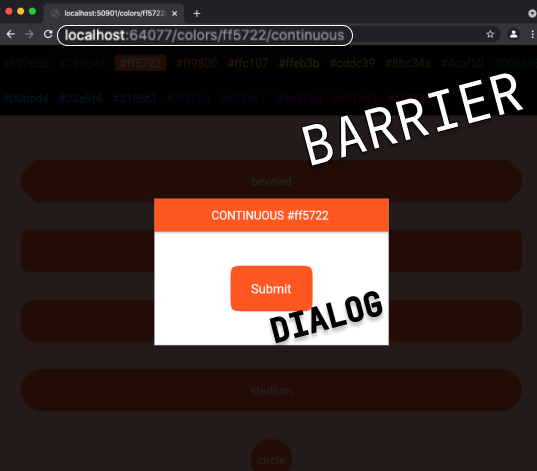
The modal barrier is a barricade between the current route and the route below it in the navigation stack. It is usually semi-transparent and you almost feel like you can interact with the widget in the below route. The barrier’s task is preventing this interaction. When [barrierDismissable](https://github.com/flutter/flutter/blob/master/packages/flutter/lib/src/widgets/routes.dart#L1131) is set true, the clicks on the barrier invokes [Navigator.pop](https://api.flutter.dev/flutter/widgets/Navigator/pop.html) method, meaning that the [CupertinoDialogRoute](https://api.flutter.dev/flutter/cupertino/CupertinoDialogRoute-class.html) that has the ShapeDialog widget will be popped.
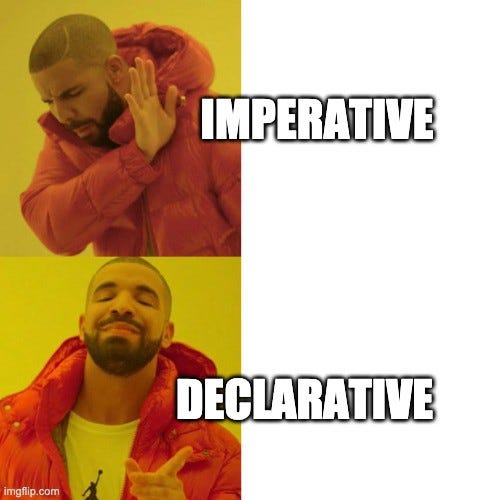
Calling the [showCupertioneDialog](https://api.flutter.dev/flutter/cupertino/showCupertinoDialog.html) method which pushes a new route to the [Navigator](https://api.flutter.dev/flutter/widgets/Navigator-class.html) widget is so imperative but we want the navigation to be declarative and separate the concerns. The ShapedButton should not know anything about the navigation logic on click events. It is the job of the [RouterDelegate](https://api.flutter.dev/flutter/widgets/RouterDelegate-class.html) to build a [Navigator](https://api.flutter.dev/flutter/widgets/Navigator-class.html) widget on app state changes caused by user interactions.
Let’s do this in a declarative way. We will first define a custom Page class. When the [Navigator](https://api.flutter.dev/flutter/widgets/Navigator-class.html) widget is built and if this page is included in the pages list depending on the app state, a [CupertinoDialogRoute](https://api.flutter.dev/flutter/cupertino/CupertinoDialogRoute-class.html) will be created.
[embed]
RouteInformationParser
[RouteInformationParser](https://api.flutter.dev/flutter/widgets/RouteInformationParser-class.html) is responsible for mapping the [RouteInformation](https://api.flutter.dev/flutter/widgets/RouteInformation-class.html) to the configuration, and the configuration to [RouteInformation](https://api.flutter.dev/flutter/widgets/RouteInformation-class.html) .
Parsing RouteInformation
When the [Router](https://api.flutter.dev/flutter/widgets/Router-class.html) widget receives a new[RouteInformation](https://api.flutter.dev/flutter/widgets/RouteInformation-class.html) from the [RouteInformationProvider](https://api.flutter.dev/flutter/widgets/RouteInformationProvider-class.html) , it calls the [parseRouteInformation](https://api.flutter.dev/flutter/widgets/RouteInformationParser/parseRouteInformation.html) method of [RouteInformationParser](https://api.flutter.dev/flutter/widgets/RouteInformationParser-class.html) . Here we will map the [RouteInformation](https://api.flutter.dev/flutter/widgets/RouteInformation-class.html) to the SinglePageAppConfiguration according to the following logic:
- If the URL doesn’t include a path, then we return a configuration that is constructed with
homemethod. - If the URL includes 2 path segments, the first path segment should be
colors, and the second path segment should be a valid hex color code. In this case, we returnhomeconfiguration. For example:[https://mysinglepageapp.com/colors/ff5722](http://localhost:63028/colors/ff5722). - If the URL includes 3 path segments, the rules for the first two segments apply the same. The last path segment should be a valid shape border type. In this case, we return
shapeBorderconfiguration. For example: *`https://mysinglepageapp.com/colors/ff5722/rounded`*. - In any other cases, we construct and return the
unknownconfiguration.

[embed]
Restoring RouteInformation
When the [Router](https://api.flutter.dev/flutter/widgets/Router-class.html) widget schedules route reporting, it calls the [restoreRouteInformation](https://api.flutter.dev/flutter/widgets/RouteInformationParser/restoreRouteInformation.html) method of the [RouteInformationParser](https://api.flutter.dev/flutter/widgets/RouteInformationParser-class.html) to forward a [RouteInformation](https://api.flutter.dev/flutter/widgets/RouteInformation-class.html) to the engine according to the current app configuration.
[embed]
RouterDelegate
The main responsibility of the [RouterDelegate](https://api.flutter.dev/flutter/widgets/RouterDelegate-class.html) is building a [Navigator](https://api.flutter.dev/flutter/widgets/Navigator-class.html) widget when the [Router](https://api.flutter.dev/flutter/widgets/Router-class.html) widget asks for it as a result of an app state change or system event. It also manages the configuration so that [Router](https://api.flutter.dev/flutter/widgets/Router-class.html) widget uses it whenever [RouteInformation](https://api.flutter.dev/flutter/widgets/RouteInformation-class.html) reporting task is scheduled.
The [Navigator](https://api.flutter.dev/flutter/widgets/Navigator-class.html) widget is usually located near the top of the widget tree. The widget that causes app state change on user interaction may be deep down in the widget tree. We need to find a good mechanism to propagate the state change from the deep down of the tree to the top of the widget.

In the Flutter Navigator 2.0 for Authentication and Bootstrapping series, we passed callback functions starting from the [RouterDelegate](https://api.flutter.dev/flutter/widgets/RouterDelegate-class.html) to the children widgets through the [Page](https://api.flutter.dev/flutter/widgets/Page-class.html) classes. This is not recommended because as the app gets more complex, we will need to pass the callback methods on many widgets from the top of the tree until the destination widget.
There are different ways of improving the app state management using the state management libraries. In this article, we will not focus on state management topic but we will use ValueNotifier instances instead of callback methods. Using ValueNotifier will not solve the problem of passing the ValueNotifier instances down to the children in the widget tree but by using ValueNotifier we make sure that its listeners will be invoked only when the single value that it holds is updated.
ValueNotifier A ChangeNotifier that holds a single value. When value is replaced with something that is not equal to the old value as evaluated by the equality operator ==, this class notifies its listeners [4].
[embed]
Reacting to App State changes
When the [Router](https://api.flutter.dev/flutter/widgets/Router-class.html) widget is notified as a result of app state change, it expects a [Navigator](https://api.flutter.dev/flutter/widgets/Navigator-class.html) widget from the [RouterDelegate](https://api.flutter.dev/flutter/widgets/RouterDelegate-class.html) . In the [build](https://api.flutter.dev/flutter/widgets/RouterDelegate/build.html) method of [RouterDelegate](https://api.flutter.dev/flutter/widgets/RouterDelegate-class.html) we will return the [Navigator](https://api.flutter.dev/flutter/widgets/Navigator-class.html) widget with a list of [pages](https://api.flutter.dev/flutter/widgets/Page-class.html) .
The logic is very simple:
- If
unknownis set to true, the stack shows only theUnknownScreen. - If
unknownis set to false, in any case, the bottom page in the stack isHomePage. - If the selected shape border type and selected color both have values, we add the
ShapeDialogabove theHomePagein the stack.
After receiving the [Navigator](https://api.flutter.dev/flutter/widgets/Navigator-class.html) widget, the [Router](https://api.flutter.dev/flutter/widgets/Router-class.html) widget may schedule route information reporting and ask the [RouteInformationParser](https://api.flutter.dev/flutter/widgets/RouteInformationParser-class.html) to restore the [RouteInformation](https://api.flutter.dev/flutter/widgets/RouteInformation-class.html) which helps to update the URL in the address bar of the Web browser.
[embed]
When we click the barrier field of the dialog route, onPopPage method of the [Navigator](https://api.flutter.dev/flutter/widgets/Navigator-class.html) widget is triggered. In this case, we first make sure that route is actually popped. Then, we check the route’s name. If the name equals to the ShapePage``s name, we set theshapeBorderTypeNotifiervalue tonull` .
Here, I handled setting the shapeBorderTypeNotifier value to null in onPopPage method of the [Navigator](https://api.flutter.dev/flutter/widgets/Navigator-class.html) widget. I am not happy with doing things in onPopPage method because it still sounds legacy. It could have been better to update the app state on user interaction events such as onDialogDismissed . However, as of today, I am not aware of a callback that is fired when the dialog is dismissed due to a barrier. Hence, I had to handle the app state change in this way.
Reacting to URL updates
After receiving the configuration from the [RouteInformationParser](https://api.flutter.dev/flutter/widgets/RouteInformationParser-class.html) , the [Router](https://api.flutter.dev/flutter/widgets/Router-class.html) widget passes it to the [RouterDelegate](https://api.flutter.dev/flutter/widgets/RouterDelegate-class.html) by calling its [setNewRoutePath](https://api.flutter.dev/flutter/widgets/RouterDelegate/setNewRoutePath.html) method. In this method, we have a chance to update the values that are held in the ValueNotifier fields. Then, the [Router](https://api.flutter.dev/flutter/widgets/Router-class.html) calls the [build](https://api.flutter.dev/flutter/widgets/RouterDelegate/build.html) method of the [RouterDelegate](https://api.flutter.dev/flutter/widgets/RouterDelegate-class.html) and receives a freshly constructed [Navigator](https://api.flutter.dev/flutter/widgets/Navigator-class.html) widget according to the new state.
[embed]
Reporting the Configuration
When the [Router](https://api.flutter.dev/flutter/widgets/Router-class.html) schedules reporting the [RouteInformation](https://api.flutter.dev/flutter/widgets/RouteInformation-class.html) to the engine, it retrieves the current app configuration from the [RouterDelegate](https://api.flutter.dev/flutter/widgets/RouterDelegate-class.html) . Therefore, in the getter method of the currentConfiguration we need to construct a SinglePageAppConfiguration according to the values that are held in the ValueNotifier fields.
[embed]
Conclusion
In this article, we studied the integration of the Navigator 2.0 API into our sample apps. From the first sample to the fourth sample app, we use selected color and shape border types as variables in path segments for URLs. To see the implementation in the demo you can run any of these samples on Github. In the next article, we will explore using these variables as query segments in one path segment
If you liked this article, please press the clap button, and star the Github repository of the sample apps.
메타데이터
- post_id
- 16b4f5a1981f
- slug
- flutter-for-single-page-scrollable-websites-with-navigator-2-0-part-6-navigation-16b4f5a1981f
- url
- https://medium.com/@ulusoyca/flutter-for-single-page-scrollable-websites-with-navigator-2-0-part-6-navigation-16b4f5a1981f
- canonical_url
- https://medium.com/@ulusoyca/flutter-for-single-page-scrollable-websites-with-navigator-2-0-part-6-navigation-16b4f5a1981f
- author_url
- https://medium.com/@ulusoyca
- status
- ok
- fetched_at
- 2026-07-28 03:34:09