Attack and Security Series: Episode 3
DNS Spoofing: When the Internet Sends You to the Wrong House 🌐🎭
Attack and Security Series: Episode 3
DNS Spoofing: When the Internet Sends You to the Wrong House 🌐🎭
Welcome back to the Attack and Security Series.
In Episode 1, we went inside the RAM chip and understood RowHammer.
In Episode 2, we came back to the network and learned how bots can abuse applications.
And now…
We’re going to attack something that almost everyone uses every single day.
Something so normal that most people don’t even think about it.
You type: google.com
Press Enter.
And somehow…
You reach Google’s server.
But wait.
How did your computer know where google.com actually lives?
Your computer doesn’t understand websites the way humans do.
Humans think: google.com
Computers ultimately need: 14.164.x.x
That translation is handled by DNS.
The Domain Name System.
And today we’re going to see what happens when someone tries to lie to DNS.
Welcome to:
DNS Spoofing 🎭
The basic idea is beautifully simple.
You ask:
“Where is example.com?”
And the attacker tries to make you believe:
“Oh yeah, it’s over there.”
Except…
“Over there” is the attacker’s server. 😈
🧠 First: What Does DNS Actually Do?
Before attacking DNS, we need to understand DNS.
Imagine you’re new in a huge city.
You know the name of a restaurant:
“Pizza Place”
But you don’t know its address.
So you ask someone:
“Bhai, Pizza Palace kaha hai?”
They give you: street 10 , Building 42
Now you can go there.
DNS does basically the same thing.
Except instead of:
Pizza Palace → Street 10we have:
google.com → IP addressFor example:
google.com
     ↓
DNS
     ↓
IP Address
     ↓
Server
DNS is basically the internet’s phonebook.
📞 The DNS Resolution Journey
Let’s say you type: www.example.com
Your computer needs the IP address.
It starts asking questions.
A simplified flow looks like this:
            Your Browser
                   │
                   ▼
             Your Computer
                   │
                   ▼
            DNS Resolver
                   │
                   ▼
            DNS Servers
                   │
                   ▼
          Authoritative DNS
                   │
                   ▼
             IP Address
                   │
                   ▼
             Web Server
The result eventually comes back:
www.example.com
        ↓
203.0.113.10
Now your browser knows where to connect.
So:
DNS = Name → IP AddressSimple.
But now let’s ask the dangerous question.
😈 What If Someone Lies?
Imagine you’re asking a hostel guard:
“Room 205 mein kaun rehta hai?”
The guard says:
“Room 205? Go to Room 305.”
You trust the guard.
You walk to Room 305.
But someone deliberately gave you the wrong information.
That’s the basic idea behind DNS spoofing.
The attacker tries to make a DNS response contain an incorrect destination.
Instead of:
example.com
      ↓
Real IP
you get:
example.com
      ↓
Attacker's IP
And now you’re going somewhere you never intended to visit.
🎭 DNS Spoofing in One Diagram
Here’s the simplest possible version:
                 User
                  │
                  │
          "Where is bank.com?"
                  │
                  ▼
             DNS Resolver
                  │
                  │
                  ▼
             DNS Response
                  │
                  │
             ❌ SPOOFED
                  │
                  ▼
        Attacker's IP Address
                  │
                  ▼
          Fake / Malicious Site
The user thinks: bank.com
But the DNS response has effectively redirected them somewhere else.
That’s the core concept.
🏨 Hostel Analogy: DNS Is the Reception Desk
Let’s go back to our favourite hostel.
Imagine the hostel has 5,000 rooms.
You want to meet: Rahul
You don’t know his room number.
So you go to reception.
You
 │
 ▼
Reception
 │
 ▼
"Rahul is in Room 217"
You trust the receptionist.
Now imagine an attacker somehow manages to interfere with the information.
You ask:
“Where is Rahul?”
Attacker says:
“Room 666.”
You go there.
Rahul isn’t there.
Someone else is.
😂
That’s the fundamental idea behind DNS spoofing.
The important part isn’t necessarily attacking your browser.
The attacker is trying to corrupt the mapping between a name and a destination.
🧩 There Isn’t Just One Type of DNS Spoofing
This is where the topic gets interesting.
“DNS spoofing” can describe several related scenarios.
The attacker may try to interfere with DNS communication directly.
Or they may try to poison a DNS cache.
Or they may compromise infrastructure involved in DNS resolution.
Let’s understand the most important one.
☠️ DNS Cache Poisoning
Imagine your DNS resolver receives:
example.com → 93.184.216.34It doesn’t necessarily ask the authoritative DNS server every single time.
That would be inefficient.
Instead, it can cache the answer for a period of time.
Think of the cache as the hostel receptionist writing down:
Rahul → Room 217Next time you ask:
“Rahul kaha hai?”
The receptionist doesn’t call Rahul.
They just check their notebook.
Fast.
Efficient.
But now imagine an attacker manages to get a fake answer into that notebook.
For example:
example.com → ATTACKER_IPNow every person asking the receptionist may receive the wrong answer.
This is the basic idea of DNS cache poisoning.
🧠 The Cache Poisoning Flow
Normally:
User
 │
 │ "example.com?"
 ▼
DNS Resolver
 │
 │ Query
 ▼
Authoritative DNS
 │
 │ Correct Answer
 ▼
DNS Resolver
 │
 │ Cache Answer
 ▼
User
The attacker wants something more like:
                   Attacker
                       │
                       │ Fake DNS Response
                       ▼
User ────────→ DNS Resolver
                   │
                   │
                   ▼
             Poisoned Cache
                   │
                   ▼
              Wrong IP
                   │
                   ▼
             Attacker Server
Now imagine thousands of users use the same poisoned resolver.
One successful poisoning event could potentially affect many users until the bad cached record expires or is removed.
That’s why DNS cache poisoning is much more serious than simply tricking one browser.
🎯 But How Does the Attacker Make the Resolver Believe the Fake Answer?
This is where DNS’s security mechanisms become important.
A DNS query and response contain information that helps the resolver match the response to the request.
Historically, attackers could try to guess or race those values.
A simplified mental model: Resolver sends:
"Give me example.com" ↓Attacker tries to send:"Here is the answer!"But the resolver needs to determine:
“Is this response actually for the query I just sent?”
DNS uses identifiers and other mechanisms to help match responses.
Modern resolvers also use techniques such as:
Transaction ID randomization
+
Random source ports
+
DNS Cookies
+
Query validation
+
Bailiwick checking
These make blind spoofing substantially harder.
But historically, weaknesses in DNS implementations and insufficient randomness made spoofing attacks much more feasible.
🎲 Transaction ID: The Secret Number
Let’s use another hostel analogy.
You submit a request: ”Give me Rahul’s room number.”
The receptionist gives your request a random token: Request ID = 48291
The response must contain the same ID. Request:
ID = 48291
"Where is Rahul?" ↓Response:ID = 48291
"Room 217"Now imagine an attacker sends:
ID = 12837
"Rahul is in Room 666"
The resolver can say:
“Bhai, I never asked for that.”
😂
The attacker therefore needs to get the response details right.
Modern DNS implementations use multiple defenses to make guessing and spoofing harder.
One important technique is randomizing the source port.
🔀 Source Port Randomization
Imagine the request isn’t just identified by:
Request id
It also comes from a randomly selected network port.
So the attacker has more information to guess correctly.
Conceptually: Query:
Transaction ID = 48291
Source Port    = 53142
The attacker would need to correctly match the relevant response characteristics.
That increases the difficulty of blind DNS response spoofing.
Think about it like a hostel.
Instead of saying:
“My room number is 217.”
You say:
“Room 217, locker 43, token 48291.”
Now someone trying to impersonate your request has many more things to get right.
🚨 DNS Spoofing Can Also Happen Locally
Now let’s move to another scenario.
Imagine you’re connected to a malicious or compromised network.
For example:
Your Laptop
     │
     ▼
Wi-Fi Router
     │
     ▼
Internet
An attacker who has sufficient control over the local network may attempt to interfere with DNS traffic.
For example:
Your Laptop
     │
     │ DNS Query
     ▼
Network
     │
     ├──────────────→ Legitimate DNS
     │
     └──────────────→ Attacker
                           │
                           ▼
                    Fake DNS Response
The goal is again:
example.com
      ↓
Wrong IP
This is one reason encrypted DNS protocols can be useful.
🔐 DoH and DoT Enter the Chat
Two important technologies are:
DNS over HTTPS (DoH)
and
DNS over TLS (DoT).
Instead of sending DNS traffic in a form that can easily be observed or modified by someone on the network, these protocols encrypt the communication between the client and the DNS resolver.
Conceptually:
Traditional DNS
Client
  │
  │ DNS Query
  │
  ▼
Resolver
DNS over TLS
Client
  │
  │ 🔒 Encrypted DNS
  │
  ▼
DNS Resolver
DNS over HTTPS
Client
  │
  │ 🔒 HTTPS
  │
  ▼
DNS Resolver
Now someone sitting in the middle of the network has a much harder time simply reading or modifying the DNS query and response.
But remember:
Encryption isn’t the same thing as authentication of the DNS data itself.
That’s where DNSSEC comes in.
🛡️ The Big Defender: DNSSEC
Now we reach one of the most important technologies for protecting DNS.
DNSSEC.
DNSSEC stands for:
Domain Name System Security Extensions.
The basic idea is:
“Don’t just give me a DNS answer. Give me a way to verify that the answer is authentic.”
Think about our hostel again.
Normally the receptionist says:
“Rahul is in Room 217.”
You trust them.
With DNSSEC, imagine the receptionist gives you:
Room 217
+
Cryptographic proof
You can verify the information.
The basic architecture looks like:
                 Root
                  │
                  ▼
                 .com
                  │
                  ▼
           example.com
                  │
                  ▼
        Authoritative DNS
                  │
                  ▼
          Signed DNS Data
                  │
                  ▼
             Resolver
                  │
                  ▼
        Validate Signature
                  │
             ┌────┴────┐
             │         │
           Valid     Invalid
             │         │
             ▼         ▼
           Accept     Reject
This is powerful.
If someone tries to inject a fake DNS answer, the resolver can detect that the cryptographic validation doesn’t match.
Instead of:
“Looks okay.”
It can say:
“Nope. Cryptographic proof failed.”
🔑 DNSSEC Uses a Chain of Trust
This part sounds complicated at first.
But let’s use the hostel again.
Imagine you don’t trust every random person claiming:
“I’m the hostel warden.”
Instead, there is a chain:
College Administration
        ↓
Hostel Warden
        ↓
Floor Manager
        ↓
Room Information
You trust the higher authority.
DNSSEC uses a similar concept called a chain of trust.
Very simplified:
Root
  │
  ▼
TLD (.com)
  │
  ▼
example.com
  │
  ▼
DNS Records
Cryptographic keys and signatures allow a validating resolver to establish that the DNS data belongs to the expected chain.
This makes forged DNS data much harder to accept.
🧱 DNS Spoofing Defense Architecture
Now let’s build our security architecture.
Imagine we are running a production application.
We don’t want to rely on one defense.
We want multiple layers.
                        INTERNET
                            │
                            ▼
                       DNS Request
                            │
                            ▼
                    Recursive Resolver
                            │
                ┌───────────┴───────────┐
                │                       │
          Cache Validation         DNSSEC Validation
                │                       │
                └───────────┬───────────┘
                            │
                            ▼
                    Trusted DNS Answer
                            │
                            ▼
                        Client
                            │
                            ▼
                      HTTPS / TLS
                            │
                            ▼
                      Web Server
Notice something important.
Even after DNS gives us an IP address…
We still use HTTPS.
Why?
Because DNS tells us:
“This domain resolves to this destination.”
TLS then helps authenticate the server and encrypt application traffic.
So security isn’t: DNSSEC = Everything solved
Instead:
DNS Security
      +
TLS
      +
Application Security
      +
Endpoint Security
That’s defense in depth.
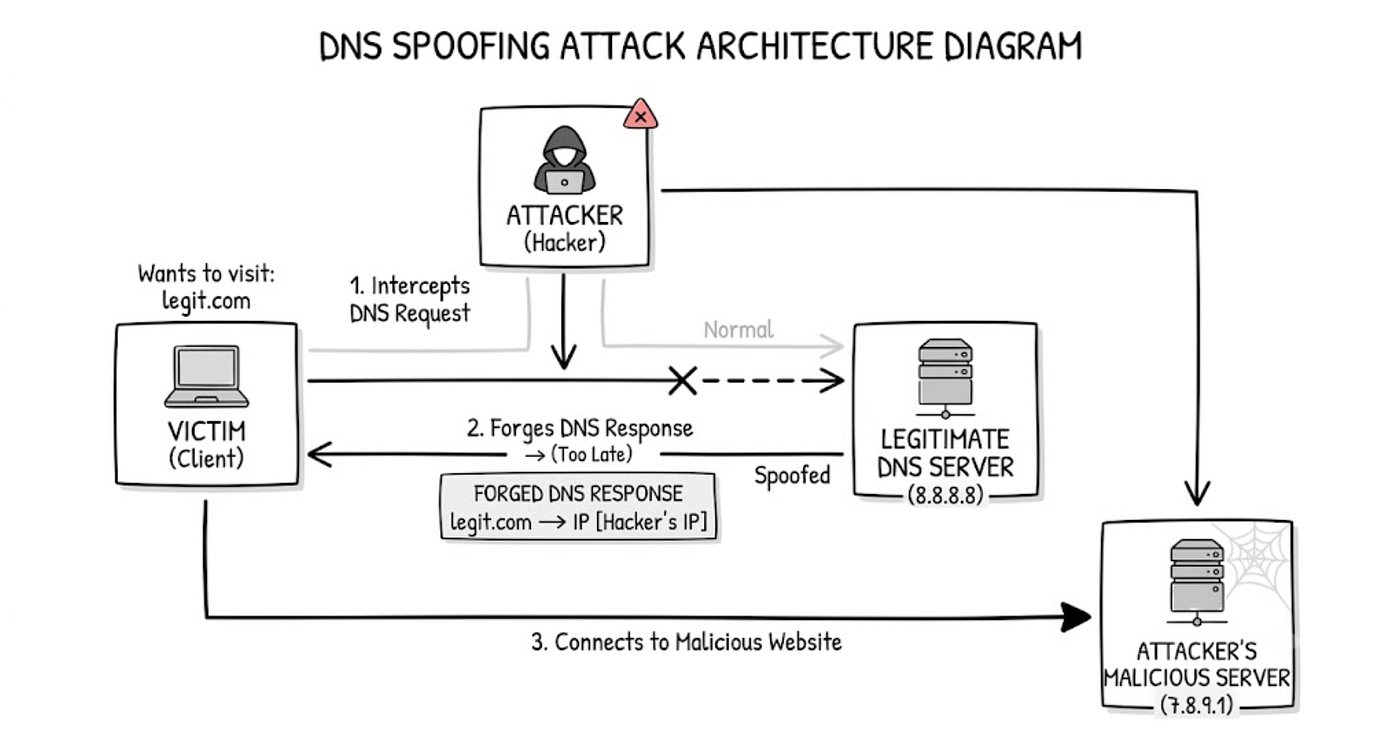
🔥 The Complete DNS Spoofing Attack Flow
Let’s put the entire attack together.
Suppose the victim wants:
bank.exampleNormal flow:
Victim
   │
   │ "Where is bank.example?"
   ▼
DNS Resolver
   │
   │ Query
   ▼
Authoritative DNS
   │
   │ Correct IP
   ▼
DNS Resolver
   │
   ▼
Victim
   │
   │ Connect
   ▼
Real Website
Now the attacker tries to interfere:
Victim
   │
   │ "Where is bank.example?"
   ▼
DNS Resolver
   │
   │ Query
   ├───────────────────────┐
   │                       │
   ▼                       ▼
Authoritative DNS       Attacker
   │                       │
   │ Correct Answer        │ Fake Answer
   │                       │
   └───────────┬───────────┘
               │
               ▼
         DNS Resolver
               │
               │
         Validation
               │
        ┌──────┴──────┐
        │             │
      Valid         Invalid
        │             │
        ▼             ▼
      Accept        Reject
If the attacker can successfully inject a forged response in a vulnerable scenario, the victim could be directed toward an attacker-controlled destination.
With proper validation and modern protections, the fake response should fail.
🔐 So How Do We Actually Mitigate DNS Spoofing?
Let’s make the defensive checklist.
1. Use DNSSEC Where Appropriate
DNSSEC allows DNS data to be cryptographically validated.
It protects the integrity and authenticity of DNS records.
DNS Answer
    ↓
Cryptographic Validation
    ↓
Valid? ── YES → Accept
    │
    └── NO → Reject
2. Use Modern, Secure DNS Software
Keep DNS resolvers and authoritative servers patched.
Security bugs don’t magically disappear.
Old Software
      ↓
Known Vulnerabilities
      ↓
Attack Surface
Regular updates reduce that exposure.
3. Randomize Query Parameters
Modern DNS resolvers use mechanisms such as:
Random Transaction IDs
+
Random Source Ports
This makes blind response spoofing much harder.
4. Use DNS Cookies Where Supported
DNS Cookies can help provide a lightweight mechanism for validating that DNS communication is associated with a legitimate client/server interaction.
Another layer.
Another obstacle for attackers.
5. Use DoH or DoT When Appropriate
Encrypted DNS can protect DNS communication from network observers and certain forms of local manipulation.
Client
   │
   │ 🔒 Encrypted
   ▼
DNS Resolver
But remember:
DoH/DoT and DNSSEC solve different problems.
DoH/DoT: protects the DNS transport path.
DNSSEC: helps validate DNS data authenticity and integrity.
They’re not interchangeable.
🔒 6. HTTPS Is Still Mandatory
Imagine DNS gets attacked.
The attacker tries to send you somewhere else.
If the destination is pretending to be your secure website, TLS certificate validation provides another important security boundary.
Your browser expects something like:
https://example.comThe server must prove its identity through the TLS certificate system.
So:
DNS
 ↓
Destination
 ↓
TLS Handshake
 ↓
Certificate Validation
 ↓
Encrypted HTTPS Session
This is why DNS security and HTTPS security complement each other.
👀 7. Monitor DNS Traffic
Security isn’t only about prevention.
We also need detection.
Watch for strange DNS behavior.
For example:
Huge DNS Query Volume
        +
Unexpected DNS Servers
        +
Suspicious Domain Changes
        +
Unusual TTL Changes
        +
Unexpected DNS Responses
In an enterprise environment, DNS logs can become extremely useful security telemetry.
Imagine your monitoring system suddenly sees:
1000 machines
       ↓
Querying
       ↓
Same suspicious domain
That’s worth investigating.
Maybe it’s malware.
Maybe it’s command-and-control traffic.
Maybe it’s a misconfiguration.
Either way…
Something interesting is happening.
🧠 One Important Distinction
Don’t confuse:
DNS Spoofing
with
DNS Hijacking
with
DNS Cache Poisoning
They are related but not exactly identical.
A simplified way to think about them:
DNS Spoofing
     │
     └── Forged / misleading DNS information
DNS Cache Poisoning
│
└── Fake DNS data gets stored in a resolver's cacheDNS Hijacking
│
└── Attacker gains control over DNS configuration
or redirects DNS resolutionThe exact terminology can vary depending on the attack scenario.
But the common goal is:
Make the victim resolve a domain to the wrong destination.
🧩 The Full Picture
Let’s put everything into one giant diagram.
                         USER
                           │
                           │
                    "example.com"
                           │
                           ▼
                    DNS RESOLVER
                           │
                           │
                 ┌─────────┴─────────┐
                 │                   │
                 ▼                   ▼
          DNS Cache              Authoritative
                 │                   DNS
                 │                   │
                 │             Signed Response
                 │                   │
                 └─────────┬─────────┘
                           │
                           ▼
                    DNSSEC Validation
                           │
                    ┌──────┴──────┐
                    │             │
                  VALID         INVALID
                    │             │
                    ▼             ▼
                ACCEPT          REJECT
                    │
                    ▼
               IP Address
                    │
                    ▼
              HTTPS / TLS
                    │
                    ▼
              REAL SERVER
And where does the attacker try to interfere?
                         ATTACKER
                            │
                 ┌──────────┴──────────┐
                 │                     │
          Fake DNS Response       DNS Manipulation
                 │                     │
                 └──────────┬──────────┘
                            │
                            ▼
                       DNS Layer
                            │
                            X
                     Validation fails
                            │
                            ▼
                          BLOCK
That’s what good security architecture tries to achieve.
Not:
“Attackers will never try.”
But:
“Even if they try, the next security layer should catch them.”
🏁 Attack vs Defense
Let’s finish our battle.
             ATTACKER
                 │
                 ▼
        Fake DNS Response
                 │
                 ▼
        DNS Cache Poisoning
                 │
                 ▼
          Wrong IP Address
                 │
                 ▼
          Victim Redirected
                 │
                 X
                 │
        DEFENSIVE LAYERS
                 │
       ┌─────────┼──────────┐
       ▼         ▼          ▼
    Random      DNSSEC    DoH / DoT
   ization       │          │
       │         │          │
       └─────────┼──────────┘
                 ▼
            HTTPS / TLS
                 │
                 ▼
          Monitoring
                 │
                 ▼
              ALERT 🚨
The attacker wants to change:
Name → IPThe defender wants to make sure:
Name → Correct IPAnd if something tries to interfere…
Detect it. Validate it. Reject it.
🧠 The One Analogy You Should Remember
Imagine your hostel has a reception desk.
You ask:
“Bhai, Saurabh ka room number kya hai?”
Reception says:
Room 217You trust that information.
Now imagine an attacker tries to whisper:
“No no… Saurabh is in Room 666.”
If the hostel has no verification system…
You might walk straight into Room 666. 😂
But now imagine the receptionist gives you:
Room 217
+
Official signed confirmation
You verify the confirmation.
The attacker’s fake answer doesn’t match.
You reject it.
That’s essentially the idea behind DNSSEC.
And if the entire conversation between you and reception is encrypted…
Someone standing nearby can’t simply listen in and change the conversation.
That’s where encrypted DNS protocols help.
And then, when you finally reach the room…
HTTPS/TLS gives you another identity check.
Multiple layers.
One after another.
🚀 Attack and Security Series: Episode 3 Complete
And that’s DNS Spoofing.
We started with something incredibly normal: google.com
But behind those few characters is a massive infrastructure of: DNS Resolvers Authoritative Servers Caches Recursive Queries Cryptographic Signatures TLS CDNs Security Monitoring
The internet looks simple from the browser.
Underneath…
It’s absolutely massive.
And that’s what makes cybersecurity so interesting.
You don’t always need to attack the website itself.
Sometimes…
You attack the map that tells the user where the website is.
That’s DNS Spoofing.
Attack Surface: DNS resolution
Goal: Manipulate domain-to-IP resolution
Common related attack: DNS cache poisoning
Defensive controls:
DNSSEC
+
Modern DNS implementations
+
Randomized transaction IDs
+
Random source ports
+
DNS Cookies
+
DoH / DoT
+
HTTPS / TLS
+
Monitoring
And perhaps the biggest lesson from this episode:
Never blindly trust the answer. Verify it.
That’s true in DNS.
And honestly…
It’s pretty good advice for cybersecurity in general. 😈
Attack and Security Series
Episode 3: DNS Spoofing
The rabbit hole continues. 🐇🌐
메타데이터
- post_id
- 16d0407fdbe3
- slug
- attack-and-security-series-episode-3-16d0407fdbe3
- url
- https://medium.com/@saurabh.hack.pandey/attack-and-security-series-episode-3-16d0407fdbe3
- canonical_url
- https://medium.com/@saurabh.hack.pandey/attack-and-security-series-episode-3-16d0407fdbe3
- author_url
- https://medium.com/@saurabh.hack.pandey
- status
- ok
- fetched_at
- 2026-08-08 06:39:37