Android On Device AI Series - 1 : ML-Kit
AI is everywhere right now, and yes, it is getting hyped hard. Every product roadmap has “add AI” somewhere on it. But on mobile, hype…
Android On Device AI Series - 1 : ML-Kit
Photo by BoliviaInteligente on Unsplash
AI is everywhere right now, and yes, it is getting hyped hard. Every product roadmap has “add AI” somewhere on it. But on mobile, hype meets a very practical wall: unstable networks, strict latency expectations, and users who do not want sensitive data constantly uploaded.
That is why on-device AI has become such an important shift for Android teams. It is not just about adding a cool feature; it is about delivering intelligence that is fast, private, and reliable in real-world conditions like low signal, metered data, or airplane mode.
This is where Google’s ML Kit comes in. In this article, we will explore exactly what ML Kit is, why it is the ideal tool for modern Android applications, and how you can easily implement its features in your own projects.
The real question is no longer “Can we add AI?” but rather: “Which on-device AI solution should we choose for this use case, and how easily can we roll it out?”
The Toolset: What Can ML Kit Actually Do?
ML Kit shifts machine learning workloads from cloud services to on-device processing. Its capabilities fall into three core areas:
- Computer Vision: Turn the camera into an intelligent sensor. Features like face detection, barcode scanning, pose detection, and object tracking run in real-time to analyze the physical environment.
- Natural Language Processing (NLP): Process text directly on the device. APIs for language identification, entity extraction (finding addresses or tracking numbers), and translation across 50+ languages work instantly, even offline.
- Generative AI: On compatible devices, ML Kit integrates with Gemini Nano via AICore. This enables advanced language features like text summarization, proofreading, tone rewriting, and custom prompt-based interactions with lower latency and improved privacy.
Together, these tools allow developers to build apps that see, understand, and generate information directly on the silicon.
Hands-on Implementation Samples
To demonstrate how ML Kit capabilities translate into real applications, our reference project includes three end-to-end examples spanning computer vision, natural language processing, and generative AI. Together, they showcase how multiple on-device AI technologies can be combined to create responsive, intelligent user experiences.
A. Real-Time Vision: Physical Landmark Pose Detection
The PoseDetectionScreen demonstrates ML Kit's real-time computer vision capabilities. As the camera feed is processed, the application detects and tracks 33 body landmarks, rendering them on a custom canvas overlay. Color-coded keypoints distinguish left, right, and center body positions, allowing users to see movement captured and visualized instantly.
[embed]
// PoseDetectionScreen.kt (excerpt)
val options = AccuratePoseDetectorOptions.Builder()
    .setDetectorMode(AccuratePoseDetectorOptions.STREAM_MODE)
    .build()
val poseDetector = PoseDetection.getClient(options)

// Inside CameraX analysis loop
poseDetector.process(image)
    .addOnSuccessListener { pose ->
        val landmarks = pose.allPoseLandmarks
        // Render 33 landmarks and connecting bones on Canvas
    }
    .addOnCompleteListener { imageProxy.close() }
B. Intelligent NLP Pipeline: Text Recognition and Translation
Building on the vision capabilities, the TextRecognitionScreen combines computer vision and NLP into a single workflow. The application first extracts text from an image, automatically identifies the source language, and then translates the content into any supported target language. The entire pipeline runs locally, enabling fast and reliable multilingual experiences even without network connectivity.
[embed]
// TextRecognitionUseCase.kt & TranslationUseCase.kt (excerpt)
class TextRecognitionUseCase : Closeable {
    private val recognizer = TextRecognition.getClient(TextRecognizerOptions.DEFAULT_OPTIONS)

    suspend fun recognize(bitmap: Bitmap): Text {
        val image = InputImage.fromBitmap(bitmap, 0)
        return recognizer.process(image).await()
    }
    override fun close() = recognizer.close()
}

class TranslationUseCase : Closeable {
    private var currentTranslator: Translator? = null

    fun getTranslator(sourceLang: String, targetLang: String): Translator {
        currentTranslator?.close()
        val options = TranslatorOptions.Builder()
            .setSourceLanguage(sourceLang)
            .setTargetLanguage(targetLang)
            .build()
        return Translation.getClient(options).also { currentTranslator = it }
    }

    override fun close() {
        currentTranslator?.close()
        currentTranslator = null
    }
}

// Usage in ViewModel after text is recognized
val translator = translationUseCase.getTranslator(TranslateLanguage.ENGLISH, TranslateLanguage.SPANISH)
translator.downloadModelIfNeeded()
    .continueWithTask { translator.translate(recognizedText) }
    .addOnSuccessListener { translatedText ->
        // Update UI with translated text
    }
Why Use ML Kit?
ML Kit provides a fast, private, and cost-effective way to add AI capabilities to mobile applications. By running machine learning models directly on the device, it enables low-latency experiences for tasks such as text recognition and object detection, making real-time interactions feel responsive and seamless. Since data can remain on the user’s device, ML Kit also helps improve privacy by reducing the need to send sensitive information to external servers.
Another major advantage is offline reliability. Core AI-powered features can continue to function even when internet connectivity is limited or unavailable. In addition, on-device inference can reduce operational costs by minimizing dependence on cloud-based processing. ML Kit’s simple APIs also make advanced AI features accessible to developers without requiring extensive machine learning expertise.

To understand where ML Kit fits within the mobile AI ecosystem, it helps to compare it with a few common alternatives:
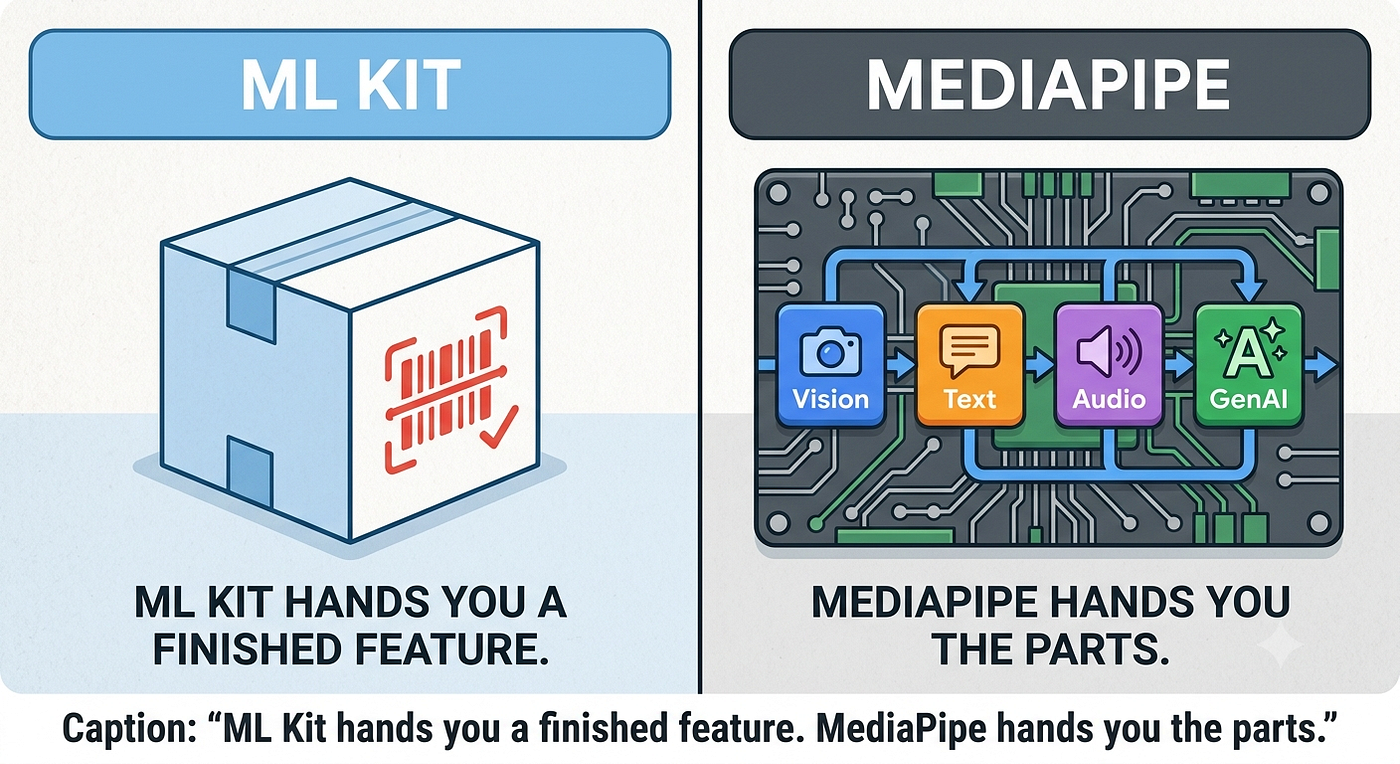
- Google ML Kit — The easiest starting point. It provides ready-to-use AI features like text recognition, barcode scanning, translation, and Gemini Nano integration with minimal setup.
- Google MediaPipe — Best for more advanced real-time pipelines that combine video, audio, and sensor data, such as AR, hand tracking, or pose estimation.
- LiteRT (formerly TensorFlow Lite) — A lower-level engine for custom models when you need more control over performance and hardware optimization.
- Apple Core ML — Apple’s native framework for iOS apps, used when building AI features specifically for the Apple ecosystem.
- Cloud APIs — Best for very large or complex AI tasks that mobile hardware cannot handle well, but they require internet access and add latency.
A useful rule of thumb is to start with the highest level of abstraction that meets your requirements. For most mobile AI applications, ML Kit provides the fastest path to production with the least implementation complexity. Developers should only move to MediaPipe, LiteRT, or cloud-based solutions when their requirements extend beyond the capabilities provided by ML Kit.
Under the Hood: Modularity and Model Deployment
Models are stored on the device in one of several locations depending on how they are integrated into an app:
- Google Play Services (Unbundled): Models reside within Google Play Services and are shared across different apps, which helps keep your individual app size small.
- App Storage (Bundled or Dynamic): Models are either built directly into the app’s own package or downloaded on-demand into the app’s private storage area.
- AICore (GenAI Models): Large foundation models like Gemini Nano are managed by a shared Android system service called AICore.

AICore is a game-changer because it allows your phone to run powerful generative AI models locally rather than relying on the cloud. This architecture provides shared intelligence, meaning multiple apps tap into the same system-level model instance, saving massive amounts of storage space compared to each app downloading its own LLM. It also unlocks advanced capabilities — like high-quality speech recognition and complex rewriting — that were previously too heavy for mobile. Just like the classic ML Kit APIs, AICore ensures your sensitive data remains private, works instantly without an internet connection, and spares developers from expensive cloud inference costs.
Rating ML Kit: How Developer-Friendly Is It?
To objectively evaluate how well ML Kit fits into the modern Android ecosystem, we ran it through a custom “Android On-Device AI Rater” — a script designed to score AI libraries based on developer experience, integration ease, and performance.
The Final Score: 9 / 10 — ✅ Excellent
Here is why ML Kit scores so highly as an Android-first solution:
- Android Integration (10/10): It is as native as it gets. You add a standard Gradle dependency via Maven Central, and you are done. There is no need to mess with CMake, NDK, or manual C++ JNI bindings.
- API Simplicity (9/10): Most tasks require less than 10 lines of code. You instantiate a client, pass an
InputImage, and get a structured result back. - Performance & HW Acceleration (9.5/10): It automatically delegates to the optimal hardware (GPU, NPU, or NNAPI) without requiring complex manual configuration.
- Documentation & Stability (10/10): Being a first-party Google product, it boasts comprehensive documentation, official sample apps, and a highly stable release cadence.
The only area where ML Kit takes a slight hit is Model Compatibility (6/10). Because it is designed to be a “turnkey” solution, you are largely locked into Google’s pre-trained models (though some APIs support custom TensorFlow Lite models).
However, for most product teams, this isn’t a bug — it’s a feature. You are trading ultimate customizability for ultimate ease of use.
Conclusion: Stop Building Infrastructure, Start Building Features
The on-device AI paradigm is undergoing a fundamental shift. We are moving rapidly past the era where mobile AI was treated as a collection of standalone, disconnected tricks — like parsing a static barcode or cropping a face out of a portrait. Today, on-device intelligence is becoming a continuous, conversational, and context-aware platform.
However, the biggest trap for Android teams right now is treating every AI feature like a research project. You don’t always need to deploy custom models, manage low-level C++ bindings, or pay for expensive cloud API calls just to add intelligence to your app.
By unifying Classic APIs (such as OCR and Pose Detection) with Generative AI runtimes (like Gemini Nano via AICore), ML Kit gives mobile engineers a practical path forward. It allows you to build features that scale infinitely without bloating infrastructure budgets, respects user privacy by default, and maintains functional utility even when cellular connections drop entirely.
As Android evolves from a standard mobile operating system into an active intelligence system, the apps that stand out will be those that integrate these layers seamlessly. Implementing ML Kit isn’t just about deploying another third-party library; it is about choosing the right tool for the job so you can stop worrying about model deployment and get back to building a highly responsive, offline-first user experience that users can genuinely trust.
The tools are ready, the APIs are modular, and the difficulty has been lowered to a simple implementation call. The next step is choosing where to build it first.
Resources
Love you all.
Stay tune for upcoming blogs.
Take care.
메타데이터
- post_id
- 17be6a5fcb06
- slug
- android-on-device-ai-series-1-ml-kit-17be6a5fcb06
- url
- https://proandroiddev.com/android-on-device-ai-series-1-ml-kit-17be6a5fcb06
- canonical_url
- https://proandroiddev.com/android-on-device-ai-series-1-ml-kit-17be6a5fcb06
- author_url
- https://medium.com/@oguzhanaslann
- status
- ok
- fetched_at
- 2026-07-09 05:26:43