Hunt Before They Hide -From Device Codes to Fake IT Support Detecting Active Microsoft 365 Identity…
Right now, anyone can buy a cheap monthly subscription to break into Microsoft 365 accounts. These toolkits do not steal passwords. They do…
Hunt Before They Hide -From Device Codes to Fake IT Support Detecting Active Microsoft 365 Identity Attacks in Sentinel
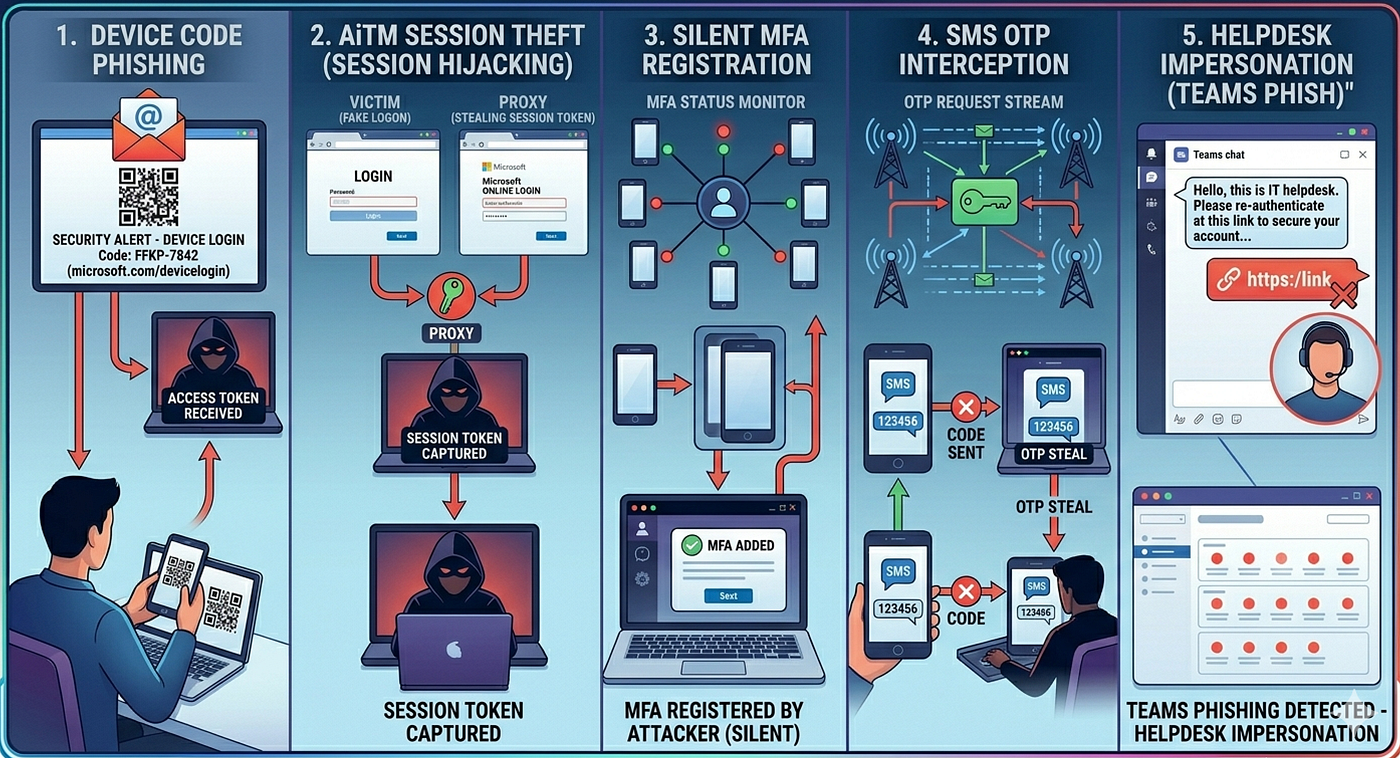
Right now, anyone can buy a cheap monthly subscription to break into Microsoft 365 accounts. These toolkits do not steal passwords. They do not use fake login pages. They do not trigger normal MFA alarms.
The FBI and major security teams are already seeing them everywhere. When law enforcement shuts one platform down, it bounces back within days.
Advanced attacks that used to require government-backed hackers are now sold like regular software. This means our classic advice — use strong passwords, turn on MFA and avoid weird links — no longer works. Some of these new attacks do not even use links. One only requires a phone number.
What This Article Covers: We will break down Five real attack methods targeting Microsoft 365 identities today. For each method, you will get:
- How it works: The exact mechanics.
- Log visibility: What to look for.
- KQL detections: Ready-to-use Sentinel queries.
- Prevention: How to stop them completely.
- Threat groups: The actual actors using them.
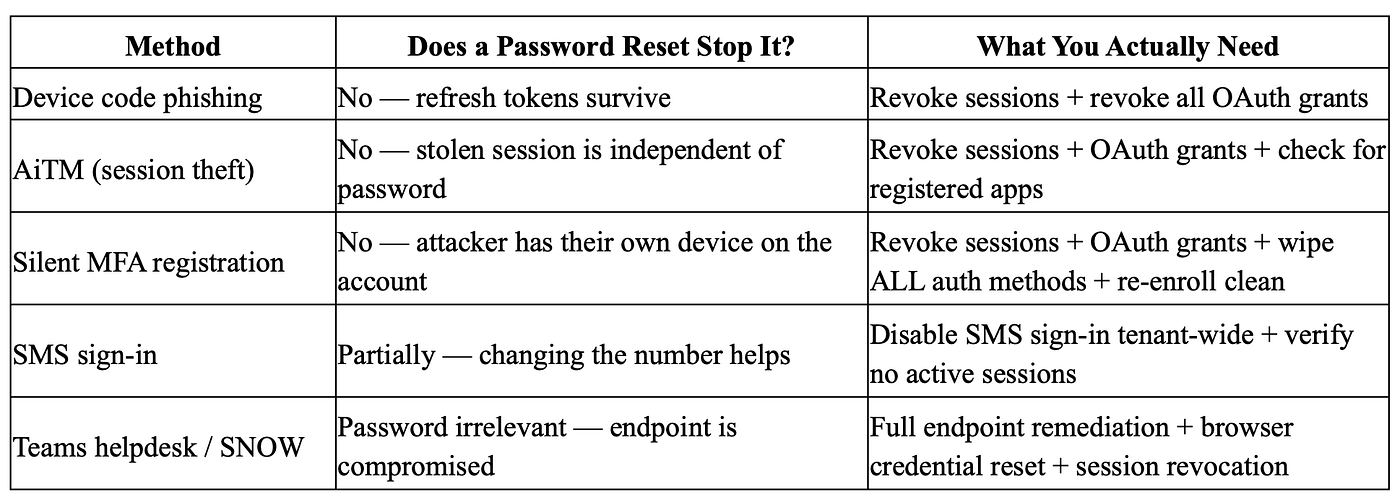
The Ultimate Trap: Every single one of these attacks shares a fatal flaw in how security teams respond. A defender resets the user’s password, closes the ticket, and assumes the crisis is over.
But the attacker is still inside.At the end of this guide, we will walk through exactly why that happens — and how to actually kick them out for good.
Attack Methods
1.Device Code Phishing: Getting Microsoft to Log In for Them
Microsoft has a sign-in feature called “device code flow”. It is used for things like smart TVs, kiosks or printers that do not have a normal keyboard or browser. The device shows you a short code, you go to microsoft.com/devicelogin on another device, enter the code, do MFA as usual and the device gets access. This is a normal useful feature and attackers have started abusing it at large scale since around early 2025.
They get an email that looks like SharePoint, DocuSign or finance telling them: “Go to microsoft.com/devicelogin and enter this code.” They go to the real Microsoft site, enter the code, sign in, approve MFA and see a success message.
The problem: that code came from the attacker’s app not from a real business system. By approving it the user gives the attacker’s app an OAuth token for their account. The attacker never sees the password or MFA code, but still gets full access.
Who is using this method
Storm-2372 (Russia-aligned active since at least August 2024) ran device code phishing campaigns specifically targeting governments, NGOs and defence organizations across multiple regions.
Kali365 — flagged by the FBI on May 21, 2026 — is a PhaaS platform available on Telegram that fully automates this attack. AI-written lure emails, real-time tracking dashboards, automated token capture. You pay, you get compromised accounts delivered to your dashboard. No technical knowledge required. Multiple actors are already using it.
EvilTokens — documented by Sekoia in March 2026 — is another PhaaS platform running the same technique. It compromised over 340 organizations across five countries starting February 2026, using Cloudflare Workers redirects to obscure its infrastructure. It also offers a “Portal Browser” that lets attackers manage hundreds of compromised M365 accounts simultaneously.
TA4903 (financially motivated) adopted device code phishing in April 2026, impersonating Microsoft and DocuSign with custom kits that look nearly identical to EvilTokens.
How to stop it
Use Conditional Access to block this sign‑in method by default. In the Authentication flows section, create a policy that denies device code flow for everyone. Only allow it for a small set of users or groups who really need it for shared devices (like kiosks or TVs) and make sure those exceptions are clearly documented.
2. AiTM Proxy Attacks: The Invisible Man in Your Login
In an Adversary‑in‑the‑Middle (AiTM) attack, the victim sees the real Microsoft login page not a fake copy. The attacker runs a proxy that sits between the user and Microsoft, forwarding everything in real time.
The user types their password, does MFA and logs in normally. Microsoft sets a valid session cookie and the attacker quietly keeps a copy of that cookie. The user sees their real mailbox or Teams, while the attacker opens the same session somewhere else.
Because the attacker just relays the whole flow, this method bypasses normal MFA like SMS, OTP and push prompts. It is already being sold as a service and used by groups that focus on high‑value targets such as executives.
For delivery, some campaigns avoid links entirely and send a “clean” email with a QR code instead. The target scans it on their phone, passes a bot check and lands on the proxy page, where their session is stolen.
Who is using this method
VENOM — discovered by Abnormal AI in April 2026 — is a closed-access platform (referral only, not sold openly) that specifically targets executives. 60% of its targets hold C-level or Board titles. VENOM uses AiTM as its primary access method, combined with a persistence trick
VENOM is a sneaky phishing attack that steals login details by bypassing standard email security filters.
Here is how the attack works in simple steps:
- The Fake Email: A high-level boss (like a CEO) gets an email. It looks like it came from a coworker.
- The Unicode QR Code: The email has no web links. Instead, it contains a QR code made out of text symbols. Security scanners cannot read or block it.
- The Phone Scan: The victim scans the QR code using their mobile phone.
- The Anti-Scanner Guard: The website checks if a real person opened it. It blocks automated security bots and researchers.
- The Login Theft: The victim sees a normal login page and signs in. The hackers instantly steal their active session and gain access.
Tycoon2FA / Storm-1747 — until its disruption by Europol in March 2026, this was the most prolific AiTM platform on the market, responsible for roughly 62% of all AiTM phishing attempts Microsoft was blocking monthly. It was back to pre-disruption volume within 48 hours of the takedown.
Starkiller (operated by a group called Jinkusu) is a newer AiTM-as-a-service with a subscription dashboard, further demonstrating how commoditised the technique now is.
How to stop it
FIDO2 passkeys are the only authentication method that fundamentally breaks AiTM.
For organizations not yet ready to roll out passkeys, the next best control is Conditional Access policies that enforce compliant device status a stolen session cookie used from an attacker’s machine will fail the device compliance check.
3. Silent MFA Device Registration: The Attacker Who Registered Their Own Authenticator on Your Account
Most hackers only steal your temporary login token. Once that token expires, they get kicked out.
VENOM does something much worse. They use your stolen login to add their own authenticator app onto your account.VENOM solved this problem in a way that is almost simple.
While the victim’s live session is active right after the AiTM proxy captures it VENOM uses that session to register a second authenticator on the victim’s real Microsoft 365 account. Not replacing the existing one. Just adding a new one alongside it. The victim’s phone still works. Their original authenticator still works. Nothing changes from their perspective.
Changing passwords does not remove the hacker’s authenticator app. Ending active sessions does not stop them either. An admin must manually open Microsoft Entra ID. They must delete every unknown authentication device and reset the user completely. Otherwise, the hacker keeps access forever.
Most security playbooks forget to include this step. This means fixing a VENOM hack with a simple password reset does not actually fix the problem at all.
How to stop it
The immediate operational fix is to require admin approval (or a Temporary Access Pass) for any new MFA method registration in Entra ID. This means an attacker with a stolen session cannot silently register their own device the registration request sits in a queue requiring admin action.
Entra ID > Authentication Methods > Registration Campaign > Require admin review
4. SMS Sign-In Abuse: The Attack That Only Needs Your Phone Number
This attack requires no hacking kits or special skills. The attacker only needs the victim’s phone number.
Microsoft has a feature called SMS-based passwordless sign-in. It lets users log in to office.com using just a phone number and a text code no password required. During a mandatory system update in 2025, Microsoft quietly enabled this by default for anyone with an MFA phone number. Most admins never noticed.
To break in, an attacker types the victim’s phone number at office.com, triggers a login code and steals it using one of three methods:
- SIM Swap: The hacker tricks the mobile carrier into moving the victim’s number to a new SIM card.
- Network Interception: Criminals intercept unencrypted text messages directly from the phone network.
- Phone Scam: The hacker calls the victim, pretends to be IT support, and convinces them to read the code aloud.
How to stop it
Entra ID > Protection > Authentication Methods > SMS > Edit > uncheck “Use for sign-in”
This removes the passwordless phone-number login while leaving SMS available as an MFA second factor for users who need it. These are two separate settings.
5.Teams Helpdesk Impersonation: When the Attacker Just Asks Nicely
Every other method in this article abuses a technical feature — OAuth flows, authentication protocols, policy misconfigurations. This one abuses something much harder to patch: the fact that when someone’s inbox is drowning in spam and a friendly IT person shows up on Teams offering to help, most people say yes.
Between March and April 2026, 77% of observed incidents targeted senior employees — executives, CFOs, IT directors. These are people who expect responsive IT support, who are busy, and who are trained to trust platforms their organisation uses.
The full attack chain
Step 1 — Create the crisis The hackers flood the target’s inbox with thousands of spam emails in minutes. The inbox becomes completely unusable, leaving the victim distracted and desperate for a solution.
Step 2 — The helper arrives on Teams Right away, an external Microsoft Teams account named “IT Helpdesk” messages the victim. The hacker offers to fix the email issue immediately. Even though Teams warns that the user is external, stressed victims usually click “Accept” anyway.
Step 3 — The fix The hacker sends a link to a fake “Mailbox Repair” utility or asks the victim to open remote access tools like Quick Assist. Either way, they install the SNOW malware suite. This toolset steals saved passwords and web tokens, giving the hacker total access to the computer.
Who is using this method
SNOWBELT is a malicious Chromium browser extension that acts as a backdoor, harvesting saved credentials and session cookies.
SNOWGLAZE is a Python tunneler that creates a persistent encrypted channel back to attacker infrastructure.
SNOWBASIN is a remote access backdoor. Together they give the attacker persistent access to the endpoint, the browser, and everything in it — including saved Microsoft 365 session tokens.
How to stop it
The most impactful single control is restricting Teams external access. By default, any Microsoft 365 tenant can contact your users. Change this in the Teams Admin Center:
Teams Admin Center > External Access > switch from “Allow all external domains” to “Allow only specific external domains”
Hunting & Detection Rules
1.Email URL Click → Device Code Auth Within 15 Minutes
let ClickWindow = 15m;
let PhishClicks = UrlClickEvents
| where Timestamp > ago(1d)
| project ClickTime  = Timestamp, UPN = tolower(AccountUpn),ClickedUrl = Url,ActionType,ClickIP = IPAddress,NetworkMessageId;
let SuspiciousSignIns =
    SigninLogs
    | where TimeGenerated > ago(1d)
    | where AuthenticationProtocol in ("deviceCode")
    | where ResultType == 0
    | extend
          IsManaged  = tostring(DeviceDetail.isManaged),
          DeviceId   = tostring(DeviceDetail.deviceId),
          OS         = tostring(DeviceDetail.operatingSystem),
          Country    = tostring(LocationDetails.countryOrRegion),
          ADjoined = tostring(DeviceDetail.trustType),
          NamedLocation=tostring(parse_json(NetworkLocationDetails)[0].networkType)
| where NamedLocation !in ("trustedNamedLocation","namedNetwork")
| where ADjoined !in ("Azure AD registered","Azure AD joined" ,"Hybrid Azure AD joined")
| project SignInTime = TimeGenerated, UPN = tolower(UserPrincipalName), AuthProto = AuthenticationProtocol,SignInIP = IPAddress,AppName = AppDisplayName, AppId,NamedLocation, ADjoined,IsManaged,DeviceId,OS,Country,RiskLevel  = RiskLevelDuringSignIn,CorrelationId;
// Correlate: same user, sign-in within 15 minutes of click
PhishClicks
| join kind=inner SuspiciousSignIns on UPN
| where SignInTime between (ClickTime .. (ClickTime + ClickWindow))
| extend
    TimeDeltaMinutes = datetime_diff('minute', SignInTime, ClickTime),
    SameIP           = (ClickIP == SignInIP),
    UnmanagedDevice  = (IsManaged != "true" or isempty(DeviceId)),
    HighRisk         = (RiskLevel in ("high", "medium"))
| project UPN,ClickTime,ClickedUrl, ActionType,SignInTime,TimeDeltaMinutes,AuthProto,ppName,AppId,ClickIP,SignInIP,SameIP, UnmanagedDevice,Country, OS,RiskLevel,HighRisk,CorrelationId,NetworkMessageId
2.Device Code Token Issued → Replayed from Different IP
let TokenReplayWindow = 15m;
let DeviceCodeIssuance =
    SigninLogs
    | where TimeGenerated > ago(1d)
    | where AuthenticationProtocol == "deviceCode"
    | where ResultType == 0
    | extend
          AuthCountry = tostring(LocationDetails.countryOrRegion),
          IsManaged   = tostring(DeviceDetail.isManaged),
          DeviceId    = tostring(DeviceDetail.deviceId)
    | project UPN=tolower(UserPrincipalName),DeviceCodeTime=TimeGenerated,VictimIP=IPAddress,AuthCountry,IsManaged,DeviceId,CorrelationId;
let TokenReplay = AADNonInteractiveUserSignInLogs
    | where TimeGenerated > ago(1d)
    | where ResultType == 0
    | where AuthenticationProtocol in ("none", "oAuth2", "deviceCode")
    | extend
          UseCountry = tostring(parse_json(LocationDetails).countryOrRegion),
          ASN         = AutonomousSystemNumber,
          ADjoined = tostring(parse_json(DeviceDetail).trustType),
          NamedLocation=tostring(parse_json(NetworkLocationDetails)[0].networkType)
    | where NamedLocation !in ("trustedNamedLocation","namedNetwork")
    | where ADjoined !in ("Azure AD registered","Azure AD joined" ,"Hybrid Azure AD joined")
    | project UPN=tolower(UserPrincipalName),ReplayTime=TimeGenerated,AttackerIP=IPAddress,Resource=ResourceDisplayName,AppName=AppDisplayName,UseCountry,ASN,UserAgent;
DeviceCodeIssuance
| join kind=inner TokenReplay on UPN
| where ReplayTime between (DeviceCodeTime .. (DeviceCodeTime + TokenReplayWindow))
| where VictimIP != AttackerIP
| extend
    CrossCountry        = (AuthCountry != UseCountry),
    AutomationLogin    = (UserAgent in~ ("node", "undici") or UserAgent matches regex "axios/.*"),
    UnmanagedDevice     = (IsManaged != "true" or isempty(DeviceId)),
    TimeDeltaSeconds    = datetime_diff('second', ReplayTime, DeviceCodeTime)
| where CrossCountry == true
| project UPN,DeviceCodeTime,ReplayTime,TimeDeltaSeconds,VictimIP,AttackerIP,AuthCountry,UseCountry,CrossCountry,Resource,AppName,ASN,UserAgent,AutomationLogin,UnmanagedDevice,CorrelationId
3.Post-Password-Reset Session Reuse
// Password reset events
let Resets =
    AuditLogs
    | where TimeGenerated > ago(7d)
    | where OperationName in (
        "Reset password (by admin)" //add if you want self reset activity "Change password (self-service)"
      )
    | extend UPN = tolower(tostring(TargetResources[0].userPrincipalName))
    | where isnotempty(UPN)
    | summarize
        ResetTime = max(TimeGenerated),
        ResetBy   = any(tostring(InitiatedBy.user.userPrincipalName))
        by UPN;
// Pre-reset sessions
let PreResetSessions =
    AADNonInteractiveUserSignInLogs
    | where TimeGenerated > ago(14d)
    | where ResultType == 0
    | where isnotempty(SessionId)
    | where isnotempty(IPAddress)
    | project UPN = tolower(UserPrincipalName),SessionId,EventTime = TimeGenerated,IP = IPAddress;
// Post-reset untrusted sessions
let PostResetSessions =
    AADNonInteractiveUserSignInLogs
    | where TimeGenerated > ago(7d)
    | where ResultType == 0
    | where isnotempty(SessionId)
    | where isnotempty(IPAddress)
    | extend
        ADjoined      = tostring(parse_json(DeviceDetail).trustType),
        NamedLocation = tostring(parse_json(NetworkLocationDetails)[0].networkType),
        GeoCountry    = tostring(parse_json(LocationDetails).countryOrRegion),
        GeoCity       = tostring(parse_json(LocationDetails).city)
    | where NamedLocation !in ("trustedNamedLocation", "namedNetwork")
    | where ADjoined !in ("Azure AD registered", "Azure AD joined", "Hybrid Azure AD joined")
    | where AutonomousSystemNumber !in (8075, 8068, 12076)
    | project
        UPN          = tolower(UserPrincipalName),
        SessionId,
        PostTime     = TimeGenerated,
        PostIP       = IPAddress,
        PostApp      = AppDisplayName,
        PostLocation = tolower(iif(isempty(GeoCity),GeoCountry,strcat(GeoCity, ", ", GeoCountry)));
// Pre-reset session state
let PreResetState =
    Resets
    | join kind=inner PreResetSessions on UPN
    | where EventTime < ResetTime
    | summarize
        SessionGranted = min(EventTime),
        LastSeenBefore = max(EventTime),
        // Take IP from the event closest to the reset time
        SessionIP  = take_any(IP)
        by UPN, ResetTime, ResetBy, SessionId
    // drop incomplete rows
    | where isnotempty(SessionGranted)
    | where isnotempty(SessionIP)
    | where isnotempty(SessionId)
    // Session must be at least 10 minutes old at reset time
    | extend SessionAgeAtReset = datetime_diff('minute', ResetTime, SessionGranted)
    | where SessionAgeAtReset >= 10
    // Session must have been active within 24h before reset
    | where LastSeenBefore > (ResetTime - 24h);
// Correlate with post-reset activity
PreResetState
| join kind=inner PostResetSessions on UPN, SessionId
// Post-reset activity must be after the reset
| where PostTime > ResetTime
| where PostTime > (ResetTime + 10m)
// Cap to 24h post-reset window
| where PostTime < (ResetTime + 24h)
// Post-reset IP must differ from pre-reset session IP
| where PostIP != SessionIP
//Summarise
| summarize
    PostResetCount     = count(),
    PostResetIPs       = make_set(PostIP),
    PostResetApps      = make_set(PostApp),
    PostResetLocations = make_set(PostLocation),
    FirstPostReset     = min(PostTime),
    LastPostReset      = max(PostTime)
    by UPN, ResetTime, ResetBy, SessionId,
       SessionGranted, LastSeenBefore, SessionIP, SessionAgeAtReset
| where PostResetCount >= 2
| extend MinutesSinceReset = datetime_diff('minute', FirstPostReset, ResetTime)
| project UPN,ResetTime=format_datetime(ResetTime,"yyyy-MM-dd HH:mm:ss"),ResetBy,SessionId,SessionGranted=format_datetime(SessionGranted,"yyyy-MM-dd HH:mm:ss"),SessionAgeAtReset,LastSeenBefore=format_datetime(LastSeenBefore,"yyyy-MM-dd HH:mm:ss"),SessionIP,MinutesSinceReset,FirstPostReset=format_datetime(FirstPostReset,"yyyy-MM-dd HH:mm:ss"),LastPostReset=format_datetime(LastPostReset,"yyyy-MM-dd HH:mm:ss"),PostResetCount,PostResetIPs,PostResetApps,PostResetLocations
| sort by MinutesSinceReset asc
4. Device code token immediately followed by data harvesting
// Subnet
let extractSubnet = (ip:string, prefixLen:int) {
    let octets = split(ip, ".");
    case(
        prefixLen == 16, strcat(octets[0], ".", octets[1]),
        prefixLen == 24, strcat(octets[0], ".", octets[1], ".", octets[2]),
        octets[0]
    )
};
// Baselines
let KnownASNPerUser =
    AADNonInteractiveUserSignInLogs
    | where TimeGenerated between (ago(14d) .. ago(1d))
    | where ResultType == 0
    | summarize KnownASN = make_set(AutonomousSystemNumber)
        by UPN = tolower(UserPrincipalName);
let KnownUserIPs =
    CloudAppEvents
    | where TimeGenerated between (ago(14d) .. ago(1d))
    | extend UPN = tolower(tostring(parse_json(RawEventData).UserId))
    | summarize KnownIPs = make_set(IPAddress) by UPN;
let FirstSeenSession =
    CloudAppEvents
    | where TimeGenerated > ago(14d)
    | extend AADSessionid = coalesce(
        tostring(parse_json(RawEventData).AADSessionId),
        tostring(parse_json(RawEventData).SessionId)
      )
    | where isnotempty(AADSessionid)
    | summarize FirstSeen = min(TimeGenerated) by AADSessionid;
// Token grants
let DCTokenGrant =
    AADNonInteractiveUserSignInLogs
    | where TimeGenerated > ago(2d)
    | where ResultType == 0
    | where AuthenticationProtocol in ("none", "oAuth2", "deviceCode")
    | where isnotempty(SessionId)
    | extend
        GeoCountry    = tostring(parse_json(LocationDetails).countryOrRegion),
        GeoCity       = tostring(parse_json(LocationDetails).city),
        GeoISO        = tolower(tostring(parse_json(LocationDetails).countryOrRegion)),
        ASN           = AutonomousSystemNumber,
        ADjoined      = tostring(parse_json(DeviceDetail).trustType),
        NamedLocation = tostring(parse_json(NetworkLocationDetails)[0].networkType)
    | where ASN !in (8075, 8068, 12076)
    | where NamedLocation !in ("trustedNamedLocation", "namedNetwork")
    | where ADjoined !in ("Azure AD registered", "Azure AD joined", "Hybrid Azure AD joined")
    | extend GrantSubnet = extractSubnet(IPAddress, 16)
    // One row per SessionId — deduplicate multiple events per session
    | summarize
        GrantTime     = min(TimeGenerated),
        GrantIP       = any(IPAddress),
        GrantSubnet   = any(GrantSubnet),
        GrantLocation = tolower(any(iif(isempty(GeoCity),
                            GeoCountry,
                            strcat(GeoCity, ", ", GeoCountry)))),
        GeoISO        = any(GeoISO),
        AppId         = any(AppId),
        GrantASN      = any(ASN)
        by UPN = tolower(UserPrincipalName), AADNonSessionId = SessionId;
//Post-grant data access
let PostCompromiseActivity =
    CloudAppEvents
    | where TimeGenerated > ago(2d)
    | where ActionType in ("FileAccessed", "MailItemsAccessed")
    | extend
        UPN          = tolower(tostring(parse_json(RawEventData).UserId)),
        // FileAccessed -AADSessionId, MailItemsAccessed -SessionId
        AADSessionid = coalesce(
            tostring(parse_json(RawEventData).AADSessionId),
            tostring(parse_json(RawEventData).SessionId)
        )
    | where isnotempty(AADSessionid)
    | extend ActivitySubnet = extractSubnet(IPAddress, 16)
| project UPN,ActivityTime=TimeGenerated,ActivityIP=IPAddress,ActivitySubnet,ActivityLocation=tolower(iif(isempty(City),CountryCode,strcat(City,", ",CountryCode))),Activity=ActionType,TargetResource=ObjectName,AADSessionid,ActivityISO=tolower(CountryCode);
// Correlation
DCTokenGrant
| join kind=inner PostCompromiseActivity
    on $left.AADNonSessionId == $right.AADSessionid
// Activity must occur within 15 minutes of grant
| where ActivityTime between (GrantTime .. (GrantTime + 15m))
// Activity must come from a different /16 subnet than the grant
| where GrantSubnet != ActivitySubnet
// Session must be newly seen within last 24h — not a long-running known session
| join kind=leftouter FirstSeenSession on AADSessionid
| where FirstSeen >= ago(24h)
// Activity IP must not exist in user's 14d known IP history
| join kind=leftouter KnownUserIPs on UPN
| where not(set_has_element(KnownIPs, ActivityIP))
| join kind=leftouter KnownASNPerUser on UPN
| extend IsNewASN = iif(set_has_element(KnownASN, GrantASN), 0, 1)
// Summarise per session
| summarize
    ActivityCount         = count(),
    Activities            = make_set(Activity),
    Resources             = make_set(TargetResource),
    AttackerIPs           = make_set(ActivityIP),
    AttackerSubnets       = make_set(ActivitySubnet),
    ActivityLocations     = make_set(ActivityLocation),
    ActivityWindowStart   = min(ActivityTime),
    ActivityWindowEnd     = max(ActivityTime),
    IsNewASN              = max(IsNewASN)
    by UPN, GrantTime, GrantIP, GrantSubnet, GrantLocation, GeoISO, AppId, GrantASN
// Remove grant location from activity locations — only show foreign locations
| extend ForeignActivityLocations = set_difference(ActivityLocations, pack_array(GrantLocation))
// Must have at least one activity from a different country than the grant
| where array_length(ForeignActivityLocations) > 0
// Minimum 3 activity events to reduce single-event noise
| where ActivityCount >= 3
// Risk score: subnet mismatch + foreign country + unknown IP = base 3
// +1 if grant ASN is also new for this user = max 4
| extend RiskScore = 3 + IsNewASN
| extend ActivityDurationMin = datetime_diff('minute', ActivityWindowEnd, ActivityWindowStart)
| project UPN,RiskScore,IsNewASN=iif(IsNewASN==1,"Yes","No"),GrantTime=format_datetime(GrantTime,"yyyy-MM-dd HH:mm:ss"),GrantIP,GrantLocation,AttackerIPs,ForeignActivityLocations,ActivityWindowStart=format_datetime(ActivityWindowStart,"yyyy-MM-dd HH:mm:ss"),ActivityWindowEnd=format_datetime(ActivityWindowEnd,"yyyy-MM-dd HH:mm:ss"),ActivityDurationMin,ActivityCount,Activities,Resources,AppId
| sort by RiskScore desc, GrantTime desc
5.OAuth authorization code grant to first-party CLI tools from unexpected context
let Timeframe = 7d;
let ReconWindow = 15m;
let OAuthGrants =
    AuditLogs
    | where TimeGenerated > ago(Timeframe)
    | where OperationName in ("OAuth2PermissionGrant", "Consent to application")
    | mv-expand TargetRes = TargetResources
    | extend AppName = tostring(TargetRes.displayName),
             AppId   = tostring(TargetRes.id)
    | extend UPN = tostring(InitiatedBy.user.userPrincipalName),
             GrantIP = tostring(InitiatedBy.user.ipAddress),
             GrantTime = TimeGenerated
    | where isnotempty(UPN) and isnotempty(AppId)
    | project UPN, GrantTime, GrantIP, AppName, AppId;
let IdentityMap =
    IdentityInfo
    | where TimeGenerated >ago(3d)
    | where isnotempty(AccountObjectId)
    | summarize arg_max(TimeGenerated, AccountUPN) by AccountObjectId
    | project UserId = AccountObjectId,
              UPN = AccountUPN;
let GraphRecon =
    MicrosoftGraphActivityLogs
    | where TimeGenerated > ago(Timeframe)
    | where isnotempty(UserId)
    | where RequestUri has_any ("/users","/groups","/directoryRoles","/roleAssignments","/servicePrincipals","/applications")
    | extend ActionTime = TimeGenerated,
             Operation = strcat(RequestMethod, " ", RequestUri),
             AppId = tostring(AppId)
    | where isnotempty(AppId)
    | project UserId, ActionTime, Operation, AppId;
OAuthGrants
| join kind=inner IdentityMap on UPN
| join kind=inner GraphRecon on UserId, AppId
| where ActionTime between (GrantTime .. GrantTime + ReconWindow)
| summarize
    ReconCount = count(),
    Operations = make_set(Operation)
    by UPN, GrantTime, GrantIP, AppName, AppId
    | where ReconCount >= 5
| project GrantTime,UPN,GrantIP,AppName,AppId,ReconCount,Operations
6. Device Code Compromise → Microsoft Graph Enumeration
let ReconWindow     = 30m;
let AutomationUAs   = dynamic(["node", "undici"]);
let AutomationRegex = "axios/.*";
let DeviceCodeCompromise =
    SigninLogs
    | where TimeGenerated > ago(10d)
    | where AuthenticationProtocol == "deviceCode"
    | where ResultType == 0
   | project UPN=tolower(UserPrincipalName),CompromiseTime=TimeGenerated,VictimIP=IPAddress,AppId,AppName=AppDisplayName;
let OperatorRecon = AADNonInteractiveUserSignInLogs
    | where TimeGenerated > ago(10d)
    | where ResultType in (0, 50173)        // 0 = success; 50173 = revoked (long-tail polling)
    | where ResourceDisplayName has_any ("Microsoft Graph","Office 365 Exchange Online","Microsoft 365","SharePoint Online")
    | where UserAgent in~ (AutomationUAs)
        or UserAgent matches regex AutomationRegex
    | extend UseCountry = tostring(parse_json(LocationDetails).countryOrRegion),
          ASN = AutonomousSystemNumber, ADjoined = tostring(parse_json(DeviceDetail).trustType),
          NamedLocation=tostring(parse_json(NetworkLocationDetails)[0].networkType)
    //| where NamedLocation !in ("trustedNamedLocation","namedNetwork")
    //| where ADjoined !in ("Azure AD registered","Azure AD joined" ,"Hybrid Azure AD joined")
    | project UPN=tolower(UserPrincipalName),ReconTime=TimeGenerated,OperatorIP=IPAddress,Resource=ResourceDisplayName,UserAgent,ASN,UseCountry,ResultType;
DeviceCodeCompromise
| join kind=inner OperatorRecon on UPN
| where ReconTime between (CompromiseTime .. (CompromiseTime + ReconWindow))
| extend
    TimeDeltaSeconds     = datetime_diff('second', ReconTime, CompromiseTime),
    CrossIP              = (VictimIP != OperatorIP),
    PostRevocationRetry  = (ResultType == 50173)
//| where VictimIP != OperatorIP
| project UPN,CompromiseTime,ReconTime,TimeDeltaSeconds,VictimIP,OperatorIP,CrossIP,Resource,AppName,UserAgent,ASN,UseCountry,PostRevocationRetry
7. Multiple users hit via device code in the same hour Campaign detection
SigninLogs
| where TimeGenerated > ago(24h)
| where AuthenticationProtocol == "deviceCode"
| where ResultType == 0
| extend Country = tostring(LocationDetails.countryOrRegion)
| summarize
    UniqueUsers = dcount(UserPrincipalName),
    UserList = make_set(UserPrincipalName),
    SourceASNs = make_set(tostring(todynamic(DeviceDetail).operatingSystem)),
    SourceIPs = make_set(IPAddress),
    Countries = make_set(Country)
    by bin(TimeGenerated, 1h)
| where UniqueUsers >= 1
| extend RiskScore = case(
    UniqueUsers >= 10, "Critical",
    UniqueUsers >= 5,  "High",
    "Medium")
| project TimeGenerated, UniqueUsers, UserList, SourceIPs, Countries, RiskScore
| sort by UniqueUsers desc
8.Successful sign-in from an IP with no prior history for the user after a long period
let LookbackWindow = 60d;
let AlertWindow = 1d;
let EstablishedIPs = SigninLogs
    | where TimeGenerated between (ago(LookbackWindow) .. ago(AlertWindow))
    | where ResultType == 0
    | summarize KnownIPs = make_set(IPAddress) by UserPrincipalName;
SigninLogs
| where TimeGenerated > ago(AlertWindow)
| extend
          IsManaged  = tostring(DeviceDetail.isManaged),
          DeviceId   = tostring(DeviceDetail.deviceId),
          OS         = tostring(DeviceDetail.operatingSystem),
          Country    = tostring(LocationDetails.countryOrRegion),
          ADjoined = tostring(DeviceDetail.trustType),
          NamedLocation=tostring(parse_json(NetworkLocationDetails)[0].networkType)
    | where NamedLocation !in ("trustedNamedLocation","namedNetwork")
    | where ADjoined !in ("Azure AD registered","Azure AD joined" ,"Hybrid Azure AD joined")
| where ResultType == 0
| extend Country = tostring(LocationDetails.countryOrRegion)
| extend IsRisky = tostring(RiskLevelDuringSignIn)
| join kind=leftouter EstablishedIPs on UserPrincipalName
| where not(set_has_element(KnownIPs, IPAddress))
| where AppDisplayName in ("Office 365 Exchange Online","SharePoint Online", "OneDrive", "Microsoft Graph")
| project TimeGenerated, UserPrincipalName, IPAddress, Country,AppDisplayName, AuthenticationRequirement, IsRisky
9.Silent MFA device registration with blank or suspicious device name
AuditLogs
| where TimeGenerated > ago(1d)
| where OperationName in (
    "Update user",
    "User registered security info",
    "User started security info registration")
| mv-expand TargetRes = TargetResources
| mv-expand ModProp = TargetRes.modifiedProperties
| extend NewValue = tostring(ModProp.newValue)
| extend TargetUPN = tostring(TargetRes.userPrincipalName)
| extend ActionBy = tostring(InitiatedBy.user.userPrincipalName)
| extend ActionByApp = tostring(InitiatedBy.app.displayName)
| where tostring(ModProp.displayName) has_any (
    "StrongAuthenticationMethod",
    "StrongAuthenticationUserDetails",
    "AuthenticationMethods",
    "UserAuthenticationMethod",
    "SoftwareTokenActivated") ///StrongAuthenticationPhoneAppDetail makes noise you can add and tune it
| where NewValue has "NO_DEVICE"
    or NewValue has "\"deviceName\":\"\""
    or (isempty(ActionBy) and isempty(ActionByApp))
| project TimeGenerated, TargetUPN, ActionBy, ActionByApp,
          OperationName, NewValue
| sort by TimeGenerated desc
10. Successful SMS Sign-in from Untrusted Location and Unmanaged Device
SigninLogs
| where TimeGenerated > ago(24h)
| extend SigninMethod = tostring(parse_json(AuthenticationDetails)[0].authenticationMethod)
| where SigninMethod has "SMS Sign-in"
| where ResultType ==0
| extend DeviceId   = tostring(DeviceDetail.deviceId),
          OS         = tostring(DeviceDetail.operatingSystem),
          ADjoined = tostring(DeviceDetail.trustType),
          NamedLocation=tostring(parse_json(NetworkLocationDetails)[0].networkType)
| where NamedLocation !in ("trustedNamedLocation","namedNetwork")
| where ADjoined !in ("Azure AD registered","Azure AD joined" ,"Hybrid Azure AD joined")
| where AppDisplayName !in ("Microsoft Authentication Broker","Microsoft Intune Web Company Portal")
| project TimeGenerated,UserDisplayName,UserPrincipalName,IPAddress,ResultSignature,Location,AlternateSignInName,AppDisplayName,ClientAppUsed,OS
11. OAuth authorization code grant to first-party CLI tools from unexpected context
AuditLogs
| where TimeGenerated > ago(90d)
| where OperationName == "OAuth2PermissionGrant"
    or OperationName == "Consent to application"
| mv-expand TargetRes = TargetResources
| extend AppName = tostring(TargetRes.displayName)
| extend GrantedScopes = tostring(TargetRes.modifiedProperties)
| where AppName in (
    "Azure CLI", "Azure PowerShell",
    "Microsoft Graph PowerShell",
    "Microsoft Graph Command Line Tools",
    "Azure Active Directory PowerShell")
| extend InitiatingUPN = tostring(InitiatedBy.user.userPrincipalName)
| extend InitiatingIP = tostring(InitiatedBy.user.ipAddress)
| where isnotempty(InitiatingUPN)
| project TimeGenerated, InitiatingUPN, InitiatingIP,
          AppName, GrantedScopes, OperationName
12.Teams Phishing via Impersonated IT/Support
MessageEvents
| where Timestamp > ago(1h)
| where IsExternalThread == true
| extend Recipient = parse_json(RecipientDetails)
| mv-expand Recipient
| extend RecipientUPN = tostring(Recipient.RecipientSmtpAddress),
         RecipientObjectId = tostring(Recipient.RecipientObjectId)
| where SenderDisplayName matches regex @"(?i)\b(help[\s\-_]*desk|it[\s\-_]*support|tech(nical)?[\s\-_]*support|service[\s\-_]*desk|support[\s\-_]*team|admin(istrator)?|system[\s\-_]*admin|mail[\s\-_]*admin|microsoft(\s*365)?[\s\-_]*support|security(\s*team|\s*alert|\s*update|\s*notice)?|account(\s*verification|\s*verify|\s*alert|\s*notice)?|password(\s*reset|\s*expiry|\s*expiration)?)\b"
| project
    Timestamp,
    SenderEmailAddress,
    SenderDisplayName,
    RecipientUPN,
    RecipientObjectId,
    Subject,
    ThreadId,
    ThreadType,
    DeliveryAction,
    ReportId
The Thing Every IR Runbook Gets Wrong
Before I close the single most important practical point in this whole article.
Every attack above has the same failure mode when the incident is resolved someone resets the password, closes the ticket and the attacker is still in. Here is why that happens with each method and what you actually need to do:
Closing Thought
Zero passwords stolen across all of them. That is the identity threat landscape today. The attacks are not getting more technically complex. Most of them simply abuse features Microsoft built, old protocols and default settings that were not designed with security in mind. What has changed is the industrialization. Techniques that required nation-state resources just two years ago are now cheap Telegram subscriptions.
The defender’s path forward is not to chase every new kit with a new detection. It is to understand which authentication methods make these attacks possible — like SMS codes, OTPs, OAuth flows, and pre-trusted app consents — and systematically remove or restrict them. FIDO2 passkeys break most of this list. Conditional Access covers the rest. Detection rules cover what slips through while you are getting there.
메타데이터
- post_id
- 17fbfc2ea098
- slug
- hunt-before-they-hide-from-device-codes-to-fake-it-support-detecting-active-microsoft-365-identity-17fbfc2ea098
- url
- https://medium.com/@rohitashokgowd/hunt-before-they-hide-from-device-codes-to-fake-it-support-detecting-active-microsoft-365-identity-17fbfc2ea098
- canonical_url
- https://medium.com/@rohitashokgowd/hunt-before-they-hide-from-device-codes-to-fake-it-support-detecting-active-microsoft-365-identity-17fbfc2ea098
- author_url
- https://medium.com/@rohitashokgowd
- status
- ok
- fetched_at
- 2026-06-09 15:37:30