Java String: All About It — Part II
In Part I, we covered the foundational concepts of Java Strings: immutability, the String Constant Pool, and how to handle mutable text…
Java String: All About It — Part II
Part-II
In Part I, we covered the foundational concepts of Java Strings: immutability, the String Constant Pool, and how to handle mutable text using StringBuffer and StringBuilder.
Now, it is time to dive deeper. In this second part, we will explore advanced memory management techniques, how the Java compiler optimizes string operations under the hood, and the modern methods introduced in recent Java releases to make string manipulation easier than ever.
Deep Dive into String Memory: String.intern()
We know that creating a string using the new keyword forces Java to allocate memory in the general Heap, bypassing the String Pool. But what if you dynamically generate strings at runtime and want to store them in the pool to save memory?
This is where the intern() method comes in.
How JVM Handles intern():
- 1. Pool Check: JVM searches the String Constant Pool for an equal string.
- 2. If Found: Returns the existing reference directly from the pool.
- 3. If Not Found: Adds the string to the pool and returns this new reference.
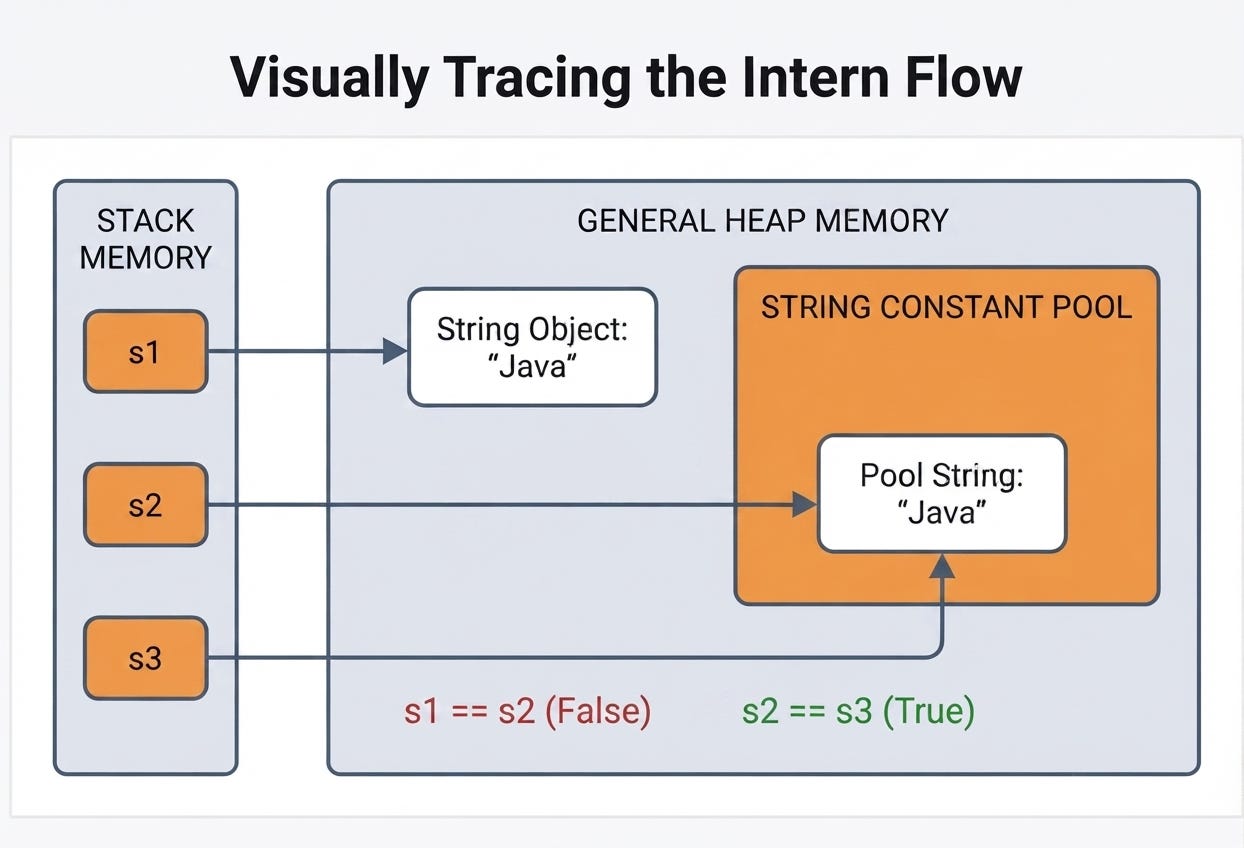
Conceptualizing String.intern()
String s1 = new String("Java");
String s2 = s1.intern();
String s3 = "Java";

System.out.println(s1 == s2); // False (s1 is in Heap, s2 is in Pool)
System.out.println(s2 == s3); // True (Both point to the same Pool reference)
Use Case: If your application processes millions of duplicate strings (e.g., parsing a massive XML/JSON file with repeated tags or keys), using intern() can drastically reduce your application’s memory footprint.
The Truth About String Concatenation (+)
A common piece of advice in Java is: “Never use the + operator in a loop; use StringBuilder instead.” But how does the + operator actually work?
In older versions of Java (up to Java 8), when you write:
String result = "Hello" + " " + "World";The Java compiler automatically converts this under the hood to:
String result = new StringBuilder().append("Hello").append(" ").append("World").toString();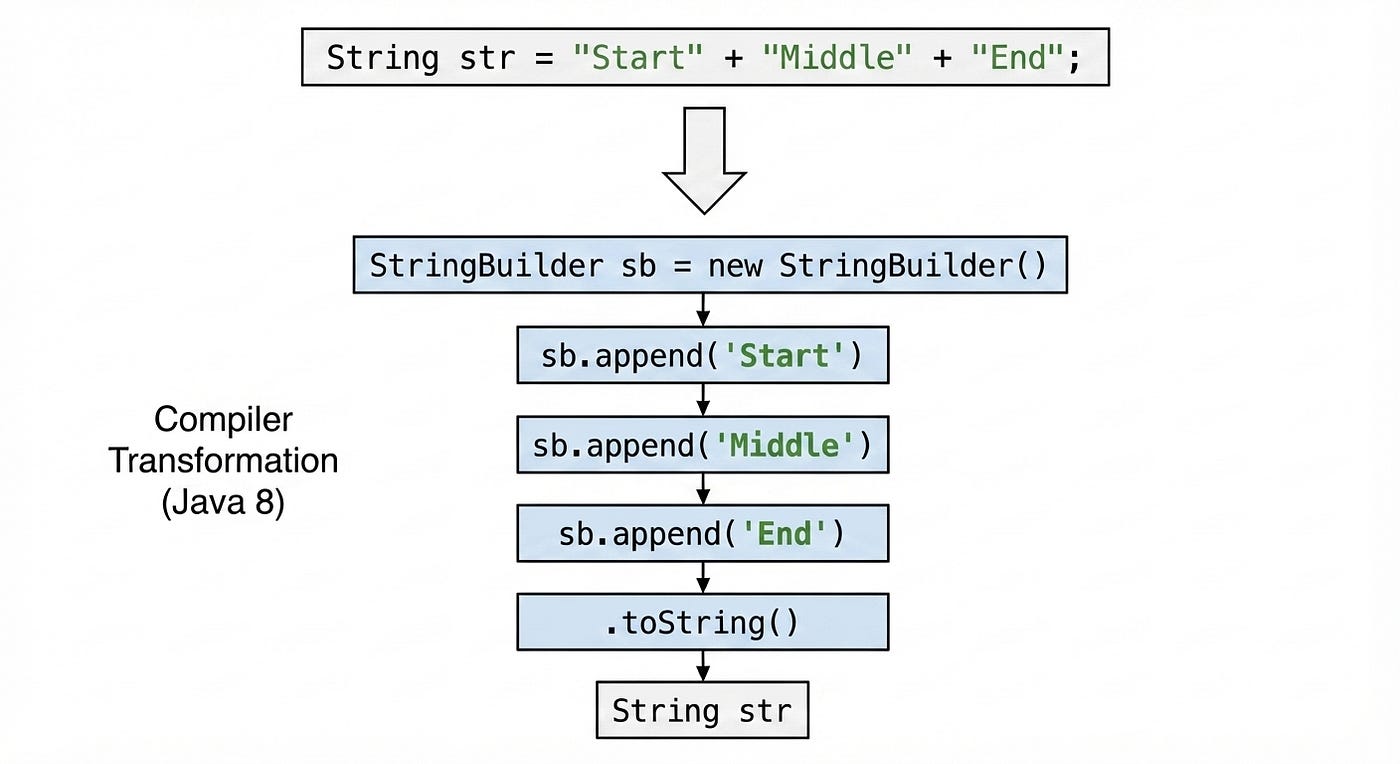
Compiler Optimization of String Concatenation
Because of this, using + for simple, one-line concatenations is perfectly fine and highly optimized. However, if you use + inside a for loop, the compiler creates a new StringBuilder instance during every single iteration, which wastes memory and CPU cycles.
(Note: Starting with Java 9, string concatenation using + is handled dynamically via invokedynamic, making it even more efficient, but the rule to avoid + inside large loops still applies.)
StringJoiner (Java 8)
Before Java 8, joining a list of strings with a delimiter (like a comma) required messy loops and manual checks to remove the trailing comma. Java 8 introduced StringJoiner to solve this elegantly.
You can specify a delimiter, and optionally, a prefix and suffix:
StringJoiner joiner = new StringJoiner(", ", "[", "]");
joiner.add("Apple");
joiner.add("Banana");
joiner.add("Mango");

System.out.println(joiner.toString());
// Output: [Apple, Banana, Mango]
Alternatively, you can use the highly convenient String.join() method:
String result = String.join("-", "2026", "07", "05");
System.out.println(result); // Output: 2026-07-05
Modern String Methods (Java 11 and Beyond)
Java 11 and subsequent releases brought some much-needed utility methods to the String class, removing the need for third-party libraries like Apache Commons Lang for basic checks.
1. isBlank() vs isEmpty()
- isEmpty() only checks if the string length is 0.
- isBlank() checks if the string is empty OR contains only white spaces.
String text = "   ";
System.out.println(text.isEmpty()); // False
System.out.println(text.isBlank()); // True
2. strip() vs trim() trim() has been around since the early days of Java, but it only removes spaces based on ASCII values (<= 32).
strip() is Unicode-aware and removes all leading and trailing whitespace characters, making it the modern standard.
3. repeat(int count) Need to duplicate a string multiple times?
String line = "-".repeat(10);
System.out.println(line); // Output: ----------
4. lines() This method returns a Stream<String> extracted from a multi-line string, partitioned by line terminators (\n, \r, or \r\n). It is incredibly useful for parsing large blocks of text.
String multiLine = "Line 1\nLine 2\nLine 3";
multiLine.lines().forEach(System.out::println);
Conclusion
Java Strings may seem basic, but they are deeply integrated into the JVM’s memory management and optimization strategies. By understanding how the String Pool works, leveraging intern() when necessary, and utilizing modern methods like StringJoiner and isBlank(), you can write Java code that is not only cleaner but significantly more performant.
Connect With Me: [LinkedIn](https://www.linkedin.com/in/in-mohit/), GitHub
메타데이터
- post_id
- 18bf2f466c19
- slug
- java-string-all-about-it-part-ii-18bf2f466c19
- url
- https://medium.com/@mohit-pal/java-string-all-about-it-part-ii-18bf2f466c19
- canonical_url
- https://medium.com/@mohit-pal/java-string-all-about-it-part-ii-18bf2f466c19
- author_url
- https://medium.com/@mohit-pal
- status
- ok
- fetched_at
- 2026-07-14 12:07:13