I Tested Every AI Coding Agent So You Don’t Have To (2026)
The benchmarks are real. The pricing is verified. The answer most people land on is wrong.
I Tested Every AI Coding Agent So You Don’t Have To (2026)
The benchmarks are real. The pricing is verified. The answer most people land on is wrong.
Three months ago I made a mistake that cost me about two weeks of confused productivity, and the only reason I’m writing about it is that I see the same mistake in basically every discussion of AI coding tools I come across.
I was evaluating these agents properly for the first time — actual production work, actual legacy codebase, not a tutorial project — and I assumed, the way most people do, that “AI coding tools” is a single category with a spectrum from less capable to more capable, and my job was to find the right point on that spectrum for my budget. I read the comparison articles, picked what seemed like the consensus best option, and spent two weeks feeling like I was fighting the tool instead of working with it. I kept assuming it was a learning curve. It wasn’t a learning curve. I had been using something that was designed to take a task and run it to completion without me — think of it like delegating a ticket to a junior developer who doesn’t need hand-holding — and I was using it like a very expensive autocomplete, asking it single questions and waiting for suggestions while I stayed in the driver’s seat.
When I figured this out, it reframed the whole evaluation. There’s a meaningful difference between tools where you stay in the loop directing every step, and tools where you hand over a task description and come back to a pull request. GitHub Copilot and the inline Cursor features are the first kind — they live in the editor, they suggest while you type, you’re still the one writing the code. Claude Code, OpenAI Codex, Devin, and OpenCode are the second kind — you write a task in natural language, they read your entire repository, plan the implementation, execute it across however many files, run your tests, fix the failures, and open the PR. The difference is not about which has the smarter model underneath. The benchmark finding that matters most in 2026 is that the frontier models have essentially converged in capability, which means the wrapper — the workflow philosophy, the harness, how the agent interacts with your codebase — is now what determines your actual experience more than the model does.
Photo by Grzegorz Walczak on Unsplash
I. The Category Confusion That’s Costing You
The AI coding market in 2026 has fractured into two distinct philosophies, and almost every debate about “which is best” collapses because the people debating are comparing tools from different categories.
Assistants — GitHub Copilot, inline Cursor — are pair programmers. They live in your IDE, autocomplete while you type, suggest refactors when you hover, answer questions in a sidebar. You are still the driver. The AI is the co-pilot suggesting turns.
Agents — Claude Code, OpenAI Codex, Devin, OpenCode — are something else. You give them a task in natural language. They read your repository, plan the implementation, execute across multiple files, run your test suite, interpret the failures, fix them, and surface a result. You review the result and give the next task. You are no longer driving — you’re the tech lead delegating to a junior developer who works fast and doesn’t get tired.
The frontier models inside these tools have largely converged, and the harness around the model now does most of the work. This is the insight that changes everything about how you evaluate these tools. Picking the best AI coding agent no longer means picking the smartest model. It means understanding what kind of workflow the harness supports — and whether that workflow matches how you actually build software.
The most common mistake: using an assistant when you need an agent, or trying to use an agent like an assistant. Cursor used as a pure autocomplete tool is expensive. Claude Code used to suggest single-line completions is using a sledgehammer to hang a picture.
Here’s the cleaner way to think about it. If you’re staying in the driver’s seat — writing code, asking questions, iterating interactively — you need an assistant. If you want to hand off a ticket and come back to a PR, you need an agent. The teams shipping fastest in 2026 are running both, because the two modes serve different parts of the development cycle.
II. The Benchmark Reality
Before getting into specific tools, the benchmark picture needs to be honest — because the numbers floating around LinkedIn are frequently wrong, outdated, or cherry-picked from incompatible harnesses.
Two benchmarks actually matter:
SWE-bench Verified — 500 real GitHub issues from real open-source repositories. The agent must fix the actual bug. No hints. No scaffolding. This is the closest thing the field has to a standardised test of practical software engineering.
Terminal-Bench 2.1 — measures terminal-native agentic task completion. Different skill set from SWE-bench, which is why the rankings look different on each.
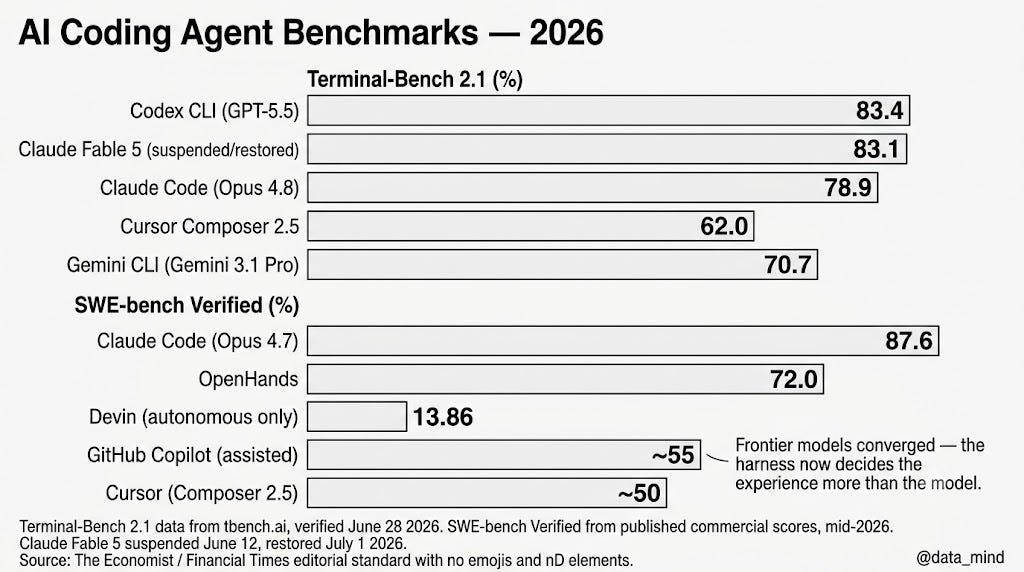
On the public Terminal-Bench 2.1 leaderboard, Codex CLI with GPT-5.5 is #1 at 83.4%, Claude Code with Opus 4.8 is the top usable Claude pairing at 78.9%, and Gemini CLI with Gemini 3.1 Pro is at 70.7%. Claude Fable 5 scores 83.1% inside Claude Code but was suspended June 12, 2026 under a U.S. export-control order and restored July 1.
On SWE-bench Verified, Claude Code running on Claude Opus 4.7 scores 87.6% — the highest published score from any commercial agent as of mid-2026. OpenHands, the open-source option, sits at 72%. Devin resolves 13.86% of real GitHub issues end-to-end on SWE-bench — modest compared to copilot-assisted tools, but remarkable for fully autonomous operation.
The lesson underneath: the same model scores differently in different harnesses, which is exactly why the wrapper matters as much as the model. A Claude Opus 4.8 inside Claude Code scores differently from Claude Opus 4.8 inside a different harness. Benchmark numbers are model-plus-harness combinations, not model quality in isolation.
III. Every Major Agent — What It Actually Does
1. Claude Code — the reasoning-depth benchmark leader
Claude Code is Anthropic’s terminal-native agent, available in the CLI, VS Code, JetBrains, and a desktop app. It scores 87.6% on SWE-bench Verified with Opus 4.7 — the highest published commercial score. The scoring is not a coincidence of the benchmark setup. Claude Code has a genuine advantage on complex, multi-step reasoning tasks — the kind that require understanding interdependencies across a large codebase before touching a single file.
Claude Code is the most capable autonomous agent, particularly for async and Slack-based workflows. The May 2026 Opus 4.8 update added Dynamic Workflows — 30 hook events that let you trigger Claude Code from cron jobs, GitHub webhooks, and Slack messages. The agent runs, opens a PR, and notifies you when it’s done. You can be in a meeting.
The pricing model changed in 2026. Claude Code Pro runs at $20/month for individual plans, $17/month on annual billing. It’s included with Claude Pro. For API access, you pay Claude token rates — Opus 4.8 is expensive per token, which matters at scale.
The honest limitation: it is terminal-native first. If you live in your IDE and want the agent to be part of that environment rather than a separate process, the IDE integration feels like a port rather than a native experience. Cursor feels like it was designed for the IDE. Claude Code feels like it was designed for the terminal and the IDE integration came after.
Best for: Hard problems. Multi-file refactors. Complex debugging across a large codebase. Async work you want running in the background while you do something else. Claude Code plus Cursor covers about 95% of what most developers need.
2. OpenAI Codex — the multi-surface workflow
Codex is OpenAI’s coding agent and the #1 performer on Terminal-Bench 2.1 at 83.4% with GPT-5.5. What distinguishes Codex from Claude Code is not benchmark performance — they’re close — but surface coverage. Codex exists as a CLI, a desktop app, an IDE extension, a ChatGPT plugin, and a cloud delegation system. OpenAI says more than 5 million people use Codex every week, and more than 85% of the company uses it internally.
The workflow advantage: if you’re already in the ChatGPT ecosystem, Codex comes with your subscription. ChatGPT Plus at $20/month includes Codex with soft usage caps. There’s no new tool to learn, no new account to manage. You assign a task from within ChatGPT, Codex runs in a cloud VM, and you get a PR.
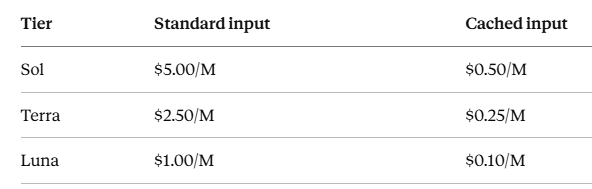
Updated July 4, 2026, Codex now runs on GPT-5.6 Sol/Terra/Luna — OpenAI’s three-tier model family. The practical implication: Codex has the widest reach in the market right now because it sits inside the most-used AI product on the planet, and it keeps getting better as GPT improves.
The honest limitation: Codex is conservative. It’s more cautious than Devin about operating without checkpoints. It checks in more frequently, which is safer but slower for long tasks that could run autonomously.
Best for: ChatGPT subscribers who don’t want another subscription. Cross-surface workflows — CLI in the morning, mobile in the afternoon, desktop agent running overnight. Background PR generation.
3. Cursor — the AI-native IDE
Cursor is not an agent in the same sense as Claude Code or Codex. It’s an IDE built around AI from the ground up — a VS Code fork where AI is baked into every layer rather than bolted on. Cursor is now at $1.2B ARR, which tells you everything about market adoption.
The May 2026 Composer 2.5 release changed the verdict on Cursor’s agent capabilities. Artificial Analysis scored Cursor’s Composer 2.5 at 62 on its Coding Agent Index — a 14-point jump over Composer 2 and third overall, at $0.07 per task on standard and $0.44 on Fast. It is the cheapest agent above 60 on that index. For teams that want agent capability without leaving the IDE, Composer 2.5 is now competitive with dedicated agents on common tasks.
Cursor Pro is $20/month. Pro+ is $60. Ultra is $200. The price jump between Pro and Ultra is significant, and heavy agent use on Pro can exhaust the included credits faster than most developers expect.
The honest limitation: Cursor’s billing confusion is real. Cursor’s CEO had to apologize publicly in July 2025 over a confusing usage model. The June 2026 model improved it, but billing surprises remain the most common complaint from new users.
Best for: Daily interactive coding. Fast autocomplete. IDE-native agent work where you want the AI inside the editor, not in a separate terminal window. The developer who lives in their editor and wants AI to feel like a natural extension of it.
4. GitHub Copilot — the enterprise default
GitHub Copilot is the agent with the largest reach since it lives inside VS Code and github.com. Copilot Pro at $10/month is the cheapest paid option in the market, with a free tier that includes 2,000 completions and 50 chat/agent requests per month — genuinely functional for evaluation without a credit card.
The usage model changed on June 1, 2026. The $10/month now buys a 1,500-credit monthly usage allowance rather than unlimited agent use, and heavy agent work can exhaust it quickly. A new Max plan at $100/month raises the ceiling significantly.
For teams deeply integrated with GitHub for issues, PRs, and CI/CD, Copilot’s coding agent creates a tighter feedback loop than any third-party tool can. The Enterprise tier at $39/seat/month adds organization-wide policy controls and audit logs — the compliance features that matter at regulated companies.
The honest limitation: Copilot is tightly coupled to GitHub. Teams on GitLab, Bitbucket, or a self-hosted Git provider will find friction. The coding agent and knowledge base features assume GitHub as your source of truth.
Best for: Enterprise rollouts. Teams already on GitHub. Developers who want the lowest-friction entry point. Organizations with compliance requirements that need audit logs and policy controls.
5. Devin — the autonomous delegation machine
Devin is the tool that started the conversation about AI replacing developers — and also the tool that most clearly proves that conversation is missing the point.
Devin resolves 13.86% of real GitHub issues end-to-end on SWE-bench — modest compared to copilot-assisted tools, but remarkable for fully autonomous operation. The qualifier matters: 13.86% of real GitHub issues resolved without human intervention is genuinely impressive when the comparison is zero human input. In real-world testing, Devin’s success rate on well-defined tasks reaches 30–50%, while novel or ambiguous tasks drop to 15–30%.
Goldman Sachs is piloting Devin alongside 12,000 human developers. The Teams plan is $500/month. At that price, you need a real backlog of well-scoped, delegatable tickets before Devin pays for itself. Below a few dozen agent-worthy tickets per month, Devin will not pay for itself. Above that threshold, it is one of the highest-ROI engineering investments you can make in 2026.
Note: Cognition rebranded Windsurf to Devin Desktop on June 2, 2026. windsurf.com/pricing now redirects to devin.ai/pricing.
Best for: Teams with a genuine backlog of well-defined, delegatable engineering tasks. Migration work. Dependency upgrades. Flaky test elimination. CVE remediation. Work where you can write a clear specification of done.
6. OpenCode — the open-source wildcard
OpenCode hit 180,312 GitHub stars and 6.5 million monthly developers by April 2026 — growing 4.5x faster than Claude Code in star velocity. It is MIT-licensed, model-agnostic, and free as a tool. You pay only for the model API you choose.
For teams with data sovereignty requirements that block proprietary tools, OpenCode’s ability to run entirely offline with local models is decisive. For developers who want full control over their tooling and don’t want vendor lock-in, OpenCode is the clear choice.
The honest limitation: community-driven means the update cadence follows contributor availability, not a product roadmap. For production-critical workflows, this matters.
Best for: Open-source advocates. Teams with strict data sovereignty requirements. Developers who want to choose their own model — run DeepSeek locally, or point it at any API.
IV. The Stack That Actually Works
Here’s the specific recommendation I landed on after three months of testing, cross-referenced with what I’ve seen in the broader developer community:
The $40/month professional stack:
Cursor Pro at $20/month + Claude Code (included with Claude Pro at $20/month).
This covers about 95% of what professional developers need. Cursor for daily interactive coding — fast autocomplete, in-editor agent mode for contained tasks, the best IDE feel in the category. Claude Code for the hard problems — the complex refactors, the large codebase analysis, the async work you want running overnight.
Add Devin when you have the ticket volume to justify it:
Once your team has 20+ well-defined, delegatable tickets per month — migrations, dependency upgrades, flaky tests, CVE patches — the math on Devin’s $500/month Team plan starts to work. Below that volume, you’re paying for capability you’re not using.
The free-to-start path:
GitHub Copilot free tier (2,000 completions, 50 agent requests) + OpenCode (model-agnostic, free tool, pay only API costs). This lets you evaluate both the assistant workflow (Copilot) and the agent workflow (OpenCode) before committing to paid plans.
The Close
The AI coding agent market in 2026 is mature enough to give you real leverage — and fragmented enough that picking the wrong combination genuinely costs you time and money.
The short version of everything above:
Claude Code leads in professional usage and satisfaction, especially for terminal-native and complex refactoring work. Cursor dominates the AI-native IDE category with the most polished editing experience. GitHub Copilot wins on reach, price, and enterprise features — best for organization-wide rollouts.
The benchmark that should anchor your decision: the frontier models have converged, so the agent wrapper now decides your experience. You are not choosing a model when you choose one of these tools. You are choosing a workflow philosophy.
Choose the philosophy that matches how you actually build software. Then stack the tools accordingly.
The teams shipping fastest in 2026 aren’t debating which single tool to use. They’re running a daily driver and a delegation agent in parallel — and they’re not spending more than $40 a month per engineer to do it.
I write about data, AI tools, and analytical careers. Follow @data_mind for more.
메타데이터
- post_id
- 1916fe687def
- slug
- i-tested-every-ai-coding-agent-so-you-dont-have-to-2026-1916fe687def
- url
- https://medium.com/ai-analytics-diaries/i-tested-every-ai-coding-agent-so-you-dont-have-to-2026-1916fe687def
- canonical_url
- https://medium.com/ai-analytics-diaries/i-tested-every-ai-coding-agent-so-you-dont-have-to-2026-1916fe687def
- author_url
- https://medium.com/@data_mind
- status
- ok
- fetched_at
- 2026-07-13 06:23:13