Generative Answering in Regulated Industries: How to Deliver AI Answers You Can Trust
The difference between a useful AI answer and one that survives compliance review.
Generative Answering in Regulated Industries: How to Deliver AI Answers You Can Trust
The difference between a useful AI answer and one that survives compliance review.
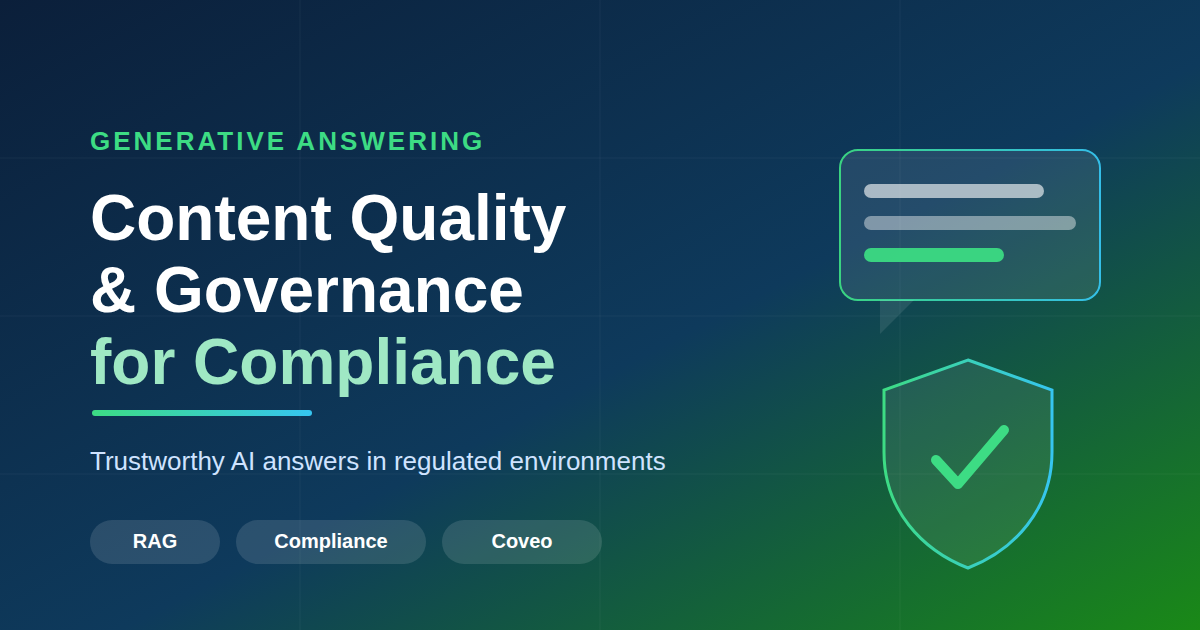
Generative answering must balance helpfulness with governance.
Ask a modern AI assistant a question and it will answer almost anything — confidently, fluently, and sometimes completely wrong. In a consumer chatbot that is a minor annoyance. In a bank, a hospital, or a government agency, a confident wrong answer is a liability with a paper trail.
That is the central tension of generative answering in the enterprise: the same capability that makes it magical — synthesizing a fluent answer instead of returning ten blue links — is exactly what makes it risky when the answer has to be correct, sourced, and auditable. This post walks through how to get the benefit without the liability: what generative answering actually is, the content quality it rests on, the compliance bar it has to clear, and the controls and feedback loops that keep it trustworthy. At the end, we look at one concrete implementation, Coveo’s Relevance Generative Answering, to see how these principles show up in a real product.
A note before we begin. This content is based on my personal learning and experience — not official guidance from any vendor or employer. Before enabling generative answering, please follow your own enterprise policies. Because this feature creates content from your existing content, some business functions may carry additional restrictions and governance expectations around enabling it.
What is Generative Answering?
Traditional search returns documents. You type a query, you get a ranked list, and you do the reading. Generative answering returns an answer: a short, synthesized response written in natural language, ideally with citations pointing back to the sources it drew from.
Under the hood, most enterprise implementations follow the retrieval-augmented generation (RAG) pattern. Instead of asking a large language model to answer from its training data alone, the system first retrieves the most relevant passages from your own content, then asks the model to generate an answer grounded strictly in those passages.

From traditional search to generative answering
It helps to be precise about what changes. Traditional keyword (and even modern semantic) search is a find problem — rank the documents most likely to contain the answer. Generative answering is a synthesize problem — read those documents and compose the answer itself. They are complementary, not rivals: generative answering is built on top of good retrieval, which is why a weak search backend produces weak answers no matter how capable the model is.
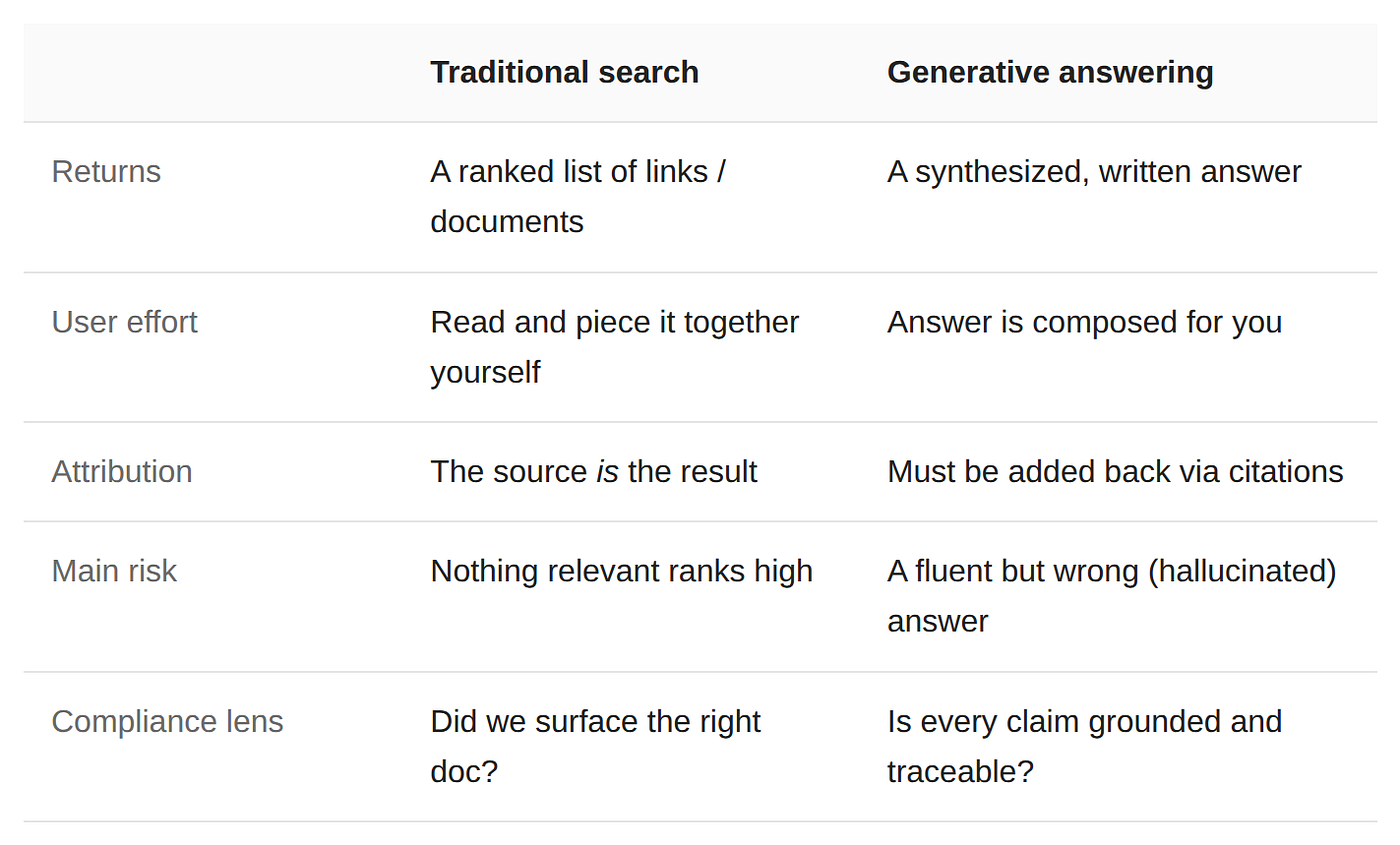
The distinction that matters most is grounded vs. ungrounded generation. An ungrounded model answers from whatever it absorbed during training — opaque, undated, and impossible to attribute. A grounded model is constrained to the content you supply, so every claim can, in principle, be traced back to a source you control. In regulated settings, grounding is not a nice-to-have; it is a foundational requirement.
But be precise about what grounding does and doesn’t buy you. Grounding improves traceability and factual alignment — it cannot, on its own, make an answer correct. A grounded answer can still be incomplete, outdated, or misleading if the source it faithfully reflects is. (We’ll see exactly that in a moment with the parental-leave example.) Grounding can’t compensate for poor source content — which is why grounding and content quality have to be solved together, not one after the other.
You will see generative answering today in customer self-service portals, internal employee help desks, support agent assist tools, and knowledge bases — anywhere people previously had to hunt through documents to find a single answer.
Content Quality
Before any of the governance machinery matters, one thing has to be true: the content underneath has to be good. A grounded answering system is only as good as the content it stands on. Garbage in, garbage out — except now the garbage comes back wrapped in a confident, well-written paragraph that looks authoritative. Content quality is where most of the real work lives.
What “quality” actually means here
- Source curation and authority. Decide which repositories are answer-worthy and which are noise. An outdated wiki and the official policy doc should not carry equal weight.
- Freshness. Stale content is a top cause of wrong answers. Detect and demote (or exclude) documents that have aged out.
- Contradiction handling. When two documents disagree, the system needs a way to prefer the authoritative one rather than averaging them into nonsense.
- Structure. Clear headings, self-contained sections, and clean text retrieve far better than dense PDFs and tables-as-images.
A concrete failure makes this vivid. Picture an HR policy assistant. One document states that employees receive 12 weeks of parental leave; a newer policy says 16. If retrieval surfaces the outdated document, the assistant will confidently answer “12 weeks” — and cite a real source while doing it. The model did nothing wrong; the failure is content governance. This is why freshness and contradiction handling aren’t housekeeping — they directly determine whether answers are correct.
The answer is perfectly grounded, perfectly cited, and perfectly wrong.
Measuring it
You can’t govern what you don’t measure. The metrics worth tracking are groundedness (does the answer actually follow from the cited sources?), citation coverage (is every claim attributable?), and hallucination rate (how often does the model assert something the sources don’t support?). These are the numbers a compliance team will eventually ask about — instrument them from day one.
Compliance Requirements
Good content is necessary but not sufficient. The reason regulated industries can’t simply bolt a chatbot onto their content is that “usually right” isn’t a standard that survives an audit. Finance, healthcare, legal, and public-sector organizations operate under rules that translate into concrete demands on any answering system:
- Accuracy and traceability. Every claim in an answer must trace back to an approved, authoritative source — not the model’s general knowledge.
- Access control. The system must respect document-level permissions. A user should never receive an answer synthesized from content they aren’t allowed to see.
- Data residency and privacy. Sensitive data and PII must stay within approved boundaries, and may not be sent to a third-party model that retains or trains on it.
- Auditability. You need a record of who asked what, what was answered, and which sources were used — reproducible after the fact.
- Jurisdiction and disclaimers. Answers may need region-specific framing, mandatory disclaimers, or the ability to remove a source on request.
In a regulated domain, an unsourced answer is worse than no answer.
Why citations matter
This is where citations earn their keep. A citation — the link from a generated answer back to the exact source passage it came from — is the single mechanism that turns several of these requirements from aspirations into something you can actually verify. It makes traceability concrete (every claim points somewhere), it gives auditability its paper trail (you can reconstruct what an answer was based on), and it gives the end user a way to check the answer themselves rather than trusting it blindly. A generative answering system that can’t cite its sources has no place in a compliance setting, however fluent its prose.
Each of these requirements pushes the design in the same direction: tightly control the content the model sees, and keep a verifiable link between answer and source.
Fine Tuning Controls
“Fine tuning” here is broader than the narrow ML sense of retraining a model. In practice, the controls that shape behavior in a compliance setting operate at three levels, from cheapest to most involved:
- Retrieval filters and thresholds. The most powerful and the safest lever. First, restrict the candidate content by source, recency, language, and — critically — by the requesting user’s permissions, before the model ever sees it. Then tune retrieval quality: set a minimum relevance threshold so weakly-related content is dropped rather than used to pad an answer, and cap how many passages are considered. Filtering decides what’s eligible; the threshold decides what’s good enough.
- Prompt-level guardrails. Instruct the model to answer only from the supplied passages, to cite its sources, to adopt a required tone and length, and to say “I don’t know” rather than guess.
- Model fine-tuning. Where justified, adapt the model itself to your domain’s language and answer style — the heaviest option, and rarely the first thing you reach for.
Concretely, most of this lives in configuration rather than code. Different products express it differently, but conceptually a grounded-answering policy looks something like this (illustrative pseudo-config):
[embed]
The single most important control is the one that’s easy to overlook: refusing to answer. A system that confidently fills gaps is dangerous; a system that returns a graceful fallback when retrieval confidence is low is one a compliance officer can trust. “No reliable answer found” is a feature.
It helps to distinguish two kinds of refusal. The first is soft — the abstention above, where the system declines because it isn’t confident enough. The second is hard — a deliberate block list of queries, topics, or terms the system should never answer, no matter how confident it is or what the content says. Think requests for legal or medical advice, questions about a competitor, anything touching regulated financial guidance, or specific sensitive keywords. A block list trades a little helpfulness for a guarantee, and in regulated settings that trade is often mandatory: there are simply questions a corporate assistant must not attempt. (As we’ll see, Coveo implements exactly this with its blocking rules.)
Who owns the model: managed vs. BYOM
Underneath all of these levers sits a more fundamental architectural choice: whose model actually generates the answer. Two patterns dominate, and they have very different governance profiles.
- Managed (shared) LLM. The vendor hosts the model and routes your grounded prompts to it. It’s the fastest path to production, but the model is effectively a black box you don’t tune — usually no choice of model, no decoding parameters, and often a single model shared across all of the vendor’s customers (typically stateless, with no training on your data). You trade control for simplicity and consistency.
- Bring Your Own Model (BYOM). You connect your own LLM deployment — for example, your own Azure OpenAI, Amazon Bedrock, or self-hosted model — and the platform grounds prompts against it. You gain control over model choice and version, data residency (generation happens inside your boundary), and sometimes the decoding parameters too. The cost is ownership: you take on the model’s operations, safety configuration, version upgrades, and spend.
For regulated environments, BYOM is appealing precisely because it keeps generation inside a boundary you can audit and certify. But it isn’t free governance — it shifts responsibility for the model’s behavior onto you, and it’s heavier to run. Crucially, not every platform offers it: many enterprise answering products are built around a managed shared model only. So before you design around BYOM, confirm your vendor actually supports it.
Feedback and Continuous Learning
Generative answering is not a launch-and-forget system. Content changes, questions drift, and yesterday’s good answer becomes today’s wrong one. Closing the loop is what keeps quality from decaying.
- Explicit feedback. Thumbs up/down and ratings on individual answers give you a direct quality signal — and a queue of failures to investigate.
- Implicit signals. Did the user rephrase, click through to the source, or escalate to a human? These reveal dissatisfaction that nobody bothers to rate.
- Review queues. Route low-confidence or flagged answers to human reviewers, especially in high-stakes domains.
- Feeding it back. Use what you learn to re-rank content, fix gaps in the corpus, and refine prompts — and govern that learning loop itself so it can’t quietly drift out of compliance.
Continuous review is the difference between a system that slowly drifts out of compliance and one that improves over time. One word of caution, though: don’t assume the feedback widget closes the loop for you. In many platforms — as we’ll see with Coveo below — thumbs up/down is captured for monitoring and reporting, not for automatically retraining the answers. The actual improvement is a human-owned cycle: review the feedback, find the cause, fix the content or the configuration.
Coveo CRGA: A Concrete Example
Everything above is vendor-neutral. To make it concrete, here is how one commercial product — Coveo’s Relevance Generative Answering (officially RGA, and commonly called CRGA, for “Coveo RGA”) — maps onto these principles.
CRGA in one line: generative answers grounded strictly in your indexed, permission-trimmed content, returned with citations and built-in governance.
Grounding, citations, and two-stage retrieval
Coveo describes grounding as supplying the LLM with relevant, enterprise-specific content it wouldn’t otherwise have, holding the model to factual data when it generates an answer. Each answer is returned with citations that reference the content used to produce it — directly satisfying the traceability requirement.
It works in two stages, and — importantly — across two models. First-stage retrieval is handled by a Semantic Encoder (SE) model, which uses vector search (plus Coveo’s permission model) to fetch the candidate items. Second-stage retrieval is the RGA model itself, which uses embeddings to pull the most relevant chunks of text from those items; only those chunks are placed in the prompt. Because the base instruction directs the LLM to answer only from the supplied chunks — drawn from content the user is already entitled to see — a user can’t get an answer synthesized from documents they aren’t allowed to read. That confinement substantially reduces hallucinations by limiting the model to retrieved content. Per Coveo’s guidance, an RGA implementation should therefore include both an RGA model and an SE model.
Scoping the content (filters)
You don’t have to point CRGA at your whole index — and Coveo’s own best practice is not to. When you create the model, in the Learn from section you choose the sources the model learns from, and under Apply filters on dataset you narrow it further. There’s a Standard mode for simple source/filter selection and an Advanced mode where you write a custom filter expression in Coveo query syntax. This is the single most important governance lever: it decides what content is even eligible to appear in an answer.
Fine-tuning model parameters
A few parameters (configured on the model–pipeline association) let you tune behavior without touching the model itself:
- Items to consider — the maximum number of items considered during second-stage retrieval (default 100). For example, lower it to 20 and the model pulls chunks only from the 20 most relevant first-stage items — useful if answers are being built from low-relevance documents.
- Chunk threshold — how relevant a chunk must be to be eligible for answer generation, set to Low, Medium (default), or High. Chunks below the threshold are dropped entirely. Higher makes the model stricter (fewer but higher-confidence chunks); lower makes it more permissive.
- Rich text formatting — enable or disable formatted output (lists, emphasis) in generated answers.
Tuning the Semantic Encoder (JSON config)
Since the SE model drives first-stage retrieval, it has its own tuning surface — and this is where the deeper “config via JSON” knobs live. When you associate an SE model with a query pipeline, you can switch the association to a JSON view and set parameters that aren’t in the standard UI:
**minCosine— the minimum semantic similarity an item needs to be considered relevant. A float between -1.0 and 1.0, default 0.80**. Higher = stricter.**topK— the maximum number of candidate items the SE model retrieves; default 500**.**minRankingModifier/maxRankingModifier** — the lower and upper bounds of the ranking boost applied to items the SE model returns (defaults 100 and 4500).
You reach these through Admin Console → query pipeline → Machine Learning → JSON view. One caution worth heeding: changing these defaults can break on a model upgrade, so treat them as advanced levers and document any changes. The RGA association can likewise be managed via JSON for advanced parameters that don’t fit the console, and scoped with query-pipeline conditions (for example, a context key) so different audiences get different behavior. Net: you have two layers to tune — SE for which items surface, RGA for which chunks become the answer.
What you can’t tune: the raw LLM knobs. Those are all the levers you get — and notably, the model’s own decoding parameters aren’t among them. A common assumption is that you can set temperature, top_p, or max tokens. You can’t. Coveo uses a third-party generative LLM that is stateless and shared across all customers — it isn’t trained on your data, doesn’t retain it, and isn’t individually tunable. There’s also no BYOM: you can’t substitute your own model deployment — every customer uses Coveo’s managed LLM. You shape answers through retrieval (filters, items, threshold) and the prompt (custom instruction), not through decoding parameters or model choice. For governance this is arguably a feature: behavior stays consistent and auditable rather than depending on a per-deployment temperature setting.
System prompt enhancement
Under Prompt enhancement you can enable a custom prompt instruction that is appended on top of Coveo’s base grounding instruction (so grounding is preserved). This is where you encode tone and audience, align answers to your brand voice, or add restrictions — for example, telling the model not to give financial advice, mention competitors, or surface sensitive information.
Blocking rules (block list)
This is Coveo’s implementation of the hard refusal described earlier. You define blocking rules that prevent an answer from being generated when a query contains a specific word or phrase. They’re configured in the Answer Manager (in the Knowledge Hub) inside an answer configuration — the object that links a specific RGA-enabled search interface to its rules and feedback. Because the configuration is tied to one search interface, blocking rules are scoped per experience: you can block a term in your public self-service portal while allowing it in an internal agent-facing tool.
It’s worth separating two complementary mechanisms here. Blocking rules suppress the entire answer based on the query (a hard block). Prompt restrictions (from the prompt enhancement above) instead shape what a generated answer may say — for example, never mentioning competitors. Use blocking rules for “don’t answer this at all,” and prompt restrictions for “answer, but within these bounds.”
Feedback and the Chunk Inspector
CRGA ships an answer feedback modal: when a user clicks thumbs-up or thumbs-down, it collects qualitative detail for reporting and monitoring. To debug a specific answer, the Knowledge Hub’s Chunk Inspector shows the exact chunks retrieved in the second stage and which ones were sent to the LLM, each with a chunk score (semantic similarity to the query). Reviewing chunks behind a poorly rated answer often reveals the real cause — a low-relevance source, stale content, or a genuine content gap.
An important caveat: learning is not automatic
It’s worth being precise here, because it’s easy to assume otherwise. CRGA does not automatically learn from thumbs up/down feedback to change its answers. Per Coveo’s documentation, the RGA model doesn’t take end-user answer feedback into account when generating answers; that feedback is for reporting and quality monitoring, and may inform future model updates. Behavioral signals do feed other Coveo ML models (such as ART and DNE) that influence the document ranking RGA draws its chunks from — so there’s an indirect effect on ranking — and each model refreshes its embeddings on its own build schedule. But the improvement loop for the answers themselves is operational: you review feedback, inspect chunks, then fix content, adjust filters, tune thresholds, or refine the prompt. Plan for a human-owned review cycle rather than expecting the system to self-correct.
Mapping back to the principles
- Compliance → permission-aware two-stage retrieval, citations, blocking rules, prompt restrictions.
- Content quality → source/filter scoping, chunk threshold, Chunk Inspector to find gaps.
- Fine-tuning controls → Items to consider, chunk threshold, SE JSON tuning, and system prompt enhancement.
- Feedback & learning → answer feedback for monitoring; indirect ranking gains via ART/DNE; no automatic retraining of answers — improvement is a manual loop.
Try it locally
Want to see CRGA running on your own machine? This minimal sample — coveo-crga-atomic-local, built on Coveo’s Atomic components — lets you stand up a working generative-answering interface from a single HTML file. Update the CONFIG values with your own organization ID, access token, and answer configuration ID, then open the page in a browser. You create the answer configuration ID in the Coveo Knowledge Hub — the same place you manage block lists and monitor chunks, user feedback, and overall answer quality.
That sample uses Atomic, but it’s only one of the paths to production. Coveo gives you a spectrum of UI control: the Atomic web components offer prebuilt, customizable UI (including a generated-answer component) with minimal code; the Headless library hands you the state management and controllers — including one for generated answers — so you can build a fully custom interface in your own framework; and beneath both sit the APIs if you want complete control. Choose based on how much UI control you need versus how fast you want to ship.
Conclusion
Generative answering is entirely achievable in compliance-heavy settings — but only when content quality and governance are treated as first-class design concerns, not afterthoughts bolted on before launch. Ground the model in content you control, keep every answer traceable to a source, give the system permission to say “I don’t know,” and close the feedback loop so it improves instead of drifting.
Get those four things right and generative answering stops being a liability and becomes what it should be: a faster, sourced, trustworthy way for people to get the answer they came for.
Trust isn’t created by generation. It’s created by governance.
In regulated environments, the organizations that win with enterprise AI won’t be the ones whose model writes the most fluent paragraph. They’ll be the ones who can prove where that paragraph came from.
References
- Coveo — About Relevance Generative Answering (RGA). Grounding, citations, two-stage retrieval.
- Coveo — RGA data security. Permissions and how content reaches the LLM.
- Coveo — Create and manage RGA models. Sources/filters, Items to consider, relevancy threshold, rich text, prompt enhancement, blocking rules.
- Coveo — Associate a Semantic Encoder (SE) model. SE’s first-stage role; JSON config —
minCosine(default 0.80), max retrieved items (default 500), ranking modifiers. - Coveo — RGA model card. Stateless, shared third-party LLM; no training/retention (why temperature isn’t exposed).
- Coveo — Evaluate generated answers & improve. Answer feedback, Chunk Inspector, why learning isn’t automatic.
- Coveo — Set up an answer configuration. Answer Manager and per-interface blocking rules.
메타데이터
- post_id
- 19219d4345a3
- slug
- generative-answering-in-regulated-industries-how-to-deliver-ai-answers-you-can-trust-19219d4345a3
- url
- https://medium.com/tech-learnings/generative-answering-in-regulated-industries-how-to-deliver-ai-answers-you-can-trust-19219d4345a3
- canonical_url
- https://medium.com/tech-learnings/generative-answering-in-regulated-industries-how-to-deliver-ai-answers-you-can-trust-19219d4345a3
- author_url
- https://medium.com/@techforum
- status
- ok
- fetched_at
- 2026-06-20 20:29:01