FIDO2 Conformance Test 完全攻略(二):註冊流程基礎驗證 — 57 項測試詳解
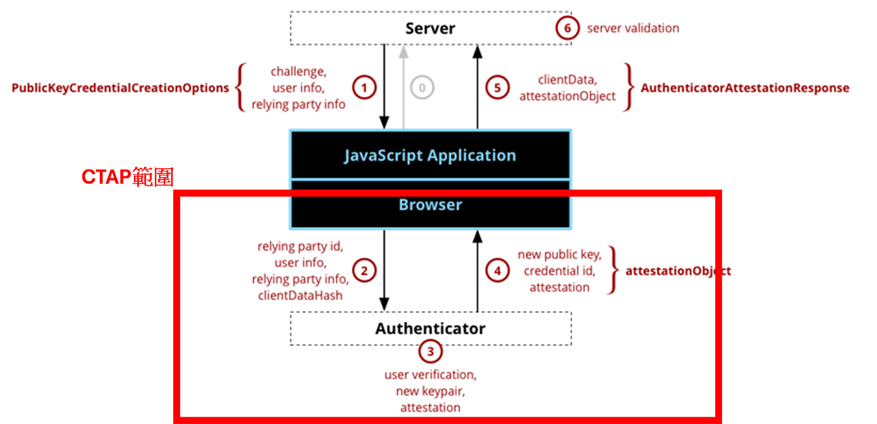
這是系列文章的第二篇,深入分析 Attestation Options 與 Attestation Result 的基礎驗證測試。
FIDO2 Conformance Test 完全攻略(二):註冊流程基礎驗證 — 57 項測試詳解
這是系列文章的第二篇,深入分析 Attestation Options 與 Attestation Result 的基礎驗證測試。
系列文章目錄
- 初步介紹與整體架構
- 註冊流程基礎驗證(本篇)
- Attestation 格式深度解析(52 項測試)
- 登入流程與 MDS3 信任機制(50 項測試)
- 踩坑總結與關鍵程式碼
本篇涵蓋的測試
群組      測試數量    內容
────────────────────────────────────────────────────────────────
Req-1        4 項    ServerPublicKeyCredentialCreationOptions
Resp-1      16 項    Response 結構驗證
Resp-2      17 項    clientDataJSON 驗證
Resp-3      20 項    attestationObject 驗證
────────────────────────────────────────────────────────────────
合計        57 項
一、Attestation Options(Req-1)- 4 項
這組測試驗證 /attestation/options API 的回應格式。
完整測試清單
編號   類型       測試內容
────────────────────────────────────────────────────────────────────────────────
P-1    Pass      回應必須包含完整的 status、user、rp、challenge、pubKeyCredParams、extensions
P-2    Pass      attestation 設為 "none" 時,回應也要是 "none"
P-3    Pass      兩次請求的 challenge 必須不同(隨機性)
P-4    Pass      userVerification 設為 "required" 時,回應也要正確反映
P-1 詳細驗證項目
這是最重要的測試,驗證回應的完整性:
(a) status 欄位
    - 必須存在
    - 必須是 DOMString 類型
    - 必須設為 "ok"
(b) errorMessage 欄位
- 必須存在
- 必須是 DOMString 類型
- 必須設為空字串 ""(c) user 欄位(Object)
├── user.name: 必須存在,DOMString
├── user.displayName: 必須存在,DOMString
├── user.id: 必須存在,DOMString,Base64URL 編碼,≤64 bytes
└── user.icon: 若存在,必須是 DOMString(d) rp 欄位(Object)
├── rp.name: 必須存在,DOMString
├── rp.id: 必須存在,DOMString
└── rp.icon: 若存在,必須是 DOMString(e) challenge 欄位
- 必須存在
- Base64URL 編碼
- 解碼後 ≥16 bytes(f) pubKeyCredParams 欄位(Array)
- 每個成員必須是 Object
- 每個成員必須有 "type" 欄位(DOMString)
- 每個成員必須有 "alg" 欄位(Number)
- 至少一個 type="public-key" 且 alg 是認證器支援的演算法(g) timeout 欄位(若存在)
- 必須是 Number 類型
- 必須 > 0(h) extensions 欄位
- 必須存在
- 必須包含 "example.extension" 鍵實際專案程式碼:attestationOptions()
以下是專案中 ConformanceApiController.java 的實作:
/**
 * 取得註冊選項
 * POST /attestation/options
 *
 * 測試案例對應:
 * - Req-1 P-1: 回應結構驗證
 * - Req-1 P-2: attestation="none" 參數處理
 * - Req-1 P-3: challenge 唯一性(SecureRandom 確保)
 * - Req-1 P-4: userVerification 參數處理
 */
@PostMapping(value = "/attestation/options", produces = MediaType.APPLICATION_JSON_VALUE)
public ResponseEntity<Map<String, Object>> attestationOptions(
        @RequestBody AttestationOptionsRequest request,
        HttpSession session) {
    try {
        // Step 1: 驗證必填欄位
        if (request.getUsername() == null || request.getUsername().trim().isEmpty()) {
            return ResponseEntity.ok(buildErrorResponse("username is required"));
        }

        // Step 2: 產生或取得 User Handle(最多 64 bytes)
        byte[] userHandleBytes = new byte[32];  // 常數定義為 USER_HANDLE_LENGTH
        random.nextBytes(userHandleBytes);
        ByteArray userHandle = new ByteArray(userHandleBytes);

        // 檢查用戶是否已存在
        Optional<User> existingUser = userRepository.findByUsername(request.getUsername());
        if (existingUser.isPresent()) {
            userHandle = ByteArray.fromBase64Url(existingUser.get().getUserHandle());
        }

        // Step 3: 建立 UserIdentity
        UserIdentity userIdentity = UserIdentity.builder()
            .name(request.getUsername())           // 測試案例:Req-1 P-1 (c)(1)
            .displayName(request.getDisplayName()) // 測試案例:Req-1 P-1 (c)(2)
            .id(userHandle)                        // 測試案例:Req-1 P-1 (c)(3)
            .build();

        // Step 4: 呼叫 Yubico 產生 CreationOptions
        // Yubico RelyingParty.startRegistration() 會:
        // - 產生隨機 challenge(Req-1 P-3)
        // - 設定 rp(Req-1 P-1 (d))
        // - 設定 pubKeyCredParams(Req-1 P-1 (f))
        PublicKeyCredentialCreationOptions creationOptions =
            relyingParty.startRegistration(optionsBuilder.build());

        // Step 5: 儲存 Challenge 到資料庫(防止 replay attack)
        RegistrationChallenge challenge = RegistrationChallenge.builder()
            .username(request.getUsername())
            .challenge(creationOptions.getChallenge().getBase64Url())
            .requestJson(objectMapper.writeValueAsString(creationOptions))
            .sessionId(session.getId())
            .build();
        registrationChallengeRepository.save(challenge);

        // Step 6: 建立符合 Conformance Test 規範的回應(平鋪結構)
        Map<String, Object> response = buildSuccessResponse(creationOptions, request.getExtensions());

        // 測試案例:Req-1 P-2 - attestation 參數處理
        if (request.getAttestation() != null) {
            response.put("attestation", request.getAttestation().getValue());
        }

        return ResponseEntity.ok(response);
    } catch (Exception e) {
        return ResponseEntity.ok(buildErrorResponse(e.getMessage()));
    }
}
buildSuccessResponse() — 回應格式轉換
這個方法將 Yubico 物件轉換為 Conformance Test 要求的平鋪格式:
/**
 * 將 Yubico 物件轉換為符合 Conformance Test 規範的回應 Map。
 *
 * Conformance Test 規範要求的回應格式是「平鋪結構」,而不是巢狀結構。
 *
 * 測試案例對應:
 * - Req-1 P-1: 驗證回應結構包含所有必要欄位
 */
private Map<String, Object> buildSuccessResponse(Object yubicoOptions,
                                                   Map<String, Object> requestExtensions) {
    try {
        // 先序列化為 JSON,再反序列化為 Map(確保 Yubico 的自訂型別正確轉換)
        String json = objectMapper.writeValueAsString(yubicoOptions);
        Map<String, Object> response =
            objectMapper.readValue(json, new TypeReference<LinkedHashMap<String, Object>>() {});

        // 加入 Conformance Test 規範要求的欄位
        response.put("status", "ok");
        response.put("errorMessage", "");

        // 處理 extensions:將請求中的 extensions 回傳
        if (requestExtensions != null && !requestExtensions.isEmpty()) {
            response.put("extensions", requestExtensions);
        }

        return response;
    } catch (Exception e) {
        throw new RuntimeException("Failed to build conformance response", e);
    }
}
二、Attestation Result 結構驗證(Resp-1)- 16 項
這組測試驗證 /attestation/result API 收到的請求結構。
完整測試清單
編號    類型       測試內容                                     錯誤訊息建議
─────────────────────────────────────────────────────────────────────────────────────────────
P-1     Pass      正常註冊後,excludeCredentials 要包含已註冊的 credId    -
F-1     Fail      缺少 "id" 欄位                                "id is required"
F-2     Fail      "id" 不是 DOMString 類型                      "id must be a string"
F-3     Fail      "id" 不是 Base64URL 編碼                      "id must be base64url encoded"
F-4     Fail      缺少 "type" 欄位                              "type is required"
F-5     Fail      "type" 不是 DOMString 類型                    "type must be a string"
F-6     Fail      "type" 不是 "public-key"                      "type must be 'public-key'"
F-7     Fail      缺少 "response" 欄位                          "response is required"
F-8     Fail      "response" 不是 Object 類型                   "response must be an object"
F-9     Fail      缺少 "response.clientDataJSON"                "clientDataJSON is required"
F-10    Fail      "clientDataJSON" 不是 DOMString               "clientDataJSON must be a string"
F-11    Fail      "clientDataJSON" 是空字串                     "clientDataJSON cannot be empty"
F-12    Fail      缺少 "response.attestationObject"             "attestationObject is required"
F-13    Fail      "attestationObject" 不是 DOMString            "attestationObject must be a string"
F-14    Fail      "attestationObject" 是空字串                  "attestationObject cannot be empty"
F-15    Fail      UV=false 但 userVerification="required"       "User verification required"
實際專案程式碼:attestationResult()
以下是專案中的驗證邏輯:
/**
 * 驗證註冊結果
 * POST /attestation/result
 *
 * 測試案例對應:
 * - Resp-1 F-1~F-14: 結構驗證
 * - Resp-2 F-1~F-17: clientDataJSON 驗證(由 Yubico 處理)
 * - Resp-3: attestationObject 驗證
 */
@PostMapping(value = "/attestation/result", produces = MediaType.APPLICATION_JSON_VALUE)
public ResponseEntity<ServerResponse> attestationResult(
        @RequestBody String credentialJson,
        HttpSession session) {
    try {
        // Step 1: 驗證必要欄位(對應 Resp-1 F-1~F-14)
        JsonNode attestationNode = objectMapper.readTree(credentialJson);

        // F-1: id is required
        if (!attestationNode.has("id") || attestationNode.get("id").isNull()
                || (attestationNode.get("id").isTextual() && attestationNode.get("id").asText().isEmpty())) {
            throw new IllegalArgumentException("id is required");
        }
        // F-2: id must be a DOMString
        if (!attestationNode.get("id").isTextual()) {
            throw new IllegalArgumentException("id must be a DOMString");
        }
        // F-3: id must be base64url encoded
        String attestationId = attestationNode.get("id").asText();
        if (!attestationId.matches("^[A-Za-z0-9_-]+={0,2}$")) {
            throw new IllegalArgumentException("id is not base64url encoded");
        }
        // F-4~F-6: type must be "public-key"
        if (!attestationNode.has("type") || !"public-key".equals(attestationNode.get("type").asText())) {
            throw new IllegalArgumentException("type must be 'public-key'");
        }
        // F-7~F-8: response must be an object
        if (!attestationNode.has("response") || !attestationNode.get("response").isObject()) {
            throw new IllegalArgumentException("response is required and must be an object");
        }

        // Step 2: 預處理 JSON(補上 clientExtensionResults)
        String processedJson = preprocessCredentialJson(credentialJson);

        // Step 3: 解析 PublicKeyCredential
        PublicKeyCredential<AuthenticatorAttestationResponse, ClientRegistrationExtensionOutputs> pkc =
            objectMapper.readValue(processedJson,
                new TypeReference<PublicKeyCredential<AuthenticatorAttestationResponse,
                                                       ClientRegistrationExtensionOutputs>>() {});

        // Step 4: Challenge 驗證(防止 replay attack)
        ByteArray challengeBytes = pkc.getResponse().getClientData().getChallenge();
        RegistrationChallenge challenge = registrationChallengeRepository
            .findByChallengeAndSessionIdAndUsedFalse(challengeBytes.getBase64Url(), session.getId())
            .orElseThrow(() -> new IllegalArgumentException("Invalid or expired challenge"));

        // Step 5: 恢復原始請求
        PublicKeyCredentialCreationOptions request = objectMapper.readValue(
            challenge.getRequestJson(), PublicKeyCredentialCreationOptions.class);

        // Step 6: Yubico WebAuthn 驗證
        // Yubico finishRegistration() 會驗證:
        // - clientDataJSON 結構和內容(Resp-2 測試案例)
        // - attestationObject 基本結構
        // - attestation 簽章
        // - 憑證鏈(如果有 AttestationTrustSource)
        RegistrationResult result = relyingParty.finishRegistration(
            FinishRegistrationOptions.builder()
                .request(request)
                .response(pkc)
                .build());

        // Step 7: Conformance Test 額外驗證(Yubico 不做的檢查)
        validateAttestationStrictly(pkc, result);

        // Step 8: 儲存認證器
        // ... 省略儲存邏輯

        return ResponseEntity.ok(ServerResponse.ok());
    } catch (Exception e) {
        return ResponseEntity.ok(ServerResponse.failed(e.getMessage()));
    }
}
preprocessCredentialJson() — 處理 Conformance Tool 的 JSON 怪癖
/**
 * 預處理 Conformance Tool 傳來的 PublicKeyCredential JSON。
 *
 * Conformance Tool 送來的 JSON 可能有以下問題:
 * 1. 缺少 clientExtensionResults 欄位(Yubico 要求 @NonNull)
 * 2. 使用 getClientExtensionResults 而非 clientExtensionResults
 * 3. 包含 Yubico 不認識的欄位
 */
private String preprocessCredentialJson(String credentialJson) throws Exception {
    JsonNode node = objectMapper.readTree(credentialJson);
    if (node instanceof ObjectNode objectNode) {
        // Conformance Tool 會送 "getClientExtensionResults",Yubico 只認 "clientExtensionResults"
        if (objectNode.has("getClientExtensionResults")) {
            if (!objectNode.has("clientExtensionResults") || objectNode.get("clientExtensionResults").isNull()) {
                objectNode.set("clientExtensionResults", objectNode.get("getClientExtensionResults"));
            }
            objectNode.remove("getClientExtensionResults");
        }

        // 如果還是沒有 clientExtensionResults,補上空物件
        if (!objectNode.has("clientExtensionResults") || objectNode.get("clientExtensionResults").isNull()) {
            objectNode.set("clientExtensionResults", objectMapper.createObjectNode());
        }

        // 移除其他 Yubico 不認識的欄位
        Set<String> knownFields = Set.of("id", "rawId", "response", "type",
                                          "clientExtensionResults", "authenticatorAttachment");
        List<String> unknownFields = new ArrayList<>();
        objectNode.fieldNames().forEachRemaining(field -> {
            if (!knownFields.contains(field)) {
                unknownFields.add(field);
            }
        });
        for (String field : unknownFields) {
            objectNode.remove(field);
        }
    }
    return objectMapper.writeValueAsString(node);
}
三、clientDataJSON 驗證(Resp-2)- 17 項
這組測試驗證 clientDataJSON 的內容。
重要: clientDataJSON 驗證主要由 Yubico java-webauthn-server 函式庫內部處理。
clientDataJSON 結構
{
  "type": "webauthn.create",
  "challenge": "原始 challenge 的 Base64URL 編碼",
  "origin": "https://example.com",
  "crossOrigin": false,
  "tokenBinding": {
    "status": "supported"
  }
}
完整測試清單
編號    類型       測試內容
────────────────────────────────────────────────────────────────────────────────
F-1     Fail      缺少 "type" 欄位
F-2     Fail      "type" 不是 DOMString
F-3     Fail      "type" 是空字串
F-4     Fail      "type" 不是 "webauthn.create"
F-5     Fail      "type" 設為 "webauthn.get"(這是登入用的)
F-6     Fail      缺少 "challenge" 欄位
F-7     Fail      "challenge" 不是 DOMString
F-8     Fail      "challenge" 是空字串
F-9     Fail      "challenge" 不是 Base64URL 編碼
F-10    Fail      "challenge" 和 RP Server 產生的不符
F-11    Fail      缺少 "origin" 欄位
F-12    Fail      "origin" 不是 DOMString
F-13    Fail      "origin" 是空字串
F-14    Fail      "origin" 和 RP Server 設定的不符
F-15    Fail      "tokenBinding" 不是 Object
F-16    Fail      "tokenBinding" 缺少 "status" 欄位
F-17    Fail      "tokenBinding.status" 不是 "present" 或 "supported"
tokenBinding.status 的有效值
根據 W3C WebAuthn 規範,tokenBinding.status 只有兩個有效值:
- “present”:Token Binding 已協商且 tokenBinding.id 存在
- “supported”:瀏覽器支援 Token Binding,但當前連線未使用
注意: 不存在 “not-supported” 這個值。如果不支援,整個 tokenBinding 欄位不會出現。
四、attestationObject 驗證(Resp-3)- 20 項
這組測試驗證 attestationObject 的 CBOR 結構。
attestationObject 結構
attestationObject (CBOR MAP)
├── fmt: String(attestation 格式)
├── attStmt: MAP(attestation statement)
└── authData: BYTE STRING(authenticator data)
完整測試清單
編號    類型       測試內容
────────────────────────────────────────────────────────────────────────────────
P-1     Pass      authData 包含 extension,且 ED flag=true
F-1     Fail      attestationObject 不是有效的 CBOR MAP
F-2     Fail      缺少 "fmt" 欄位
F-3     Fail      "fmt" 不是 String 類型
F-4     Fail      缺少 "attStmt" 欄位
F-5     Fail      "attStmt" 不是 MAP 類型
F-6     Fail      缺少 "authData" 欄位
F-7     Fail      "authData" 不是 BYTE STRING
F-8     Fail      "authData" 是空的 BYTE STRING
F-9     Fail      flags.AT=0 但 attestedCredentialData 存在
F-10    Fail      flags.AT=0 且 attestedCredentialData 不存在
F-11    Fail      flags.AT=1 但 attestedCredentialData 不存在
F-12    Fail      authData 包含多餘的 bytes
F-13    Fail      packed attestation 但 attStmt 是空 MAP
F-14    Fail      packed attestation 缺少 "alg"
F-15    Fail      packed attestation 的 "alg" 不是 Number
F-16    Fail      packed attestation 的 "alg" 和 metadata 不符
F-17    Fail      packed attestation 缺少 "sig"
F-18    Fail      packed attestation 的 "sig" 不是 BYTE STRING
F-19    Fail      packed attestation 的 "sig" 是空的
authData 結構詳解
authData 至少 37 bytes,結構如下:
位置         長度        欄位名稱              說明
────────────────────────────────────────────────────────────────────────────────
0-31         32 bytes    rpIdHash              RP ID 的 SHA-256 雜湊
32           1 byte      flags                 旗標位元(見下方說明)
33-36        4 bytes     signCount             簽章計數器(big-endian)
37+          變動        attestedCredData      僅在 AT=1 時存在
最後         變動        extensions            僅在 ED=1 時存在(CBOR 編碼)
flags 位元定義(1 byte = 8 bits):
bit:   7   6   5   4   3   2   1   0
       ┌───┬───┬───┬───┬───┬───┬───┬───┐
       │ED │AT │ 0 │ 0 │ 0 │UV │ 0 │UP │
       └───┴───┴───┴───┴───┴───┴───┴───┘
        │   │           │       │
        │   │           │       └── UP (0x01): User Present,使用者在場
        │   │           └────────── UV (0x04): User Verified,通過生物辨識/PIN
        │   └────────────────────── AT (0x40): 包含 attestedCredentialData
        └────────────────────────── ED (0x80): 包含 extensions
attestedCredentialData 結構(僅在 AT=1 時存在):
位置         長度        欄位名稱              說明
────────────────────────────────────────────────────────────────────────────────
37-52        16 bytes    aaguid                認證器型號識別碼
53-54        2 bytes     credIdLen             credentialId 長度(big-endian)
55+L         L bytes     credentialId          憑證 ID
55+L+        變動        publicKey             COSE 格式的公鑰
專案中的常數定義
// AuthenticatorData 結構常數(ConformanceApiController.java)

/** flags 欄位在 authData 中的偏移量 */
private static final int AUTHDATA_FLAGS_OFFSET = 32;

/** authData 固定部分長度:rpIdHash(32) + flags(1) + signCount(4) = 37 bytes */
private static final int AUTHDATA_FIXED_LENGTH = 37;

/** AAGUID 在 authData 中的偏移量(緊接在固定部分之後) */
private static final int AUTHDATA_AAGUID_OFFSET = 37;

/** AAGUID 長度(固定 16 bytes) */
private static final int AUTHDATA_AAGUID_LENGTH = 16;

/** 包含 AAGUID 的 authData 最小長度:37 + 16 + 2(credIdLen) = 55 bytes */
private static final int AUTHDATA_MIN_WITH_AAGUID = AUTHDATA_AAGUID_OFFSET + AUTHDATA_AAGUID_LENGTH + 2;

/** flags 的 AT bit(bit 6)- Attested Credential Data 存在 */
private static final byte FLAG_AT = 0x40;

/** flags 的 ED bit(bit 7)- Extension Data 存在 */
private static final byte FLAG_ED = (byte) 0x80;
F-12 驗證:authData 不應有多餘 bytes
這是專案中 validateAttestationStrictly() 方法的一部分:
// 4.5. 檢查 authData 沒有多餘的 bytes(F-12)
if (authData != null && authData.length > AUTHDATA_FIXED_LENGTH) {
    byte flags = authData[AUTHDATA_FLAGS_OFFSET];
    boolean hasAT = (flags & FLAG_AT) != 0;
    boolean hasED = (flags & FLAG_ED) != 0;
    int offset = AUTHDATA_FIXED_LENGTH;

    if (hasAT) {
        if (authData.length < offset + AUTHDATA_AAGUID_LENGTH + 2) {
            throw new IllegalArgumentException("authData too short for attested credential data");
        }
        offset += AUTHDATA_AAGUID_LENGTH;
        int credIdLen = ((authData[offset] & 0xFF) << 8) | (authData[offset + 1] & 0xFF);
        offset += 2 + credIdLen; // credentialIdLength + credentialId

        if (offset >= authData.length) {
            throw new IllegalArgumentException("authData too short for credential public key");
        }

        // 用 CBORFactory.createParser(byte[]) 直接操作 byte array
        byte[] remaining = Arrays.copyOfRange(authData, offset, authData.length);
        CBORFactory cborFactory = new CBORFactory();
        try (JsonParser p = cborFactory.createParser(remaining)) {
            p.nextToken();
            p.skipChildren();
            offset += (int) p.currentLocation().getByteOffset();
        }
    }

    if (hasED) {
        if (offset >= authData.length) {
            throw new IllegalArgumentException("authData too short for extensions");
        }
        byte[] remaining = Arrays.copyOfRange(authData, offset, authData.length);
        CBORFactory cborFactory = new CBORFactory();
        try (JsonParser p = cborFactory.createParser(remaining)) {
            p.nextToken();
            p.skipChildren();
            offset += (int) p.currentLocation().getByteOffset();
        }
    }

    if (offset != authData.length) {
        throw new IllegalArgumentException(
            "authData contains leftover bytes: expected " + offset + " but got " + authData.length);
    }
}
本篇總結
這 57 項測試涵蓋了 WebAuthn 註冊流程的基礎驗證:
驗證層級              重點                            處理方式
────────────────────────────────────────────────────────────────────────────────
API 回應格式          平鋪結構、status/errorMessage   buildSuccessResponse()
請求結構              id、type、response 欄位         手動 JSON 驗證
clientDataJSON        type、challenge、origin         Yubico 函式庫處理
attestationObject     CBOR 解碼、fmt、attStmt         Yubico + validateAttestationStrictly()
通過這些測試的關鍵
- 嚴格的型別檢查:每個欄位都要檢查是否存在、型別是否正確
- 詳細的錯誤訊息:測試會檢查錯誤訊息是否包含特定關鍵字
- 正確的 Base64URL 處理:不能和 Base64 混淆
- CBOR 解碼能力:attestationObject 是 CBOR 格式,不是 JSON
下一篇預告
下一篇文章將深入分析各種 Attestation 格式的測試:
- packed FULL attestation(19 項)
- packed SELF attestation(4 項)
- none attestation(3 項)
- fido-u2f attestation(3 項)
- tpm attestation(7 項)
- android-key attestation(4 項)
這些測試涉及憑證鏈驗證、簽章驗證等更深入的密碼學知識。敬請期待!
下一篇:FIDO2 Conformance Test 完全攻略(三):Attestation 格式深度解析
메타데이터
- post_id
- 19742e4c0a71
- slug
- fido2-conformance-test-完全攻略-二-註冊流程基礎驗證-57-項測試詳解-19742e4c0a71
- url
- https://medium.com/@rafaelwu0103/fido2-conformance-test-%E5%AE%8C%E5%85%A8%E6%94%BB%E7%95%A5-%E4%BA%8C-%E8%A8%BB%E5%86%8A%E6%B5%81%E7%A8%8B%E5%9F%BA%E7%A4%8E%E9%A9%97%E8%AD%89-57-%E9%A0%85%E6%B8%AC%E8%A9%A6%E8%A9%B3%E8%A7%A3-19742e4c0a71
- canonical_url
- https://medium.com/@rafaelwu0103/fido2-conformance-test-%E5%AE%8C%E5%85%A8%E6%94%BB%E7%95%A5-%E4%BA%8C-%E8%A8%BB%E5%86%8A%E6%B5%81%E7%A8%8B%E5%9F%BA%E7%A4%8E%E9%A9%97%E8%AD%89-57-%E9%A0%85%E6%B8%AC%E8%A9%A6%E8%A9%B3%E8%A7%A3-19742e4c0a71
- author_url
- https://medium.com/@rafaelwu0103
- status
- ok
- fetched_at
- 2026-06-22 17:31:34