Building a Subnetted Network in Cisco Packet Tracer: A Step-by-Step Guide
Networking is the backbone of modern organisations, and understanding how to design and configure subnetted networks is a crucial skill for…
Building a Subnetted Network in Cisco Packet Tracer: A Step-by-Step Guide
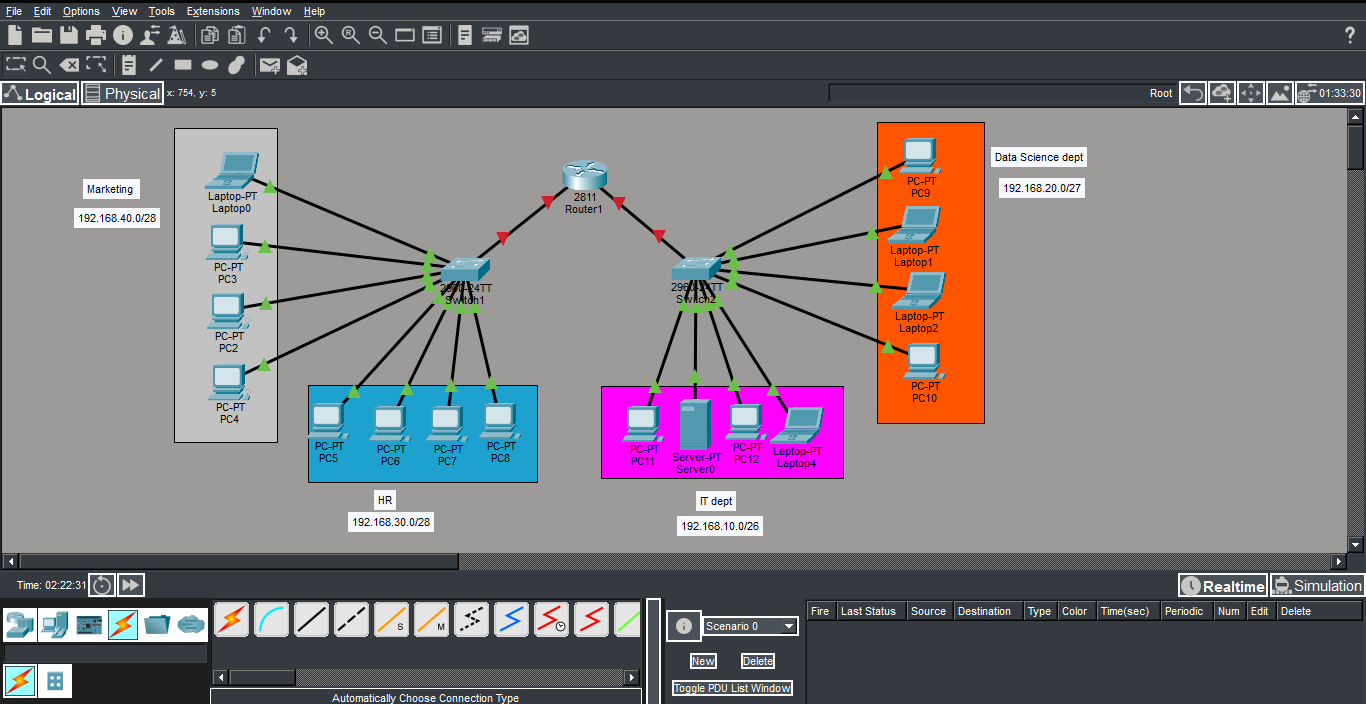
Networking is the backbone of modern organisations, and understanding how to design and configure subnetted networks is a crucial skill for IT professionals. In this blog, we’ll walk through the process of creating a simple but scalable subnetted network for a fictional company, DataBridge Eswatini, using Cisco Packet Tracer.
Department Breakdown
- IT Department = 18 devices
- Data Science Department = 13 devices
- HR Department = 10 devices
- Marketing Department = 7 devices
Subnetting Plan
We’ll use private IP ranges for each department. While the prefix notation may provide more IP addresses than we currently need, this design ensures room for expansion.
Departments
Marketing
- No. of devices : 7
- Subnet : 192.168.40.0/28
- VLAN 10
- Gateway : 192.168.40.1
HR
- No. of devices : 10
- Subnet : 192.168.10.64/26
- VALN 20
- Gateway : 192.168.10.65
IT
- No. of devices : 18
- Subnet :192.168.10.128/26
- VLAN 30
- Gateway : 192.168.10.129
Analytics Team
- No. of devices : 13
- Subnet : 192.168.10.192/26
- VLAN 40
- Gateway : 192.168.20.193
Why Basic Configurations Matter
Before diving into IP addressing and VLANs, it’s critical to establish basic configurations on your switches and router. Think of this as laying the foundation of a house , without it, everything else becomes unstable.
Basic configurations typically include:
- Host names — so devices are easily identifiable.
- Passwords — for privileged EXEC mode,console and remote access.
- Service password encryption — to protect credentials.
- Banner messages — to warn unauthorized users.
- Saving configs — so changes persist after reloads
Switch basic configuration
Switch(config)#hostname Fl_2_SW
Fl_2_SW(config)#enable secret cisco
Fl_2_SW(config)#line console 0
Fl_2_SW(config-line)#password ccna
Fl_2_SW(config-line)#login
Fl_2_SW(config-line)#line vty 0 4
Fl_2_SW(config-line)#password ccna
Fl_2_SW(config-line)#login
Fl_2_SW(config-line)#exit
Fl_2_SW(config)#service password-encryption
Fl_2_SW(config)#banner motd #Authorized Access Only#
Fl_2_SW(config)#exit
Fl_2_SW#
Fl_2_SW#copy run start
Router Configuration
Router(config)#hostname RTR_LAN1
RTR_LAN1(config)#
RTR_LAN1(config)#enable secret cisco
RTR_LAN1(config)#line console 0
RTR_LAN1(config-line)#password ccna
RTR_LAN1(config-line)#login
RTR_LAN1(config-line)#line vty 0 4
RTR_LAN1(config-line)#password ccna
RTR_LAN1(config-line)#login
RTR_LAN1(config-line)#transport input ssh
RTR_LAN1(config-line)#exit
RTR_LAN1(config)#service password-encryption
RTR_LAN1(config)#banner motd #Authorized Access Only#
RTR_LAN1(config)#exit
RTR_LAN1#copy run start
Note: SSH is enabled, but you’ll later need to configure a domain name, generate RSA keys, and create local user accounts for secure remote access.
What Comes Next
With the baseline configurations complete, you’ve laid the groundwork for a secure and organized network. The next steps will involve:
- Creating VLANs for each department.
- Configuring router subinterfaces for inter-VLAN routing.
- Assigning IP addresses to devices (either manually or via DHCP).
- Testing connectivity with ping across departments.
Conclusion
By starting with subnetting and baseline configurations, DataBridge Eswatini now has a structured and secure foundation for its network. This approach ensures that as the company grows, the network can scale without chaos. In future sessions, we’ll expand this setup with VLANs, router-on-a-stick, and DHCP services to make the network fully functional
메타데이터
- post_id
- 1ab8ccfa5bbd
- slug
- building-a-subnetted-network-in-cisco-packet-tracer-a-step-by-step-guide-1ab8ccfa5bbd
- url
- https://medium.com/@dlucy618/building-a-subnetted-network-in-cisco-packet-tracer-a-step-by-step-guide-1ab8ccfa5bbd
- canonical_url
- https://medium.com/@dlucy618/building-a-subnetted-network-in-cisco-packet-tracer-a-step-by-step-guide-1ab8ccfa5bbd
- author_url
- https://medium.com/@dlucy618
- status
- ok
- fetched_at
- 2026-07-11 08:08:22