Python Introduction
Python is a high level programming language. Widely used in Data Science /Machine Learning algorithm. The “Python” language invented by…
Python Introduction
Python is a high level programming language. Widely used in Data Science /Machine Learning algorithm. The “Python” language invented by greatest researcher by Guido Van Rossum at CWI in Netherland. He is member of the “ National Research Institute of Mathematics and Computer Science”.
What is mean by CWI?
CWI is “ Centrum Wiskunde & Informatica ” is the national research institute for mathematics and computer science in the Netherlands. Founded in 1946.
Python programming language originates from research institute “Centrum Wiskunde & Informatica (CWI)” in Amsterdam, Netherlands.
He started working at CWI, fresh out of university, as a programmer in the ABC group. Due to the lack of obvious success he is moved to the Amoeba group. But ABC gave me the key inspiration for Python, Amoeba the immediate motivation.
The name Python came from…………
One of famous comedy troupes name as “ Monty Python’s Flying Circus ”. The reference of these show and the word “ Python ”.
Some people thinking that name came from animal “Snake”.
It was an O’Reilly tradition to use animal pictures, and if it had to be an animal, it might as well be a snake. Finally, when O’Reilly wanted to put a snake on the front of their first Python book “Programming Python”.
Python was originally foundation in the late 1980s. Final implementation of this language in “ December 1989 ” and finished the first working some months after that in 1990.
The first public release of version 0.9.0 on 20 February 1991 van Rossum published the code (labeled version 0.9.0) to alt.sources.
In summer 1994, Python 1.0 was released with new features like :-
(lambda, map, filter, and reduce ).
In 2000, Python 2.0 was released.
This version of Python included list comprehensions, a full garbage collector, and it supported Unicode.Then after long time duration python language was fully developed, on December 3, 2008. Python 3.0 (also called “Py3K”) was released.
Difference Between python 2 and 3
Python 2 and 3 are similar there are subtle differences. The way the print statement works, as in Python 3.0 the print statement has been replaced with a print () function.
Why Python?
Python is a generalpurpose language,Which means it can be used to build just about anything. Which is designed to be simple to read and write. Which makes it very easier to work with, even for nonprogramming background or developers.
Professionally, Python is great for artificial intelligence, machine learning, data analysis, backend web development, and scientific computing. Many developers have also used Python to build productivity tools, games, and desktop apps.
Python works on different platforms (Windows, Mac, Linux, Raspberry Pi, etc).
- Easy to Understand :- Python handles a lot of complexity for you, so it is very beginner-friendly in that it allows beginners to focus on learning programming concepts.
- Very Flexible :- This means there are no hard rules on how to build features.
- Has a Amazing Libraries and Frameworks :- It has hundreds of different libraries and frameworks that can be used by developers.
- Is a Reliable and Efficient :- You can work across several domains including, but not limited to web development, desktop applications, mobile applications, hardware and more.
- Open Source:- It’s free of Cost. It can be easy to set up the environment.
- Has a Community :- Because of this support / Community, Python learners can easily improve their Machine Learning knowledge, which only leads to increasing popularity.
Introduction to Python
It was designed with an emphasis on code readability, and its syntax allows programmers to express their concepts in fewer lines of code.
It is used for :
1)Web development
-
Software development
-
Mathematics
-
Mobile Application
-
Machine Learning
- Finding an Interpreter:-
Before we start Python programming, we need to have an interpreter to interpret and run our programs. Number of interpreter freely available in the market such as Spider, Jupyter Notebook etc. Same interpreter install on different OS (operating system). Following procedure how to install the Python Interpreter on different OS.
Install the Anaconda :
- Windows :-
There are many interpreters available freely to run Python scripts like IDLE (Integrated Development Environment) that comes bundled with the Python software.
i. Download the Anaconda Installer :- https://www.anaconda.com/download/#windows
ii. Double click the installer to launch. Then you can show this dialog box.
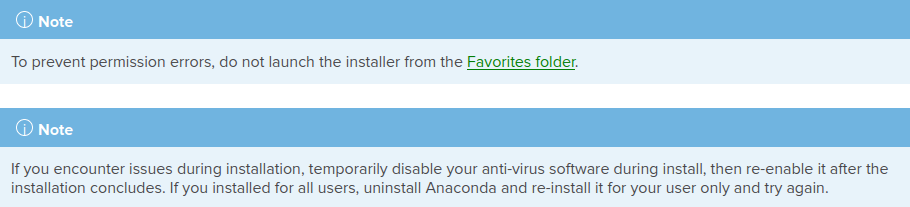
iii. Click Next.
iv. Read the licensing terms and at the last click “I Agree”.
v. Select an install for “Just Me” unless you are installing for all users (which requires Windows Administrator privileges) and click Next. There is two option one is “Public User” and another is “Just Me”.
vi. Select a destination folder to install Anaconda and click the Next button. See below diagram.
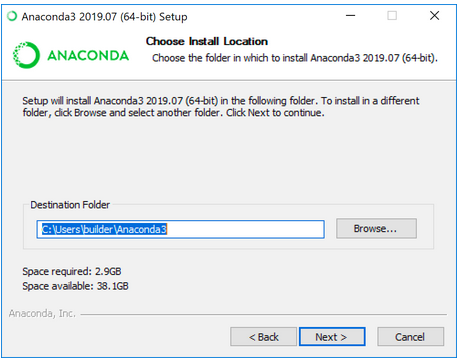
vii. Choose whether to add Anaconda to your PATH environment variable. We recommend not adding Anaconda to the PATH environment variable, since this can interfere with other software. Instead, use Anaconda software by opening Anaconda Navigator or the Anaconda Prompt from the Start Menu. Better way choose the default path.
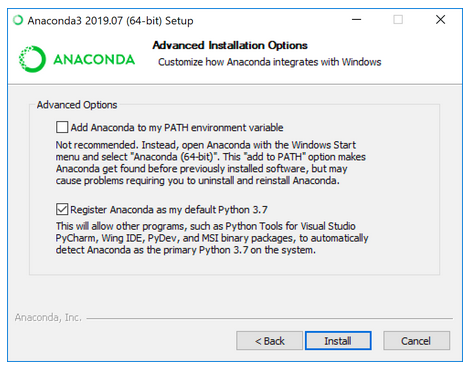
viii. Choose whether to register Anaconda as your default Python. Unless you plan on installing and running multiple versions of Anaconda or multiple versions of Python, accept the default and leave this box checked.
ix. Hit the Install button.
x. Click the Next button.
xi. After a successful installation you will see the “Thanks for installing Anaconda” dialog box:
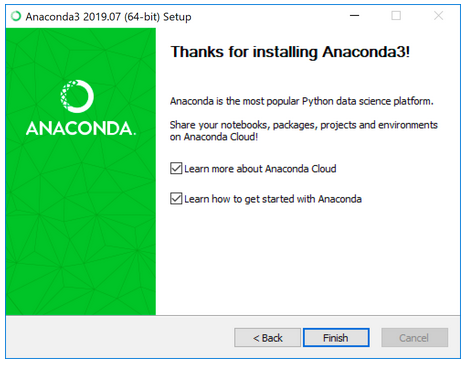
xii. Hit the Finish button. Enjoy.
2. LINUX / UNIX :-
i. for x86 systems.
ii. In your browser, download the Download Anaconda Distribution | Anaconda. Choose latest version.
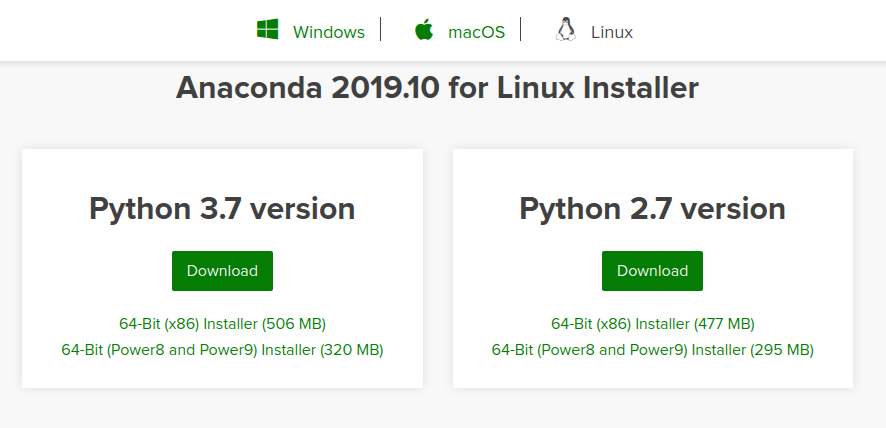
iii. RECOMMENDED: Installing Anaconda Distribution — Anaconda. For more information on hashes, see Installing conda — conda 26.1.1.dev20 documentation
iv. Open a terminal (short cut key : ctrl + alt + T) and run the following :
sha256sum /path/filename
v. Enter the following command to install Anaconda for Python 3.7: bash ~/Downloads/Anaconda32019.10Linuxx86_ 64.sh
vi. Enter the following command to install Anaconda for Python 2.7 :
bash ~/Downloads/Anaconda22019.10Linuxx86_64.sh
Note :If you did not download to your Downloads directory, replace
~/Downloads/ with the path to the file you downloaded.
vii. The installer prompts “In order to continue the installation process, please review the license agreement”. Click “Enter” to view license terms.
viii. Scroll to the bottom of the license terms and write “Yes” to agree.
ix. You accept the default install location, the installer displays “PREFIX=/home/<user>/anaconda<2 or 3>” and continues the installation. It may take a few minutes to complete.
x. The installer prompts “Do you wish the installer to initialize Anaconda3 by running conda init?” We recommend “yes”.
xi. The installer finishes and displays “Thank you for installing Anaconda!”
Enjoy
3. Installing on macOS
You can install Anaconda using either the graphical installer (“wizard”) or the command line (“manual”) instructions below. If you are unsure, choose the graphical install.
i. Download the graphical Download Anaconda Distribution | Anaconda for your version of Python.
ii. RECOMMENDED: Installing Anaconda Distribution — Anaconda. For more information on hashes, see Installing conda — conda 26.1.1.dev20 documentation
iii. Double click the downloaded file and click continue to start the installation.
iv. Answer the prompts on the Introduction, Read Me, and License screens. v. Click the Install button to install Anaconda in your ~/opt directory
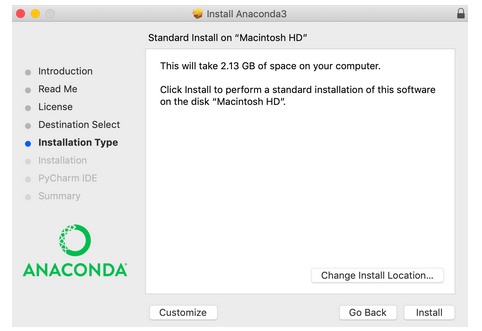
vi. OR, click the Change Install Location button to install in another location . On the Destination Select screen, select Install for me only.
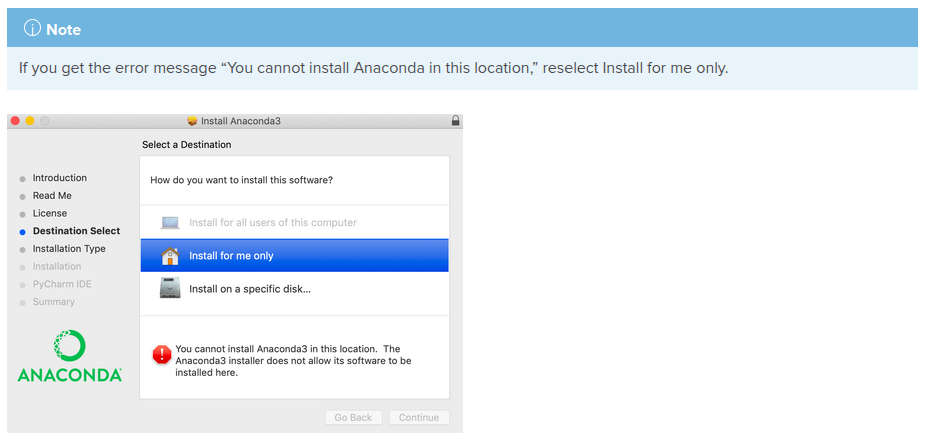
Click the continue button.
Enjoy.
메타데이터
- post_id
- 1c00d6cbdf7b
- slug
- python-introduction-1c00d6cbdf7b
- url
- https://medium.com/@shubhnagalwade/python-introduction-1c00d6cbdf7b
- canonical_url
- https://medium.com/@shubhnagalwade/python-introduction-1c00d6cbdf7b
- author_url
- https://medium.com/@shubhnagalwade
- status
- ok
- fetched_at
- 2026-06-09 15:37:30



