ArcKit v5.0.0: One toolkit, seven plugins, install only what you need
ArcKit just shipped its biggest structural change since the toolkit was first published. Until today, ArcKit shipped as a single Claude…
ArcKit v5.0.0: One toolkit, seven plugins, install only what you need
ArcKit just shipped its biggest structural change since the toolkit was first published. Until today, ArcKit shipped as a single Claude Code plugin carrying one hundred and seventeen commands. That number was a feature when ArcKit was still establishing the baseline. It became a problem the day overlays for the European Union, France, Austria, Canada, the UAE and now Australia all landed in the same plugin.
If your project is a UK Government civilian programme, you do not need the UAE Cabinet decree commands loading into your session. You probably do not need the Canadian Foreign Influence Transparency and Accountability Act either. Yet every Claude Code session that had ArcKit installed paid the token cost of every overlay, every doc-type definition, every recipe, every guide, every time. For a UK-only user the cost was roughly five thousand tokens of system-reminder bloat at the start of every session. Multiply that across a working week and the number stops being a curiosity.
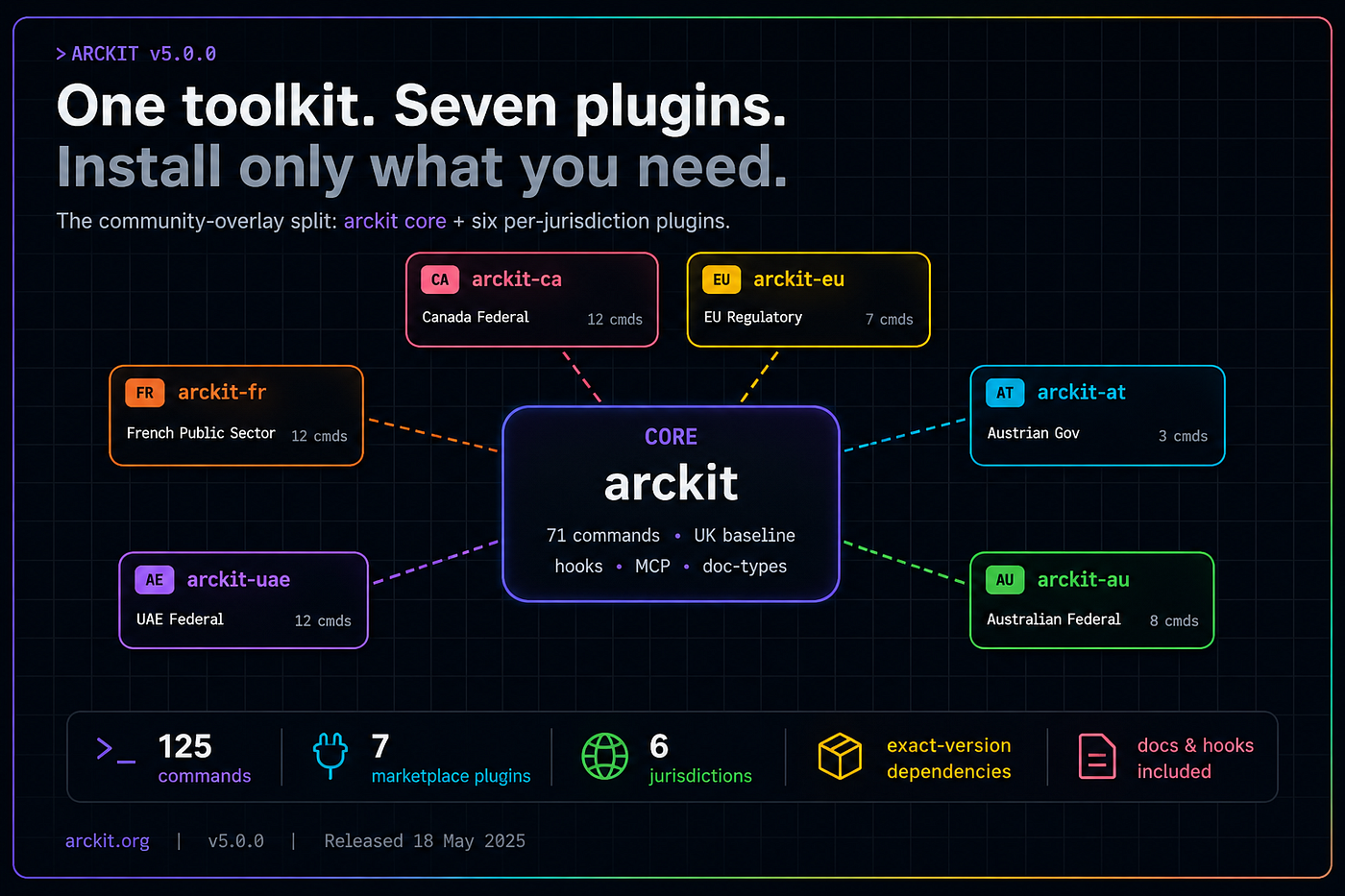
v5.0.0 splits ArcKit into seven marketplace plugins. The core plugin keeps the seventy-one official UK Government baseline commands plus everything jurisdictional that has to stay in one place: hooks, MCP servers, doc-type definitions, the validate-arc-filename gate, the plugin user configuration. Each of the six community overlays now ships as its own plugin: arckit-uae, arckit-fr, arckit-ca, arckit-eu, arckit-at, and the brand new arckit-au. You install only the jurisdictions you actually need.
Why the bloat matters
Token costs on a hot path compound. Every Claude Code session opens with a system reminder that lists the available skills, agents, MCP servers and hooks. The longer that list, the longer the prompt that bills against your context window before you have typed a single character. Five thousand tokens does not break a session. It does eat into the working memory you have available for the actual programme work, and the larger the conversation the worse the effect because the system reminder rides along on every assistant turn.
The cost also runs against the way most teams use ArcKit. A UK Ministry of Defence supplier does not pivot to UAE federal compliance between sprints. A Canadian federal team does not need French ANSSI Indice de Résilience Numérique guidance ambient in their session. The bloat was paying a multi-jurisdiction tax for what is, for most users on most days, a single-jurisdiction workload.
v5.0.0 makes that tax opt-in. The core plugin still gives you the cross-jurisdictional foundations and the UK baseline. Everything community sits behind an explicit claude plugin install arckit-uae (or whichever overlay you actually need). For UK-only users the system reminder is materially shorter. For multi-jurisdiction users it is the same as before. Either way the cost is explicit and visible.
The seven plugins
The core plugin is arckit. It ships the seventy-one commands that constitute the official-baseline of the toolkit. Everything in the foundation layer (principles, requirements, ADRs, design reviews, traceability, conformance), the UK Government baseline (Service Standard, Technology Code of Practice, Secure by Design, the AI Playbook, JSP 936, the Algorithmic Transparency Recording Standard, the Strategic Outline Business Case), and the cross-jurisdictional infrastructure (vendor evaluation, FinOps, MLOps, DevOps, Wardley Mapping, the build harness). Plus the hooks, the MCP servers, the validate-arc-filename enforcement, the doc-type registry, and the user configuration plumbing. Doc types in particular stay in core forever, because the filename validator is the single source of truth for what counts as a valid artefact filename and the cost of fragmenting it across plugins exceeds the benefit.
The six community overlays each carry the commands, templates and recipes for a single jurisdiction.
arckit-uae ships the twelve UAE Federal commands covering the Personal Data Protection Law, the Information Assurance Standard, the AI Charter, the autonomy tier posture, the sovereign cloud residency assessment under the National Cloud Security Policy version two, UAE Pass integration, Smart Data classification, zero bureaucracy service review, digital records, data sharing, national priorities alignment, and federal procurement. Plus two build recipes: uae-federal-ai for the full Cabinet agentic AI compliance bundle, and uae-agentic-transformation for the focused twenty-four month playbook against the April 2026 Cabinet framework target of fifty percent of federal services on agentic AI by April 2028.
arckit-fr ships the twelve French Public Sector commands covering ANSSI security posture, the ANSSI information system cartography methodology, RGPD with CNIL-specific guidance, EBIOS Risk Manager, PSSI security policy, SecNumCloud qualification, Diffusion Restreinte handling, DINUM digital standards, public algorithm transparency under article L311–3–1 CRPA, the Indice de Résilience Numérique, marché public procurement, and public code reuse against the SILL and code.gouv.fr catalogues.
arckit-ca ships the twelve Canada Federal commands covering FITAA (the Foreign Influence Transparency and Accountability Act), Privacy Impact Assessment under the Privacy Act and the TBS Directive, ATIP reconciliation, the Algorithmic Impact Assessment under the TBS Directive on Automated Decision-Making, the Charter Rights design review with Oakes proportionality, the ITSG-33 Statement of Applicability, the Security of Information Act handling plan, cloud residency, GC Digital Standards conformance, Official Languages Act review, federal procurement, and the First Nations OCAP sovereignty assessment. Plus the ca-federal-fitaa build recipe.
arckit-eu ships the seven EU regulatory commands covering the GDPR assessment, the EU AI Act, the Digital Services Act, the Digital Operational Resilience Act for financial entities, the Data Act for connected products, the NIS2 directive for essential and important entities, and the Cyber Resilience Act for digital products.
arckit-at ships the three Austrian commands covering DSG and DSGVO under the Datenschutzbehörde, the NISG (the Austrian NIS2 transposition under BGBl. I Nr. 94/2025), and the Bundesvergabegesetz 2018 public procurement framework.
arckit-au is the newest. It ships the eight Australian Federal and DISP-supplier commands covering the ASD Essential Eight maturity posture across levels ML0 to ML3, the Privacy Act 1988 Privacy Impact Assessment against the thirteen Australian Privacy Principles, the DTA Digital Service Standard conformance, the ASD Information Security Manual Statement of Applicability across seventeen control domains, the OAIC Notifiable Data Breach response playbook under Privacy Act Part IIIC, the Protective Security Policy Framework scorecard against four outcomes and sixteen core requirements, the DTA AI Assurance Framework baseline with the Responsible AI Policy version two and the Tranche 1 Privacy Act notification obligations, and the consolidating DISP Member self-attestation pack. Plus the au-federal build recipe (thirty-five targets across nine build waves). Domain co-maintainer: @royster70.
That is one hundred and twenty-five commands across seven plugins, give or take whatever overlays land between releases.
Auto-install through declared dependencies
The split would be merely an organisational change if installing a community plugin did not pull in the core plugin automatically. Claude Code added a dependencies field to the plugin manifest in version 2.1.110, and ArcKit v5.0.0 uses it for exactly that purpose.
Every community plugin declares an exact dependency on arckit core. When you run claude plugin install arckit-uae, Claude Code resolves the dependency, fetches the core plugin, installs it, then installs the community plugin and reports both at the end of the install output. You do not have to know the dependency chain. You ask for the overlay you want and the toolkit installs what makes it work.
Three-tier recipe lookup
The build harness moves too. The arckit-build skill that powers the bulk artefact generation now does a three-tier recipe lookup. It checks project overrides first (.arckit/recipes/{name}.yaml for user-customised recipes that survive plugin updates), then the core plugin (for the UK Government recipes: uk-saas and uk-mod-sovereign), then sibling community plugins via a glob on ${CLAUDE_PLUGIN_ROOT}/../arckit-*/recipes/{name}.yaml. The glob picks up arckit-uae/recipes/uae-federal-ai.yaml, arckit-ca/recipes/ca-federal-fitaa.yaml, arckit-au/recipes/au-federal.yaml and any future community plugin’s recipes without any further code change.
The build skill itself stays in the core plugin because the parallel agent dispatch it depends on is Claude Code specific. Non-Claude extensions (Codex, Gemini, OpenCode, Copilot, Paperclip) stay monolithic for now and ship the merged content of all seven plugins, because those extensions do not have a parallel-install model. The converter that produces them walks every plugin source on every run.
Migration
If you are upgrading from v4.x, the SessionStart hook does the work of telling you what to install. The first time you open a v5.0.0 session in a project that previously used community-overlay commands, ArcKit reads the project manifest at .arckit/manifest.json, identifies the jurisdictions you previously used, and prints the exact claude plugin install command for your specific project. If you only ever used UAE commands, it suggests claude plugin install arckit-uae. If you used UAE and France, it suggests both. If you never used any community overlay, the banner does not fire at all.
The banner is one-shot. Once you acknowledge it by running touch .arckit/v5-migration-acked, the banner stops appearing. That makes the migration explicit (you see it once, you act on it, you move on) without being a recurring distraction.
For new projects, the install flow is the obvious one. Add the marketplace once with /plugin marketplace add tractorjuice/arc-kit and then claude plugin install arckit plus whatever overlays your jurisdictions need. The dependency resolver does the rest.
What is not changing
Most of the surface stays where it was. The cross-AI distributions (Codex CLI, Gemini CLI, OpenCode CLI, GitHub Copilot, the Paperclip TypeScript SDK) all continue to ship every command in a single monolithic extension per format. The converter rebuilds them on every release. The CLI scaffolding (arckit init) still produces the same project structure with .arckit/templates/ containing every template across every jurisdiction. The non-Claude experience does not fragment.
Doc types stay in arckit-claude/config/doc-types.mjs. v5.0.0 registers eight new doc-type codes for the Australian commands and adds AU and (retroactively) CA to the REGIMES array and REGIME_LABELS object. The single source of truth for the validate-arc-filename hook does not move.
The release-flow tooling adapts. The existing scripts/bump-version.sh now updates seven plugin manifests, every VERSION file, the marketplace catalogue (all entries, not just the core), and every community plugin’s dependency pin in a single pass. A new scripts/tag-plugins.sh creates the per-plugin native tags (arckit — v5.0.0, arckit-uae — v5.0.0, and so on for the other five) that the Claude Code plugin system uses for version resolution. The umbrella v5.0.0 tag continues to trigger the GitHub Release.
What this means for contributors
The plugin split makes ArcKit easier to contribute to. If you maintain a jurisdictional overlay, your contributions land in a focused directory tree with a focused set of files. Community plugins have their own CHANGELOG.md, their own README.md, their own VERSION. They share one version with the wider toolkit (because cross-plugin dependencies need synchronised releases) but the day-to-day work of writing commands, refining templates, validating against client engagements stays inside the plugin you own.
For new jurisdictions, the template is now obvious. Look at arckit-au (the newest addition). It has the structure, the manifest, the dependency declaration, the marketplace entry, a README that names the eight commands and the recipe, a per-plugin CHANGELOG, and ports of the existing per-command guides into the docs site. The work to add a new jurisdiction is now well-scoped: write the commands, write the templates, write the recipe, register the doc types in the core plugin, add the marketplace entry, ship.
Adding a new doc-type code is the one rule worth being explicit about. Because doc types live in arckit-claude/config/doc-types.mjs, any new community command that emits a new doc type requires a two-part contribution: the command in the community plugin, the doc-type registration in the core plugin. The collision check in CI catches duplicates automatically. The pattern is documented in CONTRIBUTING.md.
Where to start
Existing projects: open a v5.0.0 session in any project that previously used ArcKit and the migration banner will tell you exactly what to install. The whole migration usually takes one command and a touch to acknowledge.
New projects: the Getting Started guide covers the new install flow. Pick your jurisdictions. Run the install command. The dependency resolver does the rest.
Maintainers of jurisdictional overlays: your contribution surface just got smaller and clearer. The seventh plugin (arckit-au) is the template for the eighth.
ArcKit v5.0.0 is on GitHub. The full changelog is in the release notes. The seven plugins are in the marketplace at tractorjuice/arc-kit.
Join the ArcKit Community
- Discord — real-time conversation, help with commands, and what people are building: https://discord.gg/W3ndQqmyg
- LinkedIn Group — announcements, case studies, and longer-form discussion: linkedin.com/groups/17641034
- GitHub — code, issues, and contributions: github.com/tractorjuice/arc-kit
메타데이터
- post_id
- 1cb3ffafb829
- slug
- arckit-v5-0-0-one-toolkit-seven-plugins-install-only-what-you-need-1cb3ffafb829
- url
- https://medium.com/arckit/arckit-v5-0-0-one-toolkit-seven-plugins-install-only-what-you-need-1cb3ffafb829
- canonical_url
- https://medium.com/arckit/arckit-v5-0-0-one-toolkit-seven-plugins-install-only-what-you-need-1cb3ffafb829
- author_url
- https://medium.com/@mcraddock
- status
- ok
- fetched_at
- 2026-07-19 18:36:54