Database Connection Pooling — The 50ms Tax You’re Paying on Every Request
Every request opens a connection. Every connection costs time. You’re paying for both.
Database Connection Pooling — The 50ms Tax You’re Paying on Every Request
Every request opens a connection. Every connection costs time. You’re paying for both.
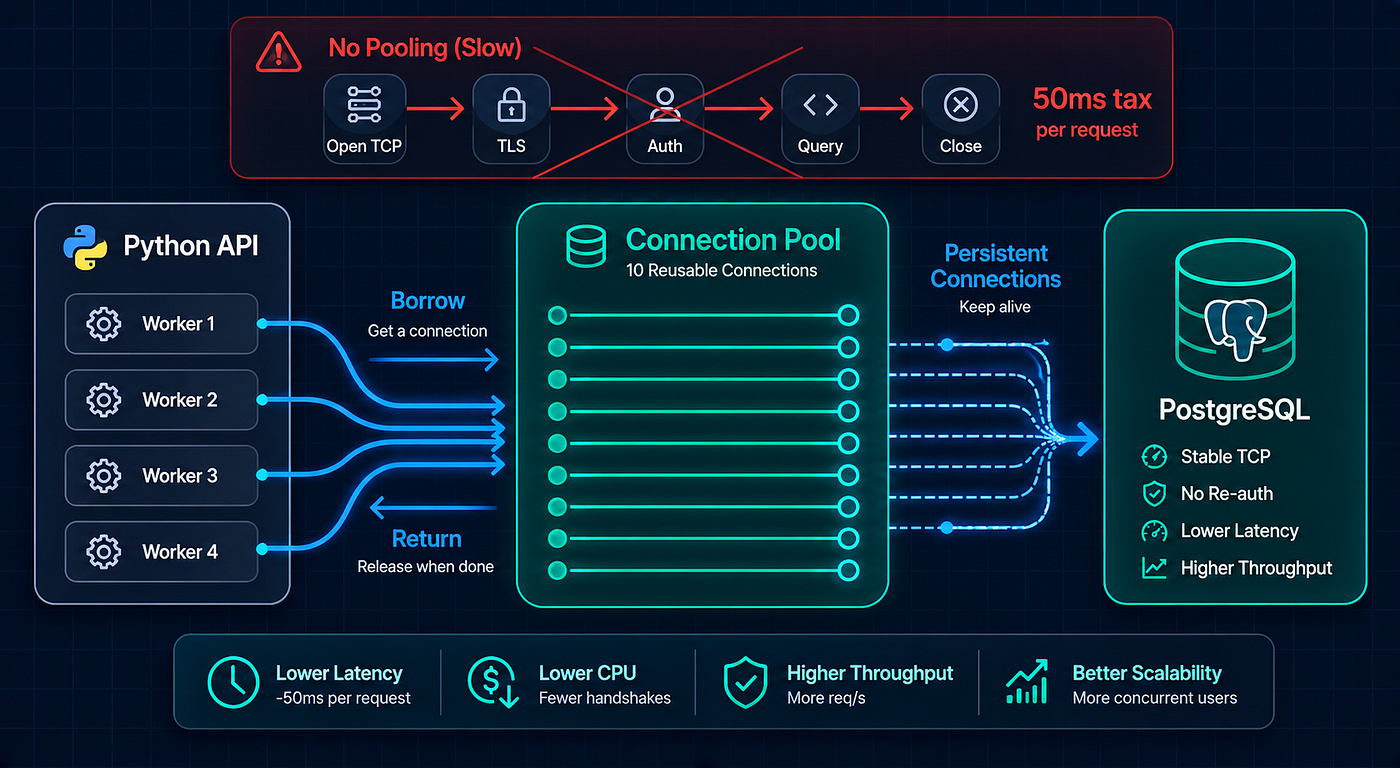
Database Connection Pooling Saves Latency
We deployed a FastAPI service behind a load balancer with four replicas. Each replica ran four Uvicorn workers. Traffic was moderate — about 300 requests per second total. PostgreSQL was on a separate server with max_connections = 100.
On the second day of production, users started seeing intermittent 500 errors. The logs showed: sqlalchemy.exc.OperationalError: connection to server at "10.0.1.5", port 5432 failed: FATAL: too many connections for role "apiuser".
I checked pg_stat_activity. There were 97 active connections. Four replicas × four workers = sixteen processes, each opening and closing connections for every request. Under sustained load, the connection teardown on one request overlapped with the connection setup on the next. Connections piled up. PostgreSQL refused new ones.
The fix was connection pooling — reusing database connections instead of creating a new one for every single request. It took 15 minutes to configure and solved the problem permanently. But the connection exhaustion was just the obvious symptom. The subtler problem was the 50–70ms of latency we’d been paying on every request to open a new TCP connection, complete the TLS handshake, and authenticate with PostgreSQL — overhead that pooling eliminated entirely.
Here’s what connection pooling actually does, why the default behavior in both Django and FastAPI wastes resources, and how to configure it properly for production.
What Happens Without Pooling
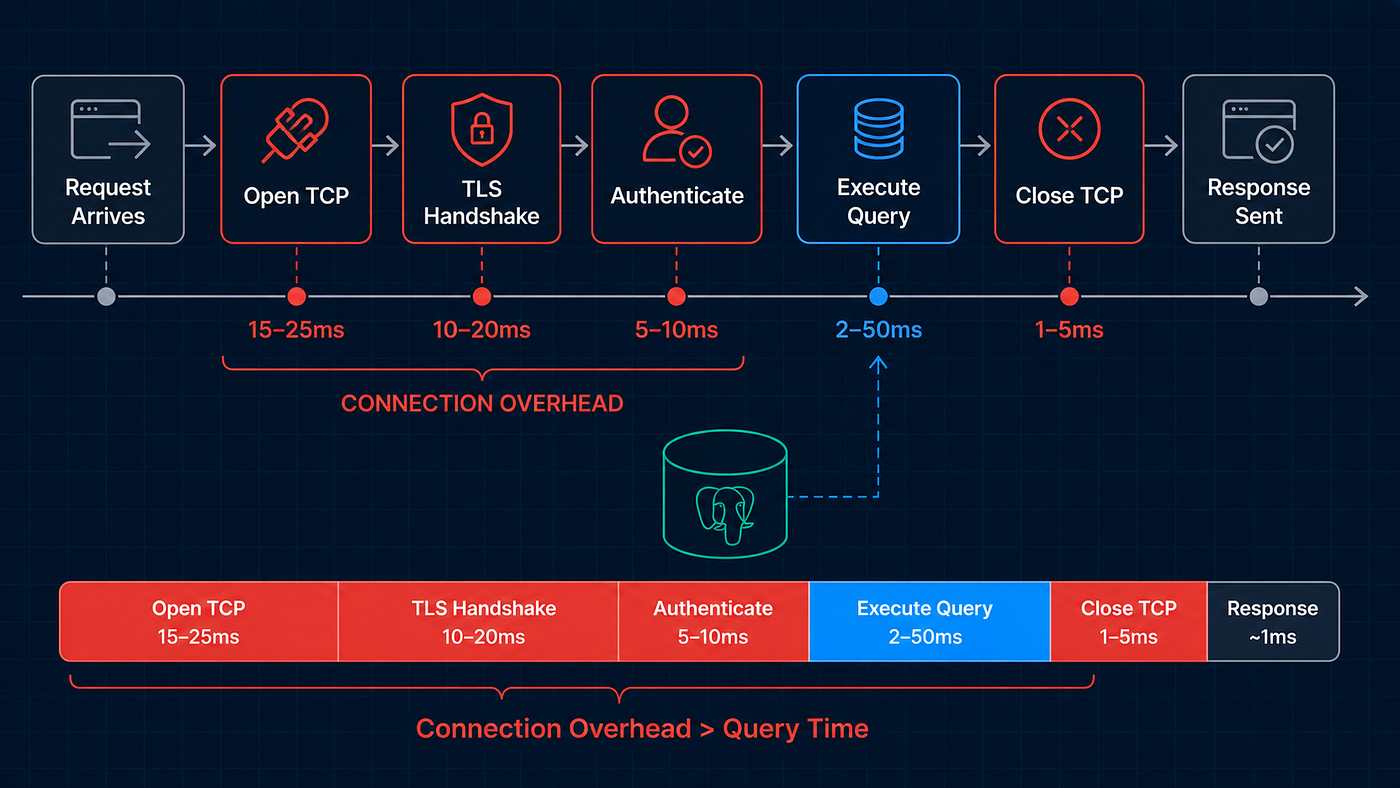
Per-Request Connection Tax
When your Python API handles a request that needs the database, here’s the default lifecycle:
Request arrives
  → Open TCP connection to PostgreSQL (15-25ms)
  → TLS handshake if using SSL (10-20ms)
  → PostgreSQL authentication (5-10ms)
  → Execute query (2-50ms)
  → Close TCP connection (1-5ms)
Response sent
The actual query takes 2–50ms. The connection overhead takes 30–55ms. For a simple “get user by ID” query that takes 3ms, you’re spending 10x more time opening and closing the connection than running the query.
Multiply that by 300 requests per second, and you’re creating and destroying 300 TCP connections every second. PostgreSQL has to authenticate each one, allocate memory for each session, and clean up after each one closes. The database spends more time managing connections than executing queries.
What Connection Pooling Does
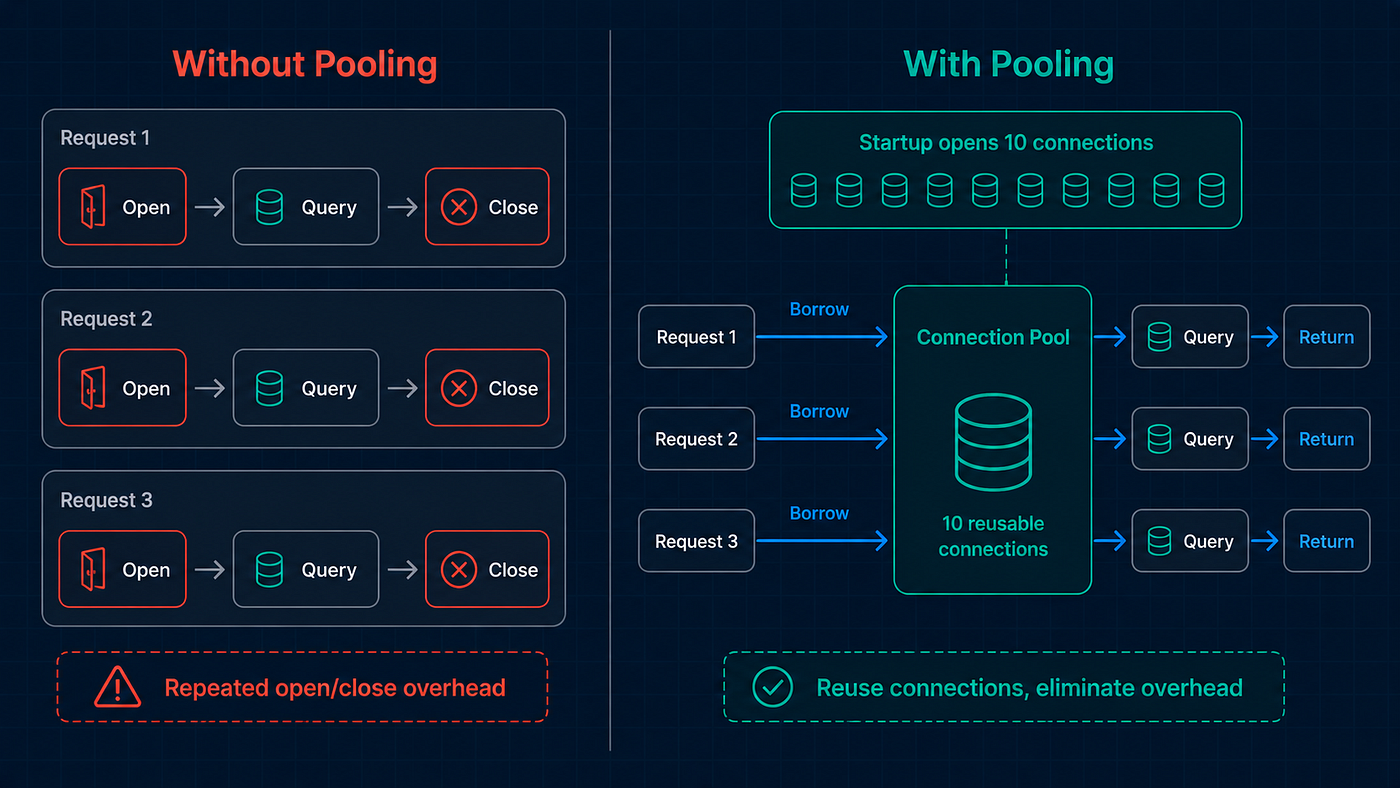
Borrow, Query, Return
A connection pool maintains a set of open, authenticated database connections. When your code needs a connection, it borrows one from the pool. When it’s done, it returns it to the pool — without closing the TCP connection. The next request that needs a connection grabs the same one.
Without pooling:
Request 1: open → query → close
Request 2: open → query → close
Request 3: open → query → close
(300 connections opened/closed per second)

With pooling:
Startup: open 10 connections → keep in pool
Request 1: borrow → query → return
Request 2: borrow → query → return
Request 3: borrow → query → return
(10 connections reused indefinitely)
The benefits are immediate:
Latency drops by 30–55ms per request. No connection setup overhead. The connection is already open and authenticated.
Database load drops dramatically. Instead of managing 300 connections per second, PostgreSQL manages 10 persistent ones.
Connection exhaustion disappears. The pool limits the maximum number of connections, preventing the “too many connections” error.
Django: Native Pooling (5.1+)
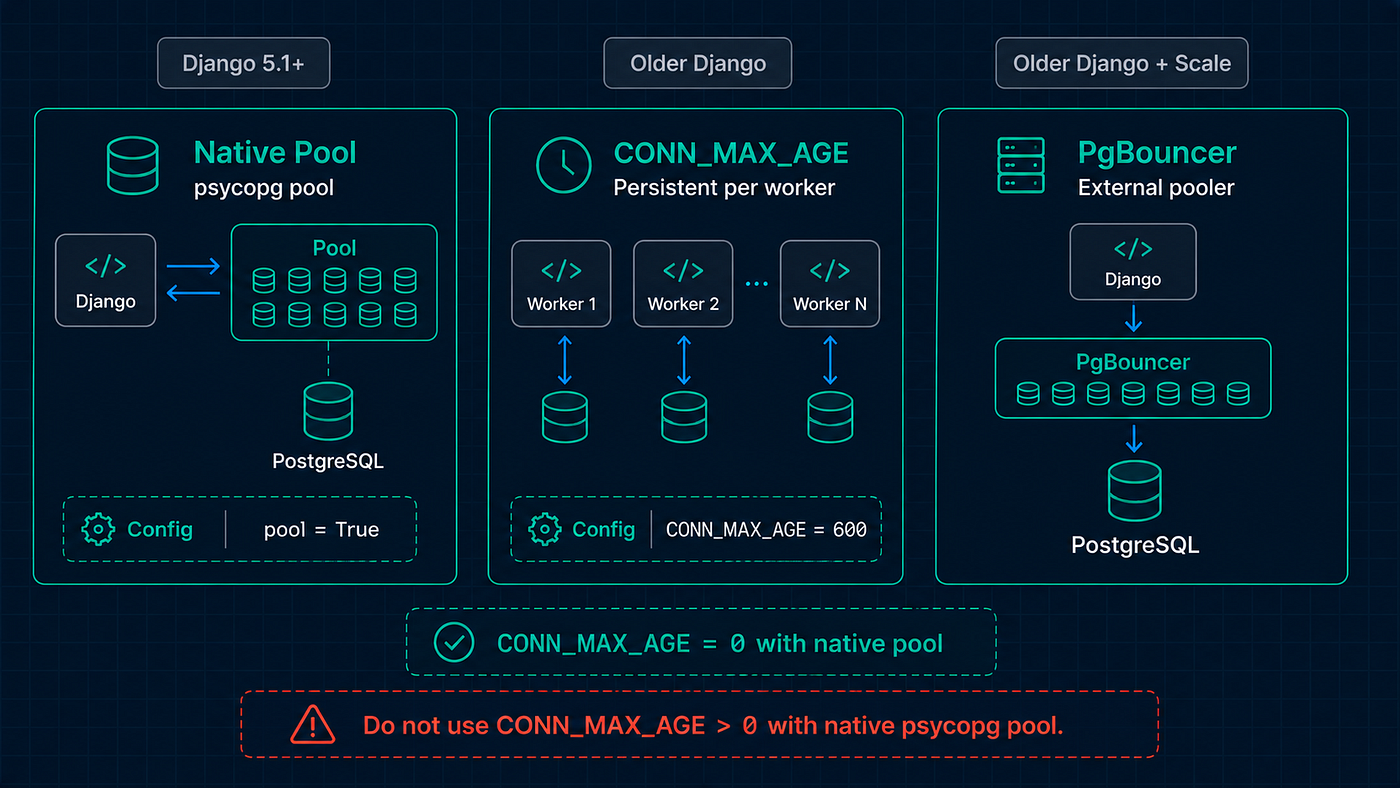
Django Connection Pooling Paths
Django 5.1 introduced native connection pooling using psycopg3's pool. If you're on Django 5.1 or newer, this is the simplest path:
pip install psycopg[pool]# settings.py
DATABASES = {
"default": {
"ENGINE": "django.db.backends.postgresql",
"NAME": "mydb",
"USER": "apiuser",
"PASSWORD": "secret",
"HOST": "10.0.1.5",
"PORT": "5432",
"CONN_MAX_AGE": 0, # Required — pooling doesn't support persistent connections
"OPTIONS": {
"pool": True,
},
}
}That’s it. "pool": True enables connection pooling. Django manages the pool automatically — creating connections on demand, reusing them across requests, and recycling them when they get stale.
The CONN_MAX_AGE = 0 requirement trips people up. Django's older persistence mechanism (CONN_MAX_AGE) conflicts with the new pool. Set it to 0 and let the pool handle connection lifetimes.
For Django Before 5.1: CONN_MAX_AGE
If you can’t upgrade to 5.1, Django’s CONN_MAX_AGE setting provides partial connection reuse:
DATABASES = {
    "default": {
        "ENGINE": "django.db.backends.postgresql",
        "NAME": "mydb",
        "USER": "apiuser",
        "PASSWORD": "secret",
        "HOST": "10.0.1.5",
        "PORT": "5432",
        "CONN_MAX_AGE": 600,  # Reuse connections for up to 10 minutes
    }
}
CONN_MAX_AGE = 600 tells Django to keep connections open for 10 minutes between requests. This is better than the default (CONN_MAX_AGE = 0, which closes the connection after every request), but it's not true pooling:
- Each worker thread holds its own connection — no sharing.
- Connections aren’t returned to a pool — they’re dedicated to one thread.
- If you have 16 workers, you have 16 persistent connections whether you need them or not.
It eliminates the per-request connection overhead but doesn’t control the total connection count. For most applications, it’s a meaningful improvement over the default.
For Django Before 5.1: PgBouncer
For true connection pooling on older Django versions, use PgBouncer — an external connection pooler that sits between your application and PostgreSQL:
Your App → PgBouncer (pools connections) → PostgreSQL# pgbouncer.ini
[databases]
mydb = host=10.0.1.5 port=5432 dbname=mydb
[pgbouncer]
listen_port = 6432
listen_addr = 0.0.0.0
pool_mode = transaction
max_client_conn = 200
default_pool_size = 20
min_pool_size = 5Point your Django HOST at PgBouncer instead of PostgreSQL:
DATABASES = {
    "default": {
        "ENGINE": "django.db.backends.postgresql",
        "NAME": "mydb",
        "HOST": "localhost",
        "PORT": "6432",  # PgBouncer port, not PostgreSQL
    }
}
pool_mode = transaction means PgBouncer assigns a server connection for the duration of a transaction, then returns it to the pool. This is the most efficient mode and works with Django's default behavior.
FastAPI / SQLAlchemy: Built-In Pooling
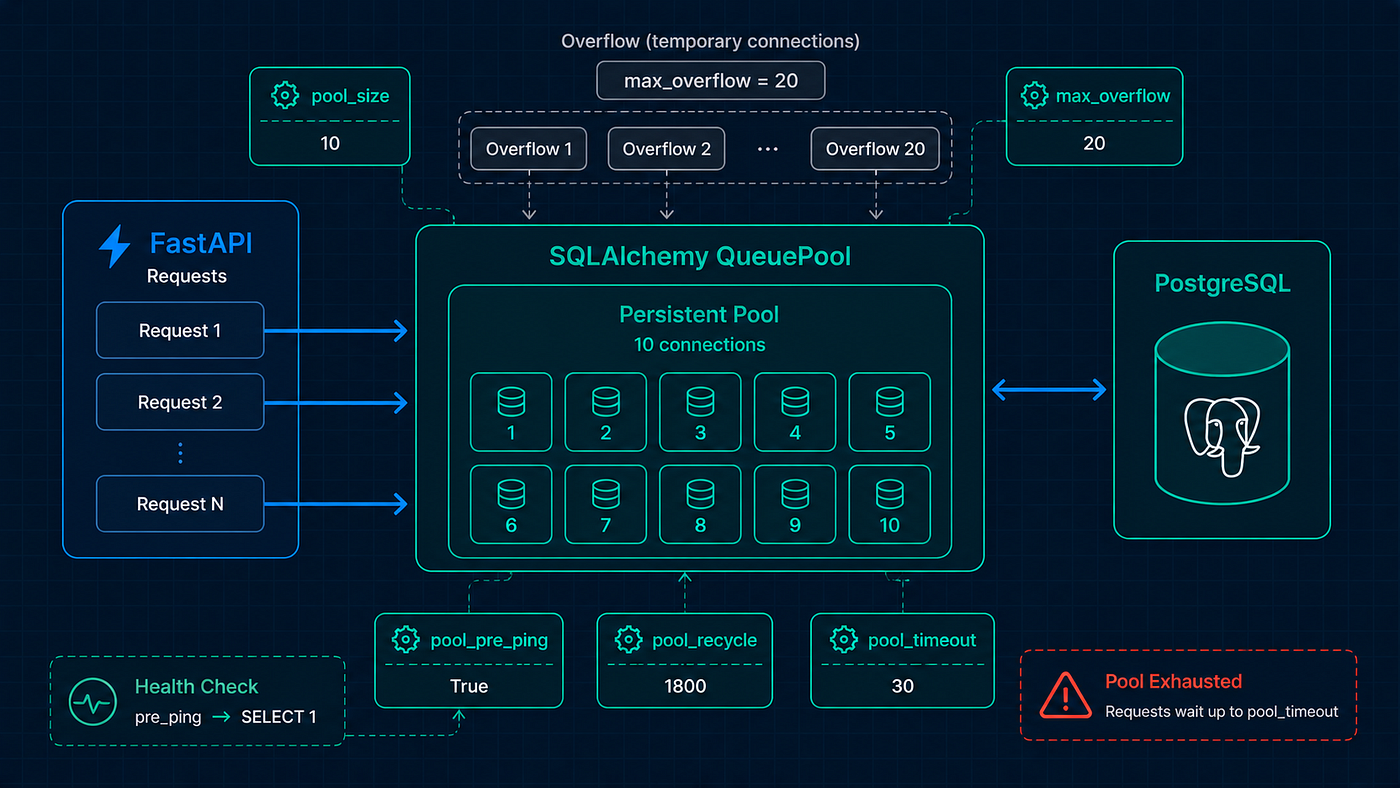
SQLAlchemy QueuePool Production Settings
SQLAlchemy has connection pooling built in. If you’re using create_engine, you already have a pool — but the defaults might not be right for production:
from sqlalchemy import create_engine
from sqlalchemy.orm import sessionmaker

# Default pool: 5 connections, 10 overflow
engine = create_engine("postgresql://user:pass@localhost/mydb")
SQLAlchemy’s default QueuePool maintains 5 connections and allows up to 10 temporary overflow connections. For a production API with any real traffic, that's too low.
Production Configuration
from sqlalchemy import create_engine
from sqlalchemy.pool import QueuePool

engine = create_engine(
    "postgresql://user:pass@10.0.1.5:5432/mydb",

    # Pool sizing
    poolclass=QueuePool,
    pool_size=10,           # Persistent connections in the pool
    max_overflow=20,        # Temporary connections allowed above pool_size

    # Connection health
    pool_pre_ping=True,     # Verify connection is alive before using it
    pool_recycle=300,       # Recreate connections older than 5 minutes

    # Timeouts
    pool_timeout=30,        # Wait up to 30s for a connection from the pool

    # Connection arguments
    connect_args={
        "connect_timeout": 5,        # TCP connection timeout
        "options": "-c statement_timeout=30000",  # Kill queries after 30s
    },
)

SessionLocal = sessionmaker(autocommit=False, autoflush=False, bind=engine)
Let me explain each setting:
**pool_size=10** — The number of connections permanently held in the pool. These are always open, always authenticated, always ready. Set this based on your typical concurrent request volume.
**max_overflow=20** — How many extra connections can be created above pool_size during traffic spikes. These are temporary — created on demand and closed when returned. Total maximum connections = pool_size + max_overflow = 30.
**pool_pre_ping=True** — Before handing a connection to your code, SQLAlchemy sends a lightweight SELECT 1 to verify the connection is still alive. This adds ~1ms per request but prevents the dreaded "connection was closed" errors that happen when PostgreSQL or a network device silently drops idle connections.
**pool_recycle=300** — Connections older than 5 minutes are closed and replaced with fresh ones. This prevents problems with firewalls and load balancers that silently drop idle TCP connections after a timeout (AWS RDS has a default timeout of ~5 minutes for idle connections).
**pool_timeout=30** — If all connections are in use (including overflow), new requests wait up to 30 seconds for a connection to become available. After 30 seconds, SQLAlchemy raises TimeoutError. This is better than hanging forever.
The Dependency That Uses the Pool
# dependencies.py
def get_db():
    db = SessionLocal()
    try:
        yield db
    finally:
        db.close()  # Returns the connection to the pool — doesn't close it
The db.close() call is misleading. It doesn't close the TCP connection. It returns the connection to the pool so the next request can use it. The pool manages the actual TCP lifecycle.
Sizing Your Pool Correctly
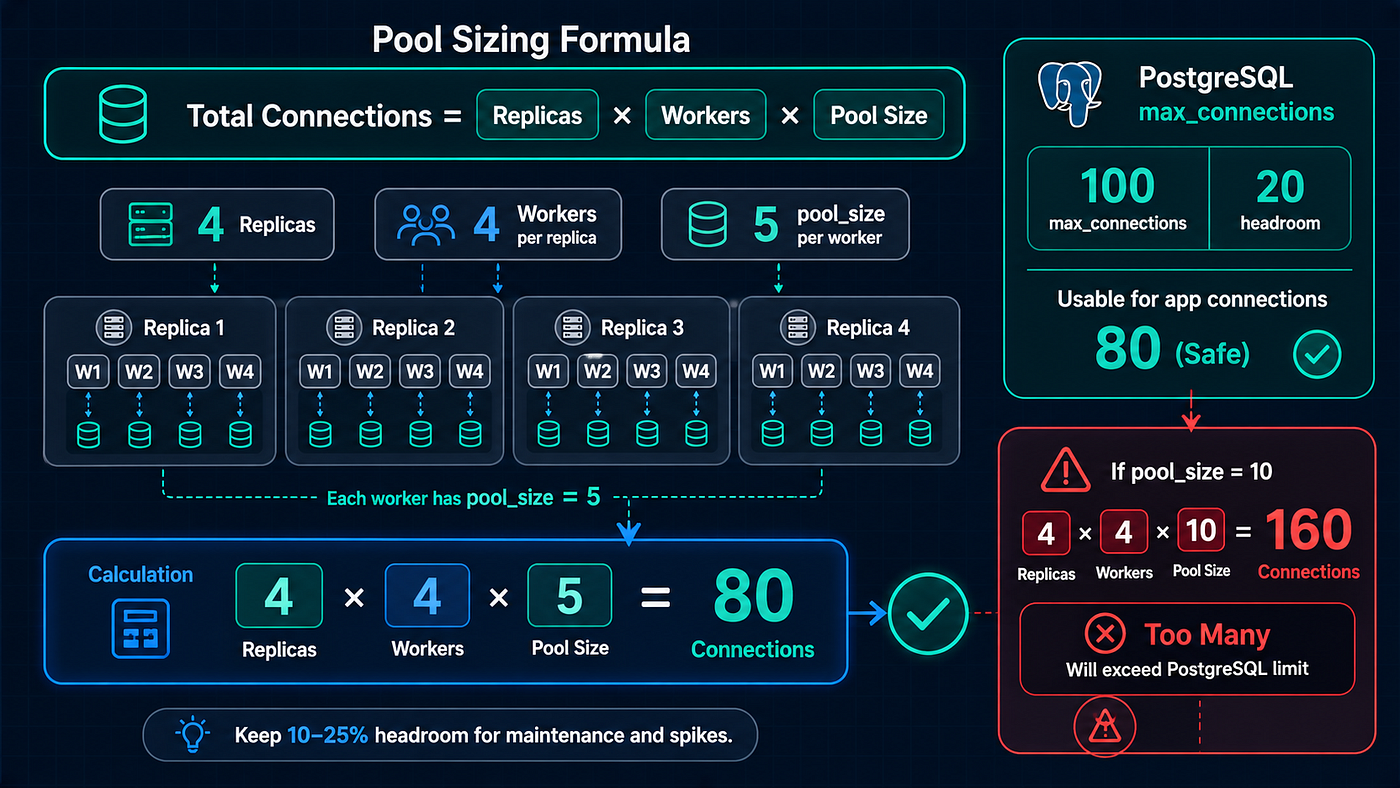
Database Pool Sizing Formula
The most common pooling mistake is setting the pool too large. More connections is not better. Each PostgreSQL connection consumes about 5–10MB of memory on the server. 100 connections = 500MB-1GB just for connection overhead.
The Formula
Total connections = (workers per replica) × (pool_size per worker) × (number of replicas)Your total must be less than PostgreSQL’s max_connections (default: 100).
Example:
- 4 replicas × 4 workers × pool_size 5 = 80 connections
- PostgreSQL max_connections = 100
- Leaves 20 connections for admin, monitoring, migrations
If you set pool_size = 10 instead: 4 × 4 × 10 = 160 connections. That exceeds max_connections. You'll get connection refused errors.
My Starting Points
Deployment pool_size max_overflow Total Single server, 4 workers 10 20 30 2 replicas × 4 workers 5 10 40–120 4 replicas × 4 workers 3 7 48–160 8 replicas × 4 workers 2 5 64–224
As replicas increase, pool_size per worker decreases. The total across all workers should stay well below max_connections.
Monitoring Your Connection Pool
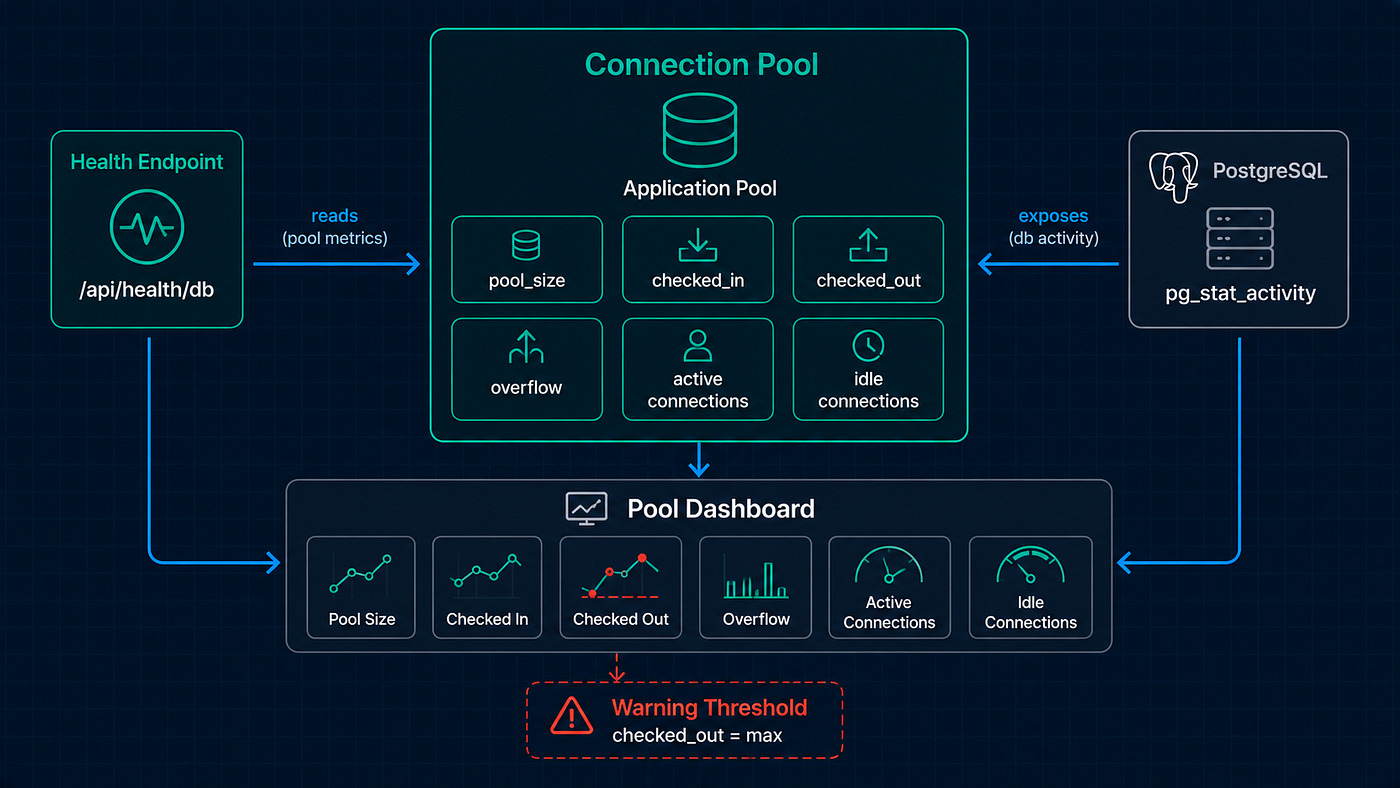
Connection Pool Health Monitoring
A pool you don’t monitor is a pool that will eventually cause an outage. Track these metrics:
PostgreSQL Side
-- How many connections are open right now?
SELECT count(*) FROM pg_stat_activity;

-- Connections by state
SELECT state, count(*)
FROM pg_stat_activity
GROUP BY state;

-- Connections by application
SELECT application_name, count(*)
FROM pg_stat_activity
WHERE backend_type = 'client backend'
GROUP BY application_name;
Healthy: active connections are a fraction of max_connections. Most connections are idle (in the pool, waiting for work).
Unhealthy: active connections are near max_connections. You either need more database capacity or fewer connections per worker.
SQLAlchemy Side
# Health check endpoint that reports pool status
@app.get("/api/health/db")
def database_health():
    pool = engine.pool

    return {
        "pool_size": pool.size(),
        "checked_in": pool.checkedin(),     # Idle connections in the pool
        "checked_out": pool.checkedout(),   # Connections currently in use
        "overflow": pool.overflow(),         # Temporary overflow connections
        "status": "healthy" if pool.checkedout() < pool.size() else "high_usage",
    }
If checked_out consistently equals pool_size + overflow, you're maxing out. Either increase the pool or optimize your queries to hold connections for less time.
Django Side
from django.db import connections

def db_pool_health(request):
    conn = connections['default']
    # Django 5.1+ with pool enabled
    if hasattr(conn, 'pool'):
        pool = conn.pool
        return JsonResponse({
            "pool_size": pool.min_size,
            "connections_in_use": pool.get_stats().get("pool_size", 0),
        })
    return JsonResponse({"pooling": "not enabled"})
The Mistakes That Cause Outages
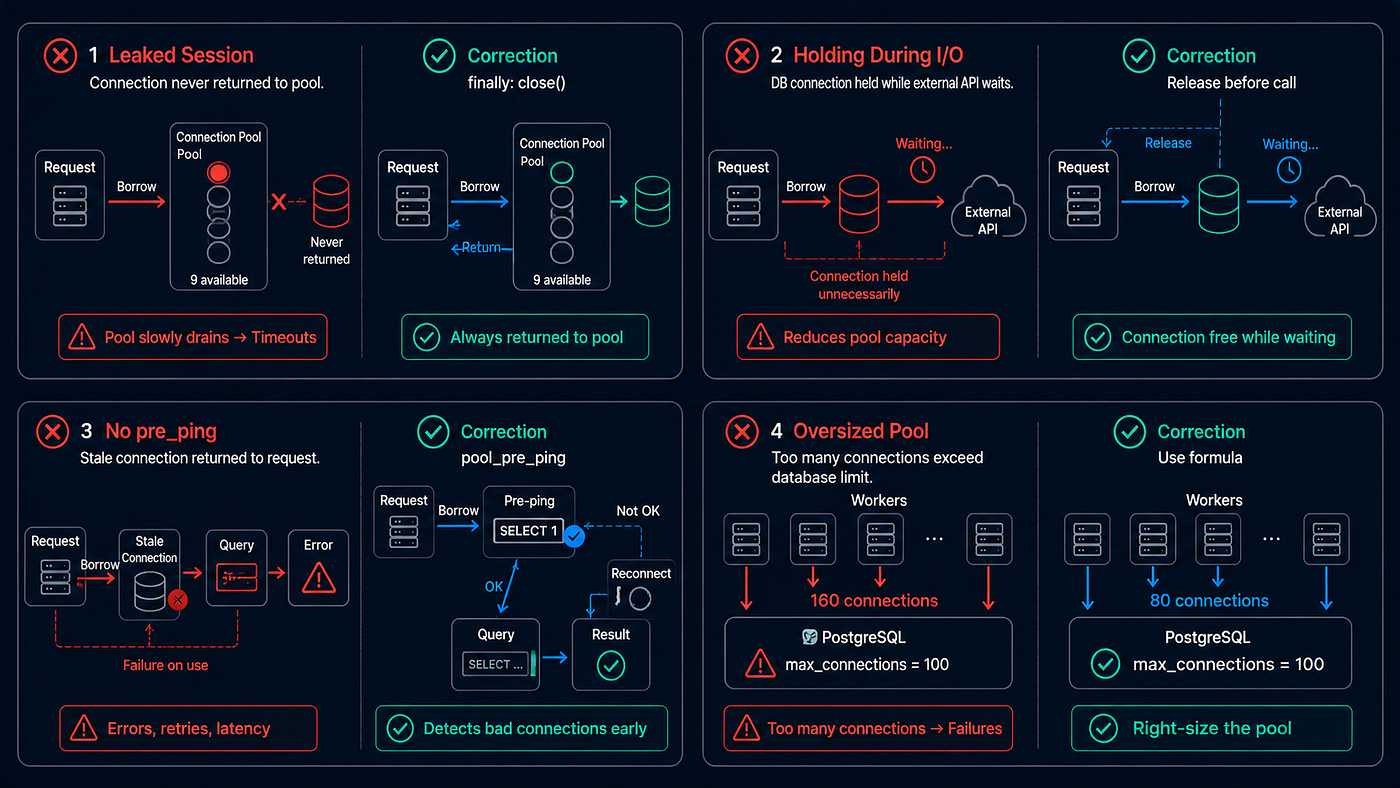
Connection Pool Outage Patterns
Mistake 1: Forgetting to Close Sessions
# BAD — connection is never returned to the pool
def get_user(user_id: int):
    db = SessionLocal()
    user = db.query(User).filter(User.id == user_id).first()
    return user
    # db.close() never called — connection leaked!
Every leaked connection is one less connection available in the pool. After enough leaks, the pool is exhausted and new requests timeout. Always use try/finally or the context manager pattern:
# GOOD — always returns connection to pool
def get_user(user_id: int):
    db = SessionLocal()
    try:
        return db.query(User).filter(User.id == user_id).first()
    finally:
        db.close()
Or with FastAPI’s dependency injection, the yield pattern handles this automatically.
Mistake 2: Holding Connections During External Calls
# BAD — holds a database connection for 2 seconds while calling an external API
def process_order(db: Session, order_id: int):
    order = db.query(Order).get(order_id)

    # This HTTP call takes 2 seconds
    payment_result = payment_gateway.charge(order.total)  # Connection held!

    order.payment_id = payment_result['id']
    db.commit()
While payment_gateway.charge() takes 2 seconds, this function holds a database connection that other requests can't use. Under load, all pool connections are held by functions waiting for external APIs — none are available for actual database queries.
# GOOD — release connection during external calls
def process_order(db: Session, order_id: int):
    order = db.query(Order).get(order_id)
    order_total = order.total
    order_id = order.id
    db.close()  # Return connection to pool

    # External call — no connection held
    payment_result = payment_gateway.charge(order_total)

    # Get a new connection for the update
    db = SessionLocal()
    try:
        db.query(Order).filter(Order.id == order_id).update({
            'payment_id': payment_result['id']
        })
        db.commit()
    finally:
        db.close()
Read the data you need, release the connection, do the external call, then get a new connection for the write. The pool connection is held for milliseconds instead of seconds.
Mistake 3: Not Setting pool_pre_ping
Without pool_pre_ping=True, SQLAlchemy trusts that connections in the pool are alive. But connections die silently — PostgreSQL restarts, network timeouts, firewall rules. The first request after a stale connection is used gets:
sqlalchemy.exc.OperationalError: server closed the connection unexpectedlypool_pre_ping=True adds ~1ms per request but eliminates this entire class of errors. Always enable it in production.
Mistake 4: Setting pool_size Equal to max_connections
# DANGEROUS — one worker consumes all database connections
engine = create_engine(url, pool_size=100, max_overflow=0)
If you have multiple workers or replicas, each one tries to maintain 100 connections. Total connections = workers × 100 = far more than PostgreSQL can handle. Set pool_size per worker based on the formula above, and always leave headroom for admin connections, monitoring, and migrations.
Bottom Line
Connection pooling is the easiest performance win for any Python API talking to PostgreSQL. The default behavior — opening and closing a TCP connection on every request — adds 30–55ms of overhead and stresses the database with constant connection churn. Pooling eliminates both problems by reusing connections across requests.
For Django 5.1+, it’s one setting: "pool": True. For older Django, set CONN_MAX_AGE or use PgBouncer. For FastAPI with SQLAlchemy, configure pool_size, max_overflow, pool_pre_ping, and pool_recycle on your engine.
The service that was hitting “too many connections” with 300 requests per second? After configuring a pool of 10 connections per worker with 20 overflow, it handles 2,000 requests per second on the same PostgreSQL instance. Same hardware. Same queries. Same code. Just 15 minutes of pool configuration.
How do you handle database connections in production? I’m curious about the PgBouncer vs application-level pooling debate — do you prefer an external pooler or built-in? And has anyone hit connection exhaustion in production? Share your story in the comments.
A special thanks to **Level Up Coding** for giving writers and engineers a space to share practical, real-world lessons like this. I’m grateful for the opportunity to publish this piece with the publication and contribute to a community that cares about better engineering.

메타데이터
- post_id
- 1cf37d185e4b
- slug
- database-connection-pooling-the-50ms-tax-youre-paying-on-every-request-1cf37d185e4b
- url
- https://levelup.gitconnected.com/database-connection-pooling-the-50ms-tax-youre-paying-on-every-request-1cf37d185e4b
- canonical_url
- https://levelup.gitconnected.com/database-connection-pooling-the-50ms-tax-youre-paying-on-every-request-1cf37d185e4b
- author_url
- https://medium.com/@anas-issath
- status
- ok
- fetched_at
- 2026-06-18 07:02:39